The only way to know if your ServiceNow ITSM setup is working is when it fails.
Here is how it usually happens: SLA reports look fine, and leadership thinks ServiceNow is doing its job. Then a user asks why their case or request has been with the dev team for a couple of days, and nobody in ServiceNow can tell them what’s going on.
That’s usually when teams realize that the ITSM setup is completely broken.
But you can only find out what’s going on if the ServiceNow ITSM health check spots that gap before it costs you users, money, or customers.
In this article, we’ll discuss how to know if your ServiceNow ITSM setup is working and what to do to get things back on track.
Key Takeaways
- The fastest way to know whether your setup is actually working is a ServiceNow ITSM health check across 3 layers: platform health, process health, and the user experience.
- The most common blind spot is the handoff. Once an incident moves to Jira, Azure DevOps, or a vendor’s system, ServiceNow’s metrics stop following it.
- ServiceNow Benchmarks and the ITSM Success Dashboard give you a good baseline, but none of their KPIs measure cross-tool resolution time.
- Fixing handoffs usually means syncing ServiceNow with the tools other teams already use, so nobody switches systems or retypes tickets.

What Is ServiceNow ITSM?
ServiceNow IT Service Management (ITSM) is the set of modules IT teams use to log, route, track, and resolve IT work on the ServiceNow platform. It follows ITIL practices, so incidents, problems, changes, and requests each get their own workflow, approvals, and SLAs.
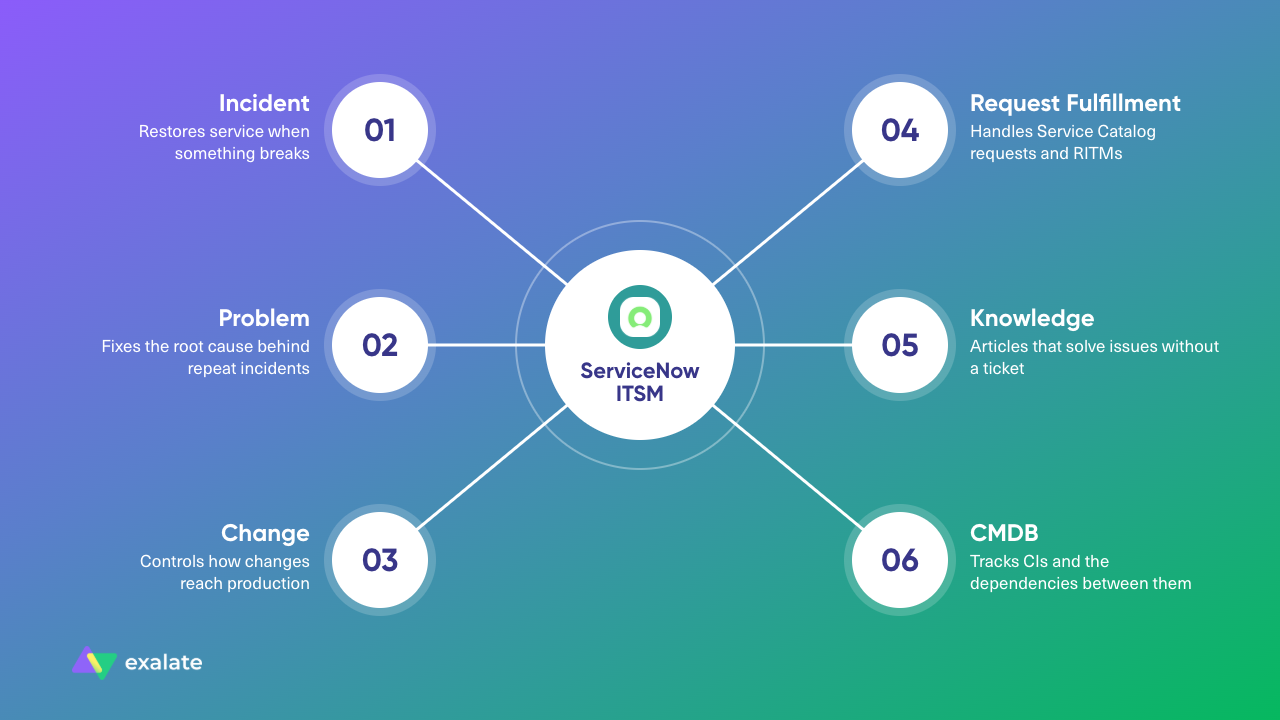
The core modules in most ServiceNow ITSM setups are:
- Incident Management: restores service when something breaks, such as an outage, a failed login, or a broken app.
- Problem Management: finds and fixes the root cause behind repeat incidents.
- Change Management: controls how changes reach production, including CAB (Change Advisory Board) reviews and emergency changes.
- Request Fulfillment: handles Service Catalog requests and requested items (RITMs), such as new laptops, access requests, and software installs.
- Knowledge Management: stores articles that agents and end users can use to solve issues without opening a ticket.
- Configuration Management (CMDB): tracks configuration items (CIs) and the dependencies between them.
ServiceNow is rarely the only tool in the room. Developers work in Jira or Azure DevOps, support might run on Zendesk or Freshdesk, and vendors and MSPs have their own service desks. Much of what determines whether your ITSM works happens between those systems, which is why ITSM integration belongs in any health check.
What Does a ServiceNow ITSM Health Check Cover?
A ServiceNow ITSM health check is a structured review of your ServiceNow instance, your ITSM processes, and the experience around them. It compares what your dashboards report with what’s happening to tickets and the people waiting on them, then ranks the gaps by impact.
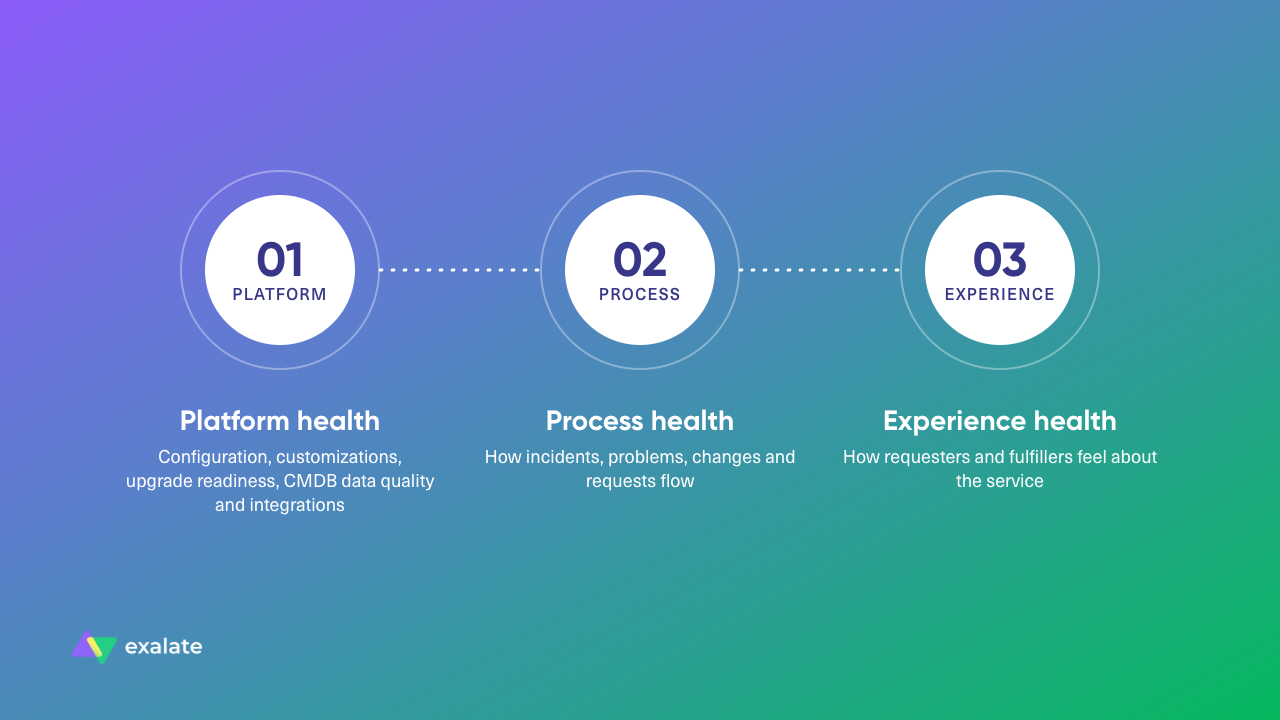
A useful health check covers 3 layers:
- Platform health: instance configuration, customizations, scripts, upgrade readiness, CMDB data quality, and integrations. Eg., how many base tables have you overridden, and how many CIs are duplicates or stale?
- Process health: how incidents, problems, changes, and requests flow. Eg., how often incidents get reassigned or reopened, and how many emergency changes you push through.
- Experience health: how requesters and fulfillers feel about the service. Eg., whether users still email the service desk instead of using the portal, and whether stakeholders trust the status they see.
Consultancies sell this as a paid assessment, which can make sense for large enterprises. But you can still run most of it yourself if you know what to look for and have the right tools.
What Are Signs Your ServiceNow ITSM Isn’t Working?
Each of these signs shows up in data you already have, or in conversations your team is already having.
No Visibility After Incidents Are Escalated to Jira
Although this is the most common sign, it is the easiest to miss because you can’t see what you are not looking for.
Let me explain in ServiceNow terms.
An agent escalates an incident to the dev team in Jira, and without a ServiceNow Jira connector in place, ServiceNow shows only “In Progress” from then on.
When the requester asks for an update, the agent pings a developer on Slack, waits, and pastes the answer into the work notes. Your service desk ends up spending time relaying messages for every escalated incident.
This lack of visibility is worse for external partners and managed service providers (MSPs) because a client’s ticket could get lost in the ServiceNow island.
Tickets Fall Through the Cracks
This problem also stems from the lack of visibility: when work crosses tools through manual steps, some of it gets lost.
In some cases, the connector will fail to create the ticket without notifying the system admin. As a result, stakeholders have to scramble for a resolution when the customer is already irate.
Where to check: sample escalated incidents from the last month and confirm each one has a matching record, with a matching status, on the other side.
Cross-Team Incident Resolution Time Keeps Growing
The mean time to resolution (MTTR) for incidents your service desk owns can stay stable while resolution time for incidents that need another team keeps climbing.
If resolution time rises while overall MTTR stays flat, the delay is in the handoff stage. Your agents are probably waiting for someone to notice the ticket, re-explaining the context, or chasing a status update.
Tickets Keep Bouncing Between Assignment Groups
An incident that moves from the service desk to networking, back to the service desk, then to applications loses time at every stop. ServiceNow records this in the reassignment count field.
High reassignment usually points to unclear categories, weak assignment rules, or tickets missing context. This is actually a common struggle for ServiceNow users.
Your SLAs Are Green, but Users Are Unhappy
This is the watermelon effect: green on the outside, red on the inside. Your SLA reports show incidents resolved on time, while satisfaction scores stay flat or fall and users complain in meetings.
But SLAs measure what’s easy to timestamp; they can’t tell you whether the fix worked for the user or how many times the user had to chase it.
Experience level agreements (XLAs) help here by measuring outcomes and sentiment alongside SLA timers.
Your Teams Update the Same Ticket in 2 Systems
When ServiceNow and a dev tool aren’t connected, someone has to update both records manually. An operations manager once complained that they needed a ServiceNow Azure DevOps integration because the team was frustrated with updating and documenting the same information in two separate systems.
A comment added in Azure DevOps never reaches the ServiceNow ticket, so the requester sees a stale status. ServiceNow connectors like Exalate can let you map and sync statuses between Azure DevOps and ServiceNow.
People Fall Back to Spreadsheets, Email, and Slack
When your teams track escalations in a spreadsheet or coordinate fixes in Slack threads, ServiceNow stops being the system of record. Tickets get logged and closed there, but the work happens elsewhere.
This problem is so bad that one company had to work with a system where an agent opens a ServiceNow ticket for internal use and a separate Salesforce ticket for their vendor. Every time the vendor replied, someone had to copy/paste the vendor info from Salesforce into ServiceNow.
They also had to reach out to developers via Slack and email for progress updates and work status. You can imagine how tedious this back-and-forth would have been for everyone involved.
Your Native Integration Can’t Handle Basic Fields
Many teams already connect ServiceNow to other tools using IntegrationHub (the native ServiceNow ITSM connector), but like most native integration tools, it is limited in the fields and entities it can cover.
Platform engineers often come to us with complaints that their native ServiceNow integration with Jira cannot sync the Assignee field because it is an unreadable, hash-tagged primary key.
The Integration Depends on One Person
If one admin or developer is the only person who understands how ServiceNow connects to your other tools, you have a single point of failure.
This is common in organizations where one developer builds spokes and REST API integrations that need manual maintenance. So when the developer or admin leaves the company, the ownership falls to no one.
What Are the Real Costs of a Failing ServiceNow ITSM Setup?
The cost of a failing ServiceNow setup spreads across team hours, licenses, consulting fees, and customer relationships.
Operational Costs
Daily work takes the first hit: delayed incident resolution, manual escalations, duplicate approvals, inconsistent request handling, and poor SLA compliance.
That’s time skilled engineers could spend fixing actual problems, but instead, they have to deal with shadow workflows. As a result, you end up spending more money on accounting for productive hours.
Financial Costs
The financial costs can stack up quickly:
- Wasted licenses: you pay for unused ServiceNow seats.
- Consulting fees: post-go-live fixes often need outside help, and repeat engagements get expensive.
- Technical debt: heavy customization raises the cost of every upgrade.
- Integration upkeep: custom scripts and webhooks need maintenance and can spiral into unplanned expenses.
ServiceNow typically licenses fulfillers, so every developer or partner you add just to update tickets costs money, and syncing lets those people stay in their own tools.
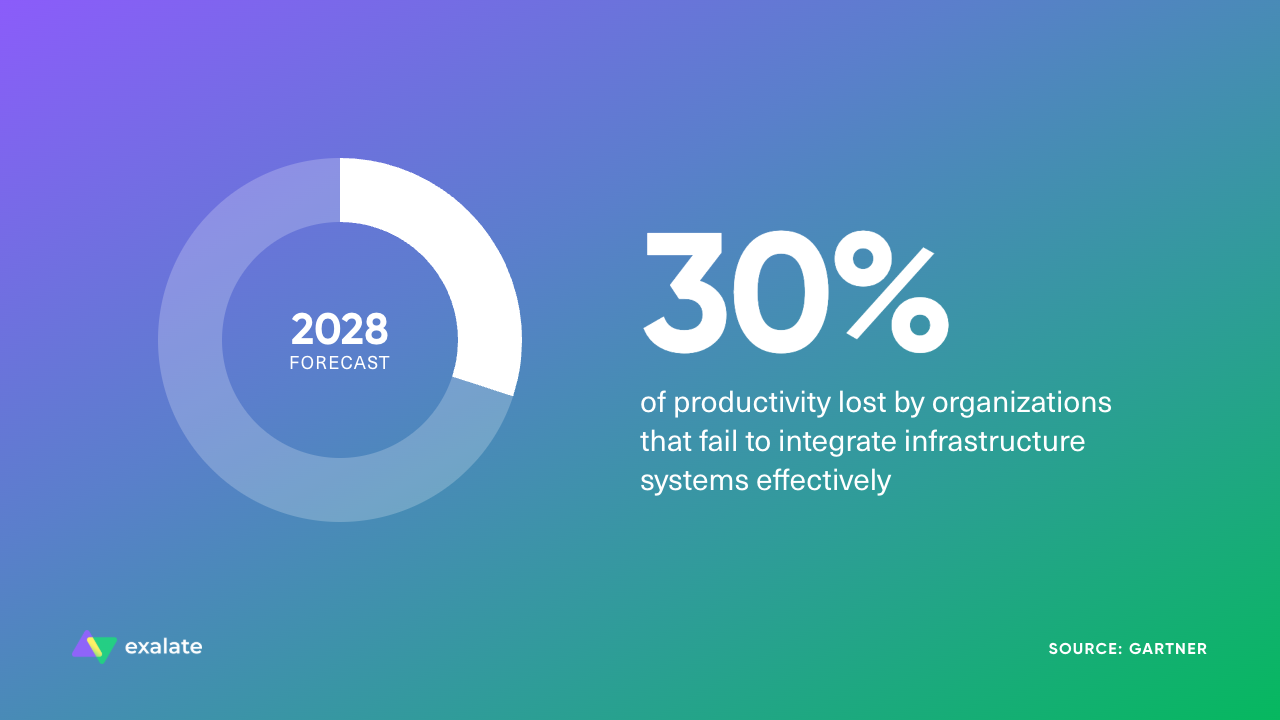
Gartner research shows that by 2028, organizations that fail to integrate infrastructure systems effectively will lose 30% of productivity.

Read how Netguru managed to cut the monthly cost of service desk management by 95%
Customer and Trust Costs
Your customers feel the costs that are hardest to measure. When your ITSM setup on ServiceNow is broken, you risk losing high-value clients due to a poor user experience.
When your ITSM supports customer-facing or vendor-facing work, sync failures turn into downtime, which erodes internal trust. Once stakeholders stop believing the status in ServiceNow, they route around it, and every problem above gets worse.
How to Fix Your Broken ServiceNow ITSM
Most ServiceNow problems come from a handful of root causes. Match each fix below to the signs you found.
Fix the Process Before You Automate It
Automating a broken process makes it break even faster. If incidents bounce between groups because nobody agreed who owns which category, a new assignment rule won’t help.
The fix: Document how incidents, changes, and requests should flow, including who owns each step and when to escalate, then configure ServiceNow to match. If network incidents keep landing with the service desk first, fix the category options and assignment rules together.
Reduce Customization Debt
Every script that overrides a base table makes the next upgrade harder. List your customizations, identify those that duplicate features ServiceNow now ships out of the box, and create a plan to retire them.
Keep any custom logic you still need in scoped applications, away from the platform core, so upgrades stop being a source of dread.
Treat Adoption as the Go-Live Metric
If users go back to email after launching the revamped ITSM setup, the implementation is still broken, and you have a long way to go.
Track portal usage, email-to-ticket ratios, and CSAT (customer satisfaction) scores for a few months after go-live to see whether people use the setup or work around it.
Roll Out in Phases
Launching every module across every department at once leads to scope creep, delayed testing, and overloaded teams. Start with the module that has the clearest pain, usually Incident Management, get it stable, then expand to the others.
Apply the same rule to fixes. If your health check finds 15 problems, fix the 3 with the most impact first, then move on to the rest.
Fix the Handoffs Between Tools
If your signs point to escalation visibility, duplicate updates, or lost tickets, the fix sits between ServiceNow and your other tools. Each option fits different situations:
- IntegrationHub and spokes: ServiceNow’s native option for ServiceNow third-party integration. It handles simple automations well, but each target platform may need a separately licensed spoke, and complex bidirectional logic gets hard to manage.
- The eBonding spoke: built for ServiceNow to ServiceNow connections. Its out-of-the-box actions focus on incidents, and one ServiceNow environment controls both sides.
- Custom scripts and webhooks: full control, but your team owns every API change, and the knowledge often leaves with whoever built it.
- iPaaS platforms (MuleSoft, Boomi, Workato): good for broad data integration across many systems, though they usually need specialist skills and treat ticket sync as one use case among many.
- Dedicated sync tools such as Exalate: built for bidirectional ticket sync between ITSM, dev, and support tools, including across company boundaries.
These options often work together. Plenty of teams keep IntegrationHub for internal ServiceNow automations and add a dedicated sync tool for Jira, Azure DevOps, or cross-company connections.
If Azure DevOps is your main handoff, this comparison of ServiceNow to Azure DevOps workflow sync tools covers the options in more detail.
Keep Governance Going After Go-Live
Without ongoing ownership, ServiceNow instances sprawl: duplicate catalog items, conflicting workflows, uncontrolled customizations, and integrations nobody remembers building.
Set up a small governance group to review customization requests, own your integrations, and rerun the health check on a schedule. Quarterly reviews work for most teams.
ServiceNow ITSM Health Check: How to Know If Your Setup Is Working
Whether you’ve just implemented ServiceNow or fixed a struggling setup, you need proof that things are working as expected. Here’s how to run a ServiceNow ITSM health check:
Step 1: Pull a Baseline from ServiceNow Benchmarks and the ITSM Success Dashboard
Both features are part of the ServiceNow ecosystem: Benchmarks compares your KPIs with anonymized data from other ServiceNow customers, and the ITSM Success Dashboard tracks indicators such as self-solve rate, call deflection, and first assignment resolution.
We’ll discuss them in detail later.
Step 2: Trace Recent Tickets from Start to Finish
Pick a mix of incidents and requests, including some that went to another team or tool. For each one, check how many times it was reassigned, how long it waited at each step, and whether the record on the other side matches what you have in ServiceNow.
Step 3: Talk to Users Outside ServiceNow
Ask developers, support agents, and vendors how they receive ServiceNow work, how they send updates back, and what they do when something goes wrong.
Their workarounds will show you whether the system is broken and pinpoint where the process breaks.
Step 4: Audit your Integrations
Write down who owns each integration, how errors show up, which fields sync, and whether comments, work notes, and attachments make it across.
In one ServiceNow-to-Jira setup, tickets, descriptions, and attachments synced correctly, but comments and work notes never reached Jira.
The system failed because the integration’s proxy user was missing the required ACLs on the sys journal field, which a field-by-field audit would have caught before users noticed.
Step 5: Reassess the Fixes Later
Choose the fixes most clearly linked to the problems you found, then rerun steps 1 and 2 after a quarter and compare.
Teams that get this right describe a working setup in similar ways:
- Stakeholders trust delivery tracking.
- Visibility survives handoffs as an incident moves to a dev team, vendor, or MSP.
- Users work in their own tools. Developers stay in Jira or Azure DevOps; support agents stay in their help desk.
- The setup survives change: new teams, new instances, migrations, and upgrades don’t break it, and fixing it doesn’t depend on one person.
If you can tick off most of these, your setup is working. The ones you can’t tick off tell you where to look next.
A Comprehensive Breakdown of ServiceNow ITSM Benchmarks and Metrics
As mentioned earlier, ServiceNow Benchmarks is a built-in feature that calculates standard KPIs from your instance every month and compares them with the average of all participating ServiceNow customers.
Benchmark KPI Categories
Benchmarks group KPIs by ServiceNow application, so you can compare each part of your platform with your peers:
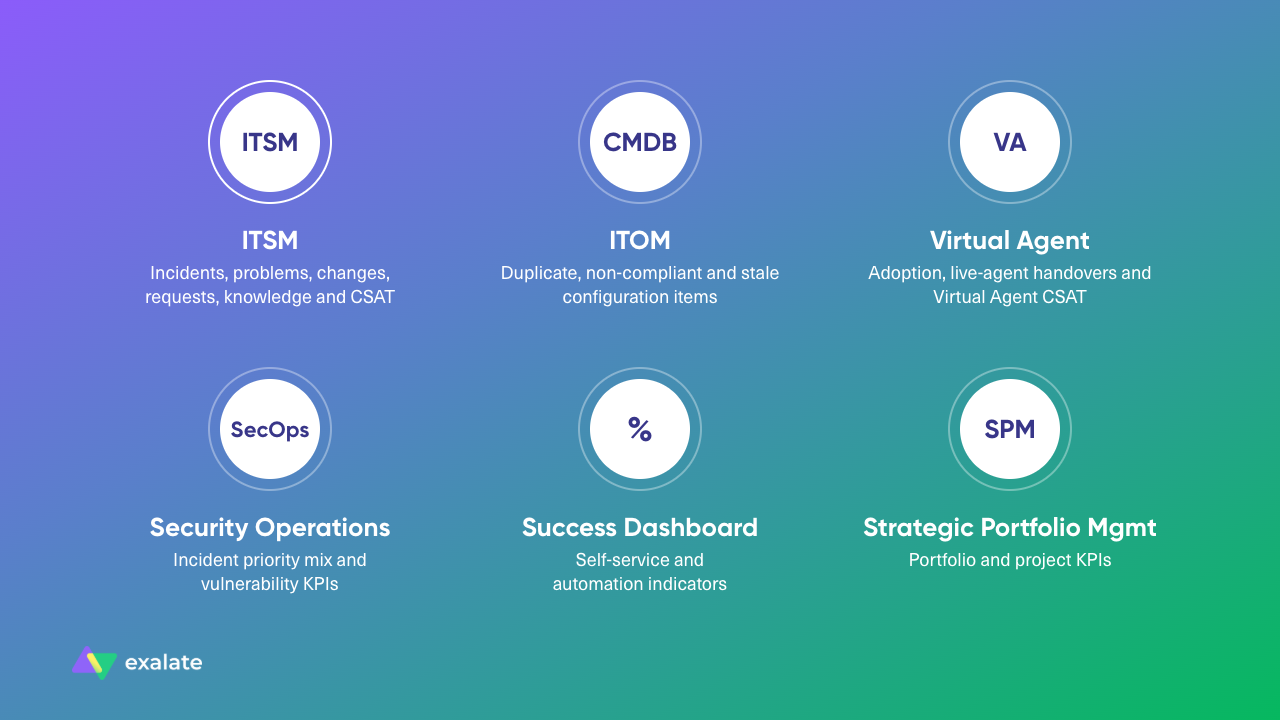
- ITSM: This is the focal point of your health assessment and the source of service management KPIs for incidents, problems, changes, Service Catalog requests, knowledge, and Virtual Agent, plus customer satisfaction.
- ITOM (CMDB): the share of duplicate, non-compliant, and stale configuration items, all calculated from the CMDB health scorecard. Bad CMDB data weakens impact analysis and change risk assessment.
- Conversational Interfaces (Virtual Agent): how many users use Virtual Agent, how often conversations get handed over to a live agent, and the Virtual Agent CSAT score. A high handover rate usually means Virtual Agent topics don’t cover the requests people actually bring.
- Security Operations: security incident priority mix, plus vulnerability KPIs such as average vulnerability age, vulnerabilities per asset, mean time to remediate, and remediation efficiency.
- Success Dashboard: ITSM Success Dashboard indicators (%), including self-solved, call deflection, structured tickets, MTTR (days), breached SLA, and first-assignment resolution. These mostly track self-service and automation.
- Strategic Portfolio Management: portfolio and project KPIs, documented on a separate SPM page.
ITSM Benchmark KPIs
Within ITSM, the KPIs fall into 7 groups. Each one answers a different health check question:
- Incident: Are you restoring service quickly, and are incidents getting to the right group the first time? This group includes first assignment rate, SLA compliance, reopen rate, and resolution times.
- Problem: Are you fixing root causes, or resolving the same incidents over and over?
- Change: how much change skips normal review, and how much of it fails?
- Service Catalog: do requests get fulfilled on time, and how much demand does each user create?
- Knowledge: are agents and users solving issues with knowledge articles?
- ITSM Virtual Agent: how much work does Virtual Agent take off your service desk?
- Other: how satisfied are requesters, and how many requesters does each fulfiller support?
Here’s every ITSM benchmark KPI, how ServiceNow calculates it, and the warning signs to watch for. All of them are monthly figures.
| KPI | How It’s Calculated | Red Flag |
| Incident | ||
| % of high priority incidents resolved | P0 and P1 incidents resolved ÷ all incidents resolved | Rising share with no matching rise in major outages, which may mean priority inflation |
| % of incidents resolved on first assignment | Incidents resolved with a Reassignment Count of 0 ÷ all incidents resolved | Falling over time, or well below the peer average |
| % of incidents resolved within SLA | Incidents resolved with met SLAs (from the task_sla table) ÷ all incidents resolved | High compliance while CSAT drops (the watermelon effect) |
| % of reopened incidents | Resolved incidents with a Reopen Count above 0 ÷ all incidents resolved | Climbing month over month |
| Average time to resolve a high priority incident | Total creation-to-resolution time for P0 and P1 incidents ÷ number of those incidents | Long waits on incidents that need another team |
| Average time to resolve an incident | Total creation-to-resolution time for all incidents ÷ number of incidents resolved | Stable overall but rising for escalated incidents |
| Number of incidents created per user | Incidents created per user in the month | Rising volume with no new services, often pointing to repeat issues |
| Problem | ||
| % of high priority problems | P0 and P1 problems closed ÷ all problems closed | A large share of high-priority problems that stay open for a long time |
| % of incidents resolved by problem | Resolved incidents linked to a problem ÷ all incidents resolved | Very low, meaning the same incidents keep coming back |
| Average time to close a problem | Total creation-to-closure time for problems ÷ number of problems closed | Problems that stay open for months |
| Change | ||
| % of emergency changes | Emergency changes closed ÷ all changes closed (standard, normal, and emergency) | Rising, often a sign of poor planning |
| % of failed changes | Unsuccessful changes ÷ all changes closed | Any upward trend |
| Average time to close a change | Total creation-to-closure time for changes ÷ number of changes closed | Long cycles that push teams toward emergency changes |
| Service Catalog | ||
| % of closed requests with breached SLAs | Closed requests with breached SLAs (from the task_sla table) ÷ all closed requests | Rising breaches on catalog items that depend on other teams |
| Average time to fulfill a request | Total creation-to-closure time for requested items (sc_req_item) ÷ number fulfilled | Slow fulfillment on items that need manual handoffs |
| Number of requests created per user | Requests created per user in the month | Sudden jumps that point to a broken process or missing self-service |
| Knowledge | ||
| % of incidents resolved using KB articles | Resolved incidents with KB articles attached ÷ all incidents resolved | Low use, meaning articles are missing or hard to find |
| Number of knowledge article views per user | Article views per user (from the sys_view_count table) | Views rising while KB-resolved incidents stay flat, meaning people read articles that don’t solve the issue |
| ITSM Virtual Agent | ||
| % call deflection | Incidents and requests created through Virtual Agent ÷ all incidents and requests created | Flat or falling after portal and Virtual Agent investments |
| % of incidents auto-resolved | Incidents resolved automatically by Virtual Agent, workflows, or Issue Auto Resolution ÷ all incidents resolved | No growth despite automation projects |
| Other | ||
| Average customer satisfaction | Sum of normalized scores from the base Customer Satisfaction Survey ÷ number of surveys taken | Falling while SLAs stay green |
| Number of requests per fulfiller | Active requester (non-ITIL) users ÷ active ITIL users | A ratio that keeps rising while headcount stays flat, a sign your fulfillers are stretched |
A few things to keep in mind when you read these numbers:
- Definitions vary between companies. What counts as P0 or P1, or as a duplicate CI, differs from one company to the next, and the peer figures are an average of all participants.
- Some KPIs need setup. In some environments, KPIs based on resolved incidents need extra configuration before they return data. The CSAT KPI uses the base Customer Satisfaction Survey, so if you collect feedback with a different survey, you’ll need to customize the KPI definition.
- Track trends over single snapshots. A one-month spike in reopened incidents might be noise, while 3 months of growth is a pattern.
- Compare like with like. A 20-person service desk and a global shared service center will have very different MTTRs.
Cross-Tool Handoff Time: The Metric ServiceNow Benchmarks Don’t Track
Every KPI in that table measures what happens inside ServiceNow. None of them follow an incident once it moves to Jira, Azure DevOps, Zendesk, or a vendor’s system.
Those handoffs are where the longest delays usually hide. An incident escalated to a dev team in Jira can sit unacknowledged for a couple of days while ServiceNow shows “In Progress.”
To measure it, track 2 timestamps for every escalated incident: when ServiceNow handed it off, and when the other team picked it up. The gap is your handoff time, and if you can’t get the second timestamp without asking someone, you’ve found your first fix.
For instant, real-time escalations, you need a bidirectional integration solution like Exalate.
How Exalate Can Improve Your ServiceNow ITSM
Exalate is a bidirectional sync platform that supports a wide range of ServiceNow integrations, connecting ServiceNow with Jira, Azure DevOps, Zendesk, Salesforce, Freshservice, Freshdesk, GitHub, Asana, and other ServiceNow instances. It syncs incidents, problems, change requests, RITMs, catalog tasks, CMDB items, and custom tables.
Each side of a connection controls its own sync rules. Your ServiceNow team decides what leaves your instance, and the other team decides what they accept, so cross-company and MSP setups work without interference.
Here’s where Exalate fits in each phase of fixing your ServiceNow ITSM.
Planning: Decide Which Handoffs to Fix First
Start with your health check results. List every place work leaves ServiceNow, then rank those handoffs by how many tickets cross, how long they wait, and who complains.
Next, decide which record types should sync and what they become on the other side. One team planning a ServiceNow to Jira integration set it up like this (you’ll find more patterns in these Jira ServiceNow integration examples):
- ServiceNow incidents become Jira bugs
- Jira releases create ServiceNow Change Requests
- Jira defects create ServiceNow Problems
- ServiceNow Service Catalog Tasks become Jira stories
In another case, the team wanted tickets submitted to their group in ServiceNow to create Jira stories on a specific board, with comments and state changes syncing back, and a Jira story created by a team lead would create a matching SCTASK in ServiceNow.
Then the admin could decide what stays private, such as internal work notes, customer data, and financial details.
Implementation: Connect Without Forcing Anyone to Switch Tools
Exalate’s sync logic runs on Groovy scripts, which gives you control over conditional logic, field transformations, and routing. You can write your scripts from scratch, but if you’d rather not, Aida AI, Exalate’s scripting and troubleshooting assistant, can help you generate them from plain-language prompts.
A financial services provider used this to connect its customer support team in Zendesk with its technical service team in ServiceNow. Months of email exchanges hadn’t fixed the coordination problem, and moving the tech team onto Zendesk meant constant context switching.

We often get 15 to 20 of these tickets per day. Sometimes when there is a surge, the ticket volumes even get higher.
– ServiceNow Platform Manager
With Exalate’s Aida AI, they were able to map ServiceNow “New” to Zendesk “New,” “Open” to “Work in Progress,” and “Resolved” to “Solved.” Comments and status updates now flow both ways in real time across their 15 to 20 daily tickets, and both teams stay in their own systems.
Triggers decide which records sync automatically. On the ServiceNow side, you filter by conditions such as type, category, priority, or assignment group; on the Jira side, you use JQL. Here’s how some teams set them up:
- Escalation by assignment group: ServiceNow tickets go to Azure DevOps when assigned to a particular group, with links stored on both records and Azure DevOps comments returning to ServiceNow.
- Contractual escalation: ServiceNow incidents now get created automatically from labeled Jira issues, so agents no longer log them twice.
- Two-tier support: first-line support works in ServiceNow, second-line support works only in Jira, and escalated tickets sync between them.
Read how WirelessCar uses Exalate to streamline collaboration with leading automotive brands.
Testing: Check Sync Behavior Before It Touches Production
Use the Test Run feature to validate your sync scripts against sample records before they go live, so problems show up in testing instead of in tickets created by angry customers.
Test the edge cases your health check found:
- Comments and work notes: confirm that internal work notes stay internal.
- Attachments: check the file types and sizes your teams use.
- Users and assignees: decide what happens when a user doesn’t exist on the other side, or has been deactivated.
- Status mapping: make sure every status on one side maps to a sensible status on the other.
- Hierarchies: confirm parent-child relationships, such as RITMs and their catalog tasks, survive the sync.
Go-Live and Migration: Keep the Service Desk Running
Turn on one connection at a time, watch it closely for the first couple of weeks, and keep your old process as a fallback until the numbers look right.
Uber Freight synced its ServiceNow and Jira Service Management instances live while it moved over 100,000 tickets, covering 15 months of incidents, requested items, and Service Catalog tasks. They moved live tickets first, then historical data.
The service desk kept running in ServiceNow throughout, and the migration took about 2 months. User attribution, original creation dates, and ticket hierarchies came across intact, and ServiceNow was decommissioned on schedule, before the next renewal.
Uber Freight’s migration forced the team to handle:
- Jira Service Management character limits that ServiceNow doesn’t have,
- ServiceNow field types that behaved differently in JSM, comments from deactivated accounts,
- a Jira API that doesn’t support backdated comment timestamps, and parent-child hierarchies that had to stay intact.
The company handled all these exceptions with Exalate’s Groovy engine. For example, comments from deactivated users went through a generic account with the original author’s name in the comment body.
The migration was completed within our required timeframe and provided the audit trail and data integrity we needed.
– Engineering Manager (Uber Freight)
Analysis: Measure What Changed
Once the sync is live, go back to your health check metrics:
- Cross-team resolution time: compare escalated incidents before and after the sync.
- Reassignment and reopen rates: these should drop as context travels with the ticket.
- Duplicate entry: ask agents and developers whether they still copy tickets by hand.
- CSAT: check whether requesters notice a difference.
Exalate’s Dashboard shows sync status and overall activity. The sync queue holds changes made while one side is down and retries them when it’s back.
Scaling: Add Teams, Partners, and Platforms
Once your first connection is stable, you can extend the same approach to other teams and partners.
Here are some real-life examples of teams that extended their ServiceNow ITSM setup to broader networks.
- Multiple tools inside the company. A service delivery team can send ServiceNow tickets to project management teams in Jira and certain tasks to development teams in Azure DevOps.
- Customers and vendors. A cybersecurity company monitors its customers’ environments in Jira. One customer on ServiceNow wanted security alerts and incidents synced in real time so they could manage alerts on their side, with each organization keeping its own system and rules.
- MSPs and multi-client support. One support team serves 2 clients on 2 separate ServiceNow tenants and wants to handle everything from its own Zendesk. Separate connections keep each client’s data apart.
- ServiceNow to ServiceNow. One managed service team wanted cases created in its own instance whenever a customer ticked the “send to MSP” checkbox in its ServiceNow instance, for both service requests and incidents.
- Post-acquisition. After mergers, parent company requirements in ServiceNow can become Jira stories for the acquired company’s developers, with sprint updates flowing back, without waiting on a long platform migration.
Each connection is configured separately, so adding a partner doesn’t affect the connections you already have.
What’s Next?
Your health check results should point to one of 3 paths:
- Most problems are inside ServiceNow (high reassignment, rising reopens, customization debt, poor CMDB data): fix processes and configuration first, because integration won’t help a broken workflow.
- Most problems are at the handoffs (no escalation visibility, duplicate entry, lost tickets, silent integration failures): fix the connections between ServiceNow and the tools your other teams use.
- You have both: start with whatever users complain about most. That’s usually the fastest way to rebuild trust in ServiceNow, and trust is what gets people using it again.
Whichever path you take, you’ll know if your setup is working by comparing the numbers.
Looking to revamp your ITSM setup with a solution that gives you customization options? Check out how Exalate fits into your environment.
FAQs
How does ServiceNow ITSM work?
ServiceNow ITSM gives IT teams structured workflows for incidents, problems, changes, and requests. When a user reports an issue through the portal, email, phone, or Virtual Agent, ServiceNow creates a record, routes it to an assignment group based on category and rules, tracks it against an SLA, and logs every update until it’s resolved. Reporting, knowledge, and the CMDB sit on the same platform, so you can link incidents to the services and configuration items they affect.
What are the 5 stages of ITSM?
The 5 stages come from the ITIL service lifecycle:
- Strategy: decide which services to offer and why.
- Design: design the services, processes, and SLAs.
- Transition: build, test, and move services into production, including change management.
- Operation: run the services day to day, including incident and request management.
- Improvement: measure performance and improve it over time.
A ServiceNow ITSM health check belongs to the fifth stage.
Does ServiceNow ITSM require coding?
Not for most work. ServiceNow is a low-code platform, so you can configure workflows, forms, assignment rules, and SLAs through the interface and Flow Designer. Custom business rules, client scripts, and complex integrations use JavaScript, and heavy custom scripting often causes upgrade problems, so keep it to a minimum.
Which tools can Exalate connect to ServiceNow?
Exalate connects ServiceNow with Jira, Azure DevOps, Azure DevOps Server, Zendesk, Salesforce, Freshservice, Freshdesk, GitHub, Asana, and other ServiceNow instances. For example, an MSP can connect a customer’s ServiceNow to its own Zendesk, while the same customer’s dev team syncs incidents to Jira. For systems outside that list, Exalate can connect them using REST APIs.
Which ServiceNow records can Exalate sync?
Exalate syncs incidents, problems, change requests, service requests, requested items (RITMs), catalog tasks, CMDB configuration items, and custom tables. You choose what each record becomes on the other side. A common setup turns ServiceNow incidents into Jira bugs, and Jira releases into ServiceNow Change Requests.
Do I need to write code to set up Exalate for ServiceNow?
Not necessarily. Exalate’s sync logic runs on Groovy scripts, but Aida AI, its AI scripting and troubleshooting assistant, writes them from plain-language prompts. For example, you can ask Aida to sync only P1 and P2 incidents assigned to the “Platform Engineering” group, then review the script and check it with Test Run before going live. Teams that want full control can edit the scripts directly.
Does Exalate replace ServiceNow IntegrationHub?
No, IntegrationHub handles internal ServiceNow automations well, but it lacks the depth of customization that most teams require. Exalate covers bidirectional ticket sync with tools like Jira, Azure DevOps, and Zendesk, especially when the other system belongs to a different team or company. You can keep IntegrationHub flows for provisioning and notifications and use Exalate to keep escalated incidents in sync with your vendor’s Jira.
Can I control what data leaves my ServiceNow instance?
Yes, each side of an Exalate connection sets its own sync rules, so your ServiceNow team decides which fields leave your instance, and the other side decides what it accepts. For example, you can sync incident status and public comments to a vendor while keeping work notes and customer details internal. Exalate is ISO 27001 certified, and it encrypts data in transit and at rest. Visit the Trust Center to find out more.
What happens to the sync if ServiceNow or the other system goes down?
Changes made while one side is unavailable wait in Exalate’s sync queue, and Exalate retries them once the system is back online. Say Jira goes down for maintenance while your agents update 30 incidents in ServiceNow: those updates reach Jira when it comes back, without anyone re-entering them.
How do I know if my ServiceNow ITSM setup is actually working?
Run a ServiceNow ITSM health check. Pull your baseline from ServiceNow Benchmarks, trace a sample of recent tickets end to end (including ones that went to other tools), and talk to the people who work outside ServiceNow. If stakeholders trust the status they see, handoffs stay visible, and users aren’t routing around the platform, your setup is working. High reassignment counts, rising reopen rates, and updates over email and Slack mean it needs attention.
How often should you run a ServiceNow health check?
A light quarterly review works for most teams: pull your Benchmarks data, trace a sample of tickets, and check your integrations. Run a fuller review before major upgrades, after big organizational changes such as an acquisition, or when users start complaining.
What KPIs should I track in ServiceNow ITSM?
Start with first assignment resolution rate, reopen rate, average time to resolve, SLA compliance, and customer satisfaction. Add change failure rate and emergency change percentage for change management, and duplicate or stale CI percentages for the CMDB. If your incidents often leave ServiceNow, track cross-tool handoff time too.
Why do tickets keep bouncing between assignment groups in ServiceNow?
Tickets bounce around between assignment groups because of unclear categories, assignment rules that don’t match how teams work, or tickets that arrive without enough context. Report on reassignment count by category to find the worst areas, then fix the categories, rules, and intake forms together.
What is the Watermelon Effect in ITSM?
The watermelon effect is when SLA reports look green while users are unhappy: green on the outside, red on the inside. It happens because SLAs measure timestamps, which don’t capture outcomes. Comparing SLA compliance with CSAT and reopen rates, or adding experience level agreements (XLAs), helps you catch it.
How do I measure ITSM performance when incidents move to Jira or Azure DevOps?
Track the handoff separately. Record when ServiceNow hands an incident to the other team and when that team picks it up, then measure the total resolution time for escalated incidents separately. A bidirectional sync between ServiceNow and Jira or Azure DevOps makes this easier because status changes and comments from the other tool appear automatically on the ServiceNow record.
Recommended Reading