After working through plenty of ServiceNow Azure DevOps integrations with customers, we’ve noticed that the way these two systems need to connect is different for every team.
Some teams want a ServiceNow request to open a work item on an Azure DevOps board so the dev team picks it up. Others run a full demand process in ServiceNow and need approved requirements to become Azure DevOps Features, with effort and status flowing back. Plenty of companies run several Azure DevOps orgs, or hand first-line support to a sister company in ServiceNow, and need everything linked without shared logins.
What ties these together is that ServiceNow is great at service delivery and demand intake, but the actual build happens in Azure DevOps. Without an integration to tie it all together, teams end up with duplicated incidents and work, statuses go stale, and the thread from request to release is broken.
We’ve gathered the recurring use cases from people running everything, from a single ServiceNow instance to multiple Azure DevOps orgs.
But first, let’s discuss the differences between native tools and third-party tools like Exalate for this use case.
Key Takeaways
- A ServiceNow Azure DevOps integration removes duplicate data entry between your service and development teams.
- ServiceNow requests, incidents, and catalog items can auto-create Azure DevOps user stories or bugs (attachments included), with comments and status syncing back so nobody chases updates.
- Each connection runs independently, so you can sync one ServiceNow instance to multiple Azure DevOps orgs without shared admin access or network-level exposure.
- MSPs route incidents to the right client system by assignment group, with bidirectional sync, no comment crossover, and state values mapped across.
- Native tools fit single-team, simple mappings; anything cross-org, multi-instance, or with real transformation logic calls for a dedicated integration layer.
Native Azure DevOps ServiceNow Tools vs Third-Party: What Actually Fits Your Setup
ServiceNow’s Integration Hub can push data through spokes and flows. It has a Microsoft Azure DevOps Boards Spoke that can mostly “Look up” work item details in Azure DevOps, and some basic create functions. It comes with the IntegrationHub subscription, but considering its cost, it’s an overkill for such basic use cases.
The Azure DevOps marketplace also has a native extension for integrating Azure Pipelines with ServiceNow change management. But it’s limited to this specific use case.
They work when the integration is specific, simple, the field mapping is straightforward, and you’ve got developers on hand to maintain it.
But we are more concerned with complex use cases. When your ServiceNow connects to development work across multiple Azure DevOps orgs, or a sister company manages one side, you have intricate, embedded cross-team workflows; you’re crossing team and sometimes company lines. Each side has its own field names, its own states, and its own data it won’t fully share.
Native tools struggle with these custom scenarios; that’s why you need a dedicated integration layer that handles the mapping without either side needing access to the other’s system.
So in summary, for single-team, clean mappings, native tools are fine. For cross-org, value transformations, or a full demand-to-delivery flow, you need a tool like Exalate.
Now here are some use cases for ServiceNow to Azure DevOps integration.

Use Case 1: Sync ServiceNow Requests to Azure DevOps User Stories
Current Setup: Your support or service team works in ServiceNow. When a request needs development, it has to land on an Azure DevOps (ADO) board so the dev team can pick it up as a User Story.
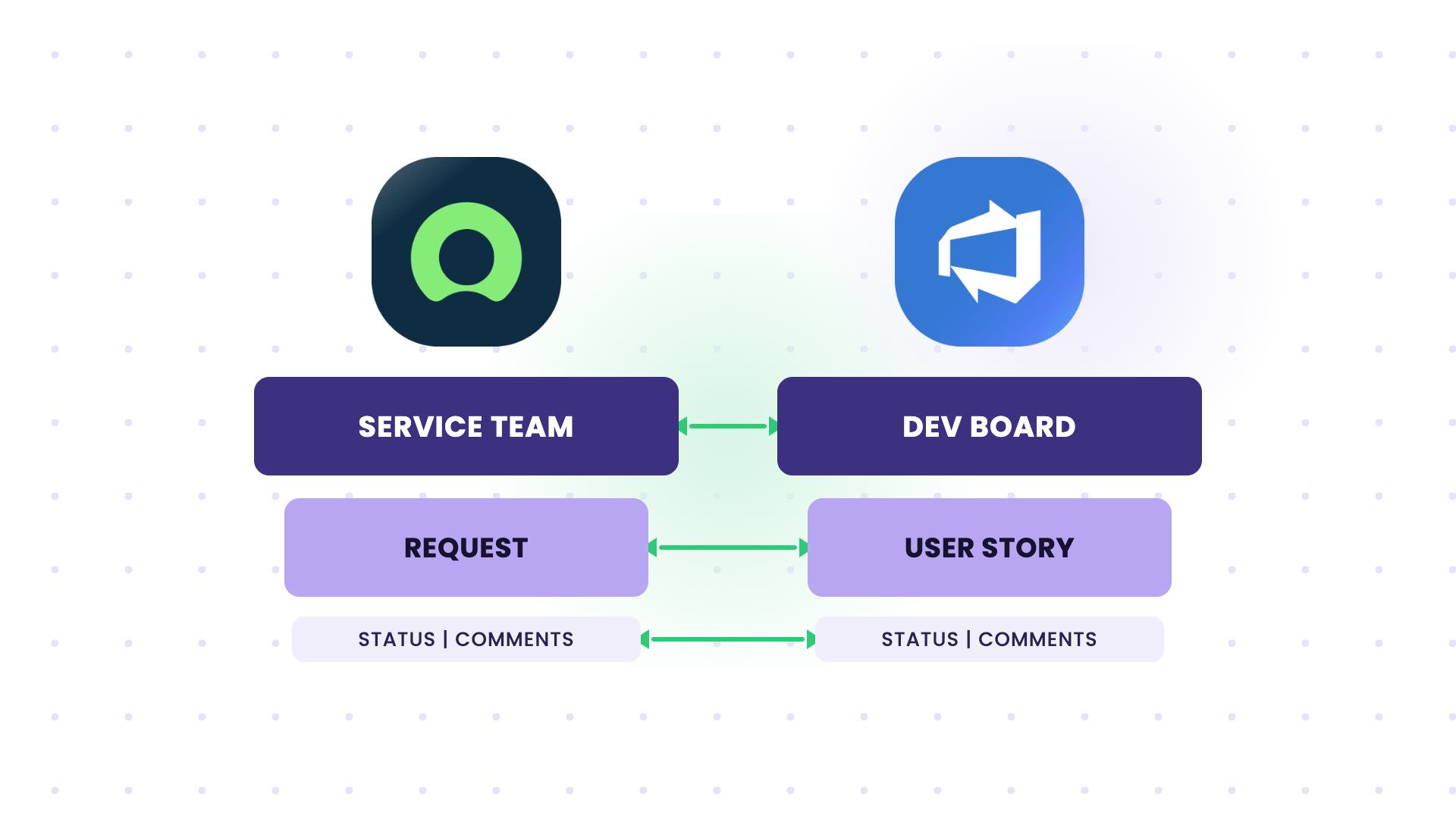
Problem: Someone creates the Azure DevOps work item, copies the request details, and then has to check back for updates. When the ADO item is closed, the ServiceNow request often doesn’t update, so the requester never hears back. The two records have no link between them.
Solution: Trigger-based sync where a ServiceNow request (filtered by assignment group, category, or a manual “send to Azure” button) creates an Azure DevOps User Story automatically. This one-to-one mapping ensures that the link to the ADO task gets stored on the ServiceNow ticket, and vice versa. Updates to the work item flow back to the request, and closing the request closes the Azure DevOps item (or the other way around).
Use Case 2: Sync Azure DevOps Comments Back to ServiceNow with Bidirectional State
Current Setup: ServiceNow holds the ticket the customer or internal user sees. Azure DevOps holds the work the developer actually does. The two teams need to stay in step without living in each other’s tool.
Problem: When the task finishes in Azure DevOps, the ServiceNow ticket’s state doesn’t change on its own. Comments made by the dev team sit in Azure DevOps where the ServiceNow side never sees them. The service team ends up pinging developers for updates.
Solution: When you send a ServiceNow ticket to Azure DevOps, the link is stored on both sides. As the task moves in ADO, its state updates the ServiceNow ticket, and comments made in DevOps are repatriated to ServiceNow. The service team sees progress without opening Azure DevOps, and status updates are passed manually.
Use Case 3: Sync ServiceNow Catalog Items to Azure DevOps
Current Setup: Users order catalog items in ServiceNow. Fulfilling some of them takes development work tracked in Azure DevOps.
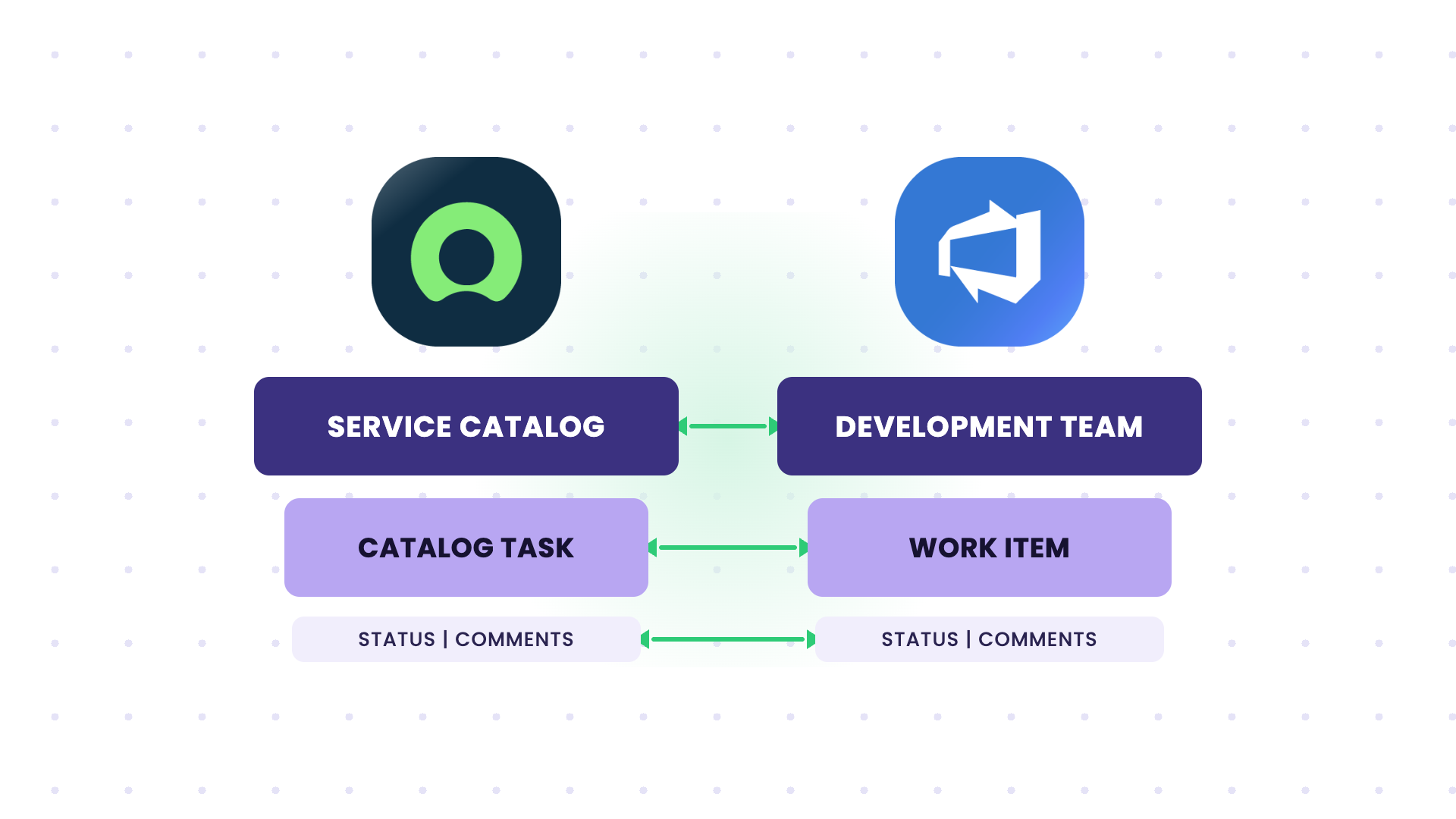
Problem: The catalog task sits in ServiceNow while the actual work happens in Azure DevOps, out of the requester’s sight. Someone has to bridge the two manually, and the catalog item’s status never reflects what’s really going on.
Solution: A ServiceNow catalog item creates a matching work item in Azure DevOps, carrying the request details across. As the dev team works, status and comments sync back to the catalog task, so the ServiceNow side shows real progress and closes when the work item closes.
Use Case 4: Sync ServiceNow Incidents to Azure DevOps User Stories to Cut Duplication
Current Setup: Incidents come into ServiceNow. Some of them get tracked as user stories in Azure DevOps so the dev team can work on them alongside the rest of their backlog.
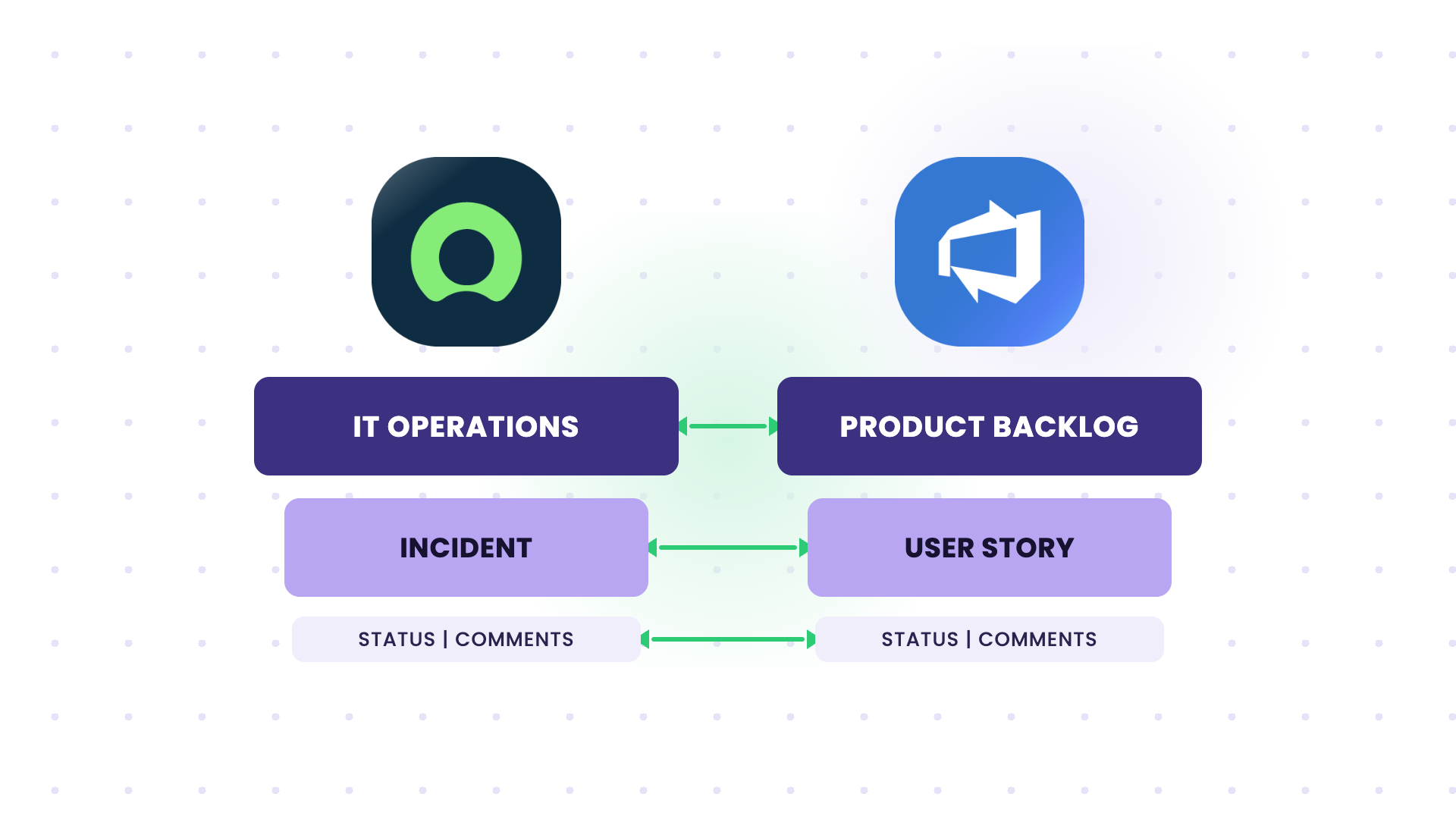
Problem: The team documents the same information in two separate systems and keeps both updated manually. It’s slow, it’s duplicated effort, and the two records drift apart over time.
Solution: Incidents brought over from ServiceNow create linked user stories in Azure DevOps, with comments and status syncing both ways. The team updates one side, and the other reflects it, so the same incident isn’t worked on twice.
Use Case 5: Sync ServiceNow Bugs to Azure DevOps with Attachments Across Multiple Orgs
Current Setup: Bugs get raised in ServiceNow, managed by a sister company that provides first-line support across the group. The product teams work across several separate Azure DevOps orgs, each with its own projects.
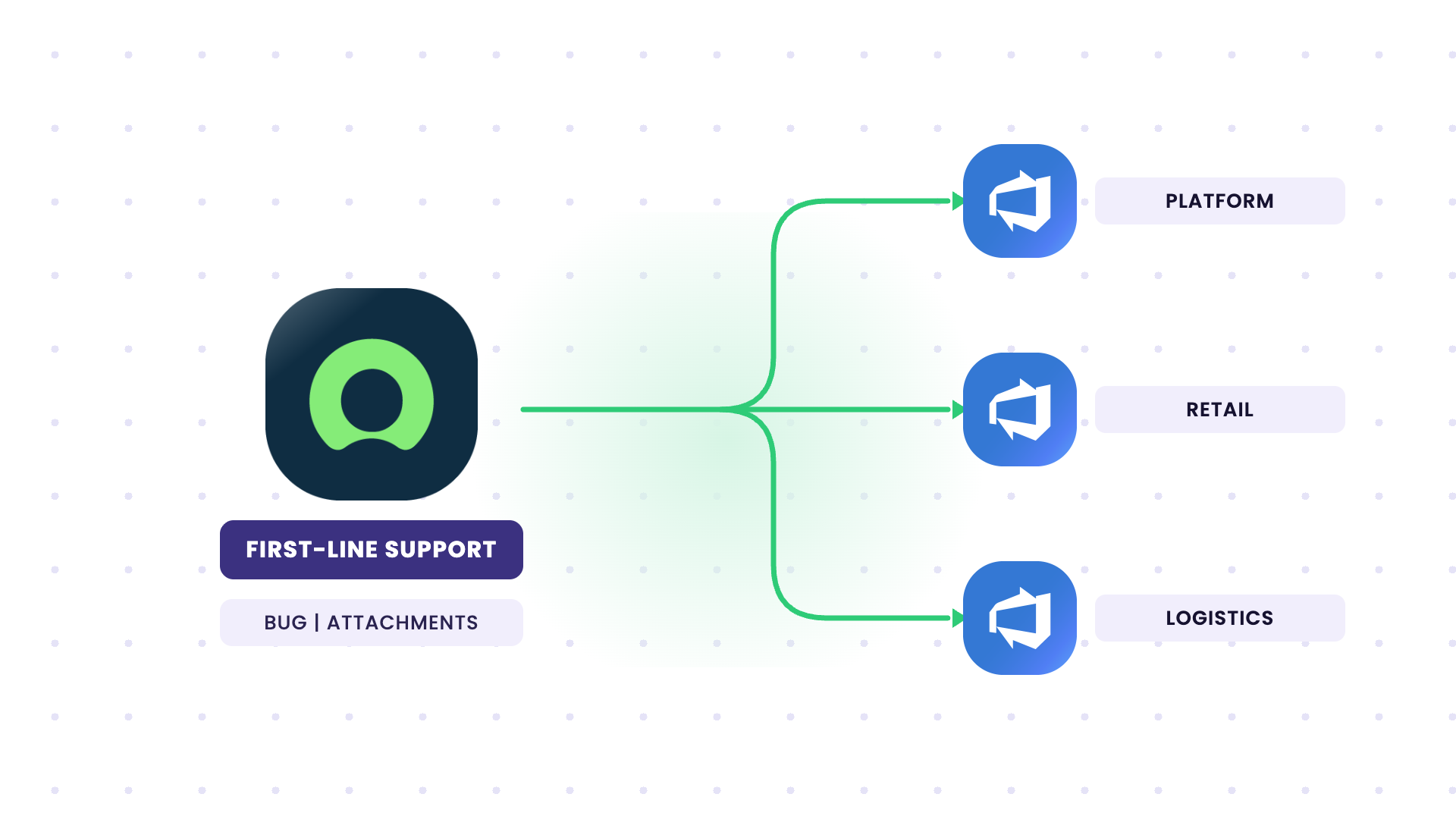
Problem: Recreating bugs by hand loses attachments and context, and there’s no clean way to route each bug to the right one of six Azure DevOps orgs. When a bug is fixed in ADO, the ServiceNow side doesn’t hear about it.
Solution: A bug raised in ServiceNow automatically creates a Bug in the correct Azure DevOps org, attachments included. When the bug is closed in ADO, its status and comments reflect back into ServiceNow. Because each connection runs independently, the sister company’s first-line team stays in ServiceNow, and no one needs a login to the other side.
Use Case 6: Project-to-Hypercare Handover Between Azure DevOps and ServiceNow
Current Setup: During a project, everyone works in Azure DevOps. Once it goes live and moves into hypercare and maintenance, incidents and requests belong in ServiceNow, often a brand-new instance.
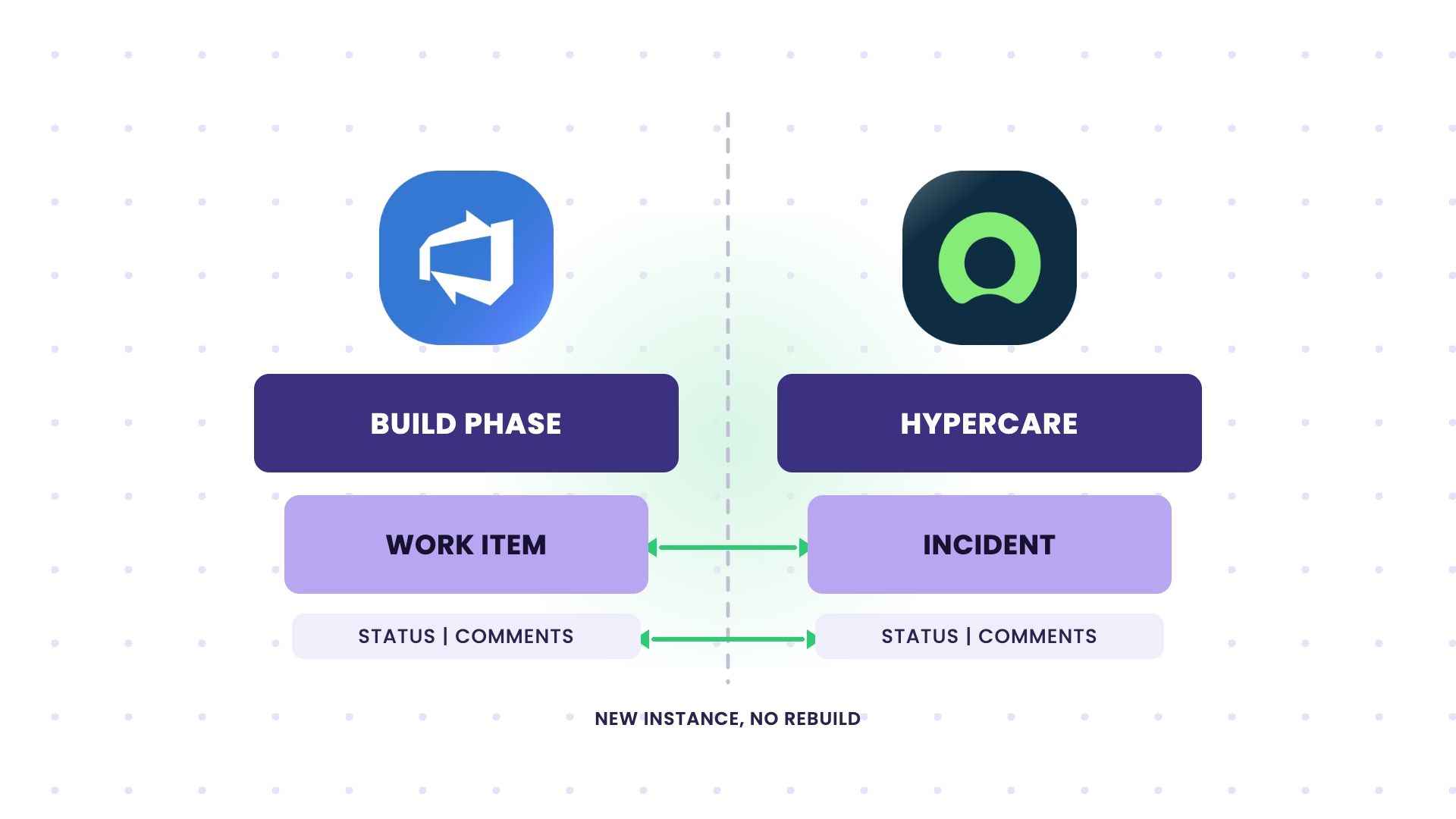
Problem: Teams used to living in Azure DevOps during the build now need a maintenance process in ServiceNow, and there’s no link between the incidents raised there and the developers who built the system.
Solution: ServiceNow Azure DevOps integration connects the maintenance workflow in ServiceNow to the development work in Azure DevOps. Incidents raised during hypercare reach the dev team in ADO, and their fixes flow back to ServiceNow. Because each connection is independent, you can add this without disrupting how either team already works, which suits a fresh ServiceNow rollout (say, after a migration off a legacy system).
Use Case 7: Bidirectional Field and Lifecycle Sync Between ServiceNow and Azure DevOps
Current Setup: A demand owner in ServiceNow needs to track a Feature as it moves through its lifecycle in Azure DevOps: scoping, work in progress, testing, and deployment.
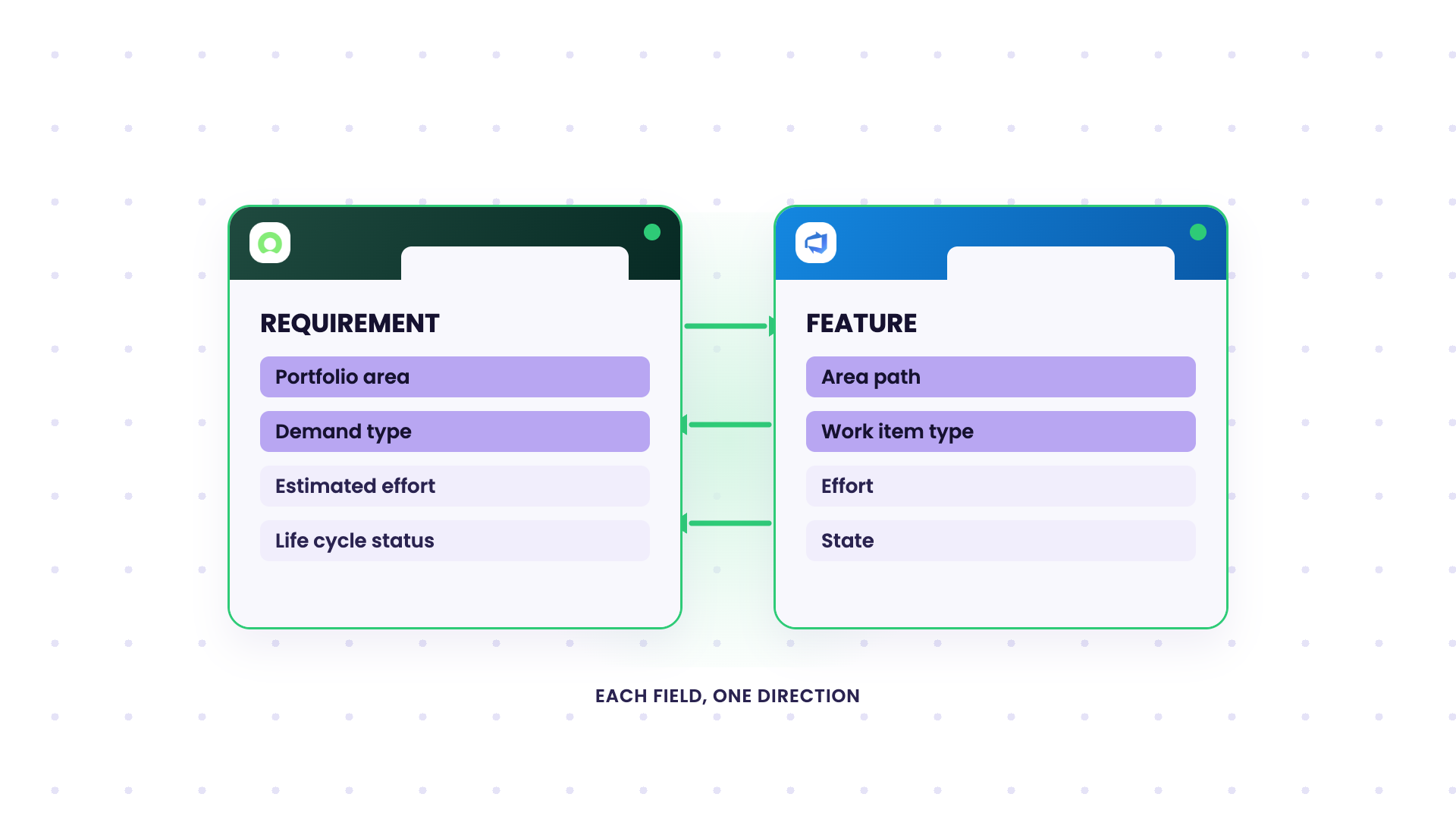
Problem: If effort, status, and assignment only live in Azure DevOps, the ServiceNow Requirement goes stale, and the demand team does not see the progress. Fields on each side use different names and values, so a raw pass-through creates nonsense.
Solution: The Head of Architecture can ensure key fields sync both ways, with explicit mappings for each direction. From Azure DevOps to ServiceNow: iteration path, change request ID, estimated effort, assignment, and lifecycle status. From ServiceNow to Azure DevOps: design documents, portfolio area, demand type, and requirement details. As the Feature moves through its stages, effort and state feed back into the ServiceNow Requirement in real time, and both records tell the same story.
Use Case 8: Multiple Azure DevOps Orgs to a Central ServiceNow Instance
Current Setup: Each business unit owns its own Azure DevOps org, often picked up through acquisitions or separate supplier setups. A central ServiceNow layer needs to see what’s happening across all of them, without forcing every unit onto one shared workflow.
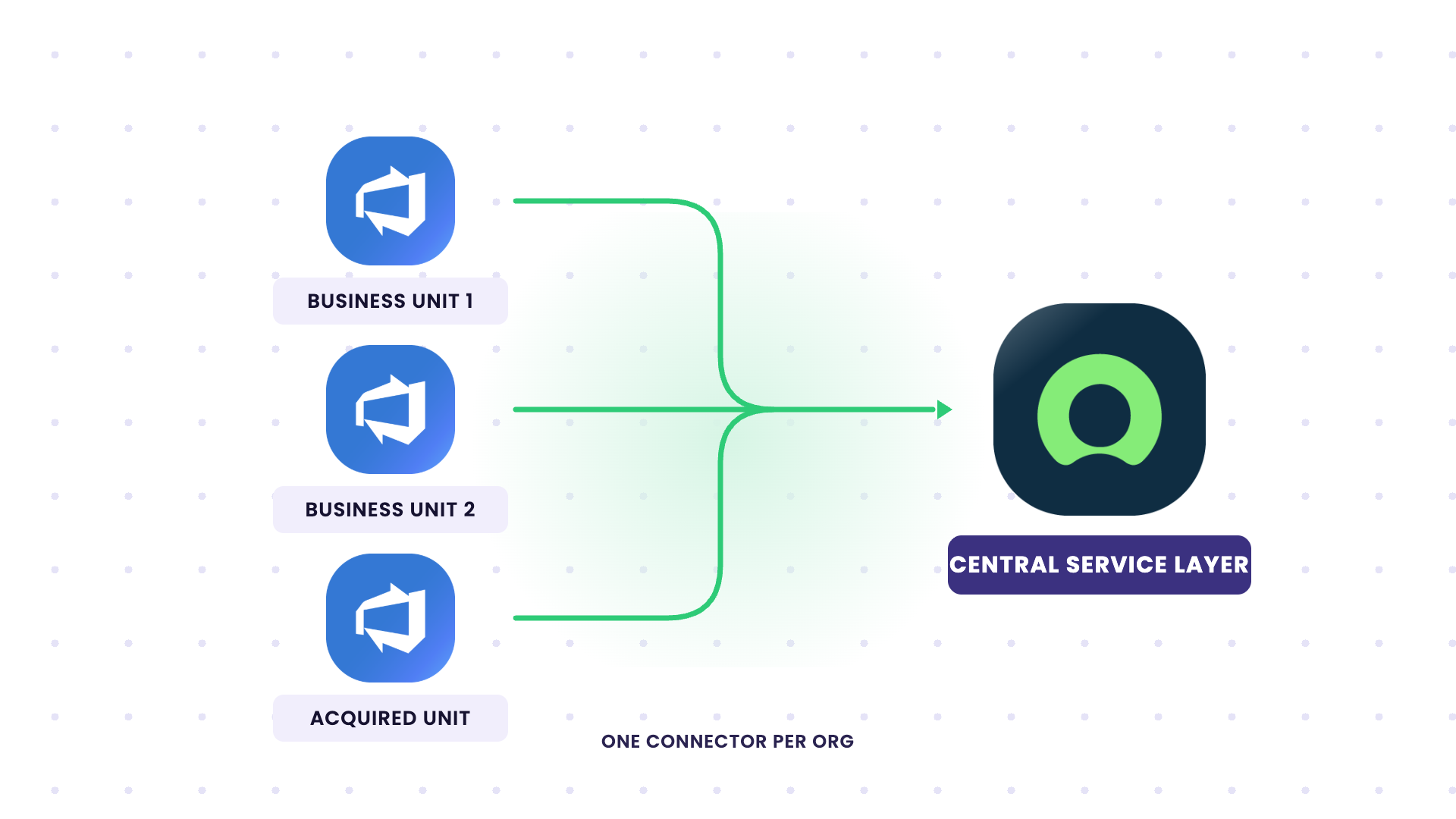
Problem: Without a sync, someone manually pulls data between systems and chases updates to keep everything aligned. This doesn’t scale as you add more orgs.
Solution: Each Azure DevOps org gets its own connector, with sync rules configured independently per side. Every org keeps its own states, fields, and processes, and feeds the central ServiceNow instance so leadership can see and plan across all of them.
Use Case 9: Selective Field Sharing Between Separately-Hosted Environments
Current Setup: One side uses Jira Cloud and the other side uses Azure DevOps Server, but each one has data it can’t expose, and in regulated setups they can’t open network-level access between systems.
Problem: A basic integration either overshares fields or needs a network connection that security won’t sign off on. Each org wants to decide exactly what leaves its own environment.
Solution: Exalate’s outgoing and incoming scripts put that control on each side: integration architects can decide what leaves, and the other admin decides what it accepts. It sits on each side and communicates over its own secured channel, so separately hosted (or network-isolated) environments sync without direct access between them.
Use Case 10: Handling Closed and Read-Only Tickets Cleanly
Current Setup: ServiceNow ACLs block updates to closed incidents. Your sync runs across incidents that move through their full lifecycle, including closure.
Problem: A basic sync piles up errors every time it tries to write to a ticket that’s already closed. Teams are usually split on whether to filter closed tickets out entirely or keep the errors visible so nothing goes unnoticed.
Solution: The solutions engineer can choose how closed states are handled. Filter closed tickets out of the sync so they never trigger a write, or let the errors surface where you can see them. Either way, the closed-ticket behavior is entirely up to your team.
Use Case 11: MSP Routing ServiceNow Incidents to Client Jira and Azure DevOps by Assignment Group
Current Setup: An MSP runs ServiceNow as its operational layer. Clients work in their own delivery tools, some in Jira Cloud, others in Azure DevOps. Manual ticket transfers work for two or three clients but fail at twenty.
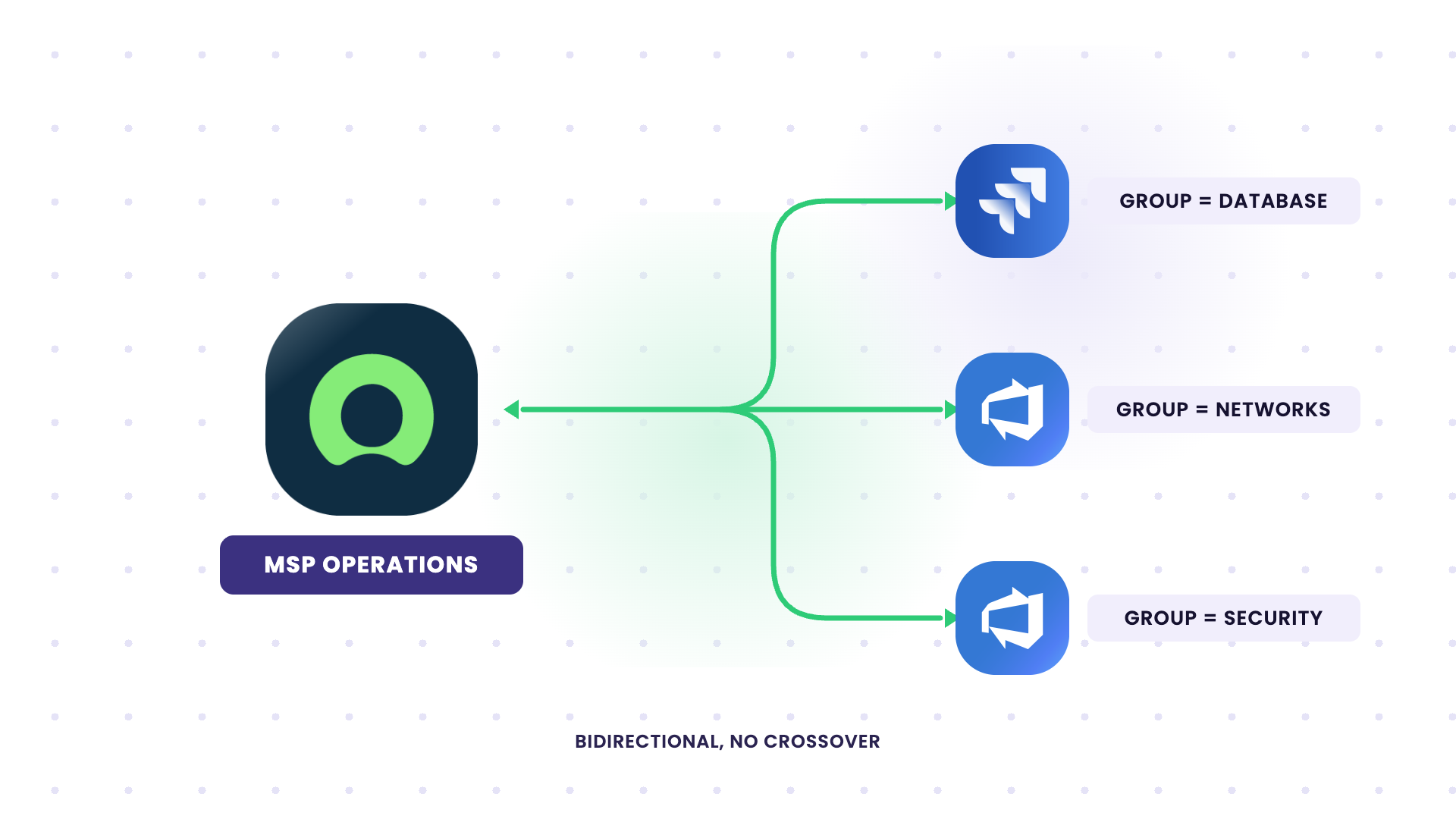
Problem: An engineer resolves a ServiceNow incident but forgets to update the client’s Jira ticket. A comment gets added on one side and never reaches the other. A status stays In Progress in Jira long after ServiceNow shows Resolved. As client volume grows, the gap between what your team knows and what clients see gets wider.
Solution: The service delivery manager can set up an automated integration to send each incident to the right client system based on its ServiceNow assignment group. Set a filter (for example, assignment group = Database routes to a client’s Jira; assignment group = Networks routes to another client’s Azure DevOps), and Exalate watches for it continuously. Both connections are bidirectional with no crossover. The original incident number and URL get written into the client ticket at creation, and status vocabularies map across (New to To Do, In Progress to In Progress, Resolved to Done).
Other MSP routing patterns include:
- Internal-note filtering: By default, both internal and public ServiceNow notes sync across. Configure the outgoing script so only client-facing updates cross the bridge, and internal notes stay in ServiceNow.
- Reusing one ServiceNow connection per new client: Adding a second client system reuses your existing ServiceNow authentication, so onboarding a new client is registering their system and setting a routing trigger without rebuilding from scratch.
Use Case 12: Conditional Escalation from Multiple ServiceNow Instances to One Azure DevOps Org
Current Setup: Several ServiceNow instances feed a single Azure DevOps instance. Only the tickets that need attention from the developers should come to the dev board.
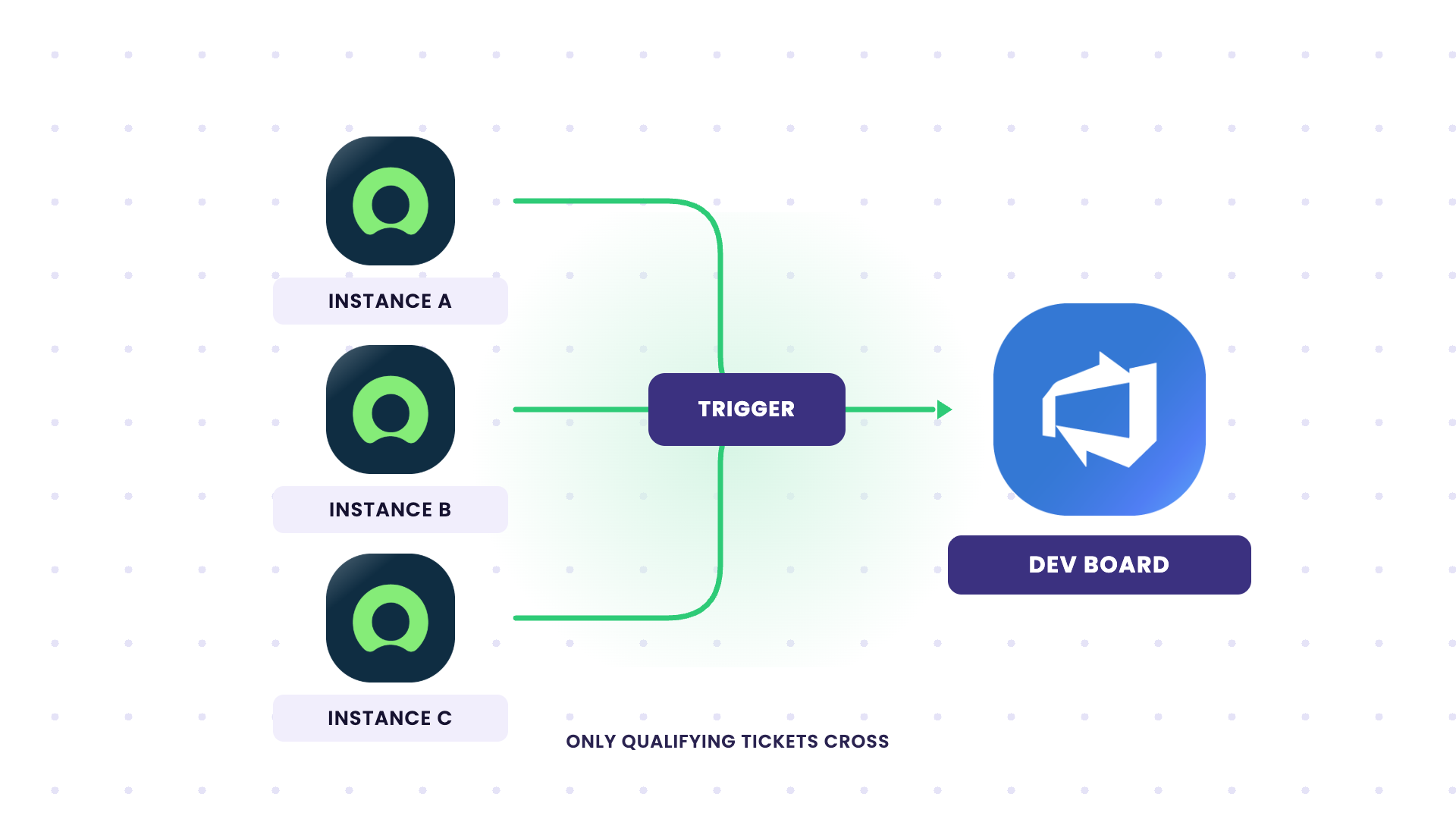
Problem: Escalating everything floods the Azure DevOps board with tickets the dev team shouldn’t be handling. Agents need a way to push only the ones that actually qualify.
Solution: A conditional, event-based trigger escalates only tickets meeting a specific condition. An agent pushes the tickets that need dev work, rather than flooding the board, and the rest stay in ServiceNow. Multiple ServiceNow instances can each feed the same Azure DevOps instance under their own trigger logic.
Use Case 13: ServiceNow Demand Management to Azure DevOps Feature Delivery
Current Setup: Your demand process runs in ServiceNow. A demand gets submitted, a Demand Manager clarifies the requirements, assigns ownership, and approves it for execution. From there, a Requirement is created and elaborated in ServiceNow. The actual build happens in Azure DevOps, where developers work on the item as a Feature through scoping, work in progress, testing, deployment, and closure.
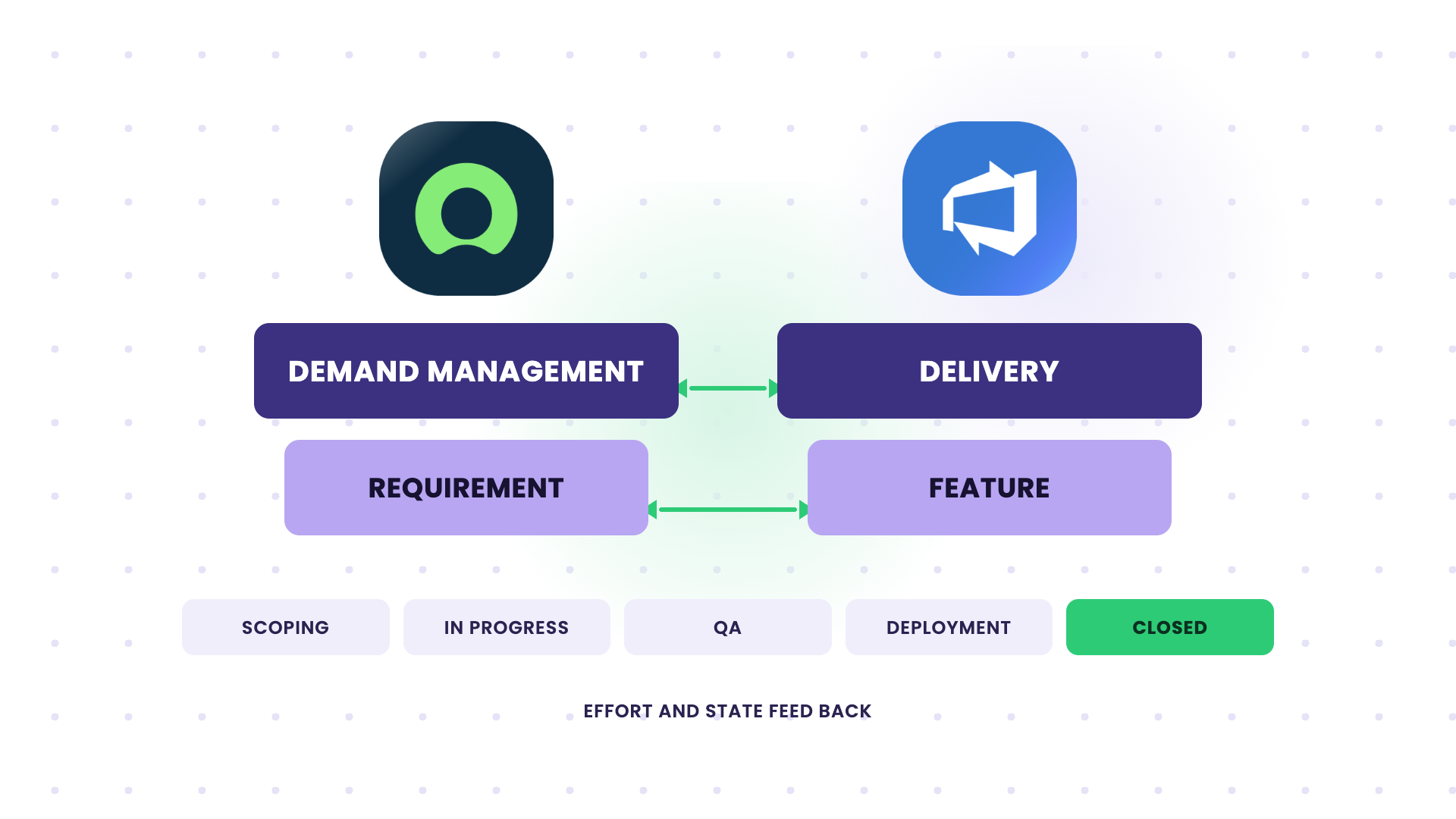
Problem: Once a Requirement is approved in ServiceNow, there’s no automatic handoff to Azure DevOps. Someone recreates the Feature, copies the demand details, and then keeps both sides updated manually. The demand owner in ServiceNow can’t see effort, status, or assignment as the Feature moves through its lifecycle, so the Requirement goes stale. When the Feature closes in Azure DevOps, the ServiceNow Requirement stays open, and the demand shows as unfulfilled until someone closes the loop.
Solution: A bidirectional sync that connects the full demand-to-delivery flow, with ServiceNow Requirements mapped to Azure DevOps Features.
- Feature creation: When a Requirement is created or updated in ServiceNow, an Azure DevOps Feature is created automatically. Demand context maps across so developers get what they need without opening ServiceNow: design document and sign-off, demand ID and web URL, portfolio and sub-portfolio area, process hierarchy, demand type, IT service, stakeholders, description, and requirement number.
- Bidirectional field sync: Updates flow both ways; each field in a set direction. From Azure DevOps back to ServiceNow: iteration path (ALM Release), change request ID, effort (Estimated Effort in hours), priority, assignment (ALM Development Responsible), and state (ALM Life Cycle Status). From ServiceNow to Azure DevOps: the demand and design fields above. A Requirement creation or update triggers the outbound sync; a Feature work item update triggers the return sync.
- Lifecycle feedback: As the Feature moves through “scoping” and “awaiting approval”, “work in progress and QA”, “deployment”, and “completion”, its effort, status, and assignment feed back into the ServiceNow Requirement in real time.
- Closure and fulfillment: When the Azure DevOps Feature is accepted or closed, the linked ServiceNow Requirement moves to Closed, and the demand is marked fulfilled by the Demand Manager. Both systems land on the same end state, with a clean, traceable record from intake through delivery.
Since ServiceNow remains the system of record for demand and Azure DevOps for execution, each side keeps authority over what it owns, and the sync respects that boundary in both directions.
Other similar ServiceNow Azure DevOps use cases include:
- Incident task to Azure DevOps work item task: Sync at the task level, linking a ServiceNow incident_task to an Azure DevOps work item task rather than the parent record.
- Selective routing across orgs: Route bugs and stories to different Azure DevOps orgs and projects based on assignment group, product, or a custom field on the ServiceNow side.
All ServiceNow Azure DevOps Integration Use Cases
| Use Case | Entities | Sync Direction | Best Fit For |
| Requests to board as stories | ServiceNow Request + Azure DevOps User Story | Bidirectional | Service + Dev teams |
| Comments and state repatriation | ServiceNow Ticket + Azure DevOps Work Item | Bidirectional | Service teams needing live status |
| Catalog item fulfillment | ServiceNow Catalog Task + Azure DevOps Work Item | Bidirectional | Service catalog + Dev teams |
| Incident duplication cut | ServiceNow Incident + Azure DevOps User Story | Bidirectional | IT + Dev teams |
| Bugs with attachments across orgs | ServiceNow Bug + Azure DevOps Bug (multi-org) | Bidirectional | Groups with multiple ADO orgs, MSP first-line |
| Demand to Feature | ServiceNow Requirement + Azure DevOps Feature | ServiceNow to ADO | Demand management + Engineering |
| Field and lifecycle sync | ServiceNow Requirement + Azure DevOps Feature | Bidirectional | Demand owners tracking delivery |
| Project to hypercare handover | ServiceNow Incident + Azure DevOps Work Item | Bidirectional | Teams moving from build to maintenance |
Specific Entities and Fields That Sync Between ServiceNow and Azure DevOps
Here are the capabilities that make the use cases actually work, across any ServiceNow and Azure DevOps setup:
- Attachment Sync: Bugs and incidents depend on files like screenshots, logs, and diagnostic exports. An integration that syncs the ticket text but skips attachments forces developers back to email. Make sure attachments flow both ways, with size limits and filtering if you don’t want every internal file leaving one side.
- Custom Field Mappings: Out-of-the-box mappings only get you so far. A real ServiceNow Azure DevOps integration maps your custom fields, like a ServiceNow portfolio area or demand type, to an Azure DevOps Feature field. The layer should transform values too, so a ServiceNow state and an Azure DevOps lifecycle stage line up rather than forcing both systems to match.
- State Mappings: ServiceNow states and Azure DevOps work item states don’t share the same values, so a raw pass-through will only come up with a mismatch. Map the states explicitly, and decide which side is authoritative when a state changes after creation.
- Selective Sync: Not every record needs to cross over. Filter by assignment group, area path, work item type, tag, or any custom field. The fewer records crossing, the easier the integration is to govern, and the lower the risk of leaking internal data across orgs or companies.
For internal, single-team workflows with simple field-to-field mapping, native tools are often the right call. For anything cross-company, multi-instance, or with a real demand-to-delivery flow, a dedicated integration layer like Exalate usually fits the bill way better.
If you want to talk through which approach fits your setup, get in touch with our team. In the meantime, you can start your free Exalate trial.
Frequently Asked Questions
What is a ServiceNow Azure DevOps integration?
ServiceNow Azure DevOps integration is a connection between ServiceNow and Azure DevOps that moves data automatically and cuts out manual handoffs. Your service team works in ServiceNow, your developers work in Azure DevOps, and nothing falls through the gap between them.
What are the most common ServiceNow Azure DevOps integration use cases?
The most common use cases involve routing ServiceNow requests, incidents, and catalog items into Azure DevOps as user stories or bugs so the dev team picks them up without copy-pasting. The full demand-to-Feature flow, where approved ServiceNow demands become Azure DevOps Features with effort and status syncing back, comes up a lot in larger organizations.
Is the sync between ServiceNow and Azure DevOps bidirectional?
Yes, the sync between ServiceNow and Azure DevOps is bidirectional and happens in real time. A ServiceNow Requirement can push updates to its Azure DevOps Feature, and Feature updates like effort, status, and assignment push back to ServiceNow. You control which fields sync in which direction, and closing an item on one side can close its counterpart on the other.
Can a ServiceNow request create a work item in Azure DevOps?
Yes, a ServiceNow request, incident, or catalog item can create a User Story, Bug, or Feature on an Azure DevOps board automatically. You trigger it by assignment group, category, or a manual “send to Azure” button, and the link between the two records is stored on both sides.
Does the integration sync attachments and comments?
When a bug or incident is raised in ServiceNow, its attachments can carry across to the Azure DevOps work item, including attachments added to the description, and comments sync both ways. When the work item closes in Azure DevOps, its status and comments reflect back into ServiceNow.
Can I connect one ServiceNow instance to multiple Azure DevOps orgs?
Yes, you can connect a single ServiceNow instance to several Azure DevOps organizations, and vice versa, each with its own projects, rules, and triggers. This suits groups running multiple ADO orgs, or setups where a sister company handles first-line support in ServiceNow. Each connection is independent, so there’s no shared admin access.
When should I use native tools vs a third-party solution?
Native tools work for internal, single-team workflows with basic mappings and scenarios. A third-party tool fits better when the integration crosses org or company lines, both sides need to configure their own rules independently, or field and state values need transforming between systems that don’t share the same data model.
Recommended Reading