That gap between developers and IT is the main reason integration exists. When a ServiceNow incident needs developer attention, someone has to get it into Jira with the right fields, the right priority, and the right attachments. When a developer resolves the work item, that resolution has to flow back to ServiceNow before the SLA clock runs out.
Manually copy-pasting between platforms introduces errors, eats hours, and guarantees that at least one system is always out of date.
This list covers 10 tools that solve this problem, each with a different approach, from script-based engines with full customization to fully managed integration services.
Note: This list is for ITSM leaders evaluating integration options, solution architects recommending tools to clients, or MSPs managing integrations across multiple customer environments.
Key Takeaways
- Manual copy-pasting between Jira and ServiceNow causes errors, wasted time, and outdated data.
- Most real ITSM workflows need both unidirectional and bidirectional sync, not just one-way data flow.
- Field mapping requires transformation logic because Jira and ServiceNow use completely different data models.
- Change management sync between Change Requests and Jira releases is underserved, and few tools handle it well.
- Cross-company and MSP setups need each side to control its own sync rules independently.
- Total cost of ownership includes setup, maintenance, and how pricing scales, not just licensing fees.
- AI-assisted configuration is reducing the scripting barrier for non-developer ITSM teams.
- The right tool depends on your complexity trajectory, since simple flows need simple tools, but complex workflows need tools that scale.

How to Evaluate a Jira ServiceNow Integration Tool
Before comparing tools, it helps to know what to compare on. These are the capabilities that determine whether an integration works in practice, not just in theory.
Bidirectional vs. One-Way Sync
One-way sync pushes data from one platform to the other. Bidirectional sync keeps both platforms aligned in real time. Changes on either side flow automatically to the other. Most real-world ITSM workflows need bidirectional sync. If your developers update the status in Jira, the ServiceNow incident should reflect that without someone manually copying it.
Cross-Company and Full Operational Control
When two organizations collaborate (say, an MSP and its client, or two partner companies), each side needs to control what data leaves its environment and how incoming data is processed. Tools that require centralized configuration create friction here. Look for solutions where each side maintains independent sync rules.
Multi-Instance Support
Large enterprises and MSPs often run multiple Jira or ServiceNow instances. For instance, ServiceNow might be their single source of truth, which logs incidents from multiple ticketing systems like JSM, Zendesk, Freshdesk, etc., creating a hub-and-spoke network. Your integration tool should handle these multiple connections and give you an overview of how they connect with one another, without requiring separate installations for each.
Security and Compliance
Your integration handles incident details, customer information, SLA data, and internal work notes. Look for ISO 27001 certification, encryption in transit and at rest, role-based access control, and data residency options. If your organization goes through audits, a public Trust Center with compliance documentation saves time.
Custom Field Mapping
Jira and ServiceNow don’t use the same data model. ServiceNow uses urgency, impact, and assignment groups. Jira uses priority, components, and labels. Your integration tool needs to map between these without flattening your data. It should handle the complexity of your actual schema, not just the five default fields.
Attachment Sync
When L1 support attaches a screenshot to a ServiceNow incident and escalates to engineering, that screenshot needs to land in Jira. Same for inline images, log files, diagnostic exports, and embedded images. Some tools sync attachments natively. Others skip them entirely or require workarounds.
Priority and Status Mapping
ServiceNow calculates priority from a combination of urgency and impact. Jira uses a flat priority field. Mapping between these values requires transformation logic, not just a 1:1 label swap. The same applies to status mapping: ServiceNow incident states (New, In Progress, On Hold, Resolved, Closed) don’t map cleanly to Jira workflow statuses without conditional rules.
Change Management Workflow Sync
If your organization runs change management in ServiceNow, you likely need Change Requests to connect with Jira releases or versions. This is one of the most underserved use cases. Most tools handle incidents, but change management sync requires deeper entity support.
Error Handling and Reliability
Integrations break, networks go down, and APIs throw errors. What matters is whether the tool recovers automatically. Look for retry mechanisms that resume from the point of interruption, not from scratch. Prioritize asynchronous sync queues that preserve data during outages.
AI-Assisted vs. Manual Sync Configuration
Some tools require you to write every sync rule by hand, and others require you to choose from pre-built templates. The latter is often limited by nature. Some script-based integration tools offer AI-assisted configuration that generates sync scripts or mappings from plain-language descriptions. This matters especially if your team doesn’t have dedicated integration developers.
Total Cost of Ownership
Subscription cost is only one part of the picture. Factor in consulting services for setup, ongoing maintenance, and what happens when you need to add a new connection or change a field mapping. Some tools use per-user pricing, others use per-task or per-operation models, and a few use outcome-based pricing where you pay for active items in sync regardless of how many updates flow through.

Calculate time and money savings from automated bidirectional sync.
The 10 Best Jira to ServiceNow Integration Tools
1. Exalate: Best for Advanced Bidirectional Sync in Intra and Cross-Company Collaboration
Exalate is a script-based integration solution that connects Atlassian Jira with ServiceNow for real-time, bidirectional synchronization. It uses a Groovy-based scripting engine paired with Aida, an AI assistant that generates sync scripts from plain-language prompts.
Exalate also supports Jira Service Management, Jira Software, ServiceNow Agile boards, Jira Data Center, as well as Docker deployments.
Unlike template-based tools that limit you to predefined mappings, Exalate gives you full control over what syncs, how it transforms, and in which direction. Each side of the integration maintains independent control over its own sync rules.
Plus, you can already sync many fields like summary, short description, comments, attachments, etc., with just the default scripts Exalate provides. So, once you connect your Jira with ServiceNow, just set a trigger to start a sync, and you already have a basic sync in place.
It’s available on both the Atlassian Marketplace and the ServiceNow Store, and it’s used by 2,500+ organizations.
Works Alongside ServiceNow IntegrationHub
Exalate complements IntegrationHub rather than replacing it. IntegrationHub handles simple inbound ServiceNow flows: creating incidents from external alerts, triggering basic workflows from Jira events.
Exalate handles the scenarios IntegrationHub wasn’t built for: true bidirectional sync, cross-company data flows with decentralized control, multi-platform orchestration, and complex field transformations.
There’s no need to rip and replace. If IntegrationHub is already handling simple inbound flows, Exalate can be added alongside it for the use cases that require more depth.
Attachment Sync
Exalate syncs attachments bidirectionally between Jira and ServiceNow: screenshots, log files, diagnostic exports, etc. You control which attachment types cross the bridge and in which direction through the scripting layer.
For example, you can configure outbound sync to include all attachments, but restrict inbound sync to only accept files under a certain size or with specific extensions. Rich text formatting is preserved, so inline images in comments don’t get stripped to plain text.
To stop attachments from syncing (for instance, from Jira to ServiceNow), you remove the relevant script line from the outgoing sync configuration. To sync them selectively, Aida can generate the conditional logic from a prompt like “Only sync attachments larger than 100KB.”
Custom Field Mapping
Exalate supports 40+ Jira fields, including fields from third-party Marketplace plugins like Tempo and Insights, and any ServiceNow table accessible via the REST API. There’s no data model flattening. You map fields to fields, with transformation logic in between.
Common mappings for Jira-ServiceNow include:
- ServiceNow assignment groups → Jira components
- ServiceNow work notes → Jira internal comments (kept separate from public comments)
- ServiceNow caller ID → Jira reporter
- ServiceNow category/subcategory → Jira labels or custom fields
- Any ServiceNow custom field → Any Jira custom field (with type conversion as needed)
Aida generates the mapping scripts from prompts like “Map the ServiceNow assignment group to the Jira component field” and produces working Groovy code that considers your existing sync rules.
Priority Mapping
ServiceNow calculates priority from an urgency × impact matrix. Jira uses a flat priority field. Exalate handles the conversion with conditional logic.
A basic mapping looks like this:
- Critical → Highest,
- High → High,
- Moderate → Medium,
- Low → Low.
But you can also build matrix logic. For example, if urgency = 1 AND impact = 1, set Jira priority to Blocker.
Aida generates these scripts to account for edge cases and integrates with your existing configuration.
Status and Workflow Mapping
Jira and ServiceNow use different workflow models. Exalate maps between them with workflow-aware status transitions.
A typical mapping: ServiceNow “New” → Jira “Open,” “In Progress” → “In Progress,” “Resolved” → “Done.” But real implementations often need conditional logic. For example, mapping “On Hold” in ServiceNow to a custom “Waiting for Customer” status in Jira, and auto-populating the resolution code when the Jira task moves to “Done.”
Resolution codes and resolution notes flow automatically. When a developer resolves a task in Jira, the corresponding ServiceNow incident status changes to Resolved, the resolution code is filled, and the resolution note from Jira appears in the ServiceNow incident.
Change Management Sync
This is one of the most underserved integration use cases. Organizations running change management in ServiceNow often create Change Requests manually: copying data from Jira releases, adding affected services, and writing risk assessments by hand.
Exalate makes it possible for ServiceNow Change Requests to sync with Jira releases or versions. When a development team creates a release in Jira, a corresponding Change Request is generated in ServiceNow with the release scope, affected services, and risk assessment pulled from Jira custom fields.
When the Change Advisory Board (CAB) approves the request in ServiceNow, the approval status flows back to Jira, so the development team proceeds without checking a second system. This workflow eliminated 4-6 hours per release cycle for organizations that previously handled it manually.
AI-Assisted Configuration with Aida
Aida is Exalate’s AI assistant. It’s embedded in the scripting console and generates Groovy sync scripts from plain-language prompts. Instead of writing code from scratch, you describe what you want:
- “Exclude attachments from syncing to ServiceNow”
- “Map ServiceNow incident states to Jira statuses”
- “Set default assignee when the user doesn’t exist in Jira”
- “Only sync high-priority work items”
Aida reviews your existing sync rules and connector type, then produces working code that integrates with what’s already configured. You review the output, test it with Test Run, and publish when ready.
This approach opens integration configuration to ITSM leaders and business analysts, not just developers. This matters in the ServiceNow ecosystem, where the platform champion is typically the head of the service desk, not an engineer.
Cross-Company and MSP Workflows
Exalate’s architecture is built around distributed control. Each side of an integration maintains its own sync rules independently.
For cross-company scenarios (an MSP syncing incidents with a client’s Jira, or two partner organizations sharing selected work items), this means each organization controls what data leaves its environment and how incoming data is processed. Internal customer data, financial information, or sensitive work notes can be excluded at the script level.
For MSPs managing multiple clients, each connection operates as an independent entity with its own rules, triggers, and error handling. The unified console provides visibility across all connections without cross-contamination between client environments.
CMDB and Configuration Item Sync
Every ServiceNow customer knows their CMDB is a challenge. Analysts consistently identify CMDB data quality as the barrier to getting full value from the ServiceNow platform.
Exalate supports all ServiceNow tables available via the REST API, including the CMDB. Configuration Items can be synced between Jira and ServiceNow, helping teams maintain consistency between what’s tracked in development and what’s registered in the CMDB.
Migration Support During Platform Transitions
Experts report a growing movement away from ServiceNow in the mid-to-large enterprise segment, toward JSM, Freshworks, ManageEngine, and others. During these transitions, organizations need live bidirectional sync between the old and new platforms, not just a one-time data dump.
Exalate maintains ongoing synchronization and data transformation during migration, aka live migration. Incidents created in ServiceNow after migration starts will sync to the new platform. Updates flow in both directions until the cutover is complete. This prevents the data gaps and duplicated work that typically plague platform transitions.
Multi-Instance and Multi-Platform Support
Exalate supports multi-instance setups: multiple Jira instances connected to a single ServiceNow instance, or vice versa. This is common for MSPs serving multiple clients, enterprises with regional ServiceNow instances, or organizations managing separate development and production environments.
Beyond Jira and ServiceNow, Exalate connects to Azure DevOps, Salesforce, Zendesk, GitHub, Freshservice, Freshdesk, and Asana. Custom connectors can be developed for enterprise plans.
Reliability and Error Handling
Exalate uses asynchronous transactional sync queues on both sides of the integration. Changes are tracked in order and applied sequentially once connectivity resumes. The integrated retry mechanism restarts synchronization from the exact point of interruption, with no manual intervention required.
The Test Run feature lets you validate your sync configuration against real data before going live. Script versioning tracks every configuration change with built-in version history, so you can roll back if something breaks.
When errors do occur, AI-powered diagnostics explain what went wrong in plain language and suggest specific fixes, reducing the time from “something broke” to “here’s how to fix it.”
Sync Panel
Exalate also comes with a Chrome extension called Sync Panel that lets users check sync status, spot errors, trigger manual syncs, and unlink sync pairs straight from the browser, without opening the console.
It’s useful for two groups: admins who want to keep an eye on sync status without switching tabs and end users who want to confirm that the remote side received their update.
You can access this feature via the browser. But if you want to check the sync queue status or configure your sync, you still need to log into the Exalate console.
Dashboard
The Dashboard lets you track the number of items under sync over time. You can monitor all the connections you have access to or focus on a specific integration or connection.
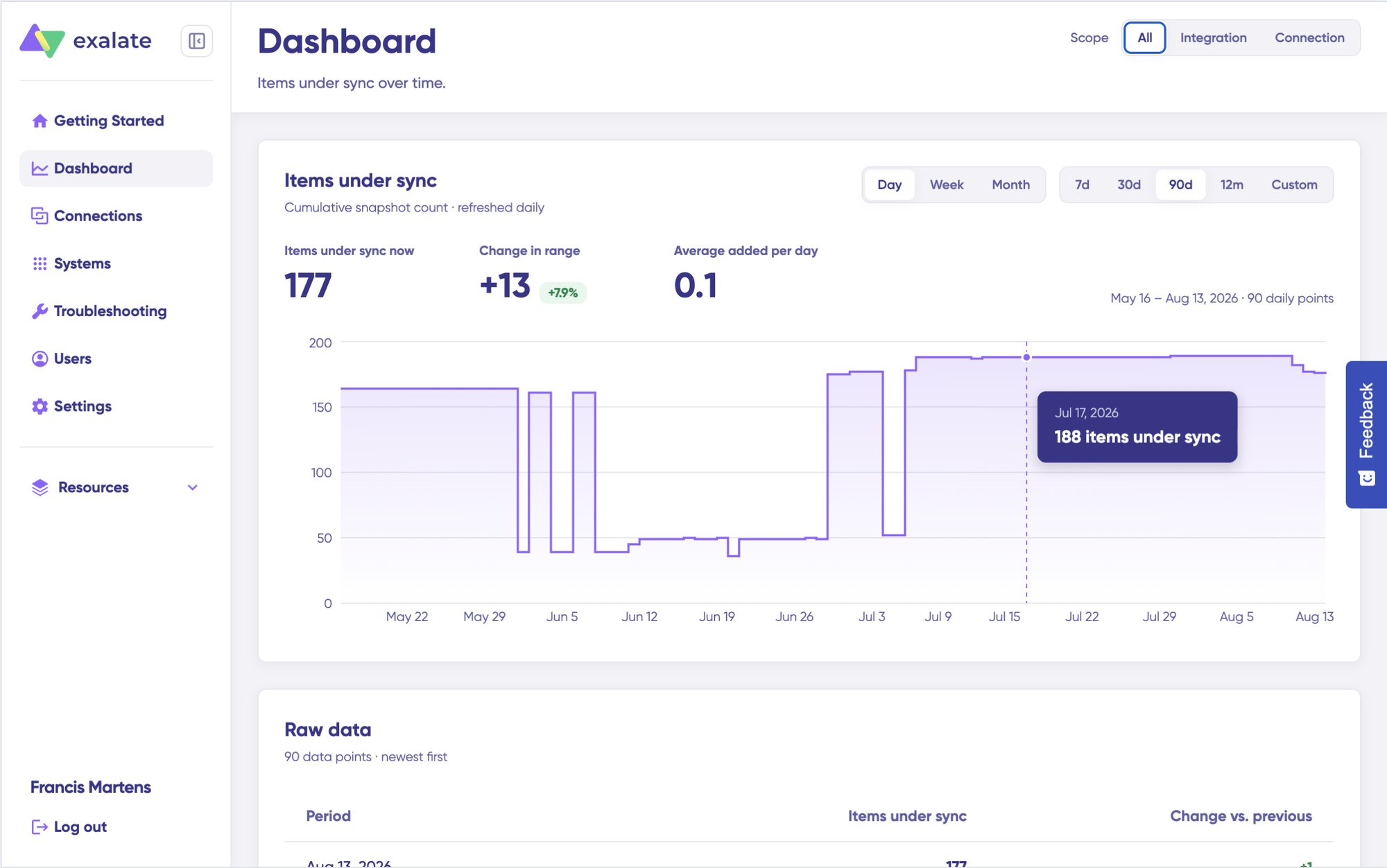
Dashboard data is displayed as cumulative snapshots and refreshed daily. You can display everything or choose a specific integration or connection to be shown, as well as a time range.
Security
Exalate is ISO 27001 certified. Data is encrypted in transit (HTTPS with TLS 1.2 and 1.3) and at rest. Authentication uses JWT access tokens, and the platform supports role-based access control and multi-factor authentication.
Organizations with strict compliance requirements can choose their data residency location. The Exalate Trust Center provides access to compliance documentation, penetration test results, and security certifications.
Pricing
Exalate uses outcome-based pricing. You pay for active items in sync (the number of items being actively synchronized), not user seats or task volumes. Each integration (e.g., Jira to ServiceNow) is billed independently. Plans include Starter, Scale, Pro, and Enterprise tiers. A pricing calculator is available to estimate costs for specific setups.
30-day free trial with full access to features, AI-assisted configuration, and Premier support.
Calculate time and money savings from automated bidirectional sync.
Use Cases and Case Studies
- Incident escalation (intra-company): L1 support receives and triages Jira Service Management tickets in ServiceNow. When an incident needs developer attention, it automatically creates a linked Jira work item in the appropriate project. Developers work in Jira. Status updates, comments, and resolution notes flow back to ServiceNow in real time. The support team sees progress without leaving their platform.
- Cross-company MSP collaboration: An MSP manages IT operations in ServiceNow for 12+ enterprise clients. Each client’s development team uses Jira. With per-client integration connections, incidents sync to the right Jira project with standardized priority mappings, regardless of how each client configures their environment.
- Change management automation: A software company releasing bi-weekly updates previously spent 4-6 hours per cycle manually creating Change Requests in ServiceNow. With automated sync, every Jira release version triggers a ServiceNow Change Request. CAB approval flows back to Jira, and the development team proceeds without checking ServiceNow.
- Platform migration: An enterprise migrating from ServiceNow to Jira Service Management uses Exalate to maintain live bidirectional sync during the transition. New incidents in ServiceNow still flow to JSM. Updates in JSM flow back. No data gaps, no duplicated work.
Best for: Complex bidirectional sync, intra- or cross-company collaboration, MSPs, enterprises with custom workflows, ITSM incident escalation, change management automation, and platform transitions.
Considerations: Advanced customizations use Groovy scripting, though Aida handles most common scenarios from plain-language prompts. Plan for an onboarding window for complex ITSM setups. This isn’t instant plug-and-play for advanced workflows. But once configured, it’s stable and reliable.
2. ServiceNow IntegrationHub (Jira Spoke)
ServiceNow IntegrationHub is the platform’s native integration layer. It uses pre-built connectors called “spokes” to link ServiceNow with external tools, including Jira, GitHub, and Azure DevOps. The Jira Spoke enables connectivity through predefined actions within Flow Designer.
For ServiceNow customers, IntegrationHub is the default starting point. It’s bundled with Pro and Enterprise licenses, it’s familiar, and it’s the lowest-risk option. It also works for simple inbound flows (creating ServiceNow incidents from Jira alerts, or triggering a workflow when a Jira work item changes status).
The limitations surface when teams need more. IntegrationHub is primarily designed for inbound integrations into ServiceNow. Outbound data flows, true bidirectional sync, and complex field transformations require custom development, often involving business rules, scripted REST APIs, and Flow Designer customizations that demand ServiceNow platform expertise.
IntegrationHub often ships with limited base capability, and expanding it (additional spoke packs, Flow Designer actions, custom flows) adds cost. The full price tag (licensing plus SI services to build and maintain custom integrations) can surprise teams that assumed IntegrationHub would handle everything out of the box.
Best for: Teams already invested in ServiceNow who need basic Jira connectivity for simple, inbound use cases.
Limitations: Complex bidirectional sync, cross-company workflows, multi-platform integrations, or outbound data flows with field transformations. If your requirements go beyond simple inbound flows, IntegrationHub is a starting point, not the destination.
3. Getint
Getint is a no-code/low-code integration tool available on the Atlassian Marketplace. It connects Jira (Cloud and Data Center) with ServiceNow through a visual configuration interface.
Its standout feature is Quick Build, an automated mapping engine that suggests field and type mappings between your connected applications. Instead of manually configuring every field, Quick Build scans both systems and proposes a starting configuration that you can then adjust.
Getint supports comment and attachment sync with the ability to route comments as public or private (or skip them entirely). Filtering is available by assignment group, status, and priority, so you can scope which ServiceNow records sync to which Jira projects.
For straightforward sync scenarios (incidents to tasks, basic field mapping, comment relay), Getint gets teams running quickly with minimal technical overhead. Setup takes minutes for standard configurations.
Best for: Small to mid-size teams wanting fast, no-code setup for standard Jira-ServiceNow sync scenarios.
Limitations: Less flexibility for complex data transformations, conditional logic, or cross-company scenarios where each side needs independent sync control. If your requirements outgrow the template, you may need a more customizable tool.
4. ZigiOps
ZigiOps is a no-code integration platform that connects Jira and ServiceNow via their native REST APIs. It acts as an integration broker: it reads from one API and writes to the other, without storing the content of transferred records. Only correlation identifiers (like sys_id matched to Jira work key) are persisted.
This architecture is what enables ZigiOps to achieve a minimal data footprint. No business data passes through or is stored in the integration layer.
Configuration happens through a guided UI with support for bidirectional sync, field mapping, filters, and conditions. ZigiOps supports both polling and webhook-based triggers, and includes a built-in monitoring dashboard for tracking active integrations, transaction counts, and failure rates.
Best for: Mid-market teams that want no-code integration with solid monitoring and a minimal data-residency footprint.
Limitations: Template-driven configuration works well for standard patterns. Complex custom logic (conditional field transformations, multi-step workflows, or dynamic routing based on business rules) may hit limitations.
5. MuleSoft (Anypoint Platform)
MuleSoft, owned by Salesforce, is an enterprise integration platform built around API-led connectivity. It offers pre-built connectors for both ServiceNow and Jira, along with comprehensive API management, governance tools, and a developer portal.
In the ServiceNow ecosystem, MuleSoft (along with Boomi and Workato) represents the default alternative when native tools fall short.
MuleSoft’s strength is breadth. If your organization connects hundreds of systems and needs centralized API governance across all of them, Anypoint Platform delivers. The ServiceNow connector syncs data in real time, and the Jira REST connector handles the Atlassian side.
The tradeoff is complexity and cost. MuleSoft requires certified developers, implementation timelines measured in weeks to months, and licensing at the enterprise level (typically six-figure annual costs). For a straightforward Jira-to-ServiceNow sync with custom field mappings, it’s significantly more platform than required.
Best for: Large enterprises with dedicated integration teams, broad API strategies across hundreds of systems, and existing investment in the Salesforce ecosystem.
Limitations: Steep learning curve, high cost, and overkill for point-to-point ITSM sync. If your primary need is Jira ↔ ServiceNow bidirectional sync with custom field mappings, MuleSoft brings API management overhead that doesn’t add value to that specific use case.
6. Boomi
Boomi is a cloud-native iPaaS platform that combines integration, API management, and data synchronization. In partnership with ServiceNow, Boomi developed Workflow Data Fabric, an automation engine for managing syncs between ServiceNow and connected systems.
The platform supports hybrid cloud deployments with on-premises agents, which matters for organizations with systems that can’t be exposed to the public cloud. With 1,500+ connectors, Boomi handles a wide range of enterprise integration scenarios beyond just Jira and ServiceNow.
Like MuleSoft, Boomi is positioned for mid-to-large enterprises that need integration across multiple platforms (ERP, HR, ITSM, and cloud services) from a single management layer.
Best for: Mid-to-large enterprises needing hybrid cloud integration with master data management capabilities across multiple platforms.
Limitations: Complex transformations still require technical expertise despite the low-code marketing. Pricing escalates with additional connections and data volumes. Implementation often requires Boomi-certified partners, adding to the cost.
7. Workato
Workato uses a recipe-based model for building integrations and automations. Each recipe consists of triggers and actions that define how data flows between connected applications. With 1,000+ app connectors, it covers a broad range of enterprise tools, including ServiceNow and Jira.
Workato’s strength lies in combining integration with business process automation. A single recipe can sync a ServiceNow incident to Jira, notify a Slack channel, update a spreadsheet, and trigger an approval workflow, all in one sequence.
AI-powered features assist with recipe creation, and the visual builder makes it accessible to teams without deep coding experience.
Best for: Teams that need integration combined with cross-application workflow automation, not just data sync.
Limitations: The recipe model can become unwieldy when managing many interconnected automations. Pricing lacks transparency and uses a task-based model that’s difficult to predict at scale. True bidirectional sync with conflict resolution requires careful recipe design. It’s not built in by default.
8. Planview Hub (formerly Tasktop)
Planview Hub takes a model-based approach to integration, connecting tools across the software delivery lifecycle. Instead of building point-to-point connections between each pair of tools, Hub uses a canonical data model. You map each tool to the model once, and all connected tools stay in sync through that shared layer.
For Jira and ServiceNow, this means bidirectional sync of attributes, custom fields, attachments, and comments.
But Hub’s real value emerges in multi-tool chains. An incident in ServiceNow flows to Jira as a bug, the team realizes it needs a different engineering team in Azure DevOps, and the bug flows there, with attributes, comments, and status synchronized across all three tools.
This is a value stream management (VSM) play. Planview Hub connects the dots between service management, development, testing, and delivery, providing traceability across the entire pipeline.
Best for: Organizations pursuing value stream management with visibility and traceability across the full delivery lifecycle, especially when more than two tools are involved.
Limitations: Heavier investment and longer implementation compared to point-to-point sync tools. Better suited to enterprises with mature VSM practices than teams that just need Jira-to-ServiceNow sync.
9. ONEiO
ONEiO is a fully managed, cloud-based integration-as-a-service platform. Rather than giving you tools to build integrations, ONEiO builds and manages them for you. The platform acts as a translation layer, brokering messages between connected tools in real time.
The ONEiO Spoke is available on the ServiceNow Store, simplifying setup for ServiceNow customers. Configuration focuses on defining what data flows where and under what rules, with no API knowledge or coding required.
ONEiO’s model is particularly strong for SIAM (Service Integration and Management) environments where multiple service providers need to exchange data. The platform supports omnidirectional routing, meaning data can flow between any combination of connected tools, not just point-to-point.
Best for: Organizations that want a fully managed integration without maintaining configurations, scripts, or infrastructure. Strong fit for SIAM and multi-vendor service management.
Limitations: Less granular control compared to script-based tools. When you need conditional logic, custom field transformations, or per-field control over what syncs, a managed service model means depending on ONEiO’s team for changes rather than making them yourself.
10. Celigo
Celigo is an iPaaS platform with pre-built integration templates for common application pairs, including ServiceNow and Jira. Its templates handle user sync, incident-to-task sync, and status updates between the two platforms.
AI-powered data processing capabilities help with mapping and transformation, and the self-service design targets both IT and business users.
Best for: Mid-market teams with moderate integration complexity who want pre-built templates as a starting point.
Limitations: Default templates run on scheduled intervals (weekly by default), not in real time. For ITSM use cases where incidents need to sync within seconds (not days), this scheduling model falls short. Depth for bidirectional ITSM-specific workflows is limited compared to purpose-built tools.
Honorable Mentions
- ScriptRunner Connect (Adaptavist): A code-first integration platform using JavaScript/TypeScript. Integrates Jira, ServiceNow, Confluence, monday.com, and other tools. Pricing by connector count, not user seats. Strong for Atlassian-heavy organizations with developer resources, but less specialized than Exalate for bidirectional ITSM sync scenarios.
- Unito: A low-code/no-code platform for syncing work across tools. Visual mapping interface with support for multiple platforms. Good for broader work orchestration, less flexible for complex ServiceNow objects or cross-company scenarios requiring decentralized control.
- Jira Service Management Native Integration: Atlassian provides a built-in integration between JSM and ServiceNow through the ServiceNow Store. It sends ServiceNow incident events to JSM as alerts and forwards JSM alerts back as incidents. Designed for incident response workflows, not full bidirectional work item sync. Limited to JSM Premium. No custom field mappings or deep data transformation.
- Custom REST API Integration: Building your own integration using Jira and ServiceNow REST APIs gives complete control over the logic. But it comes with the full burden of development, testing, error handling, monitoring, and maintenance. No built-in retry mechanisms, no sync queues, no version control for configuration changes. Organizations often start here and eventually move to a third-party tool when the maintenance burden outgrows the team’s capacity.
Calculate time and money savings from automated bidirectional sync.
What Real Users Say: G2, Capterra, and Reddit Reviews
Feature lists tell you what a tool can do. Reviews tell you what it’s actually like to use it.
We looked at reviews across G2, Capterra, and community discussions for the tools on this list, with particular focus on Exalate, since it’s our product and we want to address objections head-on.
What Users Consistently Praise
- Flexibility and customization depth. Across G2 reviews, users highlight Exalate’s scripting engine as the differentiator. Some reviewers described mapping ServiceNow assignment groups to Jira components and synchronizing work notes separately from public comments. These are configurations that aren’t possible with template-based tools.
- Measurable time savings. One reviewer running a Jira-ServiceNow ITSM escalation workflow reported saving roughly 10 hours per week on manual data entry, with a 35% improvement in cross-team bug resolution time.
- Cross-company collaboration. Multiple reviews cite Exalate’s ability to sync data between organizations without giving external teams access to internal systems. One reviewer described trying shared boards, export/import workflows, and email threads before landing on Exalate as the solution for cross-company project work.
- AI + scripting combo. Several users mention using Aida alongside ChatGPT to generate and refine sync scripts, combining Exalate’s context-aware AI with general-purpose coding assistance.
Common Objections and Concerns To Jira ServiceNow Integration Tools
- Learning curve for advanced scripting. This is the most consistent piece of feedback. Exalate’s Groovy-based scripting gives you full control, but that control requires learning Groovy syntax for complex configurations. On the bright side, Aida can help you smooth this learning curve.
- Advanced scripts can break after environment changes. One reviewer described a sync that stopped working after a few months due to environment changes. This is a scripting reality, not unique to Exalate, but worth planning for.
- Not plug-and-play for complex ITSM workflows. Reviewers consistently note that while basic sync is straightforward, complex ITSM-specific configurations need time and understanding of both platforms. Once configured properly, it’s described as “stable and reliable.”
Across reviews for MuleSoft, Boomi, and Workato, pricing complexity and cost escalation are recurring complaints. Users report difficulty predicting costs and unexpected charges as usage scales.
Users note that IntegrationHub sometimes falls short of requirements for complex use cases. One user described the onboarding as going smoothly, but IntegrationHub did not meet their needs.
How Exalate Addresses These Objections
Exalates Aida AI reduces the scripting barrier. You describe what you want in plain English, and it generates working Groovy code.
The Test Run feature lets you validate the configuration against real data before it touches production. Script versioning tracks every change with rollback capability.
Integration engineering support is available for teams that need hands-on help. And outcome-based pricing means you pay for active sync items, not unpredictable task volumes.
How to Pick the Right Tool for Your Use Case
Different tools solve different problems. Here’s a quick decision framework.
| Your situation | Recommended tool |
| Simple, one-way incident alerts only | IntegrationHub Jira Spoke or JSM native integration |
| No-code, quick setup for basic use cases | Getint, ZigiOps |
| Enterprise-grade complex real-time bidirectional sync with custom logic | Exalate |
| Company-wide API strategy across 100+ systems | MuleSoft, Boomi |
| Fully managed, hands-off integration | Exalate (managed services), ONEiO |
| Value stream management focus | Planview Hub |
| Cross-company / MSP scenarios with decentralized control | Exalate |
| Budget-conscious, moderate complexity | Celigo, Workato |
| Atlassian ecosystem with dedicated dev resources | ScriptRunner Connect |
If you’re unsure where to start, ask yourself two questions:
- Do you need bidirectional sync, or is one-way sufficient?
- Will this stay as a simple Jira-to-ServiceNow connection, or will it grow to include more platforms, more instances, or cross-company collaboration?
If the answer to either is “it’ll get more complex,” start with a tool that scales. Retrofitting is more expensive than choosing right the first time.
FAQ
What data can you sync between Jira and ServiceNow?
A well-configured integration typically syncs work item fields (summary, description, priority, status), comments and internal notes, inline images, attachments and embedded files, custom fields mapped between both platforms, status transitions and workflow state changes, assignee and reporter information, labels and categorization data, and linked records. The specific fields depend on how you configure your connection. Some integrations only push status updates one way, others sync every field change, comment, and attachment bidirectionally.
Can you sync attachments between Jira and ServiceNow?
Tools like Exalate sync attachments bidirectionally: screenshots, log files, diagnostic exports, and embedded images. You can control which attachment types sync and in which direction. Some tools sync attachments natively, others require workarounds, and a few (particularly no-code templates) skip them entirely.
How do you map custom fields between Jira and ServiceNow?
Custom field mapping requires a tool that understands both platforms’ data models. In Exalate, for example, you write mapping rules (or have Aida generate them) that specify how a ServiceNow field translates to a Jira field, including type conversions, default values for missing data, and conditional logic. Common mappings include ServiceNow assignment groups to Jira components, work notes to internal comments, and caller ID to reporter.
How do you map ServiceNow priority to Jira priority?
ServiceNow calculates priority from urgency and impact. Jira uses a flat priority field. The mapping requires transformation logic: you define rules like “if urgency = 1 and impact = 1, set Jira priority to Blocker” or simpler label maps like “Critical → Highest, Moderate → Medium.” Tools with scripting support handle this with conditional logic. Template-based tools may limit you to 1:1 label mapping without the urgency/impact matrix.
How do you handle status mapping in a Jira ServiceNow sync?
Status mapping requires defining how ServiceNow incident states (New, In Progress, On Hold, Resolved, Closed) correspond to Jira workflow statuses. This isn’t a simple label swap. It needs to account for workflow-specific transitions, conditional rules (e.g., “On Hold” maps to a custom Jira status), and auto-population of resolution codes when incidents close. Exalate’s Aida generates status mapping scripts from prompts like “Map ServiceNow incident states to Jira statuses.”
Can you integrate Jira and ServiceNow without coding?
Yes, Exalate also allows you to integrate Jira and ServiceNow without writing code yourself. For more complex requirements (conditional field mappings, status transformation logic, selective attachment sync), some level of scripting or AI-assisted configuration is needed. Exalate’s Aida bridges this gap by generating scripts from plain-language descriptions.
How much does a Jira ServiceNow integration cost?
Exalate uses outcome-based pricing. You pay for the number of ticket pairs actively synchronized at any given time. Each integration between two instances requires its own plan. The cost per item decreases as sync volume grows. Unlimited connections and users are included with every plan. A 30-day free trial provides full functionality. View pricing details.
Can you connect multiple Jira instances to one ServiceNow instance?
Yes, Exalate supports multi-instance setups where multiple Jira instances connect to a single ServiceNow instance (or vice versa). Each connection can have unique sync rules and field mappings. This is essential for MSPs managing multiple clients, enterprises with regional instances, or organizations with separate development and production environments.
How long does it take to set up a Jira ServiceNow integration?
A basic bidirectional sync with default field mapping can be up and running within a few hours using Quick Sync and Aida-generated scripts. More complex configurations with custom field transformations, multiple trigger conditions, and conversation filtering typically take hours. For organizations that prefer hands-off implementation, Exalate’s managed services team handles the full setup.
How do you sync change requests between ServiceNow and Jira?
In Exalate, you configure sync rules that map Change Request fields (scope, affected CIs, risk assessment, approval status) to corresponding Jira fields. When a Jira release triggers a Change Request in ServiceNow, CAB approval flows back to Jira automatically. Most no-code tools and basic connectors don’t support this use case.
Can Exalate work alongside ServiceNow IntegrationHub?
Yes, Exalate and IntegrationHub serve different purposes and coexist without conflict. IntegrationHub handles simple inbound flows and ServiceNow-native automations. Exalate handles bidirectional sync, cross-company data flows, multi-platform orchestration, and complex field transformations. There’s no need to replace IntegrationHub. Exalate adds capabilities where IntegrationHub reaches its limits.
How does the Jira to ServiceNow integration work?
Jira to ServiceNow integration works by creating a bridge between the two platforms so that issues, tickets, and data can flow between them automatically. Tools like Exalate use a scripting sync engine that maps fields between Jira and ServiceNow, then syncs updates in real time without requiring both teams to work in the same tool.
How do I set up Jira integration with ServiceNow using webhooks?
Webhooks are one method: they trigger an HTTP call whenever an event happens in Jira (e.g., issue created, status changed), which ServiceNow can then receive. However, native webhooks require significant custom scripting to handle field mapping, error handling, and bi-directional sync. A dedicated integration tool like Exalate handles this out of the box without needing to build and maintain webhook logic yourself.
Does ServiceNow integration work with Jira Cloud?
Yes, ServiceNow integrates with both Jira Cloud and Jira Data Center/Server. Exalate supports all Jira deployment types, meaning your ServiceNow ITSM team and Jira software team can collaborate regardless of where Jira is hosted.
What are the best tools for integrating Jira and ServiceNow?
The most popular options include:
- Exalate: the most flexible option, using a scriptable sync engine ideal for complex, intra and cross-company integrations
- Zapier: good for simple, low-volume automations
- ServiceNow’s native Jira Spoke: works for basic use cases, but limited in customization
- Custom webhooks + REST APIs: maximum control but high development overhead
For enterprise-grade, bi-directional sync with full control over what data flows where, Exalate is the go-to choice.
How do I automate ticket synchronization between Jira and ServiceNow?
With a tool like Exalate, you can automate ticket sync by setting up triggers (e.g., when a ServiceNow incident reaches a certain priority, automatically create a Jira issue) and defining sync rules using Groovy-based scripts. This eliminates manual ticket creation, reduces response time, and keeps both systems updated without human intervention.
What are the top vendors offering connectors for linking Jira and ServiceNow?
Beyond Exalate, other vendors include Workato, MuleSoft, Boomi, and Unito. However, for teams needing fine-grained control over what syncs, in which direction, and with what transformations, Exalate’s scriptable engine stands out as the most powerful option.
Recommended Reading