Choosing an integration tool usually involves a thorough evaluation of the costs, features, and applicable use cases. For anyone thinking about adding Exalate to their tech stack, we’ve compiled this review to explain how it works and who it is for.
This Exalate review also covers the use cases it handles, where it beats the alternatives, where it doesn’t, and how to decide whether it is the right option for you. We’ve also covered real customer reviews and concerns.
What is Exalate?
Exalate is a bidirectional synchronization solution for connecting work management tools, CRM, DevOps, and ITSM platforms.
It supports Jira (including Jira Service Management, Jira Product Discovery, Jira Data Center, & more), ServiceNow, Azure DevOps (Server and Cloud), Zendesk, Freshdesk, Salesforce, Freshservice, and Asana out of the box, along with a few experimental connectors like ServiceDesk Plus and Ivanti. Reach out to us to request a new connector.
It helps keep work items, incidents, tickets, comments, attachments, and multiple entities in sync across platforms in real time.
What sets Exalate apart is precision. Using a Groovy-based scripting engine, you configure your outgoing and incoming sync separately, so you control exactly which fields, statuses, comments, and attachments move and how they map. That fine-grained control over what syncs makes it feasible for cross-company syncs.
Exalate is the best option for teams with deep, intricate integration requirements, ITSM workflow orchestration needs, or advanced field mappings that standard templates don’t cover.
It works for integration leads, solution architects, service delivery managers, support and engineering leads, Atlassian engineers, system integrators, and other platform admins, and MSPs running multiple client connections.

What Exalate Actually Does
Exalate has a built-in scripting engine that enables and controls the customization of every connection.
Here’s a concrete example. A customer raises a ticket in Zendesk, and Exalate creates a matching work item in Jira automatically. When engineering changes the status, that flows back to Zendesk, along with comments and attachments. Nobody manually copies anything between the two systems.
The part our users find interesting is how the sync gets configured. Most tools give you a fixed set of field mappings and a UI via templates, while Exalate gives each side the freedom and means to implement their own logic for specific use cases.
The data from two instances is isolated by Exalate’s distributed architecture, which is what makes a sync (and data) between two separate companies (cross-company) actually safe.
How Exalate’s Scripting Works
A customer syncs incidents from ServiceNow into Jira. The business rule from their ITSM team is:
- Jira Priority must be derived from ServiceNow’s Impact + Urgency matrix (two source fields → one target field).
- Only incidents where
Category = "Application"should sync; everything else stays local. - ServiceNow commenters aren’t Jira users, so each synced comment must be prefixed with the original author’s name so context isn’t lost.
- Jira makes Component mandatory, but ServiceNow has no equivalent field, so it needs a sensible default based on the assignment group.
Exalate’s Groovy scripts run real logic on both sides:
The Impact/Urgency matrix becomes a small mapping function, the category filter is a one-line guard, comments are enriched with ${comment.author.displayName}: ${comment.body}“, and Component is defaulted from the assignment group.
The same script also handles edge cases such as missing values, deleted entities, and loop prevention instead of failing the whole sync.
Enterprises rarely have symmetric systems; they have different schemas, mandatory fields, custom workflows, and governance rules on both ends.
Exalate’s scripting solution gives you the necessary tools and flexibility to encode your business logic, transform data safely in both directions, and handle exceptions without breaking the sync.
That control is why it scales to complex, mission-critical integrations.
Sync Rules
There are two concepts essential to Exalate’s scripting engine.
The first is sync rules. Your outgoing rules (outgoing script) decide what data you send out. Your incoming rules decide how you map the data you receive onto your own items. Both sides have their own pair, each owned by the side to which it belongs.
Your outgoing script controls exactly what leaves, so you can strip or transform a field, mask a value, or block anything sensitive before it’s even in the replica (the message payload). Your incoming script controls exactly what lands, so you can rename a field, set a default, split one field into two, or drop data you don’t want.
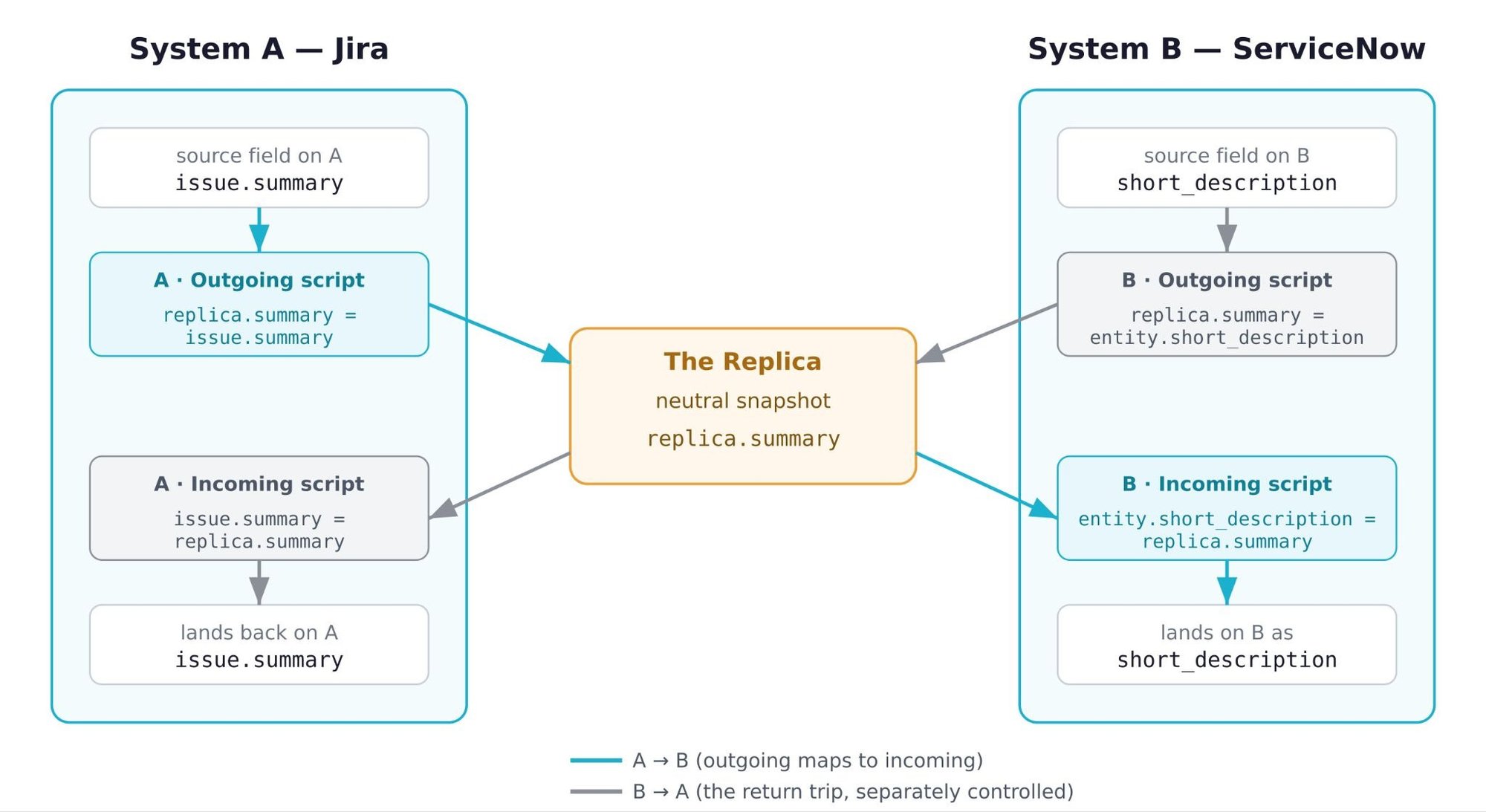
For instance, if you want to send data from Jira to ServiceNow, the Outgoing script will denote what data leaves Jira, and the Incoming script decides how the data is mapped in ServiceNow. This is applicable in a similar manner when you switch the direction of the sync, i.e., ServiceNow to Jira. So, to send Jira data: the summary, description, and labels of the issue are copied into the replica (explained in the next section), as shown in the script below. In this manner, you can copy everything you need to send in the replica.
//Outgoing Script
issue.summary = replica.summary
issue.description = replica.description
issue.labels = replica.labelsCode language: JavaScript (javascript)
On the receiving end, in the incoming script, the above function is mapped in the reverse order, as shown below. So, the replica’s summary is copied into the entity’s short description. The entity in this case is a ServiceNow object, for instance, an incident.
//Incoming Script
entity.short_description = replica.summary
.... Code language: JavaScript (javascript)
Anything you can express in Groovy–conditional logic, Elvis operator, dot (.) operator, etc.–you can put in these rules; that’s how you get the flexibility.
Replica
The second is the replica, which is the payload that carries information passed between the systems. In the outgoing script, you add fields and items to be passed to the replica. These are mapped one-to-one in the incoming script on the other side.
When something changes on your side, Exalate doesn’t push your raw ticket straight into the other system. It builds a replica, a neutral snapshot of that item, and sends that across as a message. The other side receives the replica and decides what to do with it.
For instance, as discussed above, if you’re connecting 2 systems- Jira and ServiceNow and the outgoing script in Jira has a replica.summary = issue.summary line. This means the issue’s summary is saved in replica.summary.
On the ServiceNow side, in the incoming script, this is mapped to entity.short_description = replica.summary, where the entity can be any ServiceNow object like incidents, change requests, problems, RITMs, etc.
The Most Popular Fields Users Sync
The most common fields synced with Exalate include summaries, descriptions, attachments, inline images, custom fields, hierarchical fields, work types, issue links, etc.
Each system has different entities, and you can find the full list of supported entities for all connectors here.
- Jira: Issues (work items), sprints, epics.
- ServiceNow: incidents, problems, change requests, RITMs, catalog tasks, all default or custom entities accessible via ServiceNow tables.
- Salesforce: Cases, Opportunities, Products, Accounts, Tasks, and all default and custom objects (& records) available.
- Zendesk & Freshdesk: Tickets.
- Freshservice: Tickets (incidents, service requests, & more)
- Azure DevOps: Agile board fields, work items, etc.
- GitHub: Issues and pull requests
Here is an example with a Jira to ServiceNow connection:
- On the Jira side, you can sync summary, description, status, priority, assignee, reporter, comments, attachments, and labels.
- On the ServiceNow side, you can map to short_description, description, state, urgency, priority, assignment group, caller, category, and work notes.
The field names differ between the two systems, which is exactly what the incoming script handles. It maps each incoming value onto the local field, even when they’re named nothing alike.
The interesting part is what people reach for beyond the defaults. Custom fields come up in almost every real integration, because no two teams model their work identically.
A few field-level patterns show up again and again:
- Priority mapping. ServiceNow calculates priority from an urgency-by-impact matrix, while Jira uses a flat priority field. Exalate converts the values using transformers and conditional logic.
- Comments as work notes. A common request involves syncing a Jira comment so it lands as an internal work note on the ServiceNow side, not a public reply. The script decides which kind of note it becomes on the other side.
- Entities beyond the basic issue. Teams sync incidents, problems, change requests, service requests (RITMs), CMDB CI objects, SLA data, and correlation IDs, not just the title and status. What you sync is limited by what the REST API exposes, not by a fixed field list.
If your integration only needs standard fields, most native integration tools can handle those. The reason teams pick Exalate is usually for custom fields, a mismatched scale, or an entity type that a template tool doesn’t handle.
Who is Exalate for?
Exalate fits you if:
- Your integration has requirements a template can’t meet, and someone on your team can handle the configuration: different field structures, conditional logic, custom mappings, and data you need to filter before it crosses over.
- You need to sync third-party app data, transform data as it moves between systems, automate workflows across multiple tools end-to-end, set different sync rules per direction, manage multiple hierarchies, pull in data available through REST APIs, and cover whatever doesn’t fit the usual business case.
- You’re a mid-sized to large org in IT services, software development, financial services, manufacturing, or government. These are the segments where the use cases get specific enough that flexibility matters more than a quick setup.
- You’re an MSP or solution partner connecting your clients’ tools in order to manage several client integrations across ServiceNow, Jira, and Zendesk. You think in per-client connections, not single integrations.
- You prioritize security or data residency, especially for compliance and regulated industries. Exalate’s distributed architecture makes this possible inherently.
- You just merged with or acquired another company, and now there are two Jira instances, or a Jira and a ServiceNow. This is a pattern Exalate has solved repeatedly across acquisitions, including one agency merging three separate Jira instances after acquiring multiple companies.
- A supplier, partner, or client runs their own instance, and you need selected data to flow both ways, without either side exposing their whole system. Exalate is built for this kind of secure external collaboration: each organization keeps its own authentication, with no shared admin accounts and no API keys exchanged between parties.
Exalate is the wrong call if:
- You want a fast, cheap, no-IT setup you can deploy from inside your department.
- You want a fire-and-forget kind of one-way automation.
- Your job is a general-purpose integration task: order-to-cash automation, employee onboarding flows, enterprise iPaaS, or API management. Those belong to different tools.
The Most Important Exalate Features
The Script-Based Sync Engine
What it is. Instead of a fixed UI with preset field mappings (sync templates), each side of a connection has a pair of Groovy scripts that decide exactly what data leaves and what data comes in.
Why it exists. Real enterprise systems have mismatched schemas, mandatory fields on one side that don’t exist on the other, conditional rules, and data you’re not allowed to send. When working with sync templates, you are limited to the use cases you can implement. But Exalate’s scripting engine gives you the leeway to explore more configuration options.
How it works. You write logic in the outgoing and incoming scripts on each side. Anything Groovy supports (conditional logic, loops, helper methods) is available. The script runs on every sync event, so the same rules that map a field also handle edge cases like missing values, deleted entities, and loop prevention, without failing the whole sync.
Who benefits. Technical teams with a specific requirement a template can’t meet, specifically integration leads, platform admins, and solution architects.
Script Versioning
What it is. A history of your script changes, with the ability to roll back.
Why it exists. Scripts change, and sometimes a change breaks something that was working. Without versioning, you’re rewriting from memory instead of rolling back the changes to previous versions.
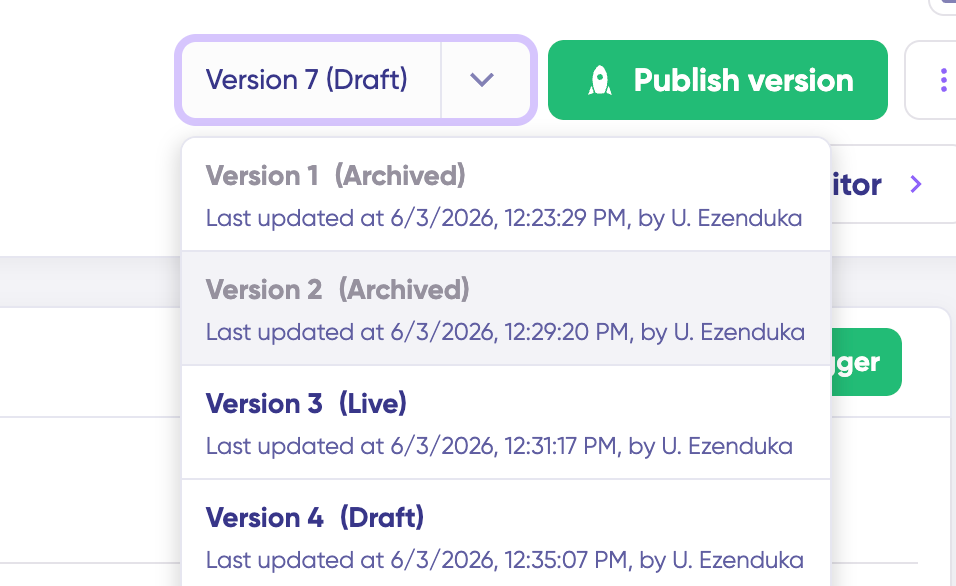
How it works. You create a new draft version to edit rather than touching the active configuration directly, so live sync keeps running on the known-good version while you work. If a published change causes a problem, you can see what changed and revert.
Who benefits. Any team maintaining a connection over time, especially where more than one person edits the scripts.
Bidirectional Real-Time Sync
What it is. Changes flow both ways, close to real time.
Why it exists. When support and engineering both act on the same ticket, any sync that is not in real time poses a risk of stale data. The whole point of connecting the systems is that a status change is visible to the other team as soon as it is updated.
How it works. When something changes on your side, Exalate builds a replica (a neutral snapshot) and sends it as a message. The other side receives it and applies its incoming rules. The trip runs in seconds, and the return direction works the same way, so a change on either end shows up on the other without anyone refreshing or re-exporting.
Who benefits. Any workflow where both sides act on live data: support-to-engineering escalations, cross-team defect handling, MSP-to-client ticket flows.
Independent Per-Side Configuration
What it is. Each side owns its own scripts and can have different logic based on the sync requirements.
Why it exists. Cross-company syncs only work if both parties keep control. You can configure the incoming and outgoing syncs on your own side to ensure the fine details are exactly to your specifications.
How it works. Your outgoing script controls exactly what goes into the replica, so you can strip a field, mask a value, or block anything sensitive before it ever leaves. Their incoming script controls what they do with what they receive. The two sides coordinate on the shared replica format but configure everything else independently. Because the directions are separate, the sync doesn’t have to be symmetric: you can send full detail one way and accept only a status back.
Who benefits. Cross-company integrations, MSPs, and anyone in a regulated or security-segregated environment. This is the feature financial services, healthcare, and government buyers care about before they look at anything else.
Aida, the AI Assistant
What it is. Aida, the built-in AI Assistant in Exalate, turns plain-language descriptions into sync scripts and helps read and debug existing ones.
Why it exists. Groovy is the source of Exalate’s flexibility and also its steepest learning curve. Aida exists to lower that barrier, so a user who doesn’t happen to know Groovy can still get a connection working and move faster.
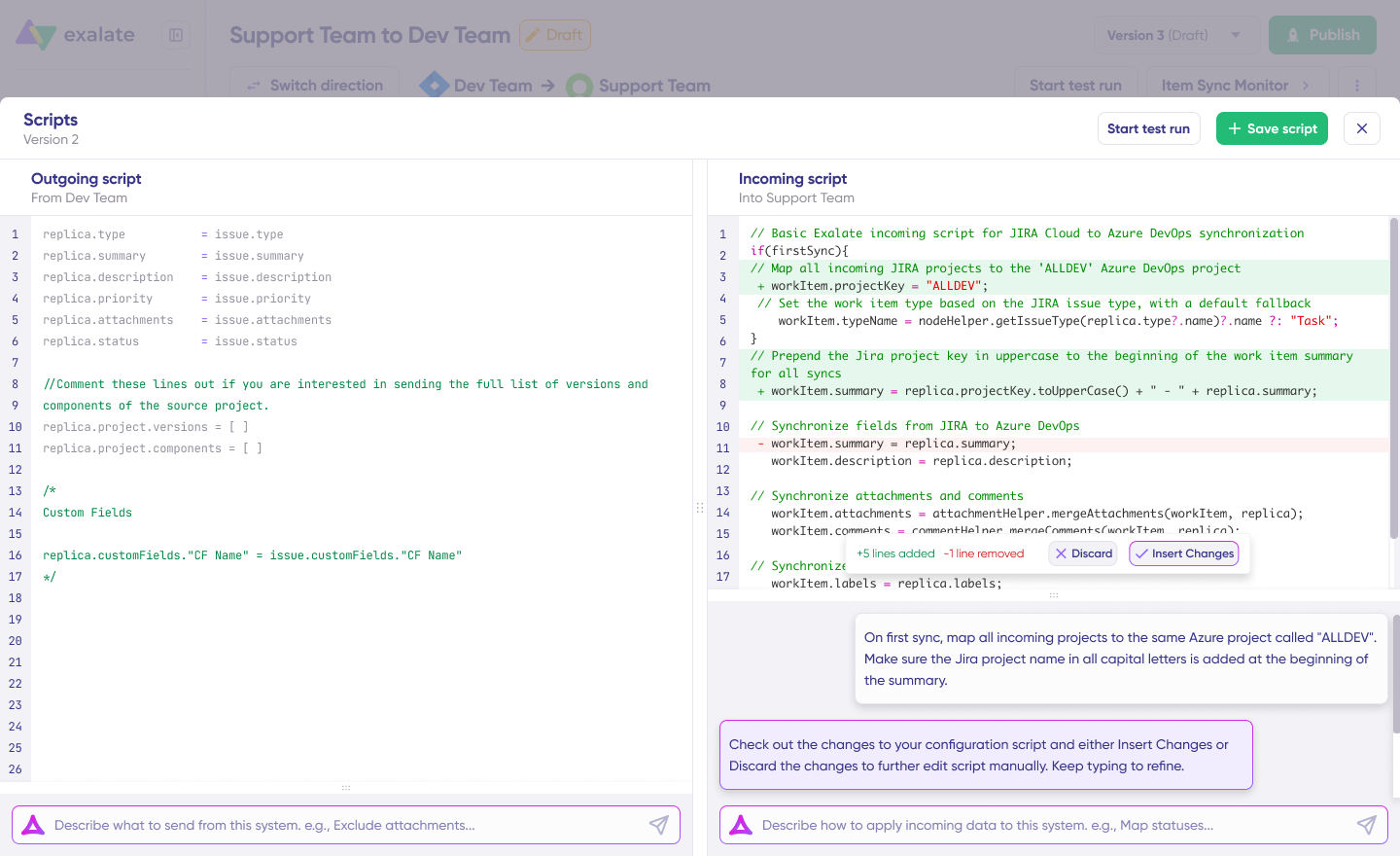
How it works. You describe what you want in plain language, like “map the ServiceNow assignment group to the Jira component field.” Aida reads your existing configuration and Exalate’s API, then generates a script that fits your current setup, which you can accept, edit, or ignore entirely. A human always stays in control of the final decision. The Conversation Mode (lab version) lets you involve Aida earlier, from requirements gathering through to script generation.
Who benefits. Teams that want to cut setup time.
Granular Field Control and Triggers
What it is. Code-level control over every field, plus platform-native triggers to decide what syncs automatically.
Why it exists. Two systems rarely have the same fields or values. You want the right fields, filtered down to the right items, rather than syncing everything and cleaning up later.
How it works. At the field level, the scripts give you full control over each value. For deciding which items sync automatically, you set triggers written in each platform’s own query language: JQL for Jira, SOQL for Salesforce, WIQL for Azure DevOps, and the native search syntax for ServiceNow, Zendesk, and GitHub. A trigger like project = SUPPORT AND priority in (High, Highest) means only those issues enter the sync. Every connection can carry multiple triggers, so you can filter as narrowly as you need.
Who benefits. Buyers who want precise control over scope. The per-platform trigger languages mean your team uses a query syntax it already knows.
Bulk Operations
What it is. A set of operations for acting on many items at once instead of one at a time. Bulk Sync brings a whole matching set into sync, Bulk Link connects large numbers of already-existing item pairs across the two systems, and Bulk Unlink stops syncing a matching set.
Why it exists. A single-item sync is fine for a new ticket, but useless when you have an existing backlog of thousands. Migrations, onboarding a new client, and backfilling a team’s history all need a way to move, link, or detach many items in one action.
How it works. Bulk Sync syncs everything that matches a trigger’s search query, creating the counterpart items on the other side. It also checks whether already-synced ones need an update, so you can safely re-run it. Bulk Connect is for when the matching items already exist on both sides, and you just need to pair them rather than create duplicates. You feed it a CSV of key pairs (local key, remote key), and it links each pair, with toggles for whether to carry across existing comments, attachments, and worklogs at the moment of connection. Bulk Unlink is the reverse of Bulk Sync: it takes a query and stops syncing everything that matches.
Who benefits. Anyone running a migration or onboarding a large existing dataset, which is most enterprise rollouts. Bulk Connect in particular is what separates a real migration story from a tool that can only sync things created after it was installed. The ACA Group and Uber Freight migrations lean on exactly these operations.
Test Run
What it is. A way to preview a sync before it goes live.
Why it exists. A bad mapping discovered in production means bad data in a system of record, and possibly a cleanup. Catching it in a test is free; catching it in production is not.
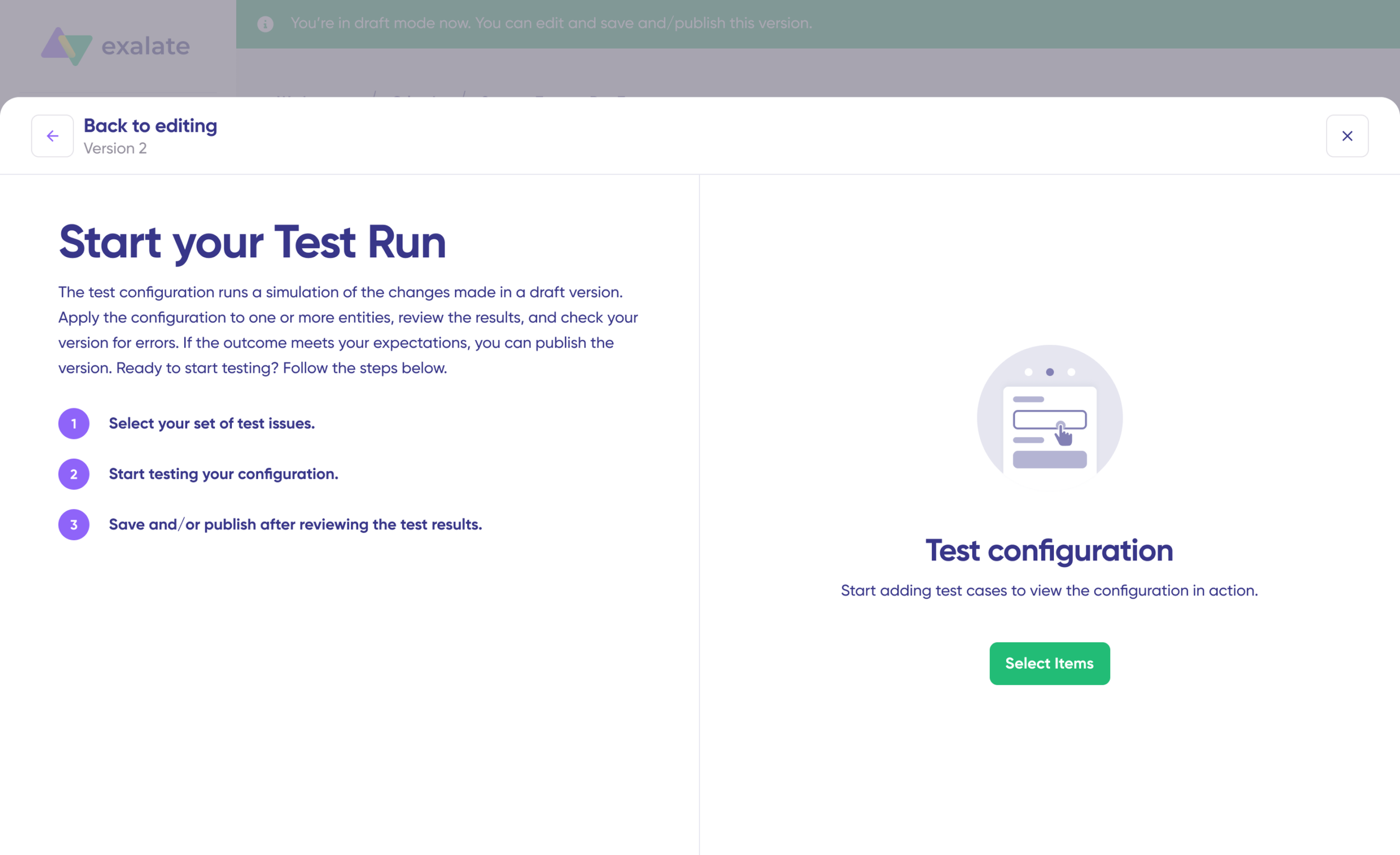
How it works. You pick one or more items and start a test run. Exalate shows you how the synced item would actually look on the destination side, including the incoming and outgoing replicas for each test item, without writing anything to the live system. You validate the mapping, adjust the script if needed, then publish.
Who benefits. Everyone, but especially teams syncing into a sensitive or high-volume production system where a mistake is expensive. It’s the safety net that makes iterating on scripts low-risk.
Sync Queue and Sync Status
What it is. A live view of every change moving between the systems, with status for each item.
Why it exists. When you’re syncing thousands of items, you need to see what’s in flight, what’s done, and what’s stuck, and find the specific item that’s causing trouble.
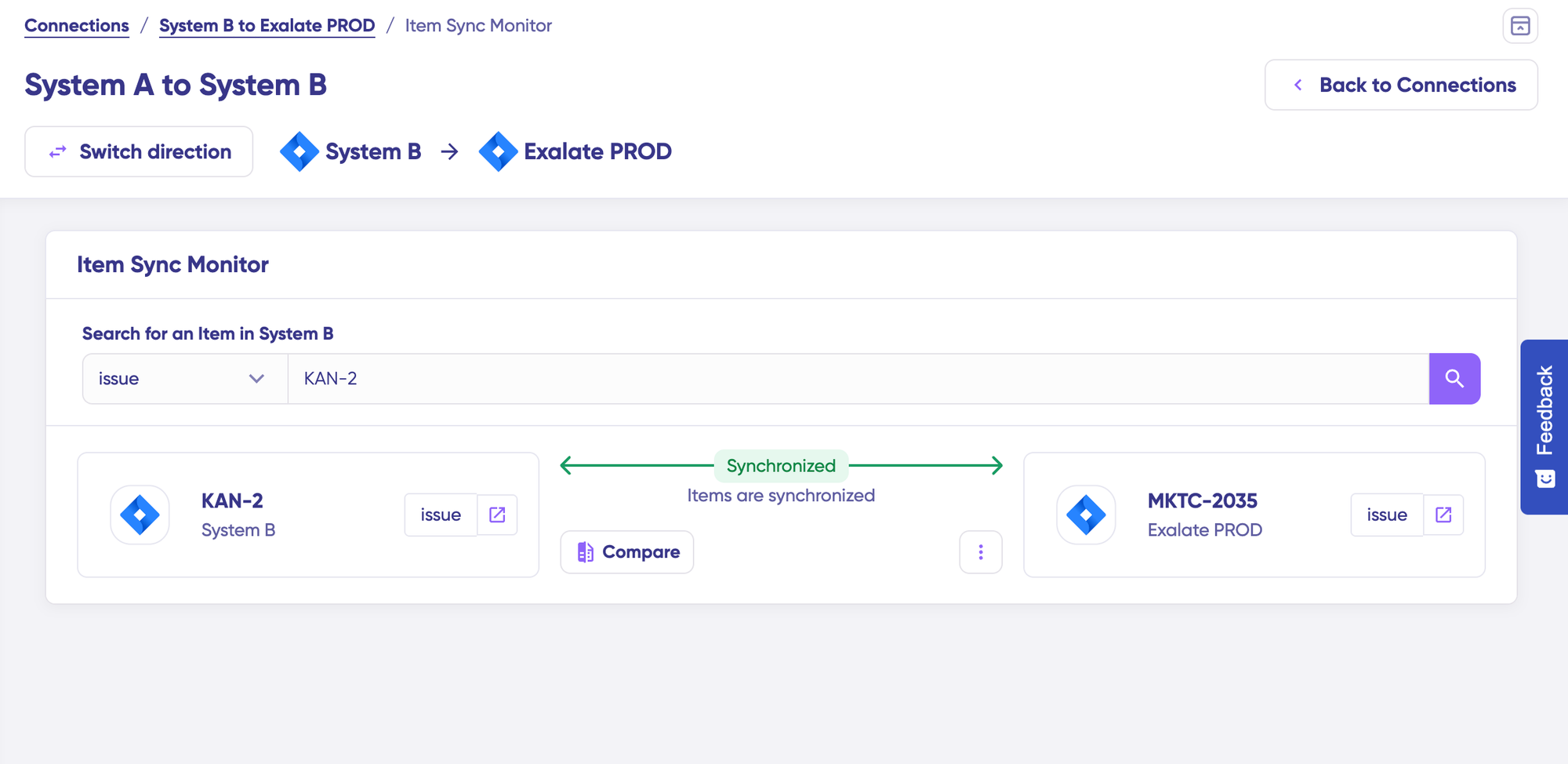
How it works. Every change travels as a message, and the queue shows those messages in progress. You can filter by connection name or entity ID and check the processing status of any item. The queue is asynchronous by design, so if the other side is briefly unavailable, messages wait and process once it’s back rather than failing.
Who benefits. Anyone running bulk operations or a large ongoing sync, and cross-company or cross-timezone setups where the two sides aren’t always online together.
Sync Panel
What it is. A browser extension that shows an item’s sync status and links to its twin on the other system.
Why it exists. Delivering it as a browser extension means the panel loads across the systems you connect without having to log in to the Exalate console to know the sync status.
How it works. You install the extension in your browser, and it surfaces the panel on the item view. It shows the current sync status for that item and, when available, a link straight to the remote issue so you can jump to the other system. It’s also where manual actions live: an Exalate button to put an item under sync on demand, and a Connect button to link two entities that already exist on both sides. Access is controlled per connection, so an admin decides who can see and use it.
Who benefits. The everyday users of the synced systems, not just the admins. A support agent or developer can confirm a ticket is connected and click through to its counterpart without touching any configuration. Because it’s a browser extension rather than a per-platform feature, it also gives teams one consistent panel across every system in the network, which matters once you’re running more than one connection.
Troubleshooting and Error Handling
What it is. When something breaks, Exalate stops that sync instead of pushing bad data through, and gives you Aida to find the cause.
Why it exists. A sync that pushes wrong data is worse than one that stops, because you find out later, after the bad data has spread. Stopping the sync instantly is the safer default option.
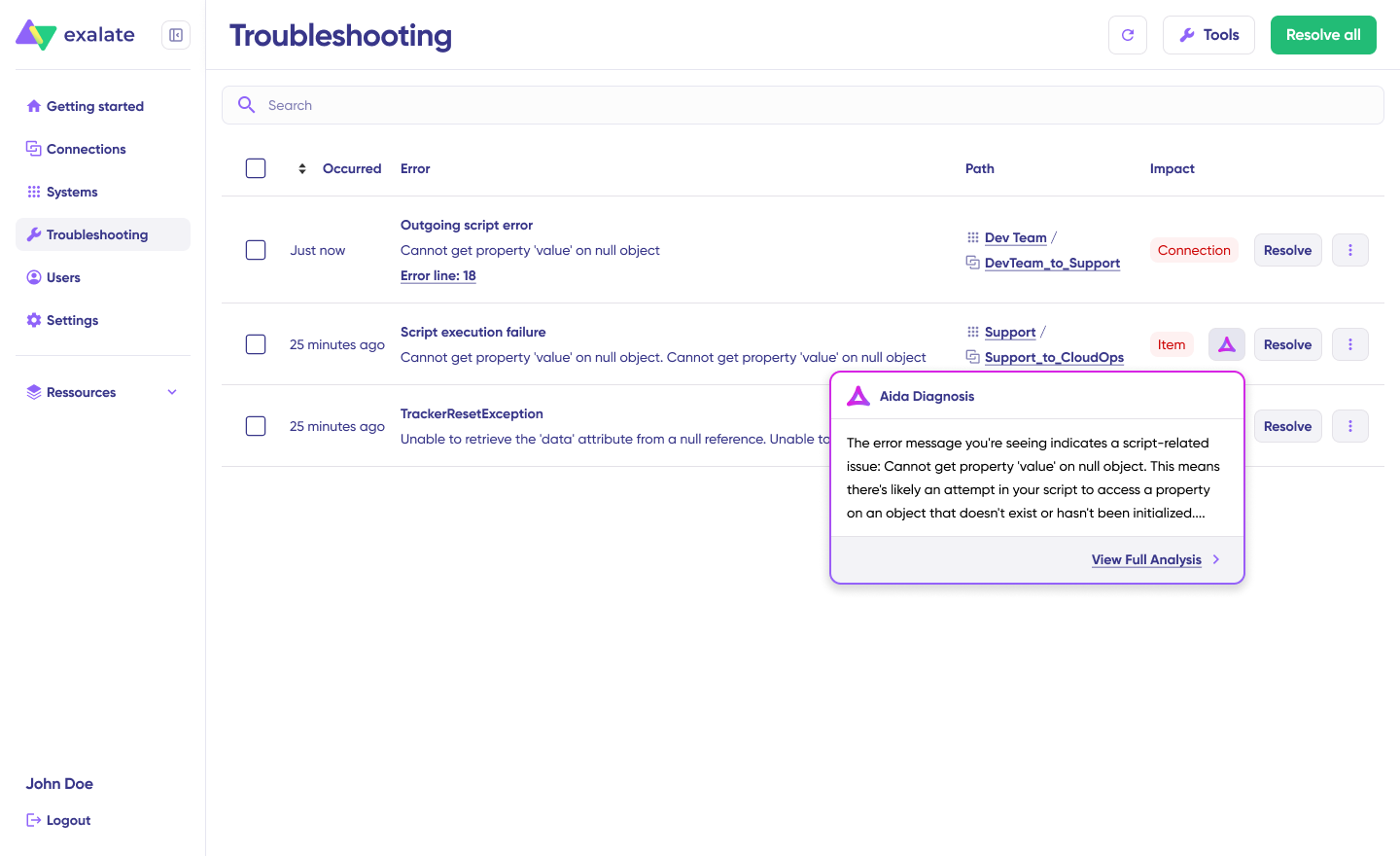
How it works. When something on the other side changes in a way the script can’t handle, Exalate raises an error and pauses that item rather than the whole connection. In the Troubleshooting tab, you can hover over an error and open Aida for an immediate read of which systems, connections, and items are affected, plus the stack trace and error type. Once you fix the cause, the sync resumes from where it paused.
Who benefits. Every team, since errors are a normal part of running an integration. The teams that get the most from it are the ones that lean on the error tooling and Aida early, since that’s how you learn the patterns that make later troubleshooting quick.
Security and Compliance
Regulated buyers choose Exalate because its underlying architecture allows each side to configure its own connection independently. You decide exactly what data leaves your system and what you accept, and the other side can’t see or change your rules.
For financial services, healthcare, and government, that control is the selling point.
What’s in place today:
- TLS 1.3 (and 1.2) on data in transit.
- ISO 27001 certified and GDPR compliant.
- Autonomous control, so sharing is opt-in by design rather than something you have to lock down after the fact.
- No shared credentials. Authenticate your instances using API tokens, Basic Auth, and OAuth. Authentication stays with the underlying tracker.
- JWT-based tokens authenticate every data transfer, so the destination always knows the data came from the expected source.
- Data residency as an add-on on higher plans, for teams that need data stored in a specific region.
- Sync queue and sync status to monitor outgoing and incoming syncs in progress, filter by connection name or entity ID, and check the processing status of any item.
If your evaluation has to clear a security team, the full details live in Exalate’s Security and Architecture Whitepaper and Trust Center.
How the Exalate Integration Network Grows
Most teams start with a single point-to-point connection, then grow into a network subsequently. It usually goes in three stages:
- You start peer-to-peer: one connection between two systems, your Jira to a partner’s ServiceNow, for example.
- Then you add another connection to integrate a second team or a second client, and this becomes a hub-and-spoke model, which is very popular with MSPs and service integrators.
- Over time, you now have several connections fanning out from your central system, which can also turn into a mesh shape. In this case, the MSPs have a hub-and-spoke model with their clients, but also connect to their internal engineering teams to get their work done.
- As you continue going forward, multiple systems connect to each other, forming a network of interconnected companies.
Exalate is built for this progression because each connection is its own independent pair of scripts. There’s no shared config that a new connection could break. You grow the network one link at a time, and each link stays under the control of the two sides it connects.
This increases scalability, and you can easily grow your simple point-to-point network into a fully connected integration ecosystem where each instance is separately configured.
Plus, with Exalate, your instance is isolated with its own data and process space, making the systems loosely coupled and reducing the possibility of a single point of failure.
This, in turn, is how the network effect works. The more nodes you add to your network and the more users use your network, the value of your network increases.
If you were hand-building point-to-point connections, the count grows fast: the math is n(n-1)/2, so 5 systems need 10 connections and 10 systems need 45. Before you know it, you’re dealing with a spaghetti architecture with a labyrinth of jumbled-up connectors.
Exalate handles the sync logic, error recovery, and monitoring per connection, so the growth stays manageable instead of turning into a mess.
With Exalate, your internal network of synced tools connects to a partner’s network, which connects to theirs, and the reach compounds. Each new participant makes the whole more useful, the way any network does.
The Industries that Use Exalate
Exalate’s customer base scatters across a wide range of industries, but these 5 industries are the primary ones, and each one buys for a different reason.
- IT services and MSPs. MSPs connect their own service desk to each client’s tools, so they think in per-client connections, and the integration becomes part of what they sell.
- Software and product development. These administrators are the most technical of the lot, and they come for GitHub and Azure DevOps connectors, code-level sync control, and bulk operations. The main focus involves syncing dev and QA trackers or connecting your Jira to a partner’s Azure DevOps.
- Financial services and banking. These teams care about certifications, data residency, PII filtering, and audit trails before they look at any feature list. The architecture is the draw, because each side controls its own data, which gets synced through their review.
- Manufacturing. This involves bridging a service desk and engineering, usually ServiceNow to Jira, and often extending to B2B supplier integration along the supply chain. Manufacturing teams tend to lean harder on implementation support and managed services than the other segments, and that’s fine, since it’s what the Enterprise plan is built around.
- Government and public sector. Similar concerns to financial services, with sensitive citizen data in place of financial data. The typical sync connects public-facing support with internal development without exposing what shouldn’t cross. These buyers also tend to start small and prove value before committing budget, which the per-integration pricing suits.
- Healthcare. The same security-first mindset as finance, but the sensitive data is patient information rather than financial records. Teams need to connect public-facing support to internal engineering without letting protected health information cross over. The line-by-line control over outgoing data is what clears a healthcare security review.
- Automotive. Often overlaps with manufacturing, but the driver is the supplier and partner network. Automotive programs run across OEMs, tier-one suppliers, and engineering partners, each on their own tracker, so the work is cross-company sync where every party keeps its own instance.
The Use Cases for Exalate
- Support to engineering escalation. Zendesk or Salesforce connected to Jira, with status flowing both ways. Support raises it, engineering works it, and support sees the update without asking.
- Cross-company and MSP integration. Your tools are connected to a client’s or partner’s tools, with both sides keeping control.
- Dev and QA workflow sync. Defect replication between projects, GitHub, or Azure DevOps connected to Jira. Companies use Exalate to replicate defects between development and QA, with a custom field tracking dev status on the QA side so testers know what’s ready to retest.
- Post-acquisition consolidation. When you acquire a company that runs different tools, you connect Jira to Jira across sites or bridge Jira and Azure DevOps, without forcing everyone onto one platform on day one.
- Regulated and security-segregated environments. ServiceNow is connected to Jira with sensitive data filtered before it syncs. More on this below, because it’s a strong proof point.
- Live migration or post-migration sync. Migrate from one tool to another while keeping historical data and syncing during the transition, instead of a hard cutover.
- Multiple Jira instances kept in sync. After acquisitions, you end up with several Jira instances, each with its own spaces, fields, and workflows. Exalate keeps data flowing between them consistently without merging them.
- Three or more systems in a chain. A common enterprise shape is Jira connected to Azure DevOps connected to ServiceNow. A customer ticket in ServiceNow becomes a Jira task for the product team, which becomes an Azure DevOps work item for the engineers building it.
Note: The most common connector pairs in practice are Salesforce to Jira, Zendesk to Jira, ServiceNow to Jira, Jira to Jira cross-site, and Jira to Azure DevOps.

Read the most common Exalate integration use cases. Connect multiple instances to a single instance, sync issue links, hierarchies, and much more.
The Common Pain Points That Exalate Solves
- Manual ticket handoffs between the service desk and dev. Someone copies the ticket, someone else copies the status back, and things fall through the gap. You usually see this in companies that use email feedback and maintain spreadsheets or chats through a messenger app. This lands on ops and support leads, who own the SLA and feel the misses.
- Tool silos where nothing syncs. This usually involves different teams on different platforms, with no shared view. This is the integration lead’s problem, the person responsible for connecting tools across teams or clients.
- Native integrations fail. Most companies opt for Exalate after using native integration options like Jira automation, Zendesk Jira native connector, etc., and failing at them. These integrations seem feasible at first because they are usually free, but teams often start to feel their limitations when it comes to syncing custom fields, connecting multiple instances, etc.
- Expensive, fragile custom builds. Developers need to dedicate some of their free time to building a custom integration. But the issue remains that custom builds are cheap to start and costly to keep alive, with no docs and no accountability. This hits MSPs and IT services hardest.
- Sensitive data crossing systems. Companies can sync ServiceNow to Jira Cloud for public support to internal engineering. Their biggest concern was personal health information accidentally syncing across. The fix was a custom regex script that detects and blocks patterns before anything syncs.
- License sharing and extra seats. Because pricing is based on items in sync rather than user seats, adding people to the workflow doesn’t add seat costs. For teams that grew frustrated with per-user pricing elsewhere, this changes the math.
- Legacy and on-premises systems. Plenty of teams run Jira Data Center, Azure DevOps Server, or an internal tracker behind a firewall, while the rest of the business works in cloud tools. Exalate bridges on-prem and cloud in the same connection, and the sync can carry a slow migration too.
How to Set Up Exalate
The onboarding flow for Exalate is basically the same regardless of which systems you’re connecting. The only slight difference is the authentication methods used by specific tools and systems.
Create an Account or Log In to an Existing Account
Head over to the Exalate app.
Sign up using Google (SSO) with a company email or create your own account.

Click Add Connections > Create New Connection.
Authenticate the systems you want to connect. Exalate supports various methods like OAuth, Basic Auth, API tokens, etc., depending on the systems.
Name your connection something unique and descriptive.
Once it wraps up, click on Continue to Configuration to proceed.
Click Build & Continue to complete the configuration.
To change the current sync rules, click on + New Version to create a new draft version. This way, you don’t accidentally edit the active configuration.
Edit sync rules using Aida (the outgoing script holds the values passed from Jira A to Jira B, and the incoming sync defines how the values from Jira B are mapped in Jira A).
In the Aida input field, type your request in plain language and click Enter.
Review the suggested changes. Then click Insert to accept or Discard to reject.
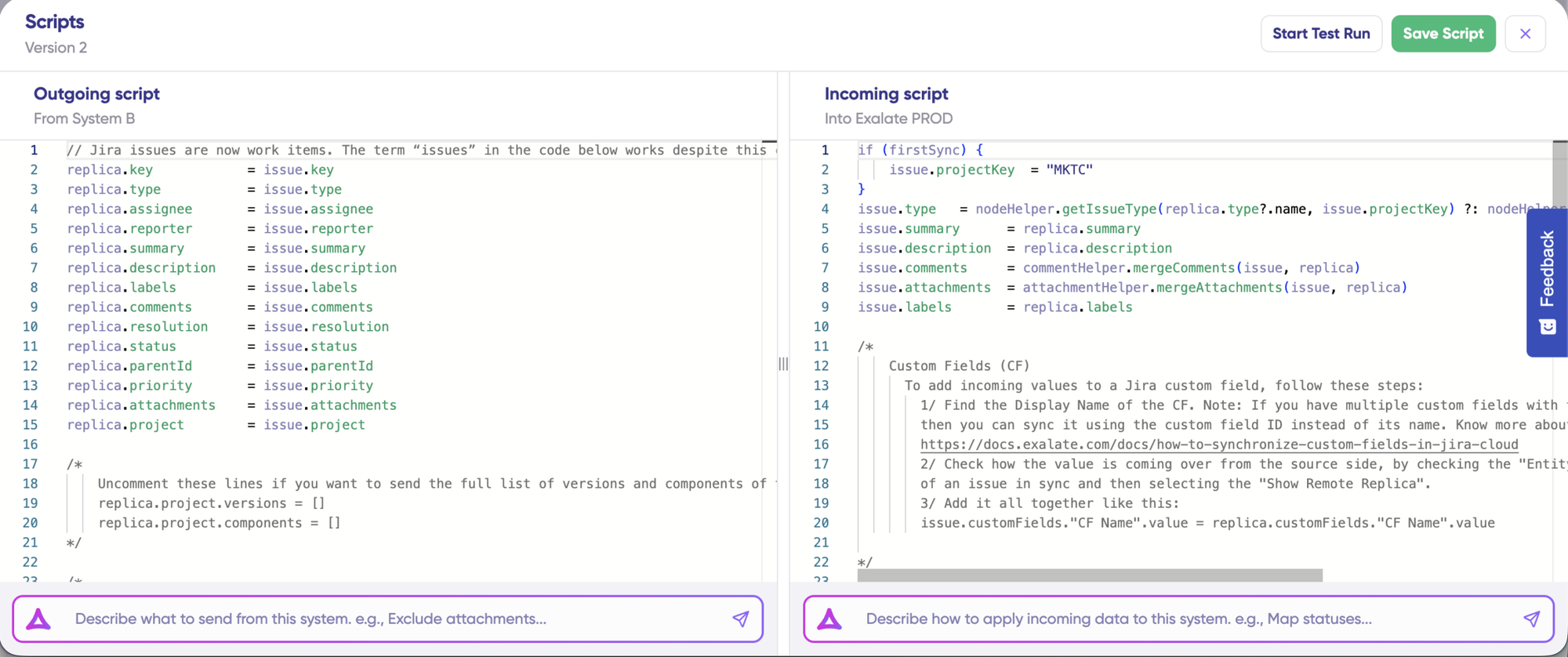
Use Test Run to validate your sync scripts.
Click on Select Items to pick the items you want to test (you can select multiple). Click Start Test Run to preview how the configuration will be applied.
Review incoming and outgoing replicas for each test item.
Click Publish Version to apply the updated configuration to live synchronization.
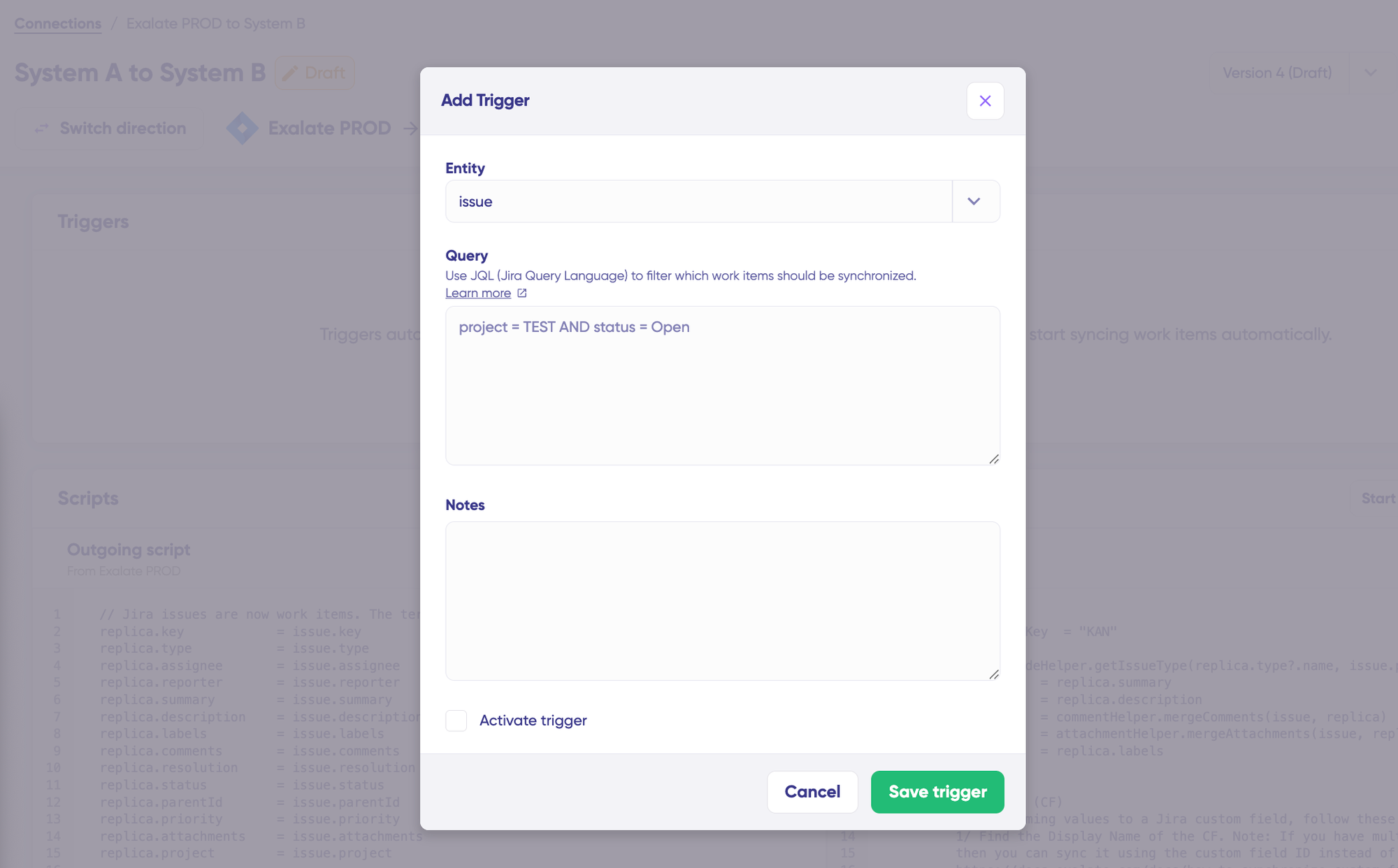
Click + Add trigger to create a new trigger using platform native query languages or search syntaxes.
Your integration is now active. Synchronization runs automatically based on your configured sync rules and triggers.
Exalate provides a unified view to manage and configure all your connections from a single interface. You can choose to invite new owners to manage your connections, view your integration network visually, and do much more through this console.
Case Studies That Highlight the Benefits of Exalate for Teams
NVISO
A cybersecurity MSP that integrates ServiceNow and Jira to collaborate with customers on security incidents while both sides keep their security and autonomy.
Exalate replaced an in-house tool, which cut maintenance costs and gave them two-way communication they didn’t have before. It also lets them offer clients a more commercially attractive service, because the integration is part of what they sell.
The pattern across all of these is consistent: less manual effort, faster customer communication, and room to expand once the first connection proves out.
One system admin said the real win was user satisfaction. People dislike switching between systems, and having ServiceNow tickets land in Jira automatically made the workflow better in a way that’s hard to put a number on.
SPK and Associates
An MSP that syncs its own Jira with each customer’s instance, so tickets land automatically instead of engineers hopping between environments to pick them up.
Each SPK engineer saves around 5 hours a week, and the numbers across their client base back it up: a 25 to 40% reduction in time to resolution, 70 to 90% fewer manual handoffs, and 20 to 30% better SLA compliance.
Their VP of Engineering summed up the evaluation: he looked at simpler left-and-right mapping tools and found them limiting, and picked Exalate for the scripting.
Vodafone
A telecommunications company syncs a large Jira environment with external vendors for software release management, where each vendor sees only what Vodafone explicitly allows.
The connection now carries over 20,000 synced entries and close to 10,000 synced comments, and multiple internal teams use the same setup to keep their own Jira instances consistent. They’d tried another sync tool first, and it couldn’t reach the level of control they needed.
Exalate also runs live migrations, where both systems stay up, and the sync carries the data across in the background.
ACA Group
The ACA Group migrated 150,000 issues from a Jira Server instance straight to Jira Cloud, cleaning up years of duplicate fields during the move rather than in a separate phase.
Atlassian’s own migration tool would have required upgrading the server to two major versions first. Because Exalate synced live data in the background for about 35 days, they were able to go live over a weekend, with zero downtime and no war room.
Uber Freight
Uber engineers moved around 130,000 tickets from ServiceNow into Jira Service Management in about 2 months, ahead of a ServiceNow contract expiry.
The service desk kept running in ServiceNow the whole time while data synced into JSM in the background, and the team picked their own cutover moment once both datasets matched.
One hard rule made Exalate a fit: no external party gets direct access to production, and the autonomous setup meant Uber Freight stayed in control of its own systems throughout.
Exalate vs Other Integration Approaches
Different tools win at different things. Here’s an honest read on where each one fits and where Exalate is the better call.
Native Integrations
Native integrations break on the hard tasks: attachments, complex custom fields, and cross-site connections. Teams that outgrow native connectors usually do so because of an attachment or a field the connector can’t carry. Exalate is the better call once you’ve hit that limit.
Here is the bottom line on competition:
Exalate wins on flexibility for specific issue-level use cases, cost-efficiency on the right pricing model, and full operational control for cross-company syncs. The others win on faster starts, lower entry prices, and broader enterprise reputation. Pick based on which of those your situation actually needs.
Build vs. Buy: Custom Integrations
Building a custom integration is cheap to start and frees you from a vendor. For a one-off with no future, it can be the right answer.
The cost shows up later: maintenance, infrastructure, missing documentation, and no accountability when it breaks.
When the other team changes a workflow, a custom build fails, and tickets stop syncing, and now it’s your problem to find and fix.
Exalate handles API and version changes as part of the product, so your engineers aren’t on the hook for upkeep. It’s the better call when the integration needs to live and evolve, not just exist once.
Use the calculator to figure out how much you get to save with Exalate instead of building a custom integration from scratch.
Template-based Tools (Unito, ZigiOps, Getint)
These are easier to start with and are built for a narrow set of common use cases. If your sync is pretty basic and you want it running today, they deliver.
However, these tools don’t keep up when it comes to specific sync configurations and security. Reviewers on G2 found Unito easier to set up, but preferred Exalate overall for meeting business needs and for ongoing support.
In one evaluation, Exalate turned out to be the better call for cross-company integrations and MSP use cases, when your requirements outgrow what a template can express, or when security needs each side to control its own data.
iPaaS Platforms (Workato, Boomi, MuleSoft, ServiceNow IntegrationHub)
iPaaS tools cover a wide range of integration needs and carry enterprise trust. If you need broad system-to-system integration across many app types, they’re available and capable.
However, the issue with iPaaS tools is that they focus mostly on “if this, then that” automation logic. If you’re looking for straightforward two-way sync, then things could get complicated. Also, if you want to use these tools to deliver 2-way sync that fills the gap in the processes somewhere -that’s (sometimes) possible, but not always straightforward.
They’re also expensive, and they lack the flexibility for niche issue-level work. IntegrationHub, in particular, comes with real overhead: you maintain the APIs and the config yourself, new connectors require a vendor request before you can use them, and deep issue-level integration isn’t really the point of the platform.
Exalate is the better option for work and ticket sync between trackers, and you want to build it yourself fast using existing infrastructure, docs, and code snippets rather than waiting on a vendor.
Automation Tools (Zapier, Tray.io)
Automation tools like Zapier are cheap, quick to set up, and require no coding to configure, which makes them perfect for simple triggers and one-directional pushes.
They’re one-way. If you need data flowing in both directions with status and comments staying in sync, these don’t do it. Exalate is built for bidirectional sync.
Connecting Tools with AI: MCP Servers and Vibe Coding
The AI landscape has added a new way to move data between tools, and it’s worth separating it from old-school “vibe coding.”
MCP Servers
Model Context Protocol (MCP) is an open standard that lets an AI assistant like Claude or ChatGPT reach directly into a tool’s data. Atlassian’s own MCP server, for example, lets Claude read and update Jira issues and Confluence pages in real time, scoped to whatever the signed-in user can already see.
Similar servers exist for Slack, GitHub, Salesforce, and a growing list of platforms. This is a real step up from copying an API call into a script. It’s officially supported, permission-aware, and doesn’t require anyone to write integration code.
An MCP call runs inside an AI session, triggered by a prompt or an agent workflow. Ask Claude to pull a Jira ticket into a Slack thread, and it will. But nothing is watching Jira in the background, waiting for a status change, and pushing it to ServiceNow the moment it happens. The moment the session or the agent task ends, there’s no ongoing connection left running.
Every exchange needs a person, a scheduled agent, or a workflow trigger to initiate it. That’s fundamentally different from a standing, bidirectional connection that keeps two systems reconciled whether or not anyone is prompting it.
Vibe Coding
Using an LLM to write the first draft of an integration script is still faster than writing it by hand. It’s fine for a one-off script or a rough prototype. The problems show up the same way they always have: when the connected tool changes its schema, the generated code breaks, and someone has to debug it.
Here are some of the challenges:
- No persistent, two-way sync. Both approaches move data on request, not continuously.
- No independent per-side control. MCP access is scoped to what a user can see, not architected as an arm’s-length agreement between two companies that each want to control exactly what leaves their system, the way Exalate’s separate outgoing and incoming scripts do.
- No error handling built for scale. A schema change or a bad value stops the task; there’s no pause-and-resume on a single item while the rest of the connection keeps running.
- No versioning, bulk operations, or sync queue. There’s no draft-and-publish workflow for changing the logic, no way to backfill thousands of existing tickets in one action, and no dashboard showing what’s in flight across a large sync.
- Cost and reliability that don’t hold up at volume. Token-based pricing gets expensive fast at real integration volumes, and the latency of an API call to a model isn’t built for low-latency, high-frequency syncing.
- Data privacy exposure. Routing information through a third-party AI model on every call raises the same residency and compliance questions as any other cross-border data flow.
- Unpredictable output: Generative models can hallucinate or format data inconsistently, which can break downstream databases.
- Latent Failures: Errors caused by AI logic are often hard to catch immediately compared to explicit, hard-coded scripting errors.
The important thing is to let a human have the final input to modify or completely discard the generated scripts before pushing them to production.
Exalate Pricing
The Exalate pricing model is per integration, not per user or per transaction.
An integration is a connection between two specific systems, like your Jira connected to your ServiceNow.
Within one integration, you can build as many workflows as you need, each with its own triggers, field mappings, and team, at no extra charge. Connect that same Jira to Zendesk, and that’s a second integration with its own plan.
What you actually pay for is active items in sync: a work entity, ticket, case, or an incident that Exalate is keeping synchronized. So you pay for live work, not historical or resolved items.
Note
Suppose you have 25 Jira work items actively syncing with ServiceNow right now. In that case, that’s 25 active items (both Jira & ServiceNow, so it’s basically 25 sync pairs), regardless of how many fields you choose to include in the sync rules or how many updates happen.
There are 4 plans. (Prices below are billed annually).
- Starter, $85/mo per integration. Gives you 25 active items in sync, real-time two-way sync, and support with no SLA. Covers Jira Cloud, Azure DevOps Cloud, Zendesk, Freshdesk, Freshservice, and Asana. This is the small-team, straightforward-sync tier.
- Scale, $280/mo per integration. Everything in Starter, plus 100 active items in sync and bulk operations. Still support with no SLA.
- Pro, starts at $550/mo per integration. Adds the enterprise connectors most evaluators come for, in addition to TopDesk, Xurrent, ServiceDesk Plus, Ivanti, SolarWinds, ConnectWise, and HaloITSM. Custom item volume, standard SLA support, and paid booster add-ons.
- Enterprise, custom. Unlimited active items, extra sandbox environments, data residency, priority support, managed services, and multi-integration pricing for connecting many systems or serving multiple customers.
A few things worth knowing before you budget. Connecting an enterprise system like ServiceNow or Salesforce requires Pro or above, regardless of how few items you sync, so the connector list matters as much as the volume. You can pay for the Starter and Scale plans directly after a trial.
The free trial gives you full feature access and up to 500 items in sync, with no credit card required. When it ends, the sync pauses, but your config stays intact.
Use the plan calculator on the pricing page to get a rough number based on your workflow, which is the realistic way to budget given the outcome-based model.
What to Know About Exalate Before Committing
There’s a learning curve. The Groovy scripting is where the flexibility lives, and it rewards technical teams.
If your team isn’t comfortable with code, plan for that, and lean on Aida AI to lower the barrier.
AI-assisted configuration has closed a lot of this gap. And with the AI-assisted Conversation Mode (Lab Feature), you can involve Aida at an earlier stage, right from requirements gathering to script generation.
Error diagnostics get easier once you know where to look. Early on, budget some setup time with support so you can learn the patterns. Customers who invest that time up front tend to report smooth running afterward.
Match the plan to the use case. The outcome-based pricing rewards you for not over-buying. A small team should be sized to what it actually syncs, not to a tier built for an enterprise.
Exalate Reviews on Atlassian, G2, Trustpilot, & More: What Others are Saying
On G2, Exalate holds a 4.7 rating across roughly 70+ verified reviews. The recurring themes from reviewers:
- the flexibility and control over sync logic,
- the bidirectional sync reliability,
- and strong ongoing support.

The scripting flexibility is what sold me. We sync issues between Jira and GitHub, and the Groovy-based scripts let us control exactly what gets mapped and what doesn’t. Most sync tools force you into rigid field mappings that never quite fit; Exalate actually lets you handle the edge cases. Setup took some time, but once it clicked, it just runs.
– Horatiu V. (Growth Marketer)
The Atlassian Marketplace is also worth checking, since that’s where a lot of hands-on technical reviews live.
Beyond reviews, the support resources are solid. There’s thorough documentation with code snippets you can adapt, an active community, and a support team you’ll likely work with during your first complex setup.
We work with clients and candidates across a lot of different regions, and keeping our internal Jira in sync with client-side tools was always messy. Exalate handles that really cleanly. The fact that both sides control their own sync rules is a big deal for us since we deal with sensitive candidate data and information.
– Danny E. (Fullstack Developer)
Exalate Tips and Best Practices
Here are some hard-earned lessons from Exalate’s own engineering and solutions teams. If you’re the one writing the sync scripts, this section alone can save you a few days of trial and error.
- Sequence your script actions with
store(). By default, Exalate applies changes to your platform in this order: field updates, then status transitions, then comments. If your logic depends on a different order (say, an issue has to reopen before a field can update), you can force that withstore().
if (issue.status.name.toLowerCase() == "closed" && replica.status.name.toLowerCase() != "closed") {

    issue.setStatus("Open")

    store()

    // issue is now Open, the rest of the script runs as normal

}Code language: JavaScript (javascript)- Minimize your replica. Only send what the other side actually needs, not everything you can. A smaller replica means faster syncs and less exposed data, which matters even more once security is part of the buying conversation.
- Don’t sync your entire status workflow. Mapping every single status locks you into your current workflow. Map only the statuses that need to trigger something on the other side (an action, a ticket resolution), and you’re free to add or change statuses later without breaking the integration.
- Reach for the safe navigation operator (
?.). It stops a null value coming from the remote side from throwing a NullPointerException and killing your sync. - Guard against forbidden actions on closed issues. Some platforms (like Jira) let you comment on a closed ticket; others (like Zendesk) don’t. If Exalate tries to push a comment or update to a closed ticket on a platform that blocks it, you’ll get an error. A one-line guard avoids it entirely:
if (issue.status.name == "Closed") returnCode language: JavaScript (javascript)- Build and test scripts one field at a time. Add a field to the outgoing sync, confirm it lands with a debug statement in the incoming sync, then move to the next field. It’s slower upfront, but you’ll spend way less time debugging a script that tries to do everything at once.
- Work one direction, then the other. When building a scripted connection, configure and fully test the outgoing sync on one side before touching the incoming sync on the other. Trying to build in both directions at once makes debugging a lot harder.
- Use co-owner access instead of handing out full admin. Exalate has an admin feature so you can grant someone else connection-level control without making them a full Jira/system admin.
- Disable the connection before archiving a project. If a synced project gets deleted, Exalate treats it as a sync event and stops trying to sync that entity, but it won’t touch historical data you’ve already received. If you want a cleaner cutoff, disable the connection (or unexalate the specific issue) first.
- Reach for
syncHelper.exalate()for edge cases that triggers can’t express. Standard triggers cover most filtering needs, but if you’ve got a business rule too complex for a JQL-style trigger, this method lets you evaluate that logic in a script and pull the issue into sync manually.
The Verdict: Is Exalate Right For You?
Buy Exalate if you have a specific integration requirement that template-based solutions can’t meet, you have technical people who can work with scripts or are willing to lean on Aida, and you care about controlling exactly what data crosses between systems.
It’s especially strong for cross-company syncs, ITSM workflows, MSP and partner setups, regulated environments with data-filtering needs, and any sync where both sides need to keep control.
Skip it if you want a click-only tool, your use case is a standard one-directional push, or your job is general-purpose iPaaS rather than issue and ticket sync between trackers.
The clearest signal you’re in the right place: you’ve already tried a native integration, built custom code, or tested a template tool and hit a wall on a field, an attachment, or a security requirement. That’s the gap Exalate is built to close.
Want to see how Exalate fits into your integration needs? Book a call with our engineers or start a free trial right away.
Recommended Reading
- The Best ITSM Integration Tools For Connecting Disparate Systems
- 10 Best Jira Integration Tools for Enterprise Teams
- The Best Workato Alternatives for Scalable Business Integrations
- Simplify Your Business Processes with Salesforce Integration Tools
- The Best Atlassian Marketplace Apps For Jira Integration