Your teams use Jira for development, Zendesk for support, Salesforce for sales, ServiceNow for IT operations, and a handful of others on top of that. None of these talk to each other by default, and every handoff between them is a place where data gets stale, lost, or duplicated.
Cross-platform integration is how you fix that. You connect systems that weren’t built to work together, get them exchanging data reliably, and remove the manual overhead in between.
This article covers what cross-platform integration involves, how different topology models work, the challenges you’ll actually hit, and how to evaluate the right tool.
Key Takeaways
- Cross-platform integration connects incompatible systems through middleware that handles data transformation, field mapping, and format conversion.
- Exalate supports all major topology models: peer-to-peer, hub-and-spoke, mesh, and star. Your architecture choice depends on the number of systems and how centralized you need the integration to be.
- On-premises systems can integrate with cloud platforms without a VPN. The connector deploys close to the on-prem system and communicates outbound over HTTPS.
- Multi-tenant integration lets MSPs manage separate sync rules for each client from a single instance. Clients don’t see each other’s data, and the MSP can package integrations as a line item in their service offering.
- A security checklist for cross-platform connectors should cover encryption in transit, access controls, audit trails, data minimization, and independent configuration per side.
- CRM-dev collaboration works best when each team stays in their own tool and the integration handles field translation between them.
- The biggest implementation pitfalls are field mapping complexity, schema evolution, and vendor lock-in.

What is Cross-Platform Integration?
Cross-platform integration is the process of connecting two or more systems with incompatible architectures so they can exchange data and act on it.
A retail company running Shopify for its storefront and Salesforce for customer management needs both to share order data, customer profiles, and support history. Without integration, someone copies data manually. With it, that happens automatically.
For most organizations, cross-platform integration runs through a middleware layer: a third-party platform, a custom API connector, or a dedicated sync tool. This middleware handles the translation work — field mapping, data transformation, format conversion, error handling — so neither system has to be redesigned to work with the other.
The integration could connect a help desk with a CRM, sync a project management tool with a development platform, or bridge an ITSM tool with a vendor’s ticketing system. The use cases are broad, but the mechanism is the same.
Integration Topology: Hub-and-Spoke, Mesh, Peer-to-Peer, and Star
When you’re connecting more than 2 systems, the architecture matters as much as the tooling. The topology you choose determines how connections scale, how failures propagate, and how much each system knows about the others.
Peer-to-Peer
Two systems connect directly, each controlling their own side of the sync. There’s no central intermediary. Each organization defines what it sends and receives independently.
This is the right model for cross-company integrations where each side needs to control its own data without granting the other party access to its configuration.
An MSP connecting to a client’s Jira doesn’t want the client to be able to modify sync rules on the MSP’s side. Peer-to-peer keeps those configurations separate.
Exalate is built on this model. Each organization installs and manages its own connector, and the two sides communicate through a secure sync layer. Neither party can override the other’s settings.
Hub-and-Spoke
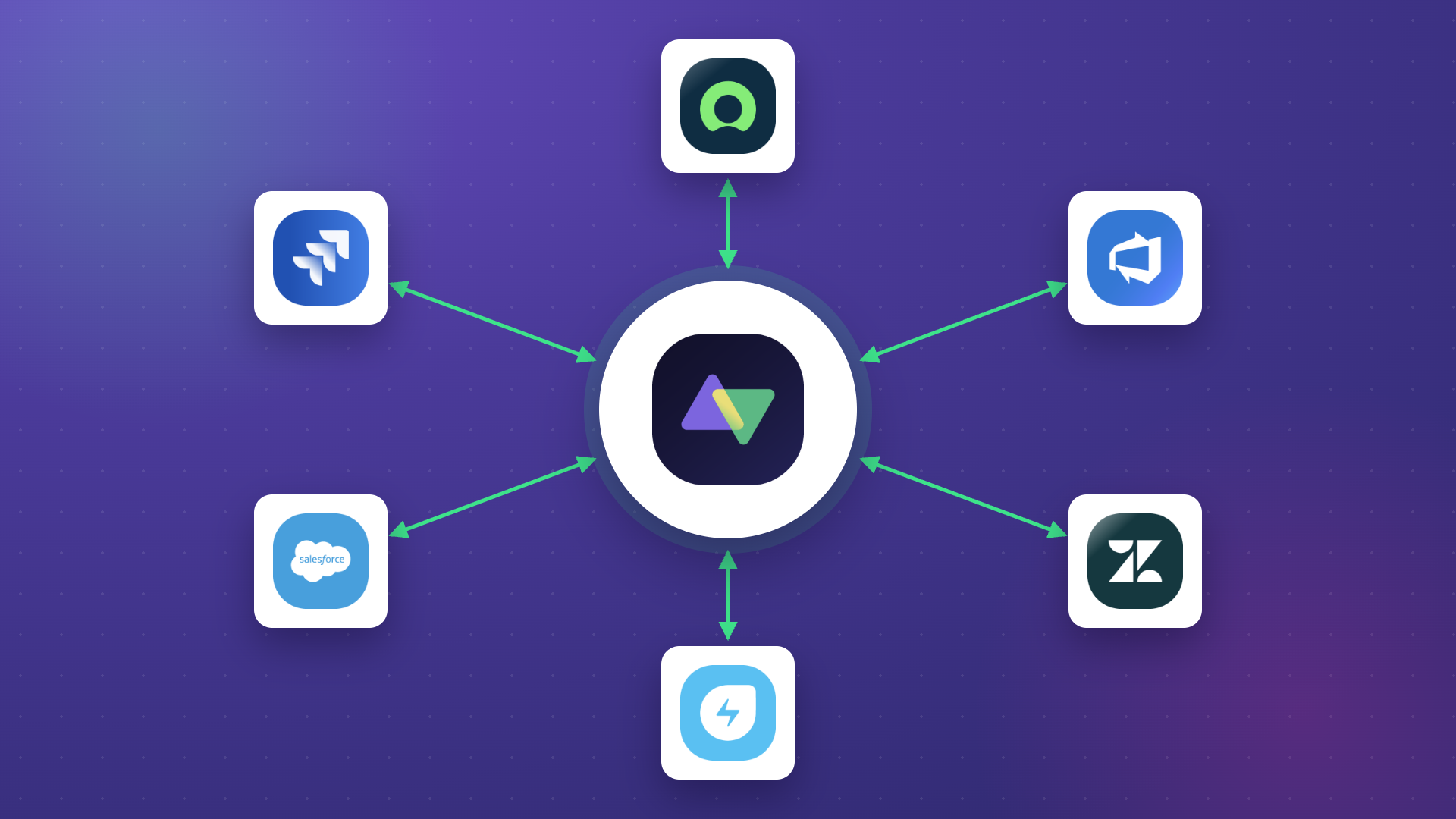
One central system (the hub) sits in the middle. Every other system (the spokes) connects to the hub, not to each other. Data flows from spoke to hub, and the hub routes it to the relevant spoke.
This scales well when you have a dominant central platform and multiple peripheral ones. An enterprise running ServiceNow as its IT operations center of record might use a hub-and-spoke model where Jira, Freshservice, and Zendesk all connect to ServiceNow. When an incident is updated in ServiceNow, the hub routes the update to whichever spoke needs it.
Adding a new spoke means one new connection, not one per existing system. That’s the main advantage over point-to-point at scale.
Mesh
Every system connects to every other system. Data can flow between any pair without going through a central hub.
Mesh makes sense when you have a small number of systems (3-4) that all need to talk to each other equally, without one playing a coordination role. It’s the most flexible topology but also the most complex to maintain. Up to 5 systems in a full mesh means 10 connections, each with its own sync configuration.
Star
Similar to hub-and-spoke, but the hub is a neutral integration layer rather than a business application. The integration platform itself sits at the center, and all business systems connect to it. The platform handles all routing and transformation logic.
Most enterprise iPaaS tools use this pattern. The advantage is that the integration logic lives in one place. The tradeoff is that the integration platform becomes a single point of failure and a central bottleneck for all data flow.
Which topology should you use?
The answer depends on 3 factors: how many systems you’re connecting, whether one system is a natural center of record, and whether each connected party needs independent control over their data.
- Two systems, different companies: peer-to-peer
- One dominant system with multiple satellites: hub-and-spoke
- Few systems with equal relationships: mesh
- Many systems with a neutral integration layer: star
Exalate supports all 4. You can configure it as a peer-to-peer connector between 2 systems, set up a hub-and-spoke where one platform receives updates from multiple others, or run a full mesh where each system syncs bidirectionally with several others simultaneously.
How to Choose the Right Cross-Platform Integration Tool
- Connector coverage. Does the tool natively support the platforms you need to connect? Check whether it supports custom connectors for platforms not in its standard library.
- Sync depth and flexibility. Can it handle bidirectional sync, custom field mapping, conditional logic, and entity transformations? Lightweight tools handle simple one-way triggers well. Complex use cases need deeper scripting.
- Security and compliance. Verify certifications, encryption standards, and access control mechanisms. For cross-company integrations, each side should be able to control its own configuration independently.
- Scalability. Can the tool handle your current volume and grow with you? Check API rate limits, sync frequency options, and whether it supports hub-and-spoke architectures with multiple connections.
- AI-assisted configuration. Tools with AI-assisted setup, like Exalate’s Aida, reduce the time it takes to build and refine sync configurations. Useful when you’re connecting platforms for the first time or modifying existing integrations.
- Error handling and reliability. How does the tool handle failed syncs and API downtime? Look for automatic retry, error logging, and notifications.
- Vendor independence. Can you export your configurations and migrate away if needed? Avoid tools that lock your integration logic into proprietary formats.
What are Cross-Platform Integration Solutions?
Cross-platform integration solutions are tools that facilitate the connection of two or more platforms, bridging the compatibility and interoperability gap. Here are the main options.
Exalate
Exalate is an AI-powered cross-platform integration solution that lets users map and exchange data between systems like Salesforce, Zendesk, Jira, ServiceNow, Azure DevOps (Cloud and Server), GitHub, Freshservice, Freshdesk, Asana, and more. For platforms not on that list, Exalate supports custom REST API connectors.
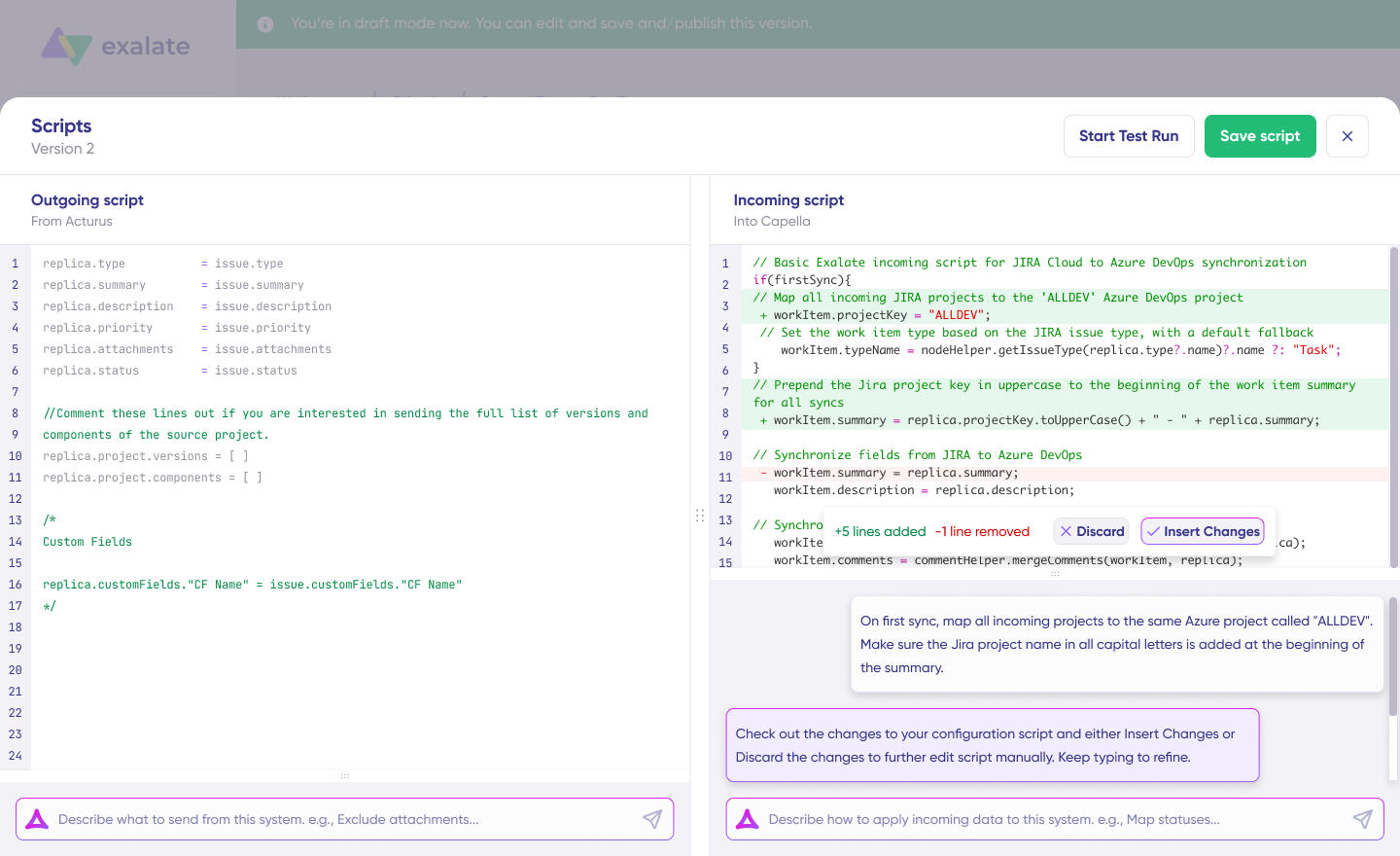
Exalate provides Aida, a scripting assistant that helps you build and refine sync scripts using natural language prompts. Instead of writing every mapping rule from scratch, you describe your use case, and Aida generates the Groovy-based configuration for you. You can then review and adjust the output for full control.
Each side of the integration controls its own configuration independently. This means your organization defines what data it sends and receives, and the other party can’t override those settings. This is especially valuable for cross-company integrations where data governance and access control matter.
Security-wise, Exalate is ISO 27001 certified and uses JWT tokens with automatic rotation and TLS encryption for data in transit. Full details are available at trust.exalate.com.
Zapier
Zapier is a cross-platform integration solution that automates workflows and processes between applications, cloud services, and more. The main selling point for Zapier is that it supports no-code integration and has a vast library of connectors for simple, trigger-based use cases. It works best for lightweight automations where you need one event to trigger one action. For complex bidirectional syncs or enterprise-grade data mapping, it has limitations.
Workato
Workato is a solution for integrating data and workflow management systems. Workato provides Recipes and Actions that can be referenced for automating complex workflows between disparate systems. It’s positioned as an enterprise iPaaS with strong automation capabilities, though the learning curve is steeper than simpler tools.
Make (formerly Integromat)
Make is a visual automation solution that connects multiple platforms to ensure they share data based on specific conditions or instructions. You can automate workflows and processes between systems and teams using Make’s drag-and-drop builder. It’s a good fit for visually-minded teams building multi-step automations, though it’s less suited for deep bidirectional sync scenarios.
Custom Cross-Platform Connectors
Some companies opt for custom connectors when available third-party tools can’t handle their specific cross-platform integration use case. This could be an API connector or a custom script written by the in-house development team for a particular scenario.
The problem with custom connectors is that they’re limited in applicability and require ongoing maintenance. The team has to keep up with API changes, handle error recovery, manage authentication, and maintain the infrastructure. If your organization’s technical debt is already high, a third-party tool is usually the better option for cross-platform data integration.
How Does Cross-Platform Integration Work?
At a technical level, cross-platform integration involves several coordinated steps.
Connection and Authentication
The integration tool connects to both platforms through their REST APIs, authenticating with tokens, API keys, or OAuth. This creates a trusted channel where both systems send and receive data without exposing credentials or internal infrastructure.
For cross-company setups, this step also establishes trust between organizations. Exalate uses JWT tokens with automatic rotation and TLS encryption for all data in transit.
Data Mapping and Transformation
Once connected, the integration maps fields and entities between the 2 systems. A Jira work item might correspond to a ServiceNow incident or a Zendesk ticket. The integration translates these entities so that data arriving from one platform makes sense in the other.
This covers differences in data formats (date and time formats, field types, enumeration values), structural differences (flat vs. hierarchical data models), and custom fields that exist on one side but not the other.
Change Detection and Sync Triggers
The integration monitors both platforms for changes. When a work item is updated in Jira, a webhook or polling mechanism detects it and triggers a sync. The updated fields are extracted, transformed according to the mapping rules, and pushed to the corresponding record on the other platform.
Real-time sync (via webhooks) is better for incident management and support escalation. Batch sync works for periodic reporting and data warehousing, where latency isn’t a concern.
Conflict Resolution and Error Handling
When both sides update the same record simultaneously, the integration needs rules for which change wins. Common strategies include last-write-wins, source-of-truth rules per field, or field-level merging where non-conflicting changes from both sides apply.
Network outages, API rate limits, and schema changes can all interrupt syncs. A well-designed integration queues failed operations and retries them automatically once the connection is restored.
On-Premises to Cloud Integration Without a VPN
Many integration discussions assume both systems are cloud-based. In practice, a lot of enterprise tooling still runs on-premises: Jira Data Center, ServiceNow on-prem instances, legacy ticketing systems behind corporate firewalls.
The common concern is whether you need a VPN to connect an on-prem system to a cloud platform. In most cases, you don’t.
Exalate’s on-premises connector deploys via Docker or a JAR file directly on the server where your on-prem system runs. It connects outbound to the Exalate sync layer over standard HTTPS. Because the connection is initiated from inside your network rather than from outside, it doesn’t require inbound firewall rules or a VPN tunnel.
The on-prem connector authenticates with the cloud-side connector through the same token-based mechanism as cloud-to-cloud integrations.
Data in transit is encrypted with TLS. Your network team doesn’t need to open inbound ports or configure a VPN; they only need to allow outbound HTTPS to the Exalate cloud endpoints, which most corporate firewalls permit by default.
This architecture is commonly used by organizations migrating from Jira Data Center to Jira Cloud in phases. The on-prem and cloud instances run in parallel during the transition, with bidirectional sync keeping both sides in sync until the full migration is complete.
It also applies to regulated industries where on-prem systems hold sensitive data that can’t leave the internal network. The connector runs inside the perimeter, and you configure exactly which fields leave the system, so sensitive data stays on-premises by default.
Security Checklist for Cross-Platform Connectors
Before you go live with a cross-platform integration, run through these items. Missing any of them creates gaps that are hard to close after the fact.
- Encryption in transit. All data moving between systems should use TLS 1.2 or higher. Check that the integration tool enforces this, not just supports it. Ask the vendor whether older TLS versions can be disabled.
- Authentication and token management. API keys and tokens should rotate automatically. Static, long-lived credentials are a liability. Verify how the integration tool handles credential expiry and rotation, and whether it supports OAuth where the connected platforms offer it.
- Independent configuration per side. In cross-company integrations, each organization should control their own sync rules. If the other party can modify what data you send or receive, your data governance is compromised. Tools like Exalate give each side independent control; neither party can override the other’s configuration.
- Data minimization. Sync only the fields you need. Every additional field that crosses the integration boundary is an additional exposure point. Before configuring the sync, list the minimum set of fields required for the use case to work, and leave everything else out.
- Field-level filtering. You should be able to exclude specific fields from the sync, transform values before they leave your system, and block categories of data (like PII or internal comments) from crossing to the other side. This is done through outgoing sync scripts in Exalate.
- Audit trail. You should be able to see what data was synced, when, and what the sync configuration looked like at any point in time. Script versioning in Exalate gives you a history of configuration changes. Combined with the integration platform’s transaction logs, this covers the audit requirements for most compliance frameworks.
- Access controls. Limit who can configure or modify sync rules on your side. Integration admins don’t need to be the same as system admins. Set role-based permissions so that sync configuration requires elevated access, separate from day-to-day platform use.
- Security certifications. Check whether the integration vendor holds certifications relevant to your industry. ISO 27001 and GDPR compliance documentation are standard requirements for enterprise procurement. Exalate’s security posture is published at our Trust Center.
Multi-Tenant Cross-Platform Integration
Multi-tenant integration is a specific architecture challenge for MSPs and organizations managing integrations on behalf of multiple clients.
The requirement is straightforward: each client gets their own sync rules, their data stays isolated, and one client’s configuration can’t interfere with another’s. The integration needs to scale as you add clients without requiring a new deployment per tenant.
Exalate handles this by running separate sync connections per client. Each connection has its own incoming and outgoing scripts, its own field mappings, and its own trigger conditions. A ticket from Client A doesn’t touch Client B’s environment, because they’re on entirely separate connections.
SPK and Associates, an engineering MSP, ran into the classic multi-tenant problem. Their engineers were logging into each client’s Jira environment individually to pick up tickets, then duplicating that work in SPK’s own system. It was error-prone and expensive, and it didn’t scale.
They used Exalate to sync tickets from each client’s Jira into SPK’s central Jira instance. Each client connection was independent: separate sync rules, separate field mappings, no cross-contamination.
SPK’s engineers stopped hopping between environments, which ended up saving each engineer around 5 hours per week, while missed tickets dropped to zero.
The second thing SPK did was position the integration as a service offering. They didn’t just use Exalate internally; they started offering integration setup and management to their own clients as a line item in their contracts.
An MSP that can take over the integration layer between a client and their vendors is providing something the client genuinely can’t do efficiently on their own.
This is the case for multi-tenant integration at scale: the integration is an operational infrastructure and a service that MSPs can sell.
Cross-Platform Integration for CRM-Dev Collaboration
A common pattern that doesn’t get enough coverage: the sales team works in Salesforce, the engineering team works in Jira, and information between them moves through email or Slack or doesn’t move at all.
The sales team opens a case in Salesforce. The engineering team needs to know about it to prioritize the fix. Without integration, someone has to relay that context manually.
With cross-platform integration, the Salesforce case creates a linked Jira work item automatically, and status changes in Jira (bug resolved, in review, deployed) flow back to
Salesforce, so the account team knows what’s happening without asking.
This works because Exalate can translate between the data models of both platforms. A Salesforce “Case” maps to a Jira “Bug” or “Task” based on rules you define. The priority level from Salesforce (Low, Medium, High, Critical) maps to the corresponding Jira priority. Internal comments on the Salesforce side don’t cross to Jira, but customer-facing notes do.
The key configuration decisions for CRM-dev integration are:
- Which Salesforce objects trigger a Jira work item (cases only, or opportunities at a certain stage, or both)
- Which fields are required on both sides for the sync to make sense
- Which direction comments flow, and whether internal vs. external comments are treated differently
- What happens in Jira when the Salesforce case is closed
Once these rules are defined in scripts, the integration runs without manual intervention. The sales team works in Salesforce. The engineering team works in Jira. Both see what they need to see.
Where Cross-Platform Integration Delivers Real Value
E-Commerce and Retail
Inventory management systems connect with storefronts to keep stock levels, pricing, and availability in sync. Without this, overselling and stock discrepancies become constant problems.
CRM tools like FLOWii and Salesforce connect with ERPs or e-commerce platforms to consolidate purchase history, sales trends, and user behavior in one place. This feeds demand forecasting, personalized marketing, and customer segmentation.
Supply Chain and Logistics
Logistics companies connect GPS and time-tracking tools with fleet management systems to monitor driver activity and optimize routes. Maersk used Jira-ServiceNow integration to keep support and development teams updated in real time, avoiding additional licensing costs.
Example use case: A global shipping company needs its warehouse management system, transportation management system, and customer portal to share real-time shipment status and inventory counts.
With integration: A status change at the warehouse updates the customer portal and triggers route adjustments in the transport system automatically. The support team sees live delivery updates without logging into the warehouse system.
Healthcare
Clinical teams get access to patient records across different EHR systems within the same hospital network. Lab results and pharmacy data reach clinicians during consultations without manual switching between systems.
Integration also supports data minimization. You connect what needs to be shared, leave out what doesn’t, and keep sensitive patient data inside the compliant environment.
Banking and Finance
Banks integrate payment systems with e-commerce platforms through secure payment gateways. Insurance company Turkiye Sigorta used cross-platform sync to improve visibility into supplier demands and customer response patterns, resolving disruptions in their ticketing system.
Service Delivery and ITSM
ServiceNow and Zendesk are the common pairings for connecting help desks with development or IT teams. Qualco used this integration approach to cut resolution times and improve customer satisfaction scores.
Example use case: An MSP manages support tickets in Zendesk but needs to escalate engineering work to a client’s Jira without the MSP having direct Jira access.
With integration: Relevant ticket data (status, priority, comments, attachments) syncs between Zendesk and Jira while each side’s configuration stays independent. Neither team switches tools, and both have full context.
Software Development and DevOps
Development teams track features in Jira, manage code in GitHub, and run pipelines in Azure DevOps. Integration keeps these in sync: a PR merged in GitHub can update the corresponding Jira work item, trigger the deployment pipeline, and notify QA through their preferred tool.
What are the Challenges of Cross-Platform Integration?
Connecting systems with completely different data formats, APIs, system configurations, transformation logic, and native architectures comes with real obstacles. Here are the most common ones.
- Figuring out the tech. The main headache of cross-platform integration is understanding how each system works at an API level. Now imagine doing that for two or more systems with fundamentally different infrastructure. You need to understand each platform’s data model, API limitations, rate limits, authentication mechanisms, and webhook capabilities before you can even start mapping fields. The technical debt compounds with every additional platform you add to the integration.
- Finding a compatible solution. Once you understand the underlying infrastructure of both systems, you need a solution that’s compatible with them. This means finding a tool that can handle the data transformations and conversions accurately and in real time, while also supporting the specific API versions and authentication methods each platform requires. Not every integration tool supports every platform, and connector quality varies significantly between vendors.
- Mapping entities and fields correctly. Even after the tech is figured out, mapping objects and fields between platforms is its own challenge. A “priority” field in Jira might have five levels while ServiceNow has three. A “status” field in Zendesk might not have a direct equivalent in Salesforce. Custom fields, required fields, and field validation rules all add complexity. This requires a deep understanding of both systems’ APIs and data models.
- Keeping data secure in transit and at rest. When data moves between platforms, especially across company boundaries, it becomes vulnerable to unauthorized access. You need encryption during transit (TLS 1.2 or higher), proper access controls on both sides, and clear policies about what data is allowed to cross the integration boundary. Look for tools with recognized security certifications like ISO and transparent security practices.
- Maintaining consistent performance. The cross-platform help desk integration tool needs to deliver consistent data transformation and sync performance. This includes handling API downtimes, rate limiting, schema changes, and network interruptions without significant service disruption or data loss. The tool should queue failed operations and retry them automatically.
- Avoiding vendor lock-in. When choosing a solution for cross-platform sync, pay attention to how tightly it couples you to a specific vendor. If the tool uses proprietary data formats or doesn’t let you export your configurations, decoupling later will be expensive and disruptive. Look for tools that give you control over your sync scripts and configurations so you can adapt or migrate if needed.
- Handling schema evolution. Platforms update their APIs and data models regularly. A field that existed last month might be deprecated or restructured. Your integration needs to be resilient enough to handle these changes without breaking, or at a minimum, to fail gracefully and alert you when something needs attention.
What are the Benefits of Cross-Platform Integration?
- Higher productivity. When every team member has current data in their preferred tool, they address work items faster without context-switching. The time saved per ticket seems small. Across thousands of tickets per month, it adds up.
- Better data accuracy. Automated sync removes the risk of duplication, typos, and version conflicts that come with manual data entry. Both systems work from the same field values at all times.
- Flexibility and customization. Scripting capabilities let admins configure sync behavior precisely for their use case. Exalate’s Aida scripting assistant generates sync configurations from natural language prompts, so you don’t have to write every rule from scratch.
- Cost savings. Without integration, teams buy duplicate licenses or pay for manual relay work. With integration, both sides stay on their preferred platform and share data without additional licensing.
- Better decisions. A surge in support tickets after a product release might indicate a defective feature. If product leadership can see that data in real time, they can act on it. Without integration, it’s buried in a support tool they don’t check.
- Regulatory compliance. Industries with data regulations can use integration to access only the necessary information from compliant systems while keeping sensitive data private. This supports data minimization principles without overhauling the toolchain.
What are the Keys to Successful Cross-Platform Integration?
Here are the best practices that help ensure your cross-platform data integration runs smoothly from day one.
- Agree on the fundamentals. Work closely with team admins from both sides to define the goal of the integration, the entities and workflows that will be part of the sync, and who owns what. This alignment upfront prevents costly rework later.
- Get your budget right. Consult with your technical leads and finance team to confirm the target budget. This helps you choose the right solution within your bracket and avoid surprises during procurement.
- Choose the right tool. The ideal solution for integrating multiple platforms needs to be secure, compliant, flexible, customizable, and scalable. Check features, supported connectors, user reviews, and security documentation before finalizing your choice.
- Work with automation. Triggers and automated actions speed up connections and data sync by removing the need for manual oversight. Define clear trigger conditions so syncs fire only when they should, reducing noise and unnecessary API calls.
- Decide on real-time vs. batch integration. As part of planning, determine whether the systems within the sync should exchange data in real time or transfer data in batches at designated intervals. Real-time works best for incident management and customer support. Batch works for reporting and analytics.
- Run tests in a sandbox. Set up and try new connections in a sandbox environment before rolling out changes to production. This helps you identify mapping errors, transformation issues, and edge cases before they affect live data.
- Train your team. Dedicate time and resources to get your team comfortable with running and configuring the integration. Even with a third-party solution, your engineers should understand how the sync rules work, how to troubleshoot common issues, and how to make adjustments when business requirements change.
- Document your sync rules. Write down what data flows where, which fields are mapped, what triggers the sync, and how conflicts are resolved. This documentation becomes critical when team members change or when you need to modify the integration months later.
- Monitor and iterate. Integration isn’t a one-time setup. Platforms update their APIs, teams change their workflows, and business requirements evolve. Build in regular reviews of your sync configurations to ensure they still align with how your teams actually work.
What’s Next? Use Exalate for Cross-Platform Integration
Exalate supports Jira Cloud, ServiceNow, Zendesk, Salesforce, Azure DevOps (Cloud and Server), GitHub, Freshservice, Freshdesk, Asana, and Jira Service Management. For platforms not on that list, it supports custom connectors via REST APIs.
Each side of the integration controls its own configuration independently. Your organization defines what data it sends and receives. The other party can’t access or override your settings.
This is what makes it practical for cross-company integrations, MSP environments, and any scenario where data governance across organizational boundaries matters.
The Groovy scripting engine handles field mapping, conditional logic, data transformation, and filtering. Exalate’s Aida scripting assistant generates configurations from natural language, so you can describe your use case and get a starting script to review and refine, rather than writing everything from scratch.
If you’d rather not manage the integration yourself, Exalate’s managed services team can run it for you: setup, configuration, and ongoing maintenance included. Want to see it in action? Book a demo with the team.
Frequently Asked Questions
What platforms does Exalate support for cross-platform integration?
Exalate natively supports Jira Cloud, ServiceNow, Zendesk, Salesforce, Azure DevOps (Cloud and Server), GitHub, Freshservice, Freshdesk, and Asana. For platforms not on that list, Exalate provides custom REST API connectors that extend integration capabilities to proprietary systems and niche tools.
How does Exalate handle cross-company integrations where both sides need independent control?
Each organization in the integration controls its own sync configuration independently. You define what data you send and what you receive through your own sync rules and field mappings. The other party can’t access or override your settings. This means even if a partner’s environment is compromised, your data exposure is limited to exactly what you’ve configured to share.
What is Aida and how does it help with cross-platform integration?
Aida is Exalate’s scripting assistant. Instead of writing sync scripts manually, you describe your integration requirements in plain language, and Aida generates the Groovy-based configuration. You can then review, edit, and refine the generated scripts before applying them. This reduces setup time significantly, especially for teams without deep Groovy experience.
Does Exalate support real-time sync or only batch integration?
Exalate supports both. Real-time sync uses webhooks to detect changes and trigger immediate data transfer, which is ideal for incident management, support escalation, and any workflow where delays cost money or customer satisfaction. Scheduled sync is also available for use cases where periodic data transfer is sufficient, such as reporting and analytics.
Can Exalate handle integrations when one platform changes its API?
Exalate maintains its connectors to stay compatible with platform API updates. When a connected platform releases a new API version, Exalate updates its connector to support it. The scripting layer also provides flexibility to adjust mappings if a platform introduces new fields or changes its data model. This reduces the risk of sync failures due to platform updates compared to custom-built integrations.
What’s the difference between hub-and-spoke and mesh integration?
In a hub-and-spoke model, a central system sits between all connected platforms. Each spoke connects to the hub, not to the others. Adding a new spoke means one new connection. In a mesh, every system connects directly to every other system. Mesh is more flexible but complex to maintain. 5 systems in a full mesh means 10 separate connections. Hub-and-spoke scales better for larger numbers of systems, especially when one platform is the natural center of record.
Does Exalate support peer-to-peer integration?
Yes. Exalate’s architecture is built on a peer-to-peer model by default. Each organization manages its own connector and sync rules independently. The two sides communicate through a secure sync layer without either party having access to the other’s configuration. Exalate also supports hub-and-spoke, mesh, and star topologies depending on how you configure the connections.
Can Exalate integrate on-premises systems with cloud platforms without a VPN?
Yes. Exalate’s on-premises connector deploys via Docker or JAR file on the server where your on-prem system runs. It connects outbound to the Exalate sync layer over standard HTTPS. Because the connection is initiated from inside your network, it doesn’t require inbound firewall rules or a VPN tunnel. Your network team only needs to allow outbound HTTPS to the Exalate cloud endpoints.
How does multi-tenant integration work in Exalate?
Exalate runs a separate sync connection per tenant. Each connection has its own incoming and outgoing scripts, field mappings, and trigger conditions. A ticket from one client doesn’t touch another client’s environment. MSPs can also offer integration as a managed service line item, packaging Exalate into their client contracts.
What’s a good security checklist for cross-platform connectors?
The key items: TLS 1.2 or higher for all data in transit, automatic token rotation, independent configuration per side (so neither party can modify the other’s sync rules), data minimization (sync only what’s needed), field-level filtering to exclude PII or internal data, an audit trail of configuration changes, role-based access controls for sync administration, and security certifications from the vendor (ISO 27001, etc.).
How does Exalate handle field mapping between different platforms?
Exalate uses a Groovy-based scripting engine for field mapping. You define how fields in one system correspond to fields in the other, including transformations (mapping a 5-tier Jira priority to a 3-tier ServiceNow urgency), conditional logic (only sync a comment if it’s marked external), and custom field handling. Aida, Exalate’s scripting assistant, can generate these mapping scripts from natural language descriptions.
What’s the difference between Exalate and Zapier for cross-platform integration?
Zapier is built for lightweight, trigger-based automations: one event triggers one action. It works well for simple use cases. Exalate is built for deep bidirectional data synchronization between enterprise platforms: entity mapping, custom field transformations, conflict resolution, and independent configuration per side. If you need ongoing two-way sync with full control over the logic, Exalate is the right tool.
Can Exalate handle schema changes when a connected platform updates its API?
Exalate maintains its connectors to stay compatible with platform API updates. When a platform releases a new API version, Exalate updates the connector. The scripting layer also gives you flexibility to adjust mappings when a platform introduces new fields or changes its data model, which reduces the risk of silent sync failures compared to custom-built integrations.
Can Exalate sync custom fields between platforms?
Yes. Exalate supports custom field mapping between any of its supported platforms. You can map custom fields from one system to standard or custom fields on the other, apply transformations during transit, and set conditions for when specific fields should or shouldn’t sync. This is handled through the Groovy scripting engine, which gives you full control over the mapping logic.
Is Exalate suitable for connecting legacy systems?
If your legacy system exposes a REST API, Exalate can connect to it through its custom connector framework. This applies to government agencies, manufacturers, and enterprises that need to bridge older systems with modern cloud platforms like Jira, ServiceNow, or Salesforce without replacing existing infrastructure.
Recommended Reading: