When a managed service provider runs its tickets in ServiceNow and its enterprise client runs its own ServiceNow, the two organizations share work without sharing a platform. To make that work, their admins need to integrate both ITSM systems.
That said, ITSM to ITSM integration involves connecting two IT service management platforms, such as ServiceNow, Jira Service Management, Freshservice, or ManageEngine ServiceDesk Plus, so tickets, comments, statuses, and attachments move between them in both directions.
Each side keeps its own platform as its system of record, and neither team has to log in to the other’s tool. The hard part is the operational detail, like SLA clocks, reopens, and closure states.
This guide covers what breaks when two ITSMs talk to each other, the workarounds teams try first, real use cases, and who should run the connection.
Key Takeaways
- ITSM to ITSM integration connects two service desks that different teams or companies own, with each side keeping its own system of record.
- It’s a separate project from ITSM automation (workflows inside one platform) and ITSM migration (moving off a platform for good).
- Things that break often include SLA measurement, source of truth, reopens, closure flows, notification loops, and the question of who builds the integration.
- Cross-company integrations carry more risk than internal ones because a failure shows up as client-facing downtime.
- Decide the operating model before you pick a tool, including who configures, monitors, and fixes the integration.
Discuss your integration setup with our experts
Get free, expert advice on your setup. We’ll reach out via email to discuss your use case.
What Is ITSM to ITSM Integration?
ITSM to ITSM integration is a bidirectional connection between two service management platforms with different owners. A ticket created in one platform creates or updates a matching record in the other, and changes flow both ways as long as the ticket is open.
The pairing can be the same platform on both sides or two different sides:
- Freshservice to Freshservice (or Freshservice to ServiceNow)
- ServiceNow to ServiceNow, usually an MSP and a client on separate instances
- ServiceNow to Jira Service Management, for providers on Atlassian supporting clients on ServiceNow
- ManageEngine ServiceDesk Plus to ServiceNow
- A three-way route where a ServiceNow incident or Freshservice ticket lands in Jira based on severity.
What makes ITSM to ITSM integration tricky is that both sides run a full service desk with their own workflows, SLAs, and admins. Each pairing carries its own field model, status workflow, and user identity format, which is why a generic setup rarely survives the first real escalation.
ITSM Integration vs ITSM Automation: What’s the Difference?
General ITSM integration connects any tool to your ITSM, like a CRM or a dev backlog, to move tickets between platforms owned by different teams or organizations. You can automate most of your internal requests and still have no answer for what happens when an incident needs to reach your vendor’s service desk.
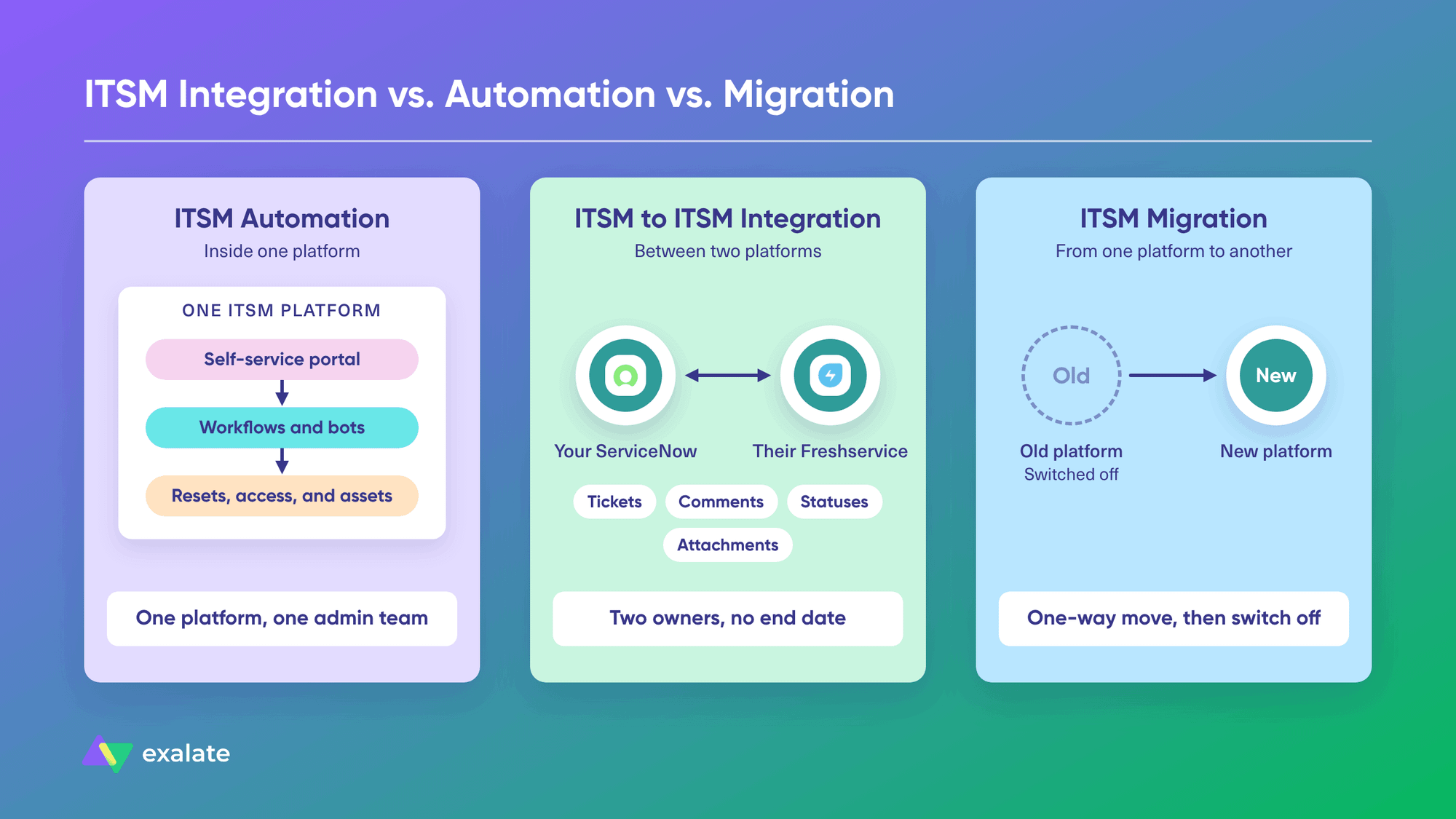
ITSM automation happens inside one platform. Workflows and bots handle password resets, access provisioning, and asset requests, usually with a self-service portal on top, and everything stays under one admin team.
Most automation case studies you’ll read describe the first kind of project. They tell you a lot about deflection rates and very little about what happens to a ticket once it crosses a company boundary.
ITSM to ITSM integration has no end date. Both platforms stay live, and the integration must keep working as each side changes its configuration. Conversely, ITSM migration is a one-way move from one platform to another, after which you switch off the old platform.
Benefits of ITSM to ITSM Integration
Manual ticket duplication between two systems is the most common reason teams start looking for an integration between ITSM systems. But let’s look at some real benefits of integrating ITSM systems.
Faster Service Handoffs Across Both Service Desks
Most delays happen in the handoff because the receiving team doesn’t know the ticket exists until someone forwards it to their dashboard. When the ticket arrives in the other queue automatically, work starts as soon as it’s assigned.
The same goes for every update after that. A question from the provider’s engineer reaches the client’s agent as a comment in their own tool, and the answer comes back the same way.
Lower MTTR With ITSM Tools Integration
Every minute a ticket sits unread in the wrong system counts toward mean time to resolution (MTTR). When the ticket lands in the right queue automatically, the clock reflects the actual work.
Context also matters as much as speed. If the priority, affected service, attachments, and earlier comments travel with the ticket, the receiving team can start troubleshooting right away and avoid spending time asking for details.
Less Manual Ticket Duplication Between Teams
Copying tickets between two desks is slow, and it’s where many data errors start. A priority gets typed wrong, an attachment gets left behind, or a status update never makes it across.
Once the sync handles creation and updates, your agents no longer spend part of every shift moving updates between two systems, and that time goes back into resolving tickets
SLA Reporting Both Sides Can Trust
When the same ticket lives in two systems, each side tends to report on its own version of it. Syncing the original creation time, priority, and SLA targets gives both teams the same timestamps to measure against.
That makes service reviews much shorter because both sides look at the same numbers, so the conversation moves straight to what needs fixing.
Each Team Keeps Its Own Platform and Workflows
For instance, in any MSP setup, the client keeps its ServiceNow workflows, approval rules, and reporting, and the provider keeps its Jira Service Management queues and automations.
This also removes the need for agents to log in to the other side’s tool. As a result, providers don’t need accounts in every client’s instance, and clients don’t need to train staff on a portal they’ll use for only one vendor.
Scaling ITSM Integrations Across Clients and Regions
The first connection takes the most effort, but that changes once you add a fourth or fifth client, region, or vendor. If you set up the integration correctly from the start, with repeatable processes and modules, scaling shouldn’t cost as much money or effort. For MSPs, that repeatability turns integration into part of the service.
Managed Integration Services vs Self-Managed: Who Should Run Your ITSM Integration?
Before you pick a tool, decide how much of the integration you want to operate yourself. The three common models below describe how much work stays with your team, and they don’t have to come as a vendor’s pricing tiers.
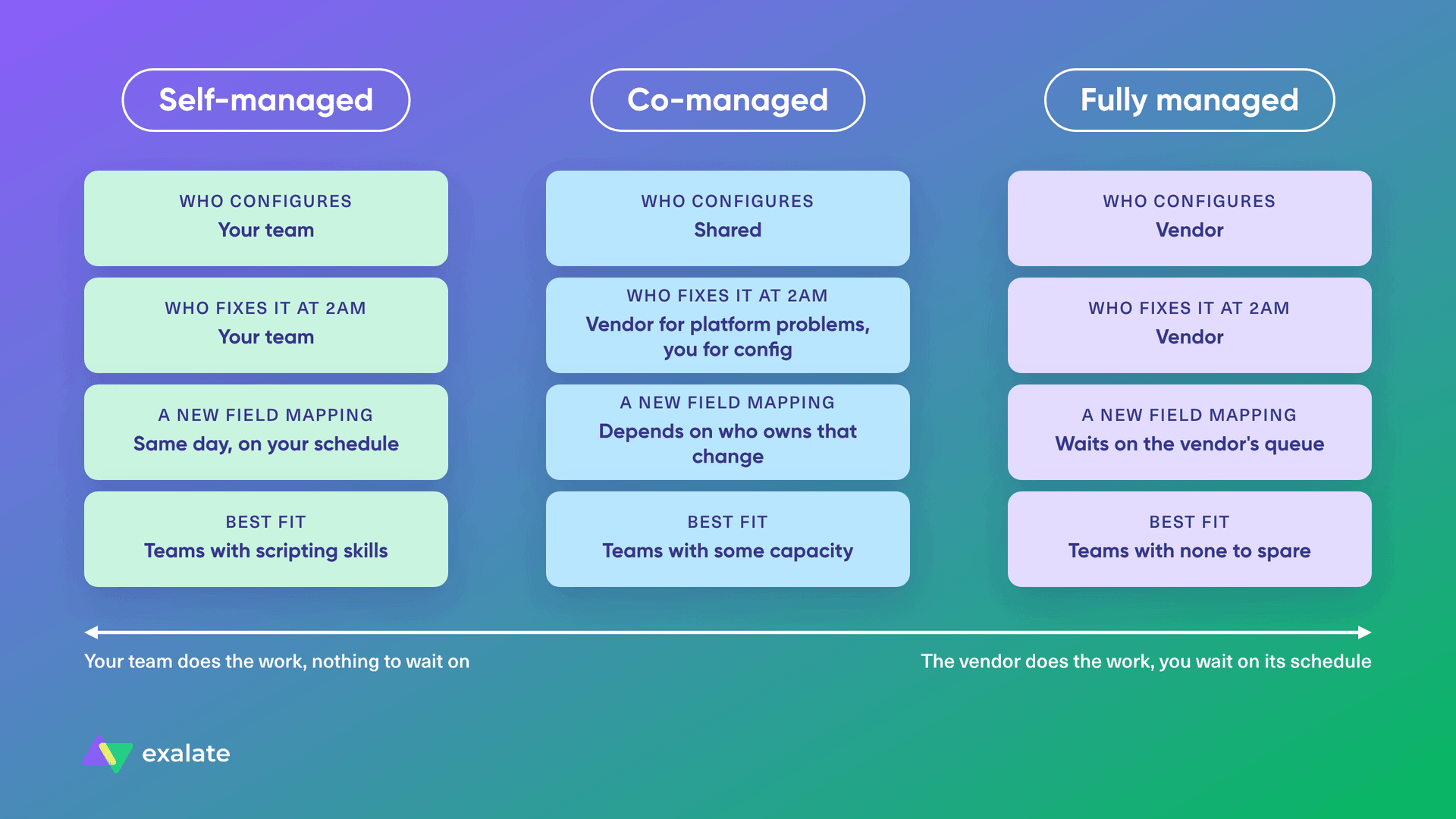
- Self-managed. Your team configures and owns the integration. It fits teams with internal scripting skills and a fairly stable environment.
- Co-managed. The vendor handles monitoring and heavier changes, and your team keeps day-to-day control.
- Fully managed. The vendor builds and runs the connections for you. This is what most people mean by managed integration services.
| Responsibility | Self-managed | Co-managed | Fully managed |
| Who configures | Your team | Shared | Vendor |
| Who fixes it | Your team | Vendor for platform problems, you for config | Vendor |
| A new field mapping | Same day, on your schedule | Depends on who owns that change | Waits on the vendor’s queue |
| Best fit | Teams with scripting skills | Teams with some capacity | Teams with none to spare |
The trade-off is that on a fully vendor-operated model, a new field mapping or an API change on the other side means waiting on the vendor’s schedule, while self-managed removes the wait and puts the work on your team.
Some vendors package these models as pricing tiers, with the vendor platform in the middle of every connection.
Exalate takes a different shape: you run the platform, each side controls its own sync rules, and you can add managed services per integration when you want the team to build and maintain a connection for you. You own the outcome either way.
5 Common ITSM to ITSM Integration Challenges (and How to Fix Them)
Connecting two platforms at the API level is the easy part. In our call data, field-mapping complexity creates far more friction than raw connectivity, and most of that friction falls into six areas.
1. SLA Measurement Across Two Service Desks
The ticket exists twice, so there are two SLA clocks. If each side measures from its own creation timestamp, the receiving side starts later and looks compliant while the sending side breaches on paper.
Solution: Agree up front which timestamp is contractual. Then sync the original creation time and the SLA target into a field on the receiving side, and map pause states like “awaiting customer” on both ends so one clock doesn’t keep running while the other stops.
2. Defining the Source of Truth for Synced Fields
When both sides edit the same field, one value has to win. In some cases, this leads to infinite propagation loops and even data loss.
Solution: To avoid this conflict, both sides should decide how changes propagate between systems. This is usually covered by the integration solution you choose.
For example, the client owns priority and the description, while the provider owns assignment, work notes, and the resolution code. If the provider’s team raises the priority, the change stays local or goes back as a request, depending on the agreement.
3. Mapping Resolution and Closure Statuses
ITSM-to-ITSM integration setups often have state failures between systems, especially when one side reopens a ticket after the other has already closed it.
This usually happens because state/status mappings differ across platforms. A ServiceNow incident moves through New, In Progress, On Hold, Resolved, and Closed, while a Jira Service Management workflow can have whatever statuses its admin built.
Solution: Create a status-mapping rule so that either the reopened ticket returns to the original record within a set window, or the integration creates a new linked ticket and references the old one.
4. Preventing Duplicate Notifications and Sync Loops
Without a plan for system notifications and alerts, the end user gets two emails or pings for every update. In some annoying cases, a synced comment triggers an update back, which triggers another sync, and the thread keeps growing.
Solution: Pick one side to own customer communication, and sync internal notes and public comments as separate streams. Then, stop the integration from syncing the user’s own changes and triggering outbound sync.
5. Deciding Who Builds the Integration
In a hub model, one party builds and maintains connections to each partner’s ITSM, which gets expensive with four different platforms across ten clients.
Solution: The other option is for each side to control what it shares or receives. That’s how Exalate works: each side sets its own outgoing and incoming sync rules, so the client’s admin decides what leaves their instance and the provider’s admin decides what comes into theirs.
ITSM Integration Workarounds and Where They Fall Short
Most teams try one of these options before they look for a dedicated tool.
- Email-based ITSM integration: One desk emails the other, and variable tokens in the subject line match replies to the right ticket. It’s cheap and works fine for simple ticket creation, until SLAs, reopens, and attachments start to matter.
- Native ITSM connectors and Integration Hub: ServiceNow’s Integration Hub spokes, including eBonding for ServiceNow-to-ServiceNow sync, work well inside the ServiceNow environment. But setting up a native ServiceNow-Jira connector requires significant work and comes with limitations.
- Custom API integration: Your developers build the integration using both APIs. This option is expensive and restrictive, which is why organizations abandon makeshift webhook builds because they require significant development time and ongoing effort to keep running.
- Hosting client operations in your own ITSM: Some MSPs ask clients to work within the provider’s platform. That works for smaller clients, and stops working once the client is too large to give up its own platform or needs to protect sensitive customer data.
To learn more, check out our detailed roundup of ITSM integration tools that compares dedicated options.
Discuss your integration setup with our experts
Get free, expert advice on your setup. We’ll reach out via email to discuss your use case.
ITSM to ITSM Integration Use Cases for ServiceNow, Jira Service Management, Freshservice, and More
Here are some actual use cases that feature permutations between ServiceNow, Jira Service Management (JSM), Freshservice, and other ITSM systems. These setups have been implemented using Exalate, a bidirectional integration solution.
1. ServiceNow to Jira Service Management Integration for Incident, Request, and Change Management
Case: A company runs incident management and service requests in Jira Service Management, and change management in a custom Jira workflow. Its IT supplier runs all three processes in ServiceNow. They need one bidirectional integration that covers all three record types.
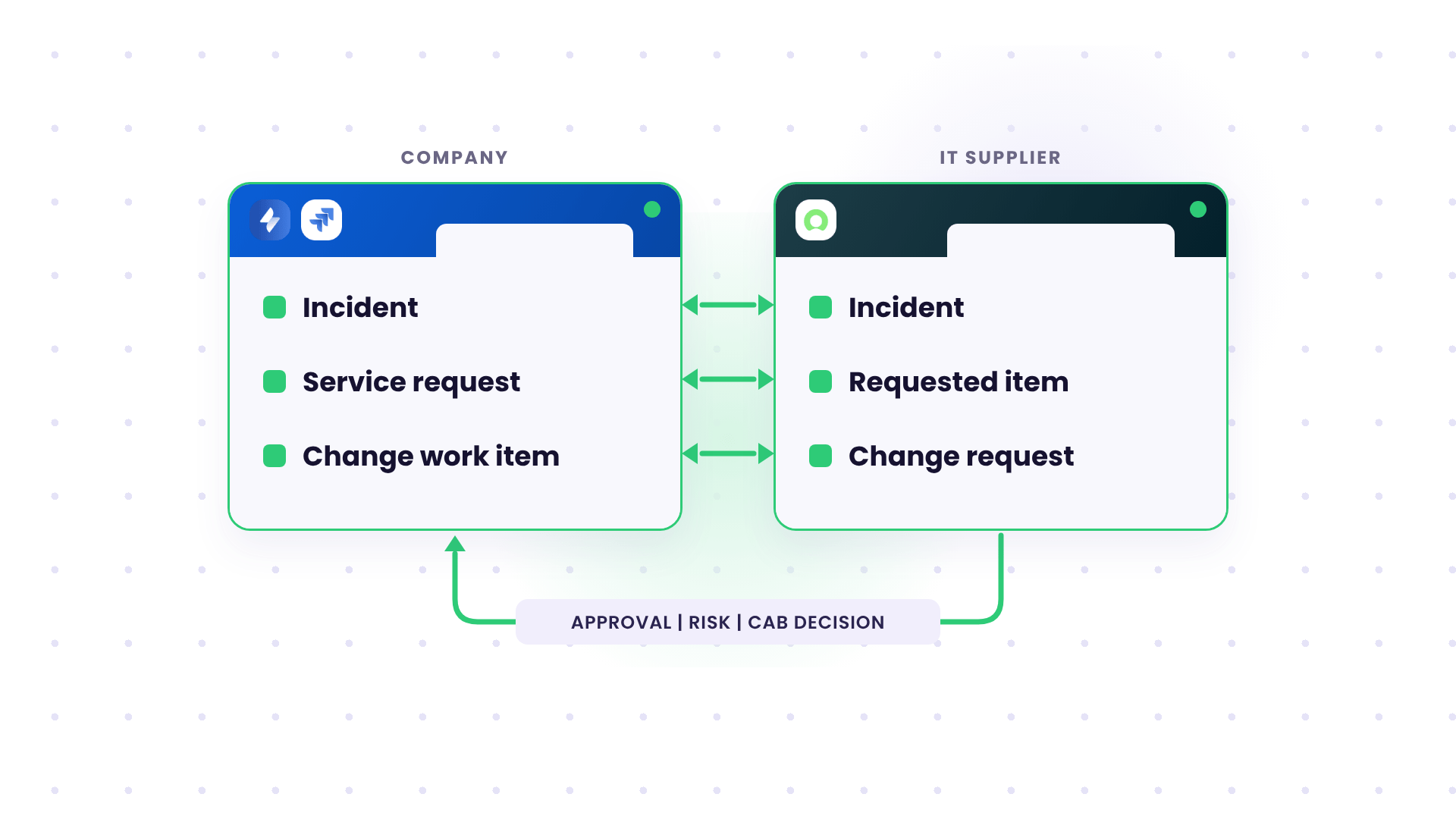
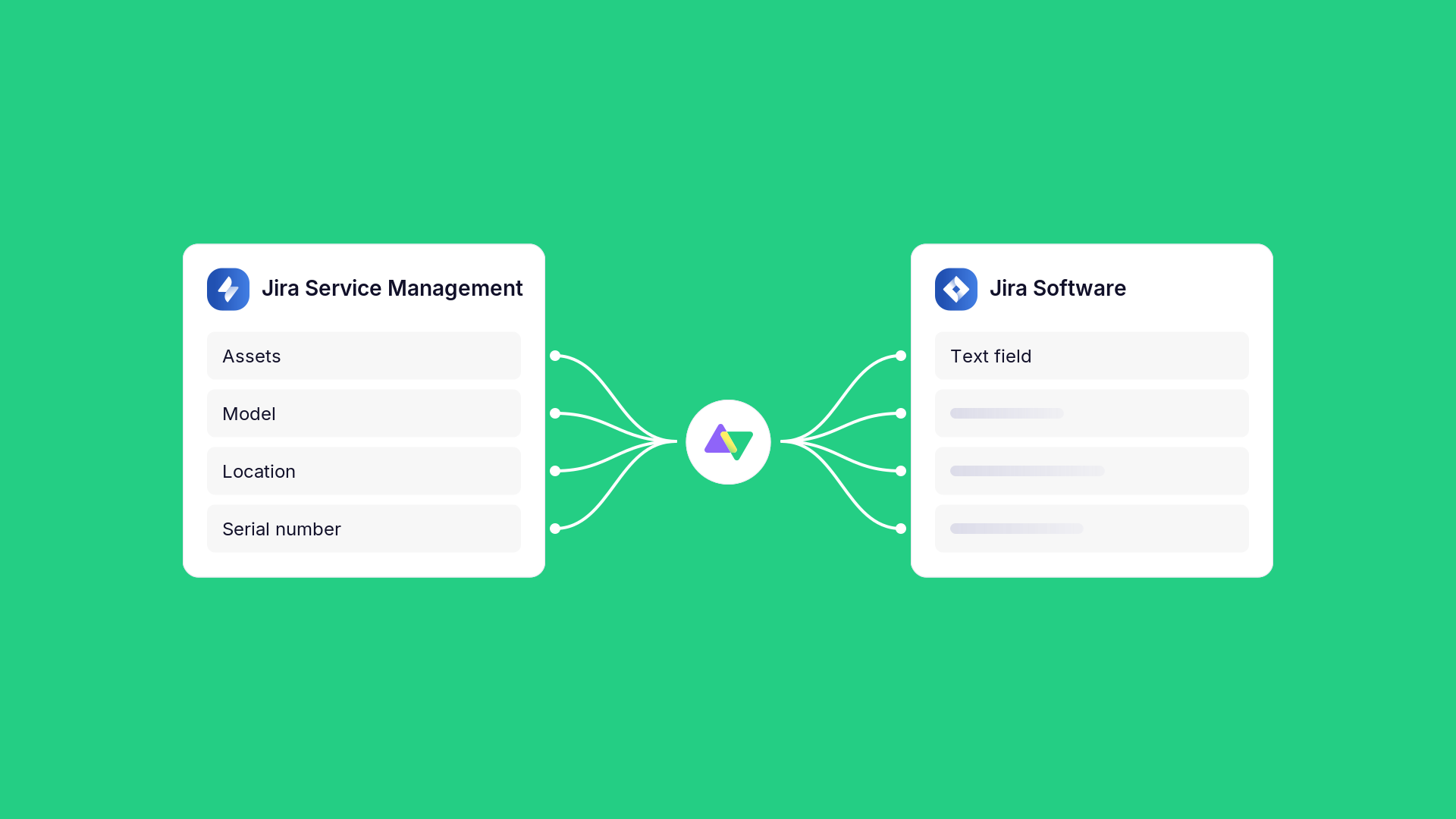
Solution: Each record type gets its own mapping: JSM incidents to ServiceNow incidents, JSM service requests to ServiceNow requested items, and Jira change work items to ServiceNow change requests. Each pair has its own status mapping, because a ServiceNow change request moves through approval states like Assess, Authorize, and Scheduled that the Jira change workflow might not have. Fields that don’t exist on one side, such as the change risk or the CAB decision, sync into custom fields.
Outcome: Both organizations keep their ITIL processes in their own tools. When the supplier approves a change, the company sees the approval state in Jira without anyone copying it across.
2. Jira Service Management to ServiceNow Integration for MSP Customer Support
Case: An MSP supports the systems a customer runs in its warehouse facilities, and the MSP’s agents work in Jira Service Management. The customer runs ServiceNow and wants to raise incidents from its own system instead of using the MSP’s portal. The MSP piloted the setup with this client and plans to offer it to other clients across different service desks.
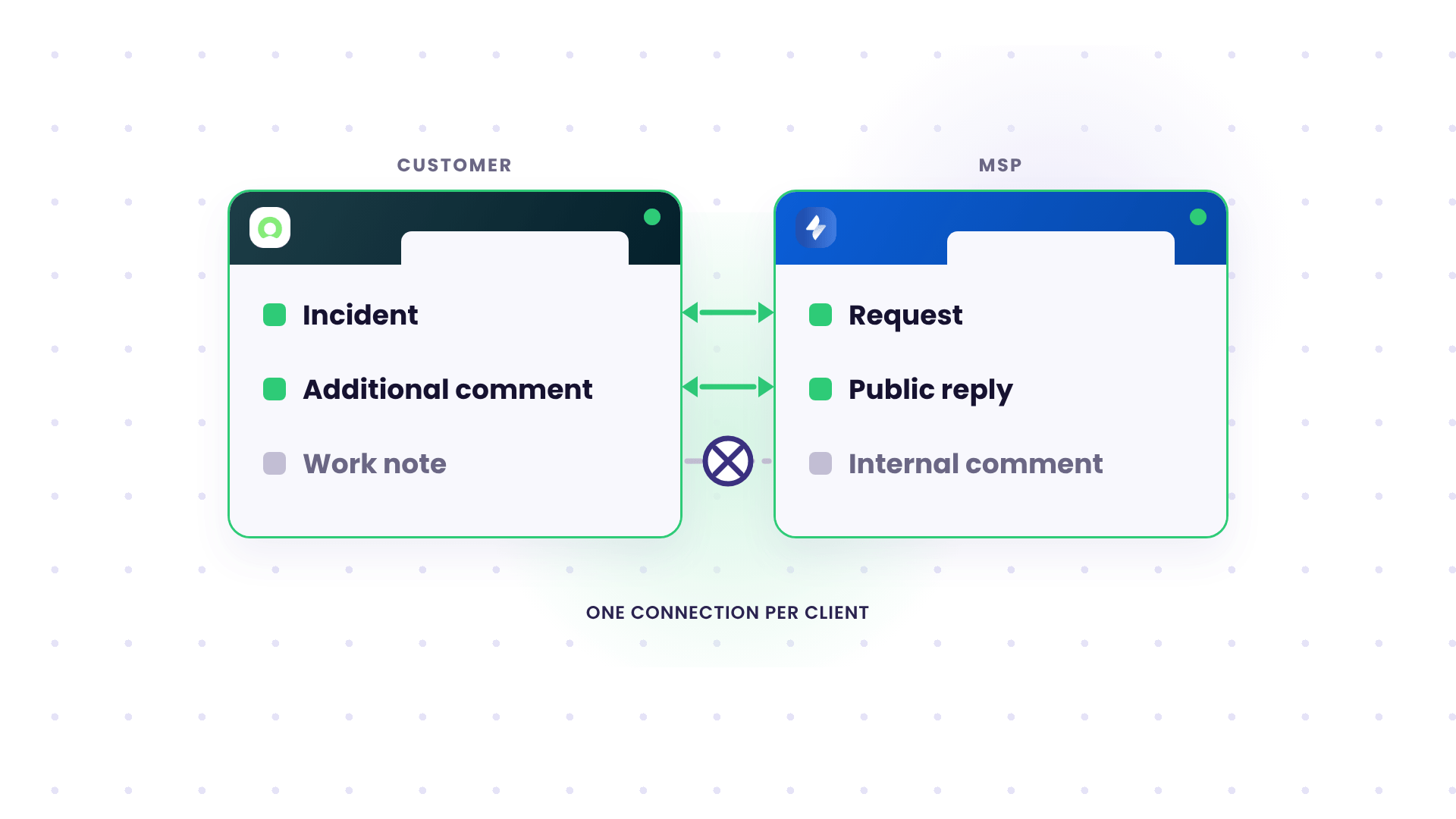
Solution: Incidents raised in the customer’s ServiceNow create requests in the MSP’s JSM project, with summary, description, priority, attachments, and comments syncing in both directions. ServiceNow additional comments map to public JSM replies, and each side’s internal notes (ServiceNow work notes, JSM internal comments) stay on their own side.
Outcome: The customer keeps its ServiceNow workflow, and the MSP keeps its JSM queues and SLAs. Once the pilot worked, the same connection setup became the starting point for the next client, each with its own connection and rules.
3. Jira Service Management to ServiceNow Integration for Security Incidents
Case: A cybersecurity provider (MSSP) delivers continuous security monitoring and receives alerts and incidents in its Jira Service Management instance for analysis and remediation. One of its customers runs ServiceNow and wants the alerts in real time so its own team can act on them.
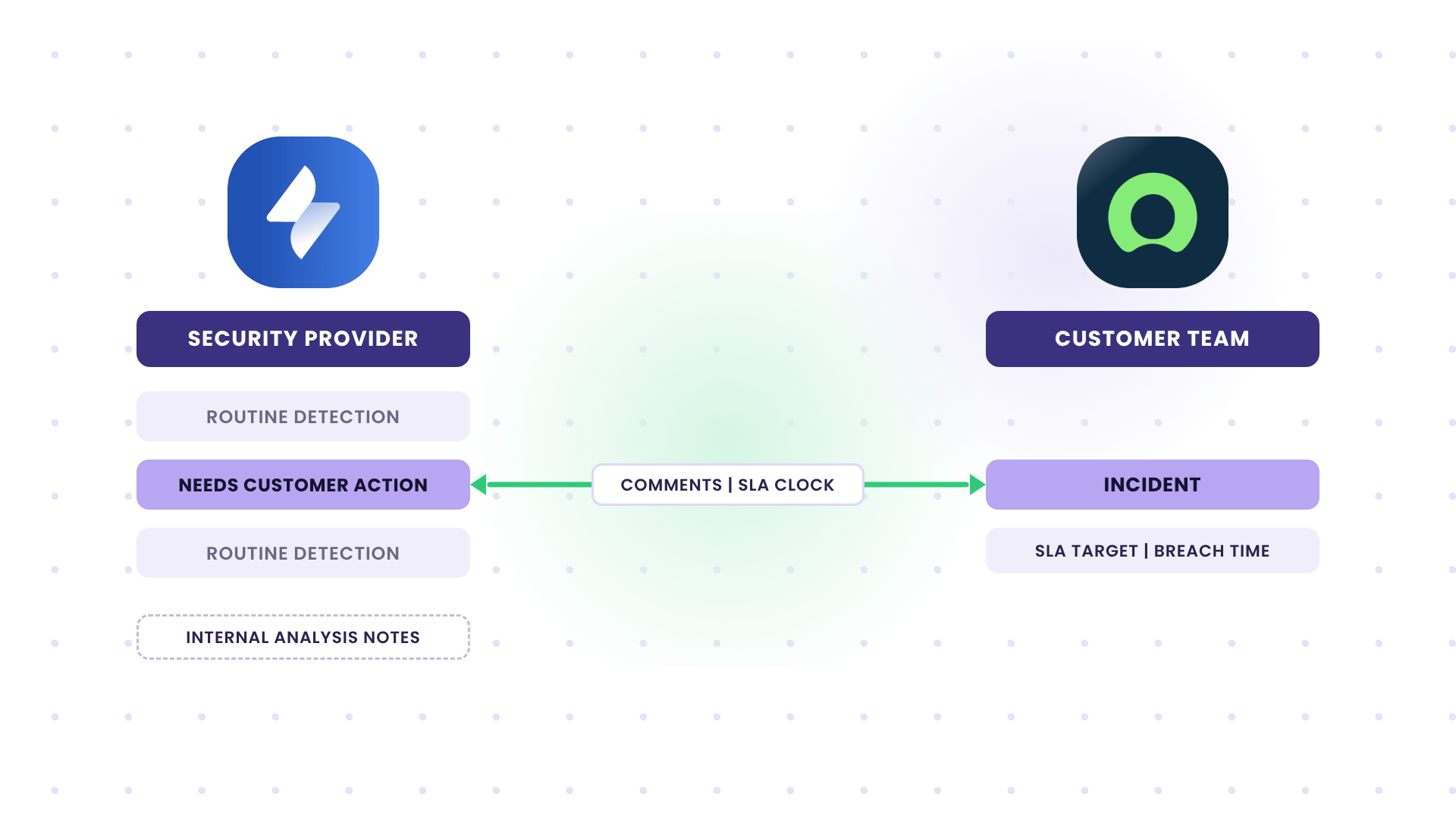
Solution: A trigger sends only the alerts that need customer action, so routine detections stay with the provider’s analysts. Each alert creates a ServiceNow incident, comments sync both ways, and the provider’s analysis notes stay internal. The provider’s SLA target and breach time sync into custom fields on the ServiceNow incident, so the customer reads the contractual clock.
Outcome: The customer’s team manages security incidents in ServiceNow without a second login, and the provider keeps its investigation detail private. Both sides report with the same SLA timestamps.
4. ServiceNow to ServiceNow Integration for an MSP and Its Client
Case: A managed service team and its customer each run their own ServiceNow instance, and both want to keep working there. When an agent ticks a “send to MSP” checkbox on an incident or a service request, the ticket appears in the MSP’s instance, and updates flow both ways while it’s open.
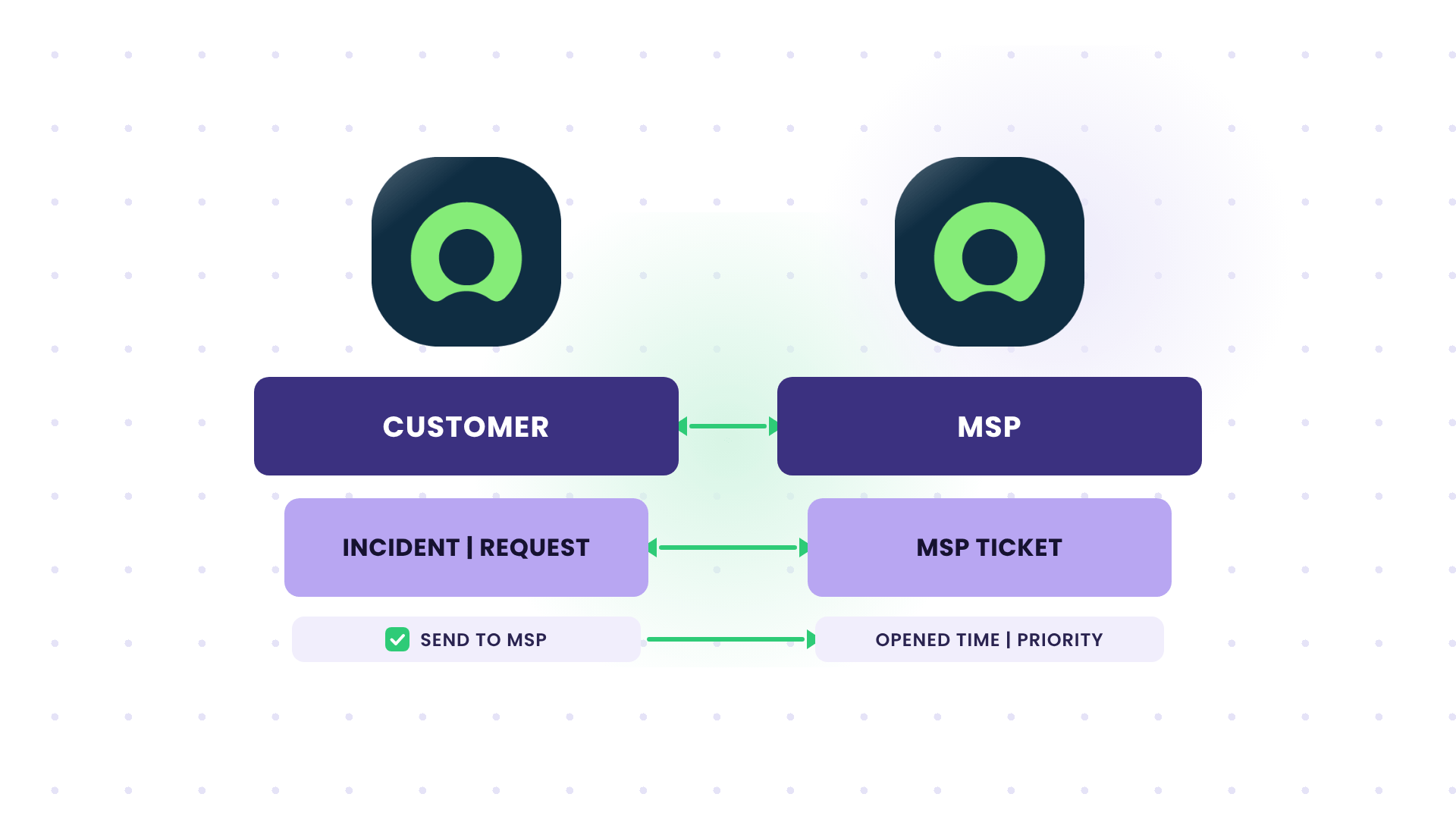
Solution: A trigger on the customer’s instance watches that checkbox, so only flagged records sync, and both incidents and service requests arrive in the MSP’s instance as the record type the MSP works with. The customer’s outgoing sync rules decide which fields leave its instance, and the MSP’s incoming rules decide how they’re stored. The MSP also syncs the original opened time and priority into its own record, because the two ServiceNow SLA clocks start at different times.
Outcome: The customer’s agents escalate without leaving ServiceNow or writing emails, and the MSP works the ticket in its own queues and reports. Neither side has to build a custom eBonding framework with staging tables and JSON payloads.
5. Jira Service Management to Jira Service Management Integration Between a Provider and Its Customers
Case: A service provider runs its own Jira Service Management instance and also has to work the JSM instances of three customers, whose contracts require them to raise incidents and requests in their own systems. The provider’s team checks each customer instance constantly for new tickets. In this setup, the fields teams ask for are usually title, description, priority, request type, reporter, assignee, comments, labels, and urgency.
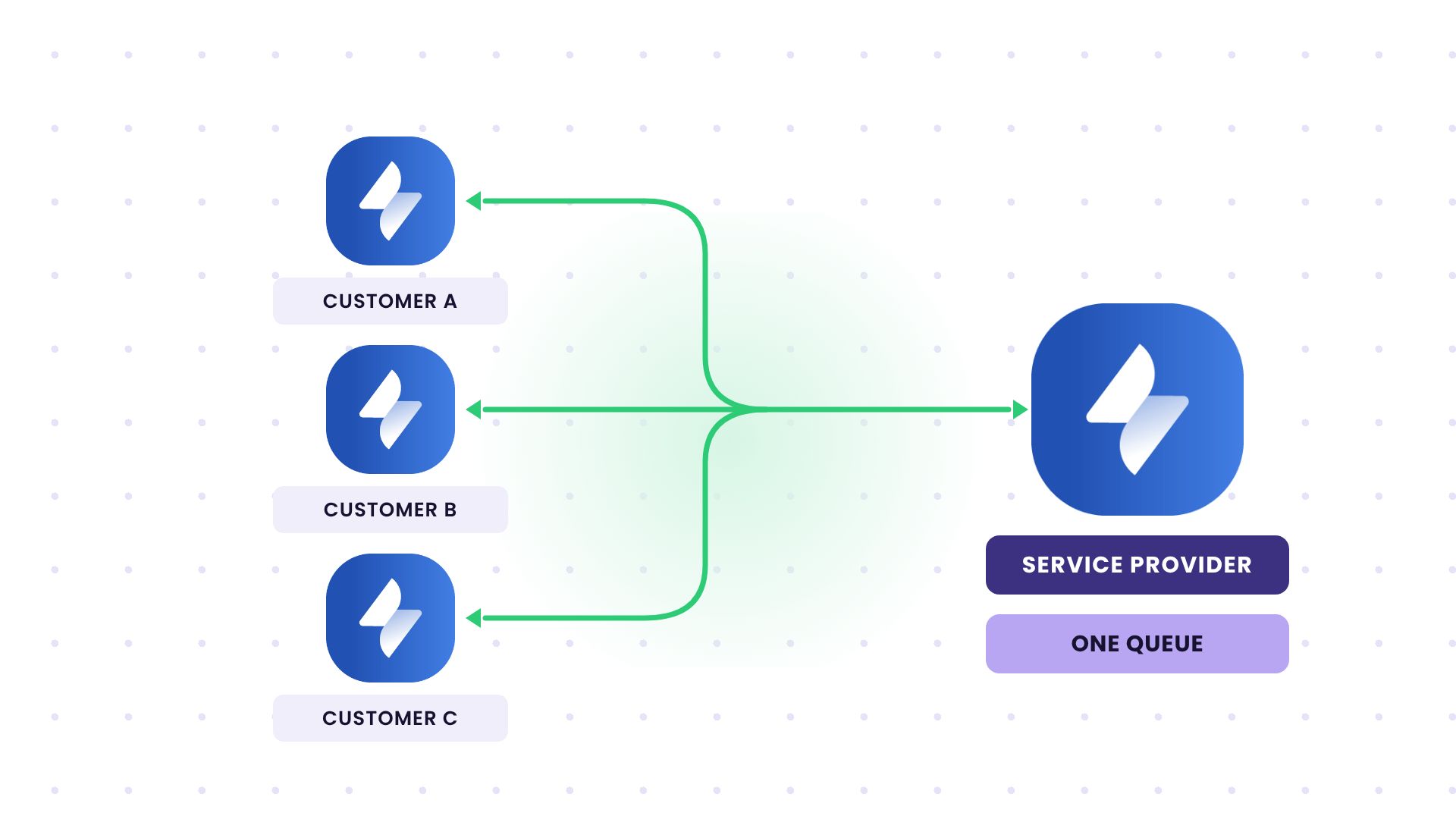
Solution: Each customer instance gets its own connection to the provider’s JSM. New customer tickets replicate automatically, and when the provider resolves a ticket, the customer’s request also moves to resolved. Request types differ between instances, so the provider’s incoming rules map each customer’s request types to its own, and only the tickets and fields each side chooses to sync ever cross.
Outcome: The provider’s agents work one queue instead of four instances, and they don’t need accounts in every customer’s JSM. Each customer still tracks every ticket in its own instance.
6. Freshservice to Freshservice Integration for MSP Escalations
Case: An outsourcing company owns a central operations instance, and each customer has its own Freshservice instance on a different domain. Only the customer instance and the central instance should be in sync, and customers must remain completely separate.
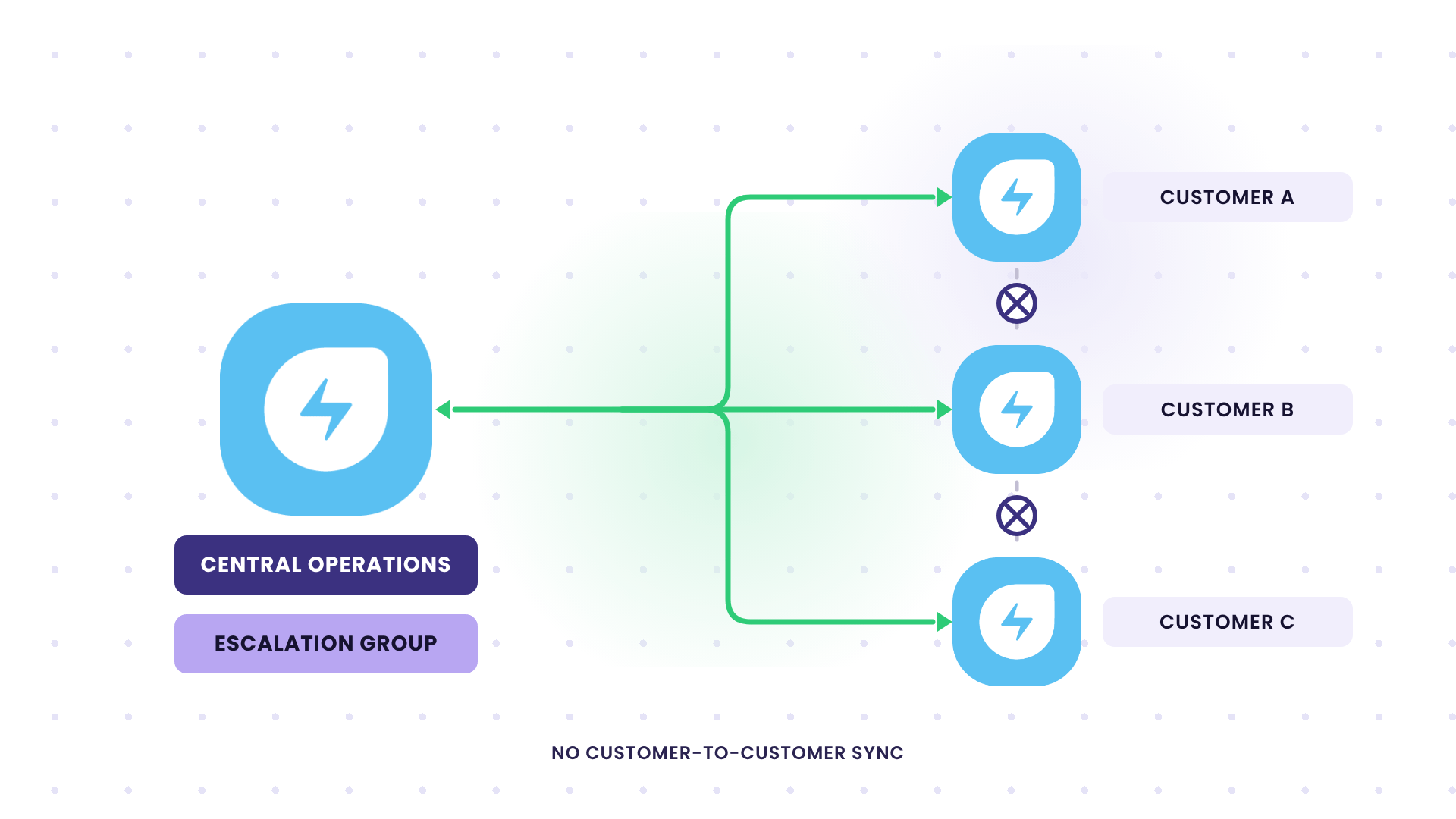
Solution: Every customer instance gets its own connection to the central instance, with no connections between customers. A trigger fires when an agent assigns the ticket to an escalation group, and the ticket, its notes, and its status sync to the central instance. Status changes and public replies come back so the customer’s agent can keep the requester informed.
Outcome: Freshservice to Freshservice escalation works the same way from every customer instance, and one customer’s data never touches another customer’s environment. Onboarding a new customer means adding one more connection to the central instance.
7. ManageEngine ServiceDesk Plus to ServiceNow Integration With Selective Sync
Case: A hotel group runs ManageEngine ServiceDesk Plus and needs to exchange tickets with a partner on ServiceNow. Compliance limits what can be synced, so the group asked for sync on flagged tickets only, with a named list of approved fields.
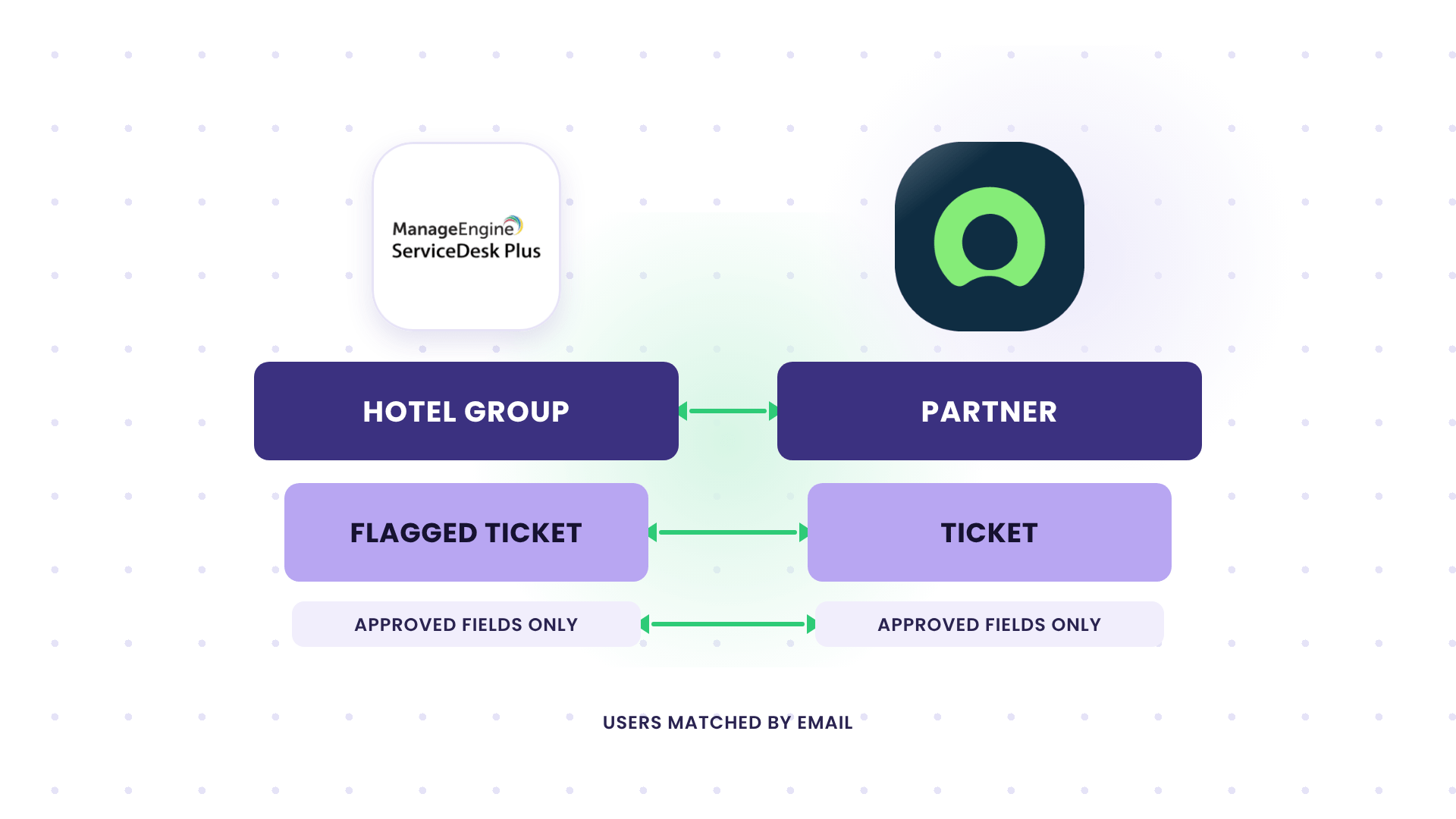
Solution: Using triggered escalations, admins can sync only flagged tickets, and the outgoing sync rules send only the approved fields, so nothing outside the list leaves ServiceDesk Plus. User and account IDs differ between the two platforms, so requesters and assignees match by email address instead of internal ID.
Outcome: The compliance reviewer signs off on one field list and can see exactly what is being shared. The same pairing happens with service providers too; for example, a provider whose engineers work in Zendesk or Freshdesk while supporting a large organization’s cloud infrastructure on ServiceNow.
When several partners each keep their own tracker, and reporting has to be pulled together, you’re closer to service integration and management (SIAM), which we cover in our SIAM podcast episode.
How Exalate Handles ITSM to ITSM Integration
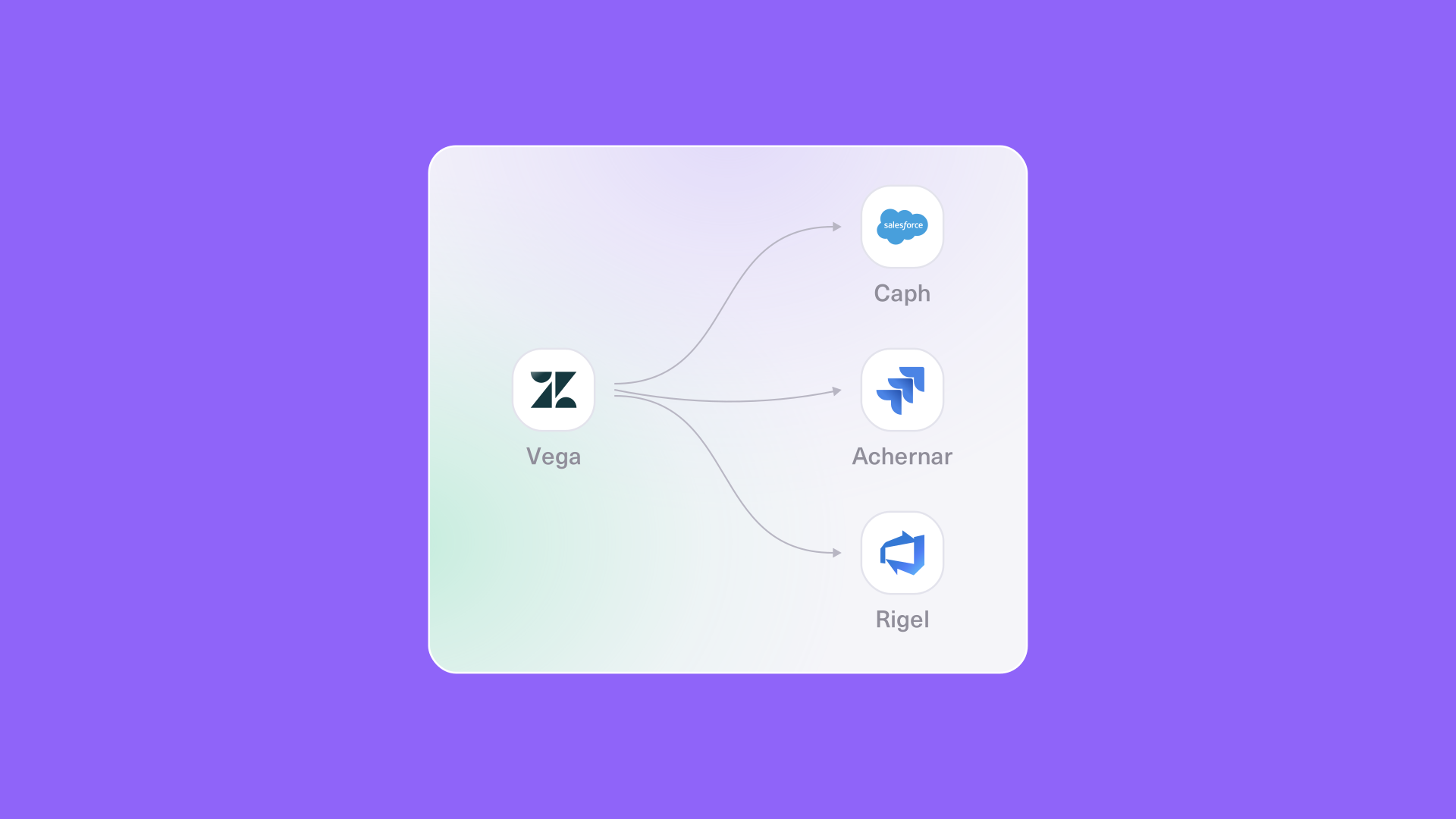
Exalate is an integration platform for bidirectional, real-time sync between service desks and work management tools. It connects ServiceNow, Jira Service Management, Jira, Freshservice, Freshdesk, Zendesk, Azure DevOps, and Salesforce, and offers connectors like ServiceDesk Plus.
Organizations in different industries choose Exalate because it addresses all the failure points covered earlier.
Independent Sync Rules on Each Side of the Connection
Exalate supports per-side connections, meaning you can configure sync rules on both sides. This is possible through sync rules: outgoing sync rules determine what leaves your instance, and incoming sync rules determine how the other side’s data lands in yours.
This feature is absolutely necessary for cross-company integration setups. Your client’s admin controls what their ServiceNow sends, your admin controls how it’s stored in your Jira Service Management, and neither side needs admin access to the other’s instance. These rules set the source of truth for each field, so the client can own priority while you own assignment and work notes.
Triggers for Selective Ticket Sync
Triggers are conditions that decide which tickets enter the sync. Exalate triggers use each platform’s search syntax, such as JQL in Jira Service Management or a ServiceNow incident filter, so you can sync only tickets assigned to an escalation group, tagged for a specific client, or flagged with a specific checkbox.
Anything that doesn’t match the trigger stays on its own side. That’s how compliance-limited setups keep unapproved tickets out of the sync entirely.
Groovy Scripting for Status, SLA, and Comment Mapping
Exalate sync rules are written in Groovy language, which gives you flexibility to configure your sync for different scenarios. A few examples of what teams script:
- Status mapping per record type, so a Freshdesk “Resolved” becomes a ServiceNow “Resolved” and the customer still owns closure,
- SLA fields, where the original creation time and SLA target sync into custom fields on the receiving side,
- Comment visibility, where ServiceNow work notes and JSM internal comments stay on their own side while public replies sync,
- User and group lookups, matching people by email address and resolving assignment groups at sync time,
You don’t have to start from a blank script. Default rules cover the standard fields, and you add logic only where your workflow needs it. The rest can be expedited with AI.
AI-Assisted Configuration and Troubleshooting
Aida AI, Exalate’s AI scripting and troubleshooting assistant, can help you write sync rules from a plain-language description of what you want.
You describe the goal, for example, “sync incidents with priority 1 or 2 to the vendor’s Jira Service Management and keep work notes private”, and Aida generates the script for you to review. The decision to discard or accept the suggestion falls to your human admin.
When a sync fails, Aida AI explains what went wrong and suggests a fix, so the integration admin can choose the best course of action.
Test Run, Publish Approval, and Script Versioning
Changes to a live cross-company integration carry risk, so Exalate lets you check them before they reach production. Test Run validates a draft configuration against real work items before you publish, and publish approval lets a second admin review changes before they go live.
Script versioning keeps every past version of your sync rules available to view or restore. If the other side changes a workflow and your update causes trouble, you can roll back to the last version that worked.
Activity and Monitoring
Cross-company integrations need a record both sides can check, because a sync problem rarely shows up on the side that caused it.
Every connection keeps a read-only history in the Activities tab of who changed what, when, and whether it worked. It covers connection setup, script and configuration changes, triggers, users and invitations, sync actions like manual syncs and unlinks, and publish approvals. Owners and collaborators on a connection see the same history, so when the other side’s admin edits a sync rule, your team can see it too.
Also, the dashboard brings sync status and connection health into one view in the Exalate console. Admins can check that every client connection is running before anyone notices a stuck ticket, and spot trends across connections without opening each one.
The Sync Panel is a Chrome browser extension that shows the sync status on the item you’re already working on, whether that’s a ServiceNow incident, a Jira Service Management request, or a Zendesk ticket. With this feature, agents can see whether a ticket synced, trigger a manual sync, or unlink a pair from their browser.
Security for Cross-Company Sync
Exalate is ISO 27001 certified and encrypts data in transit and at rest. It also uses TLS 1.2/1.3, role-based access controls, OAuth 2.0 and JWT, and other security protocols. Teams with strict data residency or hosting rules can run Exalate on-premise, and the Exalate Trust Center has the full security documentation.
Before You Scope Your ITSM to ITSM Integration
Here is an ITSM to ITSM integration checklist of questions for your next vendor call or internal planning session:
- Which side owns closure, and what does “resolved” mean on each side?
- How does each side measure SLA, and which timestamp is contractual?
- What happens when a ticket is reopened after the other side closed it?
- Which fields are allowed to cross, and who approved that list?
- Who gets notified about updates, and from which system?
- Who fixes the integration, and how do they find out it broke?
- What happens when the other side changes its API or workflow?
Most teams start with the tooling question. The operating model question determines whether the integration survives its second year, because the other side will change its workflows, fields, and maybe its platform, and someone has to absorb every change.

FAQs
What is ITSM to ITSM integration?
ITSM to ITSM integration connects two IT service management platforms, such as ServiceNow, Jira Service Management, and Freshservice, so tickets and their updates sync in both directions. Each side keeps its own platform as the system of record. It’s most common between an MSP and its clients, or between regional service desks run by different teams.
How is ITSM to ITSM integration different from ITSM migration?
ITSM migration moves your data from one platform to another, then retires the old platform. ITSM to ITSM integration keeps both platforms running and syncs tickets between them for as long as the relationship lasts.
Can two ServiceNow instances sync with each other?
Yes, ServiceNow to ServiceNow is one of the most common pairings, usually between an MSP and a client on separate instances. You can use ServiceNow’s eBonding spoke, a custom API build, or a dedicated sync tool like Exalate, where each instance controls its own sync rules.
How do you handle SLAs when a ticket exists in two systems?
Agree which timestamp is contractual, then sync the original creation time and the SLA target to the receiving side. Map pause states such as “awaiting customer” on both ends so both clocks stop and start together.
What happens when a ticket is reopened on one side after it’s closed on the other?
Without an explicit sync rule, the update fails or gets lost, because many platforms lock closed records. Most teams either reopen the original record within a set window or create a new linked ticket that references the old one.
How do you stop duplicate email notifications?
Pick one side to own communication with the end user. Sync internal notes and public comments separately, and make sure changes made by the integration user don’t trigger another outbound sync.
Can MSPs integrate with clients who use different ITSM platforms?
Yes, an MSP can connect its own platform to clients on ServiceNow, Jira Service Management, Freshservice, Zendesk, and others, with each client connection kept separate. Exalate keeps each client’s data isolated and lets each side control what it shares.
Can I limit which tickets and fields sync between two ITSMs?
Yes, triggers decide which tickets sync, for example, only those with a specific category or flag, and sync rules decide which fields travel. This matters most when compliance rules limit what can leave your instance.
Should I build my own ITSM to ITSM integration?
Custom API builds give you full control, but you own every API change, outage, and new field from then on. Teams often underestimate both the initial development time and the ongoing maintenance, especially when the other side’s platform changes without notice. If you don’t think your team can handle the heavy lifting, look for an integration solution that fits your use case. Read more about this build vs buy debate.
What are managed integration services?
Managed integration services mean a vendor builds, monitors, and maintains your integrations for you. With Exalate, managed services are available per integration, and you keep ownership of the sync rules and the outcome.
Recommended Reads
- Use ITSM Integration to Connect Your IT Service Tools
- An Overview of Integrated Service Management (ISM)
- Freshservice to Freshservice Integration to Sync Multiple Freshservice Instances
- ServiceNow to ServiceNow Integration For Setting Up a Two-Way Sync
- ServiceNow Integrations For Connecting ServiceNow & Other Tools