A Freshservice to Freshservice integration connects two or more instances so tickets, status updates, work notes, and custom fields flow between them without manual copying. IT teams on both sides continue working in their own environments while a synchronization layer keeps the relevant data aligned in real time.
Freshworks does not offer a native connector for linking one Freshservice instance to another. The built-in integration options (Workflow Automator, Sandbox config sync) do not address live ticket synchronization between production instances. That leaves organizations with a choice between building a custom REST API integration or adopting a third-party platform.
This guide covers why organizations need this integration, what data can move between instances, the available methods, real-world use cases, and a step-by-step setup using Exalate.
Key Takeaways
- Freshworks provides no native connector for linking two Freshservice production instances, which means organizations must use REST APIs or third-party tools.
- Common scenarios include MSP-to-client ticket routing, post-merger ITSM consolidation, regional IT coordination, and escalation between specialized support tiers.
- Custom API integrations give complete control but require 100 to 250+ development hours and ongoing maintenance for error handling, rate limits, and authentication.
- Evaluating any integration tool for this pattern requires checking bidirectional capability, field-level mapping, trigger granularity, cross-organization data isolation, and pricing structure.

What Is Freshservice?
Freshservice is Freshworks’ IT service management platform, built around ITIL practices for internal service delivery.
IT teams use it to handle incidents, service requests, problems, change records, and assets. Non-IT departments (HR, finance, facilities, legal) can run parallel service desks through Freshservice for Business Teams (FSBT) or Enterprise Service Management (ESM) capabilities.
For example, when an employee submits an access request through the self-service portal, Freshservice creates a service request, assigns it to the network operations group based on category rules, and tracks progress. If the request hits a compliance hold, the change management module logs the required approval workflow.
Freshservice also includes a CMDB for tracking configuration items and relationships, asset lifecycle management, a service catalog for standardized request fulfillment, and Freddy AI for ticket classification, agent assistance, and self-service deflection.
Why Connect Two Freshservice Instances?
Most integration guides focus on linking Freshservice with a different platform, like Jira, ServiceNow, or Zendesk. But connecting Freshservice to itself solves a set of problems that cross-platform integration does not address.
Managed Service Providers Working With Clients
An MSP operates its internal service desk on Freshservice. Several of its clients independently chose Freshservice for their own IT teams.
When a client logs an incident that requires MSP involvement, someone currently copies the ticket details into the MSP’s instance manually or sends an email.
A Freshservice-to-Freshservice integration automates that handoff while keeping each organization’s data isolated.
Post-Merger or Post-Acquisition IT Consolidation
When two companies merge, and they both run Freshservice, a full platform migration would take months and disrupt active workflows.
To avoid that, they’d need to integrate both instances so the combined IT leadership team has cross-instance visibility into incidents, change requests, and asset data while each legacy team continues operating in their familiar environment.
Regional or Departmental ITSM Separation
A multinational corporation runs separate Freshservice instances per region (EMEA, APAC, Americas) for compliance, data residency, or operational autonomy reasons.
When a global incident affects infrastructure across regions, the integration ensures all regional instances receive the incident details and resolution updates without anyone manually replicating the ticket three times.
Tiered Support Structures
A Tier 1 support team triages tickets in one Freshservice instance. Tier 2 and Tier 3 specialists operate from a separate instance with different workflows, escalation paths, and SLA policies. The integration routes qualifying tickets from Tier 1 to Tier 2 with complete context and syncs resolution details back when the issue is closed.
Vendor and Supplier Coordination
An enterprise’s internal IT team and an outsourced infrastructure provider both run Freshservice. Incidents that require the vendor’s involvement need to appear in the vendor’s instance with appropriate context, while sensitive internal notes remain hidden.
Methods for Connecting Two Freshservice Instances
Freshservice REST API (Custom Build)
Freshservice exposes a comprehensive REST API that supports creating, reading, updating, and deleting tickets, conversations, assets, and other entities. Both instances can act as both producer and consumer of API calls.
What you can build:
- Webhook-triggered ticket creation in the remote instance
- Polling-based status sync on a scheduled interval
- Bi-directional comment replication using the Conversations API
- Selective field mapping through custom transformation logic
What it costs to build and maintain:
- Initial development: 100 to 250+ hours depending on complexity (bidirectional sync, error handling, conflict resolution, retry logic, authentication management)
- Ongoing maintenance: API versioning changes, rate limit adjustments (Freshservice API rate limits vary by plan, starting at 400 requests per minute on Starter), authentication token rotation, schema changes when either instance adds custom fields
- Infrastructure: Hosting for the middleware layer, monitoring, alerting, and logging
Limitations:
- No built-in conflict resolution. You must implement your own “last write wins” or “field-level priority” logic.
- No visual monitoring. Sync health is only visible through whatever logging you build.
- No rollback. If a script change breaks sync, you revert manually.
- Scaling from 2 instances to 5 or 10 requires significant re-architecture.
Best for: Organizations with dedicated integration engineering teams and well-defined, stable requirements.
Automation Platforms (Zapier, n8n, Make)
These tools offer Freshservice connectors with trigger-action workflows.
What they handle:
- “New ticket in Instance A” triggers “Create ticket in Instance B”
- Basic field mapping through the platform’s UI
- One-way data pushes with minimal configuration
Limitations:
- True bidirectional sync is extremely difficult. You need separate workflows for each direction with deduplication logic to avoid infinite loops.
- Shallow field support. Complex field types, nested custom objects, and CMDB references are often unsupported.
- Per-task pricing penalizes high-volume environments. An MSP syncing 500 tickets per day could face high costs.
- No cross-organization data isolation. All connections run under a single account with shared credentials.
- Limited error visibility. Failed tasks show in a log, but troubleshooting requires manual investigation.
Best for: Low-volume, one-way data pushes between two instances where simplicity matters more than depth.
Exalate (Third-Party Bidirectional Integration Platform)
Exalate connects Freshservice instances through a script-based sync engine with AI-assisted configuration. Each instance maintains its own sync rules, and data flows through a secure intermediary layer.
What it handles:
- Full bidirectional sync of incidents, service requests, change records, problems, conversations, attachments, and custom fields.
- Groovy scripting for conditional routing, field transformation, and data filtering.
- Trigger-based automation using Freshservice’s native query syntax.
- Cross-organization configurations where each side controls its own outgoing and incoming scripts independently.
- Test run validation before production deployment.
- Script versioning with rollback capability and full change audit trail.
- Aida AI for generating sync scripts from natural language prompts.
- Multi-platform extensibility: the same Exalate workspace can connect Freshservice instances to each other and simultaneously to Jira, ServiceNow, Salesforce, Zendesk, Azure DevOps, and other platforms.
- Sync Panel, Exalate also comes with a Chrome extension called Sync Panel that lets users check sync status, spot errors, trigger manual syncs, and unlink sync pairs straight from the browser, without opening the console.
Best for: MSPs, enterprises with multiple Freshservice instances, cross-company integrations, and any scenario requiring bidirectional sync with granular control.
Integration Comparison Table
| Criteria | Zapier / n8n / Make | Exalate |
| Bidirectional sync | Partial (workarounds required) | Full |
| Custom field mapping | Limited | Full (Groovy scripting) |
| Conditional routing | Basic filters | Full (script-based triggers) |
| Cross-organization isolation | No | Yes |
| Test before production | No | Yes (Test Run) |
| AI-assisted setup | AI add-ons | Aida AI |
| Script versioning & rollback | No | Yes |
| Error handling & retry | Basic task retry | Automatic retry with queue visibility |
| Security certifications | Varies | ISO 27001 |
| Multi-platform extensibility | Broad but shallow | 40+ deep integrations |
| Setup time | Hours (basic) | Hours to days |
| Pricing model | Per-task | Per sync pair (outcome-based) |
What Data Can You Sync Between Freshservice Instances?
Because both sides run the same platform, field compatibility is high. The challenge is not data format but rather controlling what crosses over and how it maps to the receiving instance’s configuration.
| Data Category | Typical Fields | Notes |
| Incidents | Summary, description, status, priority, urgency, impact, reporter, assignee, due date, inline images, attachments, | Status and priority values may use different labels across instances; mapping rules handle conversion |
You can also sync custom fields (Single-line text, checkbox, dropdown, date, dependent fields, etc) as long as they are available through the REST API. Find out all entities that can be synced with Exalate.
Real-World Use Cases for Freshservice to Freshservice Integration
Case 1. MSP-to-Client Ticket Routing with Data Isolation
Case: An MSP runs its operations on Freshservice. Three of its enterprise clients also use Freshservice for internal IT. When a client’s IT team identifies an infrastructure issue that requires MSP involvement (server maintenance, network troubleshooting, security patching), they need to escalate it to the MSP without giving the MSP full access to their internal instance.
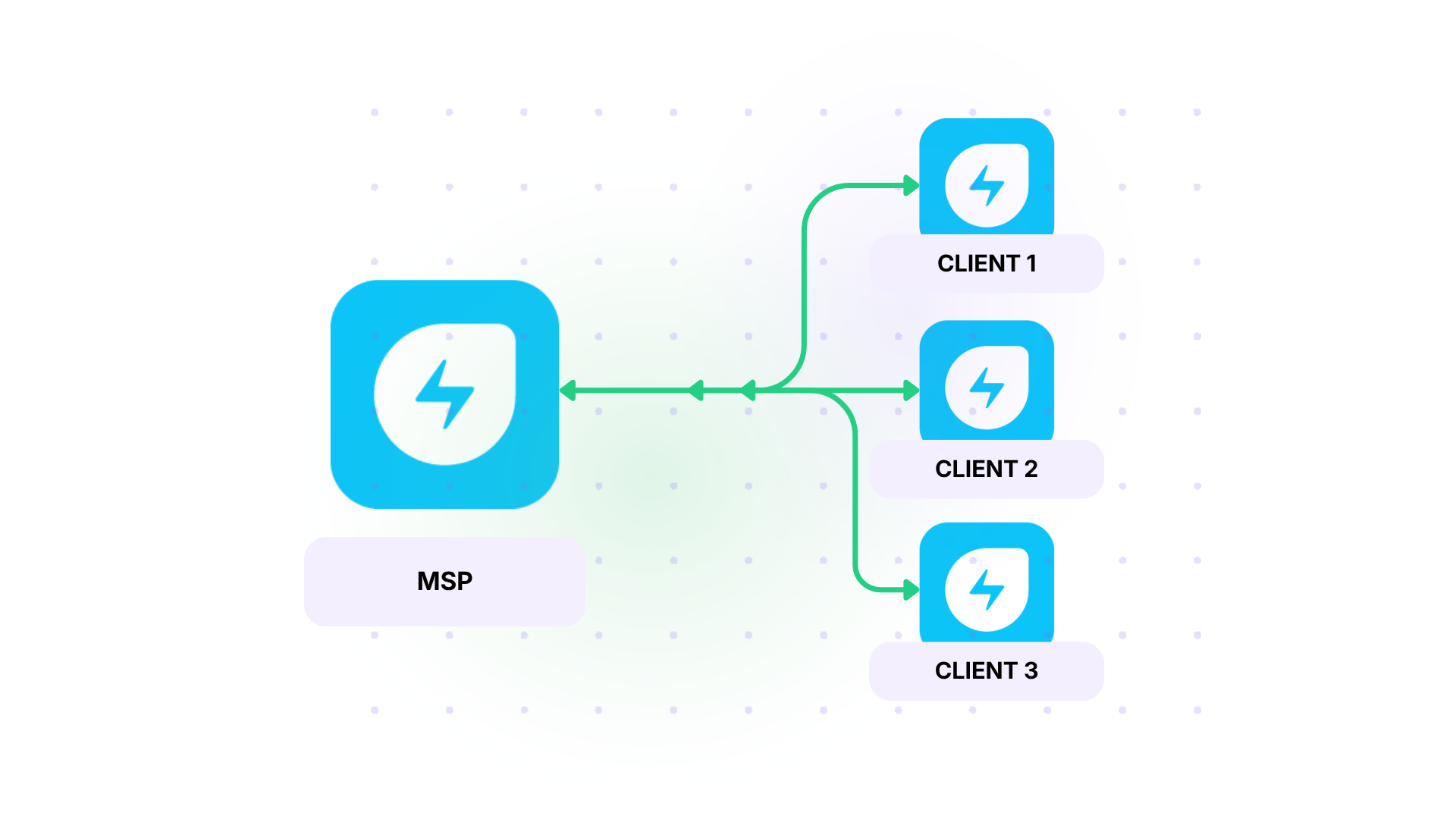
Solution: Connect each client’s Freshservice instance to the MSP’s instance through independent Exalate connections. When a client agent tags a ticket with “Escalate to MSP” or sets a custom field to “MSP Required,” the integration creates a corresponding incident in the MSP’s environment with the incident description, priority, affected configuration items, and any attached documentation.
Real-World Application: An MSP supporting mid-market clients implemented this pattern to replace an email-based escalation process. Before integration, the MSP received an average of 45 escalation emails per week, each requiring a technician to create a Freshservice ticket and copy the relevant details manually. After deployment, escalation time dropped from an average of 35 minutes to under 90 seconds per ticket, and no escalation was lost due to missed emails.
2. Post-Acquisition ITSM Bridge During Migration
Case: A parent company acquires a subsidiary. Both organizations run Freshservice. The long-term plan is to consolidate into a single instance, but that migration will take 6 to 12 months. In the interim, the combined IT leadership needs visibility into critical incidents across both instances, and the teams need the ability to collaborate on shared infrastructure problems.
Solution: Set up a bidirectional integration between both Freshservice instances focused on high-priority incidents (P1 and P2). When either instance logs an incident with priority “Urgent” or “High” that is categorized under shared infrastructure (network, identity systems, shared SaaS platforms), the integration creates a corresponding incident in the other instance. Both teams can add comments, update status, and attach investigation findings. When the issue resolves in either instance, the closure details propagate to the other side.
Real-World Application: A technology holding company acquired a cloud services firm. For the first 9 months after the acquisition, the integration synced an average of 35 critical incidents per month between the two Freshservice instances. The CISO’s team used the shared incident data to identify 4 overlapping security vulnerabilities that would have gone undetected if each instance operated in isolation.
3. Tiered Support Escalation Between Specialized Teams
Case: A large technology company separates its Tier 1 service desk (general IT support, password resets, hardware requests) from its Tier 2/3 engineering support (application debugging, database issues, infrastructure tuning). Each tier operates its own Freshservice instance with distinct workflows, SLA structures, and agent skill sets.
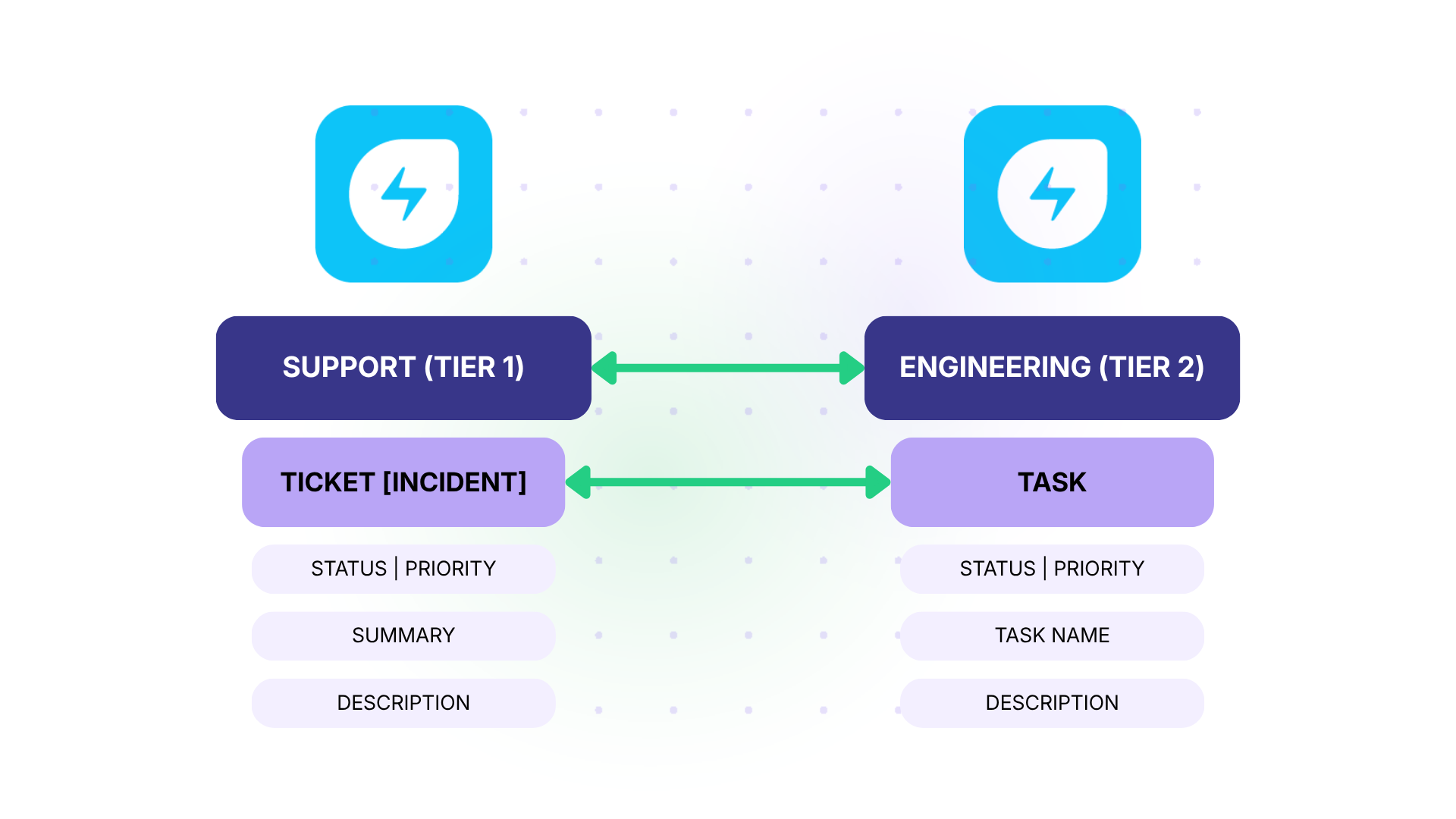
Solution: When a Tier 1 agent determines that a ticket requires Tier 2 attention, they set a custom field “Escalation Level” to “Tier 2” and select the relevant specialization category. The integration picks up the ticket, creates a new incident in the Tier 2 instance with the complete conversation history, attachments, and initial triage notes, and links both records through correlation fields. The Tier 2 team works on the issue in their own environment. Status changes, new findings, and resolution notes sync back to the Tier 1 ticket so the original agent can keep the requester informed.
Real-World Application: A company processing 2,500 Tier 1 tickets per month found that roughly 18% required Tier 2 involvement. Before integration, escalation involved copying ticket details into a shared Confluence page, which the Tier 2 team checked twice daily. Average escalation-to-acknowledgment time was 6 hours. After automating the handoff, acknowledgment time dropped to 15 minutes, and the Confluence-based escalation tracker was decommissioned.
4. Vendor Collaboration with Controlled Data Sharing
Case: An enterprise outsources its endpoint management to a vendor. Both the enterprise and the vendor run Freshservice. The enterprise needs to share specific incident details (device type, error description, affected user count) with the vendor but must keep internal investigation notes, executive communications, and compliance-sensitive data private.
Solution: Configure outgoing scripts on the enterprise side to include only the fields designated for vendor sharing: subject, description (sanitized), priority, device category, and public notes. Private notes, internal tags, and custom fields containing cost center or budget data are excluded from the outgoing payload. The vendor’s incoming scripts map the received data into their own Freshservice workflow. When the vendor resolves the issue, the resolution summary and work logs sync back to the enterprise instance, but the vendor’s internal scheduling notes and resource allocation data stay on their side.
Real-World Application: An enterprise with 8,000 endpoints outsourced patching and hardware support to a vendor. The integration synced an average of 180 tickets per month. Before deployment, the enterprise security team flagged 3 incidents per quarter where internal data had been accidentally shared via email-based escalation. After switching to the scripted integration with field-level controls, accidental data exposure dropped to zero.
How to Set Up a Freshservice to Freshservice Integration With Exalate
This walkthrough covers connecting two Freshservice instances through Exalate’s platform.
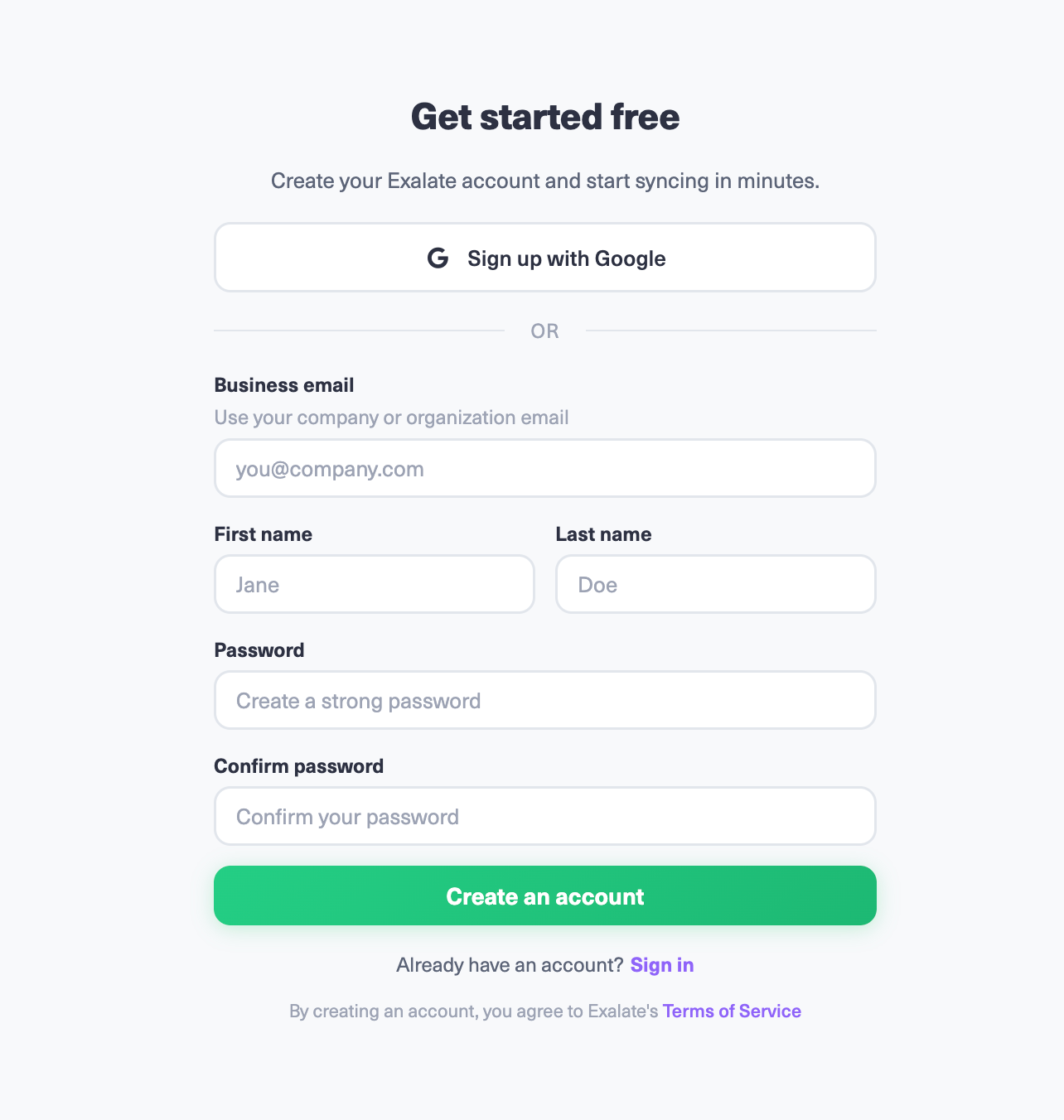
Create Your Exalate Account
Navigate to the Exalate app and create an account using business email verification or Google sign-up. Existing users can log in directly.
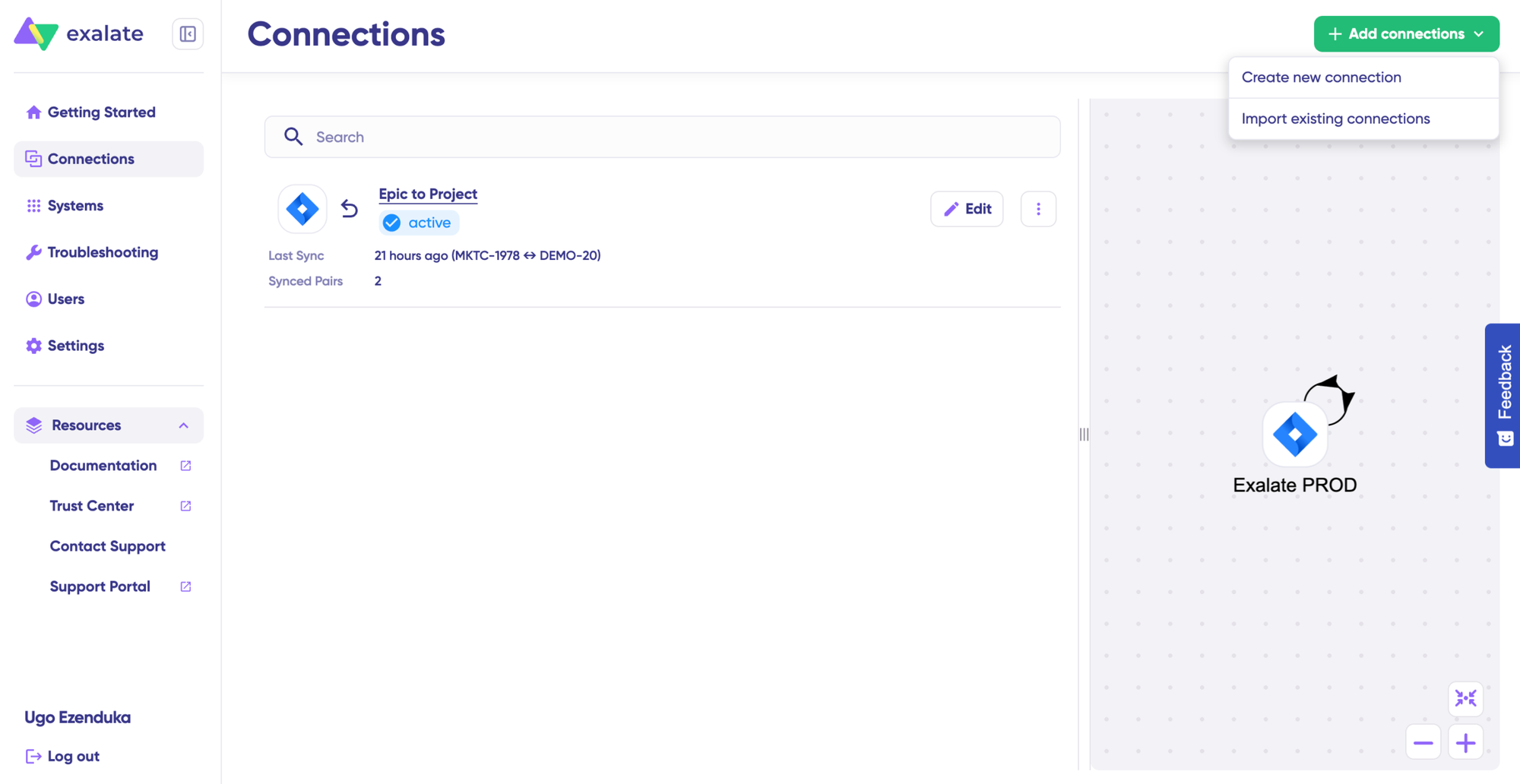
Add a New Connection
Inside your console, navigate to the “Connections” tab. Click “+ Add connections” and select “Create new connection.”
Enter the name for System A (your first Freshservice instance). Provide the instance URL (e.g., companyA.freshservice.com).
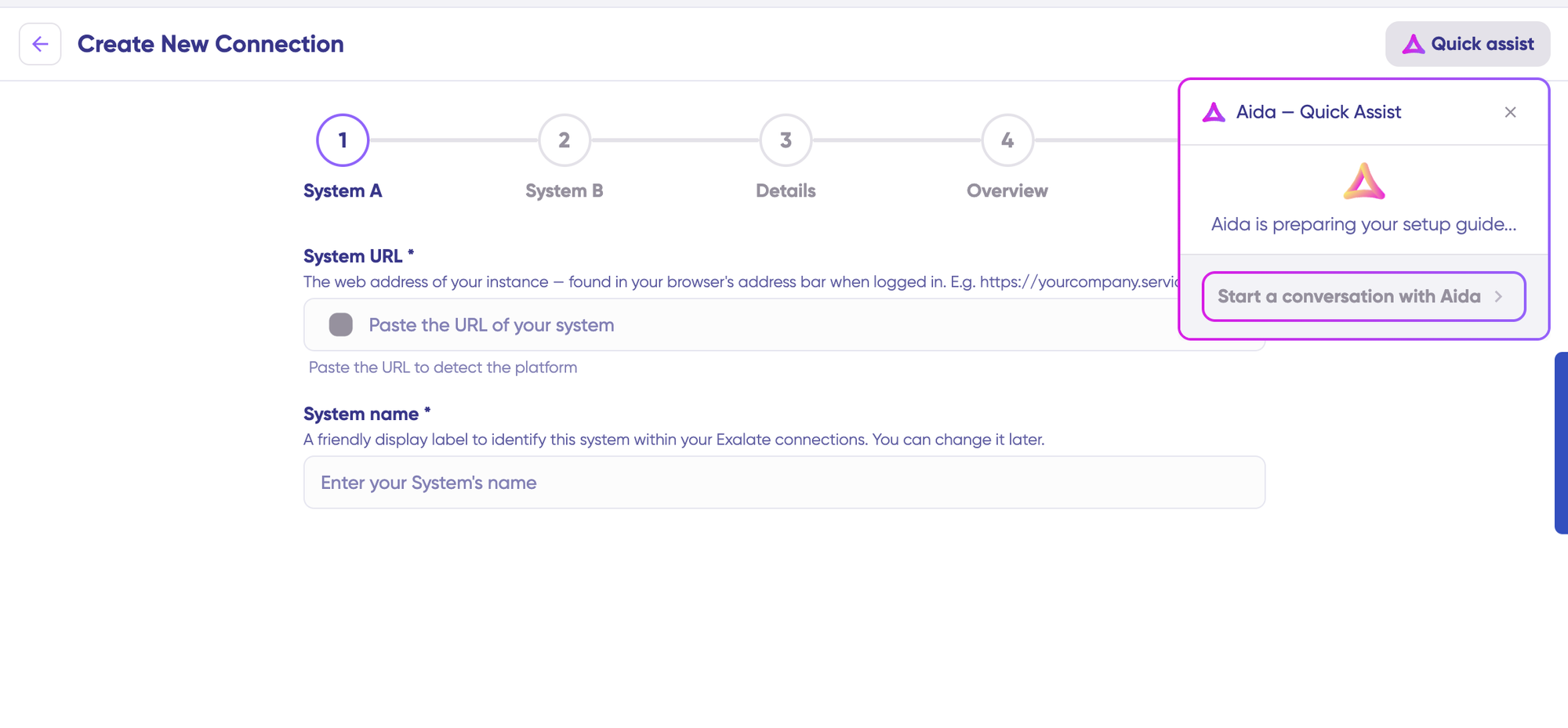
You can also speed up the process by using Aida – Quick Assist at the top right of the dashboard.
Exalate validates the URL. For new systems, enter your Freshservice credentials. Freshservice uses API keys to authenticate your system.
Repeat for System B (your second Freshservice instance). Assign a connection name, click “Next,” review details, and click “Create connection.”
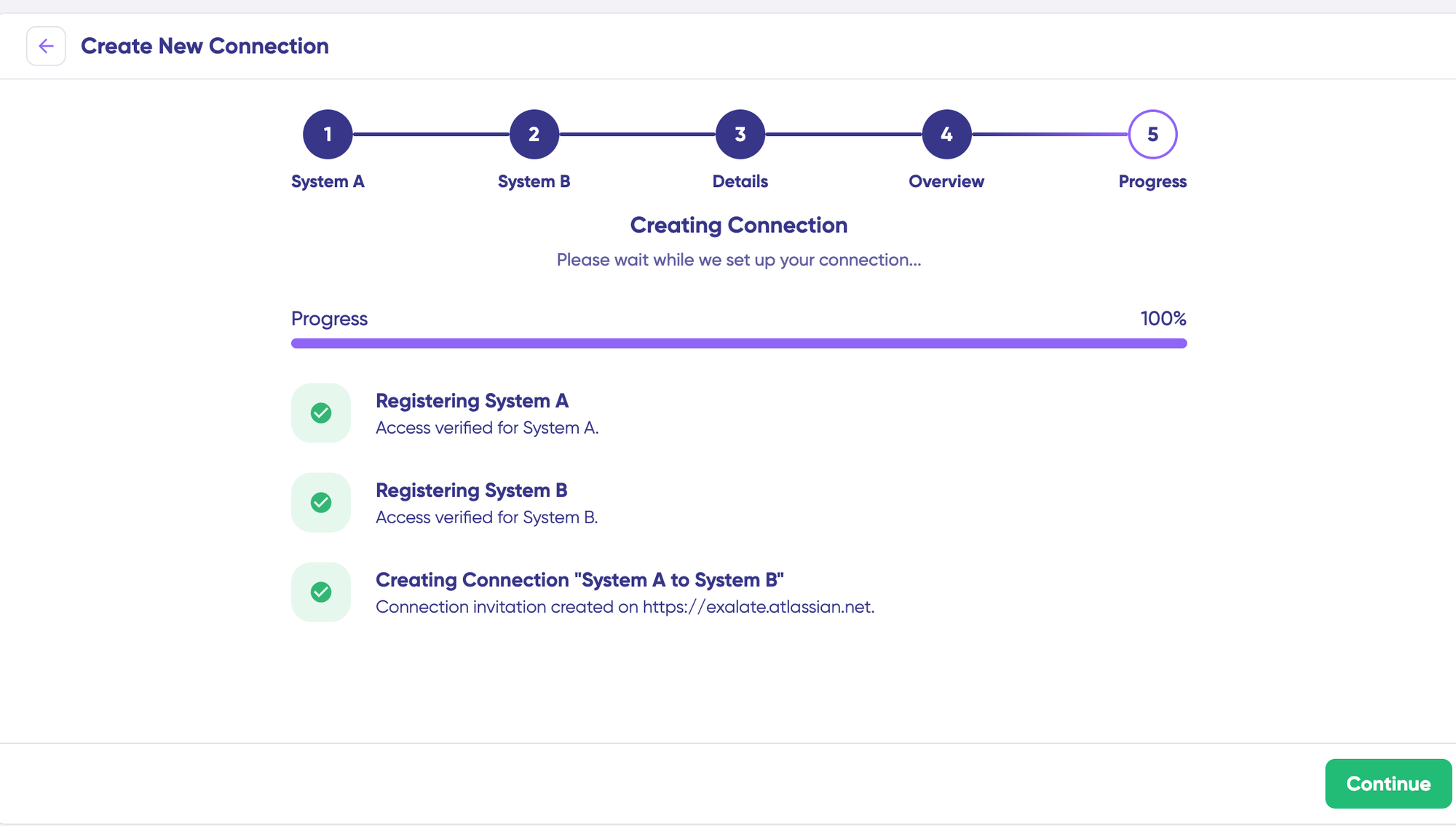
Select “Continue to configuration” and choose the Freshservice environment for synchronization. Click “Build & continue.”
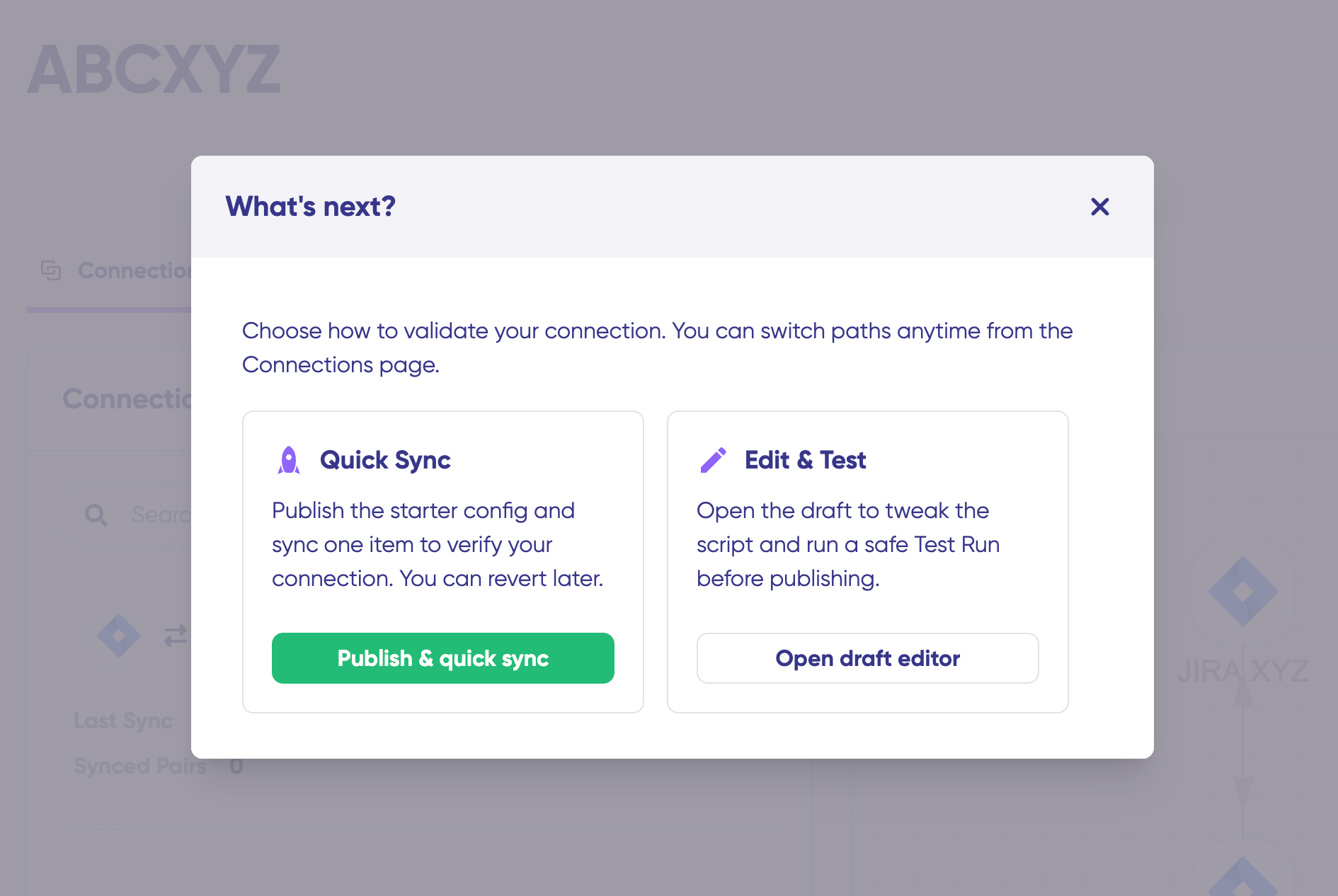
Quick Sync (Validate the Connection)
Quick Sync tests your connection by syncing a single ticket between instances.
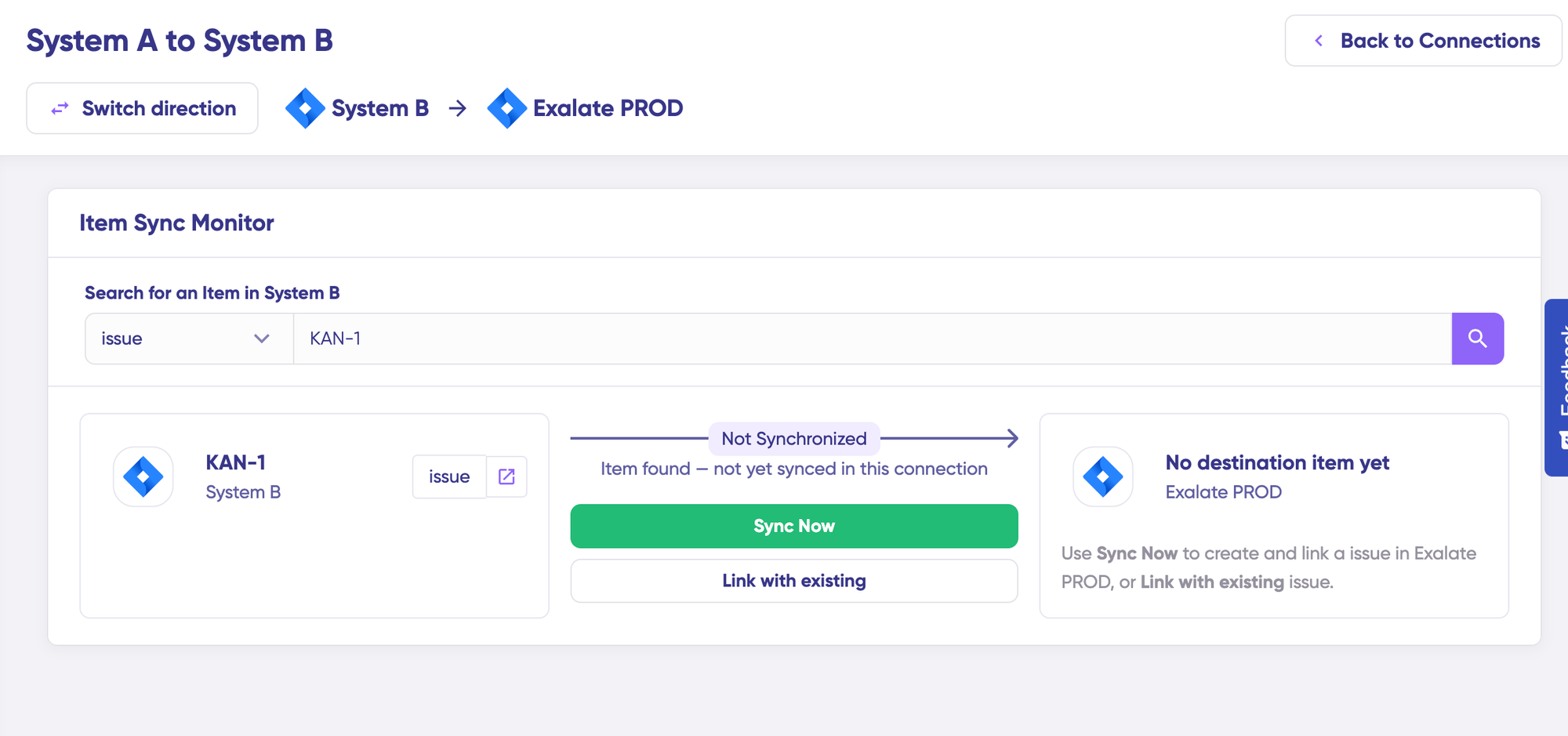
In the “Item sync monitor,” enter a Freshservice ticket number from either instance. Click “Sync Now” for a new item or “Link with existing” to connect two pre-existing tickets.
Verify the synced tickets by opening both in new windows.
Configure Sync Rules (Edit and Test)
Click “Create a new version” or “Open latest draft” to work on a draft without affecting production.
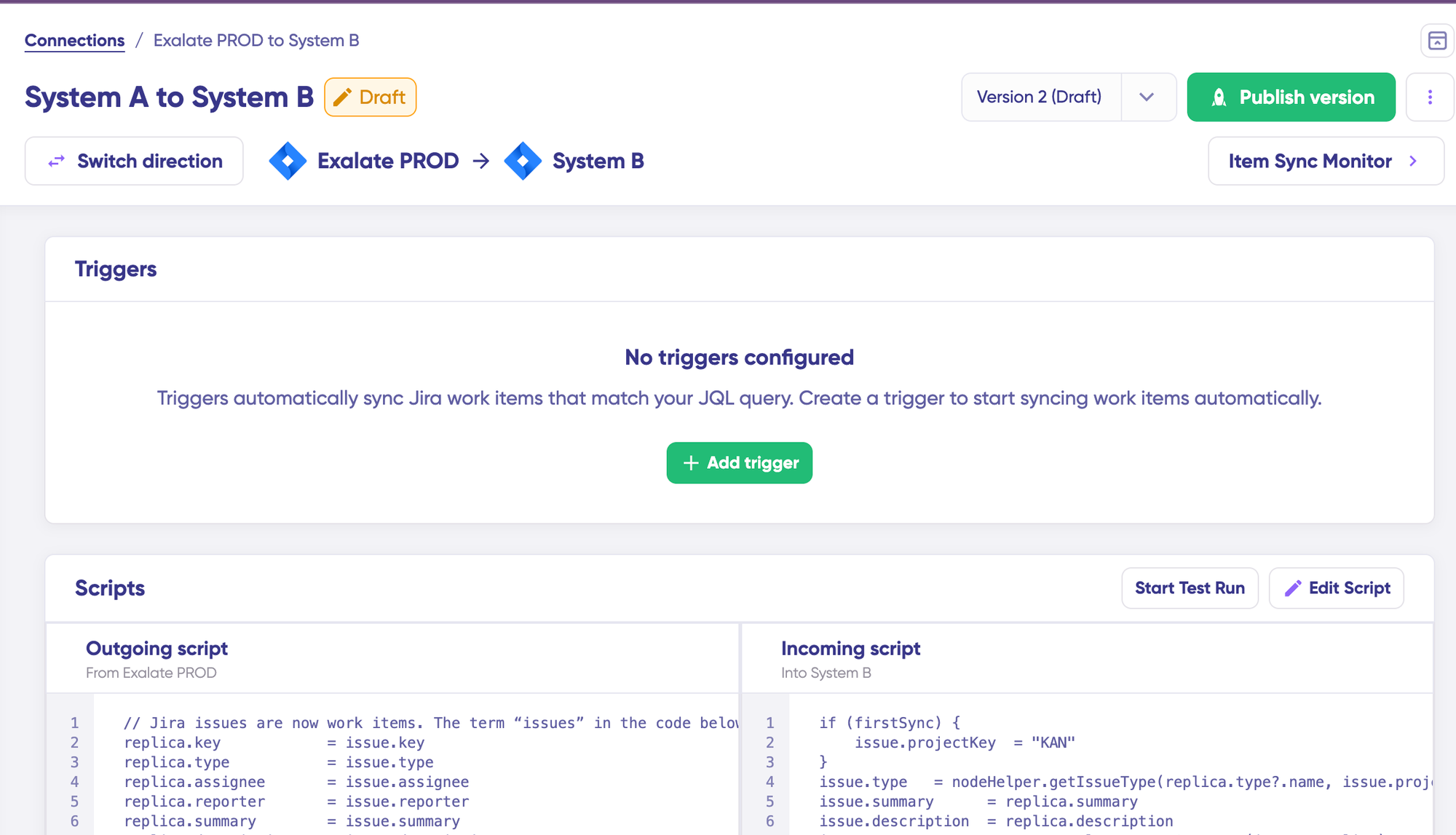
Click “Edit” to access the script editor.
Sync rules are Groovy scripts split into two sides:
- Outgoing script (from Instance A): Defines which fields leave Instance A and how they are formatted for transfer.
- Incoming script (to Instance B): Defines how the received data maps into Instance B’s fields, categories, and workflows.
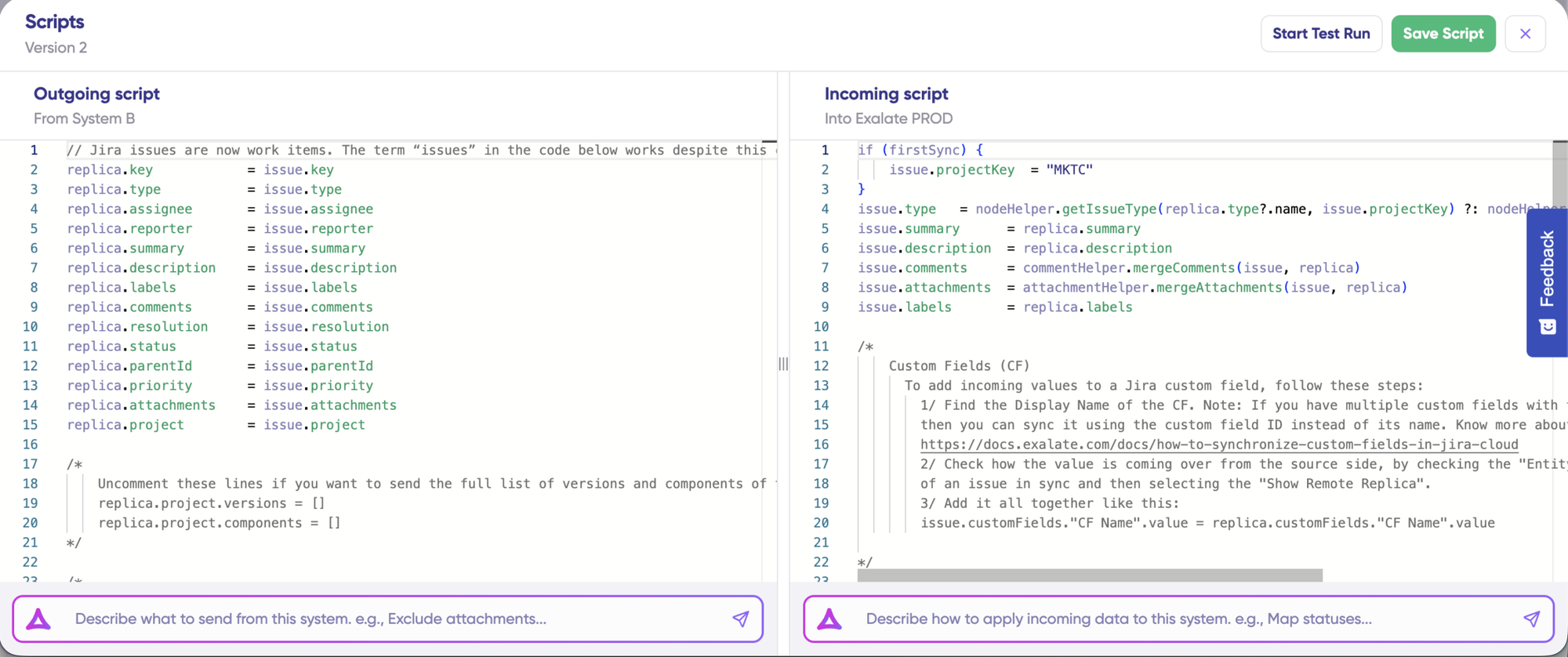
Since both sides run Freshservice, many fields have identical names. But category structures, custom field options, assignment groups, and status labels often differ between instances. The scripts handle those translations.
Example: Mapping priority values between instances that use different naming conventions.
// Outgoing script on Instance A
replica.priority = entity.priority
// Incoming script on Instance B
def priorityMap = [
    "Low": "Low",
    "Medium": "Medium",
    "High": "High",
    "Urgent": "Critical"
]
entity.priority = priorityMap[replica.priority] ?: "Medium"Code language: JavaScript (javascript)
To exclude private notes from syncing:
// Outgoing script
replica.comments = entity.comments.findAll { !it.internal }
Using Aida for Script Generation
Aida is available in both script editors. Describe your requirement in plain language, and Aida generates Groovy code.
Outgoing script prompts:
- “Exclude private notes and time entries.”
- “Only send incidents where priority is High or Urgent and category is Infrastructure.”
Incoming script prompts:
- “Map Instance A priority Urgent to Instance B priority Critical.”
- “Assign all incoming tickets to the MSP Operations group.”
- “Add a prefix [Client-A] to the subject line.”
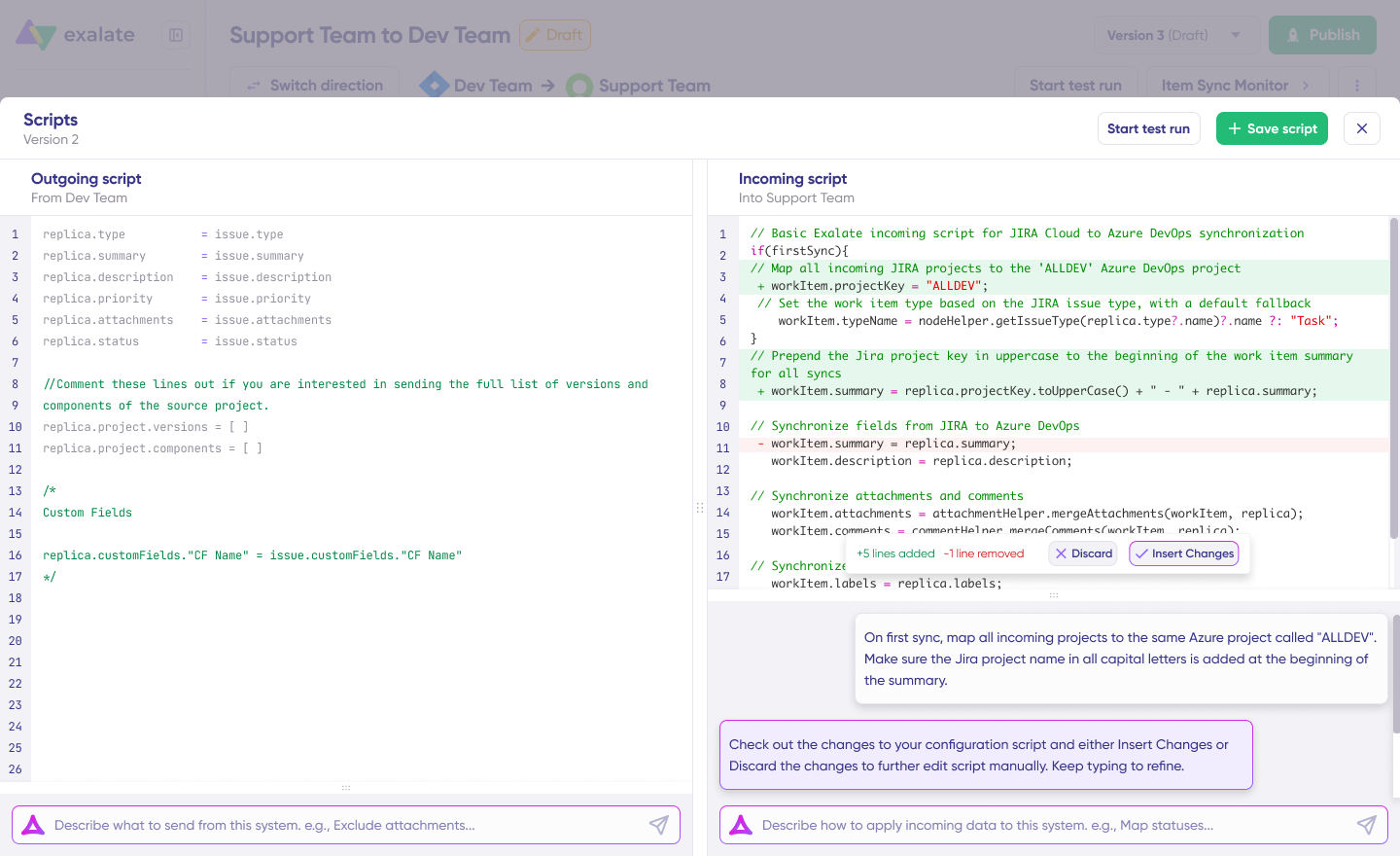
Review Aida’s output carefully. Green highlights indicate additions. Red highlights show removals. Click “Insert” or “Discard.”
Test Run (Validate Before Production)
Click “Start Test Run.” Select tickets from either instance to test against. Click “Start Test Run.”
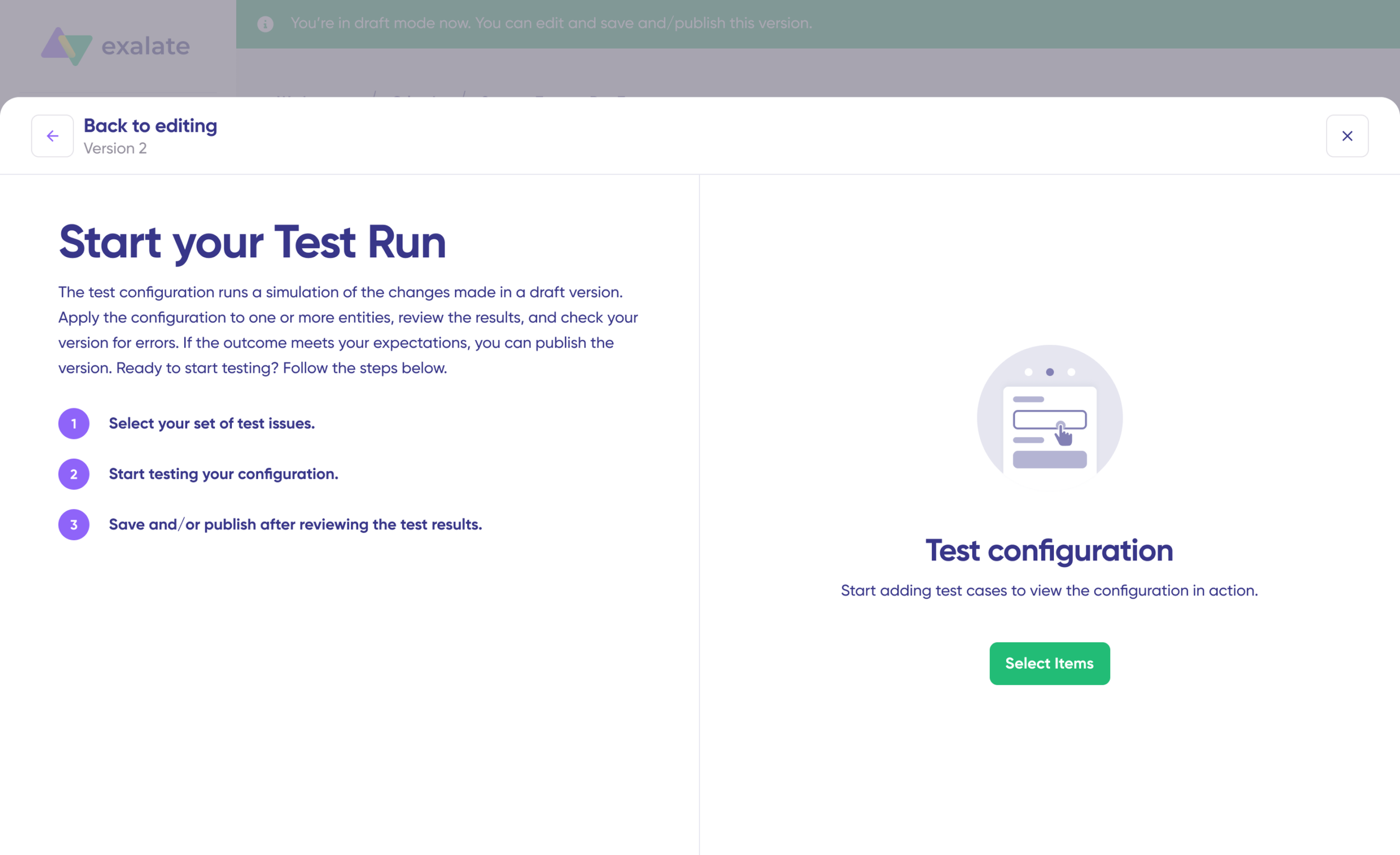
Review the incoming and outgoing replicas. Verify field mappings, check conversation handling, and confirm that excluded fields are indeed excluded.
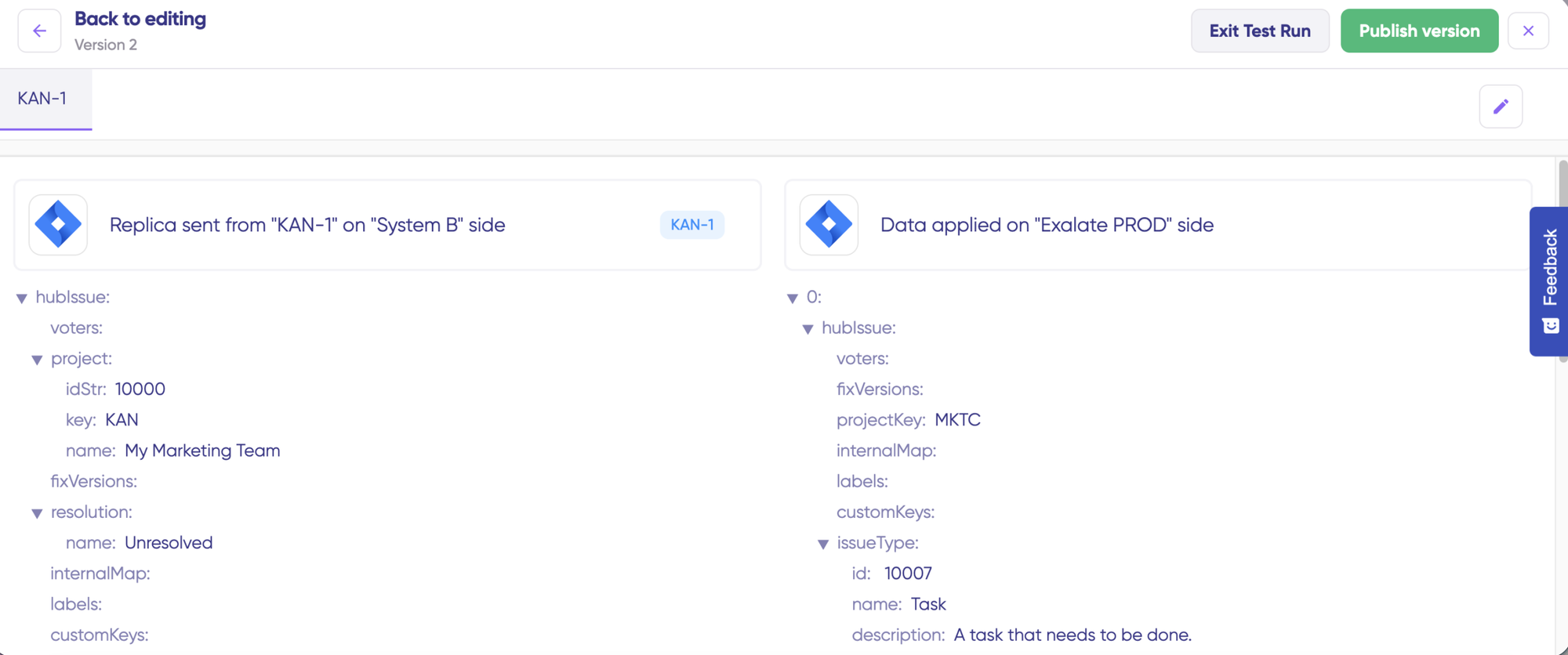
Adjust scripts and retest as needed. When satisfied, click “Publish Version.”
All versions appear in the “Version” dropdown: Active, Draft, or Archived.
Set Triggers for Automatic Sync
Triggers define which tickets enter the sync automatically. Click “+ Add trigger.”
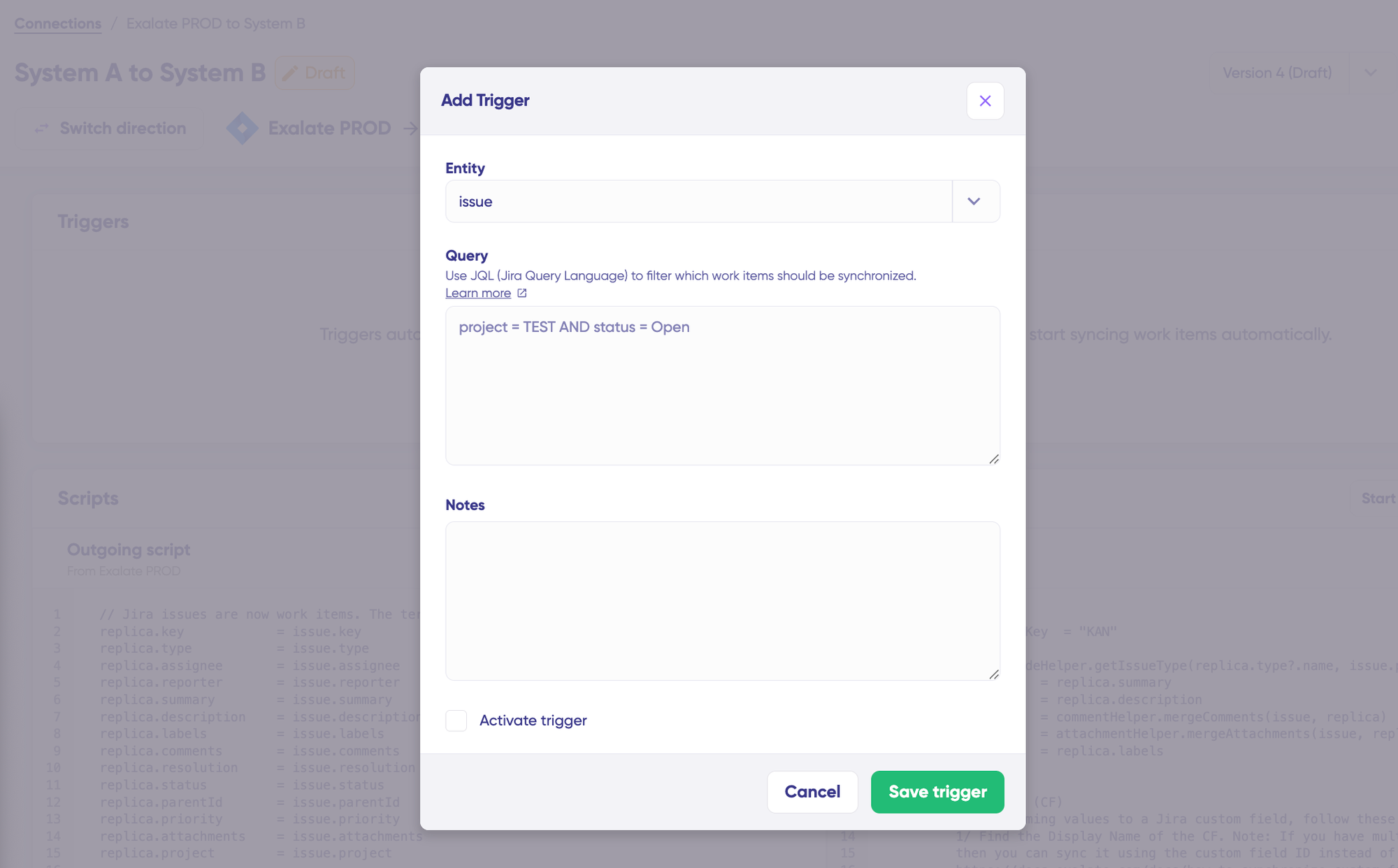
Both sides use Freshservice’s native query syntax:
Instance A trigger examples:
priority:1 AND category:Infrastructuresyncs urgent infrastructure incidents.tag:escalate-to-mspsyncs tickets tagged for MSP escalation.
Instance B trigger examples:
status:5 AND custom_field:resolution_shared=truesyncs resolved tickets where the resolution should be shared back.
Publish triggers to activate them.
Troubleshoot with Aida
Navigate to the “Troubleshooting” tab for error visibility.
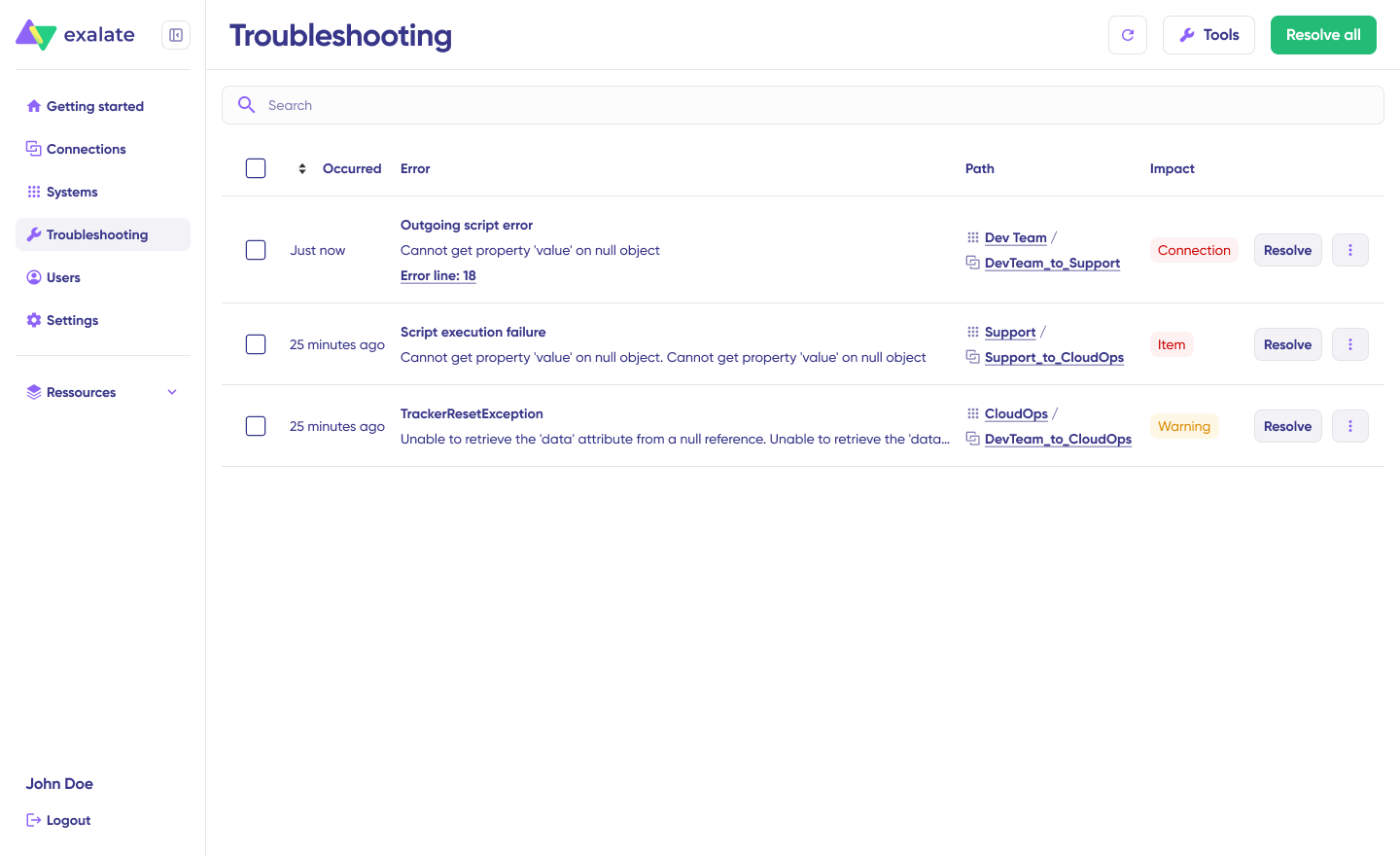
Hover over errors and click the Aida icon for context-aware diagnosis: error explanation, proposed fix, full stack trace, and raw replica data.
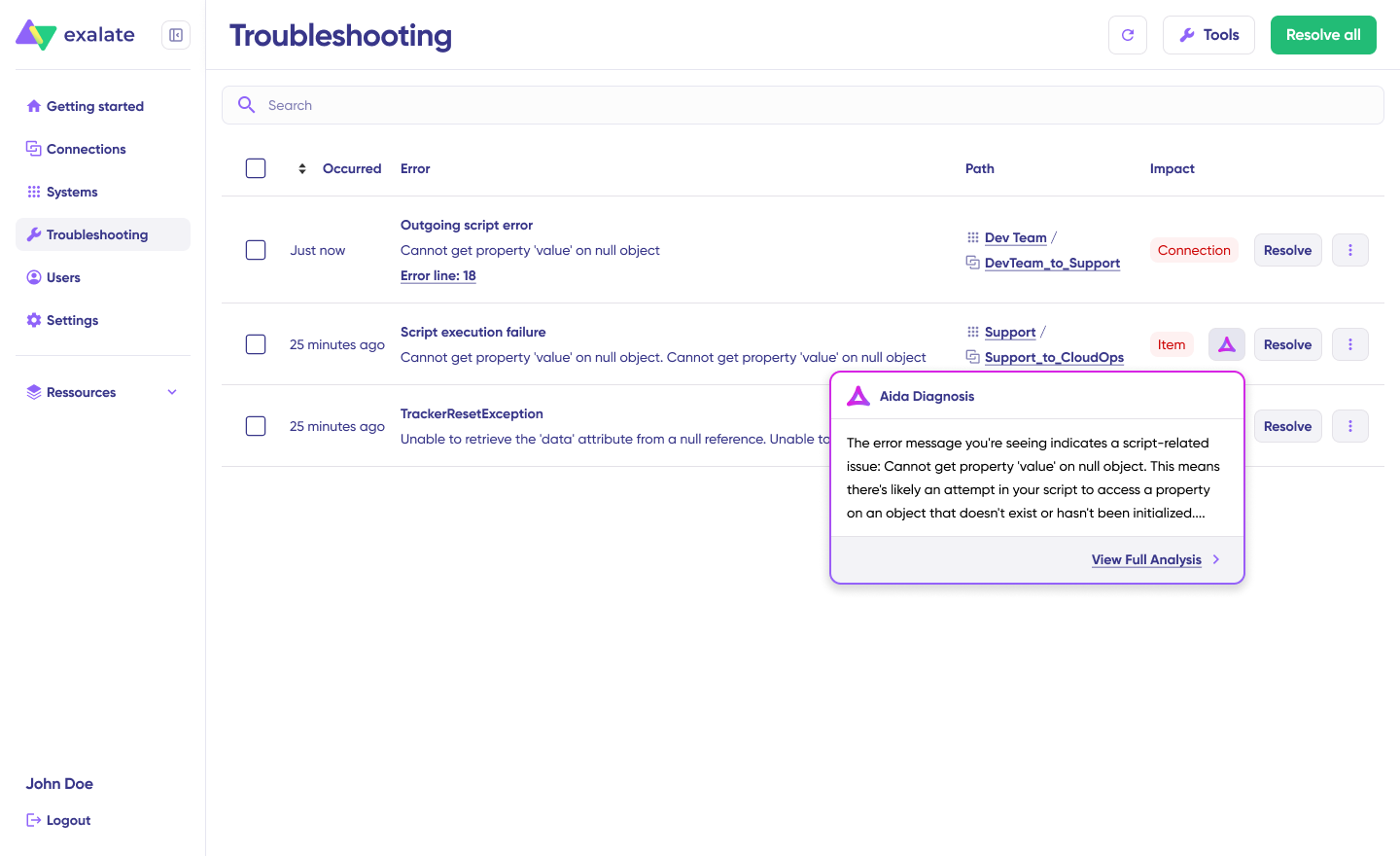
Click “Resolve” to apply and retry.
Advanced Freshservice to Freshservice Integration Patterns
Correlation Fields for Cross-Instance Traceability
When tickets sync between Freshservice instances, maintaining a stable link between the original and the replica matters for auditing, reporting, and troubleshooting. Exalate uses correlation fields to store the remote ticket’s identifier in a local custom field.
// Store the remote ticket number in a custom field
entity.customFields."Remote Ticket ID".value = replica.key
This allows agents in either instance to navigate directly to the corresponding ticket on the other side, even if the subject line or description changes over time.
Many-to-One Incident Consolidation
When multiple clients report symptoms of the same root cause, an MSP can link all client-originating tickets to a single master incident in their internal instance. Resolution notes on the master incident propagate to all linked client tickets simultaneously.
Selective Conversation Replication
Not every comment belongs on both sides. Configure scripts to sync only comments that meet specific criteria:
// Sync only comments tagged for external sharing
replica.comments = entity.comments.findAll { comment ->
    comment.body.contains("[SHARE]")
}Code language: JavaScript (javascript)
This gives agents explicit control over which notes cross the boundary.
How to Choose a Tool for Freshservice Integration
Real-time Bidirectional Capability
One-way ticket creation covers basic escalation. Real collaboration between instances requires changes to flow in both directions. Verify that the tool supports simultaneous updates from both sides with built-in conflict resolution.
Field-Level Control
Same-platform integrations seem straightforward, but Freshservice instances configured by different teams often diverge significantly. Category trees, custom field dropdown values, status labels, and group structures rarely match. The tool must support value-level mapping, not just field-level mapping.
Trigger Granularity
Selective sync prevents noise. Look for the ability to combine priority, category, custom field values, tags, and requester attributes into compound trigger conditions. Broad triggers create unnecessary ticket volume in the receiving instance.
Cross-Organization Data Isolation
For MSP and cross-company scenarios, each party must control its own sync rules without dependencies. The MSP decides what leaves their instance. The client decides what enters theirs. Neither party should need admin access to the other’s Freshservice environment.
Security and Compliance
Integration handles incident data, asset records, and potentially regulated information. Verify encryption in transit (TLS 1.2+) and at rest, role-based access control for integration administration, and compliance certifications. Exalate maintains ISO 27001 certification. Review detailed security documentation at the Exalate Trust Center.
Flexibility
Your integration requirements will evolve from a simple incident sync between two instances, eventually to include service requests, change records, and custom entities. The tool should accommodate new sync rules, conditional logic, and advanced data transformations without requiring a full rebuild each time.
Scalability
The tool should scale horizontally (more connections) without degrading performance or requiring architectural changes. Also, ask about rate limit handling at volume, since Freshservice API limits vary by plan, and a sync tool that does not manage API consumption intelligently will hit throttling walls during major incident surges.
Pricing Predictability
Freshservice-to-Freshservice sync volumes can be unpredictable, especially during major incidents when ticket counts spike. Per-task pricing models punish these spikes. Outcome-based models (like Exalate’s, where you pay for active items in sync) absorb volume fluctuations more predictably.
Best Practices For Freshservice to Freshservice Integration
- Start with a single ticket type. Sync incidents first. Once that flow is stable, add service requests, then change records. Trying to sync everything from day one introduces too many variables for troubleshooting.
- Align naming conventions before configuring scripts. If Instance A calls its priority levels “Low / Medium / High / Urgent” and Instance B uses “P4 / P3 / P2 / P1,” document the mapping table before writing a single line of Groovy. Misaligned values are the most common source of sync errors.
- Use correlation fields from the start. Storing the remote ticket ID in a local custom field costs nothing and saves significant time later when auditing, reporting, or debugging sync behavior
- Test with edge cases. Use the test run functionality to evaluate tickets that have a few attachments, special characters in custom fields, long conversation threads, and empty required fields. These are the scenarios that expose configuration gaps.
- Define escalation ownership. When a ticket syncs from Instance A to Instance B, which team owns updates going forward? Ambiguity here leads to conflicting edits. Establish whether Instance A freezes the ticket after escalation or continues updating it in parallel.
- Monitor sync health weekly. Check the troubleshooting tab for failed syncs, queue depth, and recurring errors. Sync failures during low-traffic periods often go unnoticed until a high-priority incident gets stuck.
- Document your trigger conditions. When staff turnover happens, the person who configured the integration may no longer be available. Written documentation of what triggers sync, how fields map, and what is excluded keeps the integration maintainable.
Conclusion
Connecting two Freshservice instances fills a gap that Freshworks’ native tooling does not address. Whether the goal is MSP-to-client ticket routing, post-acquisition bridge building, regional incident coordination, or tiered support escalation, the integration ensures that both instances operate from the same set of facts without either team leaving their own environment.
For bidirectional sync with field-level mapping, cross-organization data isolation, and the ability to scale across multiple instances and platforms, a dedicated integration tool like Exalate delivers the control and reliability the use case demands.
If you’re ready for seamless Freshservice to Freshservice workflows, then book a call with our engineers to see how Exalate can be helpful.
Frequently Asked Questions
Does Freshworks provide a native way to sync two Freshservice instances?
No. Freshworks does not offer a built-in connector for linking two production Freshservice instances. The native Freshdesk-Freshservice connector is designed for connecting Freshdesk (customer support) to Freshservice (IT), not Freshservice to Freshservice. The Sandbox config sync feature transfers metadata (workflow rules, automation configs) between Sandbox and Production, not live ticket data between two production instances.
Can Exalate connect more than two Freshservice instances?
Yes, Exalate supports hub-and-spoke and mesh architectures. An MSP can connect 10 or more client Freshservice instances to its own, with each connection operating independently. The unified workspace console manages all connections from a single interface.
What happens if both instances update the same ticket at the same time?
Exalate processes updates sequentially through its sync queue. Each update carries a timestamp and origin identifier. If conflicting changes arrive from both sides simultaneously, the last update processed takes effect. For fields where this is problematic, you can configure one-way sync on a per-field basis (e.g., status syncs bidirectionally, but description syncs one-way from the originating instance).
Can I sync only specific ticket types between instances?
Yes, Exalate triggers control exactly which tickets enter the sync. You can filter by ticket type (incident, service request, change, problem), priority, category, custom field values, tags, or any combination. Tickets that do not match the trigger conditions are never synced.
Is the sync real-time?
Exalate synchronizes changes within seconds of the triggering event. Status updates, new comments, and field changes propagate in near real-time. The sync queue provides visibility into processing status, and automatic retry handles transient failures without manual intervention.
Can I exclude certain fields or conversations from syncing?
Yes, you can exclude certain fields and conversations from the sync. Outgoing scripts control exactly what data leaves each instance. You can exclude private notes, specific custom fields, time entries, or any other data element. Incoming scripts control how received data maps into the local instance, including the option to discard fields that are not relevant locally.
How does pricing work for Freshservice-to-Freshservice integration with Exalate?
Exalate uses outcome-based pricing. You pay for the number of ticket pairs actively synchronized at any given time. Each integration between two instances requires its own plan. The cost per item decreases as sync volume grows. Unlimited connections and users are included with every plan. A 30-day free trial provides full functionality. View pricing details.
Can I also connect Freshservice to Jira, ServiceNow, or other platforms alongside the Freshservice-to-Freshservice sync?
Exalate supports simultaneous connections to Jira, Jira Service Management, ServiceNow, Zendesk, Salesforce, Azure DevOps (Cloud and Server), Freshdesk, Asana, GitHub, and more. All connections are managed from the same console. View all supported platforms.
What security measures protect data during Freshservice-to-Freshservice sync?
Exalate security features include TLS 1.2/1.3 encryption in transit, encryption at rest, JWT authentication, role-based access control, and audit logging of all configuration changes. Exalate holds ISO 27001 certification. Visit the Exalate Trust Center for detailed documentation.
How long does it take to set up a Freshservice-to-Freshservice integration?
A basic bidirectional sync with default field mapping can be up and running within a few hours using Quick Sync and Aida-generated scripts. More complex configurations with custom field transformations, multiple trigger conditions, and conversation filtering typically takes hours. For organizations that prefer hands-off implementation, Exalate’s managed services team handles the full setup.
Can I use this integration for Freshservice data migration?
Exalate can transfer historical tickets between Freshservice instances, but it is primarily an ongoing synchronization tool, not a one-time migration utility. For large-scale migrations with thousands of historical records, discuss your requirements with the Exalate team to determine whether the integration approach or a dedicated migration service is more appropriate.
Recommended Reading:
- How to Set Up a Freshservice ServiceNow Integration: The Complete Guide
- How Freshservice Salesforce Integration Unifies Sales and Support Operations
- Freshservice Azure DevOps Integration: The Complete Guide for ITSM and Agile Teams
- How to Set Up a Freshservice Zendesk Integration
- A Guide to Setting Up a Freshservice Freshdesk Integration