ServiceNow and Salesforce connectors come in the form of iPaaS platforms, ServiceNow’s own spoke, no-code sync apps, and dedicated sync tools on both platforms.
Most of these tools give you connectors and actions, while your team builds the correlation, comment rules, and loop prevention. A few are built for two-way record sync and handle those controls for you.
However, these tools differ in how they handle incidents. Can a case escalate into more than one incident? Do work notes stay internal? Does the resolution make it back to the customer without someone copying it over?
We asked these questions while comparing Salesforce-to-ServiceNow integrations for case-to-incident sync, focusing on sync direction, record relationships, comment control, cross-company support, and what each costs to run over time.
This list is for support operations leaders, ITSM admins, and solution architects evaluating how to connect Service Cloud and ServiceNow, plus MSPs and vendors who need to sync their Salesforce with a client’s ServiceNow.
Key Takeaways
- Most Salesforce ServiceNow integration problems show up at the escalation point, when a case becomes an incident and context gets lost on the way.
- One case often needs more than one incident, so check whether a tool handles one-to-many relationships before you buy.
- Comment control matters as much as field coverage. Internal work notes shouldn’t reach customers, and resolution notes should reach the case.
- Native options such as the IntegrationHub Salesforce Spoke still need you to design the mapping, correlation, and loop prevention yourself.
- Enterprise iPaaS tools (MuleSoft, Boomi, Informatica, Workato, Tray.ai) connect both platforms, but your team builds and maintains the two-way incident logic.
- Cross-company setups, where the vendor runs Salesforce and the client runs ServiceNow, need each side to control what it sends and receives.
- Total cost of ownership includes licensing, developer time, and maintenance after every platform update.
Talk about your integration setup with us.
Get free, expert advice on your ServiceNow to Salesforce setup. We’ll reach out via email to discuss your use case.
What Is Incident Management?
In ITSM, an incident is any unplanned interruption or drop in IT service quality. Incident management is the process of handling an incident from the moment it’s reported until service returns to normal, with as little business impact as possible.
Here is an example:
Your payments API slows down during peak hours. Customers log cases in Salesforce Service Cloud, support spots the pattern and escalates, and IT opens a P1 incident in ServiceNow to find and fix the cause.
ITIL breaks this into a familiar sequence: identify, log, categorize, prioritize, diagnose, escalate, resolve, and close. For a closer look at automating each stage, see our guide to automated incident management.
Salesforce Cases vs. ServiceNow Incidents
A Salesforce case is the customer’s record. It tracks who reported the problem, which account it belongs to, the SLA promises, and every reply sent back to them.
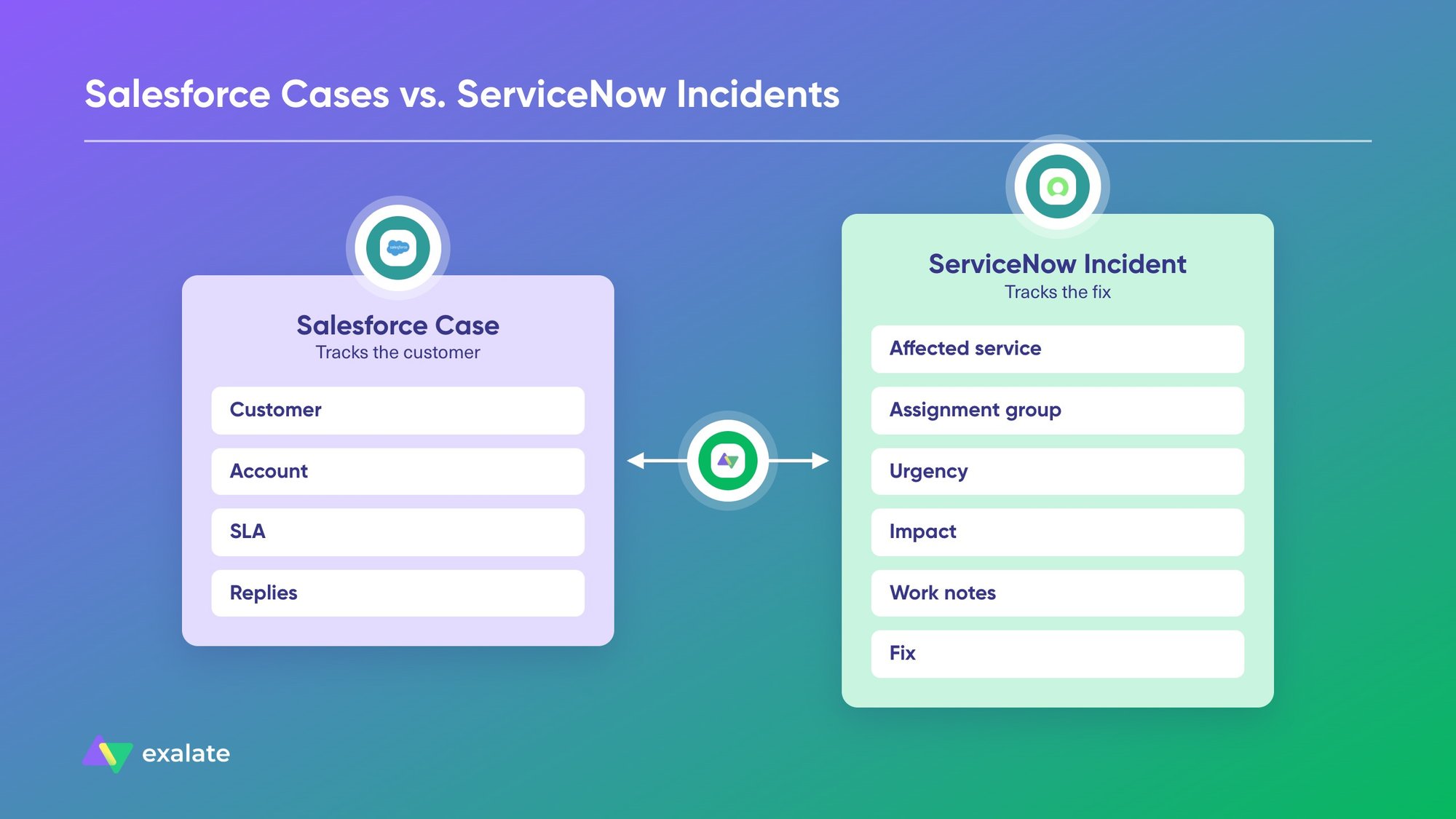
On the other end, a ServiceNow incident is IT’s record of the affected service, assignment group, urgency, impact, work notes, and fix.
These records describe the same problem from two angles. Support needs customer context, and IT needs service context, so neither team can work from the other’s object. The integration keeps both records in step without forcing anyone to switch tools.
Service Cloud also has its own Incident object for tracking customer-impacting outages. Most escalations to IT still start from a case, though, so this guide focuses on case-to-incident sync.
Differences in Incident Lifecycle Between Salesforce and ServiceNow
| Stage | Where it happens | What needs to sync |
| Identify | Salesforce (customer report) or ServiceNow (monitoring alert) | Case details or outage alert |
| Log and categorize | Both | Category, product, affected service |
| Prioritize | Both | Priority and urgency values |
| Diagnose | ServiceNow | Work notes (usually kept internal) |
| Escalate | Salesforce to ServiceNow | Case summary, account, contact, attachments |
| Resolve | ServiceNow | Resolution notes, state change |
| Close | Both | Incident closure updates the case, and support confirms with the customer |
Incidents stall at escalation and closure. If the escalated incident arrives without the account or attachments, IT starts diagnosing with missing context. If closure details don’t flow back, the case stays open, and the customer never hears about the resolution.
Why Integrate Salesforce and ServiceNow? (What Happens When You Don’t)
Without integration, support and IT keep the same incident alive in two places. Here’s what that looks like day to day.
- Vendors and clients copy updates between instances: Some teams use ServiceNow internally and rely on vendors that track support in Salesforce. Every vendor response gets copied from Salesforce into the ServiceNow ticket. For support leads, keeping Salesforce and ServiceNow in sync means incidents are created manually. As a result, each copy increases the chance of dropping an attachment, selecting the wrong priority, or omitting the account name.
- Records drift apart: A team managing accounts in Salesforce and customer records in ServiceNow can fall victim to duplicate and incomplete data moving across both systems. This often manifests as field mismatches and incorrect field values moving between systems.
- SLAs slip without anyone noticing: Your support agent can’t see the incident state, so they can’t give the customer a useful update. IT can’t see the customer’s SLA, so a P2 for a key account sits behind lower-impact work.
- Internal notes reach the wrong audience: When comments sync without rules, IT’s work notes can land in the customer-facing case thread. When they don’t sync at all, resolution details never reach the agent who has to explain the fix.
- Cases close before the customer hears back: If incident closure maps directly to case closure, IT can close a case before support confirms the fix with the customer. A separate case field for the IT state prevents this, and support decides when to close the case.
Native Salesforce to ServiceNow Integration Options
Neither platform ships a ready-made, two-way case-to-incident sync, but both give you building blocks. Before you look at third-party tools, check out the free native integration options.
ServiceNow IntegrationHub Salesforce Spoke
The Salesforce Spoke lets ServiceNow read and manage records in Salesforce objects, including Account, Contact, Case, Lead, Opportunity, Order, and User. It authenticates with OAuth 2.0 or a JWT bearer token and runs as actions inside Flow Designer.
The spoke requires a paid IntegrationHub subscription, which may exceed some companies’ or teams’ budgets. Depending on your package, IntegrationHub may not be included.
Regardless, this spoke lets you create, update, and look up records. You still design the correlation between cases and incidents, the field mapping, and the logic that stops updates from bouncing back and forth.
Salesforce APIs, Flow, and Apex Callouts
On the Salesforce side, you can push case changes out with Flow, Apex callouts, or Platform Events, and receive updates through the REST or SOAP API. API access is included in the Enterprise, Unlimited, and Performance editions.
Every outbound call counts against Salesforce’s governor and API limits. This matters during an outage, when case volume spikes at the same moment you need the integration most.
Read more about Salesforce integrations from our blog.
Custom Builds on the ServiceNow Table API
ServiceNow’s Table API lets you create and update incidents directly from Salesforce code. You control every detail, and you also own error handling, retries, and API version changes.
The bigger risk is that when the developer who built the integration leaves, the knowledge of how it works often leaves with them.
MuleSoft as Salesforce’s Integration Layer
Salesforce owns MuleSoft, so many Salesforce shops treat it as the default. However, it is a full iPaaS tool rather than a built-in feature, so it gets its own entry in the list below.
The problem is that native tools support basic sync, but two-way sync with status, comments, and attachments requires dedicated engineering resources.
Our guide to native integration covers when native options are enough.
How to Choose a Tool for ServiceNow to Salesforce Incident Management Sync
Here are some conditions and features to consider when choosing an integration solution for connecting ServiceNow and Salesforce.
Bidirectional vs. One-Way Sync
Some tools are two-way for the record but treat many fields as read-only. One-way sync is enough if Salesforce only needs to create incidents and show a read-only status. In enterprise integration scenarios, most incident workflows need two-way updates: support adds customer context, IT adds progress and resolution, and both sides see it.
Case-to-Incident Mapping
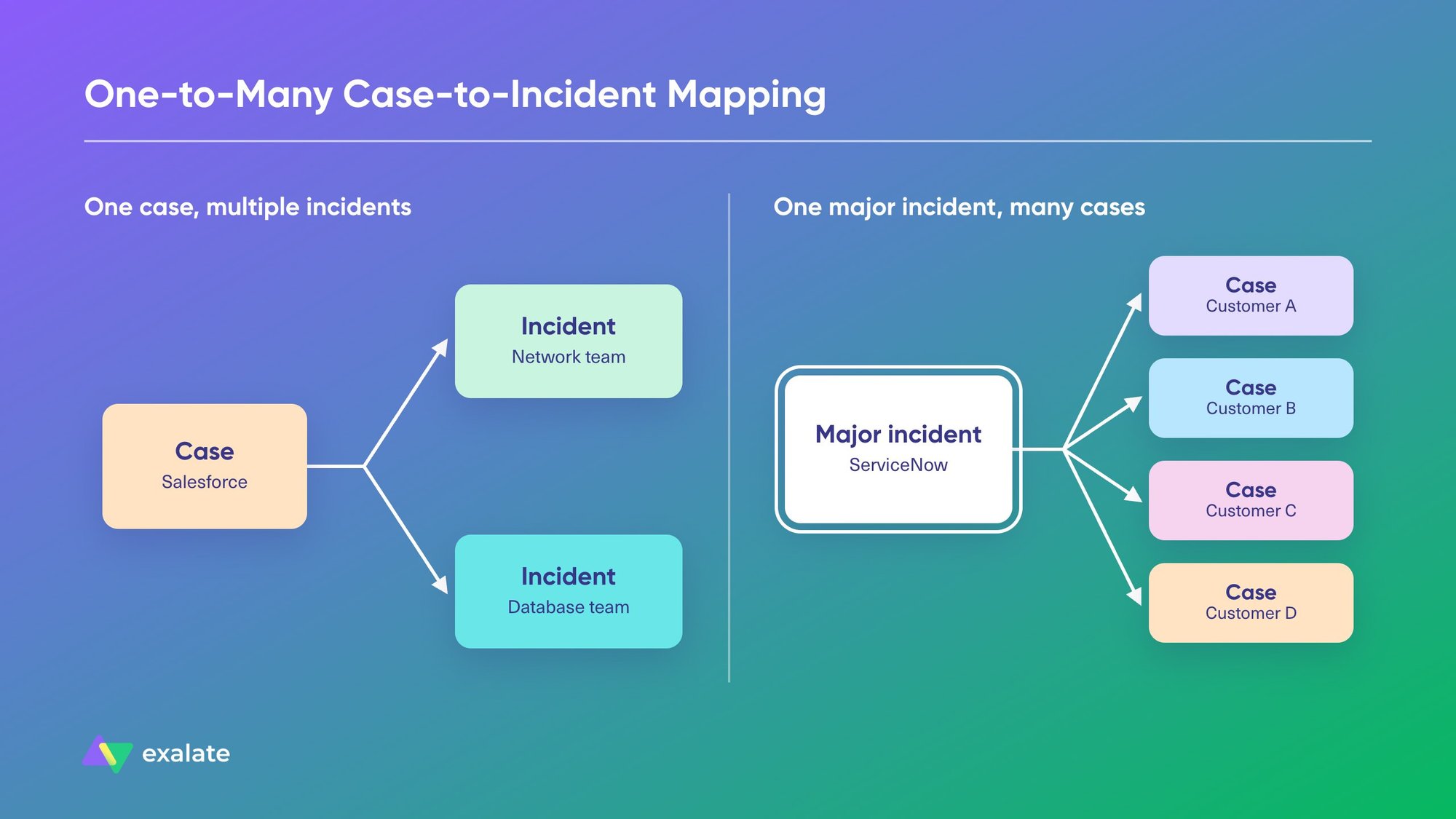
Look for flexible relationships between records. A single case may need several incidents, for example, when an outage affects 2 services owned by different assignment groups. This could be a use case to create multiple ServiceNow incidents/problems per Salesforce case.
The reverse could also be the case, where a major ServiceNow incident can affect hundreds of customers, each with their own case.
Selective Comment and Work Note Sync
The tool should let you filter by comment type, author, or keyword rather than syncing everything. This will help you decide which comments cross over and where they land.
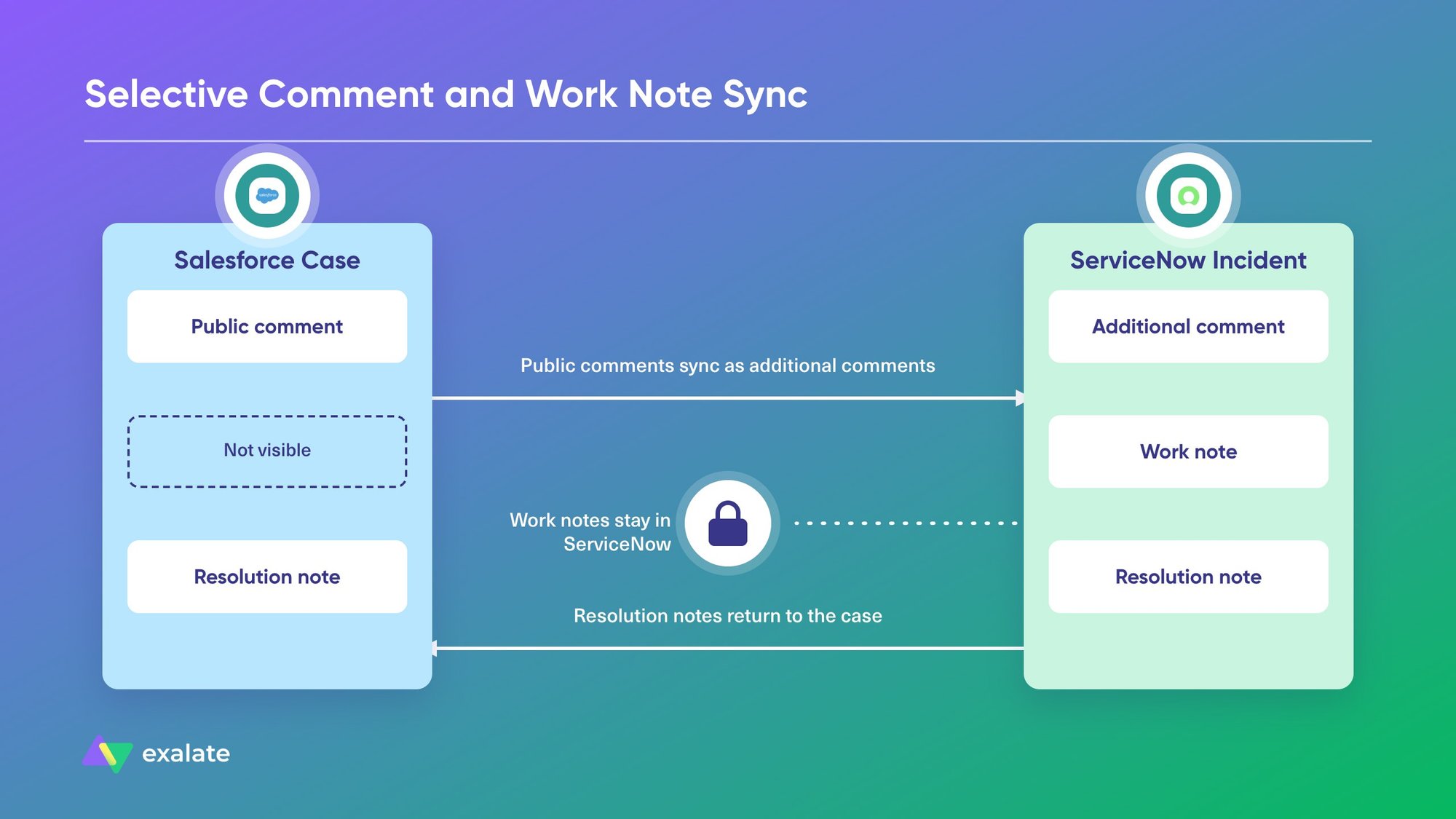
A common setup sends public case comments to ServiceNow as additional comments, keeps work notes in ServiceNow, and sends resolution notes back to the case for the agent to review.
Status and Priority Mapping
Salesforce and ServiceNow use different status values and priority scales. A ServiceNow priority of 1 – Critical might map to High in Salesforce, while 3 – Moderate maps to Medium.
Consider mapping the incident state to a separate field on the case rather than to Case Status. Support keeps control over when the case closes, and the agent still sees IT’s progress.
Conditional Escalation and Triggers
Some cases being escalated from Salesforce belong in ServiceNow, and most belong to another system. To avoid flooding ServiceNow, use rules that escalate only cases that meet set conditions, such as product category, priority, or a checkbox the agent ticks.
The same applies in the other direction. A ServiceNow incident tagged as a customer-facing outage could create or update cases for the affected accounts.
Cross-Company and Independent Control
If your vendor or client runs the other platform, each side must decide what to share. The vendor’s Salesforce shouldn’t create records in the client’s ServiceNow unless the client allows it.
Look for tools for cross-company integration, where each side configures its own outgoing and incoming rules, without admin access to the other instance.
Multi-Instance and MSP Support
MSPs and software vendors often connect one ServiceNow to several client Salesforce orgs, or one Salesforce org to several client ServiceNow instances. Check whether the tool handles multiple connections without rebuilding every rule for each one.
Security, Compliance, and Data Residency
Your InfoSec team will ask about encryption in transit and at rest, authentication, role-based access, audit logs, and certifications. Regulated teams also ask where the integration runs. One financial services team we spoke with needed US-only hosting before they’d consider any tool.
Error Handling and Sync Visibility
Sync failures can happen when a required field is empty, a user doesn’t exist on the other side, or an API limit kicks in during an outage. The tool should queue failed syncs, retry them, and tell you what failed and why.
Also check whether agents can see sync status from the record they’re working on, without opening a separate admin console.
AI-Assisted vs. Manual Configuration
Advanced rules, such as routing cases to different assignment groups by product, usually mean writing scripts or building complex flows. AI-assisted configuration allows users to generate those rules from a plain-language description. This lowers the barrier for admins who don’t script every day.
Total Cost of Ownership
The costs to evaluate go beyond what you pay for the license. Spoke licensing, per-user pricing, transaction-based pricing, and per-item pricing all grow differently as volume increases. Model your expected case volume against each one.
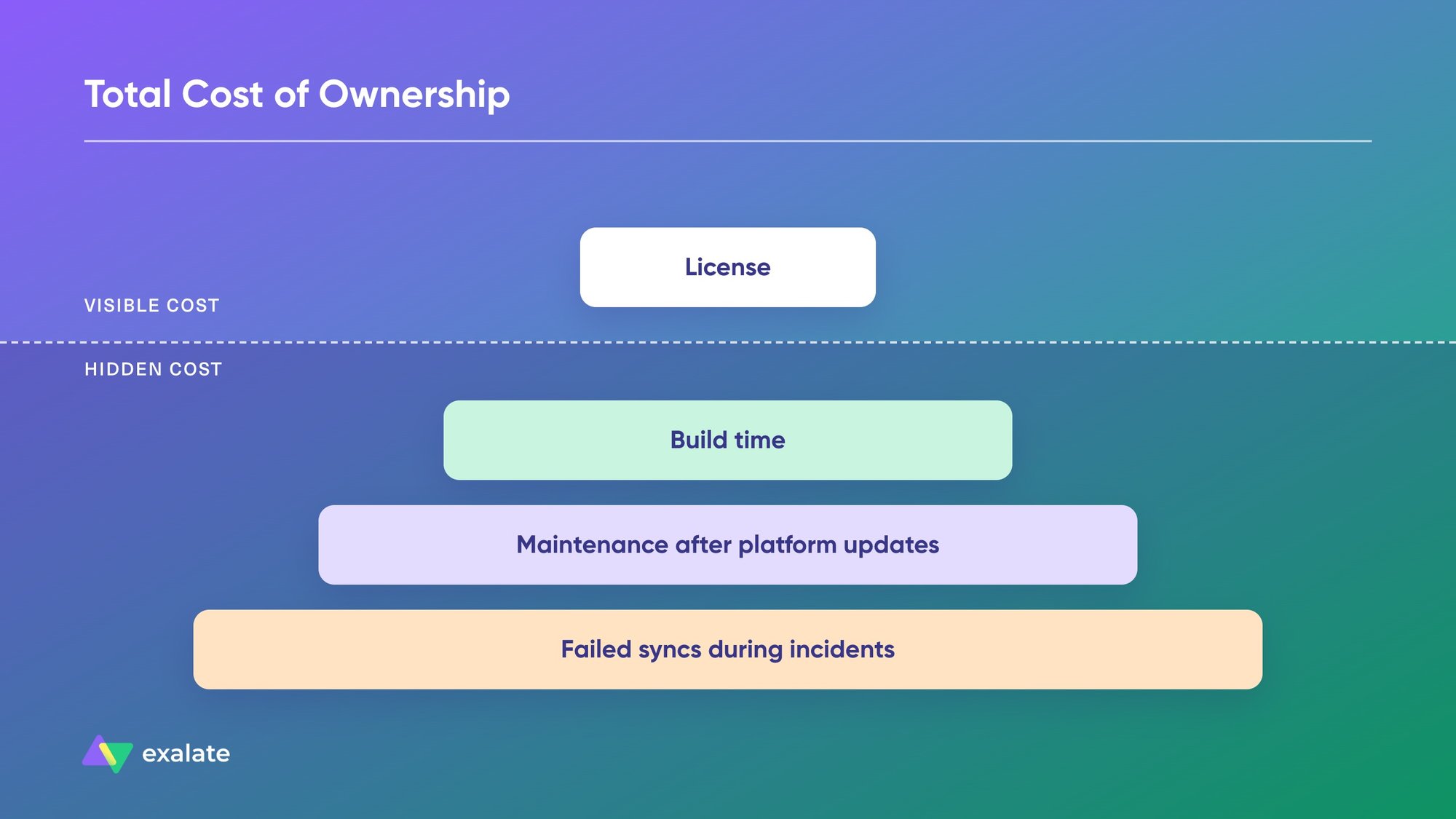
Add the developer time to build the integration, the time to maintain it when either platform updates, and the cost of failed syncs in the middle of an incident.
The 10 Best ServiceNow Salesforce Integration Tools
1. Exalate: Best for Bidirectional Case-to-Incident Sync
Exalate is a bidirectional sync platform for ITSM, CRM, and development tools. It connects Salesforce and ServiceNow at the record level, keeping cases and related incidents in sync across fields, comments, attachments, and status.
Each side of the connection controls its own sync rules, Groovy-based scripts that admins can write manually or generate with Aida AI, the troubleshooting and scripting assistant. This makes it suitable for internal escalations and external setups where your vendor or client runs the other platform.
With Exalate, you can sync Salesforce cases, accounts, opportunities, and custom objects with ServiceNow incidents, problems, change requests, RITMs, and any entity available through the ServiceNow REST API.
Supported Salesforce case fields include Account Name, Asset, Case Owner, Contact Email, Escalated, Priority, Product, SLA Violation, Type, and custom fields.
Main Features of Exalate
- Groovy engine: Use the Groovy language to specify sync rules and describe what needs to be synced based on your use case requirements.
- Triggers: Start syncs automatically when records meet set conditions, such as cases of a specific type or priority, or ServiceNow incidents flagged as outages.
- Aida AI: Describe what you need in plain language, and Aida generates or reviews the sync scripts. It also helps you troubleshoot sync errors.
- Test Run and script versioning: Test sync rules against real records before you publish them, keep drafts and archived versions, and roll back if a change causes problems.
- Sync Panel and Dashboard: Check sync status from the record you’re working on, and monitor connections and errors from one dashboard.
- Security: JWT access tokens, OAuth 2.0, HTTPS with TLS 1.2 and 1.3, role-based access control, multi-factor authentication, and ISO 27001 certification. Details are in the Exalate Trust Center.
- Flexible record relationships: Script how cases relate to incidents, including scenarios where one case needs more than one incident.
- Comment and work note control: Filter which comments sync by type, author, or content, and choose whether they land in ServiceNow as work notes or additional comments.
- Priority and status mapping: Map ServiceNow’s 1 – Critical through 5 – Planning to Salesforce’s High, Medium, Low, and None, and map incident states to case statuses or a custom field.
Strengths
- Two-way sync of fields, comments, attachments, and status, with full scripting control when you need it.
- Independent control on each side, which suits vendor-client and MSP setups.
- Connects multiple Salesforce orgs and ServiceNow instances, plus Jira, Azure DevOps, Zendesk, Freshservice, and other platforms.
- Aida AI cuts down the scripting needed for advanced rules.
Limitations
- Complex scenarios still involve Groovy scripting, and reviewers mention a learning curve.
- Each integration pair needs its own plan, so costs grow as you add more platform pairs.
Use Cases
- Internal escalation: Support escalates qualifying Service Cloud cases to ServiceNow incidents, and IT’s progress and resolution flow back to the case.
- Vendor and client collaboration: A client’s ServiceNow tickets create cases in the vendor’s Salesforce, and status, comments, and resolution go back to the client’s record.
- Outage alerts: A ServiceNow incident or problem tagged as an outage notifies Salesforce users, so support can warn affected customers early.
- MSP multi-client management: An MSP connects several client Salesforce orgs to its central ServiceNow, with separate rules for each client.
What Users Say
Exalate has a 4.7/5 rating from 77 reviews on G2. Reviewers point to the scripting engine’s flexibility and control, and several describe it as a long-term fix for CRM and ITSM sync. The most common complaint is the learning curve for scripting complex setups.
Pricing
Exalate uses outcome-based pricing, so you pay for active items in sync rather than user seats. Each integration pair has its own plan with unlimited connections and users. There’s a 30-day free trial with full access to all features. Find out more about the pricing.
Best for: Teams that need two-way case-to-incident sync with control over every field and comment, especially across company boundaries.
Discuss your integration setup with our experts
Get free, expert advice on your setup. We’ll reach out via email to discuss your use case.
2. ServiceNow IntegrationHub (Salesforce Spoke)
IntegrationHub is ServiceNow’s integration layer, and the Salesforce Spoke is its prebuilt connector for Salesforce. You build flows in Flow Designer that call Salesforce actions when incidents change, or that pull Salesforce data into ServiceNow.
Main Features
- Actions for Salesforce objects, including Account, Contact, Case, Lead, Opportunity, Order, and User.
- OAuth 2.0 or JWT bearer token authentication.
- Flow Designer for building triggers and logic inside ServiceNow.
- Access to the wider IntegrationHub spoke library for other systems.
Strengths
- Runs inside ServiceNow, so your ServiceNow admins already know the tooling.
- No extra vendor in the data path.
- Works well for ServiceNow-driven workflows, such as updating a case when an incident reaches a certain state.
Limitations
- Needs a paid IntegrationHub subscription, and the Salesforce spoke may not be part of your current package.
- Control sits on the ServiceNow side, so Salesforce admins depend on ServiceNow developers for every change.
- You build correlation, field mapping, and loop prevention yourself. Two-way sync with comments and attachments takes custom flow work.
Use Cases
- Creating or updating Salesforce cases from ServiceNow incidents.
- Pulling account and contact data from Salesforce into ServiceNow.
- ServiceNow-centric teams with in-house developers who already build flows.
What Users Say
Public reviews of the Salesforce Spoke itself are thin. The ServiceNow IntegrationHub listing on Capterra has a single review. In conversations we’ve had with ServiceNow teams about IntegrationHub spokes, the common feedback is that they suit one-way flows better than real-time two-way sync, and that they push both teams toward the same workflow and status names.
Pricing
Part of ServiceNow’s IntegrationHub packages. Contact ServiceNow for a quote.
Best for: ServiceNow-centric teams that already have IntegrationHub and mostly need one-way Salesforce actions.
3. Boomi
Boomi is a low-code enterprise iPaaS with prebuilt connectors for Salesforce and ServiceNow. You build integration processes visually and run them on Boomi Atoms, either in Boomi’s cloud or on your own infrastructure.
Main Features
- ServiceNow connector and ServiceNow REST connector.
- Salesforce connector.
- Visual, drag-and-drop process builder.
- Cloud or self-hosted runtimes (Atoms).
- Data mapping, API management, and master data tools.
Strengths
- Large connector library that covers ERP, HR, finance, and CRM alongside ServiceNow and Salesforce.
- Low-code builder that integration teams pick up quickly.
- Fits organizations that want one platform for all their enterprise integrations.
Limitations
- We couldn’t find a ready-made Salesforce case to ServiceNow incident template, so you design the process, correlation, and loop prevention.
- Two-way comment and attachment sync needs careful process design.
- Reviewers say debugging and monitoring get harder as the number of integrations grows.
Use Cases
- Escalating Salesforce cases into ServiceNow for teams already running Boomi.
- Syncing account and customer records between Salesforce and ServiceNow.
- Feeding customer or CMDB data into ServiceNow from several source systems.
What Users Say
Boomi has a 4.4/5 rating from 508 reviews on G2. Users praise its ease of use and large connector library. Complaints include a dated interface, hard-to-read error logs, costs that rise as integrations grow, and memory issues with large payloads. G2 reviewers report about 4 months to implement.
Pricing
Depends on edition and connectors. Contact Boomi for a quote.
Best for: Organizations that already standardize on Boomi for enterprise integration.
4. Informatica (Intelligent Data Management Cloud)
Informatica’s Intelligent Data Management Cloud (IDMC) is an enterprise data management platform. Its Cloud Application Integration service handles process-level integrations, and Informatica publishes a ready-made recipe for syncing Salesforce incidents to ServiceNow.
Main Features
- A prebuilt recipe: “Synchronize Salesforce Incidents with ServiceNow Incidents based on Platform Events.”
- Event-driven processing, where a Salesforce platform event fires when an incident is created or updated.
- An automatic user check that creates the user in ServiceNow if they don’t exist yet.
- Data quality, governance, and master data tools across the wider platform.
Strengths
- The recipe shortens setup for a one-way escalation flow.
- Strong governance and data quality tooling for regulated teams.
- Fits companies already using Informatica for Salesforce data pipelines.
Limitations
- The recipe syncs Salesforce to ServiceNow only. Updates from ServiceNow back to Salesforce need custom work.
- It matches records by incident description, which breaks when descriptions change or two incidents read the same.
- It’s a heavy platform if case-to-incident sync is your only integration.
Use Cases
- One-way escalation of Salesforce incidents into ServiceNow.
- Teams already using IDMC for Salesforce data loading or ETL.
What Users Say
Recent public reviews of Informatica’s cloud integration services are scarce. Older TrustRadius reviews of Informatica Intelligent Cloud Services praise the point-and-click interface and fast Salesforce bulk loading. They also flag slow incremental jobs on large tables and connector costs that add up. Most of that feedback is about ETL, not ServiceNow sync.
Pricing
Consumption-based, using Informatica Processing Units (IPUs). Contact Informatica for a quote.
Best for: Informatica customers who need one-way escalation from Salesforce into ServiceNow.
5. MuleSoft (Anypoint Platform and Composer)
MuleSoft is Salesforce’s integration platform. Anypoint Platform covers API-led integration for developers, and MuleSoft Composer gives Salesforce admins a no-code builder. Both have ServiceNow connectors.
Main Features
- ServiceNow Connector for Mule 4, plus the Salesforce Connector.
- MuleSoft Composer flows for admins, with a Trailhead module on service case management that uses ServiceNow.
- MuleSoft Accelerator for Service Cloud, which includes a use case for creating issues or incidents in external systems.
- API management, Anypoint Exchange, and Runtime Manager for monitoring.
Strengths
- Close fit with the rest of the Salesforce stack and your Salesforce account team.
- Reusable APIs for organizations connecting many systems beyond ServiceNow.
- Enterprise monitoring and governance.
Limitations
- Anypoint needs MuleSoft developers. Composer is simpler but suits straightforward flows better than complex two-way logic.
- You build correlation, conflict handling, and loop prevention.
- Licensing is expensive for a single case-to-incident use case.
Use Cases
- Salesforce-centric enterprises that already run Anypoint.
- Case escalation to ServiceNow as one flow among many API-led integrations.
What Users Say
MuleSoft Anypoint Platform has a 4.4/5 rating from 894 reviews on G2. Reviewers praise its integration capabilities, API management, and reusable API-led approach. Common complaints include high cost, vCore-based licensing, and a steep learning curve. G2 reviewers report about 4 months to implement.
Pricing
Quote-based and tied to capacity. Contact MuleSoft or your Salesforce account team.
Best for: Salesforce-centric enterprises that already run MuleSoft for broader API integration.
6. Unito
Unito is a sync tool for work management, CRM, and ITSM platforms. Its Salesforce-to-ServiceNow integration syncs Salesforce cases with ServiceNow incidents, requested items, and tasks, plus other native and custom objects.
Main Features
- Salesforce objects: tasks, cases, contacts, accounts, leads, opportunities, and other native or custom objects.
- ServiceNow tables: any native or custom table.
- No-code flow builder with rules and field mappings.
- Two-way sync for supported fields.
Strengths
- Quick setup without scripting.
- Wide object coverage on both sides.
- Suits teams that want to configure the sync themselves.
Limitations
- Many Salesforce case, contact, lead, and opportunity fields sync one way only.
- Sync timing depends on your plan, so real-time updates aren’t guaranteed.
- Syncing private work notes needs extra ServiceNow admin setup, such as granting a journal-entry role.
- Template-based mappings limit how far you can customize incident logic.
Use Cases
- Support teams syncing cases to incidents without developer time.
- Sharing account and contact data between Salesforce and ServiceNow.
What Users Say
Unito has a 4.5/5 rating from 90 reviews on G2, and G2 users report an implementation time of about a month.
Pricing
Tiered plans based on the number of items in sync. See Unito’s pricing page for current tiers.
Best for: Teams that want a no-code sync and can work within template mappings.
7. ZigiOps
ZigiOps, from ZigiWave, is an integration platform for ITSM, monitoring, DevOps, and CRM tools. It syncs Salesforce cases with ServiceNow incidents in both directions in real time.
Main Features
- Salesforce cases, accounts, and contacts synced with ServiceNow incidents, problems, and change requests.
- Field-level mapping for case to incident, priority, account to company, contact to caller, and comments.
- Per-field conflict rules, including an option to flag conflicts for review rather than overwrite them.
- Audit trail and unlimited connections.
Strengths
- Two-way sync configured without Apex, triggers, or ServiceNow business rules.
- Conflict handling built into the field rules.
- Also covers monitoring and observability tools, which helps if alerts start your incidents.
Limitations
- Fewer public reviews than the larger platforms on this list.
- Teams with highly custom routing logic should confirm in a trial that the no-code rules cover it.
Use Cases
- Real-time case-to-incident escalation.
- Syncing Salesforce accounts and contacts to ServiceNow companies and callers.
What Users Say
ZigiOps has a 4.8/5 rating from 28 reviews on G2.
Pricing
Annual subscription with a free trial. Contact ZigiWave for pricing.
Best for: ITSM teams that want two-way case-to-incident sync without code.
8. OpsHub Integration Manager
OpsHub Integration Manager (OIM) is an integration platform built mainly for ALM and DevOps tools, with a no-code Salesforce ServiceNow integration. It runs as a standalone application outside both platforms.
Main Features
- Salesforce cases, accounts, contacts, opportunities, and custom objects, synced with ServiceNow incidents, problems, changes, requests, and CIs.
- Per-field sync direction and sync filters.
- Conflict detection that flags conflicts rather than overwriting them, plus audit logs.
- Sync of links, mentions, and inline content with history, and built-in failure recovery.
- On-premises and private cloud deployment.
Strengths
- History-aware sync for audit-heavy teams.
- Support for 70+ ALM and DevOps platforms if your incident flow extends to engineering.
- Self-hosted deployment for strict environments.
Limitations
- Its main focus is ALM and DevOps, so CRM-specific case workflows get less attention.
- Very few public reviews to judge real-world use.
- Standalone deployment means your team has one more application to run.
Use Cases
- Regulated teams that need sync history and on-premises hosting.
- Escalating Salesforce cases to ServiceNow and onward to development tools.
What Users Say
OpsHub Integration Manager has a single review on G2 (4.0/5), so public feedback is limited.
Pricing
Contact OpsHub for pricing. A Community Edition is listed on the ServiceNow Store.
Best for: Regulated teams that want self-hosted sync with history across ITSM and DevOps tools.
9. Workato
Workato is an enterprise automation platform built around recipes, its name for automated workflows. It has prebuilt Salesforce and ServiceNow connectors with real-time triggers on both sides.
Main Features
- Salesforce triggers for new, updated, and deleted records, plus actions to create, update, and upsert records.
- ServiceNow triggers for new or updated records, plus actions to create and update records, including from a template.
- Recipe builder with conditional logic.
- HTTP connector for custom API calls.
- Usage dashboard for tracking consumption.
Strengths
- Real-time triggers on both platforms.
- Recipes cover automation beyond sync, such as approvals and notifications.
- Business users can build basic recipes without code.
Limitations
- Two-way sync means building and maintaining paired recipes, with your own loop prevention.
- Consumption-based pricing grows with transactions and connections.
- Reviewers mention a learning curve for complex recipes.
Use Cases
- Creating ServiceNow incidents from high-priority Salesforce cases.
- Broader Salesforce and ServiceNow automation run by a central automation team.
What Users Say
Workato has a 4.7/5 rating from 858 reviews on G2 and 4.6/5 from 84 reviews on Capterra. Capterra reviewers say basic recipes are easy to build without code.
Complaints focus on a steep early learning curve, prices that climb with connections and transactions, and support replies that can take a couple of days. One developer called out drag-and-drop field mapping between ServiceNow and Salesforce as a strength.
Pricing
Edition-based (Standard, Business, Enterprise, and Workato ONE), with consumption tracked by capability. Contact Workato for pricing.
Best for: Enterprises with a central automation team that runs Salesforce and ServiceNow workflows in one place.
10. Tray.ai
Tray.ai is an AI-focused integration and automation platform. It has prebuilt Salesforce and ServiceNow connectors and templates for common ITSM and CRM flows.
Main Features
- Templates such as “Create ServiceNow Incident from Salesforce Critical Case” and “Sync Salesforce Accounts to ServiceNow Customer Records.”
- Visual workflow builder.
- AI agent and orchestration tools.
Strengths
- Templates shorten setup for one-way escalation.
- Flexible builder for teams that automate across many apps.
Limitations
- Templates cover common flows. Two-way sync with comments, attachments, and conflict handling needs custom workflow design.
- Tray.ai’s public pages don’t detail object-level limits, so test your exact fields in a trial.
Use Cases
- Escalating critical Salesforce cases to ServiceNow incidents.
- Syncing Salesforce accounts to ServiceNow customer records.
What Users Say
Tray.ai has a 4.5/5 rating from 158 reviews on G2, and G2 users report an implementation time of about 2 months.
Pricing
Starts at $50 per month for the Builder edition, with enterprise plans by quote.
Best for: Teams that want templates for simple escalation flows inside a wider automation platform.
Honorable Mentions
- Perspectium: ServiceNow-native apps that keep ServiceNow incidents and Salesforce cases in sync.
- Celigo: An iPaaS with a ServiceNow-Salesforce integration template.
- Oracle Integration Cloud: Has a documented recipe for syncing Salesforce cases with ServiceNow incidents, a fit for Oracle shops.
- Zapier and Make: Trigger-and-action automations for simple, mostly one-way flows, such as creating an incident from a new case.
- TSANet: A vendor-neutral network for multi-vendor support case collaboration, which works differently from record-level sync.
| Tool | Sync direction | Configuration control | Setup approach |
| Exalate | Two-way | Configurable on each side | Scripts + AI (Aida) |
| IntegrationHub (Salesforce Spoke) | Mostly one-way, two-way with custom flows | ServiceNow side | Flow Designer |
| Boomi | Two-way with custom processes | Single shared setup | Low-code |
| Informatica | One-way recipe (Salesforce to ServiceNow) | Single shared setup | Low-code + recipe |
| MuleSoft | Two-way with custom flows | Single shared setup | Pro-code (Anypoint), no-code (Composer) |
| Unito | Two-way (many fields one-way) | Single shared setup | No-code |
| ZigiOps | Two-way | Single shared setup | No-code |
| OpsHub | Two-way (per field) | Single shared setup | No-code, self-hosted |
| Workato | Two-way with paired recipes | Single shared setup | Low-code recipes |
| Tray.ai | Template-based, two-way with custom work | Single shared setup | Low-code |
Discuss your integration setup with our experts
Get free, expert advice on your setup. We’ll reach out via email to discuss your use case.
What Real Users Say: G2, Capterra, and Community Reviews
Here are some objections and observations from independent user reviews.
How Exalate Addresses Common Objections to Salesforce ServiceNow Integration Tools
- Cost: Reviewers of MuleSoft, Boomi, and Workato all mention costs that rise with scale, and IntegrationHub teams run into add-on costs for spokes. Exalate’s outcome-based pricing is per active item in sync, with unlimited users and connections per integration.
- Learning curve: Scripting, recipe logic, and API-led design all take time to learn. Aida AI generates and reviews scripts from plain-language prompts, and Test Run lets you validate changes before they go live.
- One-way bias: Native spokes and prebuilt recipes tend to favor one direction. Exalate is built for bidirectional sync of fields, comments, attachments, and status.
- Workflow conformity: Some tools push both teams toward the same workflow and status names. Each side keeps its own statuses and workflows, and the sync rules translate between them.
- Security review: InfoSec teams want documentation before they approve any tool in the data path. Exalate uses encryption in transit and at rest, role-based access control, ISO 27001 certification, and has a public Trust Center your InfoSec team can review.
How to Pick the Right Tool for Your Use Case
To choose, start with these two questions:
- Do you need updates flowing both ways, or is one-way enough?
- Is this a single Salesforce-to-ServiceNow connection?
- Will it grow into more instances, more platforms, or another company?
If these answer points to more complexity, pick a tool built for two-way sync across multiple connections.
| Your situation | Recommended tool |
| You already pay for IntegrationHub and need ServiceNow to update Salesforce one way | IntegrationHub Salesforce Spoke |
| You need two-way case-to-incident sync with custom comment and status rules | Exalate |
| Your vendor or client runs the other platform | Exalate |
| You’re an MSP connecting several client instances | Exalate |
| Your company runs most integrations through MuleSoft | MuleSoft |
| You already run Boomi for ERP and HR integrations | Boomi |
| You use Informatica and only need Salesforce to ServiceNow escalation | Informatica |
| You want a no-code setup and template mappings are enough | Unito or ZigiOps |
| You need self-hosted sync with history | OpsHub Integration Manager |
| Your automation team builds all workflows in one platform | Workato or Tray.ai |
What’s Next?
Pull some of the recent cases that were escalated to ServiceNow. For each one, check which fields, comments, and attachments reached the incident, whether the resolution came back to the case, and how long the handoff took.
For setup steps, see our Salesforce ServiceNow integration guide. You can also book a demo with our engineers to get a better understanding of how your use case will be covered.

FAQ
Can Exalate sync Salesforce cases with ServiceNow incidents?
Yes, Exalate syncs Salesforce cases with ServiceNow incidents in both directions, including fields, comments, attachments, and status. It also syncs other Salesforce objects, such as accounts, opportunities, and custom objects, with ServiceNow problems, change requests, RITMs, and other entities available through the REST API.
Does Exalate support bidirectional sync between ServiceNow and Salesforce?
Yes, each side has its own outgoing and incoming sync rules, so updates flow both ways. When IT updates an incident, the linked case updates too, and when support adds customer context to the case, it reaches the incident.
Which fields can Exalate sync between a Salesforce case and a ServiceNow incident?
Exalate supports all case and incident fields, including custom fields. Common ones are priority, status, description, assignee, account, contact, comments, work notes, and attachments. You decide which fields sync and how values translate.
Can I connect my ServiceNow instance to a vendor’s or partner’s Salesforce with Exalate?
Yes, Exalate is built for cross-company sync, where each side controls what it sends and receives, so you don’t need admin access to your vendor’s Salesforce, and they don’t need access to your ServiceNow.
How does Exalate compare to the ServiceNow IntegrationHub Salesforce Spoke?
The Salesforce Spoke gives ServiceNow developers actions to build flows, and control sits on the ServiceNow side. Exalate is a dedicated two-way sync where each side manages its own rules. Keep IntegrationHub for simpler workflows and use Exalate for case-to-incident sync.
Do I need coding skills to set up a ServiceNow Salesforce integration with Exalate?
With Exalate, basic integrations can be up and running within about 30 minutes, and Aida AI generates custom sync rules from plain-language prompts. For complex scenarios, use Groovy scripting, which Aida AI and Test Run make easier to manage.
Can Exalate route only specific cases or incidents?
Yes. Triggers start a sync only when records meet the conditions you set, such as a case type, priority, or product. You can also set triggers on the ServiceNow side to notify Salesforce users when an outage incident is created.
How does Exalate keep data secure between ServiceNow and Salesforce?
Exalate uses JWT access tokens, OAuth 2.0, HTTPS with TLS 1.2 and 1.3, role-based access control, and multi-factor authentication, and it’s ISO 27001 certified. Each side also decides what data leaves its system. Full details are in the Exalate Trust Center.
How much does Exalate cost for a ServiceNow Salesforce integration?
Exalate uses outcome-based pricing, where you pay for active items in sync rather than user seats. Each integration pair has its own plan with unlimited connections and users. You can start with a 30-day free trial or use the pricing calculator to estimate costs.
Recommended Reads: