Key Takeaways
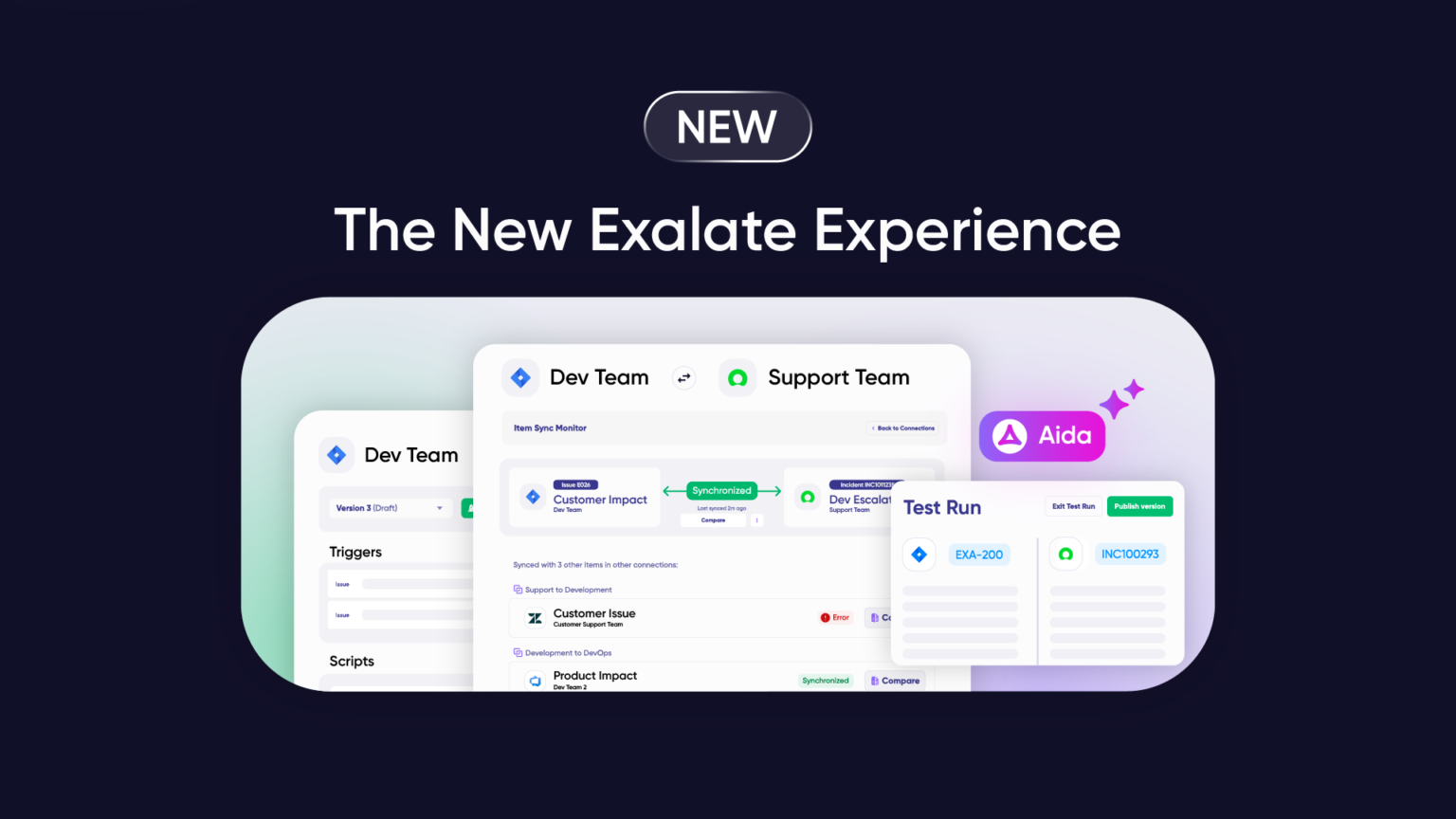
- Exalate has evolved into a new experience with a unified console for managing all your integrations, with AI-assisted configuration, Test Run, script versioning, and side-by-side connection views.
- Recent updates include user management, the Sync Panel browser extension for manual sync from your browser, local connections between projects in the same system, and a simpler product model built around systems, connections, and roles.
- Aida now does AI-assisted onboarding and troubleshooting inside the product, and Conversation Mode (early access) lets you configure connections through a chat interface.
- The outcome-based pricing covers active sync pairs, not user seats. You pay per integration, and you can pick a different plan for every connection.
- The Groovy scripting engine and your operational control stay the same. Scripts are still split into incoming and outgoing for each side.
Your integrations are critical infrastructure. They keep teams aligned, data flowing, and work moving across systems. When something changes at that layer, clarity matters.
This update covers what’s new, what stays the same, and how New Exalate has kept evolving since launch.
| A Note on Naming: The existing platform is now called Exalate Classic. Exalate Classic is fully supported and works exactly as it does today. The improved experience is called New Exalate. It’s built on the same scripting engine, with a unified console and better visibility for managing integrations at scale. |
Discuss your integration setup with our experts
Get free, expert advice on your setup. We’ll reach out via email to discuss your use case.
Why Exalate Is Evolving
When Exalate started, integrations were simpler. A few point-to-point connections between tools, maybe a handful of sync scenarios.
Integration environments today are larger, more interconnected, and harder to operate.
They have grown into a complex, interconnected ecosystem spanning multiple tools, teams, and companies. Managing dozens (sometimes hundreds) of connections across platforms like Jira, ServiceNow, Azure DevOps, Zendesk, Salesforce, Freshservice, Freshdesk, Asana, and GitHub has become its own challenge, which is separate from the integration logic itself.
The New Exalate experience addresses this reality by adding visibility and operational control when integration environments scale, without changing what makes Exalate work: highly customizable, real-time bidirectional sync with full scripting control.
What Stays the Same
Let’s start with what’s not changing.
Your Integrations Keep Running
Every connection you’ve built continues to work exactly as it does today.
Your Scripts Stay Intact
The Groovy-based scripting engine that handles your custom workflows remains there. Every script you’ve written, every custom logic you’ve implemented, all work the same way. Scripts are still divided into incoming and outgoing for each system, so your sync logic remains robust and precise.
Full Operational Control Over Your Sync
You keep complete control over what data syncs and how. Each side of the integration manages its own rules independently.
Security Standards Stay Strong
Your data stays protected with ISO 27001 certification, encryption in transit and at rest, and role-based access control. Learn more at our Trust Center.
What’s New in the Exalate Experience
The New Exalate experience brings operational improvements that make managing integrations easier, especially as environments grow.
Unified Connection Management Console
Instead of visiting each system individually to check configurations or troubleshoot sync errors, you can now access all your nodes and connections from one place. Think of it as a unified view of your entire integration environment, without changing how any of it actually works.
Simpler Product Model: Systems, Connections, and Roles
Exalate no longer uses workspaces. The new experience is now built around systems, connections, and roles, so ownership and access are easier to understand. You add your systems, create connections between them, and assign co-owners to control who can do what.
Sync Panel Browser Extension
The Sync Panel is a Chrome extension that lets you sync items manually straight from your browser, without logging into the Exalate app. You get user registration and login inside the extension, real-time sync status, Sync Now and Unlink actions, and support for multiple connections. So if you’re working inside a Jira work item and want to push it across, you don’t have to switch tabs to the console.
Local Connections
You can now create connections between different projects within the same system instance. For example, you can sync work items between a DEV project and a TEST project in the same Jira, so a developer’s task can create and update a matching test item automatically.
Note: Local connections aren’t supported on Azure DevOps or GitHub.
Side-by-Side Connection View
View script rules, active queues, and errors for both sides of your connection at once from the Connection Details page. Diagnose sync issues without switching between systems.
Connection Properties Overview Page
Every connection has a dedicated overview page that shows its configuration and settings in one clear view, so you can check how a connection is set up without digging through tabs.
Test Run Functionality
Test your sync scripts before they touch production data. Create draft configurations, preview what would happen, and only publish when you’re confident everything works as expected. This reduces the risk of errors affecting live items in sync.
Script Versioning and Roll Back
Every time you make a change and publish it, a new version is created. You can:
- Trace what changed
- See who made the change
- Identify when it changed
- Roll back if something doesn’t work as expected
No more “what did we change last week?” detective work.
Aida: AI-Assisted Configuration and Troubleshooting
Aida started as an expert for all things Exalate in the documentation. Then she gained more knowledge about the product, including scripting. Now she lives inside the product and has replaced AI Assist from Exalate Classic, so you interact with Aida the same way you did with AI Assist.
Aida writes Groovy scripts for your sync logic and troubleshoots when something goes wrong. She gives context-aware suggestions, explains errors in plain language, and cuts troubleshooting time.
AI-Assisted Onboarding
New users get a Welcome Page with a Getting Started checklist and Quick Assist guidance.
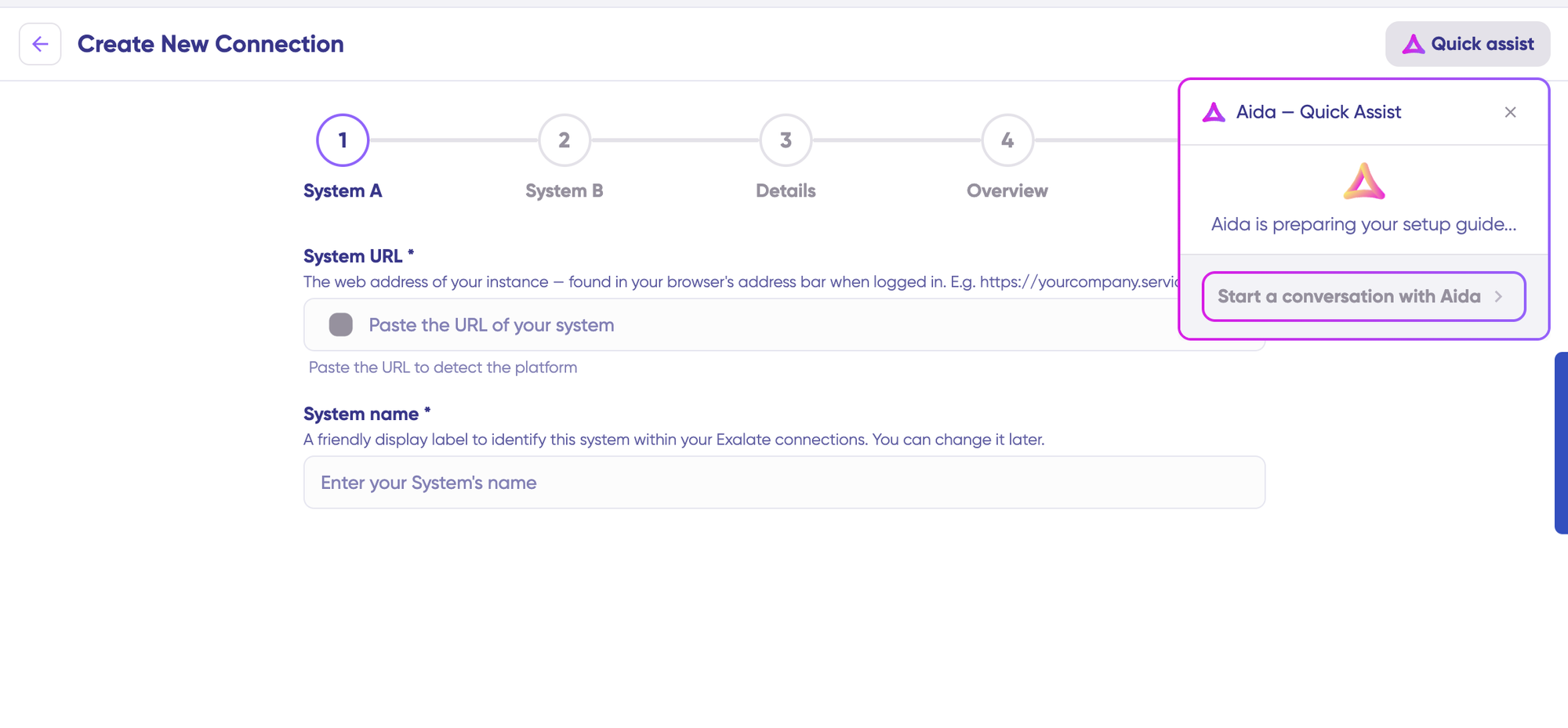
The connection creation wizard shows inline field context and pulls Aida in for context-aware setup help, so you’re not guessing what each field wants.
Conversation Mode (Early Access)
Conversation Mode lets you configure a connection through a chat interface. You describe what you want, and Aida helps set up the connection for you. It’s currently available to early adopters via request through the community.
User Management
You can add users at the connection level, and you can select multiple connections at once so you’re not repeating the invite for each one. Invitations have a full lifecycle: resend one that got lost, cancel one you don’t need, and check the Users tab to see who hasn’t accepted yet.
For cross-company setups, Collaborative Import lets you invite a destination admin by email when you don’t have admin access on the other side, so one person doesn’t need admin rights on both systems.
Improved Sync Queue Visibility
Monitor sync progress more clearly. Filter by connection name or entity ID, view processing status, and spot work item sync issues faster. The Item Sync Monitor and Sync Queue screens also have a Refresh button so you can pull the latest status on demand.
Integration Network Visualization
See all your connections in one place with a visual view of how your systems connect. Understand your integration architecture and spot dependencies quickly.
Simpler, Transparent Pricing
We changed how we charge for Exalate. You now pay based on how many items you’re actively syncing between your systems, and you can pick a different plan for every new connection you create.
What is an Active Sync?
Here’s what that looks like. If you’re syncing 50 work items between Jira and ServiceNow, you pay for those 50. It doesn’t matter how many times they update, how many users work with them, or how many back-and-forth syncs happen. You pay for the number of items you’re keeping in sync.
This means you can calculate exactly what you’ll pay before you commit. No hidden pricing, no surprise quotes, no guessing. Just straightforward numbers based on your actual use.
You can see what this looks like for your team using our pricing calculator. Pick your integrations, estimate your synced items, and get an instant quote. Or check the full details on the new pricing model.
What’s Not Available Yet (But Coming Soon)
We believe in being upfront about what’s still in development. At launch, New Exalate doesn’t yet include:
Trust Levels for Collaborative Access Control
In Exalate Classic, admins only had access to their own side of the connection. In New Exalate, the side-by-side view currently shows both sides to all users. This is what we call “High Trust” mode, useful for integrations where all parties work closely together.
Granular Trust Levels that restore separated access are coming soon. The underlying sync logic stays separated (incoming and outgoing scripts for each system), so your integration rules stay robust and precise. What’s changing temporarily is who can see what in the console, not how the sync actually works.
Discuss your integration setup with our experts
Get free, expert advice on your setup. We’ll reach out via email to discuss your use case.
Connector Availability
The following connectors are supported at launch:
- Jira Cloud
- ServiceNow
- Azure DevOps Cloud (or Service)
- Azure DevOps Server (on-premises)
- Zendesk
- Salesforce
- Freshservice
- Freshdesk
- Asana
- Custom connectors can be requested
Check the full list of supported integrations here.
Note: GitHub and Jira on-premise are available only in Pro and Enterprise plans. Book a call with our team to learn more.
Security in New Exalate
Security remains a top priority. New Exalate maintains:
- ISO 27001 certification: rigorous security standards
- Encryption: data protected in transit and at rest
- Role-based access control: granular permissions (coming with Trust Levels)
- Script separation: incoming and outgoing scripts stay separated for each side
- Change history: script versioning gives you a complete record of what changed
- SentinelOne protection: advanced threat detection and response
For complete security details, visit our Trust Center.
How to Get Started
If You’re an Existing User
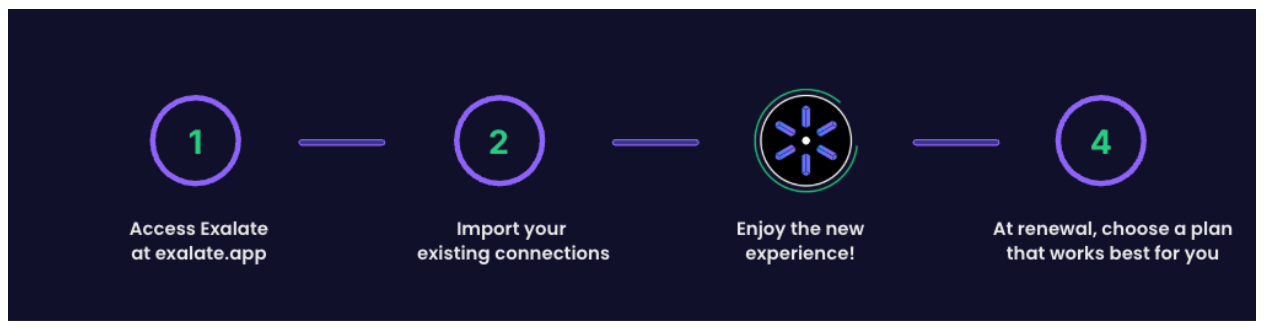
You can explore the New Exalate experience whenever you’re ready. Your Classic integrations keep running. When you want to try the new console, you can import existing connections and switch to the new experience without the need for migration or rebuilding from scratch.
If You’re New to Exalate
You can start directly with the new experience. The New Exalate console gives you clearer visibility into your integrations, with safe testing and better change management.
If You’re Evaluating Exalate
New Exalate gives you a clearer view of what you’re building, with safer testing and better change management. The underlying power of real-time bidirectional sync with full scripting control stays the same.
Template-based sync tools (Unito and Getint) focus on predefined mappings and limited customization. iPaaS solutions (Workato and MuleSoft) prioritize orchestration across systems but add complexity and operational overhead, with higher costs at scale.
Exalate is built for teams that need operational control and high flexibility for advanced cross-team or cross-company scenarios, while keeping costs predictable.
How to Set Up Your Integration With New Exalate
For this walkthrough, we’ll set up a Jira and ServiceNow integration, one of the most common cross-platform sync scenarios.
Step 1: Create Your Exalate Account
Go to the Exalate console and create your account, or log in if you already have one. New Exalate is built around systems, connections, and roles, so there’s no workspace setup to worry about. You add your systems and start connecting them.
Step 2: Add Your First Connection
Go to the “Connections” tab and click “+ Add connections” > “Create new connection”. Enter details for both systems:
- System A: enter your Jira instance URL and authenticate (OAuth)
- System B: enter your ServiceNow instance URL and authenticate
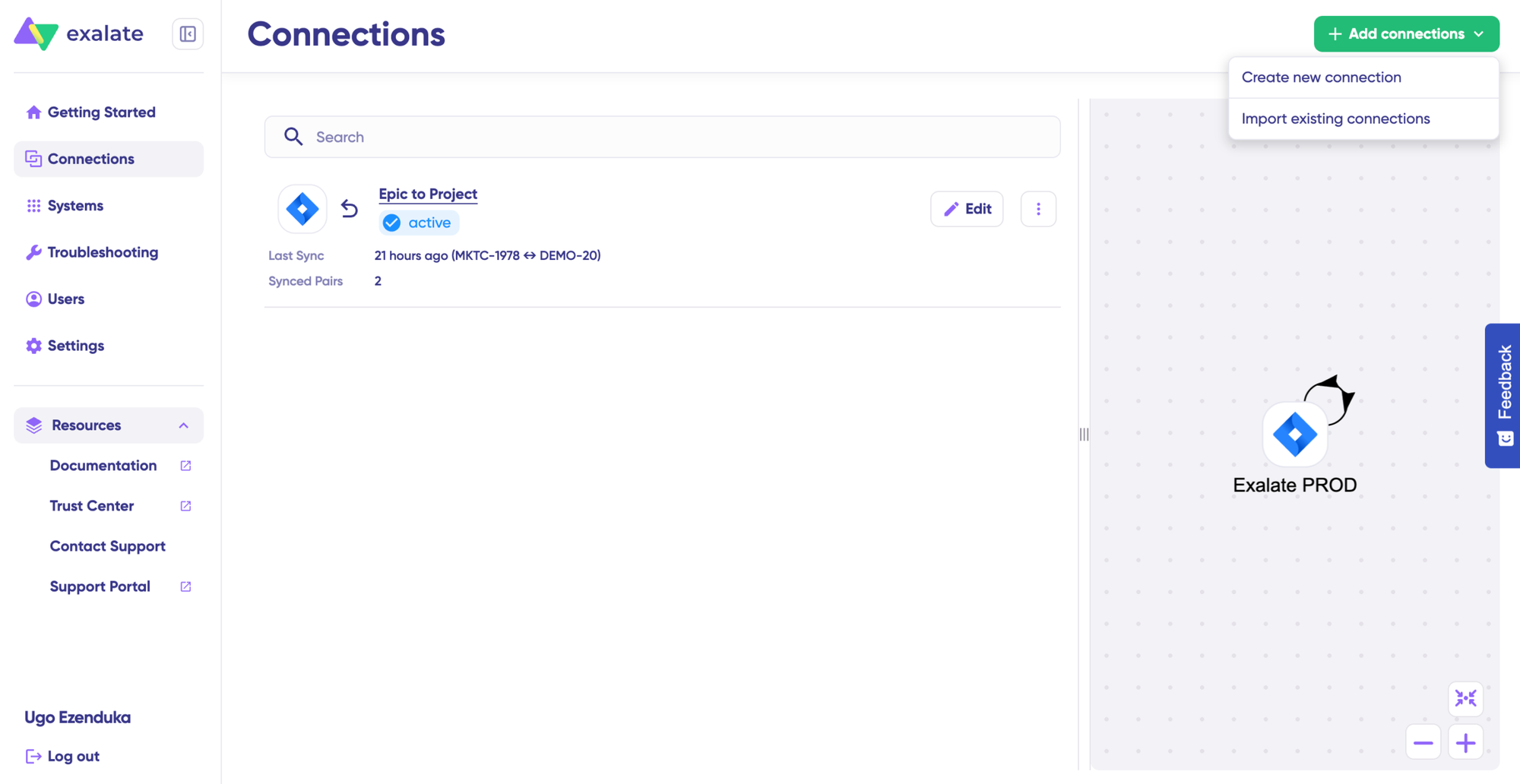
Give your connection a name and description, review the details, then click “Create connection”. The connection creation wizard shows inline field context, and you can pull in Aida for help if a field isn’t clear.
Step 3: Configure Your Sync Rules
After creating the connection, select “Continue to configuration” and choose the Jira project you want to sync. Click “Build & continue”. You now have two options:
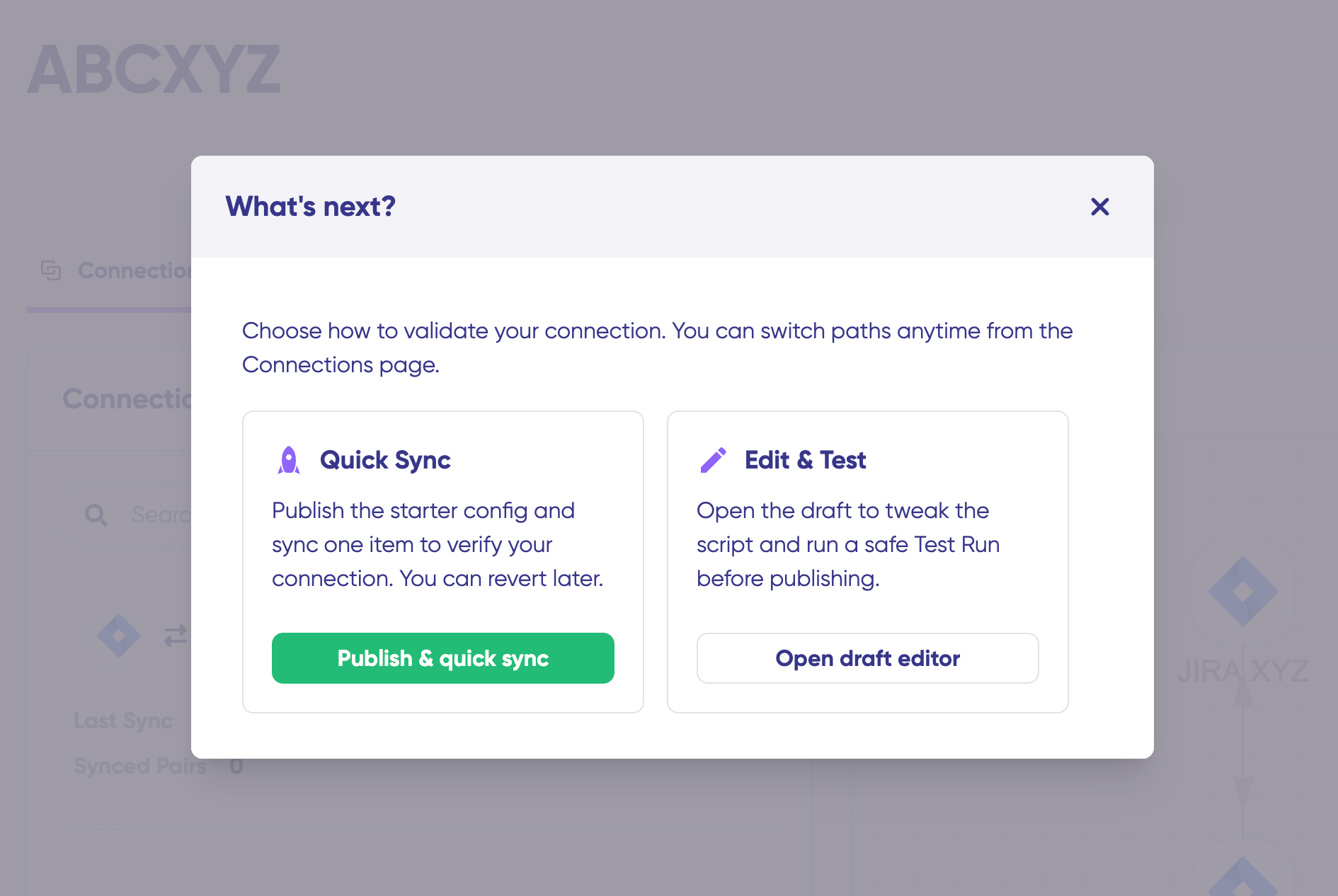
Quick Sync (recommended for first-time setup): sync one work item between Jira and ServiceNow to verify your connection works. Enter a work item key in Jira or an incident number in ServiceNow, then click “Sync Now”. Preview how the synced items look before proceeding.
To access the Conversation mode, click on “Quick Sync & Edit”, then you’ll be redirected to the screen.
Edit & Test (for custom configuration): click “Open latest draft” to start editing sync rules without affecting your live configuration. Changes save automatically.
Step 4: Write or Generate Your Sync Scripts
Sync rules use Groovy-based scripts, divided into incoming and outgoing for each system.
Option 1: Write Sync Scripts Manually
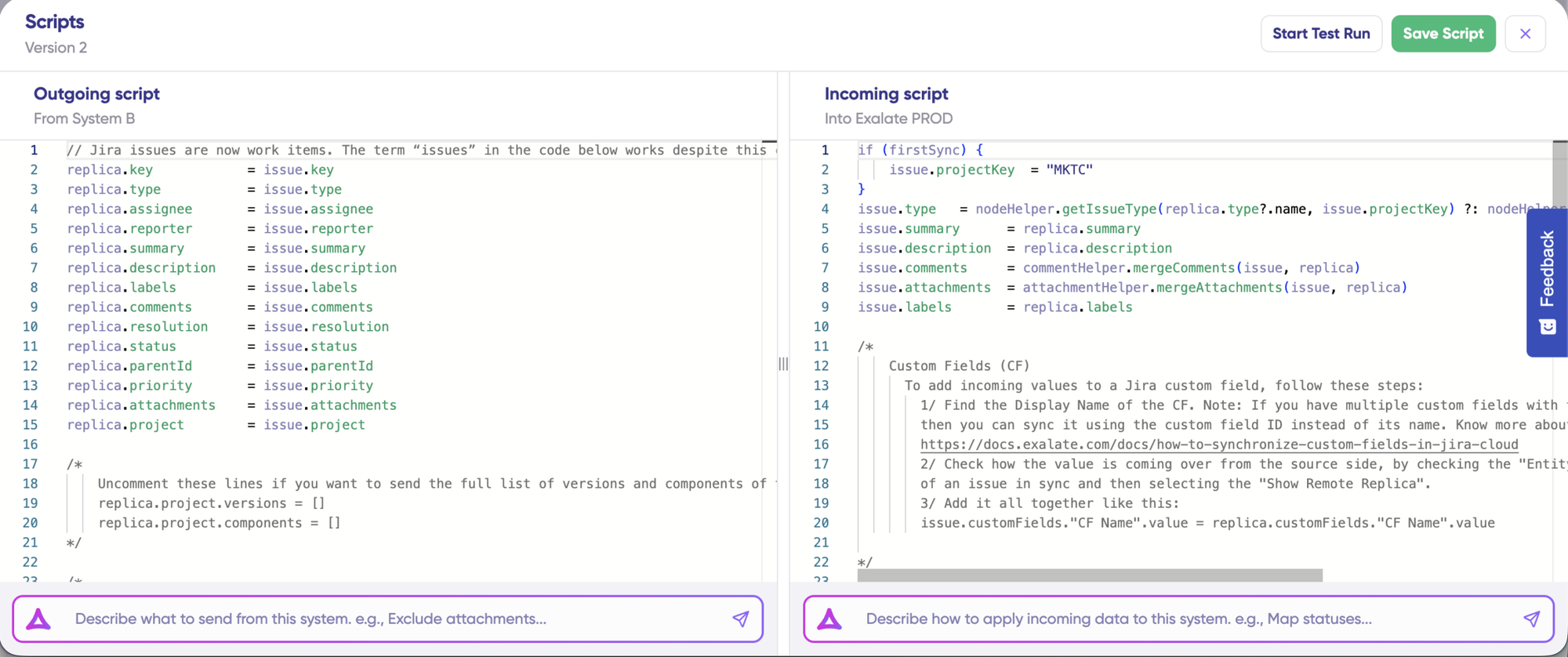
If you’re comfortable with scripting, click “Edit Script” to open the script editor. Define what data leaves your system (outgoing) and how incoming data is applied (incoming).
Option 2: Use Aida (AI-Assisted Configuration)
Describe what you want in plain language:
- Outgoing: “Exclude attachments” or “Only sync high-priority work items”
- Incoming: “Map statuses” or “Set a default assignee if user not found”
Aida generates working Groovy scripts based on your requirements. Review the changes (green = added, red = removed), then choose “Insert” or “Discard”.
Step 5: Test Before Going Live
Click “Start Test Run” to validate your configuration without affecting production data. Select work items to test, then preview:
- How sync rules will be applied
- Field mappings for each item
- Incoming and outgoing replicas
Adjust scripts if needed, test again, then click “Publish Version” when everything looks correct.
Step 6: Set Up Triggers
Triggers define which items sync automatically. Click “+ Add trigger” and specify conditions:
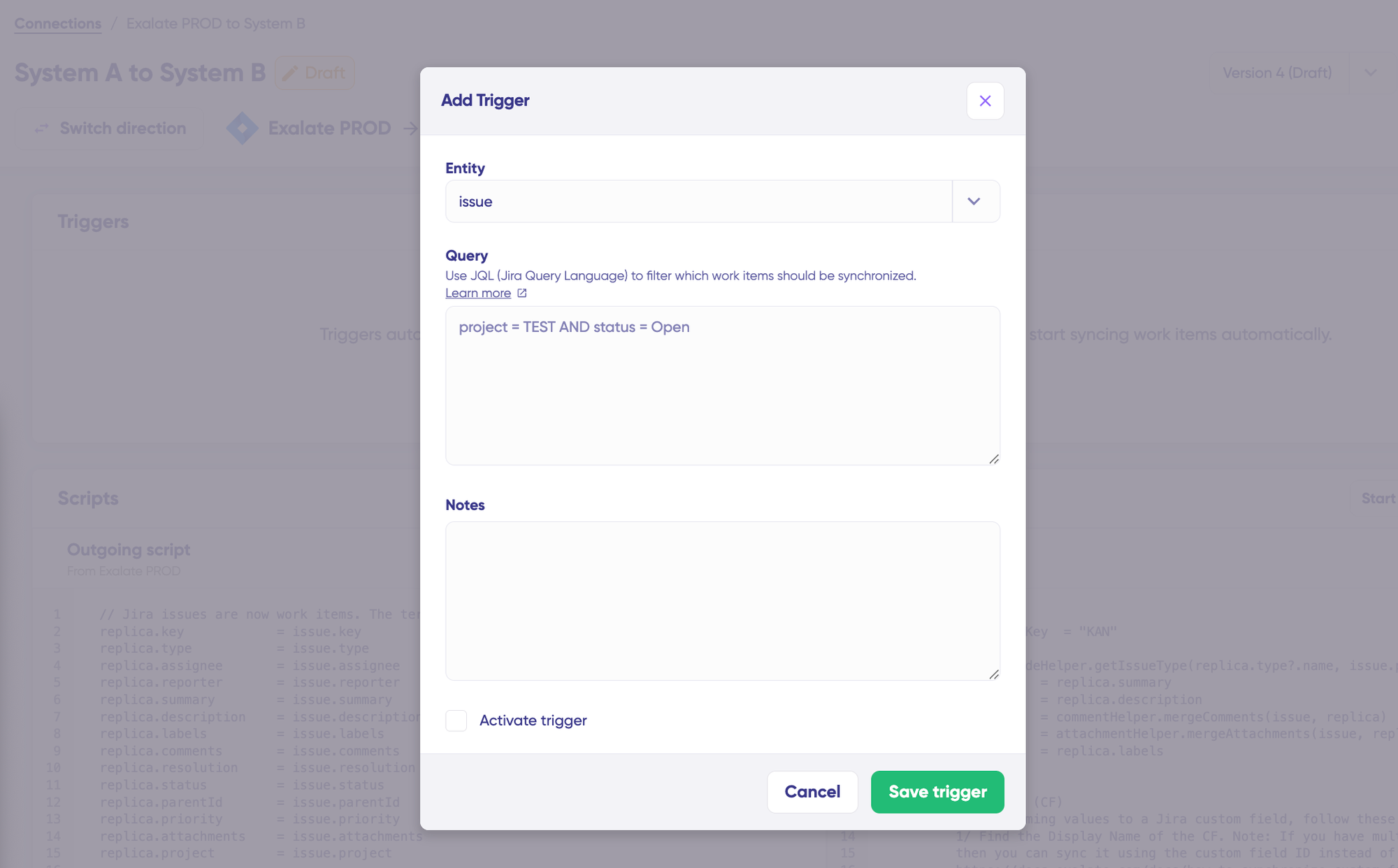
- Jira: use JQL (e.g., label = “dev”)
- ServiceNow: use advanced search syntax (e.g., assignment group filters)
Save and publish your triggers.
Step 7: Monitor and Troubleshoot
Your sync starts automatically based on your rules and triggers. If errors occur, go to the “Troubleshooting” tab. Hover over any error and click the Aida icon for context-aware suggestions and proposed solutions. You can view the full analysis, error details, or replicas in JSON format.
How to Switch From Exalate Classic to New Exalate
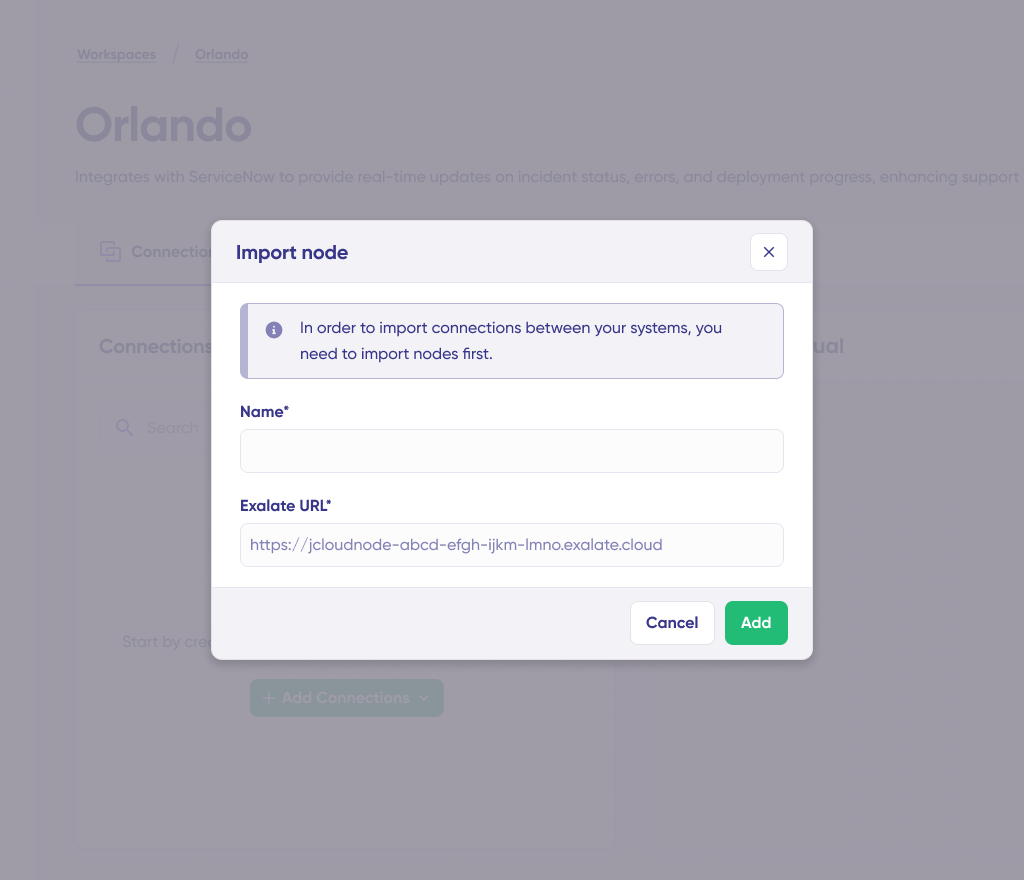
You switch from Exalate Classic to New Exalate by importing your existing connections. Use the Import Existing Connections feature to bring your current integrations into New Exalate. Your sync rules transfer automatically; no rebuild required.
If you’re importing a cross-company connection and you don’t have admin access on the destination side, Collaborative Import lets you invite a destination admin by email to finish the import.
What Comes Next
This is an ongoing evolution. More improvements are on the way:
- Trust Levels and collaborative integrations: granular access control for team-based integration management.
- Conversation Mode moving out of early access: Aida-driven connection configuration through chat, available to everyone.
- Additional connector support: more platforms joining the new experience.
We’re building in public, and we want your input. If you have feedback or questions, reach out at product@exalate.com.
Frequently Asked Questions
Will my existing Exalate Classic integrations stop working?
No. All existing integrations keep running unchanged. There’s no deadline for switching to New Exalate. You can do it whenever you’re ready.
Do I need to rewrite my scripts from Exalate Classic?
No. All your existing Exalate Classic Groovy scripts work as they do in the new experience. You can also import connections with their configurations intact.
What happens to my Exalate Classic license?
Your Exalate Classic pricing stays unchanged until you choose to move to the new subscription model.
Can I use both experiences at once?
Yes. You can run Exalate Classic integrations while exploring the new experience. When you’re ready, import connections to the new console.
What’s the difference between Exalate Classic and New Exalate?
Exalate Classic used a Groovy scripting engine that required installation on both sides, so you had to pay for all integrated systems. New Exalate changes this, so you no longer need to pay for both sides or install Exalate on all your systems.
New Exalate is a standalone web interface. It adds unified management for your connections, the Sync Panel browser extension, local connections, Test Run, script versioning, and Aida AI assistance, while keeping the same scripting engine and independent operational control you rely on.
What is the Sync Panel?
The Sync Panel is a browser extension that lets you sync items manually from your browser without logging into the Exalate app. It shows real-time sync status and gives you Sync Now and Unlink actions, with support for multiple connections.
What is a local connection?
A local connection syncs data between different projects within the same system instance, like two projects in the same Jira. It’s useful when a developer’s task in one project needs to create and update a matching item in another project. Local connections aren’t supported on Azure DevOps or GitHub.
How does outcome-based pricing work?
You pay for active work items currently in sync between systems, not for user seats or transaction volumes. If you sync 100 work items between Jira and Azure DevOps, you pay for those 100 active sync pairs.
Is New Exalate suitable for intra- and cross-company integrations?
Yes. New Exalate works for both intra-company and cross-company integrations, from basic to advanced, though granular Trust Levels are still in development. The current “High Trust” mode works well for all your integrations, and Collaborative Import already covers cross-company import scenarios. Full collaborative integration features are coming soon.
Which platforms are supported in New Exalate?
New Exalate supports Jira, ServiceNow, Asana, Azure DevOps Cloud and Server, Zendesk, Salesforce, Freshservice, and Freshdesk. You can request custom connectors, best for enterprises integrating legacy systems or exotic toolsets.
How do I switch to New Exalate from Exalate Classic?
Use the Import Existing Connections feature in the New Exalate console. Select your existing systems and connections, and your sync rules transfer automatically. No rebuild required. For cross-company connections where you don’t have destination admin access, Collaborative Import lets you invite a destination admin by email.
The Bottom Line
New Exalate is an evolution, not a replacement. Your current integrations keep working, your scripts stay intact, and your operational control stays the same.
What’s new is clarity, one place to understand every connection, the Sync Panel for manual sync from your browser, local connections between projects, safer testing before deployment, and AI assistance to help you work faster.
Switch when you’re ready. Classic keeps running.
Built by engineers. Refined by reality. Yours to run.
Need help deciding if Exalate is right for your integration needs? Contact our team or start a free trial to test New Exalate.