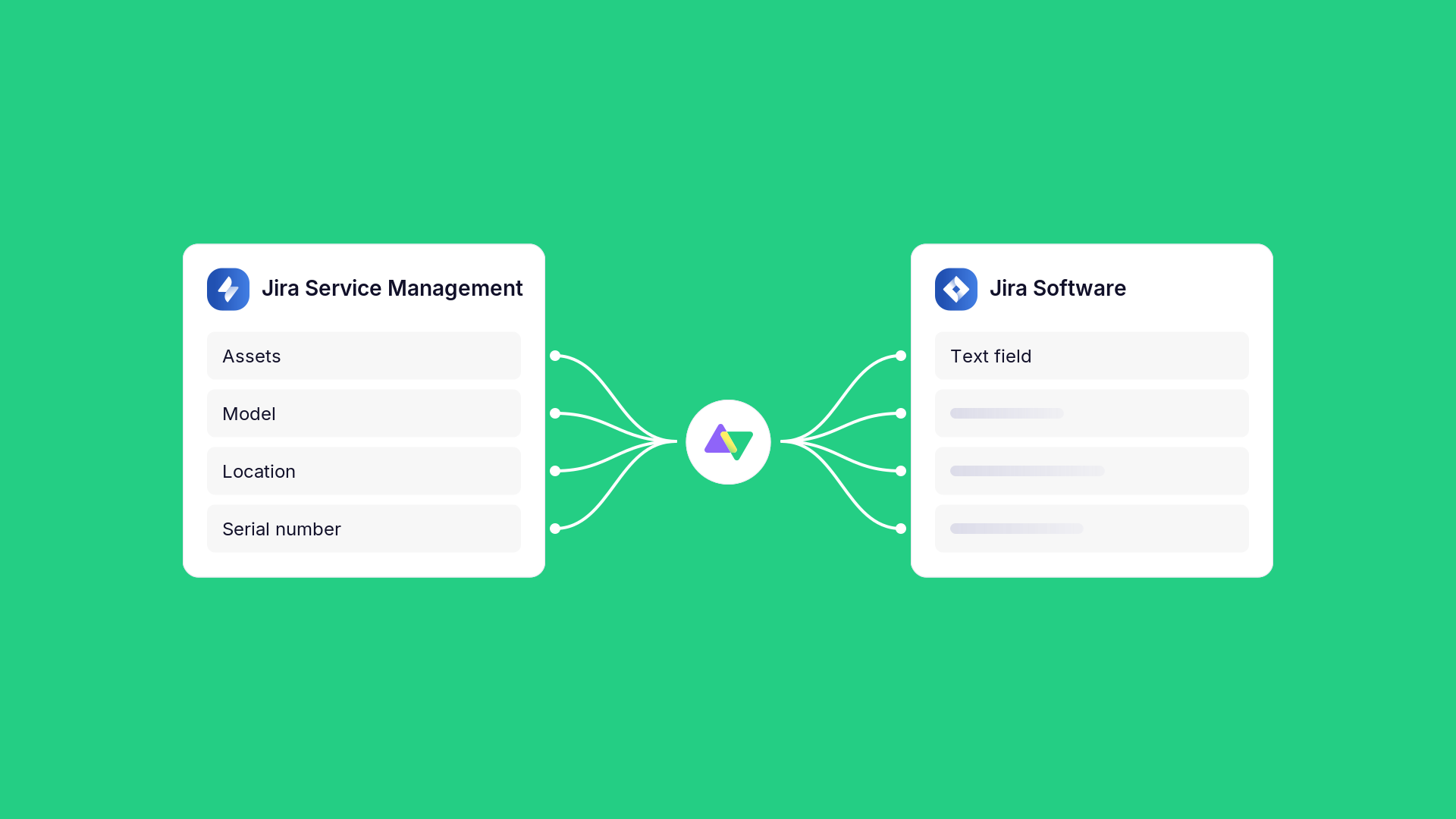
ITSM change management is how IT teams plan, approve, and roll out service changes without breaking what’s already running. In most organizations, the change record lives in ServiceNow, while the actual work happens in Jira or Azure DevOps.
This disparity between systems means that approvers can’t see what’s inside a release, developers update the same change in 2 places, and the audit trail ends up spread across tools that don’t share data.
That’s why you need to connect these tools to keep approvals in your ITSM platform and execution in your dev tool, with status, IDs, and approval state moving between them automatically.
In this guide, we’ll go through the basics of ITSM change management, the cross-tool workflows teams run, the metrics worth tracking, and how to set up the integration one flow at a time.
Key Takeaways
- ITSM change management controls how changes to IT services get requested, assessed, approved, implemented, and reviewed.
- Standard, normal, and emergency changes need different approval paths. Treating them all the same is the fastest way to turn your CAB into a bottleneck.
- Most enterprises split change governance (ServiceNow) from change execution (Jira or Azure DevOps), and that split causes most of the friction.
- Before connecting tools, decide which system owns approval, which fields cross, what triggers a change record, and how references loop back.
- Start with one project pair and one standard change type, then expand once the first flow is stable.
Discuss your integration setup with our experts
Get free, expert advice on your setup. We’ll reach out via email to discuss your use case.
What Is ITSM?
ITSM (IT service management) is the set of practices IT teams use to design, deliver, support, and improve the services they provide to the business. It covers incidents, service requests, problems, assets, and changes.
For example, an employee requests a new laptop through the service portal (a service request), the VPN goes down for the sales team (an incident), and the network team schedules a firewall upgrade to fix the root cause (a change). All 3 run through ITSM processes, usually in a platform such as ServiceNow, Jira Service Management, or Freshservice.
Most ITSM teams base their processes on ITIL, a widely used ITSM framework. ITIL gives you the vocabulary and the practices, while your ITSM platform is where those practices run day to day.
What Is Change Management?
Change management is a structured framework that helps an organization handle all personnel changes and process adjustments.
The term covers 2 different disciplines:
- Organizational change management deals with the people side of change, such as training staff on a new CRM or restructuring a department.
- IT change management deals with changes to technology services: infrastructure, applications, configurations, and the processes that support them.
This guide covers IT change management. For example, your team may need to upgrade a production database to a new major version. IT change management decides who reviews the risk, who approves the upgrade, when it runs, and what happens if it fails.
According to ITIL 4, this practice is called change enablement, which focuses on delivering changes safely. But for this guide, we’ll continue to call it change management.
What Is ITSM Change Management?
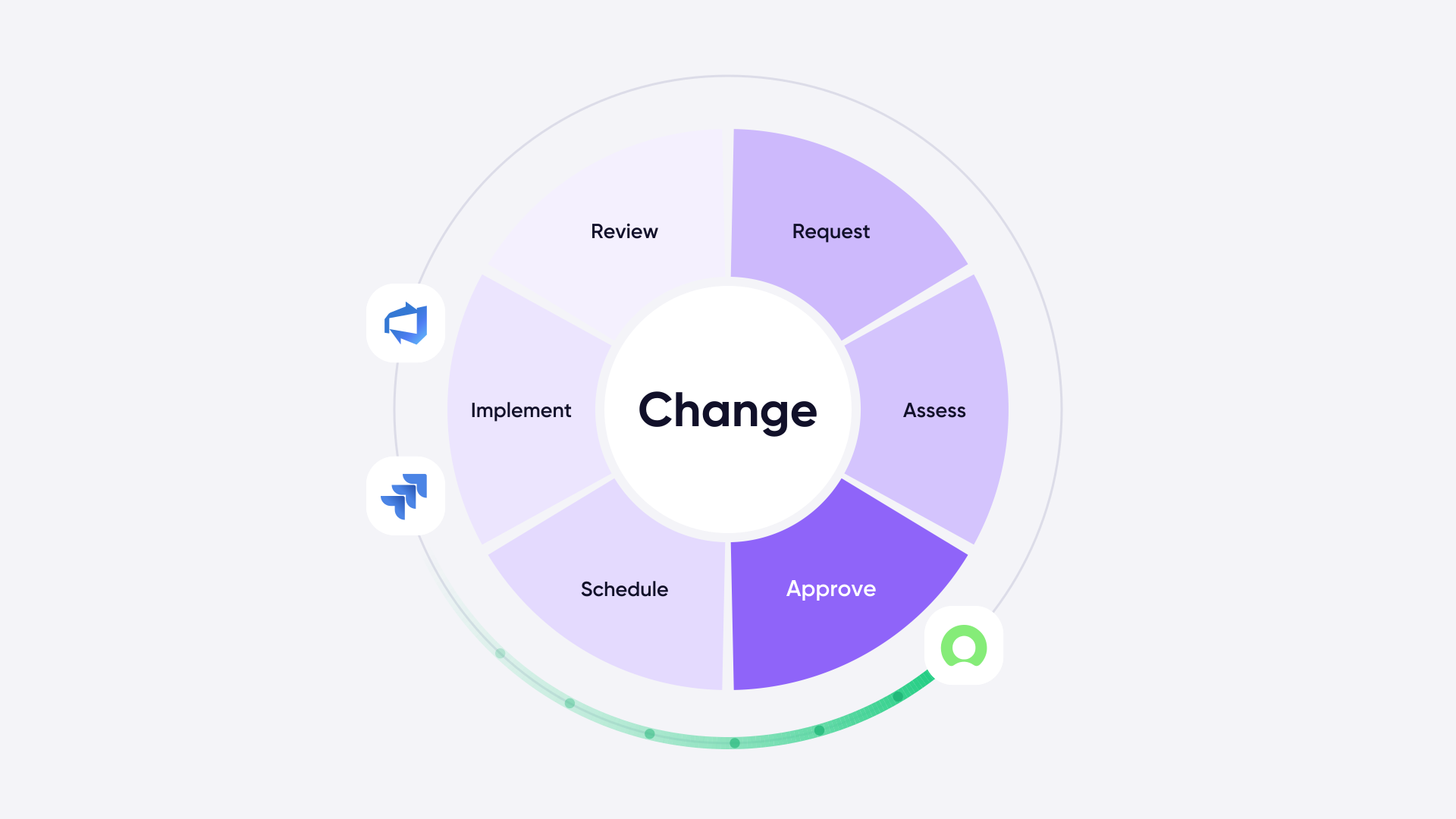
ITSM change management is the process of recording, assessing, approving, scheduling, and reviewing changes to IT services so they go live with minimal risk and disruption. Each change gets a change request, a risk rating, an approval path based on its type, a scheduled window, a rollback plan, and a post-implementation review.
For instance, a team wants to patch a customer-facing payment API. They raise a change request in ServiceNow, the change manager rates it as medium risk, the CAB approves it for a later date, the dev team deploys from Jira, and the change gets closed once monitoring confirms the patch is stable.
Standard vs. Normal vs. Emergency Changes
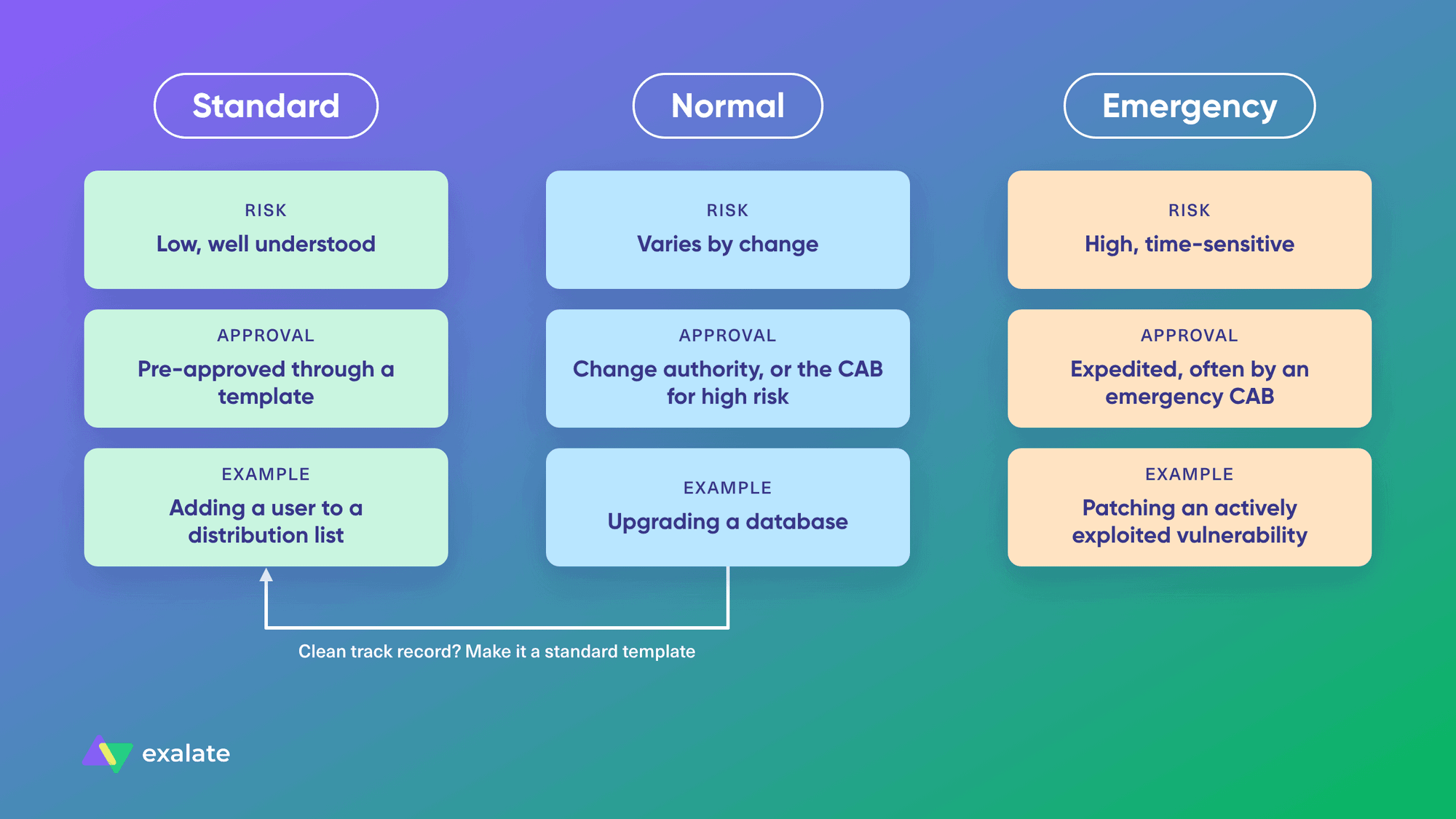
ITIL groups changes into 3 types, each with a different approval path.
| Change type | Risk level | Approval path | Example |
| Standard | Low, well understood | Pre-approved through a template | Adding a user to a distribution list, replacing a router with an identical model |
| Normal | Varies by change | Assessed case by case, by a change authority or the CAB for high-risk changes | Upgrading a database, releasing a new application version |
| Emergency | High, time-sensitive | Expedited, often by a smaller emergency CAB | Patching an actively exploited vulnerability, restoring a failed production server |
Standard changes save the most time. Once a normal change runs a few times with no incidents, it’s a good candidate for a standard change template.
Components of an Effective Change Management Process
A working change management process has a few moving parts. Some are documents, some are roles, and some are records in your ITSM tool.
Change Policy and Change Models
The change policy sets the rules regarding what counts as a change, which types exist, who can approve what, and what every request must include. Change models then describe the exact path for each type, so a standard change and an emergency change don’t go through the same review.
Request for Change (RFC)
The RFC is the record that describes what’s changing, why it has to change, which systems are affected, the implementation plan, and the rollback plan. In ServiceNow, this is the change request table. In Jira Service Management, it’s a change work type.
Risk and Impact Assessment
Someone, usually the system admin, has to decide how risky the change is before it gets approved. Good assessments pull from the CMDB to see which configuration items and services depend on the thing being changed. Example: restarting a shared authentication service affects every app that uses it, even if the change itself looks small.
Approval and the Change Advisory Board (CAB)
The CAB reviews high-risk normal changes and advises the change authority on whether to approve them. A single change manager, a peer reviewer, or automated checks can approve lower-risk changes because the expected impact is low.
To stop the CAB from becoming the slowest step in the process, keep it focused on the riskiest changes.
Change Schedule
The change schedule (sometimes called the forward schedule of change) shows every approved change and its window. It helps you spot conflicts, such as 2 teams planning to change the same server on the same night.
Implementation and Rollback Plan
The implementation plan covers the steps, owners, and timing. The rollback plan covers what you do if something goes wrong, and it needs to exist before approval, not after the incident.
Post-Implementation Review and Closure
After the change goes live, the team confirms whether it worked, whether it caused incidents, and whether it ran on time. This review feeds back into your change models. Example: a change type that keeps succeeding can move to the standard change list.
Benefits of ITSM Change Management
A working change process means fewer outages, faster approvals, and cleaner audits. Here .
Fewer Change-Related Incidents
Every change gets a risk assessment and a rollback plan before it goes live, so teams catch risky changes before they reach production. This matters most for changes that look small but touch shared services.
For example, a CMDB check shows that a config update affects 3 customer-facing apps. The team moves the change to a low-traffic window and has a rollback ready if response times climb.
Faster Approvals for Low-Risk Work
Standard change templates let routine, pre-approved work skip the CAB. Your CAB then spends its time on the changes that carry real risk.
For instance, patching a non-production server goes through a template and gets approved in minutes, while the CAB meeting focuses on next week’s database migration.
Clean Audit Trail
Each change has a record of who requested it, who approved it, when it ran, and how it turned out. When an auditor asks about a production change from last quarter, you pull one change record and skip rebuilding the story from emails and chat threads.
With connected tools, the trail covers both sides. The change ID on the Jira or ADO work item links the approval in ServiceNow to the work that implemented it.
Shared Visibility for Developers and Approvers
When change records sync between ServiceNow and your dev tool, each team sees the other side’s status without leaving its own tool. Developers know when a change is approved, and approvers can see what’s inside the release they’re signing off on.
This removes the step where someone copies work item links into the change request right before the CAB meeting.
Less Duplicate Work Across Tools
Without a sync, service team leads would have to update the change request in ServiceNow and then make the same update in Jira. With status, approval state, and schedule moving automatically, each update happens once, in the tool where the person already works.
This also reduces errors from copying, such as a change marked approved in one tool but still pending in the other.
Safer Collaboration With Partners and Suppliers
Partners and suppliers keep working in their own ITSM tools, while your change schedule still reflects their part of the work. Each side controls what it shares, so internal work notes and customer data stay where they belong.
Example: a managed service provider sees only the change requests assigned to its group, updates them in its own Jira, and the status flows back to your ServiceNow.
Use Cases for ITSM Change Management
The use cases below cover the fields that are synced, the direction, and the point where it tends to break.
Jira Releases That Raise ServiceNow Change Requests
Case: A retail brand creates Jira fix versions well in advance, while the matching ServiceNow change requests only get created close to the release date. Approvers can’t see what’s in the change, so someone has to copy work item links into the change request before the CAB meeting.
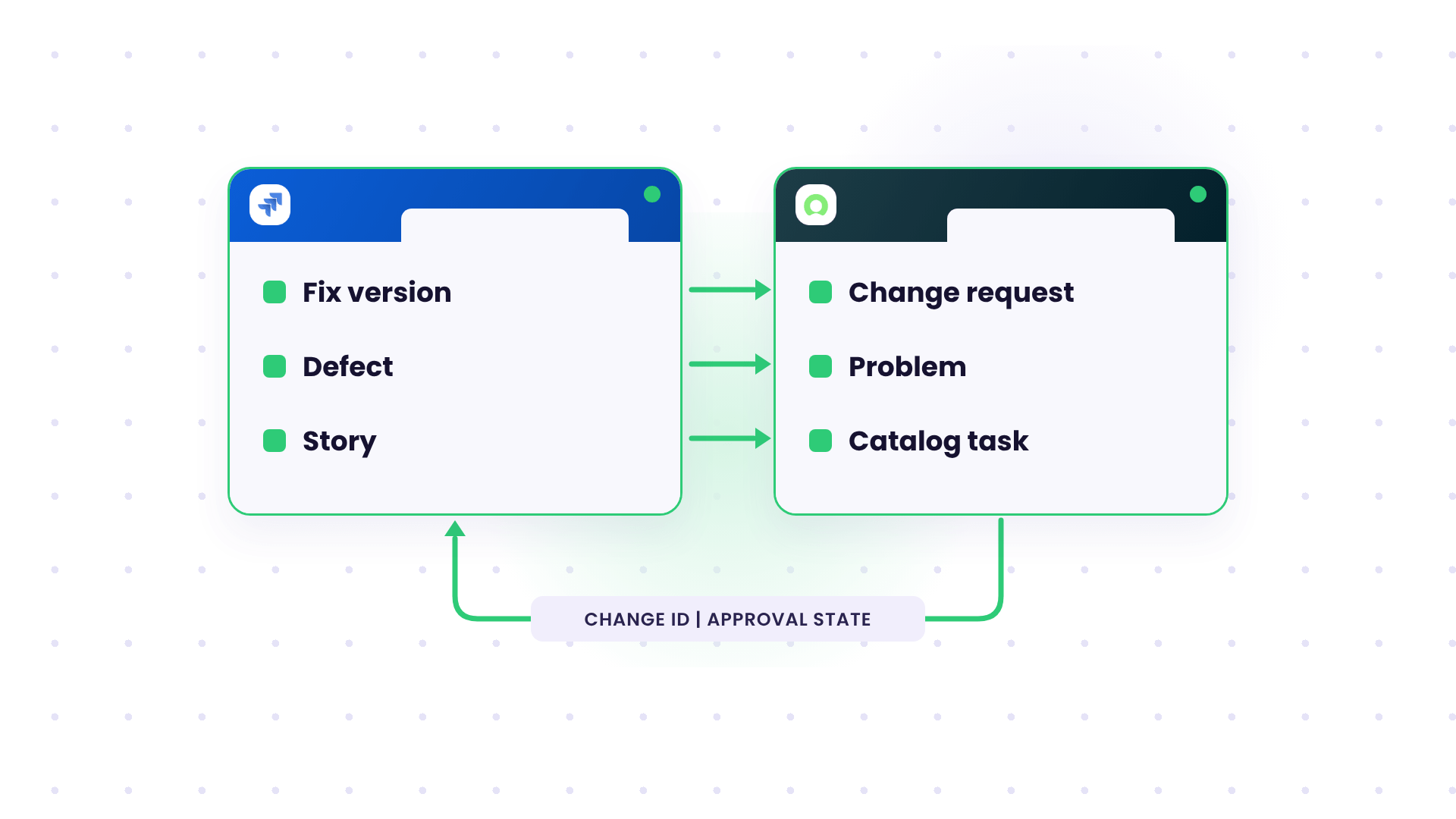
Solution: A new Jira version creates the ServiceNow change request automatically. The release maps to the change request, defects map to problem records, and catalog tasks map to stories. The change ID comes back to the Jira version, so developers see the approval state without opening ServiceNow. If new work items get added to the version after approval, the sync updates the change request too, so approvers see the current scope before the change goes live.
Approved Jira Bookings That Become Standard Changes
Case: A health insurer uses Jira to book environment and release slots, while the Release team approves changes in ServiceNow. They want every approved booking to become a ServiceNow standard change without anyone entering it twice.
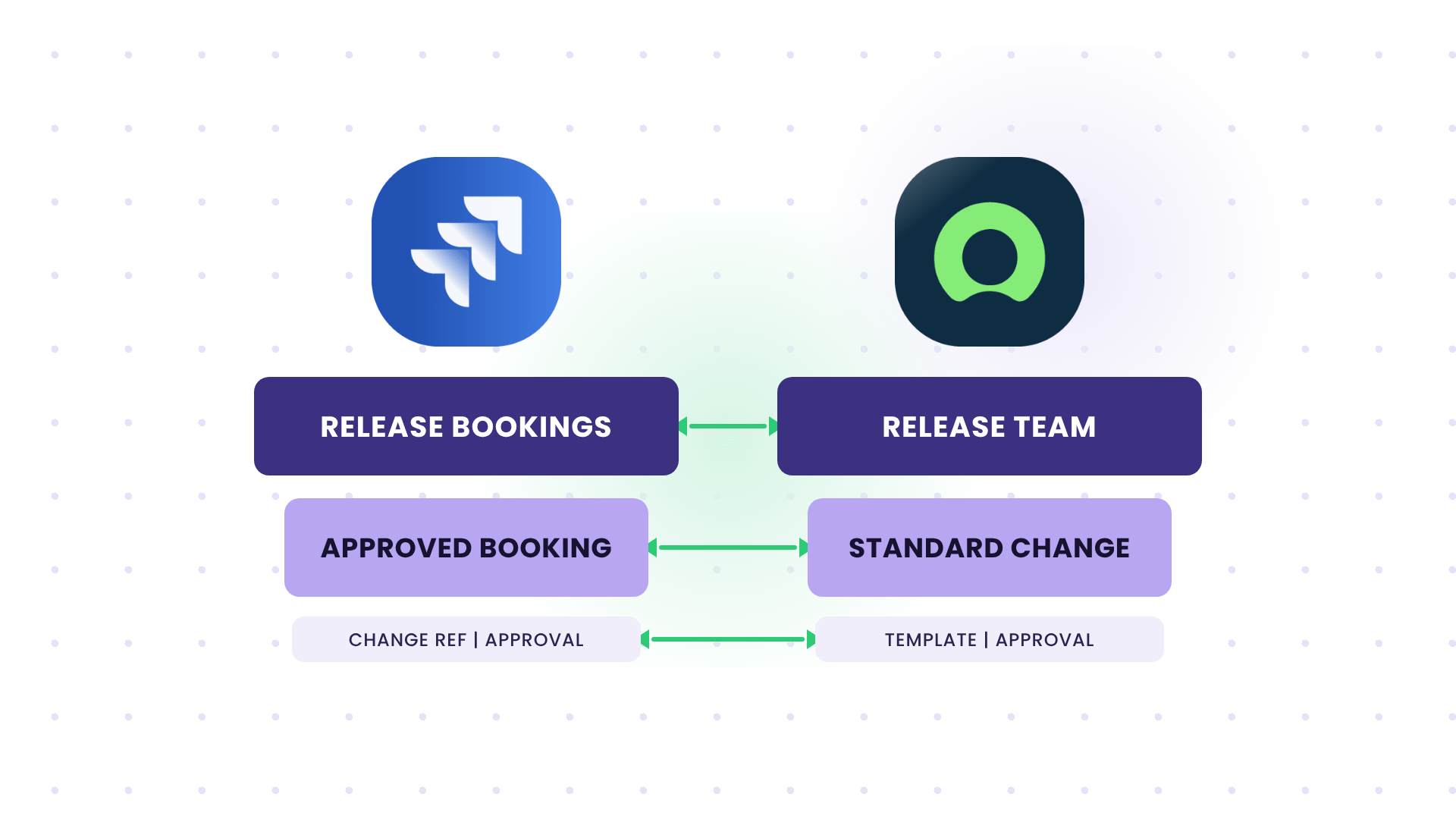
Solution: Once a booking is approved in Jira, ServiceNow raises a standard change from a template, and the change reference loops back to the Jira booking. The Release team approves the change in ServiceNow, the approval status returns to Jira, and automation closes the Jira ticket after the change window. Keep the standard change template under change control, since an unannounced edit to it can stop new changes from being created.
Azure DevOps Work Items Feeding ServiceNow Changes
Case: One company is decommissioning Jira and moving engineering to Azure DevOps (ADO). They need ADO to replicate the Jira-to-ServiceNow change flows they already have, without losing the history of changes that are mid-flight.
Solution: A change request in ServiceNow creates linked work items in ADO, the ADO state syncs back to the change request, and the change can’t close until the linked work items are done. During the cutover, open changes still linked to Jira either finish in Jira or move to Azure DevOps with their references intact.
Approval Gates Tracked Inside the Dev Tool
Case: Developers can’t see which approval a change is waiting on because the approvals happen outside their tool. For instance, some Azure DevOps-to-Jira workflows set the statuses to UAT Approved, Security Approved, CAB Approved, and Ready for Release, with a note to move approvals into Jira.
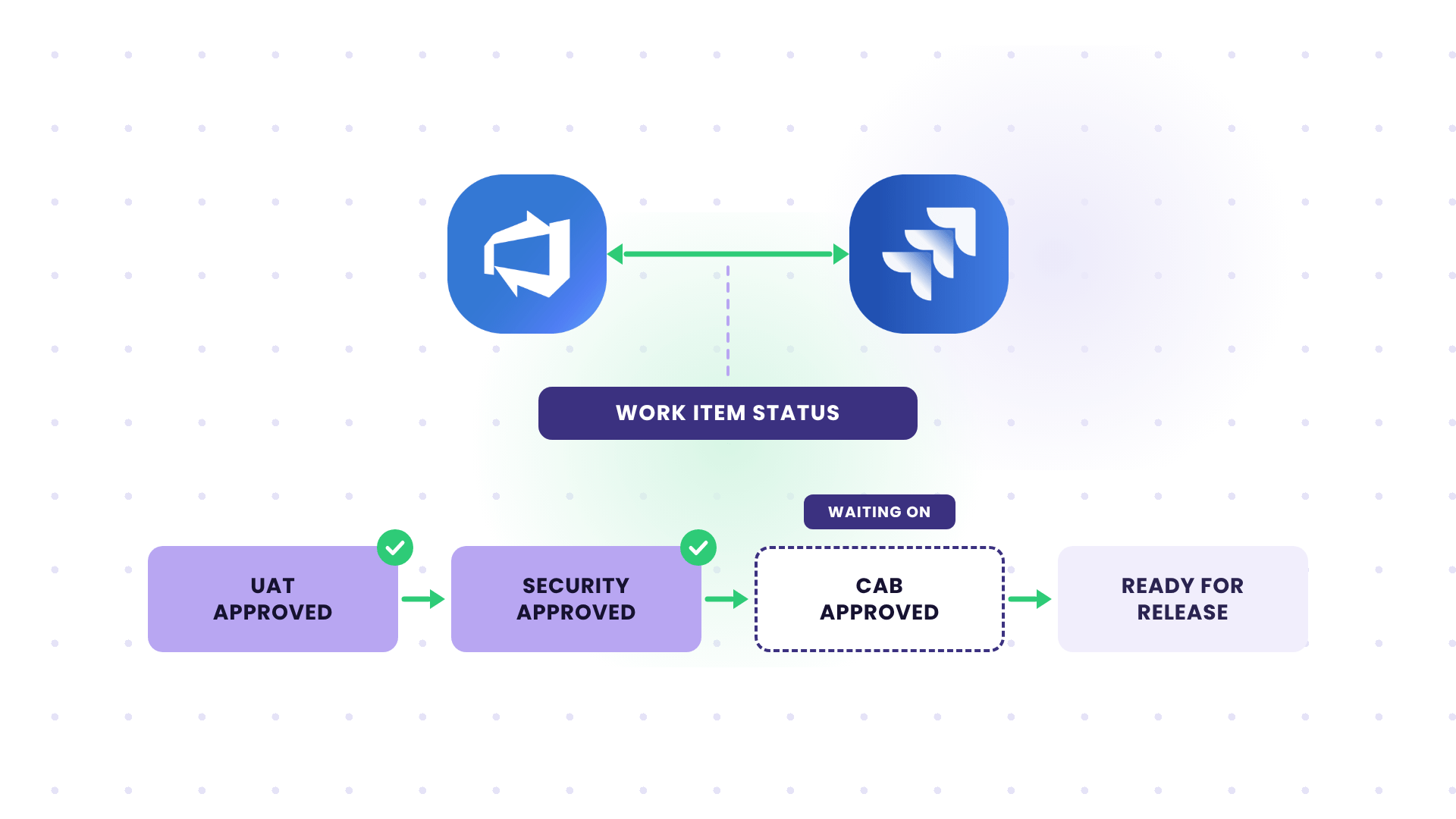
Solution: Each status maps to an approval stage owned by a different group, and the integration carries each approval forward as a status change, so developers know exactly which gate the change is waiting on. If two approvals can happen in any order, such as Security before UAT, use separate approval fields in place of a single linear status.
Change Records Shared With Partners and Suppliers
Case: In SIAM and outsourcing setups, the supplier runs their own ITSM tool. Your change request lives in your ServiceNow, while the supplier’s implementation work lives in their Jira, ServiceNow, or Zendesk.
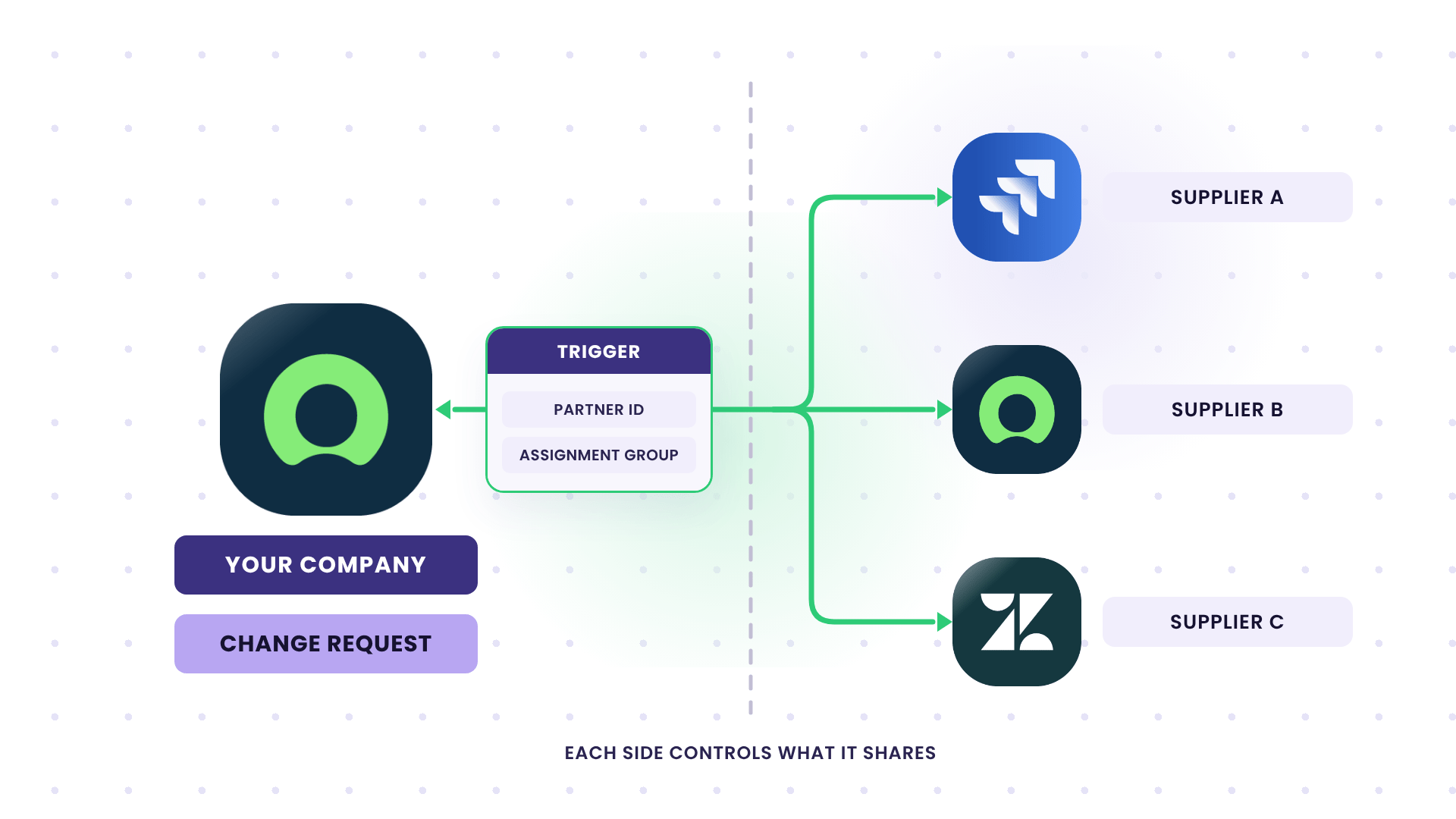
Solution: A trigger, such as a partner ID or assignment group, determines which changes leave your instance, so only those involving that supplier sync. Each side controls what it sends and accepts, keeping internal work notes, unrelated changes, and customer data from reaching the other company.
How to Implement ITSM Change Management Integration
The steps below assume your change governance sits in one tool and your execution sits in another. Treat the first 4 steps as decisions to make before anyone touches a connector.
Step 1: Decide Which System Owns What
Every field that crosses between tools needs one system of record. If both sides can edit the approval state, you’ll eventually get a change marked approved in Jira and pending in ServiceNow.
| Attribute | System of record | Direction | Example |
| Change request and approval state | ServiceNow | ServiceNow to Jira/ADO | CAB Approved shows on the Jira version |
| Implementation work | Jira or ADO | Status flows to ServiceNow | Stories marked Done update the change tasks |
| Change ID | ServiceNow | ServiceNow to Jira/ADO | CHG0031234 stored on the work item |
| Work item key | Jira or ADO | Jira/ADO to ServiceNow | Jira key stored on the change request |
| Schedule window | ServiceNow | ServiceNow to Jira/ADO | Planned start and end dates |
| Internal work notes | Each side | Doesn’t sync | Engineering comments stay in Jira |
| Time logs and billing data | Each side | Doesn’t sync | Logged hours stay in the dev tool |
Discuss your integration setup with our experts
Get free, expert advice on your setup. We’ll reach out via email to discuss your use case.
Step 2: Choose the Fields That Cross
Start with the status, change ID, approval state, and the schedule window. Then, add description, attachments, and public comments (only if the other team needs them).
For comments, decide whether to keep internal commentary out of the sync, along with billing and time data.
Step 3: Define What Triggers a Change Record
Pick one event that creates the change record, such as a workflow milestone, a new Jira version, an approved booking, or a specific label. Then decide which updates matter after that.
Step 4: Set Up Loop-Back References
The change ID should land in Jira or ADO, and the work item key should land in ServiceNow. This gives each team a direct reference to the other record and gives auditors a clean link between approval and execution.
Step 5: Handle Identity Mismatches
Users rarely exist identically in both tools because some systems use emails, while others assign a unique ID (or hash key) for each user. For instance, you can set a fallback for when the “Requested For” person in ServiceNow has no corresponding Jira account.
You can look for common workarounds such as a default service account, an email-based lookup, or a custom field that stores the original user’s name as text.
Step 6: Pick How You’ll Connect the Tools
There are 4 common ways to connect change management across tools.
Native connectors (such as ServiceNow Integration Hub spokes)
- Best for: simple, one-direction flows within a single company.
- Limitations: limited control over field logic, and each side usually needs its own licensing and admin effort.
iPaaS platforms (such as Workato or MuleSoft)
- Best for: organizations that already run an iPaaS for data pipelines.
- Limitations: built around triggers and actions, so bidirectional record sync with conflict handling takes a lot of custom work.
Custom webhooks and APIs
- Best for: teams with spare engineering capacity and a single, stable flow.
- Limitations: every API change, new field, or workflow update becomes your team’s problem.
Dedicated sync tools (Exalate)
- Best for: bidirectional sync of change requests, work items, and approvals across Jira, ServiceNow, Azure DevOps, and other ITSM tools, including across company boundaries.
- Limitations: scripting with Groovy can take time, but the Aida AI scripting assistant makes things easier.
Exalate also connects Jira, ServiceNow, Azure DevOps, Zendesk, Salesforce, Freshservice, and other tools with bidirectional sync.
Each side controls its own outgoing and incoming data through Groovy scripts, which matters when your partner’s admin needs control over what enters their instance.
Aida AI, Exalate’s AI scripting assistant, helps you generate sync scripts from plain-language prompts. The Test Run feature lets you check scripts against real work items before anything goes live. You can use the script versioning to roll back a configuration if a change to the sync itself goes wrong.
If your change flows span several instances, partners, or regulated environments, talk to the Exalate team about an enterprise setup that covers your approval model and security requirements.
Step 7: Plan for the Audit and Security Review
When change records live in 2 places, auditors will want proof that approvals in one tool match execution in the other.
Expect these questions during review:
- Can you show who approved the change and when, in the system of record?
- Does the dev tool show the same approval state at the time work started?
- Were any fields changed after the fact?
- What access does the integration need?
- Where is synced data stored, and which certifications cover it?
The integration itself also counts as a change because it adds a new solution to your tech stack.
Step 8: Roll It Out One Flow at a Time
Start with one project pair and one standard change type. Standard changes are low-risk and repetitive, so they surface problems quickly without risking production approvals.
Before turning on your first sync, check that:
- The system of record is agreed for every synced field.
- The trigger only catches the changes you expect.
- Loop-back references show on both sides.
- User mapping has a fallback.
- Test Run (or your tool’s equivalent) passes on real records.
- The integration rollback plan is documented.
Once the first flow runs cleanly for a few change cycles, add normal changes, then additional projects or partners.
What Metrics Are Important for ITSM Change Management?
The right metrics tell you whether changes go live safely and on time. The cross-tool metrics at the end show whether your integration helps or adds risk.
- Change success rate: The share of changes that go live without causing an incident, rollback, or unplanned outage. Track it per change type, since a low success rate on standard changes means a template needs fixing.
- Change failure rate: The share of changes that lead to degraded service and need a fix. It’s one of the 4 DORA metrics, which makes it useful for comparing ITSM and DevOps performance in the same conversation.
- Lead time for changes: The time from change request to implementation. Break it down by stage to see where changes wait, usually for approval.
- Emergency change ratio: The share of changes that go through the emergency path. A high ratio often means teams use emergency changes to skip the normal review, or that planning is weak.
- Unauthorized changes: Changes that went live without an approved change record. Even a couple of these per quarter is worth investigating, because they often point to teams working around a slow process.
- Approval cycle time: The time a change spends waiting for approval. Compare CAB-approved changes against those approved by a single change authority to see whether the CAB is reviewing changes it doesn’t need to.
- Sync lag and missing references: For cross-tool setups, measure how long it takes for an approval in ServiceNow to show in Jira or Azure DevOps, and how many change records are missing a loop-back reference. These numbers show whether developers can trust what they see in their own tool.
Common Pitfalls of ITSM Change Management (and Consequences)
Some pitfalls come from the process itself, while others appear only when change management spans more than one tool.
One Approval Path for Every Change
When every normal change goes through the CAB, low-risk changes wait days for a meeting slot.
Consequence: teams start labeling changes as emergencies to skip the queue, and your emergency change ratio climbs.
The Same Change Lives in 2 Systems
When the change request sits in ServiceNow and the work sits in Jira, someone has to keep both updated. Teams end up updating ServiceNow, going back to Jira, and then revisiting Jira again after closure.
Consequence: the 2 records drift apart, and nobody is sure which one is correct during an audit.
Approvals Happen Where the Work Doesn’t
Approvers sit in ServiceNow, while developers sit in Jira or ADO. Developers can’t see whether a change is approved without asking someone or logging into another tool.
Consequence: work starts before approval, or approved work sits idle because nobody told the dev team.
Questions Only Travel by Email
When the ServiceNow team has a question about a change, their only route to the dev team is often email or chat.
Consequence: answers get lost in inboxes, and the change record doesn’t capture the decision.
Partners and Suppliers Run Their Own Tools
In SIAM and outsourcing setups, your supplier won’t log into your ServiceNow. They’ll work in their own tool and send updates when they remember.
Consequence: change schedules miss supplier dependencies, and the wrong team gets blamed for failed changes.
Changes Ship Without Advance Notice
Stakeholders who own affected services don’t hear about the change until it goes live. This is often a CMDB problem, where the affected configuration items aren’t linked to their owners.
Consequence: change-related incidents that a single notification could have prevented.
Best Practices for Change Management in ITSM
These practices apply whether your change process runs in one tool or several.
- Make standard changes the default: Review your normal changes every quarter and move those with a clean track record into standard change templates. The more changes you pre-approve, the more time your CAB has for the risky ones.
- Keep the CAB for high-risk changes: Let change managers, peer reviewers, or automated checks approve low- and medium-risk changes. ITIL 4 encourages this decentralized approval, cutting approval cycle time without lowering the bar for risky changes.
- Let each team work in its own tool: Forcing developers into ServiceNow, or approvers into Jira, creates resistance and workarounds. Syncing records lets each team work where it’s productive while still seeing what it needs from the other side.
- Sync the minimum each side needs: More fields mean more conflicts and more audit questions. Start with status, change ID, approval state, and schedule, and add fields only when a team asks for them with a clear reason.
- Put the integration config through change control: Changes to your sync scripts can break your change process. Test them against real records before release, keep versions, and have a rollback ready, just as you would for an application change.
- Review the process with your metrics: Look at change success rate, emergency change ratio, and approval cycle time together. If one improves while another worsens, the process has only moved the problem elsewhere.
What’s Next
Start with the change flow that costs your teams the most time today. For most teams, that’s either the Jira release that needs a ServiceNow change request or the approval status developers keep asking about.
Get both teams in the same room and agree on 4 things: which system owns the approval, which fields cross, what creates the change record, and who owns the integration when a workflow changes on either side. Then sync one standard change type for a few change cycles before adding normal changes, more projects, or partners.
If you want to see how this works with your own Jira, ServiceNow, or Azure DevOps setup, book a demo with our engineers.

Frequently Asked Questions
What is change management in ITSM?
Change management in ITSM is the process of recording, assessing, approving, scheduling, and reviewing changes to IT services so they go live with minimal risk. Every change gets a request, a risk rating, an approval path based on its type, and a post-implementation review.
What are the 5 stages of ITSM?
The 5 stages come from the ITIL v3 service lifecycle: Service Strategy, Service Design, Service Transition, Service Operation, and Continual Service Improvement. Change management sits in Service Transition. ITIL 4 replaced the lifecycle with a service value system, but many teams still use the 5 stages to describe their ITSM work.
What’s the difference between ITSM and ITIL?
ITSM is the practice of managing IT services: incidents, requests, problems, changes, and assets. ITIL is a framework that guides how to do ITSM well. Example: your team does ITSM in ServiceNow, and it uses ITIL to decide how its change approval process should work.
What’s the difference between a standard change and a normal change?
A standard change is low risk, repeatable, and pre-approved through a template, such as adding a user to a distribution list. A normal change gets assessed case by case and approved by a change authority or the CAB, such as upgrading a production database. Normal changes with a clean track record often become standard changes.
What is a Change Advisory Board (CAB)?
A CAB is a group that reviews high-risk changes and advises the change authority on whether to approve them. It usually includes IT operations, security, service owners, and business representatives. Modern teams limit CAB review to the riskiest changes and let lower-risk changes go through faster approval paths.
Can a Jira release create a ServiceNow change request?
Yes. With an integration, creating or updating a Jira version can raise a ServiceNow change request automatically. The release maps to the change request, and the change ID syncs back to the Jira version. Approvers see the release scope in ServiceNow, and developers see the approval state in Jira.
How does change management work between Azure DevOps and ServiceNow?
ServiceNow usually holds the change request and approval, while Azure DevOps holds the work items that implement the change. An integration creates linked Azure DevOps work items from the change request and syncs their state back. The change can’t close until the linked work items are done, which keeps the audit trail complete.
Can Exalate sync ServiceNow change requests with Jira and Azure DevOps?
Yes, Exalate syncs ServiceNow change requests with Jira or Azure DevOps work items in either direction. You choose which fields cross, such as state, change ID, approval status, and planned dates, and you can keep work notes or time logs local to each side.
How does Exalate decide which change records get synced?
Exalate uses triggers to decide what records get synced between both systems. In Jira, the trigger uses a JQL query, while in ServiceNow, it uses a filter written in advanced search syntax.
Can I test Exalate sync rules before they touch live change records?
Yes, Test Run lets you check your sync scripts against real work items in draft mode before you publish them. Exalate also keeps versions of your configuration, so if a sync change causes problems, you can roll back to an earlier version.
Does Exalate support cross-company change management?
Yes, Exalate supports cross-company change management. Each side of an Exalate connection controls its own outgoing and incoming data through its own scripts. Your partner’s admin decides what enters their instance, and you decide what leaves yours. This suits SIAM, MSP, and supplier setups where neither company wants the other managing its configuration.
Recommended Reads