Remember when teams huddled over the same screen, using a single app to get things done? Those days are long gone. Today, each team has specialized tools for their tasks. But these tools often don’t talk to each other, leaving vital information siloed.
The cost shows up quickly. One managed services provider we spoke with was spending 14 hours per week manually copying tickets between their helpdesk and their clients’ systems. A software company’s integration had quietly become a full-time job for one developer. A CX software company put a number on it: 8 hours a week of “manual scrubbing” across systems that should have been synchronized automatically.
That’s where two-way synchronization, or two-way sync, comes in. It automatically updates, adds, or deletes information across systems, keeping data consistent and accurate.
Manually sharing data is one option, but it’s error-prone and tedious. An automated solution keeps everyone on the same page in real time.
Key Takeaways
- Choosing the right sync tool means evaluating connector coverage, field mapping flexibility, AI-assisted configuration, security certifications, and scalability for cross-company workflows.
- Two-way synchronization keeps data consistent across two or more connected systems by automatically reflecting changes made in either direction.
- Unlike one-way sync, two-way sync maintains an ongoing, bidirectional relationship between synced entities so updates flow both ways.
- Real-time sync and scheduled sync serve different use cases. Event-driven sync is faster but requires webhook support; polling-based sync is more broadly compatible and works well for less time-sensitive workflows.
- Conflict resolution is one of the biggest technical challenges in bidirectional sync. In Exalate, you define your own conflict resolution rules through scripting, giving you per-field control over which system wins.
- Loop prevention stops sync from triggering itself indefinitely. It can be handled through scripting by checking whether incoming data is actually different before writing it.
- User identity mapping handles the case where a user exists in one system but not the other. Options include email-based matching, a default user fallback, or fully custom Groovy scripts.
- Script versioning in Exalate provides a full audit trail of sync configuration changes, which is valuable for compliance-sensitive industries.
- Practical use cases span support-to-dev escalation, ITSM coordination, MSP collaboration, sales-marketing alignment, and pre-migration scenarios.

What is Data Synchronization?
Data synchronization is the process of keeping records consistent across two or more connected systems. When data changes in one location, synchronization detects that change and applies it to every other connected location. The result is one reliable version of the record across all systems, without manual data entry.
Synchronization covers several patterns. One-way sync pushes changes from a source system to a target, but not in return. Two-way sync moves changes in both directions, so either system can be updated, and the other will reflect it. Real-time sync applies changes as they happen. Scheduled sync batches change at defined intervals. What all these patterns share is the same core function: detecting changes and applying them consistently so no system holds a stale or conflicting record.
For organizations running separate tools across teams — say, Jira for engineering, ServiceNow for IT, and Salesforce for sales — data synchronization isn’t optional. Without it, the same customer issue, incident, or deal lives in three places with three different statuses. Someone ends up manually reconciling them.
Data Consolidation vs. Data Synchronization
Data consolidation is the process of combining records from multiple separate systems into a single unified location, typically for reporting, analysis, or archiving.
It differs from synchronization in one key way: synchronization keeps multiple live systems aligned with each other during active work, while consolidation pulls data from many sources into one destination for downstream use.
Both serve data accuracy goals, but at different stages of the data lifecycle. A consolidation project might pull resolved Jira tickets, closed ServiceNow incidents, and completed Salesforce opportunities into a central data warehouse for quarterly reporting. A synchronization project keeps the live records in Jira and ServiceNow current while both teams are actively working on them.
The two approaches work together. Operational synchronization keeps teams aligned during active collaboration. The synchronized data then feeds cleanly into any data consolidation pipeline once work closes. Exalate handles the sync so that what happens to the data after that is fully within your control.
What is a Two-Way Sync?
A two-way sync is a process that updates, adds, or deletes information between two connected systems such that changes made in one system are reflected accurately in the other and vice versa.
Imagine a calendar app that you use on your smartphone and your laptop. When you add an event on your laptop, you expect it to appear immediately on your phone, and if you delete it on one device, it should disappear from the other. These simultaneous edits across devices or systems portray what a two-way sync looks like in practice.
In the context of data integration, two-way synchronization, also called bidirectional sync, ensures data remains consistent across two or more systems and minimizes errors arising from outdated or conflicting data.
Leaving data to remain updated on all devices automatically allows teams to focus on strategic initiatives rather than routine data entry or reconciliation tasks.
Access to real-time synced data empowers teams with actionable insights, enabling faster and more informed decision-making.
You might have also come across a one-way sync.
What is the Difference Between One-Way and Two-Way Sync?
In one-way synchronization, data passes only in a single direction, from one system to another. Consider a Managed Services Provider (MSP) that provides managed services to its customers. Data almost always passes from the MSP to the customer and never the other way around. This is an example of one-way synchronization.
In one-way synchronization, data is only allowed to pass from system A to system B and not from system B to system A. If data changes or is deleted in system A, then the corresponding changes are reflected in system B.
This is a little different from automation. Automations are usually one-way, for instance, create a Slack notification when a new lead books a product demo. There’s hardly any one-on-one connection between the automated entities. Once the notification is set off, the relationship ceases to exist.
On the other hand, two-way synchronization is an integration that establishes and maintains an ongoing relationship between the synced entities.
So, if one entity is updated in one system, it’s also updated in another system. When discussing two-way synchronization, the data always remains consistent and accurate between both connected systems.
Real-Time Sync vs. Scheduled Sync: Understanding the Difference
These terms often get confused, so let’s clarify the full picture.
Two-way sync vs. real-time sync vs. data mirroring
Two-way sync means changes flow in both directions between connected systems. System A updates System B, and System B updates System A. The sync can happen in real-time or at scheduled intervals.
Real-time sync refers to the timing of the data exchange, not the direction. A real-time sync can be one-way or two-way. It simply means changes propagate immediately (or near-immediately) rather than on a schedule or batch cycle.
Data mirroring creates an exact replica of one dataset in another location. It’s typically one-way and used for backup or disaster recovery rather than active collaboration. The mirrored copy is usually read-only.
The key distinction: two-way sync is about direction, real-time sync is about speed, and data mirroring is about creating identical copies.
When real-time sync is the right choice
Real-time sync is driven by events. When something changes in System A, a trigger fires immediately and pushes that change to System B. This approach minimizes latency but requires both systems to support event-based notifications (webhooks or API callbacks).
Real-time sync is worth prioritizing when:
- A delay in information reaching the other team has a direct operational cost. A severity-1 incident logged in ServiceNow needs to appear in the engineering team’s Jira board within seconds, not after the next scheduled batch run.
- Your teams are making decisions that depend on the current state of a record in the other system, such as a support agent checking whether a bug has been resolved before responding to a customer.
- The volume of changes is low enough that event-driven triggers don’t overwhelm either system’s API rate limits.
When scheduled sync is the better fit
Scheduled sync (also called polling) runs at defined intervals. The sync engine checks both systems for changes every few minutes or hours and processes any updates it finds.
This works well when:
- Your data changes infrequently and near-instant updates are not critical. A weekly sync of project status into a reporting dashboard doesn’t need to fire on every keystroke.
- You are syncing large volumes of records in batches where event-driven triggers would generate excessive API traffic.
- One of your connected systems doesn’t support webhooks natively, and polling is the only available mechanism.
How Exalate handles both approaches
Exalate uses event-driven sync for systems that support it, such as Jira and ServiceNow, where changes trigger near-instant propagation.
For systems where webhooks aren’t available, Exalate falls back to polling automatically. Teams can also configure the sync mechanism based on their specific requirements, giving you control over how responsive or resource-efficient the integration needs to be.
A robust integration often combines both: event-driven triggers for urgent workflow items and scheduled sync for lower-priority bulk data.
How Does Two-Way Synchronization Work?
Two-way synchronization relies on a few core mechanisms working together to keep data consistent across connected systems.
Connection and Authentication
Before any data moves, both systems need to establish a secure connection. This typically happens through APIs (REST or SOAP) that authenticate requests using tokens, OAuth, or API keys.
The connection layer determines which systems can talk to each other and what permissions they have. When evaluating sync tools, look for ones that support encrypted connections (TLS 1.2 or higher) and role-based access controls to limit who can configure or modify sync rules.
Data Mapping
Once connected, you define how fields in one system correspond to fields in the other. A “Priority” field in Jira might map to an “Urgency” field in ServiceNow. A “Contact” in Salesforce might map to a “Reporter” in Zendesk.
Proper mapping ensures that relevant information like names, statuses, descriptions, and custom fields transfers correctly despite differences in data formats or naming conventions between platforms.
Change Detection: Event-Driven vs. Polling
The sync engine needs to know when something changes. Two common approaches handle this:
- Polling means the sync engine periodically checks both systems for updates. A CRM might check every few minutes for new leads or changes to existing customer records. Polling is simple but introduces latency between when a change happens and when it syncs.
- Webhooks work as an alternative by allowing systems to notify the sync engine immediately when specific events occur, like a new customer inquiry or a status change. Webhooks are faster but require both systems to support event-based notifications.
Exalate uses event-driven sync for platforms that support it. For platforms where only polling is available, it handles change detection automatically. This hybrid approach means you get near-real-time updates where possible and reliable scheduled updates everywhere else, without having to configure the mechanism per platform yourself.
Conflict Resolution in Two-Way Sync
What happens when both systems update the same record at the same time? Without a conflict resolution strategy, you risk data loss or infinite sync loops.
Common conflict resolution approaches include:
- Last-write-wins: The most recent change takes priority. Simple, but it can cause problems when updates happen in rapid succession across time zones.
- Source-of-truth rules: One system’s data always takes precedence for specific fields. Your CRM might own customer contact information, while your service desk owns ticket status and resolution data.
- Field-level merging: Non-conflicting field changes from both sides are accepted. If System A updates the description and System B updates the priority simultaneously, both changes go through.
- Manual review: Conflicts are flagged for human intervention rather than resolved automatically. Useful for high-stakes data where automated decisions carry too much risk.
In Exalate, conflict resolution rules are defined in scripts. This means you’re not limited to a single strategy across the entire integration. You can set source-of-truth rules field by field, build conditional logic (for example, if a ticket status is “Closed,” don’t overwrite it regardless of what the other side sends), and combine multiple approaches in a single connection.
For regulated industries where data ownership needs to be documented and auditable, this level of control is often a deciding factor.
Loop Prevention in Bidirectional Sync
Sync loops are one of the most common configuration mistakes in two-way sync. Without loop prevention, a change in System A triggers an update in System B, which triggers an update back in System A, and so on indefinitely until both systems are flooded with redundant updates.
Exalate handles loop prevention through scripting. A typical approach checks whether the incoming data is actually different from what’s already in the system before writing it. If System B receives an update that matches what it just sent to System A, the incoming script ignores it rather than writing the same value again.
Another common pattern is to attach a marker (such as a flag in a custom field) to changes that originated from the sync engine, so the system can distinguish between a user-initiated change and a sync-propagated change. Only user-initiated changes trigger outgoing sync; changes that arrived via sync do not trigger another sync event.
This logic runs in Exalate’s Groovy scripting engine on each side of the connection independently. Both teams have full control over their loop prevention rules without depending on the other side to do anything.
User Identity Mapping Across Systems
When a user exists in Jira but not in ServiceNow, or in Salesforce but not in Zendesk, the sync engine needs to know what to do.
This is one of the most common configuration challenges teams encounter during setup, and it comes up constantly in integration projects: “What happens to the assignee field when the user on the other side doesn’t exist in our system?”
Exalate gives you several options:
- Email-based matching: Exalate looks up the user by email address in the target system. If a match exists, the field populates correctly. This works well when both systems share the same corporate email directory.
- Default user fallback: If no match is found, the ticket gets assigned to a predefined default user (such as a team queue or an integration service account) rather than failing or leaving the field blank. This keeps the sync running cleanly while giving someone on the receiving side a clear signal that manual assignment may be needed.
- Custom mapping scripts: For more complex scenarios, such as different email domains across companies, or systems where users are identified by employee ID rather than email, you can write Groovy scripts that look up users by any available field and apply different logic based on issue type, project, or other conditions.
The right approach depends on how much your user directories overlap. Enterprise integrations within a single company typically work well with email matching.
Cross-company integrations, where each side has a completely separate user base, usually need a combination of email matching and a sensible fallback.
Sync Architecture
Sync architecture defines how, when, and what data flows between systems.
The “how” defines the direction of data flow. For instance, data might pass bidirectionally between a support team’s Zendesk and a development team’s Jira, but only one-way from an MSP’s ServiceNow to a customer’s Freshservice.
The “when” defines the conditions to start an automatic sync. For instance, automatically sync all bugs labeled “todev” into the dev team’s application.
The “what” refers to the actual data being passed between systems. Choose what you want to sync and refrain from sending any additional data. Some two-way sync solutions also allow you to sync historical data.
What are the Tools and Technologies to Achieve Two-Way Sync?
API Integration (RESTful and SOAP APIs)
APIs allow seamless communication between systems, enabling the exchange of data in real-time. RESTful APIs offer lightweight, easy-to-implement integrations, while SOAP APIs handle more complex, secure integrations requiring higher reliability and transaction support. Most modern sync platforms use REST APIs as their primary communication method.
Webhooks
Webhooks are lightweight HTTP callbacks that allow platforms to send real-time data to each other.
When a specific event occurs in one system, a webhook triggers an automated action in the other, ensuring the timely synchronization of service-related data between platforms. They reduce unnecessary API calls compared to polling and are the preferred trigger mechanism for near-instant sync.
ETL/ELT Tools
ETL (Extract, Transform, Load) tools facilitate extracting data from source systems, transforming it into the required format, and loading it into the target system. ELT reverses the last two steps, loading raw data first and transforming it in the destination.
These tools automate batch synchronization and work well for large data volumes, but they’re typically better suited for analytics and reporting pipelines than real-time operational sync between work management platforms.
Custom Scripts
Custom scripts allow developers to set up connections using programming languages like Python, Node.js, or Java. These scripts can fetch data, transform it, and push it into the other system. Your script controls how the sync works exactly.
The tradeoff is maintenance: every API change on either side means updating your scripts, and you’re responsible for handling errors, retries, and conflict resolution yourself. Teams that have gone this route often describe it as a second, invisible job that grows in complexity as the business scales.
Third-Party Integration Platforms
Third-party integration platforms allow teams to connect CRM systems, service desks, email platforms, or IT monitoring solutions without building from scratch. These platforms handle the heavy lifting of authentication, data transformation, error handling, and monitoring.
Some notable third-party integration tools include:
- Jitterbit enables real-time data exchange for automating business processes and workflows with robust transformation tools. It also provides a unified approach to managing system integrations across an organization. Best for organizations that need strong data transformation capabilities alongside integration.
- Zapier automates workflows between applications without needing code. It allows users to create “Zaps” to streamline repetitive tasks like ticket creation or data updates between systems. Best for simple, trigger-based automations between SaaS tools.
- MuleSoft’s Anypoint Platform offers a unified integration solution with pre-built connectors and API management capabilities. It streamlines workflows and ensures secure, scalable data exchanges across cloud and on-premises environments. Best for enterprise API management and complex integration architectures.
- Workato connects systems using easy-to-use recipes. It allows organizations to automate business workflows, synchronize data, and create complex integrations with little to no coding. Best for business teams that want to build automations without heavy developer involvement.
- Dell Boomi is a cloud-based integration platform with drag-and-drop interfaces and pre-built connectors for automating workflows and data synchronization. Best for organizations needing master data management alongside integration.
- Exalate is a flexible, cross-platform integration tool built specifically for bidirectional synchronization of work items, tickets, cases, and service requests across platforms. It provides configurable field mappings and AI-assisted configuration through Aida, making it well-suited for cross-company integrations.
What are the Benefits of Two-Way Sync?
1. Enhanced Collaboration
Two-way sync lets teams using different platforms stay aligned without switching tools. A development team in Jira and a support team in Zendesk can share work item updates, comments, and status changes automatically. Neither team has to leave their preferred tool, and both see the same information.
This is especially valuable in cross-company scenarios where giving external partners direct access to your system isn’t feasible. Platforms with support for granular access controls, like those certified under ISO, help ensure that shared data stays within defined boundaries. You can verify an integration tool’s security posture through resources like Exalate’s Trust Center.
2. Improved Data Accuracy
Manual data entry between systems introduces typos, missed updates, and version conflicts. Two-way sync eliminates that by propagating changes automatically.
When a support agent updates a ticket’s priority in Freshservice, the corresponding work item in Jira reflects that change without anyone copying it over. Everyone works with the most current information, which reduces the chance of decisions based on stale data.
3. Increased Efficiency
Duplicating information across systems is a time sink. Two-way sync removes that overhead by keeping multiple platforms updated simultaneously. Instead of a project manager spending time each morning copying status updates from Azure DevOps into a Salesforce case, the sync handles it.
That time goes back to actual work. One MSP team quantified it at 14 hours per week just on manual ticket copying. Over weeks and months, the cumulative time savings are significant, especially for teams managing dozens or hundreds of synced records.
4. Accurate Real-Time Updates
When you make a change in one system, it reflects in the connected system quickly (often within seconds, depending on the sync mechanism). This matters most in time-sensitive workflows.
A severity-1 incident logged in ServiceNow that triggers an immediate work item in Jira means the engineering team sees the problem right away, not after the next scheduled batch run.
5. Better Scalability and Flexibility
As your business grows, you add new tools. A two-way sync solution that supports a broad range of connectors (Jira, ServiceNow, Freshdesk, Asana, GitHub, Salesforce, Azure DevOps, and others) lets you integrate new systems without rebuilding your sync architecture.
Look for platforms that also offer custom connectors for proprietary or niche tools, so you’re not locked into a fixed set of supported systems.
6. Reduced Risk of Discrepancies and Errors
Every manual handoff between systems is a potential failure point. Two-way sync closes those gaps by ensuring every update made in one platform propagates across all connected systems.
Combined with proper conflict resolution rules, this virtually eliminates the “which version is correct?” problem that plagues teams relying on spreadsheets, emails, or chat messages to keep each other informed.

Calculate time and money savings from automated bidirectional sync.
Use Cases for Two-Way Sync
Companies wanting a two-way sync usually fall into two categories: connecting applications for internal teams, or connecting with external partners, suppliers, vendors, or customers.
Case 1: Support and Development Sync
Case: A SaaS company’s support team uses Jira Service Management (JSM) to handle customer tickets, while the engineering team works in GitHub. When a customer reports a bug, the support agent has to manually create a GitHub issue, then check back periodically for updates to relay back to the customer.
Solution: Exalate connects JSM to GitHub, automatically creating a linked item in GitHub when a support ticket meets escalation criteria (e.g., labeled “bug” and priority is “High”). Status changes, comments, and attachments sync bidirectionally, so the support agent sees engineering progress without leaving JSM.
Real-world application: Support response times improve because agents no longer wait for engineering to send manual updates. Engineers get full customer context in GitHub without joining a support tool. The customer gets faster resolution because the handoff between teams is instant.
Case 2: ITSM Integration
Case: A financial services company runs ServiceNow for IT service management, but different departments also use Freshservice and Jira for their specific workflows. Incident management, change management, and problem management processes are fragmented across these tools, making it hard to maintain end-to-end visibility.
Solution: With ITSM synchronization, Exalate connects ServiceNow, Freshservice, and Jira so that incidents, change requests, and related work items flow between systems based on defined rules. Each team continues working in their preferred tool while the sync engine keeps all platforms aligned.
Real-world application: An incident logged in ServiceNow that requires a code change automatically creates a work item in Jira. When the developer resolves the work item, the ServiceNow incident updates accordingly. The operations team gets a unified view across all ITSM tools without forcing teams onto a single platform.
Case 3: Sales and Marketing Collaboration
Case: A B2B technology company uses Salesforce for sales pipeline management and a separate marketing automation platform for campaigns. The marketing team runs targeted campaigns, but the sales team doesn’t see which prospects engaged with specific content. Meanwhile, sales feedback about lead quality never reaches the marketing team.
Solution: Two-way sync between Salesforce and the marketing platform ensures that campaign engagement data (email opens, webinar attendance, content downloads) flows into Salesforce contact records automatically. Sales feedback and lead disposition data sync back so marketing can refine targeting.
Real-world application: Sales reps see a prospect’s full engagement history before their first call, enabling more relevant conversations. Marketing gets a closed-loop view of which campaigns actually generate revenue, not just leads. Both teams work from the same data without duplicate entries.
Case 4: E-commerce Integration
Case: An online retailer manages inventory across multiple sales channels (website, marketplace, physical stores) using different systems. Price changes and stock levels updated in one channel don’t immediately reflect in others, leading to overselling and customer complaints.
Solution: Bidirectional sync between the e-commerce platform, inventory management system, and payment gateway keeps product information, pricing, and stock levels consistent across all channels in near real-time.
Real-world application: When a product sells out on the website, the marketplace listing updates within minutes, preventing overselling. Price adjustments made centrally propagate everywhere at once. The retailer builds customer trust through accurate product information and availability across every touchpoint.
Case 5: Timely Reporting and Visibility
Case: A professional services firm tracks projects in Asana but reports financials and utilization metrics in a separate system. Project managers spend hours each week manually compiling status updates for leadership dashboards.
Solution: Two-way sync between Asana and the reporting system consolidates project data automatically. Task completions, milestone updates, and resource allocations flow into the reporting platform without manual intervention. Leadership comments or priority changes in the reporting tool sync back to Asana.
Real-world application: Leadership sees real-time project status and resource utilization without waiting for weekly status meetings. Project managers reclaim hours previously spent on manual reporting, and discrepancies between “what’s in the project tool” and “what leadership sees” disappear.
Case 6: MSP Integration
Case: A managed services provider supports multiple clients, each using different ITSM tools. Client A uses Jira, Client B uses Freshservice, and Client C uses Zendesk. The MSP manages everything in a single ServiceNow instance but struggles to keep each client’s tickets synced with their respective systems.
Solution: Exalate connects the MSP’s ServiceNow to each client’s platform independently. Each connection has its own sync rules, so the MSP controls exactly what data they share with each client without exposing internal workflows or data from other clients.
Real-world application: When the MSP updates a ticket in ServiceNow, the corresponding record in the client’s system (whether Jira, Freshservice, or Zendesk) updates automatically. Clients see progress in their own tool without requesting access to the MSP’s internal system. The MSP scales to new clients by adding new connections rather than redesigning their sync architecture.
Case 7: Pre-Migration Sync
Case: Your company acquires a small agency that uses Jira, and you need to bring them into your existing Azure DevOps environment. A direct data migration would disrupt both teams’ workflows during the transition period.
Solution: Exalate establishes a temporary two-way sync between the agency’s Jira and your Azure DevOps. Both teams continue working in their current tools while all new and updated work items stay synchronized. When the team is ready, the final migration happens with minimal disruption because the data has been flowing in parallel.
Real-world application: The acquired team doesn’t lose productivity during the transition window. Your team gets visibility into the agency’s active work immediately, and when the full migration completes, there are no data gaps or lost context from the transition period.
Challenges of Setting Up a Two-Way Sync
Data Conflicts and Consistency
The biggest technical challenge in two-way sync is ensuring data changes propagate accurately without conflicts or discrepancies. When two users update the same record in different systems at the same time, the sync engine needs clear rules for which change wins. Without proper conflict resolution, you risk overwriting valid changes or creating duplicate records.
Unwanted Data Leakage
Teams today have information that’s more distributed than ever. Having the information they need within their own tool has immense benefits. But if a two-way sync is poorly configured, unwanted data can slip through.
A support agent’s internal notes might accidentally sync to a customer-facing system, or sensitive financial data could reach a partner who shouldn’t see it.
Stick with sending only the required data and make sure your sync security is airtight. Tools that support independent sync rules for each side of the connection, like Exalate, help reduce this risk because each organization controls its own outgoing and incoming data.
Legacy System Compatibility
Legacy systems are still very much a part of modern organizations. Older platforms may have limited APIs, outdated authentication methods, or rigid data structures that make bidirectional sync difficult.
Implementing a sync between these diverse technology stacks often requires custom connectors or middleware that can bridge the gap between modern REST APIs and older integration protocols.
Scaling Complexity
A two-way sync between two systems is manageable. But as you add more systems, the complexity grows. Five systems with bidirectional connections between each pair means 10 distinct sync configurations to manage.
Each new system added increases the potential for conflicts and requires careful mapping. Choose a sync platform that handles multiple connections without requiring you to rebuild from scratch each time.
Ongoing Maintenance
A two-way sync isn’t a “set it and forget it” setup. Systems update their APIs, new fields get added, workflows change, and teams grow. Your bidirectional synchronization requirements will shift over time.
New field mappings might arise, or you might stop syncing existing fields. The integration tool you choose should make all of this easy to modify without downtime or re-implementation.
Despite all these challenges, if done properly, two-way sync can be a pleasant experience for your teams. With the right solution, think increased collaboration, reduced interdependency, and the data you need in the tool you use the most.
Data Privacy, PII Filtering, and Audit Trails in Bidirectional Sync
For teams in regulated industries or those sharing data across company boundaries, two-way sync raises legitimate questions about what data crosses the connection, who can trace it, and how configuration changes are tracked.
These are not edge cases. They come up in nearly every enterprise integration discussion, and the answers determine whether legal and security teams will sign off on the integration.
Preventing Sensitive Data from Crossing the Sync
The most common privacy concern in bidirectional sync is accidental exposure of sensitive fields. A healthcare service desk, for example, might have ticket descriptions that contain patient-identifiable information. Syncing those descriptions verbatim into a development team’s Jira could constitute a compliance breach.
With Exalate, you write outgoing sync rules that filter, transform, or block specific fields before they leave your system.
A practical approach uses regex-based logic to scan incoming field values for patterns that resemble sensitive data (such as email addresses, numeric strings that could be patient IDs, or formatted names) and suppresses those fields from the outgoing payload if a match is found.
One healthcare organization running a large-scale ServiceNow-to-Jira integration implemented a custom Groovy script that iterated over all relevant fields before each sync, checked against a regex pattern library for PHI indicators, and blocked any matching fields from crossing to the development team’s environment. The integration passed an internal security review because the filtering logic was documented, versioned, and auditable.
This isn’t a built-in toggle in Exalate but a scripting pattern. The advantage is that you define exactly what “sensitive” means for your context, not a vendor’s assumption.
GDPR-Compliant Cross-Company Data Sharing
When two organizations share data through a bidirectional sync, both sides need to understand what they’re sending and receiving. The architecture in Exalate helps each organization independently control what it sends out and how it processes incoming data. There is no shared configuration that one side can modify without the other’s knowledge.
For GDPR compliance, the practical checklist for a cross-company sync includes:
- Define which fields are in scope for the sync and document the legal basis for sharing each field type.
- Use field-level filtering in outgoing scripts to ensure personal data not covered by your legal basis never leaves your system.
- Make sure your data processing agreement (DPA) with the integration vendor covers the data that flows through the platform.
- Use the principle of data minimization: only sync what the other side genuinely needs to do their job.
Exalate’s Trust Center provides the security documentation, certifications, and DPA that legal teams typically request.
Audit Trails Through Script Versioning
A frequent requirement in regulated industries is the ability to show exactly what your sync configuration looked like at any point in time, who changed it, and what effect that had. This is relevant both for internal audits and for demonstrating due diligence to external regulators.
Exalate’s script versioning feature gives you a full history of changes to your sync configuration. You can see what the outgoing and incoming scripts contained at any previous point, compare versions to understand what changed, and trace whether a specific configuration change corresponds to a period of unexpected sync behavior.
For teams managing integrations across compliance-sensitive workflows, such as incident management, change management, or customer data handling, this audit trail means the integration itself is accountable and reviewable, not just the data it moves.
Best Practices for Two-Way Sync
1. Start with Clear Requirements
Before choosing a tool or writing a single sync rule, document exactly what needs to sync, in which direction, and under what conditions. Identify which fields map to which, which system is the source of truth for specific data types, and what should happen when conflicts arise. Skipping this step is the most common reason sync implementations stall or need rework.
2. Choose the Right Integration Tool
Select an integration tool that fits your current needs and can grow with you. Evaluate the range of supported connectors, the depth of field mapping customization, and whether it supports cross-company sync scenarios where each side controls its own data.
AI-assisted configuration, like Exalate’s Aida, can reduce setup time significantly, especially for teams without dedicated integration engineers.
3. Sync Only What’s Needed
It’s tempting to sync everything, but over-syncing creates noise and increases the attack surface. Define the minimum data set required for each connection.
A development team probably doesn’t need customer billing information, and a support team doesn’t need every commit message. Sending only relevant data keeps sync fast, reduces conflict potential, and aligns with data minimization principles for security and compliance.
4. Plan Your Conflict Resolution Strategy Before Going Live
Map out field ownership before you configure a single script. For each field that can be updated from either side, decide which system is authoritative and document that decision. This becomes the foundation of your conflict resolution scripts and prevents debates that slow down operations after the integration goes live.
5. Test Thoroughly
Before going live, test extensively in a sandbox environment. Verify that data syncs correctly in both directions, conflict resolution rules work as expected, and edge cases (empty fields, special characters, large attachments, missing users) don’t break the sync. This catches issues before they impact daily operations.
6. Monitor and Maintain
Regularly check on sync performance. Watch for errors, latency increases, or data mismatches. Most integration platforms provide error logs and notifications. Set up alerts so your team knows immediately when a sync fails rather than discovering it days later when someone notices outdated data.
7. Involve Stakeholders Early
Get input from all teams that will use the sync. The support team might need different fields than the engineering team. The compliance team might have data residency requirements. Involving stakeholders early keeps everyone in the loop before the integration is live.
Exalate: A Customizable Two-Way Synchronization Solution
Exalate supports one-way and two-way synchronization between Jira, Salesforce, Zendesk, ServiceNow, GitHub, Azure DevOps (Cloud and Server), Freshservice, Freshdesk, Asana, and more.
It also supports custom connectors for proprietary platforms with available REST APIs, extending your integration reach beyond any single vendor’s ecosystem.
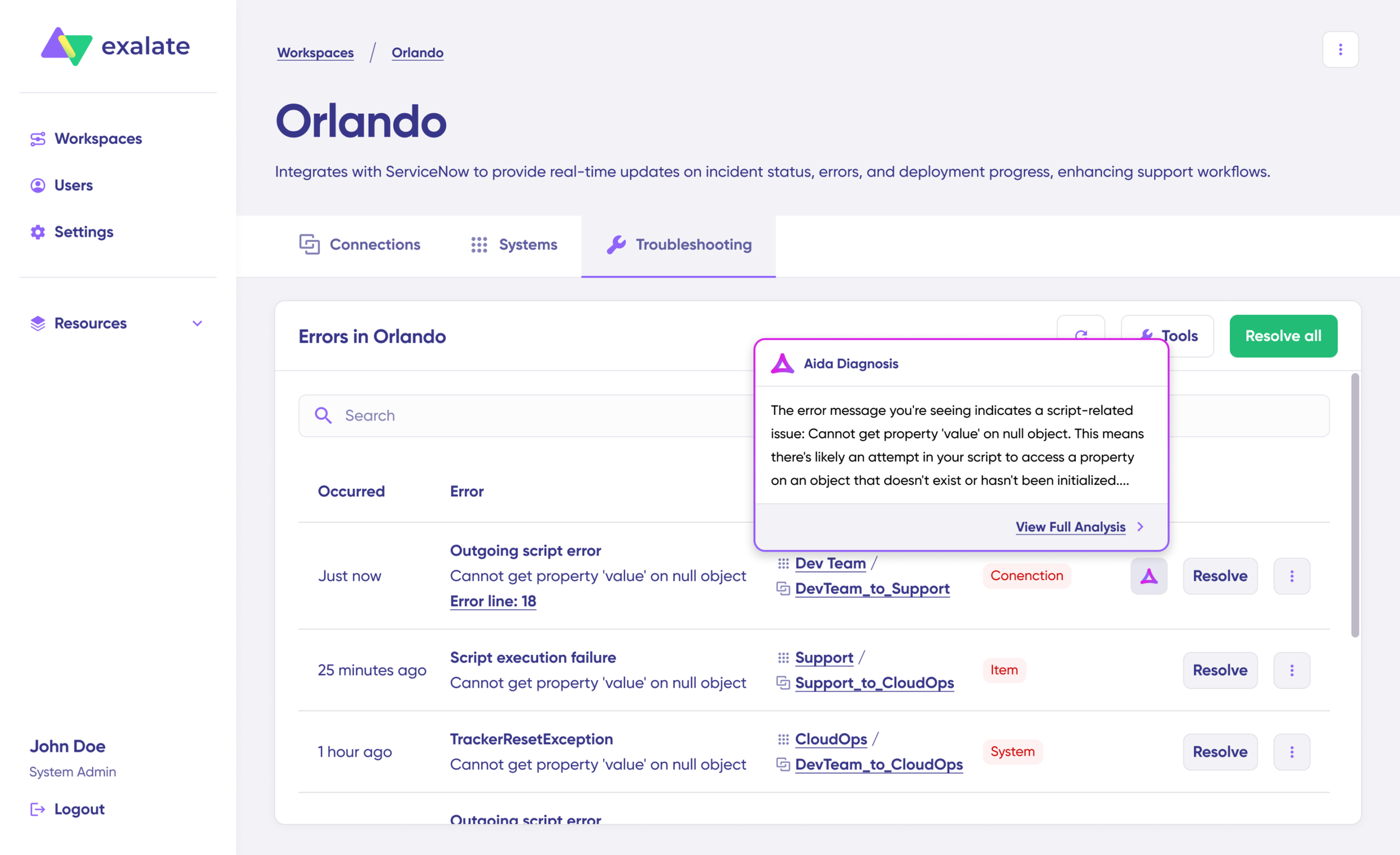
Exalate uses a Groovy-based scripting engine that lets you configure your sync exactly as needed. Need to map Jira “Done” status to a ServiceNow “Resolved” state with a resolution note? That’s a few lines of scripting. Need to filter synced work items by label, priority, or custom field values? Straightforward to set up.
Exalate’s AI-assisted configuration, powered by Aida, lets you describe your sync requirements in plain language and generates the configuration for you. This takes into account your inputs, existing configuration, and Exalate’s scripting API. As with any AI-generated output, review everything before publishing changes.
What sets Exalate apart for cross-company sync is that each side of the connection manages its own sync rules independently. Your organization controls what data you send out and how you process incoming data, without needing to coordinate configurations with the other party.
This makes it particularly well-suited for MSP integrations, vendor collaborations, and any scenario where organizations need to share data without sharing system access.
What’s Next
When teams run on specialized tools, data consistency becomes an operational problem that compounds over time. Two-way synchronization solves that by ensuring records stay accurate and current across systems automatically.
Whether it’s support-to-dev escalation, ITSM coordination, MSP collaboration, or cross-company workflows, the mechanics are the same: changes in one system reflect in the other, without manual intervention.
Choosing between real-time and scheduled sync, defining conflict resolution rules per field, preventing loops through scripting, handling user identity mapping across systems, and protecting sensitive data are all solvable problems. The right tooling makes each of them manageable without turning your integration into its own maintenance project.
If you’d rather not set this up yourself, you can offload it to us, and we’ll handle everything.
Explore our docs and academy to go deeper, or ask Aida directly. If you still have questions, book a call with our sync experts to talk through your use case.
Frequently Asked Questions
What is data synchronization?
Data synchronization means keeping the same record consistent across two or more systems at once. When data changes in one location, the synchronization process detects that change and applies it everywhere else the record lives. The result is one accurate, current version across all connected systems, with no manual copying or reconciliation required.
What is two-way synchronization in simple terms?
Two-way synchronization is a process where changes made in one system are automatically reflected in a connected system, and vice versa. If you update a work item in Jira, the linked ticket in ServiceNow updates too. If someone changes the ticket in ServiceNow, that change flows back to Jira.
What is the difference between one-way and two-way sync?
One-way sync pushes data in a single direction: from System A to System B. Changes in System B don’t flow back. Two-way sync maintains a bidirectional relationship where updates in either system propagate to the other. Two-way sync is ideal when both teams actively work on shared records and need to see each other’s changes.
What is the difference between real-time sync and scheduled sync?
Real-time sync uses event-driven triggers (usually webhooks) to propagate changes immediately when something happens. Scheduled sync polls both systems at regular intervals and processes changes in batches. Real-time sync is better for time-sensitive workflows, such as incident escalation or support ticket updates. Scheduled sync is better for high-volume batch operations or when the connected systems don’t support webhooks. Exalate uses event-driven sync where supported and polling where needed, and allows teams to configure the approach for their situation.
How does conflict resolution work in two-way sync?
Conflict resolution determines which change wins when both systems update the same record at the same time. Common strategies include last-write-wins, source-of-truth rules per field, field-level merging, and manual review flags. In Exalate, conflict resolution is fully scriptable: you define the rules yourself using Groovy, which means you can apply different strategies to different fields within the same connection.
How do you prevent sync loops in bidirectional sync?
Sync loops happen when System A updates System B, which triggers an update back to System A, continuing indefinitely. The standard prevention approach is to check, before writing, whether the incoming value is actually different from what’s already in the system. If it’s the same, the incoming script skips the write. You can also attach a marker flag to sync-originated changes so the system distinguishes them from user-initiated changes, which are the only ones that should trigger outgoing sync.
How does Exalate handle user identity mapping in cross-system sync?
When a user exists in one system but not the other, Exalate supports email-based matching (looks up the user by email in the target system), default user fallback (assigns to a pre-configured default), and fully custom Groovy scripts for complex scenarios like different email domains or systems that use employee IDs rather than email addresses. The right approach depends on how much overlap exists between the user directories on both sides.
Can Exalate filter out sensitive or PII data before syncing?
Yes, you can write outgoing sync rules that check field values against patterns and suppress or transform any data that shouldn’t cross the connection. This approach has been used in healthcare integrations to prevent patient-identifiable information from reaching systems that shouldn’t have it. It is a custom Groovy solution, not a built-in toggle, which means the filtering logic is fully under your control and can be versioned and audited.
How does Exalate handle conflict resolution in two-way sync?
Exalate gives each side of the connection independent control over sync rules. You define how incoming data is processed on your end, and the other party does the same on theirs. This means conflicts are handled at the configuration level: you decide which fields to accept, which to ignore, and how to transform incoming data before it writes to your system. For scenarios where both sides update the same field, you can set source-of-truth rules per field.
What platforms does Exalate support for two-way sync?
Exalate supports bidirectional synchronization between Jira, ServiceNow, Salesforce, Zendesk, GitHub, Azure DevOps (Cloud and Server), Freshservice, Freshdesk, Asana, and Jira Service Management. It also supports custom connectors for proprietary systems with available REST APIs, so you can integrate platforms that aren’t covered by pre-built connectors.
Can Exalate sync data between two different companies?
Yes. Cross-company sync is one of Exalate’s core strengths. Each organization independently controls what data they send and how they process incoming data. This means you can share work item updates with a partner, vendor, or customer without giving them access to your internal system, and without needing to coordinate sync configurations with them.
Can I use Exalate for a temporary sync during system migration?
Yes. Pre-migration sync is a common use case. You can set up a temporary bidirectional connection between the old and new systems so both teams continue working during the transition period. Once the migration is complete, you simply remove the connection. This avoids the “big bang” migration approach, where everyone has to switch tools at once.
What types of data can Exalate sync bidirectionally?
Exalate can sync work items, tickets, cases, service requests, comments, attachments, status changes, priority levels, custom fields, labels, and more. The specific fields available depend on the connected platforms and your configuration. You control exactly which data points sync and how they map between systems.
Recommended Reading:
- How to Get the Most out of Your Workflow Integration
- Automated Integration: A Key to Scalable and Agile Business Operations
- Exploring the Build vs. Buy Integration Debate
- ITSM Integration: Simplify Your IT Services Like Never Before
- The Reality of Business Process Integration
- Perfecting Legacy System Integration For Better Connectivity
- How to Synchronize Epics between 2 Jira Instances