Between July 2025 and September 2026, we analyzed about 110 conversations with our customers. Across them, the integration stopped being a standalone tool and became part of bigger decisions: Data Center migrations, mergers, and how much control each side keeps when two companies share work.
One thing dominates this year. Atlassian set an end date for Jira Data Center, and a lot of integrations are now part of a migration plan. Some teams planned for that. Most found out when their integration became the hardest part of the move.
| Note on methodology and confidentiality: This field report is based on about 110 anonymized customer conversations held between July 2025 and September 2026. Company names, individual identifiers, and sensitive details have been removed. Quotes are included to show recurring patterns and aren’t attributable to any specific customer. |
Key Takeaways at a Glance
- Migration moved to the top. 29% of conversations involved a migration or a period of running two systems side by side. 17% were about connecting Jira Data Center or Server with Jira Cloud.
- About 4 in 10 integrations cross a company boundary. 39% of conversations described syncing with vendors, clients, partners, or outsourcers.
- Error visibility is the most specific product ask. 24% of conversations asked for better monitoring, alerting, or error detail, and the asks were concrete: a sync log or a baseline.

The Main Integration Drivers
Jira Data Center End of Life
Atlassian announced in September 2025 that Data Center products reach end of life on March 28, 2029. New Data Center sales stopped on March 30, 2026. Existing customers can renew or add users until March 30, 2028.
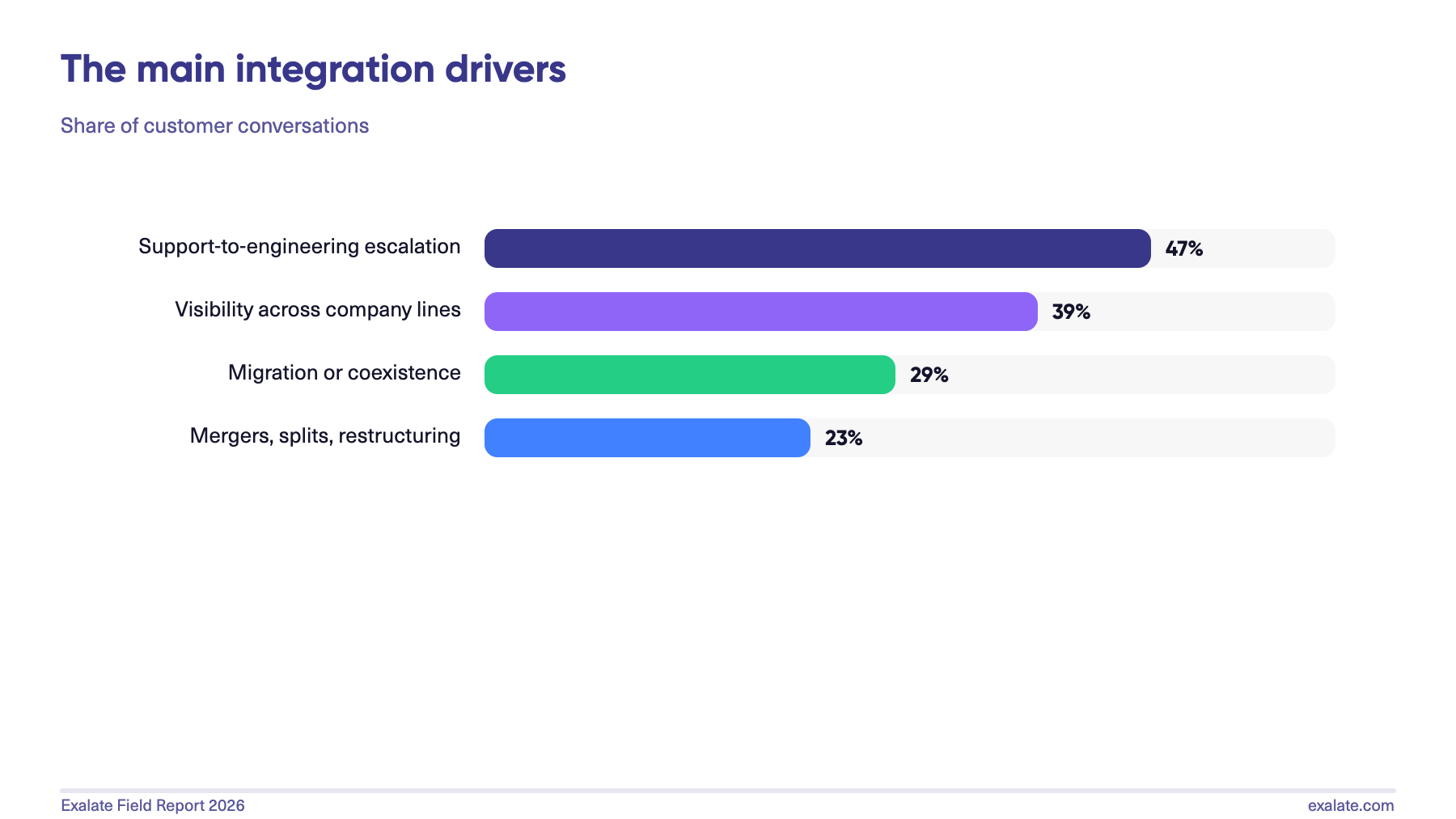
We can see those dates in the conversations. 29% involved a migration or coexistence project, and 17% were specifically about Jira Data Center or Server and Jira Cloud.
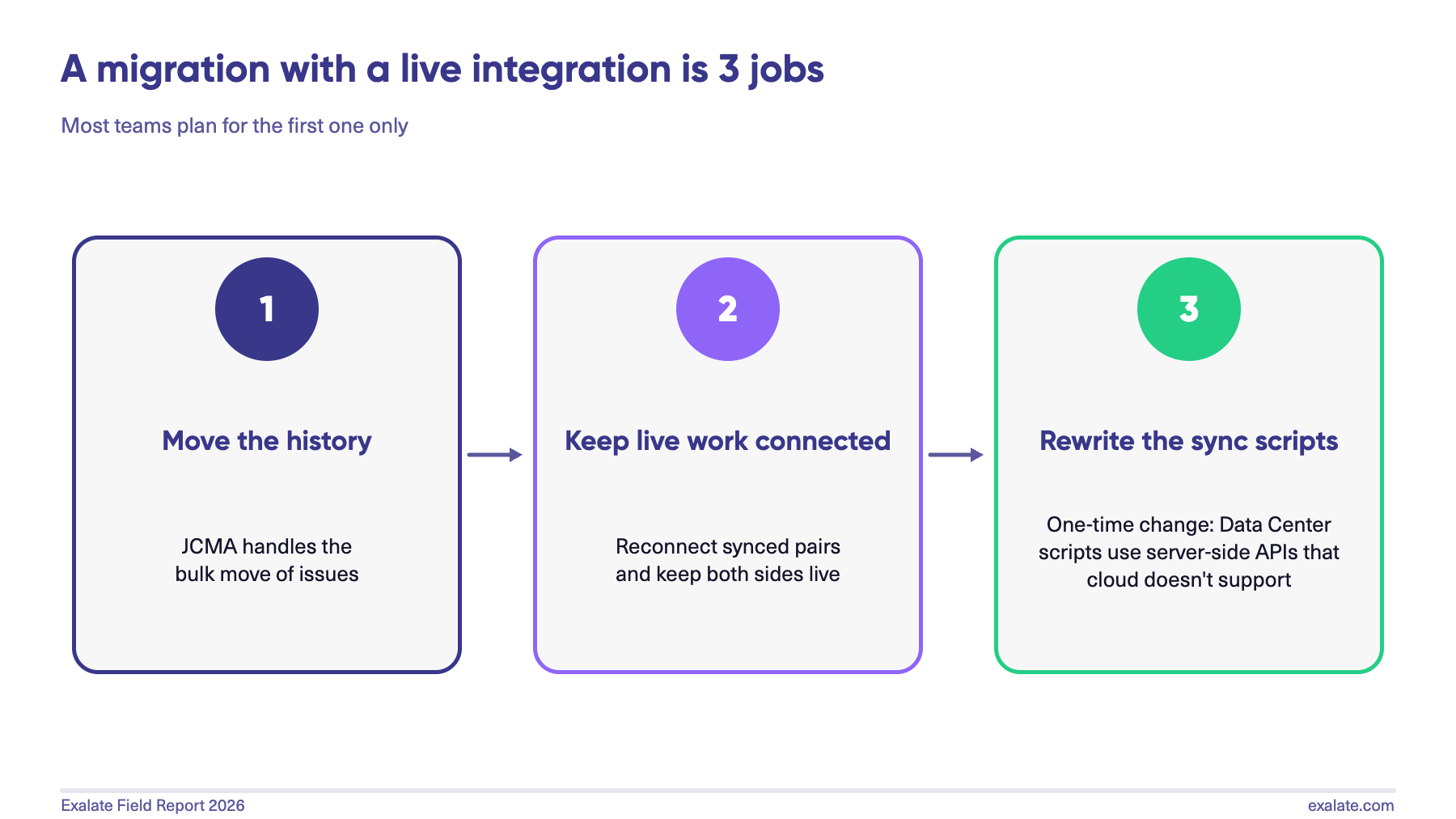
A migration with a live integration came up often, and it is 3 jobs:
Moving the history: Most teams use the Jira Cloud Migration Assistant (JCMA) from Atlassian for the bulk move. One German team with around 400,000 issues wanted to switch everyone over in a single weekend, so their team would not have to work in two systems at once.
Keeping live work connected: The same team had about 70,000 issues synced across instances. After JCMA moves everything, those synced pairs need to be reconnected on the cloud side. This is where an integration does the work JCMA isn’t built for.
Rewriting the scripts: The APIs for Jira Cloud and Data Center are different, so if you have Exalate scripts written for the Data Center, they often don’t exist in the cloud, such as server-side classes and Jira Service Management Assets queries. Teams that reviewed their scripts early had the smoothest cutovers.
Teams that went in prepared saw the value. An IT services firm said that when they researched the Atlassian Marketplace for a way to keep both ends in sync during their move, “the feasible option available was Exalate.”
If you’re planning a Jira Cloud migration with integrations in it, count your synced items (not your total items), ask what your per-event time is, and find out which scripts touch server-only APIs. Do all this before picking a cutover date.
Manual Escalation Between Support and Engineering
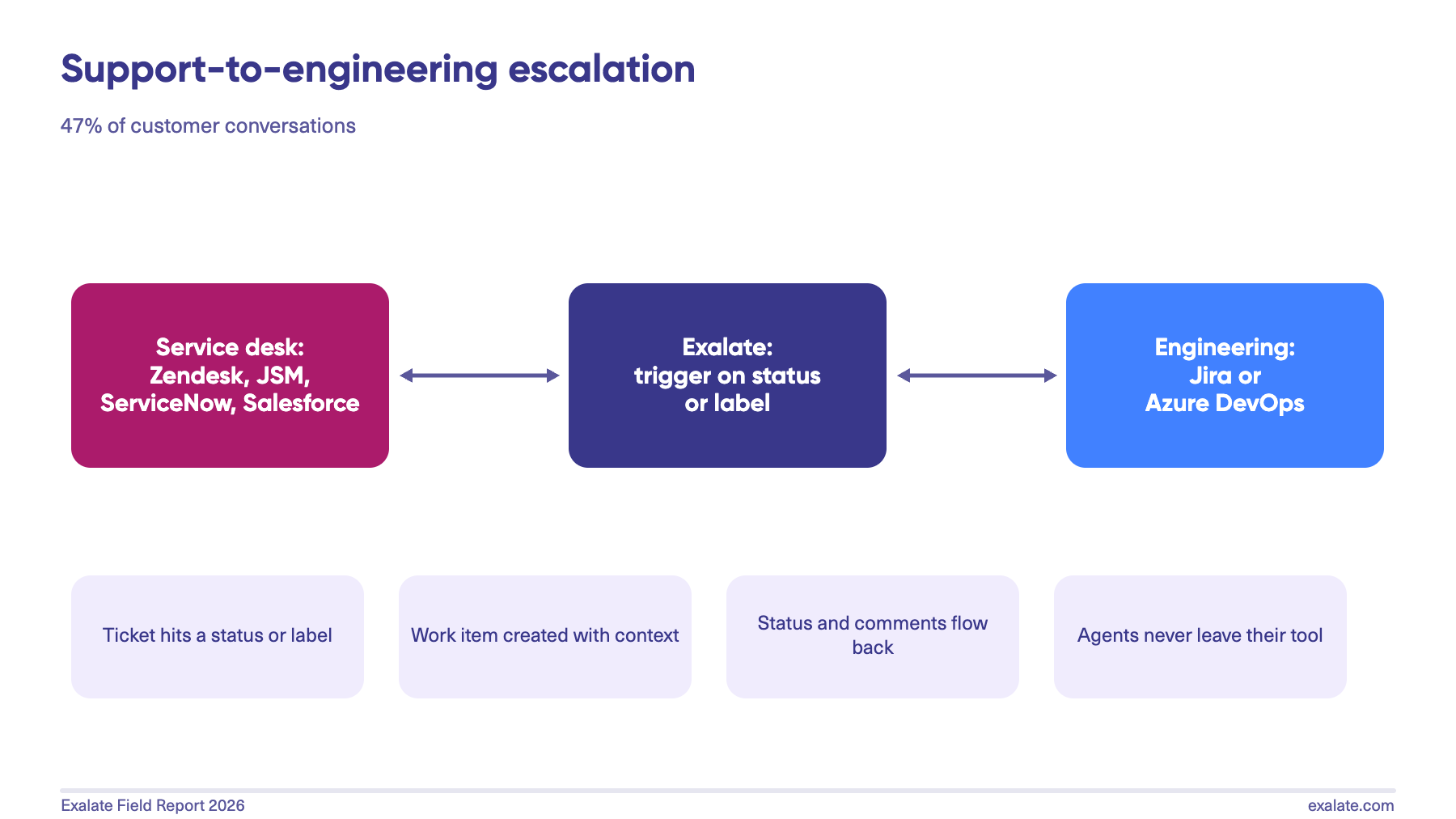
This is still the most common reason teams buy an integration. 47% of conversations described a support-to-engineering flow: a ticket in a service desk becomes a work item for developers, and status and comments need to come back.
The workaround teams want to escape is always the same. Agents copy tickets by hand, engineers update status in multiple places, and relay updates by email. One team’s current setup was an email bridge that created a duplicate ticket for every update.
A UK software company moved its support and engineering teams onto Exalate between Zendesk and Jira, then expanded it to a second department and a second Zendesk instance. Their lead said the teams now describe it as “slick” and say “it does what it needs to do,” because nobody logs into two tools anymore.
Visibility Across Company Lines
Service providers, vendors, and outsourcers want their clients to see progress without getting access to their systems. 39% of conversations described a cross-company use case. The deciding condition hasn’t changed since last year: each side wants to control its own configuration, fields, and security.
Mergers, Splits, and Restructuring
23% of check-in conversations had an acquisition, divestiture, or restructuring behind the integration plans. A European media group acquired another business in late 2025 and is migrating both into one Jira Cloud organization, with the acquired company moving first and a streaming partner still connected on the other side. Its procurement lead summed up the state of things: “Everything runs fine.”
A background screening company moved to the cloud as a side effect of acquiring a business that was already there. A gaming and lottery company split into two legal entities, and part of the debate was political: some people wanted no connections between the two, others said they’d be in trouble without them.
Exalate Industry Spread
Our customers work in a wide range of industries:
- Healthcare and pharmaceuticals
- Semiconductors
- Heavy manufacturing
- Automotive
- Retail
- Energy and utilities
- Telecom
- Networking
- Software and SaaS
- Banking and insurance
- Media and entertainment
- Government and public sector
- Higher education
- Construction and building materials
- Gaming and lottery
- IT consulting
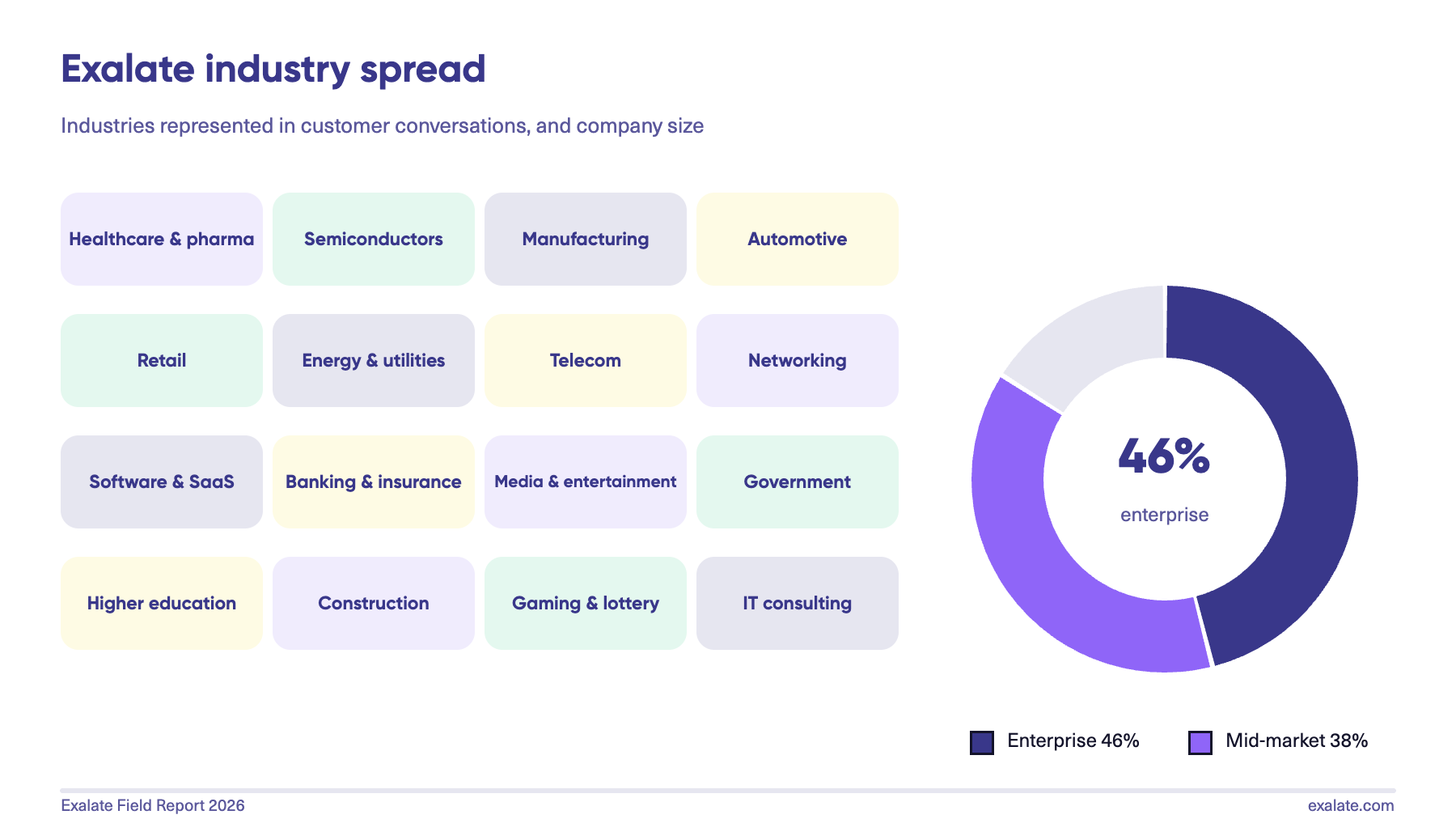
Among conversations where company size was recorded, 46% were enterprise and 38% mid-market.
Business Criticality: When Integrations Become Load-bearing
1 in 5 customers described their integration as business-critical. These are the integrations that client delivery, regulated reporting, or a service desk depends on every day. The clearest picture comes from how customers talk about it.
A regulated financial team in Argentina said Exalate is becoming close to essential for them:
A Boston-based managed service provider runs its client ticketing through Exalate and pays for premium support because so much depends on it.
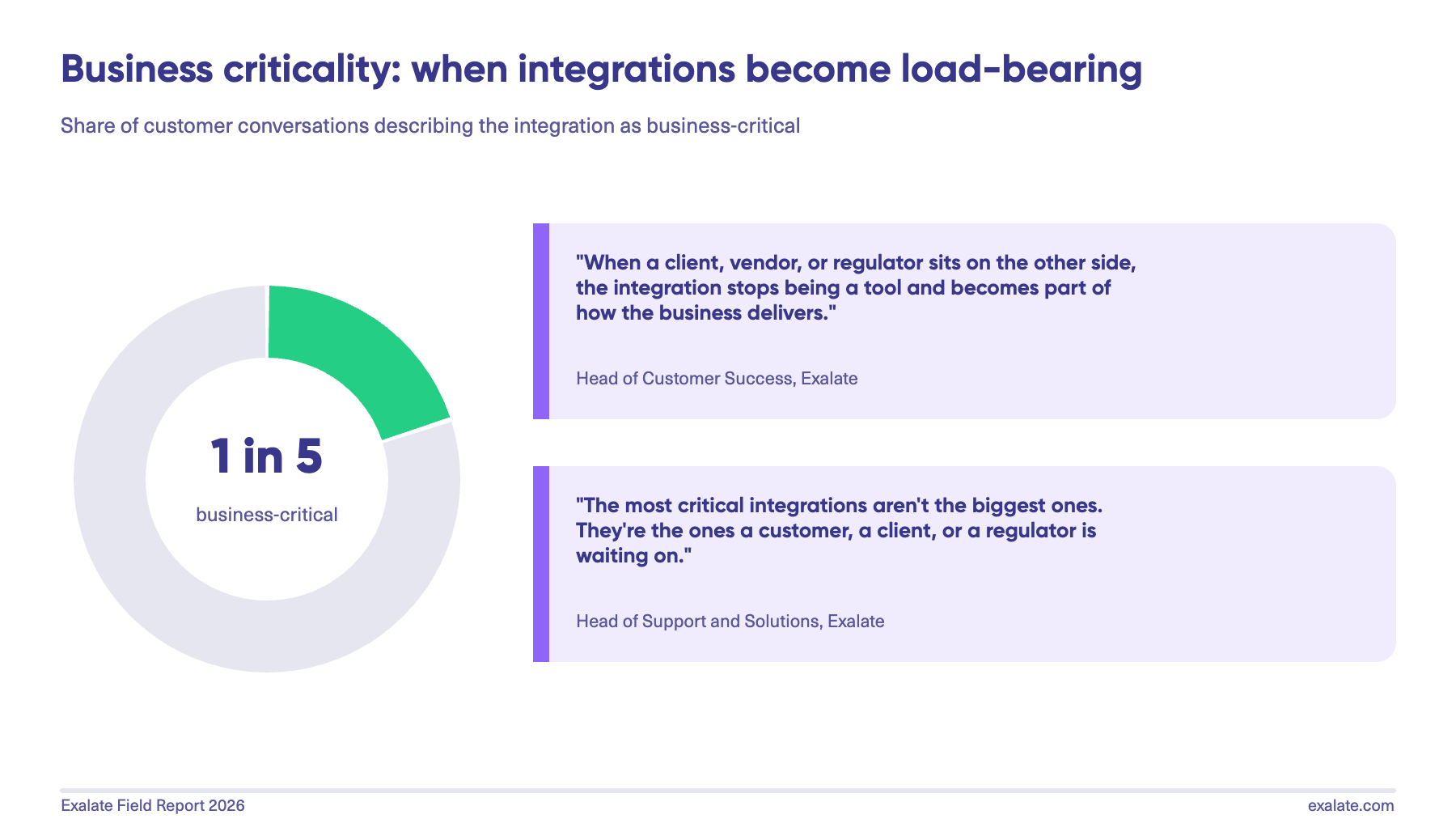
The business-critical integrations almost always cross a company boundary. When a client, vendor, or regulator is on the other side, the integration becomes part of how the business delivers.
Exalate Geographic Spread
Exalate customers are spread across 6 regions, led by North America and Europe.
| Region | Share of conversations |
| North America | 45% |
| Europe | 40% |
| Asia-Pacific | 10% |
| Latin America | 2% |
| Middle East and Africa | 3% |
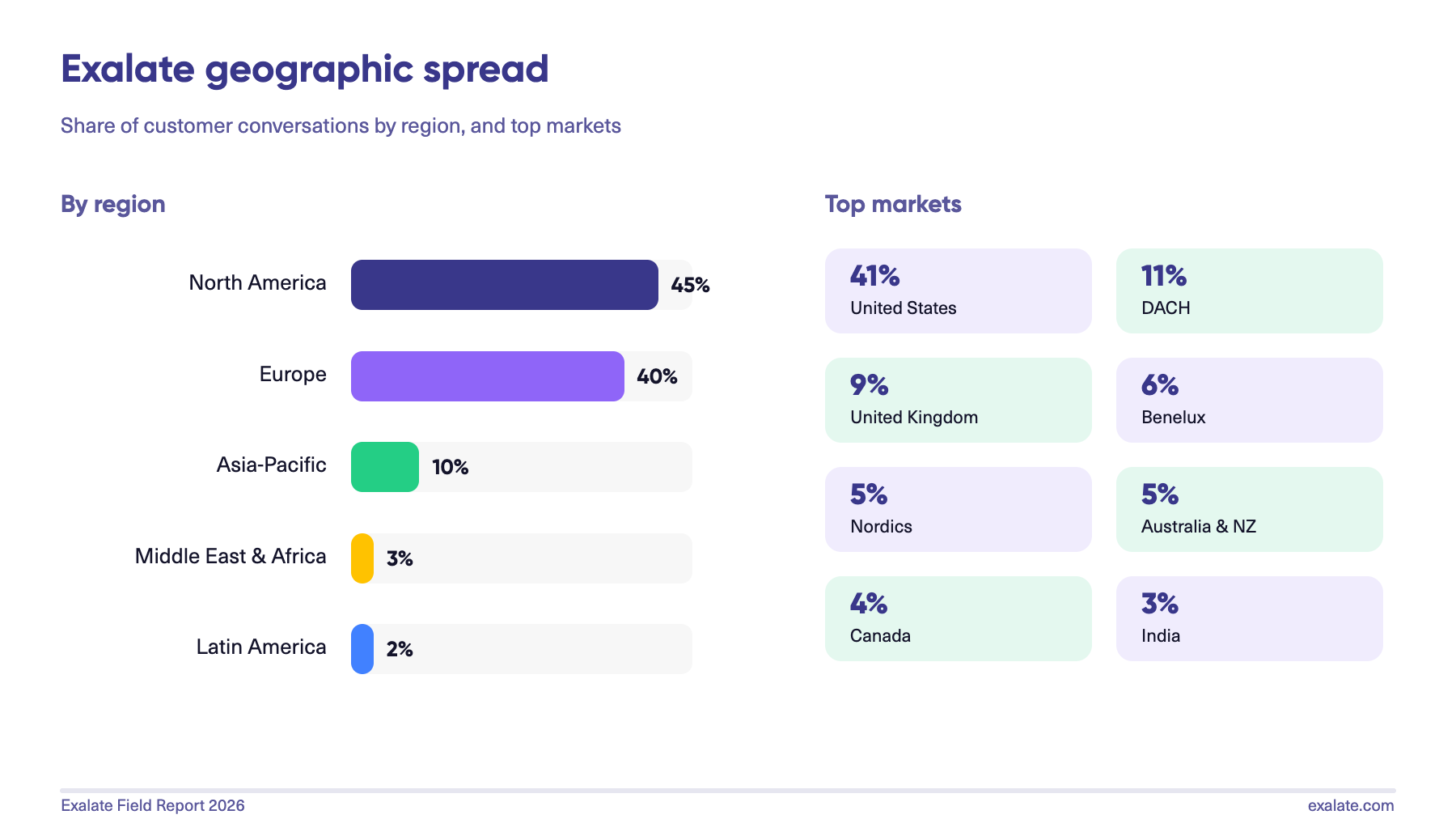
The United States is the largest single market at 41% of conversations. Within Europe, the DACH region (Germany, Austria, and Switzerland) leads at 11%, followed by the United Kingdom at 9%, the Benelux countries at 6%, and the Nordics at 5%. In Asia-Pacific, Australia and New Zealand account for about half of conversations, with India, Japan, and South Korea making up most of the rest.
The mix shapes how integrations get built. European customers raised data residency, hosting regions, and customer-managed encryption keys more often, especially in regulated industries.
Cross-company integrations often span regions, such as a Canadian vendor syncing with a South American telecom, or a European media group syncing with a streaming partner. Time zones then become part of the integration plan.

Which Exalate Connectors Are Most Popular
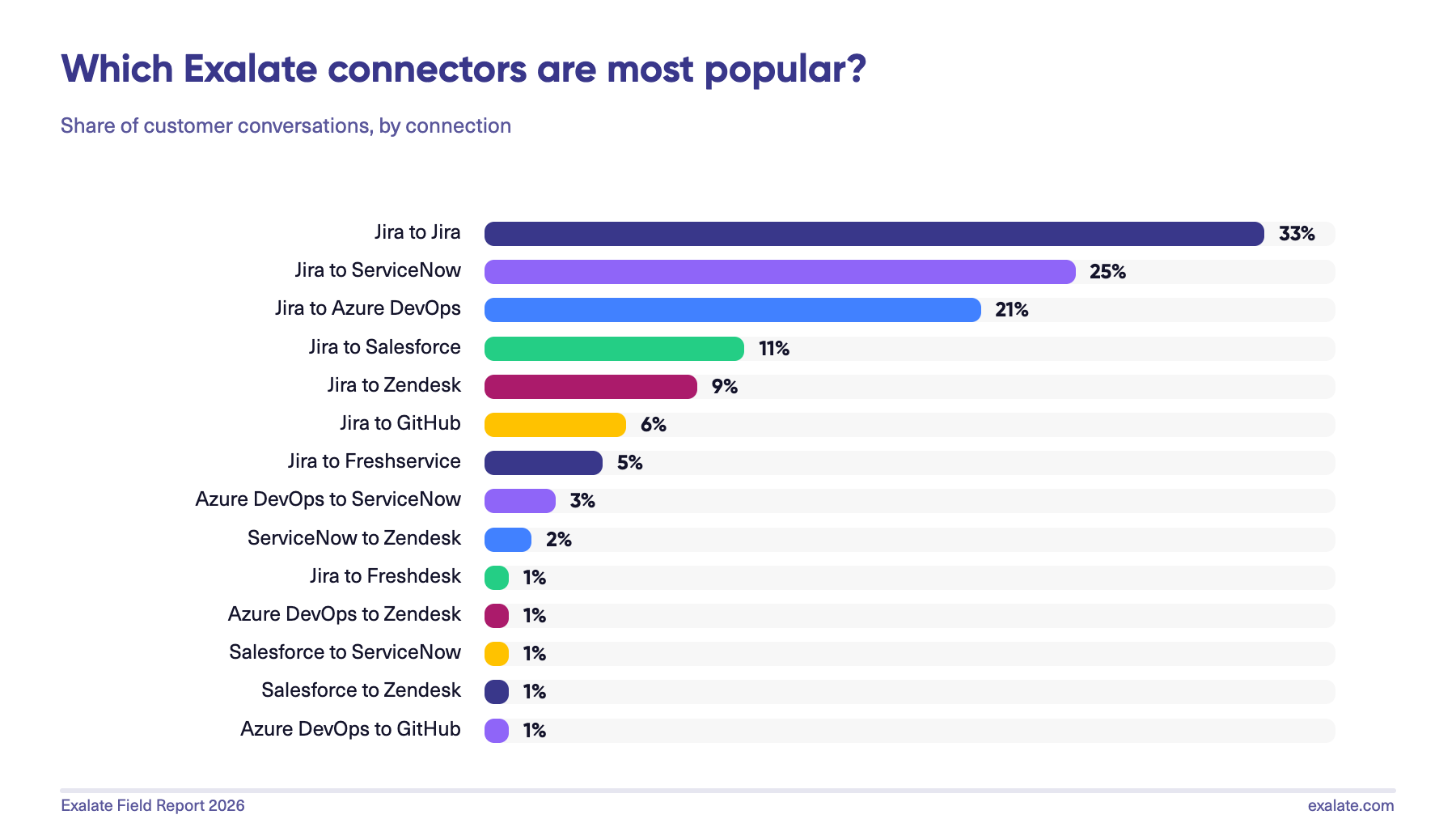
Jira sits on at least one side of about 9 in 10 integrations. Here’s what customers connect it with:
| Connectors | Share of conversations |
| Jira to Jira | 33% |
| Jira to ServiceNow | 25% |
| Jira to Azure DevOps | 21% |
| Jira to Salesforce | 11% |
| Jira to Zendesk | 9% |
| Jira to GitHub | 6% |
| Jira to Freshservice | 5% |
| Azure DevOps to ServiceNow | 3% |
Another group didn’t involve Jira at all: ServiceNow to Zendesk, Azure DevOps to ServiceNow, and Azure DevOps to Zendesk were the most common of those.
A long tail keeps growing: TOPdesk, ManageEngine ServiceDesk Plus, Ivanti, GitLab, Asana, and ClickUp all came up.
→ Browse all Exalate integrations.
Most Popular Real-world Exalate Use Cases
6 recurring integration patterns dominate the conversations. Here’s how each one works and what teams get from it.
Support-to-Engineering Escalation
A customer reports a problem in Zendesk, Jira Service Management, ServiceNow, Salesforce, or Freshservice. When the ticket reaches a set status, gets a label, or matches a condition the team defines, Exalate creates a work item in Jira or Azure DevOps. The case summary, description, priority, attachments, and any custom fields the developers need come with it.
From there, updates flow both ways. Developers comment and change status in their own tool, and agents see the progress in theirs. When engineering resolves the item, the service desk ticket updates, and the agent can close the loop with the customer without chasing anyone.
Teams shape this to fit how they work:
- A UK support team runs Zendesk to Jira one way for ticket creation, and Jira to Zendesk one way for updates. Agents see what developers do, and developers never touch Zendesk.
- Other teams sync only escalated tickets, keep internal comments private, or route tickets to different Jira projects or Azure DevOps boards based on product area.
The payoff is time and accuracy. Teams no longer copy tickets, or get into status meetings to find out where a bug stands, or update each other via emails.
Cross-Company Collaboration
Two companies share work, but neither wants to give the other access to its systems. With Exalate, each side fully controls its own instance and decides what it sends and what it accepts. That’s the decentralized model customers keep coming back to.
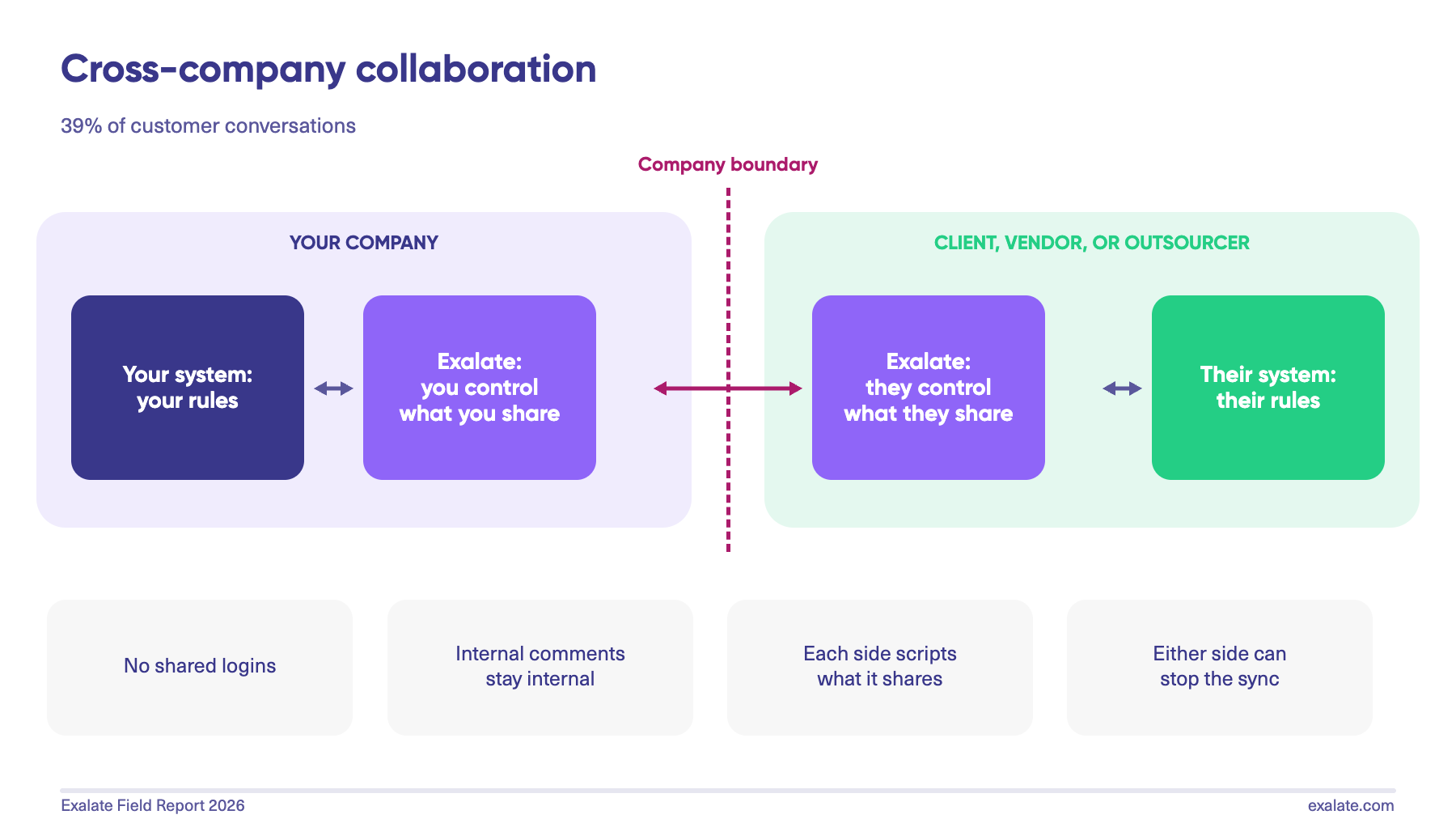
- A life insurer syncs defects between its Azure DevOps and its IT outsourcer’s Jira during testing cycles.
- A media consultancy syncs its Jira with several film and TV studio clients. Each studio runs its own Exalate sync scripts, and the consultancy keeps its internal comments private with a few lines of Groovy.
- A telecom software vendor has synced with a major telecom client since 2021.
The value here goes beyond saved time. Clients get real-time visibility; vendors keep their workflows.
Migration and Coexistence
Teams moving between platforms use Exalate to keep both systems live while they move.
That covers 3 kinds of moves:
- Data Center to Cloud. Common this year because of the Data Center deadline.
- Platform to platform. For example, ServiceNow to Jira Service Management, like Uber Freight, or one company moving 14 Azure DevOps organizations into Jira.
- Site to site. For example, a consulting group syncing its internal Jira site with a client-facing one.
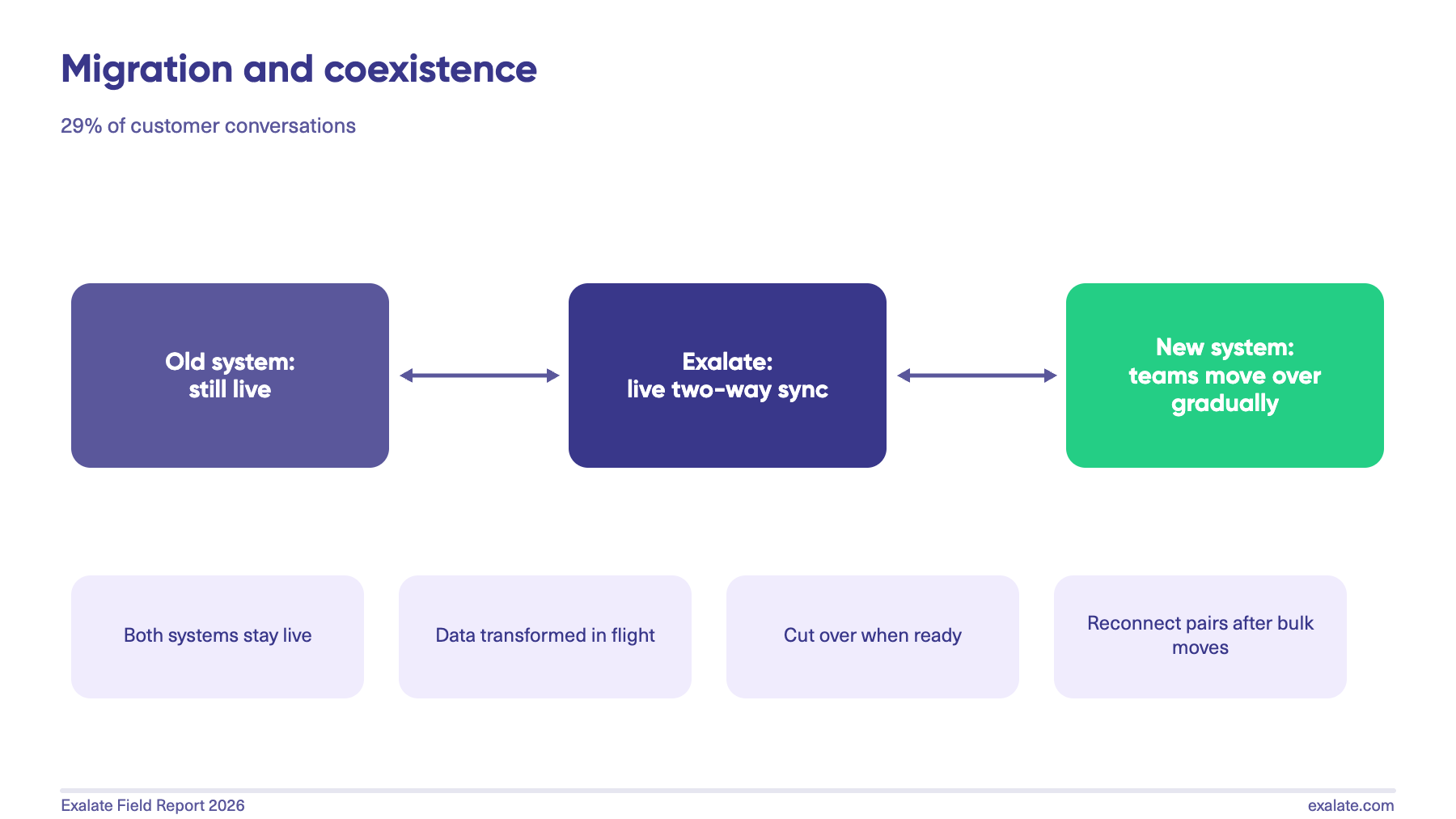
The pattern works because nobody has to stop working. The old system stays authoritative until the team is ready. Data is transformed on the way across, so field differences, user mismatches, and character limits get handled in the script instead of by hand. After a bulk move with JCMA, Exalate reconnects synced pairs so integrations keep running on the new platform.
Project, Roadmap, and Dev-to-Dev Sync
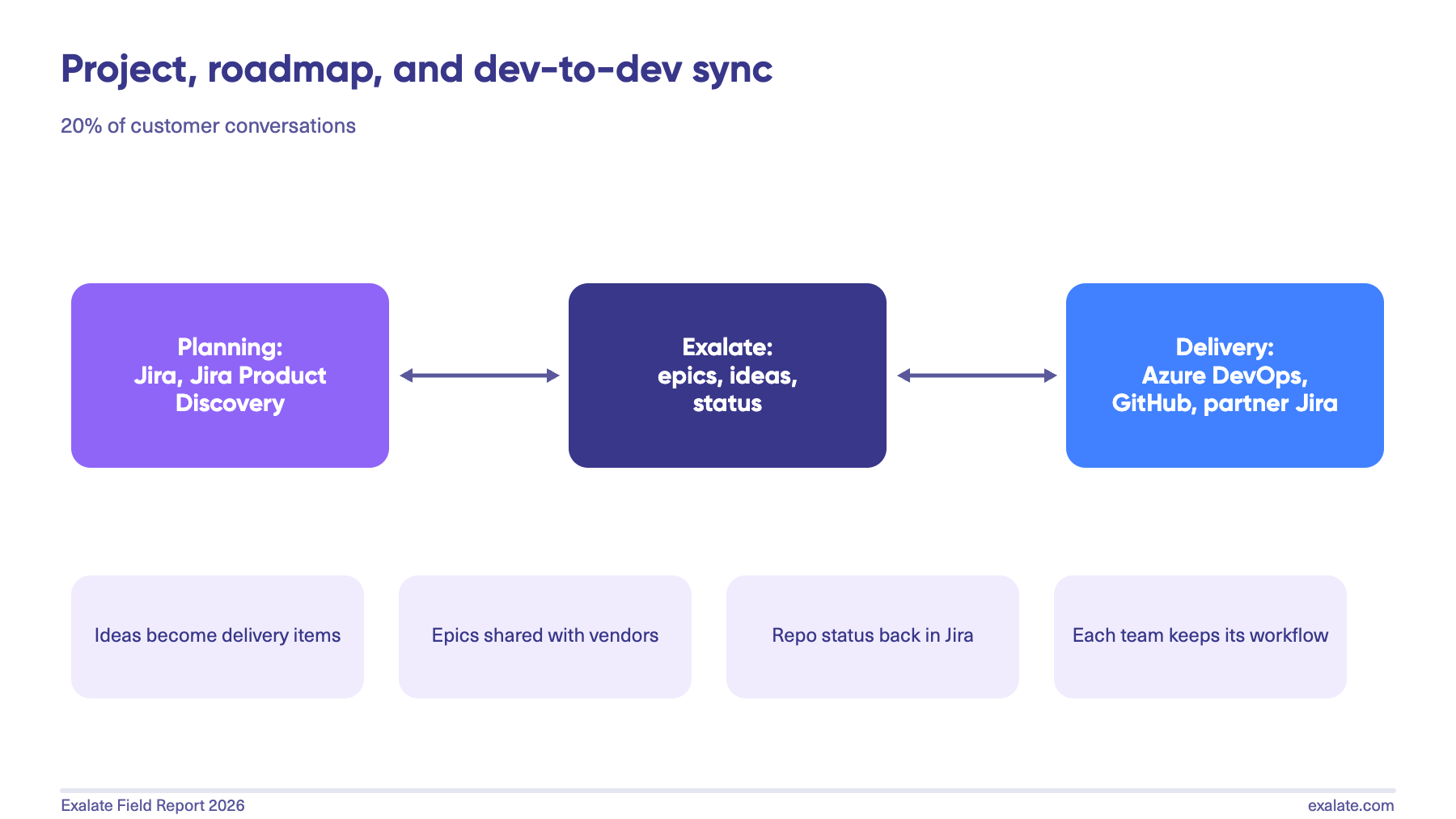
Planning and delivery often live in different tools:
- Jira Product Discovery ideas become Azure DevOps features.
- Epics get shared with a vendor’s Jira.
- GitHub repository activity feeds back into Jira so product owners see it.
- A Canadian ERP program keeps non-development work in Jira and pushes development tickets to Azure DevOps. Their project lead trained both the Jira and the Azure DevOps admins, so each side owns its half.
Each team keeps its own workflow and status names, and Exalate maps between them.
CRM to Engineering
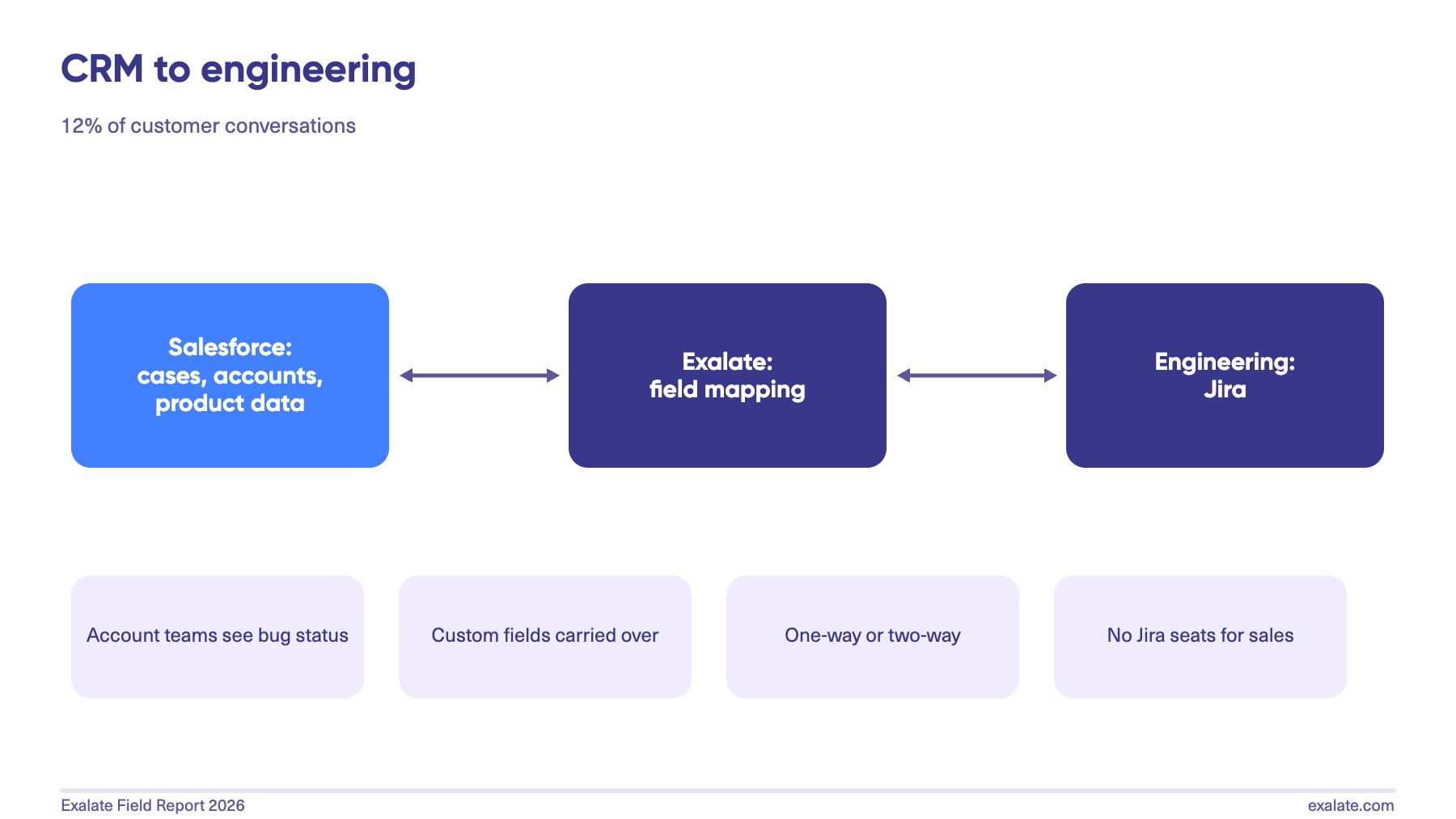
Sales and account teams want to see what engineering is doing without needing Jira seats. Salesforce cases, account details, or product data flow to Jira, and status comes back to Salesforce. One enterprise learning team pushes about 40 custom fields one way from Jira to Salesforce to keep a product catalog current.
Change and Problem Management Handoffs
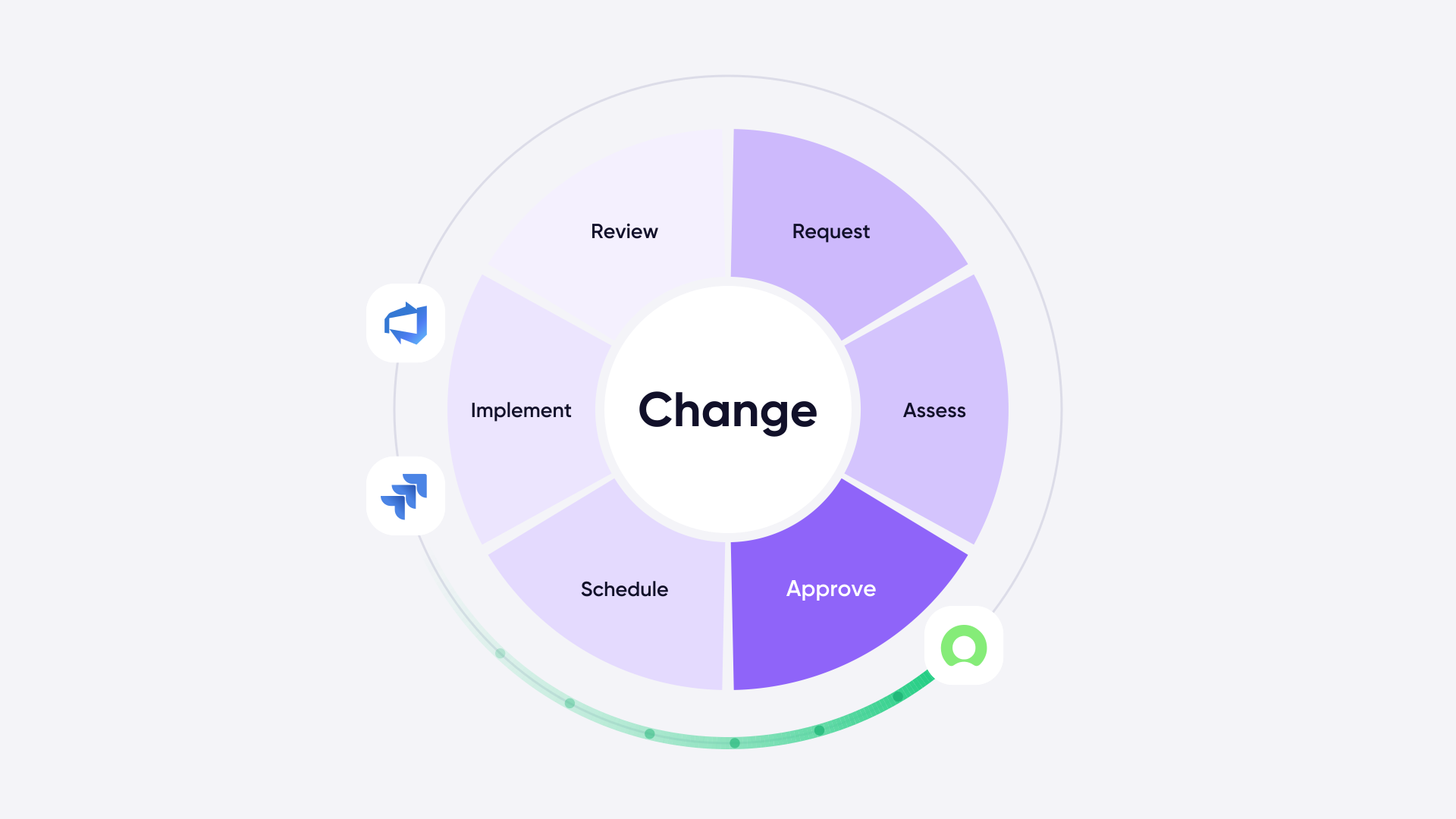
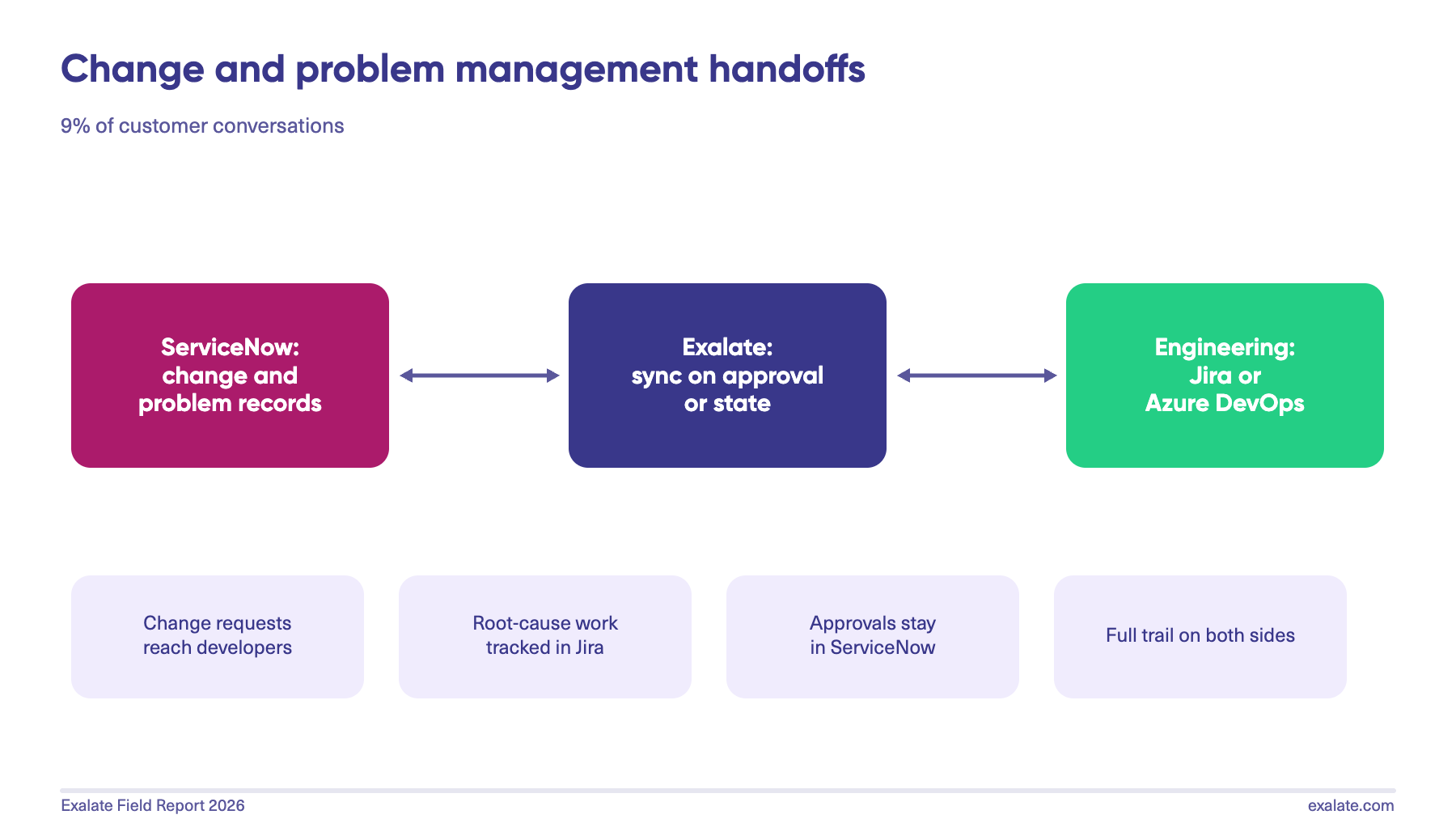
ServiceNow change requests and problem records often need engineering input. Teams sync them to Jira or Azure DevOps when they reach an approval or state. Approvals stay in ServiceNow, the technical work happens where developers already are, and both sides keep a full record.
In live demos, the reaction to seeing these flows work was often immediate:
A healthcare IT consultant said he was “highly impressed” by how fast a working ServiceNow to Zendesk sync came together on the call.
A Practical Use Case: How Uber Freight Moved 130,000 Tickets with Zero Downtime
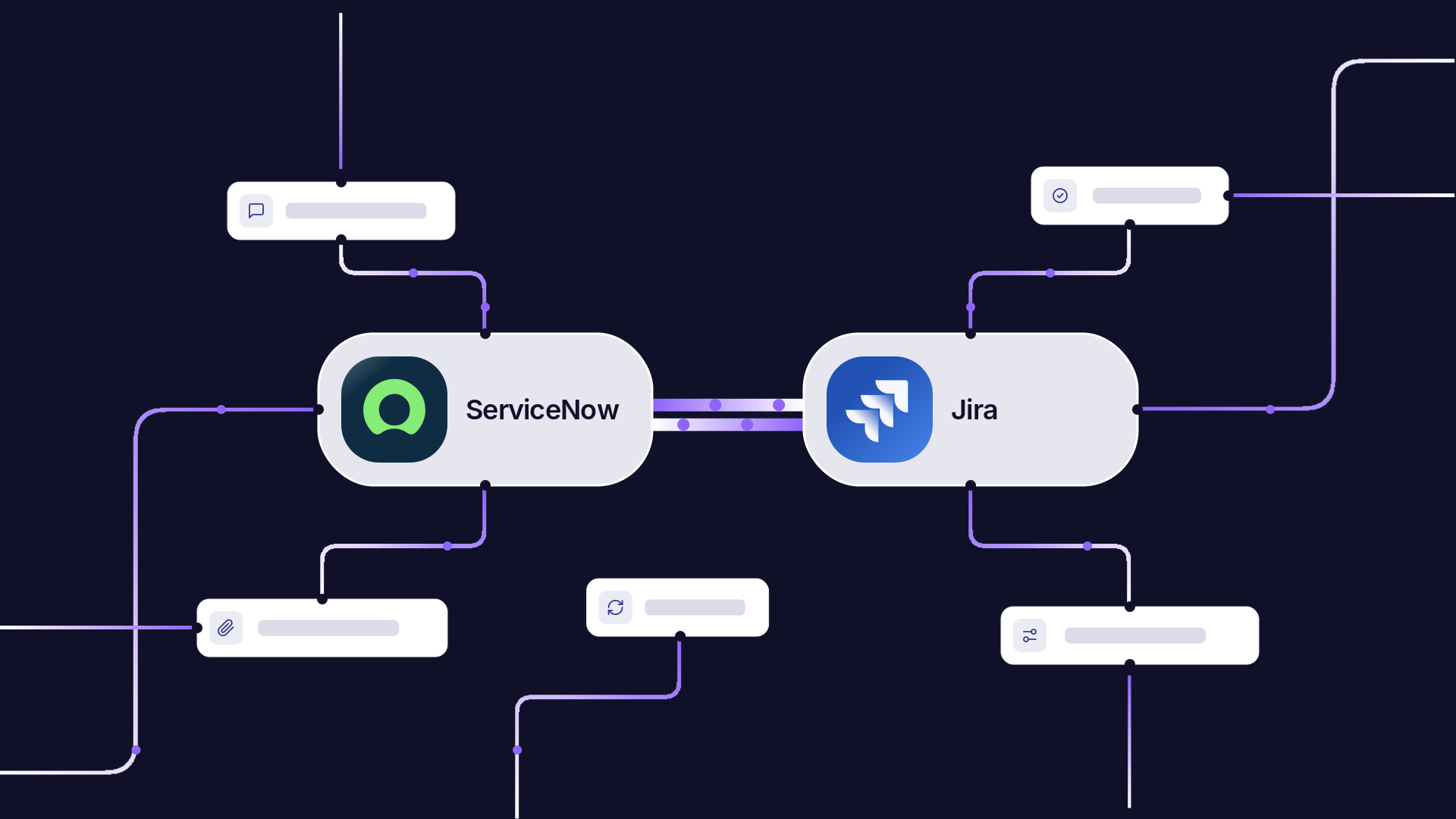
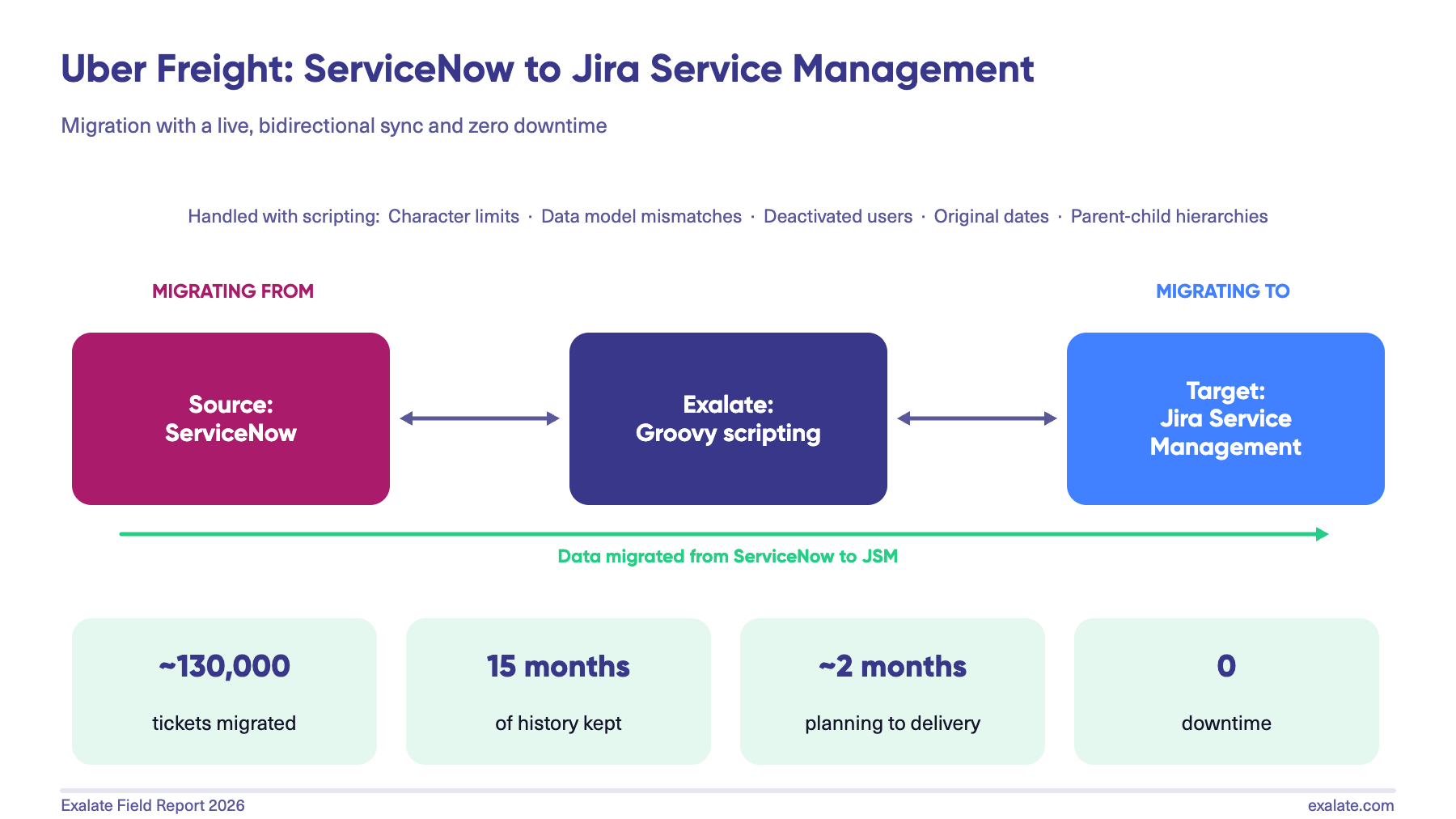
Exalate ran a live, bidirectional sync between ServiceNow and Jira Service Management (JSM), so Uber Freight’s service desk kept working while data moved to Jira Service Management.
Read the full story: How Uber Freight moved 130,000 tickets with zero downtime
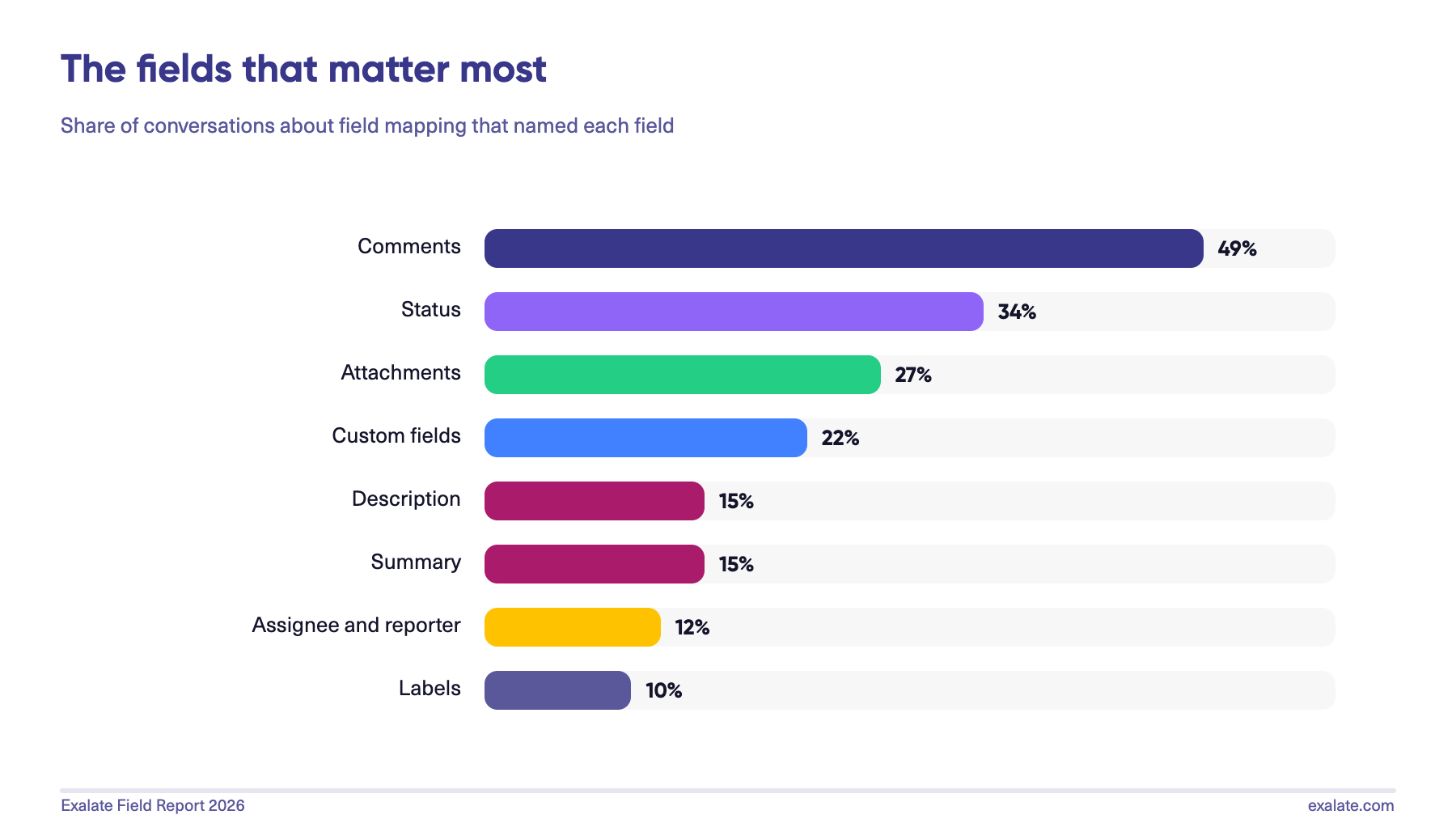
The Fields That Matter Most
| Field | Share of conversations about field mapping |
| Comments | 49% |
| Status | 34% |
| Attachments | 27% |
| Custom fields | 22% |
| Description | 15% |
| Summary | 15% |
| Assignee and reporter | 12% |
| Labels | 10% |
Comments, status, and attachments top the list, and they’re also the fields where teams make the most decisions:
- Comments: Which ones are internal and which are public?
- Status: How does “Waiting for customer” in one tool map to a workflow that has no such status in the other?
- Attachments: Which files should cross, and which should stay behind?
Exalate’s Groovy scripting lets teams sync almost any field the way they want. You can filter comments, map statuses one by one, transform values, set defaults, and add conditions. That flexibility is why technical teams choose it.
Because scripting is that powerful, the teams that get the most from it start with an integration plan. Before the first sync, they agree on 3 things with the other side:
- Which fields cross
- How statuses map
- What happens when a value exists on one side but not the other
A short mapping document, reviewed by both sides, prevents most of the surprises we heard about.
How Platform Limits in Jira, ServiceNow, and More Affect Your Sync
Most sync stalls happen because of limitations in the systems we support, or in the plan around them. For instance, max file limit on attachments for some systems. This has nothing to do with how you have set Exalate up, or how the scripts run behind the sync.
Exalate goes deep into every platform it connects: custom fields, comments, attachments, hierarchies, and history. The deeper an integration goes, the more of each platform’s own limits it meets. Every system has them, and the more ways teams use Exalate, the more of them we find. Here are the ones we see most often, and how we work around each one.
Here’s what we heard most, where each one comes from, and how teams handle it.
Rate limits: Some systems like Salesforce cap how many API calls an app can make in a given time. During migrations, bulk updates, or busy periods, requests get throttled. Exalate queues and retries throttled requests automatically. Teams also use sync rules to cut unnecessary traffic, such as stopping updates to tickets that are already closed, and schedule large bulk syncs outside peak hours.
Attachment size caps: Every platform sets its own maximum file size, and some are much lower than others. When an engineer attaches a 2 GB log file in Jira, and the sync tries to send it to a platform that caps attachments at a few dozen megabytes, the receiving platform rejects it. Exalate can move much larger files between platforms that accept them. The fix is a simple script rule: skip files above the target platform’s limit and post a link instead.
Mandatory field mismatches: Many platforms require certain fields before they’ll create a record. If the destination requires a field that the source doesn’t have, or uses dropdown options that don’t match, the platform refuses the new item. This is a mapping question, not a sync failure. A default value or a lookup table in the script solves it.
Character limits and different data models: No two platforms store data the same way. Jira Service Management has character limits that ServiceNow doesn’t, and fields that exist in one system often have no direct match in the other. Scripts can convert long values to fit and map each field to its closest equivalent.
API gaps and platform changes: Some things platform APIs simply don’t allow. The Jira API can’t backdate comments, and deactivated users can’t be set as authors. Exalate works around both: original dates are carried over through API calls, and comments from former users are posted with the original author’s name in the body. Platforms also change their APIs and authentication on their own schedule. When they do, we ship updates so integrations keep running.
Volume: Large backlogs and attachment-heavy syncs need more processing capacity, especially during migrations. Teams that planned for volume used extra node resources or synced open items first and history afterward.
Stable setups stay stable. A French government team running Jira Cloud and GitHub told us:
“We haven’t had an issue in a very long time.”
Jira administrator, government agency, France
Internal vs. External Synchronization
39% of conversations described at least one integration across a company boundary. The rest were internal: support to development, one business unit to another, or one instance to another inside the same organization.
Our last report put cross-company usage at 7 in 10. That figure counted any customer with at least one external connection. This year’s number looks at the main use case in each conversation.
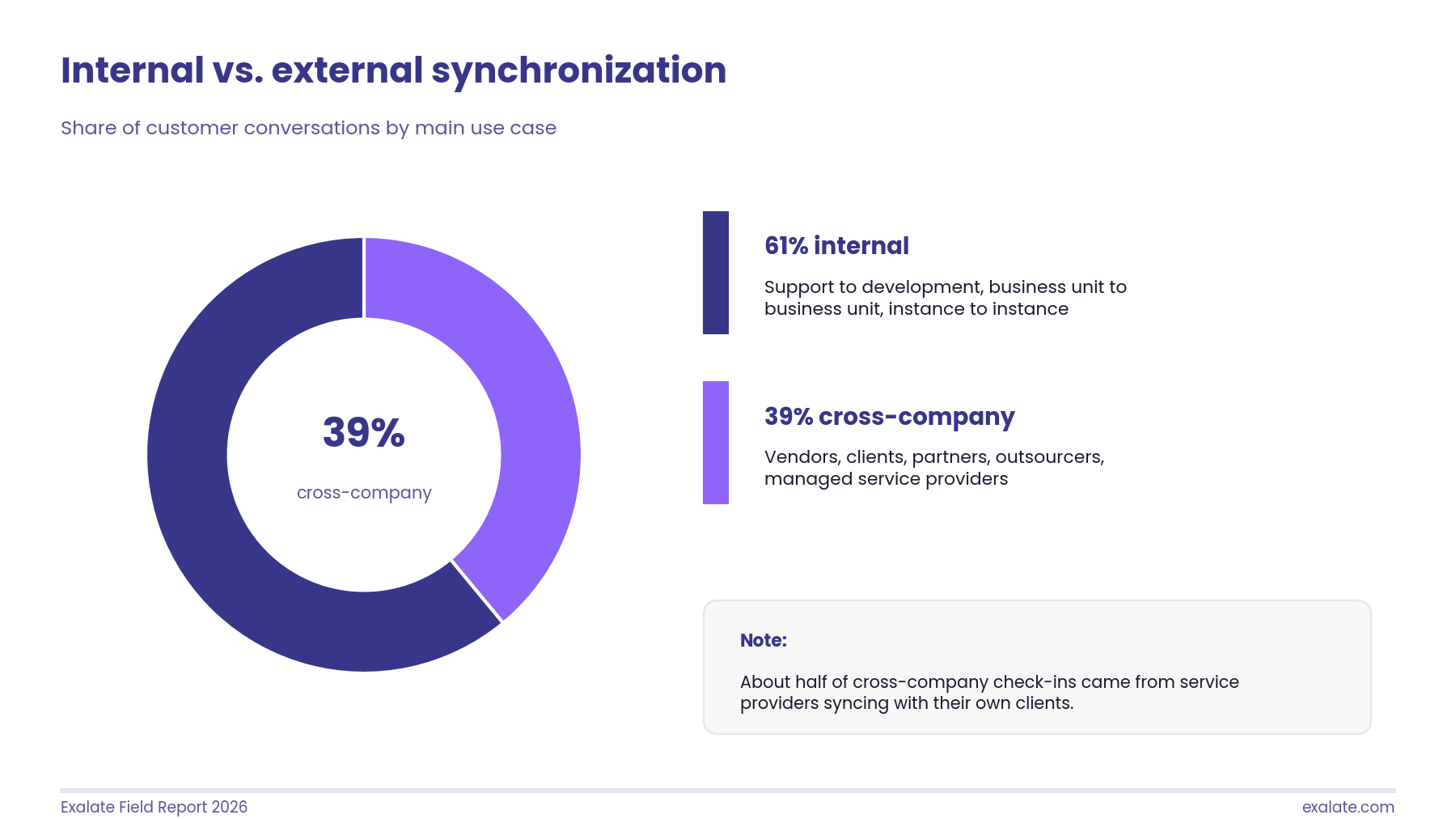
Both views agree on the direction: cross-company is where integrations are most critical, and internal is where teams compare us most with native tools.
A new pattern stood out this year. About half of the cross-company check-ins came from service providers syncing their own ticketing with their clients.
They connected with:
- Another managed service provider
- A media consultancy
- An education software vendor
- A telecom software vendor
- A utilities software vendor
- An Atlassian partner
The co-owner of the managed service provider said: “Every case so far has been us as MSPs needing it more than, much more than them (our customers).”
Who’s Making these Decisions
The person on the call usually isn’t the person who signs. Several primary contacts said as much (“I’m just the Jira developer guy here”) and escalated renewal questions to managers we’d never met.
Admins own the tool; someone else owns the budget.
This year added 3 variations:
- Cost boards: Private equity ownership moved one customer’s decision to a cost review board.
- Procurement and partners: Procurement took over renewals at several accounts, often through a partner or reseller.
- The client’s finance team: In cross-company setups, the client decides whether to buy its side of the connection.
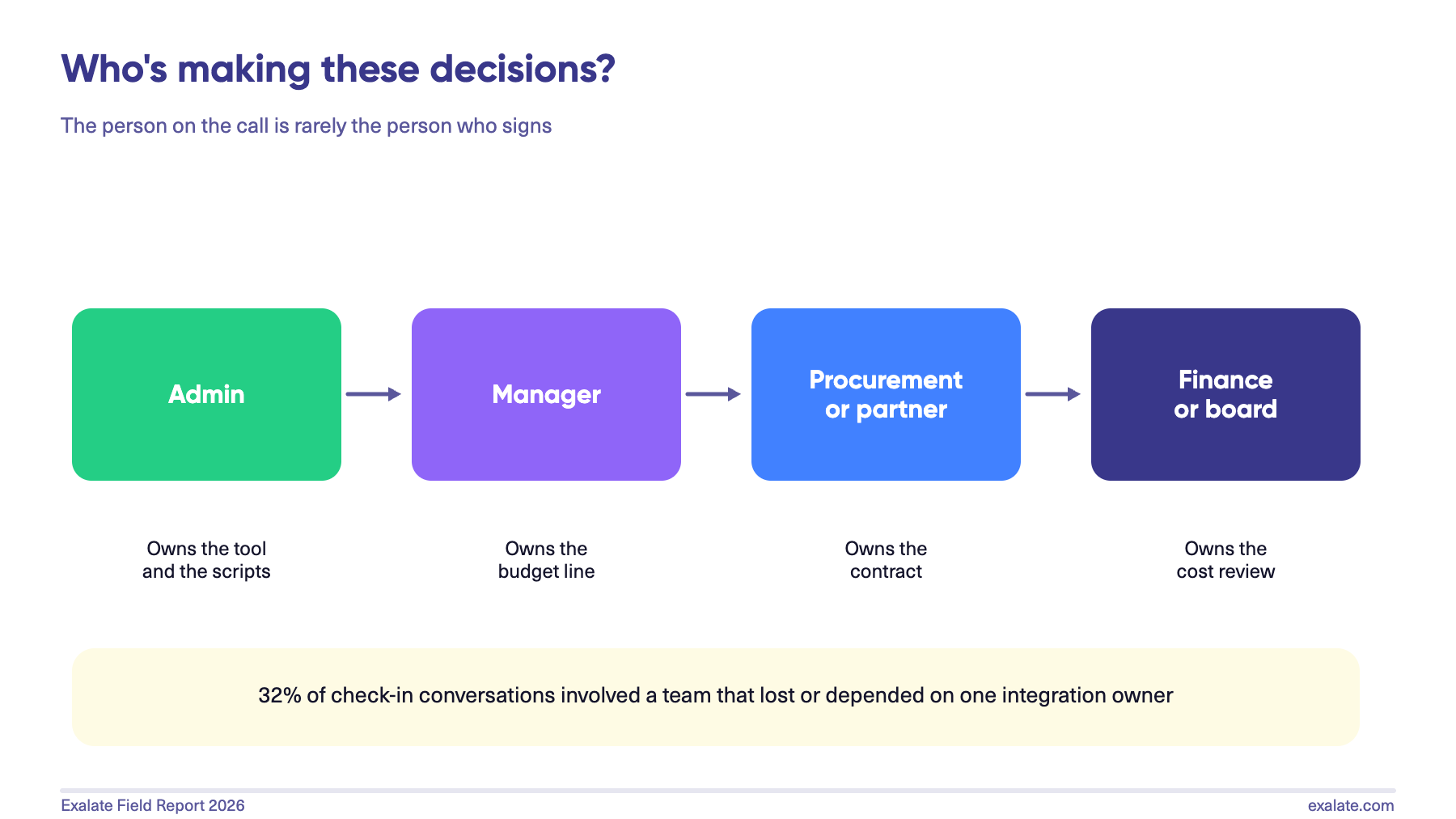
People leaving made all of this harder. 32% of check-in conversations involved a team that had lost the person who set up the integration or depended on one person to run it.
A software vendor’s delivery manager left with no handover, and his replacement found no notes to refer to. At a university, new admins on both sides couldn’t find the service account password. A government admin said: “I’m kind of the only person that really knows how to do it on the team, which scares me.”
What Customers Love About Exalate
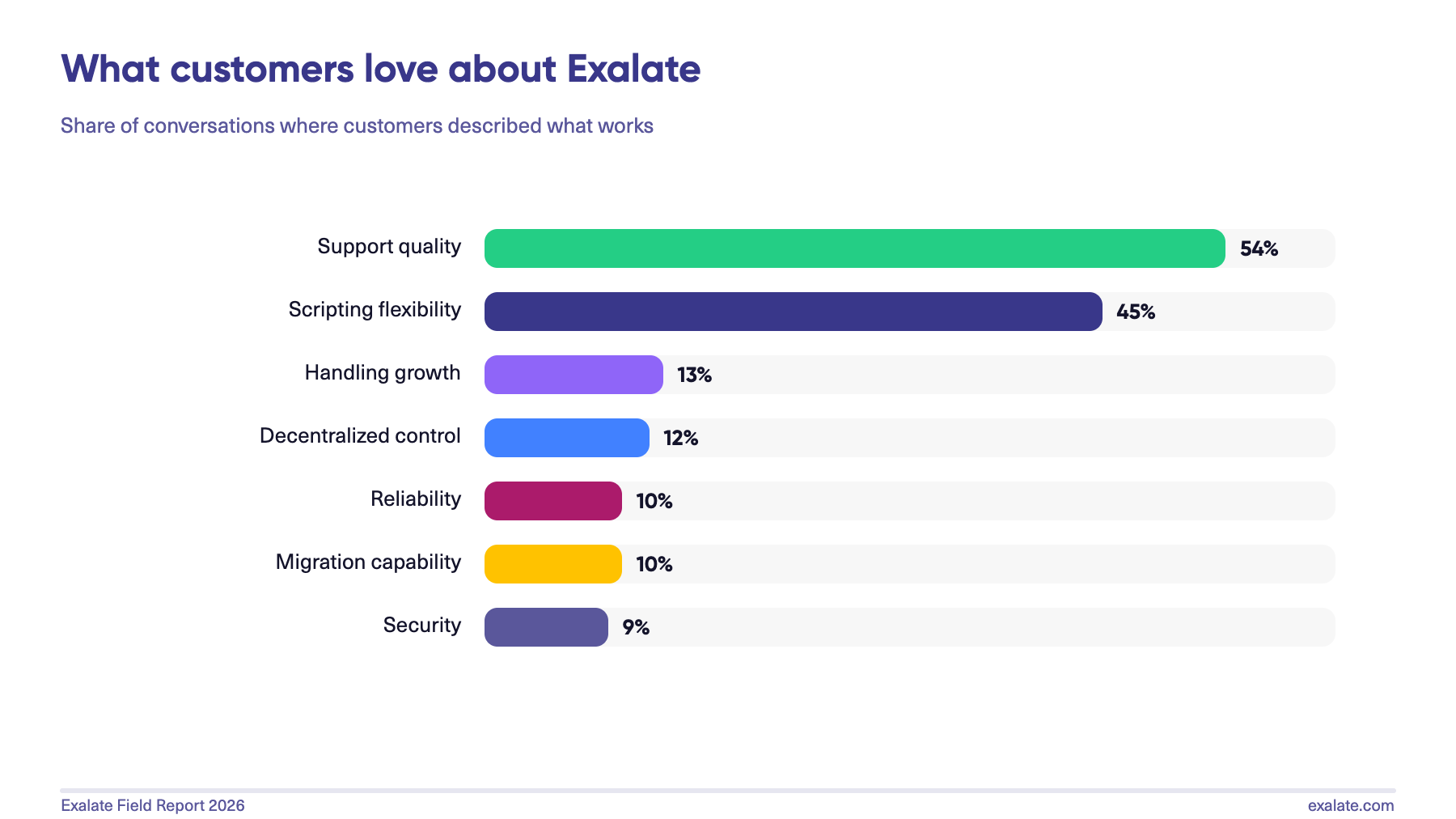
Support and scripting led again.
Support quality was the most-cited strength, in 54% of conversations where customers described what works.
Scripting flexibility followed at 45%.
Handling growth, decentralized control, reliability, migration capability, and security each came up in 9% to 13% of conversations.
Customers named people. A UK team credited one support engineer (Rodrigo) for a workaround after an update broke their triggers.
A telecom software vendor’s lead called us “one of my good vendors that I actually like to work with.” A US healthcare team called a one-time configuration session “solid,” adding, “it was very appreciated.”
Scripted control across company lines came up in almost every cross-company conversation. The media consultancy said removing Groovy scripting “would cause us to reevaluate the tool,” and in the same call: “we have no plans to get off of it.” An enterprise learning team at a large networking company said of its current setup: “I like everything about it.”
New Exalate
This year, many customers got their first look at New Exalate. It brings every connection into one unified console, so admins can see and manage all their integrations in a single space instead of jumping between instances.
New Exalate adds:
- Version control: A record of every change to a script, showing who changed it and when, with the option to roll back.
- Test Run: Simulates a sync against real tickets without touching production, so teams can check a change before it goes live.
- Aida, built into the console: Covered in more detail below.
- Import from Classic: Existing Classic customers can import their connections at no extra cost.
The change control features got the strongest reactions. A government admin told us version control “was actually going to be my biggest piece” before she even saw it. A regulated financial team that moved over uses Test Run heavily before every change.
What Solutions Did Exalate Replace
Here’s how they break down:
| Alternative | Share of conversations |
|---|---|
| A native or built-in connector | 24% |
| A named integration or automation vendor | 21% |
| Building it in-house (APIs, webhooks, scripts) | 20% |
| Staying manual (email, spreadsheets, CSV) | 16% |
The reasons teams gave for looking beyond an option repeated:
- Native connectors like Zendesk’s Jira app, the Azure DevOps connector for Jira, and ServiceNow’s Jira Spoke were free and already installed, but often one-way, unable to handle custom fields or forms, or unable to connect more than one instance. One team called the native Jira connector “pretty basic.” Another called the out-of-the-box Zendesk to Jira integration “awful.”
- In-house builds worked until attachments, API changes, or maintenance hit. One team’s webhook solution copied data and custom fields but failed on attachments.
- Automation tools like Zapier and Power Automate were seen as good for one-way triggers and weak for two-way sync of comments and attachments. One team colleague said Zapier “breaks constantly.”
- Other sync tools lost on hierarchy, custom fields, and security. Teams told us one tool flattened parent-child structures, one didn’t recognize their custom fields, and one required sharing an API key that security rejected.
- JCMA was chosen for big-bang migrations, with a sync tool alongside for phased moves and reconnection.
The pattern from last year held. When a team doesn’t pick Exalate, the alternative is usually something already paid for: a native platform tool, an enterprise iPaaS, or building it themselves.
New Emerging Integration Trends
AI Changed Where Admins Go For Help
Aida is Exalate’s AI assistant, and it helps at 3 points:
- Planning: In the documentation, it answers questions about how Exalate works.
- Building: In the script editor, it generates and edits sync scripts from plain-language prompts.
- Troubleshooting: It explains sync errors and suggests a fix, which you choose whether to apply.
This year, customers brought up AI on their own. The media consultancy’s admin taught herself Groovy from our knowledge base and community forum.
Now she starts with AI when she hits an error:
“Now, as you can imagine, Aida AI kind of solves a lot of my troubleshooting headaches.”
Project lead, media and entertainment consultancy
A government admin used Aida heavily when she first set up her integration.
Teams working with complex, multi-step mappings got the best results when they gave Aida clear, detailed descriptions of what they wanted. Some paired Aida with a short training session with our team.
Integrations With An End Date
Some integrations are built for a project.
A Canadian ERP program runs most of its Exalate usage through one program that winds down in 2027.
A financial services firm expects its two projects to land on the same cloud platform.
For project-based work like this, Exalate’s ability to keep systems connected through a transition is exactly the value. The teams that planned the integration’s lifecycle from the start got the most from it.
Teams Want Both Control And A Single View
New Exalate shows both sides of a connection in a single view, which internal teams and solo admins liked right away.
Cross-company teams have an extra requirement: each company wants to control its own side of a shared connection. That’s what Access Levels are built for. Access Controls are access controls for invited users, and they’re coming next. They’ll give each company in a shared connection its own permissions inside New Exalate.
Pricing That Matches The People Who Use It
Exalate now uses outcome-based pricing. You pay per integration, based on the number of active items in sync: the work items, tickets, or cases Exalate is keeping in sync right now.
There are no per-user fees, and an item stops counting once you stop syncing it. Plans range from Starter and Scale for smaller volumes to Pro and Enterprise, which offer custom and unlimited active items.
That’s a big change from per-user licensing, which charges for every user in an instance whether they use the integration or not.
Customers told us how that plays out:
- One organization with 200 Jira users needed the integration for about 10 people.
- A media consultancy’s studio client had thousands of Jira users and about 50 who needed the connection.
- A managed service provider found it hard to explain to clients why their Exalate cost was tied to their whole Jira headcount.
Outcome-based pricing fixes that. You pay for what you sync, so the cost matches the value. It also makes it easier for service providers to recommend Exalate to their clients, because the price depends on how much the client syncs, not on how big its Jira is.
Addressing The Top Customer Requests: What We Said, And What Happened
Our last report ended with 3 commitments.
Here’s where each one stands.
| What customers asked for | What we said last year | What we made happen this year |
|---|---|---|
| Versioning for scripts and testing sync data before it hits production | Shipped | Version control and Test Run shipped in New Exalate and got the strongest praise of any feature |
| Version pinning or a sandbox to test changes | In active development | NA |
| Permission granularity and a single console | Underway | The single console shipped in New Exalate. Access controls for invited users are still in progress, but a portion of it has shipped. You can now add Collaborators to your connection. |
| License usage transparency (Subscription-based sync) | Shipped | Items in sync pricing is live for New Exalate customers. Service providers welcomed it. |
This year’s requests, in order of how often they came up:
- Deeper sync visibility. A step-by-step timeline of what a sync did, a baseline for normal sync time, a notice when an error resolves itself, and alerts in Slack, Teams, or WebEx.
- Automatic retry and queue cleanup.
- Parallel processing, so one heavy attachment doesn’t hold up other connections.
- Cross-company access permissions in New Exalate, plus sync status visible on each work item for business users.
- Help moving scripts from Data Center to cloud, including guidance for Assets.
- A runbook for service providers. When to recommend an integration to a client, how to budget it, and what the client needs to prepare.
The Integration Maturity Curve
Most teams start with manual work: email, spreadsheets, and copy-paste. Once they connect their systems, we saw 3 distinct stages. Knowing yours tells you what to do next.
Stage 1: Connected. A native or one-way connector. It works for simple cases but struggles with custom fields, comments, and attachments. 24% of conversations compared Exalate with a connector at this stage.
Stage 2: Controlled. Two-way, scripted sync where each side owns its own rules. Most Exalate customers start here.
Stage 3: Governed. The integration is versioned, tested before changes go live, monitored against a baseline, and documented, with a second admin and a named owner on the other side. Teams at this stage handle migrations, mergers, and staff changes with the least disruption.
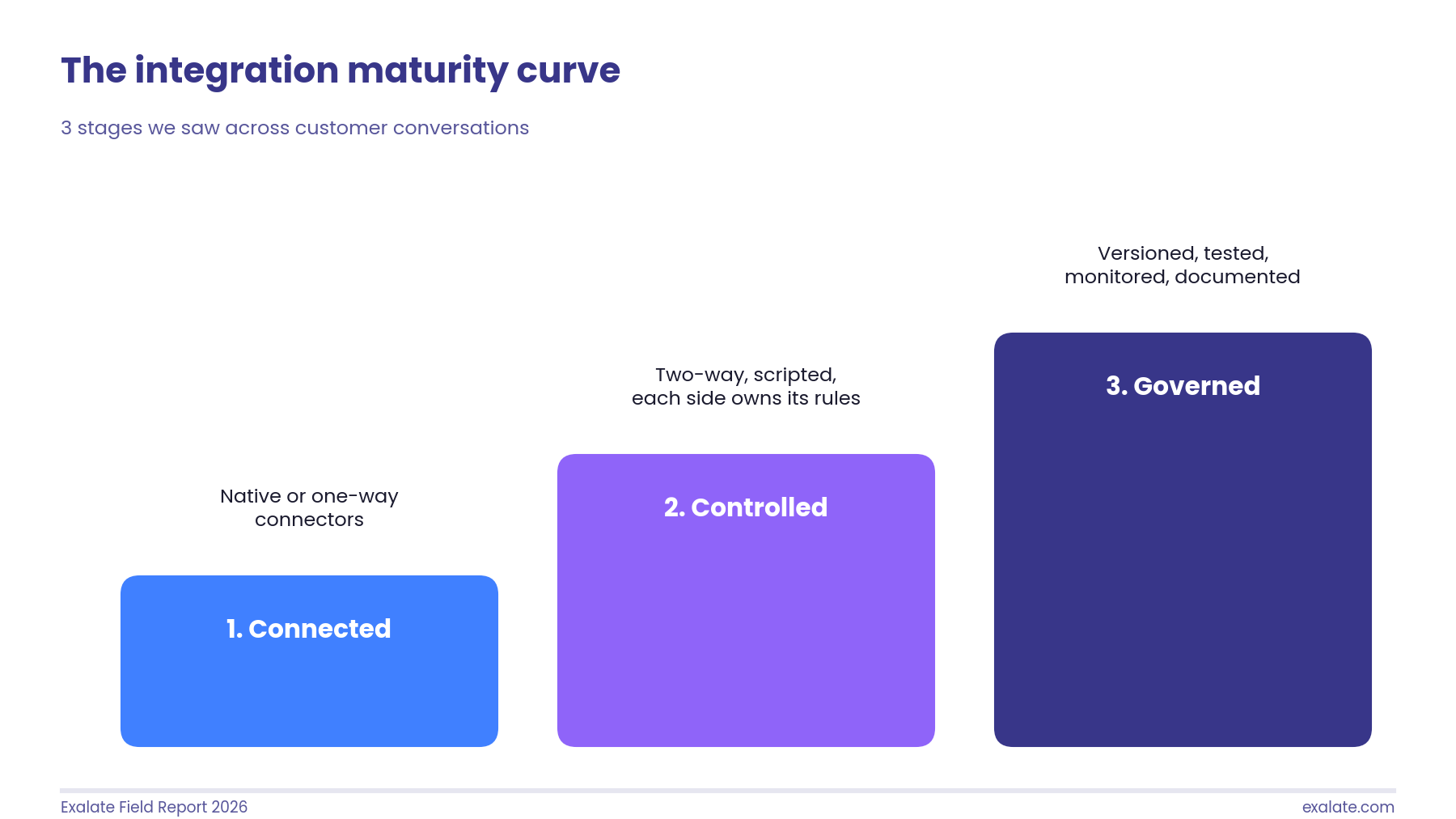
New Exalate is built to help teams move from Stage 2 to Stage 3. Version control, Test Run, and a single console are the tools that this stage depends on.
What’s Next
If you own an integration, this year’s data says you should be able to answer 4 questions today.
- How many items are actively synced, and how long does one take end to end? If you’re migrating off the Data Center, you’ll need the first number to plan and the second to know if your plan is realistic.
- Who else can log in and fix it? If the answer is nobody, that’s your first task.
- Which errors do you clear with a retry, and are they logged? Patterns help support you faster.
- Who owns the other side, and do they know your mappings? In a cross-company setup, the other side’s turnover affects you too.
We’ll run this study again in 2027 with the same themes and the same counting method, so the numbers can be compared year to year.
FAQ
Is the Jira Data Center going away?
Yes. Atlassian stopped selling Data Center to new customers on March 30, 2026. Existing customers can renew until March 30, 2028, and Data Center reaches end of life on March 28, 2029, when instances become read-only. Atlassian says it may offer extended maintenance by exception in some cases.
What happens to Jira integrations when you move off the Data Center?
Your connections don’t move by themselves. In our data, teams reconnected synced issue pairs on the cloud side, rewrote scripts that used server-only APIs, and rebuilt anything that read Jira Service Management Assets. Count your synced items and review your scripts before you set a cutover date. Contact our team for additional questions.
Can you use a sync tool to migrate Jira Data Center to cloud?
Yes. Most teams in our data used JCMA for the bulk history and Exalate for what JCMA doesn’t cover: keeping live work connected during the move, reconnecting synced pairs afterward, and cross-platform moves such as ServiceNow to Jira Service Management or Azure DevOps to Jira.
How is Exalate priced?
Exalate uses outcome-based pricing. You pay per integration for the number of active items in sync, with no per-user fees. Plans start with Starter and Scale and go up to Pro and Enterprise for custom and unlimited volumes.
How long does it take to sync 100,000 tickets during a migration?
It depends on attachments and node resources. In one case this year, a standard node ran at roughly 25 to 39 seconds per event, and extra resources brought that to about 6 to 10 seconds. Even at 10 seconds, 100,000 items is close to 280 hours, so teams usually sync open items first and move closed ones afterward
Recommended Reads
- How Uber Freight Moved 130,000 Tickets from ServiceNow to Jira Service Management
- Exalate Field Report 2024-2025: Customer Insights
- How Jira Service Management Integration with ServiceNow Can Save Your Service Delivery
- Jira Zendesk Integration: Connect Support and Other Teams
- Build or Buy an Integration? Calculate the True Cost