A normal week in an IT department often goes something like this: A support agent gets a customer reply in Zendesk, escalates it to engineering, and now has to open Jira separately to retype the summary because the two systems don’t interact.
Later on, engineering closes the bug, but the agent has no idea because the updated status didn’t reflect in his system. So they’d have to check Jira again manually to see progress updates.
You can see how time-consuming this could get in real life, and this stacks up over time and costs your organization money in the long run.
Managed integration replaces that manual reconciliation with an ongoing, real-time sync between two systems.
Key Takeaways
- A managed integration requires an ongoing, maintained sync between two platforms, whereby an organization outsources the maintenance and configuration to a dedicated third-party vendor.
- The core problems it solves: one person becoming a single point of failure, teams losing trust in which ticket version is current, uncounted manual reconciliation hours, and sprawl across multiple instances of the same tool.
- Buyers cluster around three axes: organization type, industry, and role within the organization.
- Field-level control, independent admin access on both sides, and a plan for what happens if the original owner leaves matter more than any single feature.

What are Managed Integrations?
A managed integration is when an organization outsources the job of connecting and syncing its systems, including the systems run by its external service providers, to a third-party vendor, instead of building and maintaining that sync in-house.
This also appears in managed services integration, connecting multiple service providers (an MSP handling infrastructure, an MSSP handling security, an internal help desk) into one coherent flow of data, instead of leaving each relationship siloed in its own system.
How this changes an IT team’s day-to-day workflow
- Faster incident handoffs. An incident raised in one system, internal or with a provider, reaches the right team on the other system with context attached, instead of getting relayed by email or Slack and losing detail in the process.
- No single person holding the integration together. Mapping logic, field translations, and error-handling live in a maintained setup instead of one person’s memory, so the sync survives a team change.
- Less unbudgeted reconciliation time. The hours a team used to spend cross-checking systems by hand, including systems they don’t own, go back to actual ticket work.
- One coherent picture across providers. As more of an organization’s operations run through external providers, this stops being a convenience and starts being the only way anyone gets a real status update without a meeting.
What are the Alternatives to Manual Escalation?
Instead of asking for updates manually, here are some integration options to explore:
- A one-off script or custom code. Someone on the team writes a webhook or a scheduled job that moves data from A to B. This option is difficult to manage when an API changes, a field gets renamed, or that person leaves.
- A native point-to-point connector. Jira’s native Zendesk connector, for example, passes a ticket in one direction with fixed field mappings and no real control. It works fine for a simple escalation flow, but falls short once a team needs selective sync, field-level control, or independent ownership on both sides.
- A full iPaaS platform. Tools like MuleSoft or Workato are built to move data across dozens of systems at an enterprise-data-pipeline scale. That’s a different job from keeping two ticketing tools in sync, and it usually comes with a matching implementation lift.
Then you have integration solutions like Exalate that provide bidirectional sync as well as AI-assisted scripting for controlling complex scenarios. It provides an ongoing, maintained sync, usually between two ITSM or work management tools. Both sides keep independent control over their own data and admin rights, and someone (a vendor, a specialist team) owns the mapping logic and the upkeep instead of leaving it to whoever set it up first.
The Problems Managed Integrations Solve
- The headcount tax. One person becomes the de facto owner of the integration, usually the one who set it up. When they leave, the sync doesn’t just get harder to maintain, with broken assignee logic and no documentation.
- Lack of expertise. Keeping a sync alive means understanding both platforms’ APIs, tracking their update cycles, and rewriting mapping logic every time either one changes something. That’s a specialized, ongoing skill set that most internal IT teams lack the appetite and spare capacity to stack on top of their actual job.
- Extra maintenance. An in-house integration is constantly changing. Field changes, workflow updates, and API deprecations on either platform all break something eventually, and fixing it falls on whoever owns it, on top of their regular workload.
- No room to add providers. Every new MSP, MSSP, or vendor relationship means another integration to build and maintain in-house. A manufacturing company running three MSPs—one for ERP on Salesforce, one for security on ServiceNow, one for infrastructure on Freshservice—would need to build and maintain three separate custom syncs internally just to keep them coordinated.
Who Needs Managed Integrations?
Real buyers break down along three lines: what kind of organization they are, what industry they’re in, and what role they play in the integration itself.
By Organization Type
- Enterprises running the same tool across business units, or after M&A. This often involves multiple Jira orgs, multiple ServiceNow instances, and no single admin who can see across all of them.
- IT service providers and MSPs serving multiple business entities. This could be a shared services entity running ServiceNow centrally while each client keeps its own Jira instance. The integration has to sync tickets and attachments across that boundary without exposing sensitive member data (names, phone numbers, dates of birth).
- Companies with a vendor or supplier relationship that needs ticket handoff. One customer syncs specific request types with a vendor’s Jira instance just to place equipment orders for new hires, terminations, and repairs.
By Industry
- Software and SaaS and industrial engineering use managed integration customers most consistently based on our estimation. The numbers also make sense because these are industries where teams already run several specialized tools like Jira, Salesforce, and ServiceNow. IT services firms also opt for managed integration too, which is important to connect Jira Service Management with other service desks.
- Financial services, insurance, and healthcare companies are also up there as far as managed integrations are concerned. Longer security reviews and tighter price sensitivity slow things down. But the issue is that in such regulated industries, the main struggle is data residency and PII-filtering requirements. So when moving data from Salesforce to Jira or Azure DevOps, Exalate makes sure you don’t have to worry about these compliance concerns.
- Automotive and manufacturing companies need managed integrations to connect a service or operations tool like ServiceNow or Salesforce to a development or engineering tool like Jira or Azure DevOps. These are often multi-facility, multi-system rollouts (global coordination across plants, supply chain integration with external vendors) rather than a single team connecting two tools.
- Government and public sector organizations need managed integrations for a specific reason: a public-facing system (almost always ServiceNow) has to stay connected to an internal development tool, without letting sensitive citizen or patient data cross between them.
- Managed service providers, syncing tickets across client environments. An MSP usually needs an integration solution to populate assets in Jira Service Management and sync cases with vendor service desks (Freshdesk/Zendesk) simultaneously, because every client expects their own system of record, not a shared one.
By Role in the Organization
Beyond company type and industry, a third group shows up consistently: people managing the integration on someone else’s behalf, not for their own internal use.
- System integrators and consulting partners who deliver the integration as part of a broader implementation. Enterprises have Exalate as the technical backbone of a service package for their own end customers. The integration is invisible infrastructure inside someone else’s project, not the product being sold.
- Service integrators, where one central team is explicitly responsible for coordinating multiple external service providers into a single, coherent set of processes. This is close to the shared-services pattern above, but the SIAM layer is specifically about governing several outside vendors rather than several internal business units.
- Independent integration consultants, brought in specifically to design and configure the sync logic (field mapping, status mapping, scripting) for a client who doesn’t have that expertise in-house. They’re closer to the technical admin role than the budget owner, but they’re often the ones who choose the tool.
- Solution architects and enterprise architects. They’re the ones asked to make disparate systems work together without creating a maintenance liability. They usually come with titles such as Head of Architecture, Principal Infrastructure Architect, and Jira Architect.
- IT operations managers and managed services engineering managers. This is the person responsible for keeping client-facing or cross-team integrations running, and they’re often the first to feel the cost of a DIY sync once it’s live and something breaks.
- DevOps engineers and platform engineers. The technical practitioners who actually configure and troubleshoot the sync, particularly on developer-tool-heavy pairs like Jira and Azure DevOps. They’re the ones who decide whether a tool is workable.
What Does A Good Managed Integration Setup Look Like?
Some concrete cases include.
- Multiple business units, one shared workspace. An international enterprise needed several divisions working on a shared project to see the same tickets, without migrating every team onto one Jira org. The setup routes tasks from one instance into another, with the integration translating roughly 50 statuses on one side down to 10 on the other, and a default assignee fallback for when a user doesn’t exist on the receiving side.
- Parent-child sync inside one tool. An EU-based company’s setup inside a single Zendesk instance needed parent tickets and their child tickets to reflect the same status changes both ways, so an update on either level shows up on the other without someone manually mirroring it.
- Sensitive data that can’t leave a region. Financial services providers handle user PII on synced tickets and attachments, so the integration has to control what leaves the country, not just what gets duplicated. That kind of setup usually means metadata-only sync objects rather than full field payloads.
- Access without elevated admin rights. At a bank, the Jira admin wasn’t a super-admin on the connected Azure DevOps instance, and internal policy blocked giving them that access. Rather than escalate a permissions request, the integration ran through a setup that let both admins keep their existing access levels, cutting connection setup time from over a day to a couple of minutes.
- Two internal teams, two tools, one shared problem. A company running Freshdesk for customer support and Freshservice for internal IT has the coordination problem without any external vendor involved at all. Every customer-reported issue that actually needs IT to fix it has nowhere to go without someone manually opening a second ticket. Syncing the two means a customer ticket that needs IT intervention creates a linked service request automatically, with status and resolution details flowing back, while internal notes stay internal.
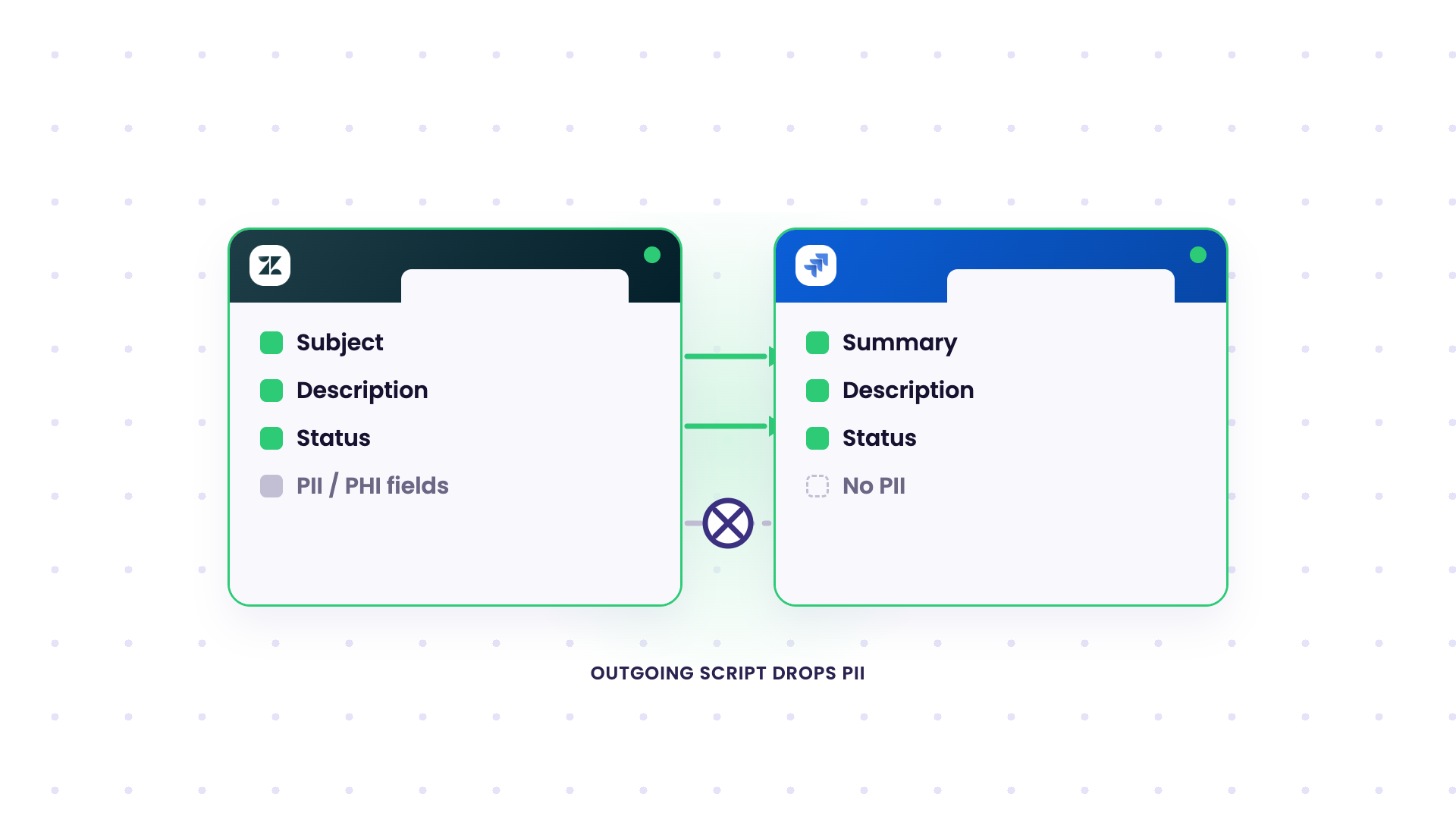
- PII that can’t cross platforms. A healthcare company using Zendesk and Jira together had a specific, non-negotiable requirement: Zendesk holds patient PII, and none of it can reach Jira. The standard native integration didn’t support that level of field control. The setup that worked filters out PII fields entirely before anything syncs, so the two teams still share ticket status and progress without patient data ever leaving its original system.
- One Jira instance splitting to two, mid-merger. A company mid-acquisition had its Jira platforms merging into one, but its Zendesk tenants staying separate, because the two support teams weren’t consolidating on the same timeline as engineering. Native tooling only supports one Jira-to-Zendesk connection at a time. The workaround was routing the single Jira instance to sync with both Zendesk tenants independently, so neither support team had to wait on the other’s timeline to keep working.
- A multi-platform chain across Jira environments. One enterprise needed work items to move from an internal Jira instance to a second internal Jira instance for a different business function, to an external customer’s Jira instance, with the data format changing to match what each side expected along the way. Rather than a single sync, the integration reformats fields at each hop, so the same underlying request looks native to whoever’s looking at it, regardless of which instance they’re on.
- Multiple external suppliers, one shared process. A SIAM-style setup, coordinating several outside suppliers who each use their own ticketing tool, into a consistent process for the buying organization. So a big part of what a managed integration has to solve here is making each supplier’s system visible without asking them to change how they work.
Across all of these, four things tend to hold true regardless of which two tools are involved:
- Field-level control, where each side chooses what’s shared, what’s transformed, and what stays internal.
- Independent admin control on both sides, where both teams retain ownership of their own tool as well as the sync configurations for incoming and outgoing data.
- No single point of failure when the person who set it up leaves. Documentation and shared ownership matter more than anything else.
- Security and data residency treated as a design question up front.
What Can You Sync with Managed ITSM Integrations?
ITSM platforms like ServiceNow, Jira Service Management, and Freshservice are usually the system of record for incidents, changes, and requests. So any sync involving them has to handle status mapping between two different workflow models, assignment-group and user-ID mapping, and CAB (Change Advisory Board) approval stages.
None of that is optional in a regulated ITSM environment. A ticket that shows “approved” on one system and “pending” on the other can block a release or misrepresent compliance status during an audit.
This also brings us to the DC-to-cloud migration headache. Atlassian’s move to deprecate Jira Data Center has pushed a lot of ITSM-adjacent teams into migrating while still needing their existing ServiceNow or Azure DevOps connections to keep working.
Quorum Cyber provides a good example of what this looks like as a managed service rather than a self-run sync. As a managed security services provider, they needed their customer portal to stay in sync with each client’s own service desk, so security tickets, monitoring alerts, and vulnerabilities reached clients automatically. The vendor owned the setup, maintenance, and infrastructure on their behalf.
A managed ITSM integration solution like Exalate is a massive asset because it supports real-time, bidirectional sync during that kind of cutover. You can also use it for custom migration tasks.

How ACA Helped Its Customer Move 150K Issues with Zero Downtime Using Exalate
Key Considerations Before Setting Up Managed Integrations
A few questions worth answering before evaluating vendors:
- How many systems, and how many instances of each, actually need to stay in sync?
- Who owns what data on each side, and does either team need to keep independent admin control?
- Do you need a full merge, or selective, field-level sync?
- Is data residency or compliance review going to be part of this conversation, and if so, how early can you bring it in?
The vendor conversation goes faster once you already know what you’re asking for.
Where Exalate’s Enterprise Managed Services Fit
The core Exalate architecture keeps both sides of a sync editable. Each team keeps admin control of their own instance; nobody hands over ownership of their own tool to make the sync work, and field-level scripting decides exactly what crosses the boundary, what gets transformed, and what stays internal.
Beyond the initial setup, Exalate’s managed services cover the following:
- Ongoing script and field-mapping support as either the connected platform changes its API or workflow structure,
- monitoring for sync failures instead of waiting for someone to notice a stale ticket,
- and support tiers that scale from self-service community help up to dedicated engineers for business-critical, client-facing integrations.
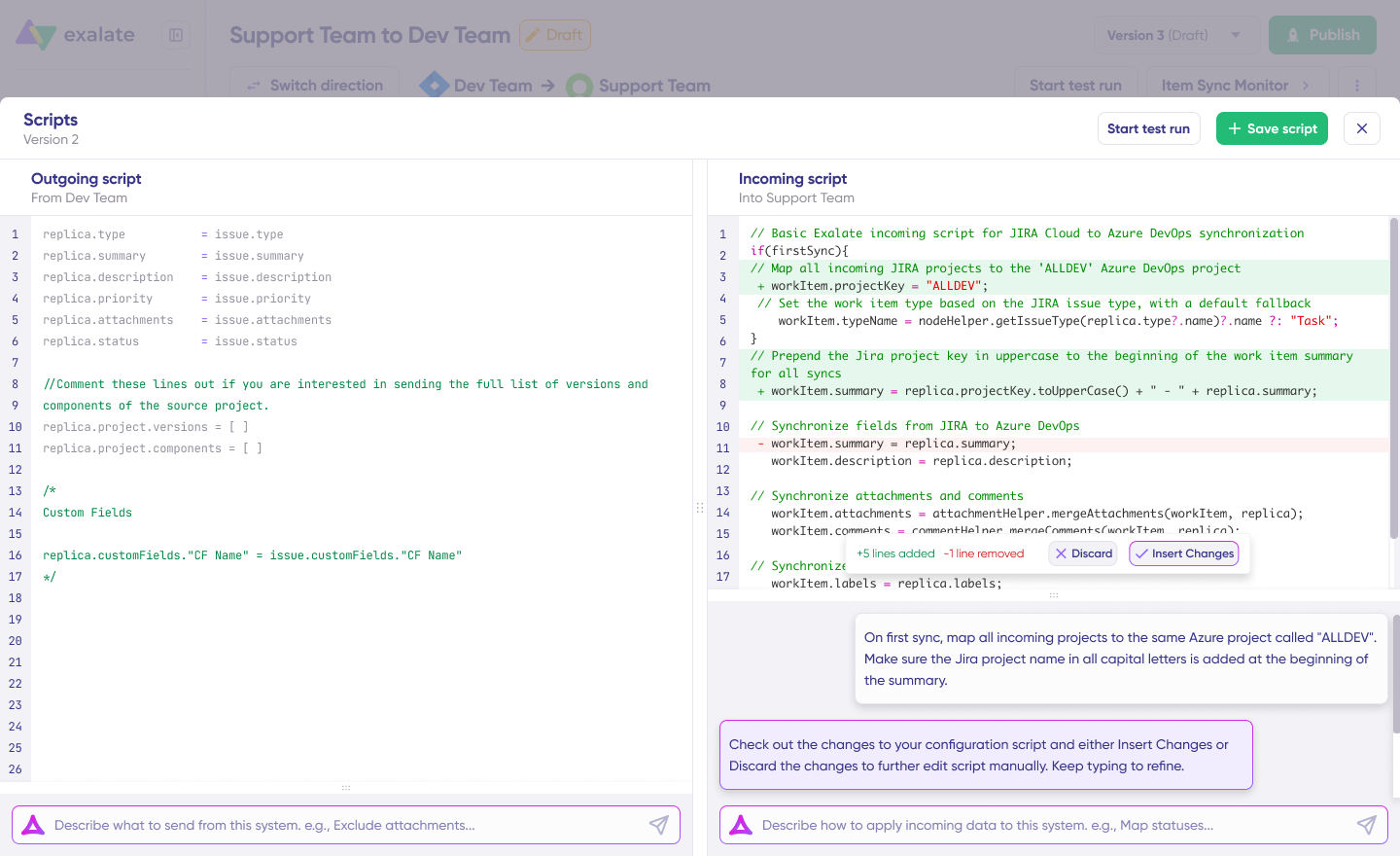
The customer keeps ownership of business outcomes, system access and approvals, escalation decisions, and compliance requirements. Exalate’s team owns the integration architecture, the build and configuration, the monitoring and alerting, and the ongoing maintenance and updates.
That breaks down into four recurring patterns:
- Outsourced internal IT service desk. A client’s service requests get managed directly from your own ITSM platform, so your team works in one system while tickets, priorities, and resolutions stay in sync with theirs.
- Cross-company project management. Multiple organizations working on the same project, on separate Jira, ServiceNow, or Azure DevOps instances, stay aligned without manual updates or duplicate entry.
- Incident escalation across systems. An incident raised on one side syncs automatically to the right team on the other, with context attached, instead of getting relayed by email.
- Security operations across partners. Security incidents sync from internal tooling out to a client’s ITSM platform, which is closer to acting as an extension of their security team than being another vendor in the queue.
Exalate also runs an isolated architecture (no shared infrastructure between customers), encryption in transit and at rest, role-based access controls, API key authentication, and ISO 27001 certification. Read more about the security posture in our Trust Center.
FAQ
What is a managed integration in IT?
A managed integration is when an organization outsources the job of connecting and syncing its systems, including the systems run by its external service providers, to a third-party vendor, instead of building and maintaining that sync in-house.
How is a managed integration different from a native connector?
A native connector typically passes data in one direction with fixed fields and little to no mapping control. A managed integration gives both sides independent control over what’s shared, transformed, or kept internal.
Do managed integrations replace an iPaaS platform?
Not usually. iPaaS platforms are built for moving data across many systems at an enterprise data-pipeline scale. Managed integrations are typically scoped to keeping two specific ITSM or tracking tools in sync, a narrower and more specific job.
What industries use managed ITSM integrations most?
Software/SaaS, healthcare, automotive, and industrial engineering show the strongest and fastest adoption. Financial services and insurance need managed ITSM integration too, but longer security reviews and price sensitivity slow the buying process down.
Can managed integrations work across on-prem and cloud instances?
Yes, managed integrations can work across on-prem and cloud instances. This is one of the more common triggers for adopting one, especially during a data-center-to-cloud migration where legacy on-prem connections need to stay live during the transition.
How do managed integrations handle sensitive or regulated data?
Well-built ones sync metadata and field references rather than full data payloads, so sensitive information (PII, PHI) doesn’t have to leave its original system or region unless a team explicitly configures it to.
What happens if the person who set up the integration leaves the company?
This is the exact failure mode managed integrations are meant to prevent: documentation, shared admin access, and vendor support (rather than one person’s tribal knowledge) keep the sync running through a personnel change.
Do MSPs use managed integrations differently than enterprises?
Yes, MSPs use managed integrations differently than enterprises. System integrators typically manage integrations across multiple client environments simultaneously, often reselling the capability as part of a broader service, rather than running one integration for their own internal use.
How long does a managed integration typically take to set up?
It varies by complexity, but access-control friction (not technical setup) is often the biggest time sink. Removing the need for elevated cross-system admin rights has cut connection setup from over a day to a couple of minutes in at least one documented case.
Is a managed integration worth it for a single tool pair, or only at scale?
A managed integration is worth it whenever manual reconciliation between two systems is costing real time every week, regardless of company size. The scale question matters more for which specific solution fits than whether the category applies at all.
Recommended Reading