This post was originally posted on the Atlassian community.
In our previous Atlassian post, we talked about optimizing Jira-to-Jira integrations to improve workflows and team collaboration. In this second post, we’re focusing on Jira-to-Azure DevOps integration.
Many teams use both Jira for project management and Azure DevOps for development, and connecting these tools can make work smoother and more efficient. We’ve collected some common use cases from our conversations with users, highlighting the typical challenges they face when syncing Jira with Azure DevOps.
So, here it goes!
Discuss your integration setup with our experts
Get free, expert advice on your setup. We’ll reach out via email to discuss your use case.
1. Syncing User Stories and Bugs Between Jira and Azure DevOps
A key challenge for many teams is ensuring that user stories and bugs stay in sync between Jira and Azure DevOps.

Use Case:
- Current Setup: Teams use Jira to manage incoming user requests, while Azure DevOps (ADO) is used for development tasks.
- Problem: Updating Jira issues and Azure DevOps work items manually is time-consuming, and keeping both systems aligned (e.g., updates, comments) can lead to inefficiencies.
- Solution: Implementing two-way synchronization between Jira and Azure DevOps allows both systems to update automatically, ensuring bugs and user stories are always in sync. This integration saves time and reduces human error, enabling development teams to focus on the actual work.
2. One-Way Sync for Specific Use Cases (Jira to Azure DevOps)
In some cases, businesses only need a one-way sync from Jira to Azure DevOps. This is particularly useful when Jira serves as the main project management tool, and Azure DevOps is primarily used for development.

Use Case:
- Current Setup: Jira is used for planning and tracking, while Azure DevOps manages the development work.
- Problem: The team needs to ensure that certain fields, such as start/end dates, sprints, titles, and status, are automatically copied over to Azure DevOps from Jira without needing to manually enter them into both systems.
- Solution: A one-way sync can automate the transfer of key metadata, such as user story status or due dates, from Jira to Azure DevOps. This ensures that the development team in Azure DevOps can easily see updates while preventing the need to constantly update two separate platforms.
| “Our project managers use Jira to track overall progress, but the developers prefer Azure DevOps for managing work items. A one-way sync has helped us keep everything organized without extra manual work.” — Jira User, Product Owner |
3. Syncing Work Item Status and Updates Between Jira and Azure DevOps
Another common use case is synchronizing status updates between Jira and Azure DevOps, ensuring that work items in one system reflect the correct status based on actions taken in the other system.

Use Case:
- Current Setup: The development team in Azure DevOps works on code and creates pull requests (PRs) linked to Jira issues.
- Problem: Manually updating Jira status based on PR progress or approval in Azure DevOps is prone to errors and slows down the development lifecycle.
- Solution: Integrating PR status with Jira allows updates to be triggered automatically. For example, when a PR is created or approved in Azure DevOps, Jira can automatically update the user story or task status to reflect its progress (e.g., “In Progress” to “Code Review” to “Ready for QA”).
4. Automating the Creation of Jira Tickets Based on Azure DevOps Tasks
For teams with external partners, it’s common to create Jira tickets automatically based on specific actions taken in Azure DevOps.

Use Case:
- Current Setup: A development team uses Azure DevOps to manage work items, while an external partner uses Jira for managing tasks.
- Problem: Manually creating corresponding Jira issues for tasks in Azure DevOps can be time-consuming.
- Solution: Using automation, Azure DevOps tasks can be tagged in a way that triggers the automatic creation of corresponding Jira tickets, ensuring seamless task tracking across both systems. The integration also ensures that both teams can easily collaborate and track progress without switching tools.
5. Syncing Epics, Features, and Work Items Across Jira and Azure DevOps
Syncing high-level features, epics, and related work items across Jira and Azure DevOps is critical for ensuring that development teams can track the overall progress of a project while staying connected to specific work items.

Use Case:
- Current Setup: Epics are tracked in Jira, while Azure DevOps is used to manage features and work items.
- Problem: It can be difficult to link work items in Azure DevOps to corresponding epics or features in Jira, leading to visibility gaps.
- Solution: The integration can synchronize epics and features across both platforms, ensuring that progress on a high-level project in Jira is reflected at the work item level in Azure DevOps. This helps project managers and development teams stay aligned on overall project goals and timelines.
| “Before the integration, we had to manually update the status of tasks in both systems. With the sync in place, work items update automatically in both Jira and Azure DevOps, saving us a lot of time.” — Product Manager, Enterprise Software Company |
6. Managing Multiple Projects in Jira and Azure DevOps Simultaneously
For teams with complex project structures, integrating multiple Jira projects with a single Azure DevOps project can help ensure data consistency and visibility.

Use Case:
- Current Setup: A single Azure DevOps project is used for development, while multiple Jira projects are used for different teams or business units.
- Problem: Syncing data between multiple Jira projects and a single Azure DevOps project can be tricky, especially when dealing with different workflows and priorities.
- Solution: The integration can be set up to sync key data (e.g., titles, statuses, start dates, and sprint information) from multiple Jira projects to Azure DevOps, making it easier to manage work across teams without losing track of project-specific details.
| “We use custom fields in Jira to track additional details, but keeping them in sync with Azure DevOps was always a challenge. Now, the integration ensures that our metadata is consistent between both systems.” — Business Analyst, Agile Software Team |
7. Connecting Two Azure DevOps Tenants to One Jira Cloud Instance
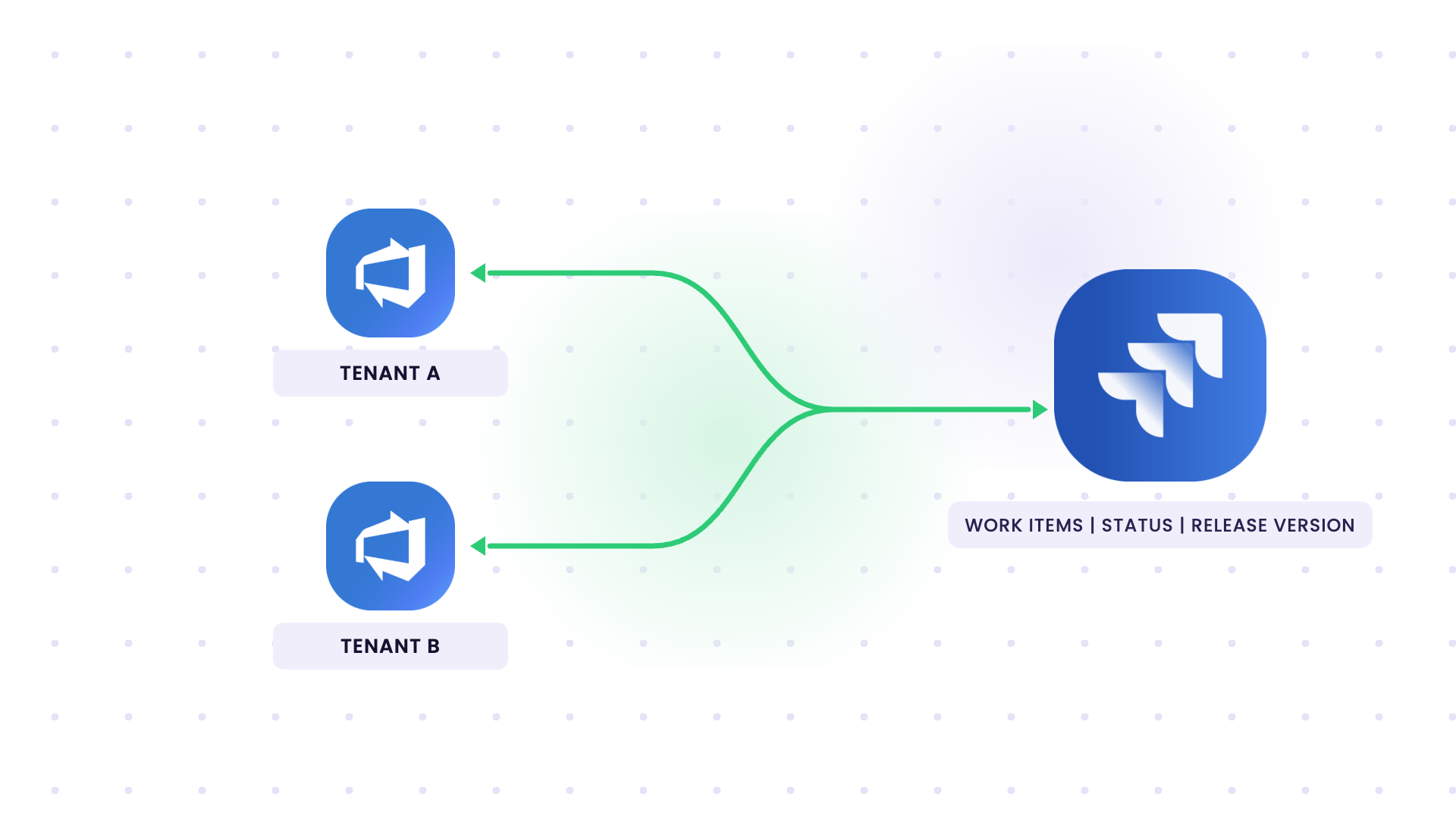
Use case 6 covers many Jira projects feeding one Azure DevOps project. This one runs the other way. A healthcare training company we spoke with has 2 separate Azure DevOps cloud tenants and a single Jira Cloud instance, and they need both tenants syncing into that one Jira.
Use Case:
- Current Setup: Product and engineering leads plan sprints in Jira Cloud. Engineers do the actual work in Azure DevOps, spread across 2 cloud tenants.
- Problem: The native connector can’t handle 2 Azure DevOps tenants syncing with 1 Jira instance. Engineers finish work in Azure DevOps and don’t go back to update Jira, so Jira falls behind. The release version gets entered twice, once in each system, and managers spend their time chasing people for updates.
- Solution: 2 Azure DevOps to Jira connections, one per tenant, both pointing at the same Jira Cloud instance. Each connection syncs work items, statuses, and custom fields in both directions. The release version field is mapped on both sides, so a change in either system shows up in the other without any manual intervention.
Why Stale Jira Data Was a Reporting Problem
Leadership runs reporting for major initiatives out of Jira, including the metrics their investors track. Their compliance and governance reports pull from the same data.
So when an engineer closes a work item in Azure DevOps and skips Jira, the status in those reports is wrong. It does not get reflected unless manually copied between systems.
Why Two Connections Instead of One
Each tenant has its own projects, work item types, and custom fields. A separate connection per tenant keeps the sync rules separate too, so when one tenant changes its process, the other tenant’s sync keeps running.
Jira still gets one combined view for sprint planning, which is what the product and engineering leads needed.
What To Check Before You Build It
Run a technical session against the real project structures first. The field mappings that look obvious initially often change once you open both tenants side by side.
Check these:
- Which Jira projects map to which Azure DevOps projects in each tenant.
- How the release version is stored on each side. In Jira, it’s usually the Fix Version field, which is a version object. Azure DevOps has no direct equivalent, so teams often use a custom field, a tag, or the iteration path.
- The status workflow in each tenant, since the 2 tenants may not use the same states.
- Custom fields that exist in one tenant and are missing in the other.
The Usual Field Setup
If you haven’t confirmed how your fields are stored yet, start from the setup most Jira and Azure DevOps teams use. Then adjust it in the technical session.
| What Sync | Jira Cloud | Azure DevOps |
|---|---|---|
| Work item type | Story, Bug, Task, Epic | User Story (Agile process) or Product Backlog Item (Scrum process), Bug, Task, Epic |
| Status | Workflow status, such as To Do, In Progress, Done | State, such as New, Active, Resolved, Closed (Agile) or New, Approved, Committed, Done (Scrum) |
| Release version | Fix Version/s | Custom picklist field, such as Release Version |
| Sprint | Sprint field | Iteration Path |
| Estimate | Story Points (or Story point estimate) | Story Points (Agile) or Effort (Scrum) |
| Team or area | Component or Team field | Area Path |
| Source tenant | Label or custom field, such as ADO Tenant | Set by the connection each work item comes from |
Discuss your integration setup with our experts
Get free, expert advice on your setup. We’ll reach out via email to discuss your use case.
The release version needs the most care. Fix Version in Jira can hold more than one version, and a custom field in Azure DevOps usually holds one. A common approach is to sync the latest release and keep version names identical in both tenants, such as 2026.11, so both connections write to the same Jira version.
The version also has to exist in the Jira project before a work item can point to it. Either create it in Jira first, or add a rule that creates it when a new version comes in from Azure DevOps.
Tag every synced work item in Jira with its source tenant, using a label or a custom field. This lets your reports filter by tenant, which helps when leadership asks where a number came from.
What’s Next?
Have you integrated Jira with Azure DevOps? We’d love to hear about your experience! Share your challenges, solutions, or insights in the comments below and join the conversation, or simply get on a call with me.
If one of these Jira Azure DevOps scenarios sounds like yours, book a call with our sales team to plan it out.

Recommended Reads