

Knowing when to use integration or automation can work wonders for your business workflows. For teams with several CRMs, DevOps platforms, ERPs, finance systems, support desks, and countless others, getting them to interact is critical for operational efficiency.
But for that interaction to work, you’d need to know when to integrate both systems or automate processes using triggers, or when to use both.
I’ll share everything I know about choosing between automation and integration by highlighting some real-world use cases where either or both can improve workflows.
Key Takeaways
- Integration connects disparate systems to keep data consistent and accurate across platforms, while automation uses triggers to execute tasks with minimal human intervention.
- Software engineers, ITSM teams, sales reps, and support staff each benefit from integration and automation in different ways, depending on whether their problem is data silos or repetitive manual work.
- Real-world integration use cases range from cross-team agile collaboration and MSP multi-client routing to multi-platform escalation workflows.
- Automation use cases cover lead management, email marketing sequences, onboarding workflows, and ticket queue cleanup.
- The most effective setups combine integration and automation so that data flows between systems and triggers actions automatically without manual intervention.

Integration vs. Automation: What’s the Difference?
What Is Integration?
Integration is the process of connecting disparate systems so they can share data and keep each other updated. It involves using a webhook, third-party application, or custom script to share information between the integrated platforms.
Integration can be two-way, one-way, real-time, near real-time, or scheduled. The main goal is to get the data flow consistent and accurate across systems.
For instance, you can integrate Jira and Azure DevOps to make collaborations between IT and development teams seamless. Both sides will have access to the data they need when they want.
Integration is especially valuable when multiple teams rely on different platforms but need a unified view of the same data. Think of a support team on Zendesk, an engineering team on Jira, and a field services team on ServiceNow. Without integration, every status update or escalation requires someone to manually copy information between systems. With integration, the data moves automatically and stays consistent everywhere.
What Is Automation?
Automation is the process of using triggered actions to execute a process. The goal is to get rid of human intervention or to limit it to the barest minimum, especially for monotonous or repetitive tasks.
The automation can be event-based or schedule-based. It is predominantly a one-way connection: the trigger goes off, and the data shoots to the other side.
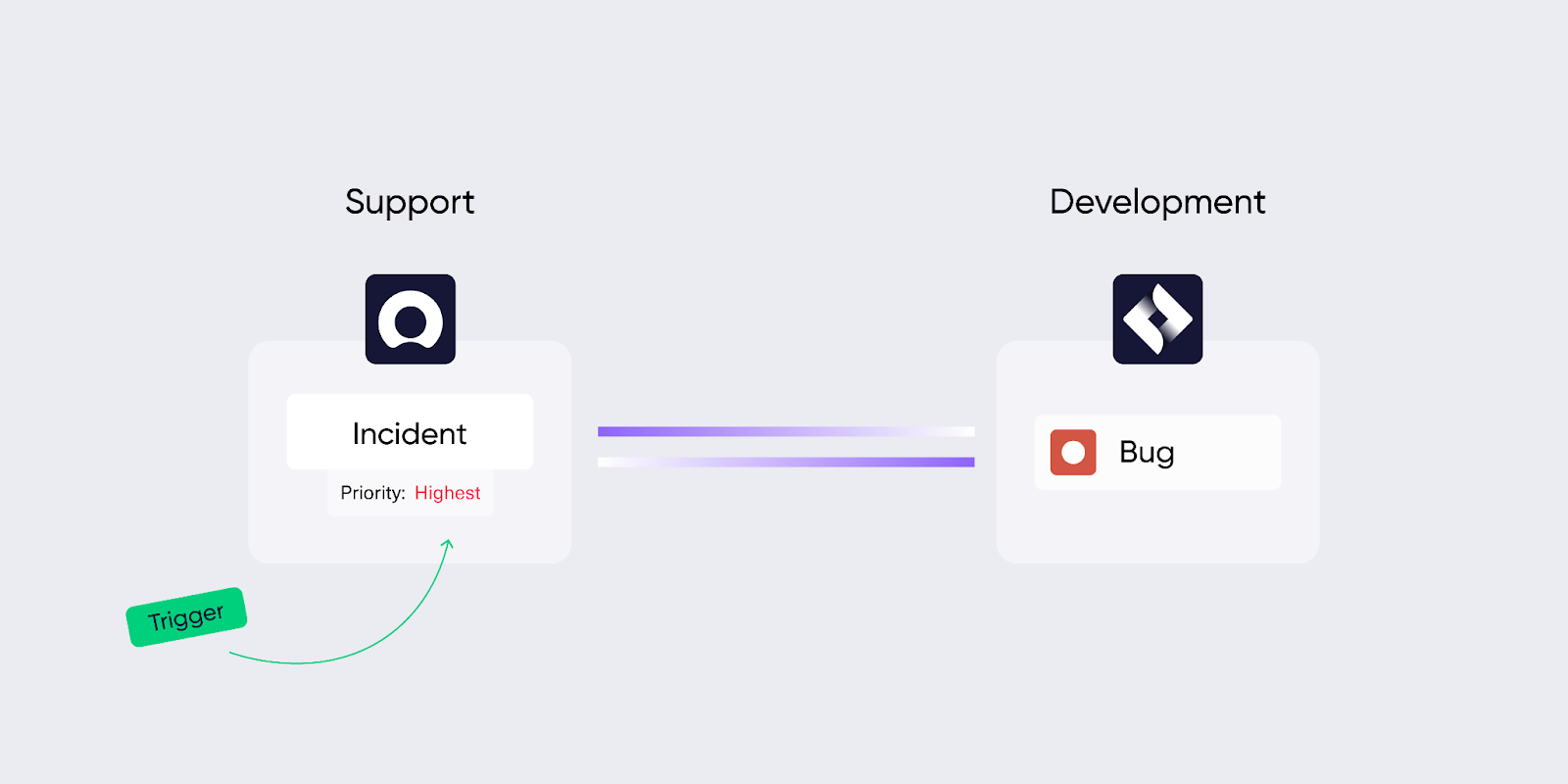
You can implement automation for triggering sales quotes after a lead converts to an opportunity or for kicking off incident responses without human authorization or supervision.
For schedule-based automation, it is possible to write a rule for all ticket updates to be sent over to another platform at midnight every day.
Automation also plays a role in internal process efficiency. For instance, when a new employee joins the company, an onboarding automation can provision their workspace, assign training tasks, and send a welcome email without any HR rep pressing a button.
The same logic applies to IT alerting: a server health check fails, and automation immediately creates an incident ticket, pages the on-call engineer, and starts the escalation timer.
How Do Integration and Automation Compare?
| Feature | Integration | Automation |
| Focus | Data flow and consistency | Task execution and repeatability |
| Architecture | APIs, third-party apps, middleware | Triggers, workflows, bots, scripts |
| Direction | Bidirectional or unidirectional | Predominantly unidirectional |
| Complexity | Medium to High | Low to Medium |
| Primary benefit | Eliminates data silos | Eliminates manual, repetitive work |
| Example | Syncing Jira work items to ServiceNow incidents | Auto-closing resolved tickets after 24 hours |
How to Decide: Integration, Automation, or Both?
The simplest way to figure out what you need is to ask four questions:
- Do the two systems need to stay in sync? If yes, integration is the answer. Anytime you need the same data reflected accurately on both platforms, you’re looking at an integration use case. For example, when a support team in Zendesk escalates a ticket to engineers in Jira, both sides need to see status updates, comments, and resolution details in real time.
- Is your problem about repetitive tasks? If the bottleneck is a task that gets done the same way every time (closing stale tickets, sending reminder emails, provisioning accounts), automation is the most likely solution.
- Are users interacting with both systems? When team members actively use both platforms and expect their data to be current on each one, integration ensures nobody is working with stale information.
- Do you need two-way updates or just one-off triggers? Two-way updates (changes on either side reflected on the other) call for integration. A one-off trigger that fires an action without expecting a return update is automation.
In many cases, you’ll answer “yes” to more than one of these. That’s when you need both working together.
Integration or Automation: Which One Does Your Team Need?
To understand whether automation or integration is the best option, let’s look at how different professionals use each one.
Software Engineers and DevOps Teams
Engineers can integrate Azure DevOps with Jira Software as well as other systems to align sprint planning across tools and squads. An engineer can sync a deployment bug from Azure DevOps into Jira for visibility by QA.
Development team managers can use automation to generate reports, changelogs, and docs from code or data automatically. For instance, a new GitHub work item can trigger a Jira ticket, and the QA team will receive the alert via Slack.
When evaluating tools for this use case, check whether the platform supports the specific connectors your teams use. Exalate, for example, covers Jira, Azure DevOps (Cloud and Server), GitHub, and Asana, which covers most engineering stacks. If your team uses a less common tool, look for platforms that offer custom connectors via REST API.
IT Service Management (ITSM) Experts
ITSM integration helps service development managers and teams streamline ticket escalations, reduce manual data handoff, and create a unified view of incident tracking across ServiceNow, Jira, Zendesk, Freshservice, or Freshdesk. An L1 support agent can create a ticket in Zendesk and hand it off to L3 engineers in Jira.
ITSM automation helps teams respond faster to alerts, tickets, and incidents, especially when the process is repetitive and scaling rapidly. For instance, when a security vulnerability is reported, an incident workflow will be triggered to lock access and initiate resolution steps.
For ITSM environments, bidirectional sync matters more than in most other contexts. You want tools that can push and pull data between platforms independently so that each team controls what they send and receive.
Sales Reps and Marketers
Sales and marketing integration allows companies to streamline lead nurturing, email campaigns, and follow-ups. Managers can connect their Salesforce CRM to ServiceNow to provide more context about SLAs related to specific accounts.
Teams can use sales automation to remove the tedious work of manual data entry, follow-ups, and CRM cleanup. It can help your team log every sales call, update deal stages, and send proposal reminders.
Marketing automation can help you maintain email campaigns, which you can use across the user journey from subscribing to unsubscribing.
The key thing for sales and marketing teams is whether the integration platform can map custom fields between your CRM and other systems. A Salesforce Opportunity field like “Estimated Close Date” needs to land in the right field on the other side without manual intervention.
Customer Support Staff and Service Delivery Managers
Teams handling customer success and support can understand everything about the customer by linking support tickets, billing issues, and product usage logs. When a support ticket is opened in Zendesk or ServiceNow, it’s synced to a Jira Service Management ticket with all the context.
The customer support team can also use chatbots to deliver automated responses for frequently asked questions, which are already in the knowledge base. So let’s say the customer wants to increase the transaction limit on their card; the bot will automatically point them to the right steps.
For support-to-engineering escalation workflows, look for integration platforms that can sync attachments, custom fields, and threaded comments, not just ticket titles and statuses. Without that depth, engineers end up asking for context that already exists in the support ticket.
What Are the Use Cases for Integration?
Now that we’ve covered who needs what, let’s look at specific real-world use cases. First, integration use cases.
Case 1: Cross-Team Collaboration in Agile Environments
Case: An internal IT team uses Jira Service Management while an external IT team runs on ServiceNow. Both teams contribute to the same product but track work separately.
Solution: A Jira to ServiceNow integration allows work items to flow from Jira and get replicated on ServiceNow as problems, incidents, requests, and more. Each side manages its own sync rules independently, so the internal team controls what data it shares without requiring a shared admin setup.
Real-world application: A SaaS company’s internal platform team tracks feature requests in Jira while their outsourced infrastructure partner uses ServiceNow. Integration keeps both teams aligned on priority changes, status updates, and blockers without a daily sync meeting. Cross-team collaborations can also extend to teams in another company. In that case, we get cross-company integration.
Case 2: ITSM Integration Between Teams
Case: Support and engineering teams work in different ITSM platforms. Escalating tickets requires copying data manually, which introduces delays and errors.
Solution: Use ITSM integration to synchronize tickets across Zendesk, Jira, ServiceNow, Freshdesk, or Freshservice. Both sides get access to all ticket details, comments, custom fields, and attachments in real time.
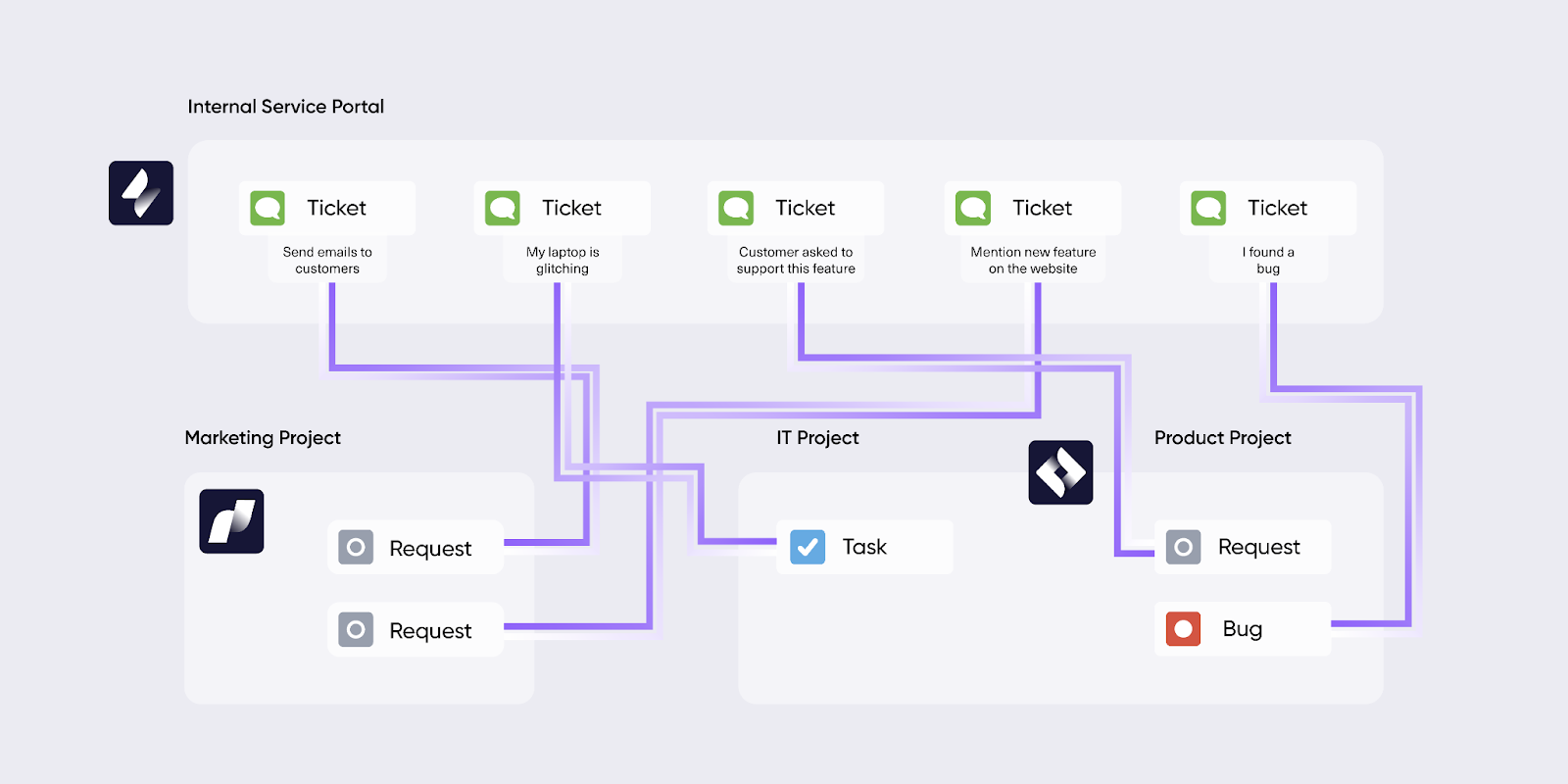
Real-world application: A financial services company escalates Zendesk incidents to engineers using Jira or the service team on ServiceNow. When the engineering team updates the root cause analysis, the support team sees it immediately and can relay it to the customer. This can be used to streamline internal and external service management.
Case 3: MSP Integration
Case: A managed service provider (MSP) handles tickets from multiple customers, each using a different platform. The MSP needs a unified view of all client work without switching between tools.
Solution: A common MSP integration scenario involves Freshdesk and Zendesk tickets from multiple customers, partners, and suppliers coming into the MSP’s Jira. This Jira instance is where the MSP tracks all its work. Once an update is available in Jira, the data flows back to the different client instances respectively.
Real-world application: An IT services company manages 15 clients across Freshdesk, Zendesk, and ServiceNow. All tickets route into a single Jira workspace. When an MSP engineer resolves a ticket in Jira, the resolution details sync back to whichever client platform the ticket originated from, complete with comments, attachments, and status changes.
Case 4: Multi-Platform Integration
Case: A complex support issue involves the frontend team (Jira), backend team (Azure DevOps), and the support team (Zendesk). Manually routing information between three platforms is unsustainable.
Solution: Multi-platform integration makes it possible to triage and escalate complex support issues across multiple engineering teams. A ticket from Zendesk is forwarded to the frontend team in Jira and the backend team in Azure DevOps.
Real-world application: A B2B software company receives a bug report through Zendesk. The integration automatically creates corresponding work items in both Jira (for the frontend fix) and Azure DevOps (for the API fix). All attachments, status updates, fixes, suggestions, and comments stay synced across all three tools until resolution.
Case 5: Handle Service Requests Promptly
Case: Service requests pile up from both internal teams and external customers. Without a routing mechanism, high-priority requests sit in the same queue as routine ones.
Solution: Create an automated mechanism to channel requests to the responsible team based on urgency, priority, and severity. The integration routes each request to the correct platform and team automatically.
Real-world application: A Freshdesk service request comes in from an employee about a laptop replacement. It gets channeled to the IT department. But a critical production outage report that comes through the same channel is escalated to the engineering team instantly based on its severity tag.
Case 6: Sort and Route Tickets Based on Labels (Tags)
Case: Incoming tickets from customers span multiple departments. Manually reading and routing each one wastes time and creates bottlenecks.
Solution: Automation sorts tickets based on urgency, labels, and category, then routes them to the appropriate team via the integration.
Real-world application: Two incoming tickets have the labels “software” and “payment.” The automation sends the first one to the engineers for immediate attention, while the second one is forwarded to the sales team. No manual triage required.
Case Study: Read how a women-owned engineering and IT Services company leverages Exalate to streamline its MSP operations.
Case 7: Product Feedback Loop from CRM to Development
Case: Customer feedback logged in Salesforce never reaches the engineering team in a structured way. Product decisions happen without direct input from the field.
Solution: Integrate Salesforce with Jira so that feature requests, bug reports, and feedback tagged by sales reps automatically create or update work items in the engineering backlog. Priority and customer impact context come along with the data.
Real-world application: A SaaS company’s sales team tags a Salesforce Opportunity with “Feature Request: API Rate Limit Increase.” The integration creates a Jira work item in the product backlog with the customer name, deal size, and request details. The product team can now prioritize based on revenue impact without a single email or meeting.
What Are the Use Cases for Automation?
Case 1: Lead Management
Case: Sales reps lose track of leads that go cold because there’s no systematic follow-up process.
Solution: Set up automation rules that trigger reminders, emails, or alerts based on lead inactivity. After a defined period without engagement, the automation nudges the lead or alerts the rep.
Real-world application: A proposal was sent to a prospect. After a week of inactivity, the automation sends a follow-up email with updated pricing and a meeting link. If there’s still no response after another week, the sales manager receives a notification to step in.
Case 2: Email Marketing
Case: Marketers need to send the right email at the right time based on user behavior, but doing it manually doesn’t scale.
Solution: Set up automated email chains for every single action taken by a customer on the website or online store. Users get an email notification when they sign up for a newsletter, complete a purchase, forget an item in the cart, or request a new password.
Real-world application: A customer adds items to their cart but doesn’t check out. One hour later, they received a reminder email. If they still don’t act within 24 hours, a second email with a discount code goes out. Use email automation tools like ConvertKit or MailChimp to automate the entire process without having to customize and push “Send” every time.
Case 3: Onboarding and Payroll
Case: New hires wait days for workspace access, training materials, and system credentials because HR and IT handle everything manually.
Solution: Automate the onboarding flow so that when a new employee joins the company, they get their workspace set up automatically, as well as instant access to the Confluence knowledge base to get up to speed with how things work.
Real-world application: A new developer starts on Monday. By 9 AM, their Jira access is provisioned, their Slack channels are assigned, they have a Confluence welcome guide in their inbox, and their first sprint tasks are visible. HR and accounting also use an automated payroll system to send out pay slips and invoices for salaries and other recurring payments.
Case 4: Ticket Queue Cleanup
Case: Support queues fill up with resolved tickets that haven’t been formally closed. Agents waste time reviewing them manually.
Solution: Automate the cleanup process based on specific criteria. The automation trigger creates a condition to automatically close all resolved tickets after 24 hours without any follow-up from the customer.
Real-world application: A Zendesk ticket is marked “Resolved” by the support agent. If the customer doesn’t respond within 24 hours, the ticket auto-closes. The customer receives an email about the closure along with instructions on what to do if they want to reopen the conversation.
Case 5: Incident Response Escalation
Case: Critical incidents require a chain of responses, from initial acknowledgment to team notification to stakeholder communication. Manual escalation is too slow for high-severity events.
Solution: Set up an automation chain where a critical incident alert triggers a sequence: create an incident ticket, page the on-call engineer via PagerDuty or Opsgenie, post a status update to a Slack incident channel, and notify the affected account manager.
Real-world application: A monitoring tool detects a database outage at 2 AM. Within 30 seconds, the automation creates a P1 incident in ServiceNow, sends an SMS to the on-call DBA, posts the incident to the #incidents Slack channel, and starts a 15-minute escalation timer. No human needed to initiate any of those steps.
When Integration and Automation Work Together
Technological advancements have made integration and automation inseparable in most modern setups. Here’s how it works in practice.
When a customer creates a Freshdesk support ticket, it will automatically be replicated as a task in Jira. This is integration and automation working together to ensure that both sides have all the context they need regarding this specific customer concern.
At the same time, updates from the Jira side will be shared with the integrated Freshdesk instance. And when the Jira task is marked as “Done”, the Freshdesk resolution is updated, and the ticket is closed. This will automatically set off a Slack alert for the support team’s visibility.
Here’s another example. A Salesforce Opportunity is marked “Closed Won.” The integration creates a new project in Asana with all the deal details. Automation then assigns onboarding tasks to the customer success team, sets due dates, and sends a welcome email to the customer. Three systems, zero manual intervention.
The pattern is consistent: integration handles the data movement between systems, and automation handles the triggered actions within or between those systems. When you layer them together, you get workflows that are both connected and self-executing.
Common Mistakes When Implementing Integration or Automation
Even with the right tools, teams run into avoidable problems. Here are the most common ones.
- Over-automating without integration. Teams set up automation triggers between disconnected systems, which means the data that flows is incomplete or inconsistent. The automation fires correctly, but the receiving system doesn’t have the context it needs. Always establish a solid integration foundation before layering automation on top.
- Treating integration as a one-time project. Integrations need maintenance. Platforms update their APIs, fields change, new work item types get added. Without periodic reviews, sync rules drift out of alignment and data starts breaking silently.
- Ignoring data mapping complexity. A “Status” field in Jira doesn’t automatically correspond to a “State” field in ServiceNow. Teams underestimate the effort needed to map fields, priorities, and categories between systems. Scripting-capable platforms like Exalate handle this through Groovy-based sync rules, but the mapping logic still needs thought upfront.
- Not defining ownership. When two systems are connected, who owns the data? If both sides can edit the same field, conflicts arise. Define which system is the source of truth for each data type, or use bidirectional sync with clear conflict resolution rules.
- Automating broken processes. If your ticket triage process is messy and inconsistent when done manually, automating it will just scale the mess faster. Fix the process first, then automate it.
What Are the Best Integration or Automation Tools?
Here’s a breakdown of tools based on their specialization. Most of the tools here serve both automation and integration purposes, but I’ll categorize them based on what they do best.
Integration Tools
Exalate
Exalate is a bidirectional integration tool for syncing data between work management systems and ITSM platforms like Jira, ServiceNow, Azure DevOps (Cloud and Server), Freshdesk, Freshservice, Salesforce, Zendesk, GitHub, and Asana. For platforms not covered by existing connectors, Exalate supports custom connector development via REST APIs.
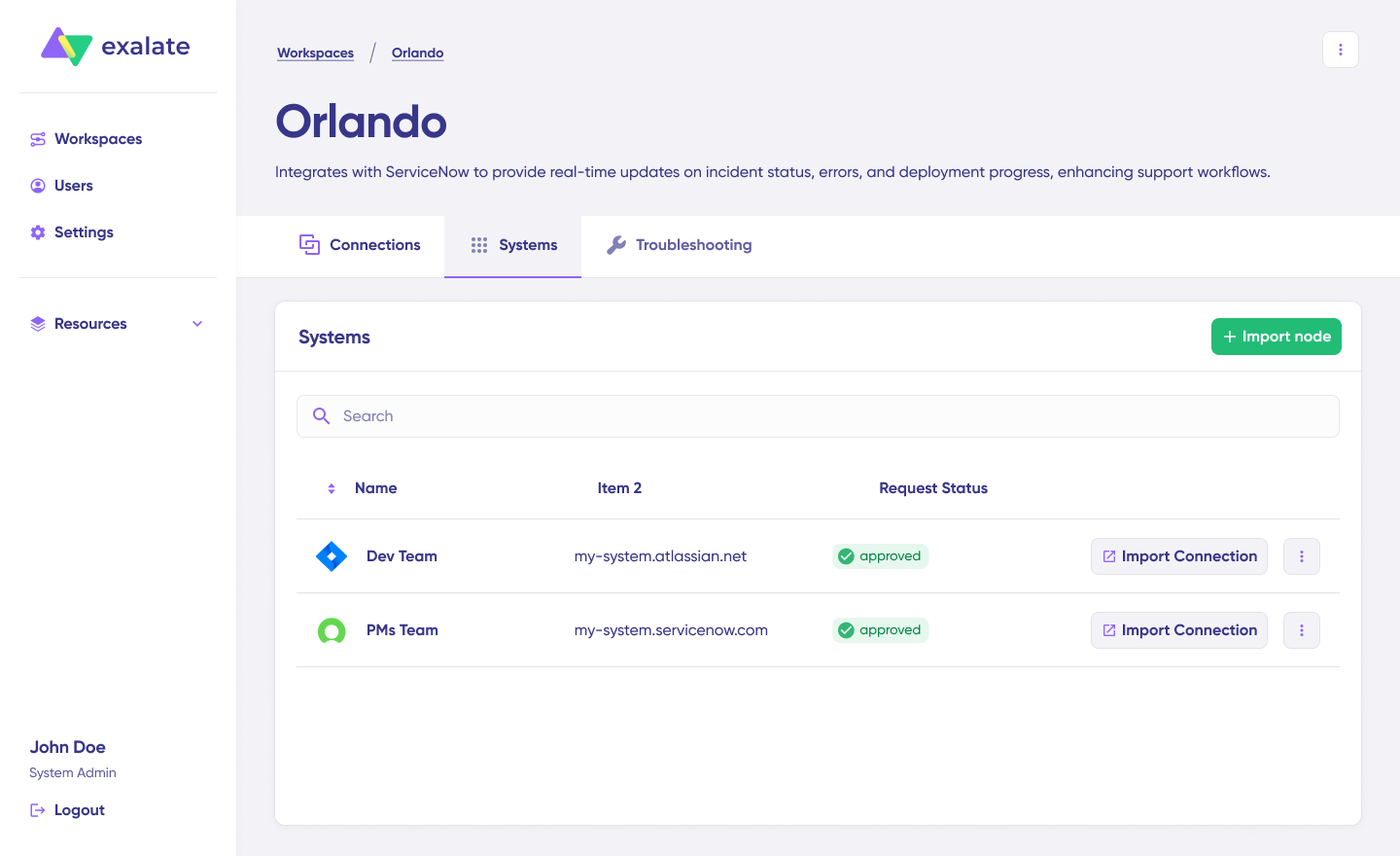
It excels in integrations where each side needs full control over data flows, which makes it a strong fit for cross-company collaborations and intra-company workflows where autonomy and data security are important. Each side of an Exalate connection manages its own sync configuration independently, so your organization controls exactly what data it shares and how it processes incoming data.
Exalate uses Groovy-based scripts for setting up complex workflow integrations between multiple systems at the same time. These scripts support advanced logic and data mapping for every requirement, from simple field-to-field syncing to conditional routing based on labels, priorities, or custom fields.
It also comes with Aida, an AI-powered scripting assistant that helps generate synchronization scripts from natural language descriptions. Describe what you want to sync and how, and Aida produces a working script you can review and refine. This cuts setup time significantly, especially for teams without deep Groovy experience.
Exalate holds ISO 27001:2022 certification, and you can review its security documentation at the Exalate Trust Center.
Whether you’re an MSP looking to connect with multiple companies or an engineer looking to stay in sync with other team members, Exalate handles both scenarios.
Best for: Cross-company integrations, MSP multi-client workflows, complex ITSM escalations, and teams that need granular scripting control over bidirectional sync.
Unito
Unito offers no-code, two-way workflow syncing across tools like Trello, Asana, GitHub, and Jira. This solution is perfect for users who want a simple setup and visual mapping, especially in project and task management contexts.
Although Unito lacks deep customization capabilities, it is an option for teams looking to sync and collaborate without worrying about all the engineering palaver.
Best for: Small to mid-sized teams that need lightweight project management syncing without any coding.
Workato
Workato is an enterprise integration platform that blends API-based data movement with logic-rich automation. It supports thousands of connectors and handles complex workflows between CRMs, ERPs, and support platforms.
Businesses can use Workato to facilitate collaboration between DevOps, RevOps, and IT teams.
Best for: Enterprises that need API-based integrations with built-in automation logic across a wide app ecosystem.
MuleSoft Anypoint
MuleSoft is an integration platform as a service (iPaaS) known for enterprise-grade APIs, governance, and scalability. The Salesforce-owned solution is ideal for large organizations looking for deep backend integrations, robust data governance, and API lifecycle management.
The major drawback to MuleSoft Anypoint is that it has a steep learning curve, and it is limited by all Salesforce rate limits and other restrictions.
Best for: Large enterprises with dedicated API teams that need full API lifecycle management and governance.
ONEiO
ONEiO offers cloud-native integration for ITSM and ESM (Enterprise Service Management) tools, using a unique message-based routing system. It focuses on process-level syncs across systems like ServiceNow, BMC, Jira, and beyond.
Service and IT teams can use the integration ops (IntOps) provided by ONEiO to guarantee reliable service integrations with managed endpoints and minimal setup.
Best for: ITSM and ESM teams that want a managed integration service with minimal configuration overhead.

Discover the untold secrets of automated integration and how it is the future of connected systems.
Automation Tools
Zapier
Zapier is a no-code automation platform for startups and small teams. With 6,000+ app integrations, it’s perfect for simple, linear workflows like sending emails, creating CRM entries, or updating spreadsheets.
Marketers, system admins, and ops team managers can create Zaps for fast, event-triggered automations. However, it is not the best option for custom scripting and advanced use cases that require granular control.
Best for: Non-technical teams that need quick, trigger-based automations without any code.
Make (formerly Integromat)
Make offers a more visual automation builder that supports conditional workflows, data transformations, and complex API chaining. It supports automations across systems like Airtable, Google Workspace, or Jira.
It’s slightly more technical than Zapier in the sense that it gives you more control over workflow logic and data structure.
Best for: Teams that need conditional logic and multi-step automations with a visual builder.
Power Automate
Microsoft’s Power Automate is part of the Microsoft 365 ecosystem, which makes it perfect for automating tasks across Outlook, Teams, SharePoint, and Dynamics.
It supports low-code and RPA use cases, making it a good fit for both cloud-based and desktop automations. Although the learning curve might be too steep for beginners, it works nicely for those familiar with the Microsoft stack.
Best for: Organizations already invested in Microsoft 365 that want native automation across their stack.
UiPath
UiPath is a robotic process automation (RPA) tool for automating repetitive tasks in legacy systems such as back-office operations and complex enterprise workflows.
The interface is developer-friendly, and it comes with AI and orchestration capabilities. Teams in finance, HR, or IT can use UiPath to automate structured tasks at scale.
Best for: Enterprise teams that need RPA for legacy systems and structured back-office processes.
IFTTT
IFTTT (If This Then That) is a lightweight automation platform for consumers and IoT users. It connects smart devices, social apps, and web services in basic trigger-action flows.
Unlike other tools in this list, this solution is perfect for simple automation tasks and personal productivity. Business enterprises will not be able to use it for complex use cases or large-scale automation.
Best for: Personal productivity and IoT automation with simple trigger-action rules.
Quick Comparison
| Integration Tools | Best For | Automation Tools | Best For |
| Exalate | Cross-company sync, MSP, ITSM | Zapier | No-code, simple triggers |
| Unito | Lightweight project syncing | Make | Visual conditional workflows |
| Workato | Enterprise API + automation | Power Automate | Microsoft 365 ecosystem |
| MuleSoft Anypoint | API lifecycle management | UiPath | RPA, legacy systems |
| ONEiO | Managed ITSM integrations | IFTTT | Personal/IoT automation |
Frequently Asked Questions
Does Exalate support both integration and automation?
Yes. Exalate handles integration through bidirectional data synchronization between platforms and supports automation through Groovy-based sync rules that can trigger actions based on conditions. For example, you can configure Exalate to automatically create a Jira work item when a Zendesk ticket meets specific criteria (like a certain priority level or label), and then keep both sides synced as updates happen on either platform.
What platforms does Exalate integrate with?
Exalate supports connectors for Jira, ServiceNow, Salesforce, Azure DevOps (Cloud and Server), Zendesk, GitHub, Freshdesk, Freshservice, and Asana. For platforms not covered by existing connectors, Exalate offers custom connector development via REST APIs, which extends its reach to virtually any system with an available API.
Can Exalate handle cross-company integrations?
Yes. Each side of an Exalate connection manages its own sync configuration independently. This means your organization controls exactly what data it shares and how it processes incoming data, without relying on a shared admin setup with the other party. This makes Exalate particularly effective for MSPs, vendors, suppliers, and any B2B collaboration where both sides need autonomy over their data.
How does Aida help with setting up integrations in Exalate?
Aida is Exalate’s AI-powered scripting assistant. It generates Groovy-based synchronization scripts from natural language descriptions. You describe your integration scenario (for example, “sync all high-priority bugs with attachments and comments from Jira to Azure DevOps”), and Aida produces a working script you can review and refine. This reduces the time and technical expertise needed to get complex integrations running.
What’s the difference between Exalate and Zapier?
Exalate is built for deep, bidirectional data synchronization between work management and ITSM platforms. It supports advanced scripting, cross-company workflows, and granular field mapping. Zapier is a no-code automation tool designed for simple, linear trigger-action workflows across a broad app ecosystem. If you need two-way sync between Jira and ServiceNow with custom field mapping and independent control on both sides, Exalate is the better fit. If you need to send a Slack message when a form is submitted, Zapier handles that quickly.
Can I use Exalate for multi-platform integrations?
Yes. Exalate supports multi-platform integrations where data flows across three or more systems simultaneously. A common example is a support ticket from Zendesk being forwarded to both the frontend team in Jira and the backend team in Azure DevOps, with all status updates, comments, and attachments staying synced across all three tools.
Is Exalate secure enough for enterprise use?
Exalate holds ISO 27001:2022 certification and uses encrypted connections with secure authentication for every integration. For detailed security documentation, compliance information, and audit reports, visit the Exalate Trust Center.
How do I know if I need integration, automation, or both?
Ask yourself four questions: Do the systems need to stay in sync? Is the problem about repetitive tasks? Are users interacting with both systems? Do you need two-way updates or just one-off triggers? If you need data consistency across platforms, that’s integration. If you need to eliminate repetitive manual work, that’s automation. Most modern workflows need both to work together.
Can Exalate integrate on-premises systems?
Yes. Exalate supports on-premises deployments, including Azure DevOps Server. This makes it suitable for organizations with hybrid environments where some systems run in the cloud, and others remain on-premises due to compliance, security, or infrastructure requirements.
What types of data can Exalate sync between platforms?
Exalate can sync work items, comments (public and internal), attachments, custom fields, labels, priorities, status values, sprints, epics, and more. The Groovy scripting engine gives you full control over what data moves between platforms and how it gets transformed during the sync. For instance, you can map Jira priority levels to ServiceNow urgency values, filter out internal comments from syncing to an external partner, or conditionally route work items based on labels or categories.
Want to learn more about how Exalate handles automation or integration? Book a discovery call with our integration engineers to discuss your use case.
Recommended Readings:
- The Secret to Automated Incident Management For Responsive Teams
- Why Real-time Data Synchronization Matters More Than Ever
- How to Automate Your Integration For Smarter Business Workflows
- Leveraging the Power of Workflow Automation – It’s Easy to Work Smarter
- Automated Integration: Everything You Need to Know


