

In today’s data-heavy world, organizations want to adapt quickly and evolve at a relentless pace. The need for interconnected systems through which data flows faster and more efficiently has never been greater. This is where enterprise integration platforms step into the spotlight.
They offer a unified solution to the intricate web of applications, data sources, and workflows that power modern organizations.
This guide explores the what and how of enterprise integration platforms and discusses their transformative potential, key benefits, and the pivotal role they play in fostering collaborations within and across organizations.
Key Takeaways
- Enterprise integration connects disparate software applications and data sources, enabling seamless data sharing and process automation across your organization.
- Enterprise integration platforms (EIPs) solve common challenges like data silos, inconsistent information, and manual data entry that slow down business operations.
- When evaluating integration platforms, prioritize bidirectional sync capabilities, AI-assisted configuration, security certifications, and scalability.
- Integration use cases span support-to-engineering escalation, ITSM handoffs, multi-vendor project sync, and cross-company collaboration with external partners.
- The right platform can save teams up to 15 hours per week by eliminating manual copy-paste workflows and automating ticket escalation.
- AI-powered integration tools like Exalate’s Aida reduce implementation time by 50% and decrease script errors by 85%.

What is Enterprise Integration?
Enterprise integration or EAI (Enterprise Application Integration) refers to the process of creating smart connections between different software applications, systems, and data sources, enabling them to share data and functionality.
In a typical organization, you might use various software applications and systems that handle different aspects of your business operations, such as customer relationship management (CRM), enterprise resource planning (ERP), supply chain management, human resources, finance, and more.
To stay ahead in this hyper-competitive global market, you need to deal with IoT, modern APIs, big data, and real-time data exchange requirements.
All these applications, systems, devices, and data sources exist to serve common business objectives. However, these different systems may lack the ability to talk to each other, resulting in information silos and widespread operational inefficiencies.
Employees using these applications feel overwhelmed navigating through so many of them to ensure they run smoothly and get the required information. Any updates they make in one system must be manually replicated in another. The technologies remain siloed, and businesses lack a unified view of critical data.
As enterprises deploy more of such applications, hosted on-premise or on public or private cloud or outsourced to a third-party service provider, data silos grow exponentially.
Key Building Blocks of Enterprise Integration
There are various methods and technologies to integrate your enterprise applications.
- Application Programming Interfaces (APIs): APIs provide a standardized way for different applications to communicate with each other. By exposing specific endpoints, applications can request and exchange data, trigger actions, and interact smoothly. You can also use API integration for real-time data exchange between your systems. Modern REST and GraphQL APIs have become the backbone of enterprise connectivity, supporting both synchronous requests and event-driven architectures.
- Middleware: Middleware acts like a software layer that sits between applications and systems. It enables data exchange by translating data formats and protocols, ensuring compatibility between disparate systems. Today’s middleware solutions handle complex transformations, message routing, and protocol translation while maintaining data integrity across heterogeneous environments.
- Enterprise Service Bus (ESB): ESB acts like a centralized hub that manages communication between various applications. It simplifies integration by providing a common platform for routing messages, transforming data, and performing other integration tasks. While ESBs dominated earlier integration strategies, many organizations now complement them with API-led connectivity and event-driven approaches for greater flexibility.
- Message Queues: Message queuing enables asynchronous communication between applications. Messages are first sent to queues from where applications retrieve and process them at their own pace. Message queues help manage high data volumes and ensure reliable delivery. They provide guaranteed message delivery, automatic retries, and backpressure handling for mission-critical data flows.
- Data Integration: This involves combining data from multiple data sources to provide a unified view. It includes technologies like Extract, Transform, and Load: ETL platforms, data warehouses, and data lakes. Modern approaches also include ELT (Extract, Load, Transform) patterns that leverage destination compute power and Change Data Capture (CDC) for real-time data synchronization.
- Enterprise Integration Patterns: These consist of technology-independent answers to common integration problems. The patterns establish a standard vocabulary that developers and application architects can use to define integration strategies. Patterns like message routing, content enrichment, and scatter-gather help teams implement consistent, maintainable integrations.
- Business Process Automation (BPA): Integration isn’t just about data; it’s also about automating business processes across multiple systems. BPA tools can orchestrate complex workflows, ensuring tasks move efficiently between systems and departments. Trigger-based automation can replicate tickets, escalate incidents, and execute cross-platform actions based on predefined rules.
Evolution of Enterprise Integration Models
Point-to-Point Integration
It all started with basic point-to-point connections between two different applications or systems, aka Peer-to-Peer Integration. But this simple approach became unwieldy and hard to manage with a growing number of connections. Each new integration multiplied complexity exponentially.
Hub and Spoke Integration
Then came a central integration hub acting as a mediator between systems, connecting the spokes to the hub directly rather than to each other. However, this model faced scalability issues and created potential bottlenecks when the hub experienced problems.
ESB (Enterprise Service Bus)
ESBs introduced a more standardized approach where a centralized hub managed communication between different systems. This provided better governance and monitoring but often required specialized skills and lengthy implementation cycles.
Modern Integration Approaches
With the advent of cloud computing and web APIs, integration expanded beyond organizational boundaries. Integration now involves connecting cloud-based services with on-premise systems, enabling hybrid environments.
These evolved integration needs required agile, event-driven approaches that respond instantly to changes. Hybrid Integration Platforms (HIPs), Microservices, and API-first integration took center stage and changed the way enterprises handled integrations.
The evolution of these models reflects the ever-changing landscape of technology and business needs. For this complex business landscape, you need a comprehensive solution for connecting various systems within your organization.
What Are Enterprise Integration Platforms?
Enterprise integration platforms (EIPs), sometimes called EiPaaS (Enterprise Integration Platform as a Service), are comprehensive software solutions designed to offer a range of tools, services, and functionalities to address the challenges of integrating disparate enterprise systems.
These platforms provide a framework that enables organizations to establish communication between diverse IT systems and streamline data exchange, process automation, and workflow optimization.
Challenges of Enterprise Integrations
Enterprise integration, while immensely beneficial, comes with its fair share of challenges.
- Complexity: Integrating diverse systems with varying data formats, protocols, and technologies can be complex and time-consuming. Managing the intricacies of different systems’ requirements and ensuring compatibility can be a significant challenge. Organizations often run dozens of applications across departments, each with its own data structures, APIs, and update cycles.
- Data Consistency: Maintaining data consistency and accuracy across integrated systems is a constant challenge. Discrepancies can lead to errors, incorrect decision-making, and a lack of trust in the integrated information. Real-time bidirectional sync with conflict resolution becomes essential for operational systems that need to stay in lockstep.
- Security and Privacy: Integrating systems can expose your sensitive data to potential security vulnerabilities. Ensuring your data remains secure throughout the integration process is crucial, as breaches could lead to significant consequences. Enterprise-ready solutions require encryption, JWT authentication, role-based access controls, and compliance with standards.
- Scalability: As your organization grows and you add more systems, the integration architecture should be able to scale without compromising performance. You must ensure that the integration solution can handle increased data volumes and system interactions. Loosely coupled systems and cloud-native architectures help maintain performance at scale.
- Legacy Systems: Many organizations have legacy systems that weren’t designed with modern integration in mind. Integrating these systems can be particularly challenging because of their outdated technologies and lack of support for standard integration protocols.
To overcome these challenges, you need careful planning, a deep understanding of your organization’s goals and requirements, the right technology choices, skilled personnel, and a commitment to continuous improvement in the integration process.
Benefits of Enterprise Integration Platforms
Here are the key benefits of using EIPs:
- Real-Time Data Synchronization: EIPs facilitate the smooth exchange of data and information between different systems and applications within an organization. With real-time data synchronization and access to up-to-date information, organizations can make informed decisions more quickly. Updates in one system automatically reflect in connected platforms, eliminating delays and reducing manual data entry errors.
- Workflow Automation: Automate workflows and reduce manual data entry and repetitive tasks, enhancing operational efficiency. Teams report saving up to 15 hours per week by eliminating copy-paste ticket escalation and manual status updates. Trigger-based automation ensures the right information reaches the right team at the right time.
- Customer Experience: Enable a unified view of customer data across different systems, leading to a more comprehensive understanding of customer needs and preferences. This allows organizations to provide more personalized and tailored customer experiences. Support teams can share context with development or sales without switching tools or requesting information manually.
- Scalability and Flexibility: Scale to accommodate new systems, applications, and data sources. This flexibility supports business growth without requiring extensive reengineering. Add new partners, vendors, or internal teams to your integration network without rebuilding from scratch.
- Partner Ecosystem: Organizations often work with multiple vendors and partners. EIPs enable integrations between various external systems and facilitate data exchange with external stakeholders while maintaining control over what information is shared. Cross-company collaboration has exploded, with seven in ten organizations now running at least one cross-company connection.
Features to Consider When Choosing an Integration Platform
Selecting the right enterprise integration platform requires evaluating multiple dimensions beyond basic features. Here’s what to prioritize:
Connector Ecosystem and Platform Support
Evaluate the breadth and depth of pre-built connectors. A strong connector ecosystem ensures you can connect your existing tools without custom development. Look for platforms that support your core systems and have a track record of adding new connectors.
Key platforms to verify: Jira Cloud, ServiceNow, Salesforce, Azure DevOps, Zendesk, GitHub, Freshservice, Freshdesk, Asana, and any custom applications critical to your workflows. The best platforms also support custom connectors for proprietary or niche applications.
Data Flow and Directionality
Does the platform support one-way sync (typically for reporting), or true bidirectional sync for keeping operational systems in lockstep? True bidirectional sync requires sophisticated conflict resolution to prevent data corruption and ensure both systems stay consistent.
For cross-team collaboration, bidirectional sync is usually essential. Support teams need to see development updates, while engineering needs customer context—and both sides need changes to flow automatically.
Latency and Processing Model
Does the tool operate in batches on a schedule, introducing latency of minutes or hours? Or does it process data in real-time, using an event-driven architecture to propagate changes in sub-second timeframes?
For ITSM and support scenarios, real-time synchronization matters. When a critical incident occurs, you can’t wait for the next batch cycle. Updates should flow within seconds of changes being made.
Reliability and Error Handling
Mission-critical integrations demand automated reliability. Look for features like guaranteed data delivery, automated retries, detailed logging, and intelligent error handling to ensure data consistency and prevent silent failures.
Robust queuing mechanisms track syncs and maintain data integrity even when connectivity issues occur. The system should process queued updates when connectivity is restored without losing any changes.
Scalability and Performance
The platform must scale effortlessly from thousands to millions of records without performance degradation or requiring manual infrastructure management. Consider both current volumes and future growth when external partners or new business units join your integration network.
Platforms built with loosely coupled architectures handle scaling more gracefully than tightly integrated monolithic solutions.
Security and Compliance
Enterprise-ready platforms must provide robust security controls and hold key compliance certifications. Essential requirements include:
- Encryption: Data protection both at rest and in transit using TLS 1.2/1.3
- Access Controls: JWT authentication, role-based permissions, and multi-factor authentication
- Certifications: ISO 27001:2022, GDPR compliance
- Monitoring: 24/7 Security Operations Center coverage and Endpoint Detection and Response systems
Multi-Platform and Cross-Company Support
Can you connect multiple platforms simultaneously? Many organizations need to sync ITSM tools with development trackers, CRM systems with support desks, and external partner systems with internal workflows.
Look for platforms that support mesh, star, hub-and-spoke, or any network topology you need. Each connected organization should maintain control over its own sync rules and data without depending on other parties’ configurations.
Vendor Support and Documentation
Adequate vendor support is crucial. If the platform provider doesn’t offer reliable and timely support, you could find yourself struggling with technical issues without proper assistance.
Evaluate support response times, available channels (chat, email, phone), and whether managed services options exist for organizations that want expert engineers to handle configuration and maintenance.

Calculate time and money savings from automated bidirectional sync.
What Not to Ignore When Picking an Enterprise Integration Platform
Here are some things you must not ignore while making this important decision:
- Don’t ignore business needs. It is one of the biggest mistakes in selecting an enterprise integration platform. You must identify your integration requirements, current and future, to ensure the platform aligns with your business goals.
- Don’t ignore scalability. A platform that works well for your current integration needs might not be able to handle increased loads in the future. Failing to consider scalability can result in disruptions and migration hassles down the line.
- Don’t ignore vendor support assessment. Adequate vendor support is crucial. If the platform provider doesn’t offer reliable and timely support, you could find yourself struggling with technical issues without proper assistance.
- Don’t underestimate integration types. Different integration types (batch, real-time, APIs, bidirectional sync, etc.) work for different scenarios. Failing to understand these variations can lead to poor performance and inefficiencies.
- Don’t go for the hype. Choosing a platform solely based on industry hype or trends without evaluating how it aligns with your organization’s needs can lead to disappointment and underwhelming results.
- Don’t ignore migration. If you’re migrating from an existing integration platform, overlooking the migration process and associated challenges can lead to data loss, disruptions, and extended downtime.
Avoiding these common mistakes can save you from unnecessary challenges and ensure a successful enterprise integration process.
What Are The Top Enterprise Integration Platforms?
Exalate
Exalate is a synchronization and integration platform designed to connect and synchronize data between different work management and service desk tools. Exalate enables bidirectional data exchange between platforms like Jira, ServiceNow, GitHub, Salesforce, Azure DevOps, Zendesk, Freshservice, Freshdesk, Asana, and more through custom connectors.
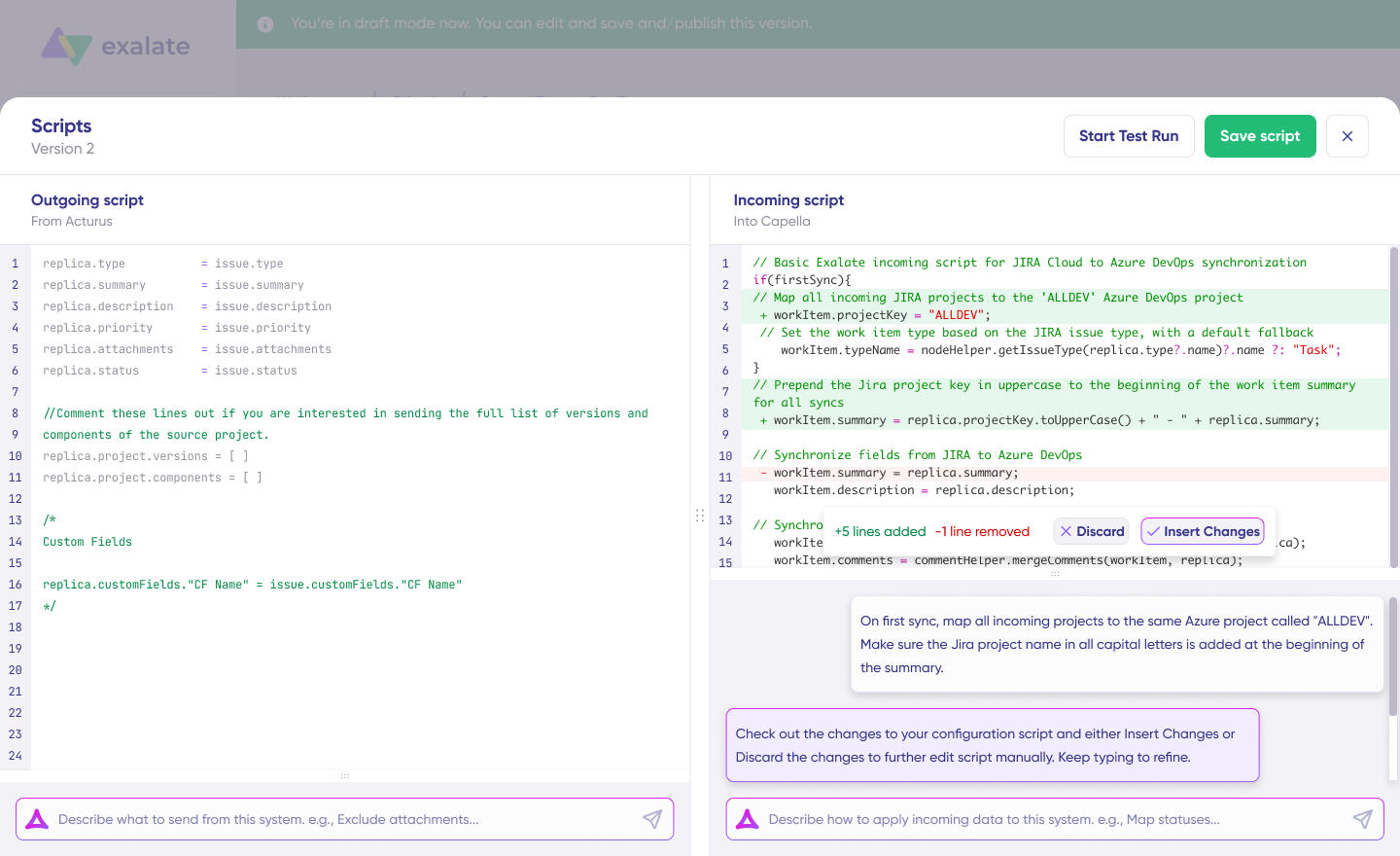
What sets Exalate apart:
- AI-Assisted Configuration: Exalate’s Aida feature helps generate integration scripts for different use cases by entering requirements in natural language. It has delivered 50% reduction in implementation time and 85% decrease in script errors.
- Aida Documentation Assistant: An AI-enabled assistant that helps users find answers, plan integrations, and troubleshoot issues quickly.
- Groovy-Based Scripting: A powerful scripting engine that allows complete customization of sync rules for the most advanced use cases.
- Cross-Company Collaboration: Seven in ten organizations using Exalate run at least one cross-company connection, syncing data with external partners, vendors, and MSPs while maintaining control over what’s shared.
- Enterprise-Grade Security: ISO 27001:2022 certified with JWT authentication, role-based access controls, TLS 1.2/1.3 encryption, and 24/7 monitoring. Learn more at the Trust Center.
Use cases: Support-to-engineering escalation, ITSM handoffs between ServiceNow and Jira, multi-vendor project sync, MSP client management, and migration/co-existence bridges.
Mulesoft Anypoint Platform
MuleSoft Anypoint Platform’s comprehensive suite of tools enables businesses to design, build, manage, and monitor integrations using APIs, connectors, and various integration patterns. The platform’s API-led approach facilitates the creation of reusable APIs that enhance agility and scalability, enabling businesses to adapt to changing technological landscapes.
Best for: Large enterprises with complex multi-system environments needing API management and hybrid cloud support.
Dell Boomi
Dell Boomi stands as a prominent cloud-native integration platform, empowering organizations to link applications, data, and processes. Boomi’s user-friendly interface facilitates the design of integrations using a visual approach, reducing the need for complex coding. Its comprehensive capabilities span application integration, data synchronization, B2B/EDI management, and API connectivity.
Best for: Organizations seeking a scalable, low-code integration solution with a large library of pre-built connectors.
SnapLogic
SnapLogic offers an intuitive drag-and-drop interface and simplifies integration complexities, enabling users to create intricate workflows without extensive coding. The platform supports a range of integration patterns, including real-time event-driven scenarios and batch-oriented processes. SnapLogic’s SnapGPT uses generative AI to convert business intent into workflows.
Best for: Enterprises seeking rapid integration development with AI assistance and a broad range of connectors.
Jitterbit
Jitterbit offers a robust integration platform designed to link applications, data sources, and business processes with ease. Its emphasis on simplicity and efficiency is evident in its pre-built connectors and straightforward interface, enabling users to quickly construct integrations without complex coding. Jitterbit’s platform supports various integration scenarios, including cloud and on-premises applications, data synchronization, and API connectivity.
Best for: Mid-sized organizations wanting ERP integrations without extensive custom middleware.
Workato
Workato is an integration and automation platform that enables businesses to seamlessly connect applications, automate workflows, and streamline processes. With a focus on no-code and low-code capabilities, Workato empowers users to build integrations and automate tasks without extensive technical expertise.
The platform supports a wide range of applications, both cloud-based and on-premises. Workato’s strength lies in its ability to orchestrate complex workflows, trigger actions based on events, and enable data synchronization across systems.
Best for: Business teams seeking automation-first integration with minimal developer involvement.
Informatica
The Informatica platform encompasses a range of capabilities, including data integration, data quality, data governance, master data management, and more. It allows organizations to connect, transform, and move data across various sources and targets, ensuring data accuracy and consistency.
With a strong emphasis on data governance and security, Informatica helps organizations comply with regulatory requirements and maintain data integrity throughout its lifecycle.
Best for: Organizations prioritizing data governance and operating in regulated industries.
Practical Use Cases for Enterprise Integration
Support-to-Engineering Escalation
Challenge: Support teams log customer issues in platforms like Zendesk, Freshdesk, or Salesforce, but developers work in Jira or Azure DevOps. Manual ticket escalation causes delays and lost context.
Solution: Automated bidirectional sync creates work items in the development platform when support tickets meet specific criteria (priority, category, or tags). Status updates, comments, and attachments flow both directions automatically.
Real-World Application: A technology company syncs Salesforce cases to Jira. When a case reaches a certain priority threshold, Exalate creates a Jira work item with full customer context. Developers resolve the work item, and the status update flows back to Salesforce automatically. Support reported saving 15 hours per week in manual updates.
ITSM-to-Development Handoffs
Challenge: Operations teams record incidents in ServiceNow or Jira Service Management, but resolving them requires development work tracked in separate systems.
Solution: Integration connects ITSM platforms with development trackers. Critical incidents create work items automatically with SLA timers intact. Resolution updates sync back to keep operations informed without manual follow-up.
Real-World Application: A financial services firm connects ServiceNow to Azure DevOps. When an incident requires code changes, the integration creates an Azure DevOps work item. Development progress stays visible in ServiceNow, and resolution triggers automatic incident closure with a full audit trail.
Multi-Vendor Project Synchronization
Challenge: Projects involve multiple partners, each using their own tools. Sharing progress requires email updates, spreadsheets, or giving external users access to internal systems.
Solution: Cross-company integration syncs relevant work items between organizations while keeping each party’s data private. Each side controls what they share and maintains their own rules and workflows.
Real-World Application: An automotive manufacturer coordinates with three suppliers, each using different platforms. Exalate syncs milestone updates and requirements between systems. Partners stay informed without needing access to the manufacturer’s internal Jira instance, and sensitive internal discussions remain private.
MSP Client Management
Challenge: Managed Service Providers handle tickets for multiple clients, each potentially using different support platforms. Routing updates manually don’t scale.
Solution: Integration routes tickets to the correct client platform based on configurable criteria. Multiple client systems can connect to a single MSP instance without architectural limitations.
Real-World Application: An MSP uses Freshservice internally but has clients on Zendesk, ServiceNow, and Jira Service Management. Exalate connections route incidents to the appropriate client system. Each client sees updates in their own platform without switching tools or requiring access to the MSP’s system.
Freshservice-Freshdesk Coordination
Challenge: IT teams work in Freshservice while customer support operates in Freshdesk. Both teams waste time copying ticket details between platforms or waiting for manual updates.
Solution: Automated sync between Freshservice and Freshdesk ensures IT teams get customer context without asking, while support stays informed about resolutions.
Real-World Application: When a Freshdesk ticket requires technical investigation, the integration creates a Freshservice incident with all relevant details. IT resolves the issue, and the resolution flows back to Freshdesk automatically, keeping customers informed without manual intervention.
What is the Future of Enterprise Integration Platforms?
The future for integration platforms connecting enterprise applications is bright thanks to technological innovations and evolving business needs.
- Hybrid and Multi-cloud Integration: With businesses leveraging a mix of on-premises and cloud-based solutions, integration platforms will focus on connecting these diverse environments, ensuring smooth data and process synchronization across hybrid and multi-cloud setups.
- AI and Machine Learning Integration: Enterprise integration platforms will incorporate AI and machine learning capabilities to automate data mapping, detect patterns, predict potential integration issues, and generate configurations from natural language requirements. The rise of AI assistants like Aida and AI-assisted scripting tools is just the beginning.
- IoT Integration: As the Internet of Things (IoT) ecosystem grows, integration platforms will facilitate connections between IoT devices, sensors, and data streams with core business systems.
- Agentic AI and Orchestration: As AI agents become an opportunity for intelligent automation and technological leadership, the ability to create, govern, and manage AI Agents and other AI tools is becoming an essential feature for enterprise integration platforms.
- Low-Code/No-Code Integration: The democratization of integration will continue through low-code/no-code platforms, empowering non-technical users to create and manage integrations and accelerating development cycles.
Conclusion
If innovation is the driving force behind your organization, your success will hinge upon your ability to make your business processes, data, and applications collaborate.
Enterprise integration platforms have emerged as the bridge that connects the silos of isolated systems and technologies into seamless business operations. They have transcended the realms of mere tools and become the new era of collaboration and efficiency.
As you stand at the crossroads of the present and the future, choosing the right integration platform is crucial for ensuring your organization’s survival and success.
Ready to calculate your potential savings? Use an integration ROI calculator to quantify the value of automated data sync, reduced manual work, and faster time-to-value for your organization.
Frequently Asked Questions
What are enterprise integration platforms?
Enterprise integration platforms (EIPs or EiPaaS) are software frameworks that enable organizations to connect and unify their diverse systems, applications, and data sources. These platforms provide tools for designing, implementing, and managing various integration flows, allowing for seamless communication and data sharing between different parts of the organization.
What is an example of EAI (Enterprise Application Integration)?
An example of Enterprise Application Integration (EAI) is when a company uses EAI to connect its Customer Relationship Management (CRM) system with its Inventory Management system.
This integration allows real-time updates of customer orders and inquiries to be automatically reflected in the inventory levels, ensuring accurate order fulfillment and reducing the risk of overcommitting or underdelivering on products. The EAI helps improve operational efficiency and provides a unified view of customer interactions and available inventory across the organization.
What platforms does Exalate support for enterprise integration?
Exalate supports bidirectional integration between Jira Cloud, ServiceNow, Salesforce, Azure DevOps, Zendesk, GitHub, Freshservice, Freshdesk, Asana, and additional platforms through custom connectors. You can sync data across multiple platforms simultaneously in mesh, star, hub-and-spoke, or any network topology your workflows require.
How does AI-assisted configuration speed up integration setup?
AI-assisted configuration tools like Exalate’s Aida convert natural language requirements into working sync rules. Instead of writing scripts manually, you describe what you want to sync, and AI suggests the appropriate configuration. This approach has reduced implementation time by 50% and decreased script errors by 85%.
What security features should enterprise integration platforms include?
Enterprise-ready platforms should include encryption (TLS 1.2/1.3) for data in transit and at rest, JWT authentication, role-based access controls, multi-factor authentication, and compliance certifications like ISO 27001:2022 and GDPR. Additional protections include Endpoint Detection and Response systems and a monitoring center.
Recommended Reading:


