Organizations use myriad tools to manage their operations efficiently. Among these essential tools, Jira and ServiceNow stand out as the pillars of productive development, IT service management, and beyond.
However, the true potential of these platforms can only be realized when they work together. A Jira ServiceNow integration can make work and tasks flow between these platforms without hiccups. The end result: streamlined workflows and superior customer service.
Frequently, conceptualizing such an integration requires a deep understanding of how it could be represented in a tangible, real-world context. We’ve put together a guide that will take you along for a practical ride with a lot of real-world applications of integrating Jira with ServiceNow.
Note: Jira now refers to “issues” as “work items.” Throughout this guide, we use Jira’s updated terminology.
So let’s hit the pedal!
Key Takeaways
- A Jira ServiceNow integration eliminates siloed workflows, duplicated efforts, and unreliable data between IT and development teams.
- Incident management integration automatically escalates critical incidents from ServiceNow to Jira work items with full context, including SLA information.
- Change and problem management sync enables coordinated handling of infrastructure changes and recurring work items across both platforms.
- MSPs benefit from integration by connecting their internal workflows with customer systems, maintaining SLA compliance while preserving operational autonomy.
- Choosing the right integration solution requires evaluating flexibility, security certifications, scripting capabilities, and multi-platform support.
- Real-time bidirectional sync keeps both teams aligned without manual data entry or context switching between systems.

The Need for a Jira ServiceNow Integration
Jira and ServiceNow are powerful tools for project tracking and IT service management. But they can be even more powerful when integrated. Here are some of the challenges that can be solved with a Jira ServiceNow integration:
- Siloed workflows — IT teams work in ServiceNow while developers live in Jira, creating communication gaps that delay resolution.
- Duplicated efforts — Without integration, agents manually recreate tickets in both systems, wasting time and introducing errors.
- Lack of real-time insights — Stakeholders can’t see the full picture when data lives in disconnected systems.
- Unreliable data — Manual updates lead to outdated information and conflicting status reports.
A Jira ServiceNow integration helps you overcome these challenges by automating data exchange between the two systems. This ensures that all stakeholders have the data they need when they need it, and that the data is accurate and reliable.
Integrating Jira and ServiceNow also helps improve your team’s efficiency and productivity. By automating tasks and workflows, you free up your team to focus on more strategic work.
If you’re looking to improve your team’s performance, a Jira ServiceNow integration is a great place to start.
We’ll uncover real-world examples of integrating ServiceNow and Jira, where complex workflows can intertwine with everyday tasks, making work life a breeze.
How to Integrate Jira and ServiceNow: A Step-by-Step Guide
This tutorial demonstrates how to integrate Jira and ServiceNow using Exalate.
Go to the Exalate app. If you already have an account, you can log in directly.
New users can create an account by manually entering their email and verifying it, or by signing up using Google.
Creating Your First Connection
Start creating connections between Jira and ServiceNow. If you already have connections set up, you can view them under the “Connections” tab, where you can edit connection settings and view other connection details.
Note: To create a connection, you’ll need an active Exalate profile with the access credentials for the systems you want to connect.
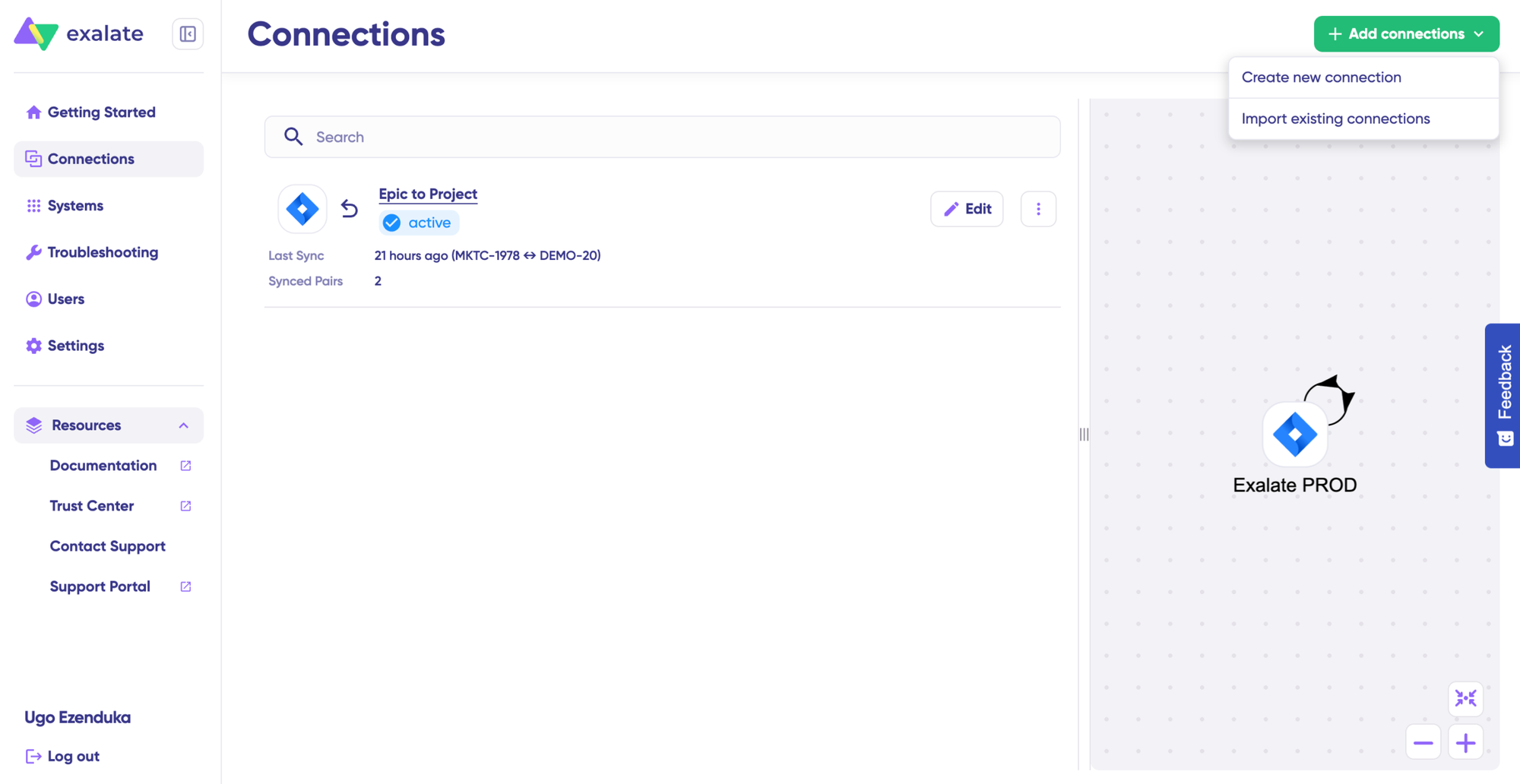
Jira ServiceNow Connection Setup Steps
- Click “+ Add connections” > “Create new connection”.
- Enter the name for your first system (System A). You can name either Jira or ServiceNow as System A—it doesn’t matter which one goes first.
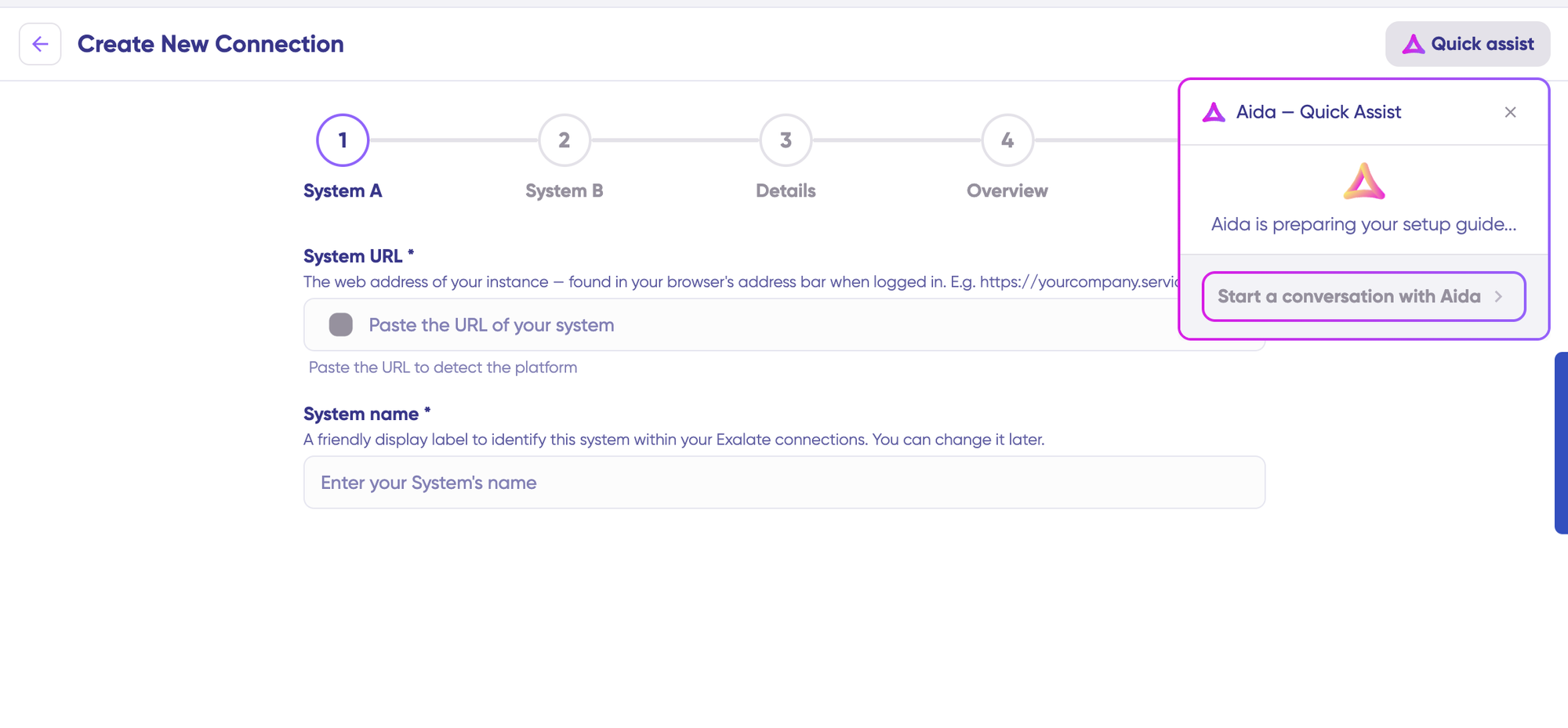
- You can also speed up the process by using Aida – Quick Assist at the top right of the dashboard.
- Enter the URL of your system. For example, if you start with ServiceNow, enter your ServiceNow instance URL.
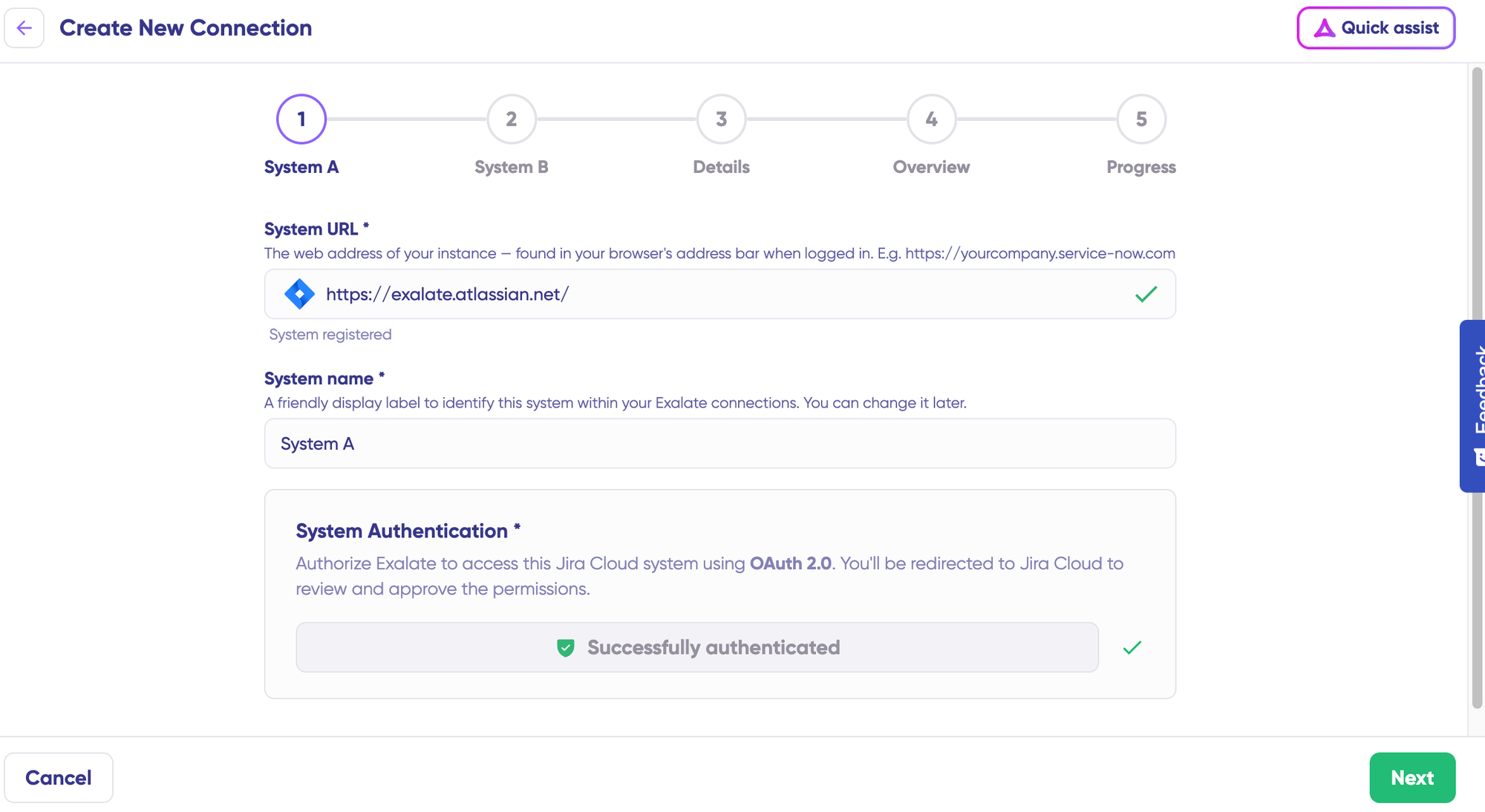
- Once you enter the URL, a validation check occurs. For new systems, you’ll need to enter your authentication details. ServiceNow uses your login credentials and OAuth, and Jira uses OAuth.
- Complete the same setup process for the Jira side.
- Give your connection a name and description.
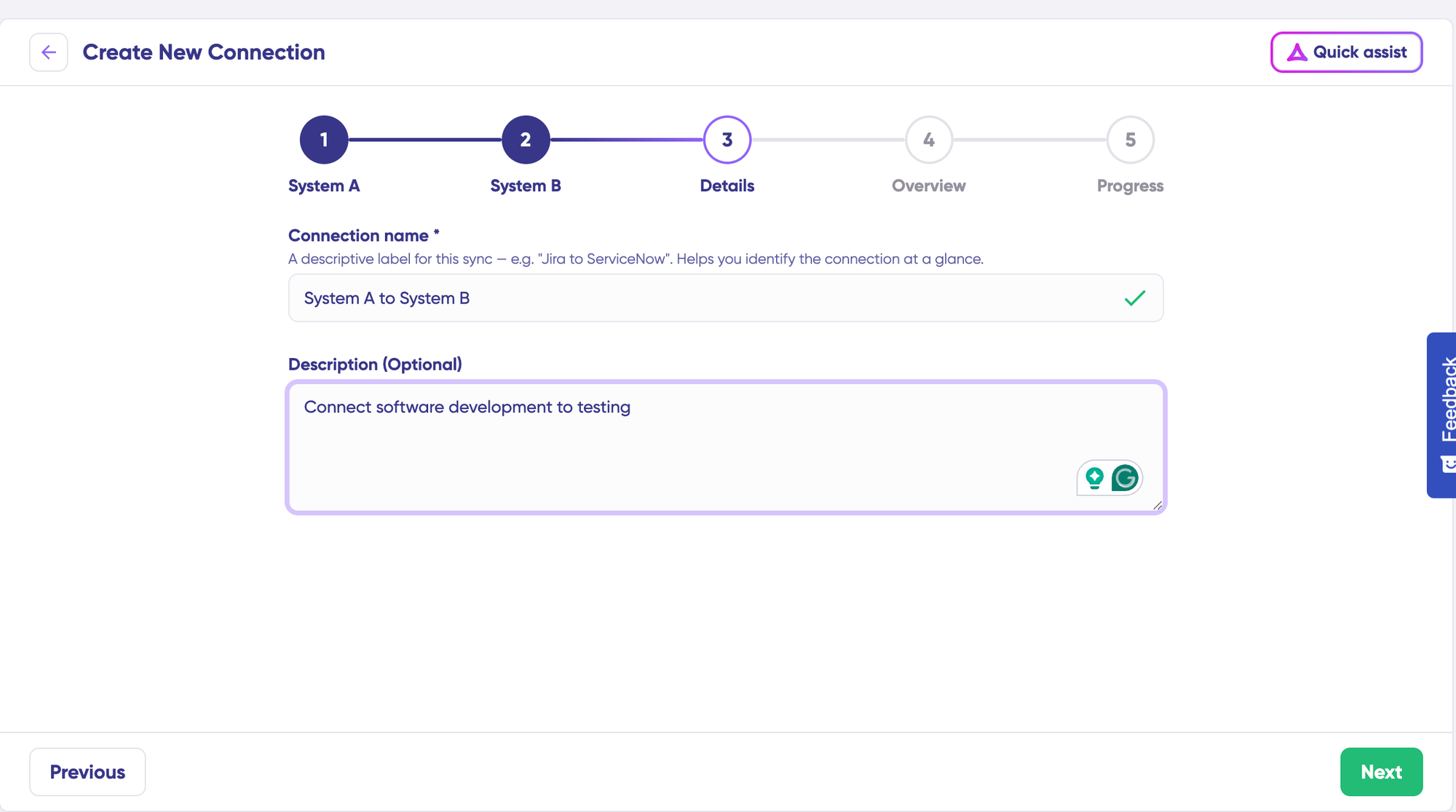
- Click “Next”.
- Review the details to ensure they are correct, then click “Create connection”.
When the process is complete, select “Continue to configuration” and choose a Jira project you want to use for synchronization.
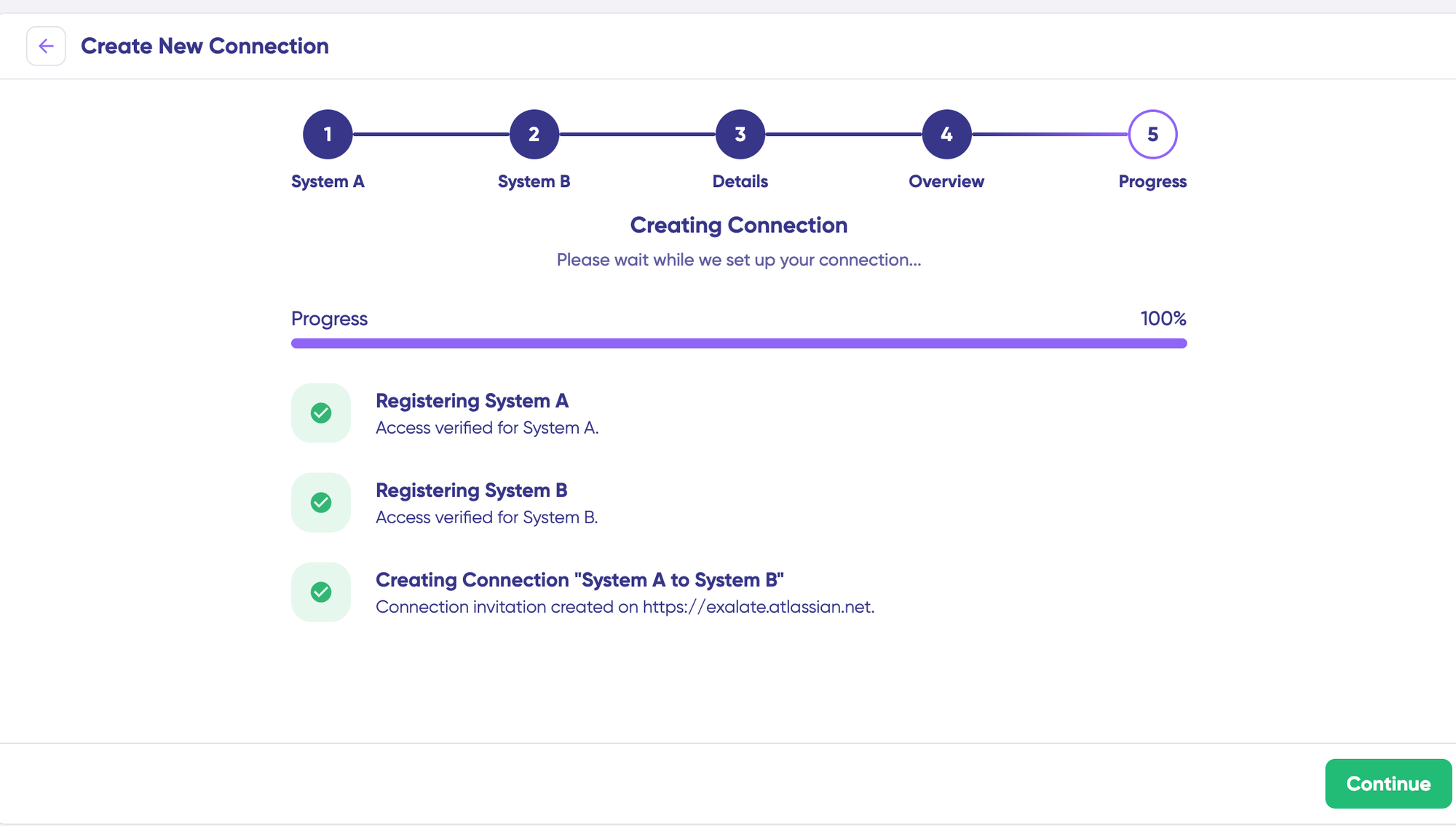
Then click “Build & continue”.
Jira ServiceNow Configuration Options
After creating your connection, you have two configuration options: “Quick Sync” and “Edit & Test”.
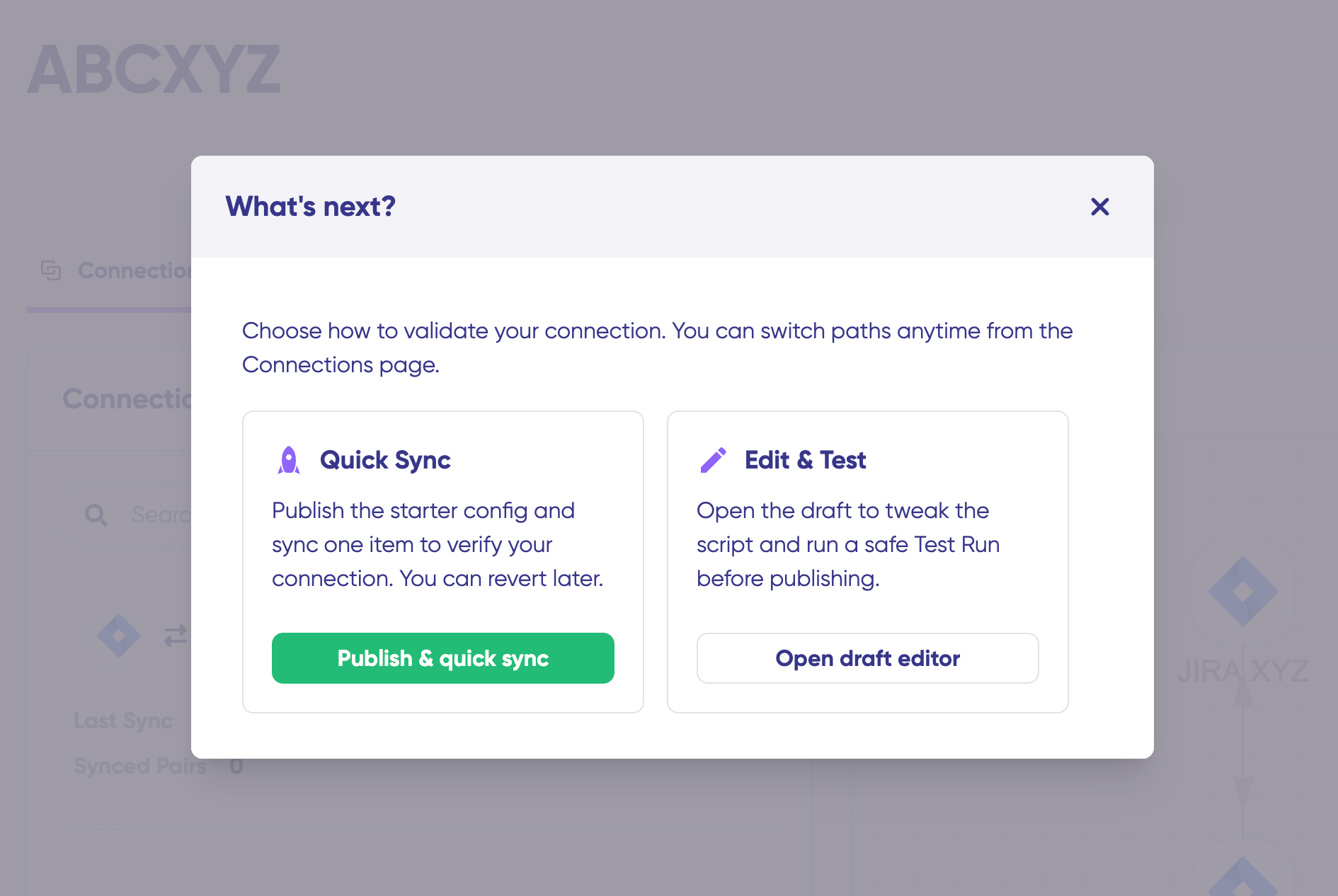
Let’s explore both.
For local connections in Jira, you can also choose to sync work items between separate Jira projects (or spaces) sitting in the same instance.
Example: your URL https://example.net/ might run 2 Jira projects (or spaces), project A holding work item PROJA-11 and project B holding work item PROJB-12. Both work items can sync using local connections in Exalate.
Quick Sync: Publish & Quick Sync
This option allows you to sync one item between Jira and ServiceNow to verify that your connection works properly. This is an optional step, but recommended for initial testing.
Under the “Item sync monitor,” enter the work item key in Jira or the incident number in ServiceNow.
To sync the first item, click “Sync Now”. To link two existing items, click “Link with existing”.
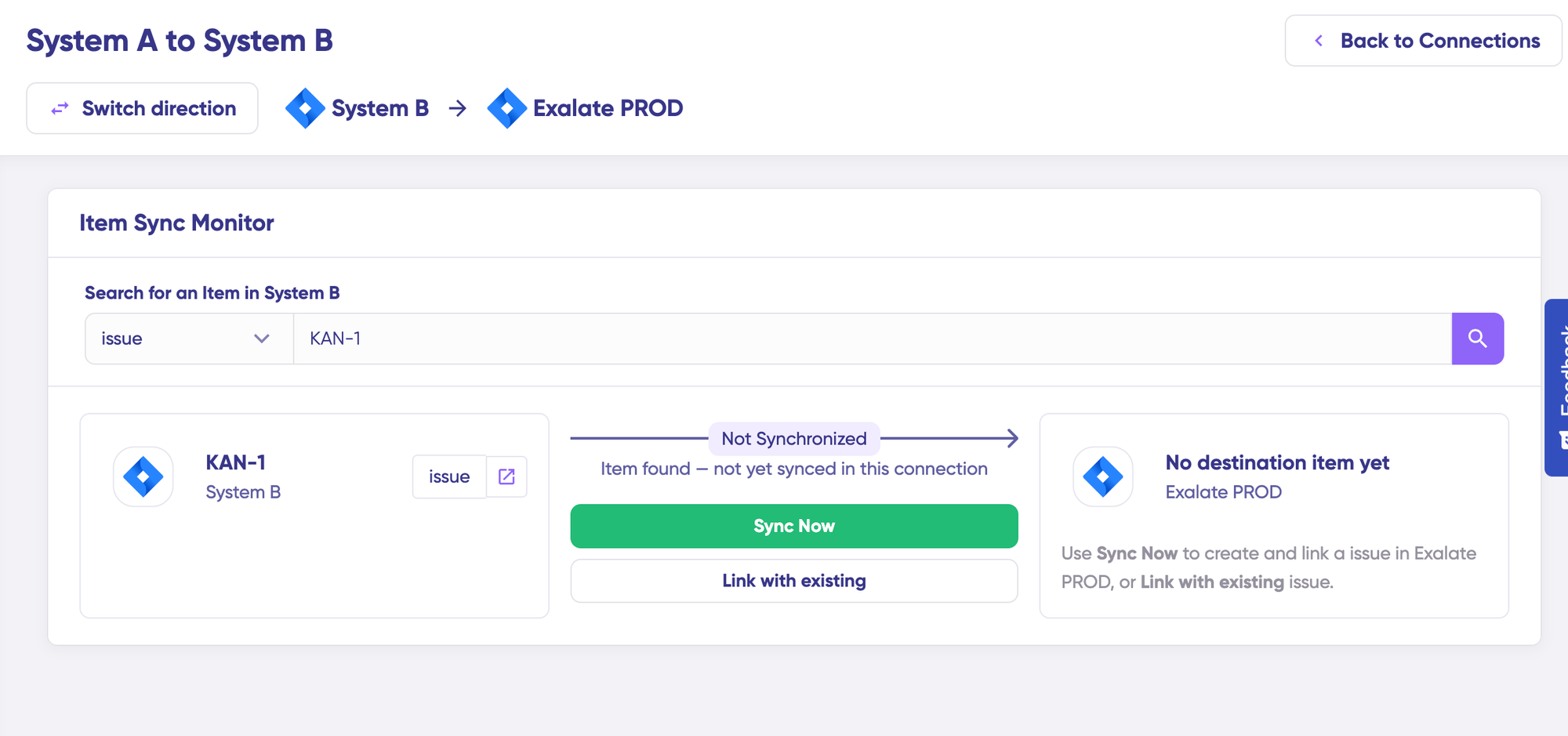
You’ll receive status updates while the items sync, and once the sync is complete, you can view both synced issues by opening them in a new window.
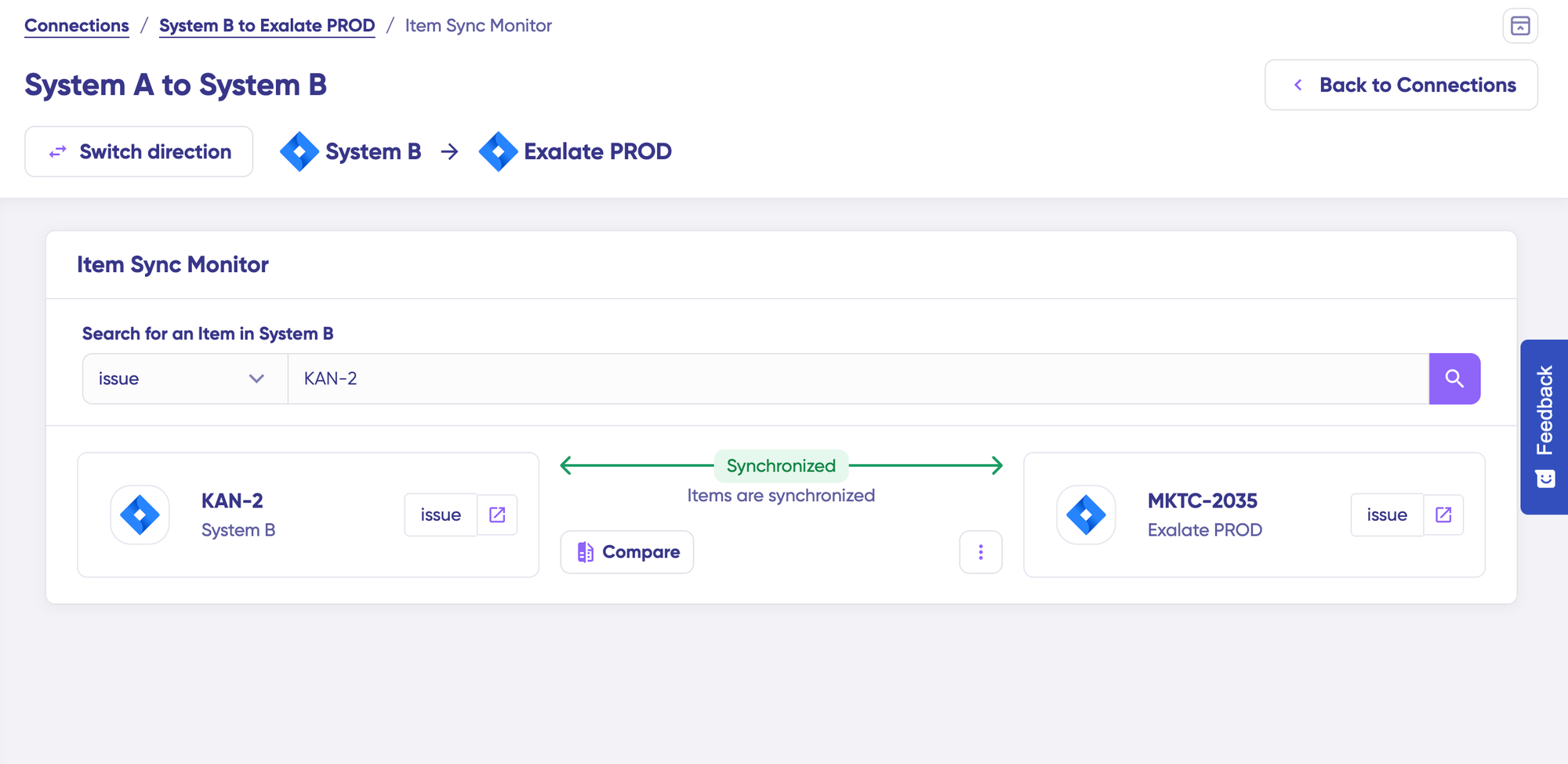
You can also compare how the synced items will look and how the changes will be applied.
Edit & Test: Open Draft Editor
To start making changes to your sync configuration, click “+ New version” or select “Open latest draft”.
This ensures you don’t accidentally modify the existing configuration. Changes in the draft are saved automatically.
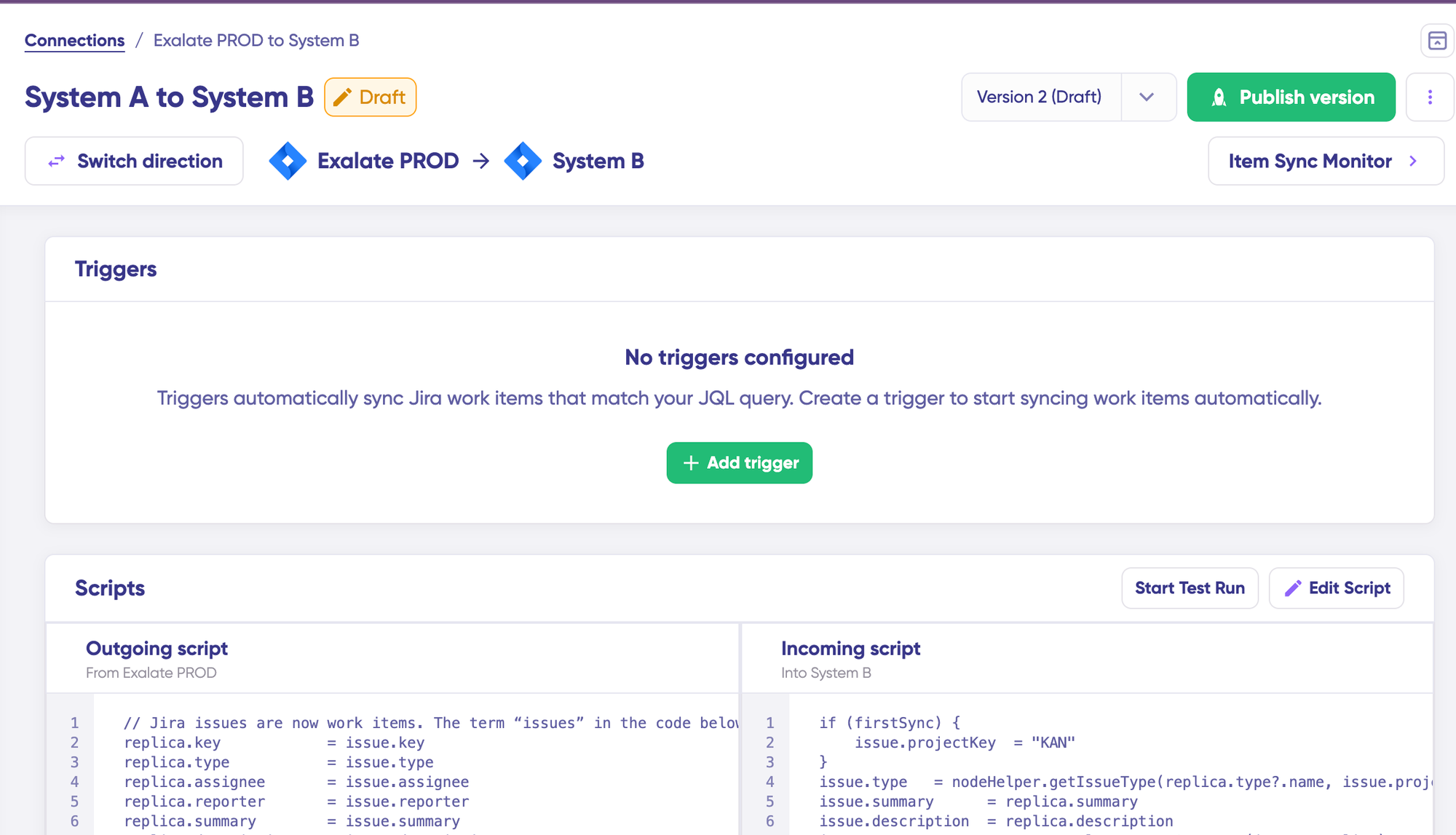
Click the “Edit Script” button to open the editor and modify the sync rules.
Understanding Sync Rules
Sync rules are based on Groovy scripts. With these scripts, you can add custom data logic and mapping, along with conditional flows, allowing you to adapt for any complex or advanced use cases and workflows.
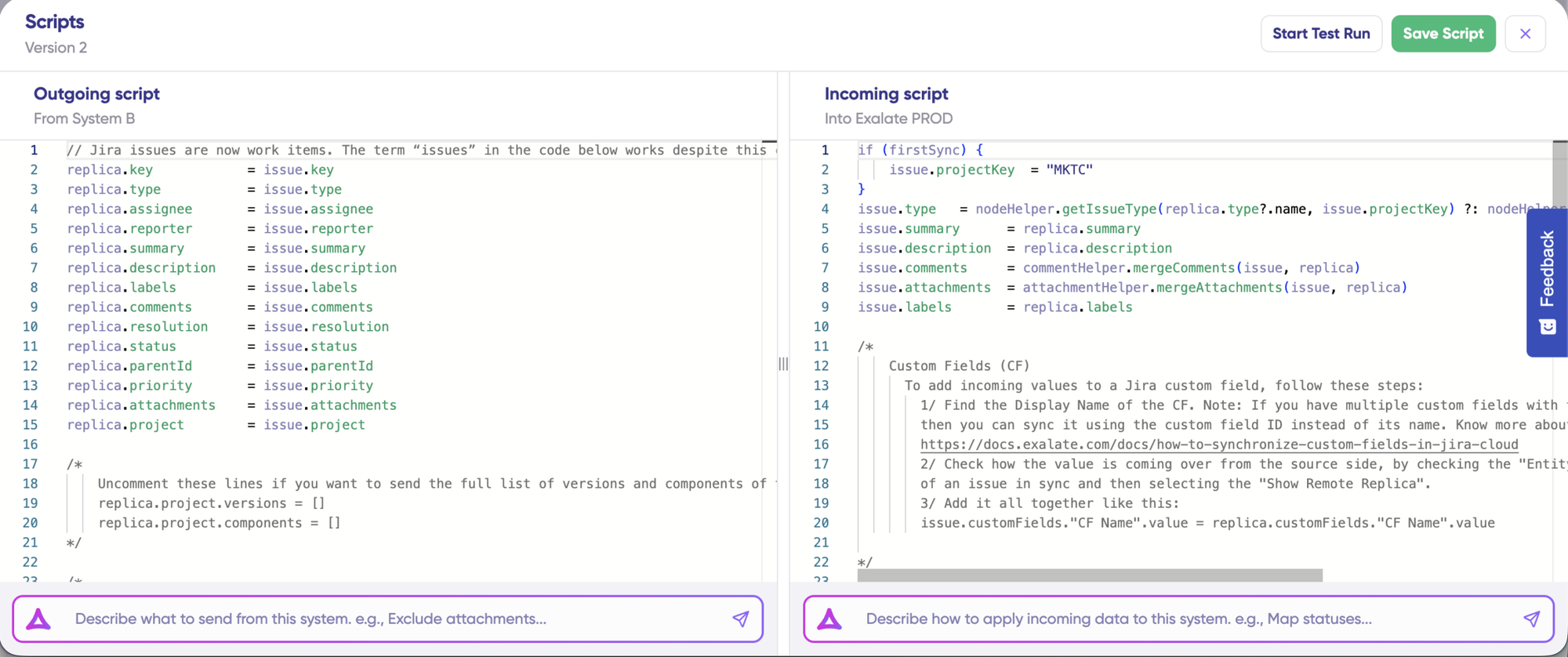
The direction of the sync can be changed by clicking the two arrows next to the connection name.
The scripts are divided into incoming and outgoing scripts:
- Outgoing script: If the sync direction is from Jira to ServiceNow, the outgoing script will hold the values passed from Jira to ServiceNow.
- Incoming script: The incoming script defines how the values coming from Jira are mapped in ServiceNow.
These scripts will be reversed if the direction changes.
Replica works like a message payload and holds the actual data passed between the synced entities. It exists in JSON format.
To sync new values, you can enter the sync script yourself if you are familiar with Groovy.
To stop something from syncing (for instance, attachments from Jira to ServiceNow), simply remove that script line from the corresponding script.
AI-Assisted Configuration
To save time and simplify the scripting process, you can use Exalate’s AI-assisted configuration feature called Aida to generate sync scripts.
Aida is available in both incoming and outgoing script sections, so choose the appropriate side accordingly.
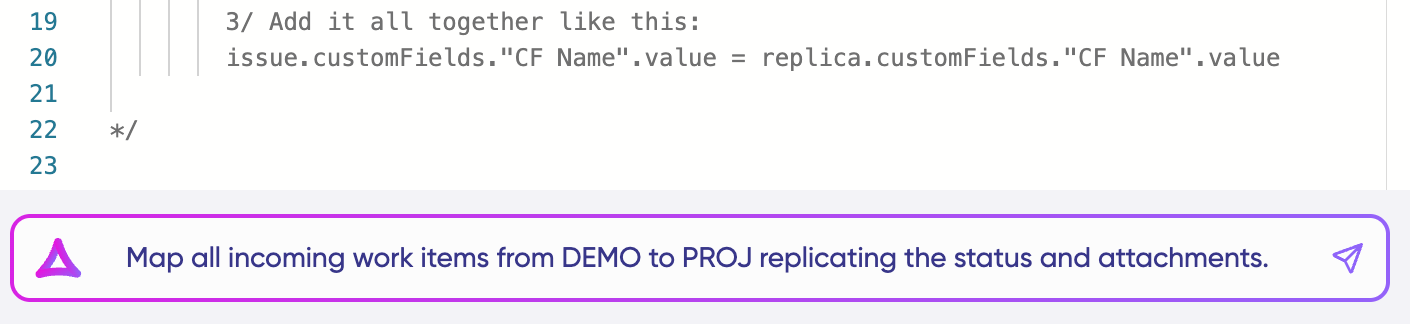
Aida helps you in two ways:
- For Outgoing scripts: Describe what data should leave your system. For example, “Exclude attachments” or “Only sync high-priority issues.”
- For Incoming scripts: Describe how incoming data should be applied to your system. For example, “Map statuses” or “Set a default assignee if the user can’t be found.”
Based on Exalate’s scripting API and your existing scripts, Aida generates working Groovy scripts with proper field mappings for you.
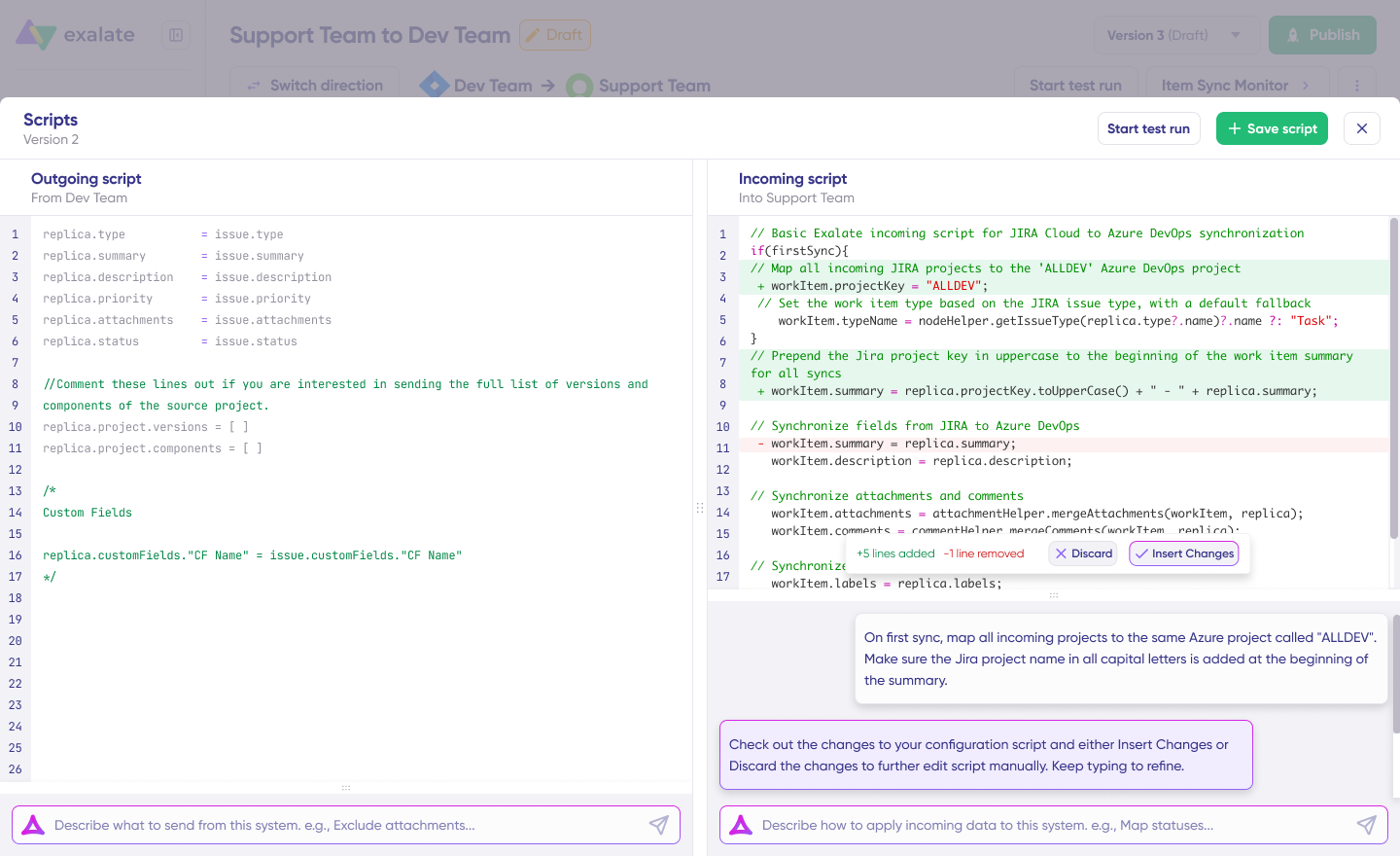
Once Aida finishes drafting your script, review the suggested changes. Green highlights indicate new lines that will be added, while red highlights show lines that will be removed from your script. You can choose to “Insert” or “Discard” Aida’s suggestions.
The outgoing and incoming scripts work independently, as does Aida, so maintain separate context and direction for each prompt.
Note: While Aida is helpful, like any AI tool, please review the generated code before applying it.
TestRun: Validate Before Production
Once your sync scripts are ready, you can choose to “Save script” or proceed to test them using the “Start Test Run” option.
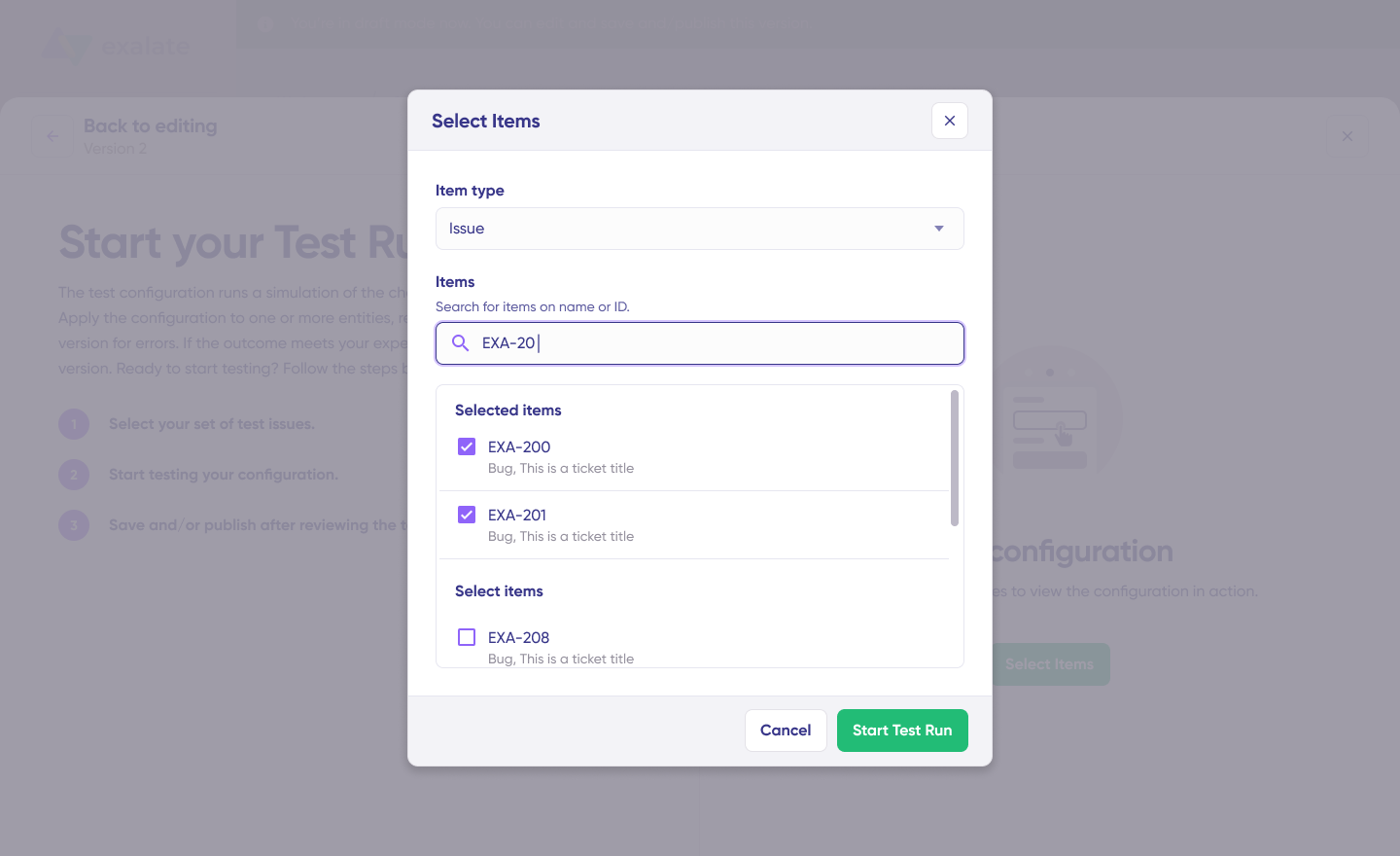
To test the configuration, select the items you want to apply the sync to. You can select multiple items. Once selected, click “Start Test Run”. You can now view all the incoming and outgoing replicas for each item you selected in their respective tabs.
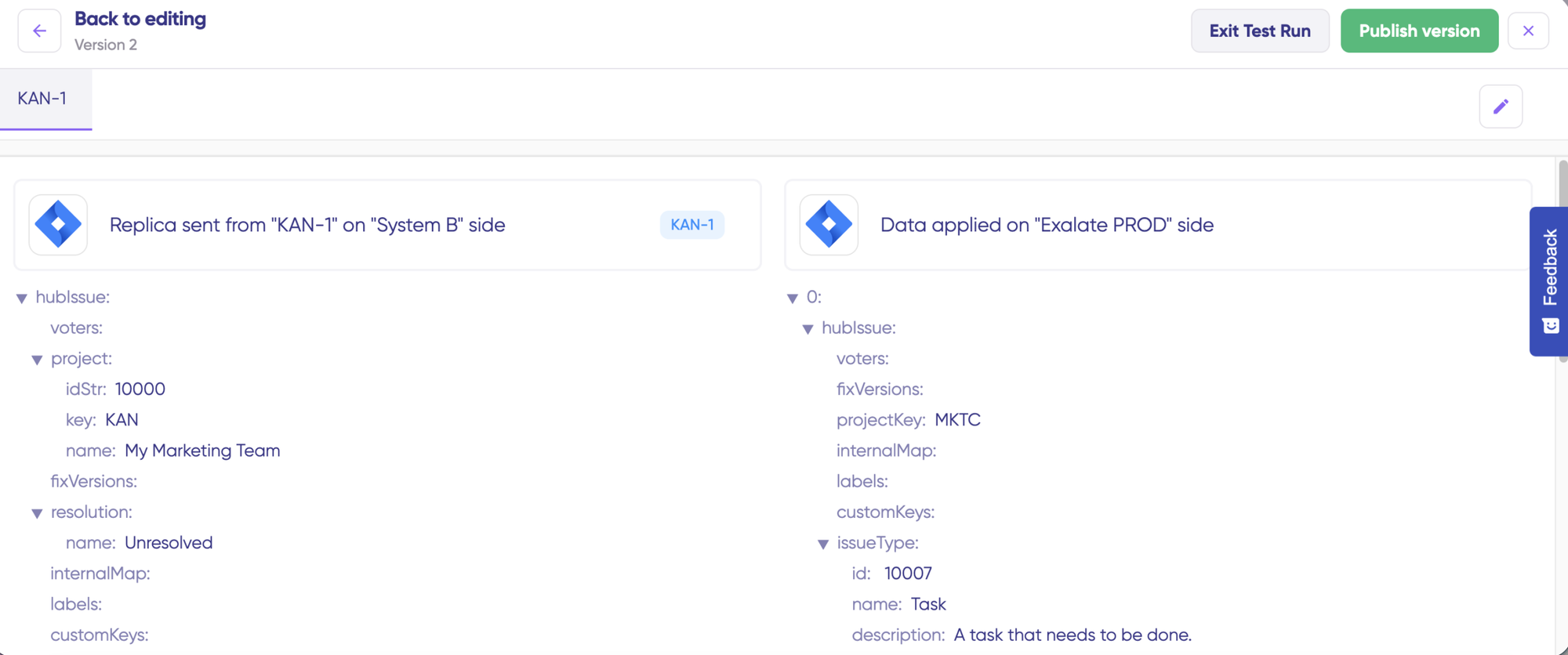
Review how the sync configuration will be applied to your items, preview the replica, and verify that the field mappings look correct. If needed, go back, adjust the scripts, and test again. Deploy only when you’re confident everything works correctly.
This safety net prevents errors from affecting live data.
Once everything matches your needs, click “Publish Version” to apply the updated configuration to your live synchronization.
All versions for a connection are available in the “Version” dropdown. Versions can be either “Active”, in “Draft” (editable), or “Archived”.
Adding Triggers
To start your sync automatically, it’s important to add triggers, which are conditions or filters you apply to specific items. For instance, you can sync all Jira work items that have a label “dev”, or sync all incidents in ServiceNow that belong to a specific assignment group.
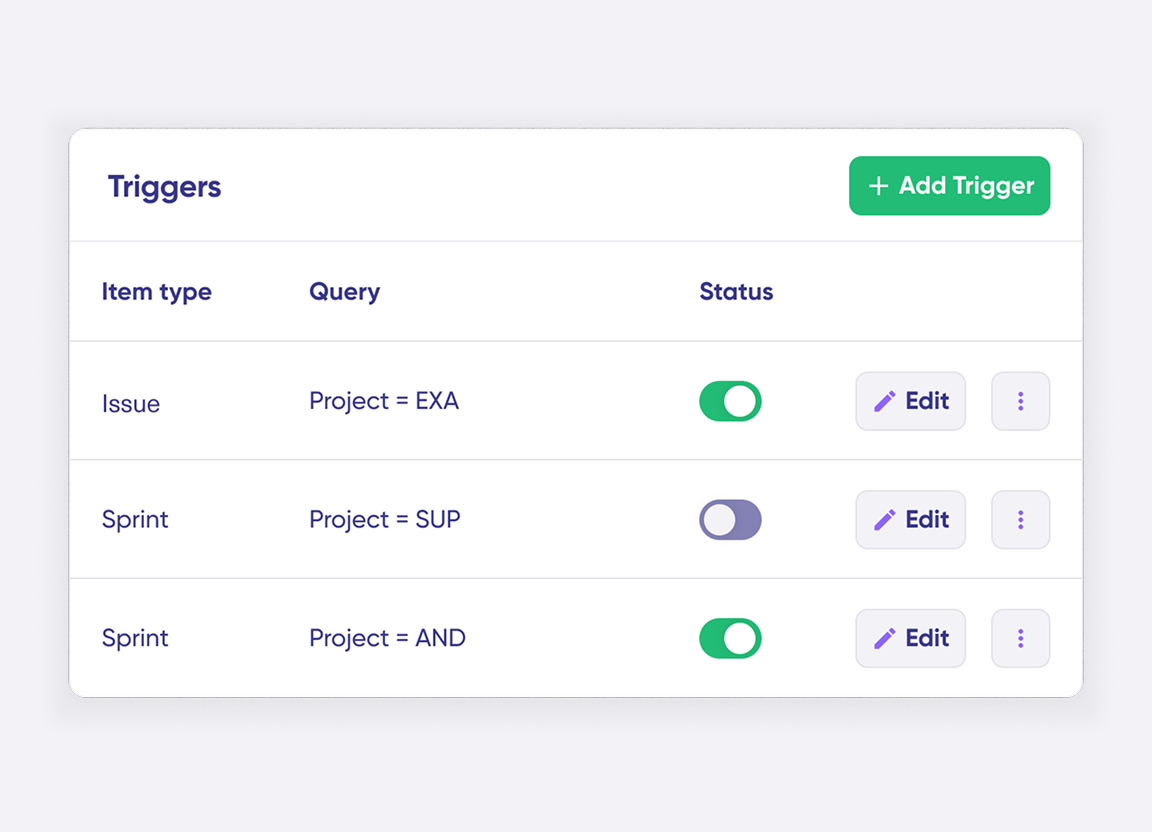
Click the “+ Add trigger” button to start creating triggers. These triggers are platform-specific:
- For Jira: You can use Jira Query Language (JQL) to specify conditions for work items or sprints.
- For ServiceNow: You can use the advanced search syntax to apply the trigger to incidents, problems, change requests, etc.
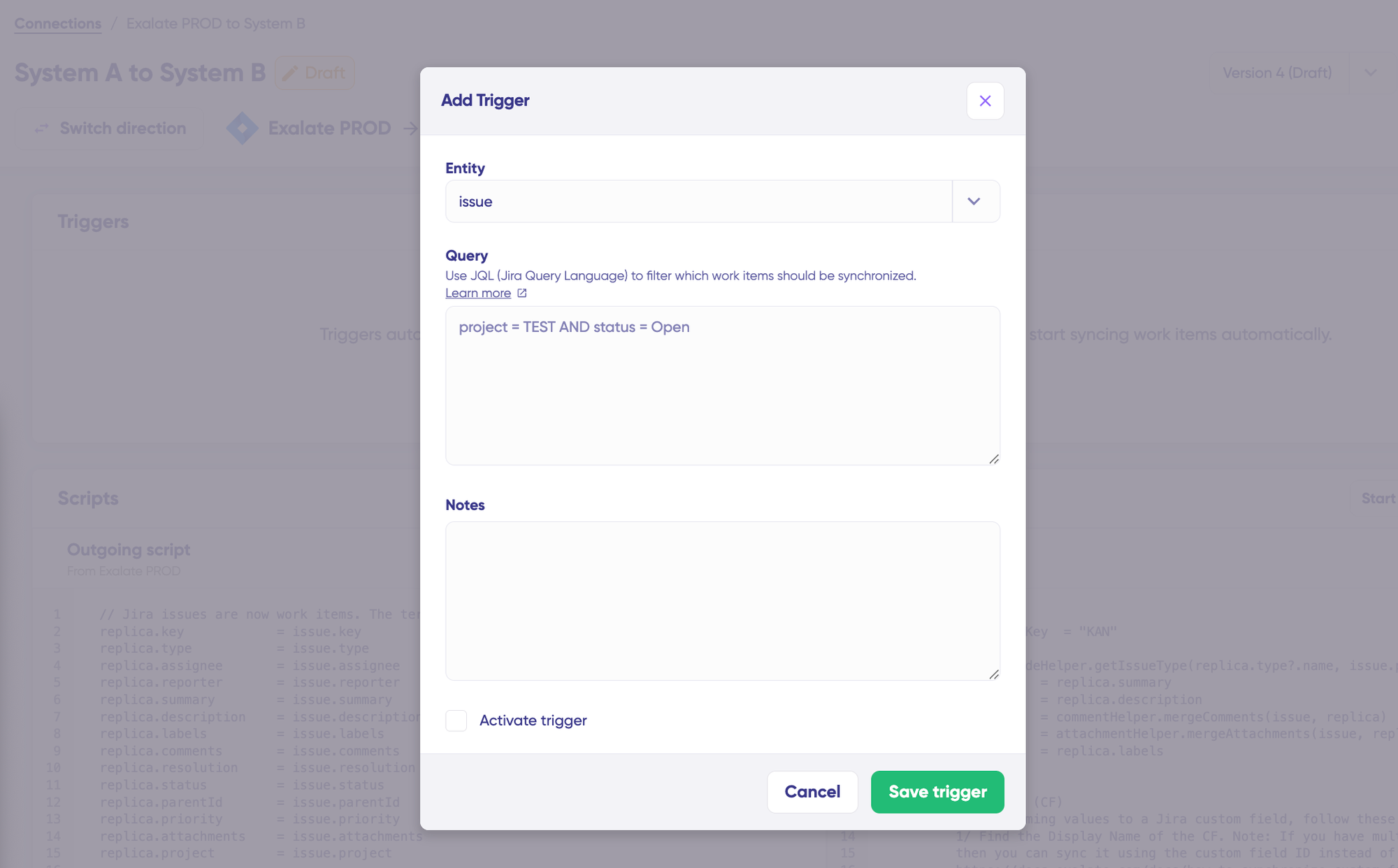
Save your changes by publishing them.
Deploy and Monitor
That’s it! Your first synchronization will start automatically based on the sync rules and triggers you have set. Happy syncing!
Unfortunately, troubleshooting errors is a significant part of synchronization, especially in script-based tools like Exalate, which allow the flexibility of setting up complex workflows.
Troubleshooting with Aida
Aida AI helps you troubleshoot errors faster by offering clear and context-aware suggestions to resolve errors right where you see them.
If there’s an error, go to the “Troubleshooting” tab. Hover over the error you want to diagnose and click on the Aida icon that appears next to the error. You will see the AI-generated suggestion in the modal window. This includes a short explanation of the error and a proposed solution for it.
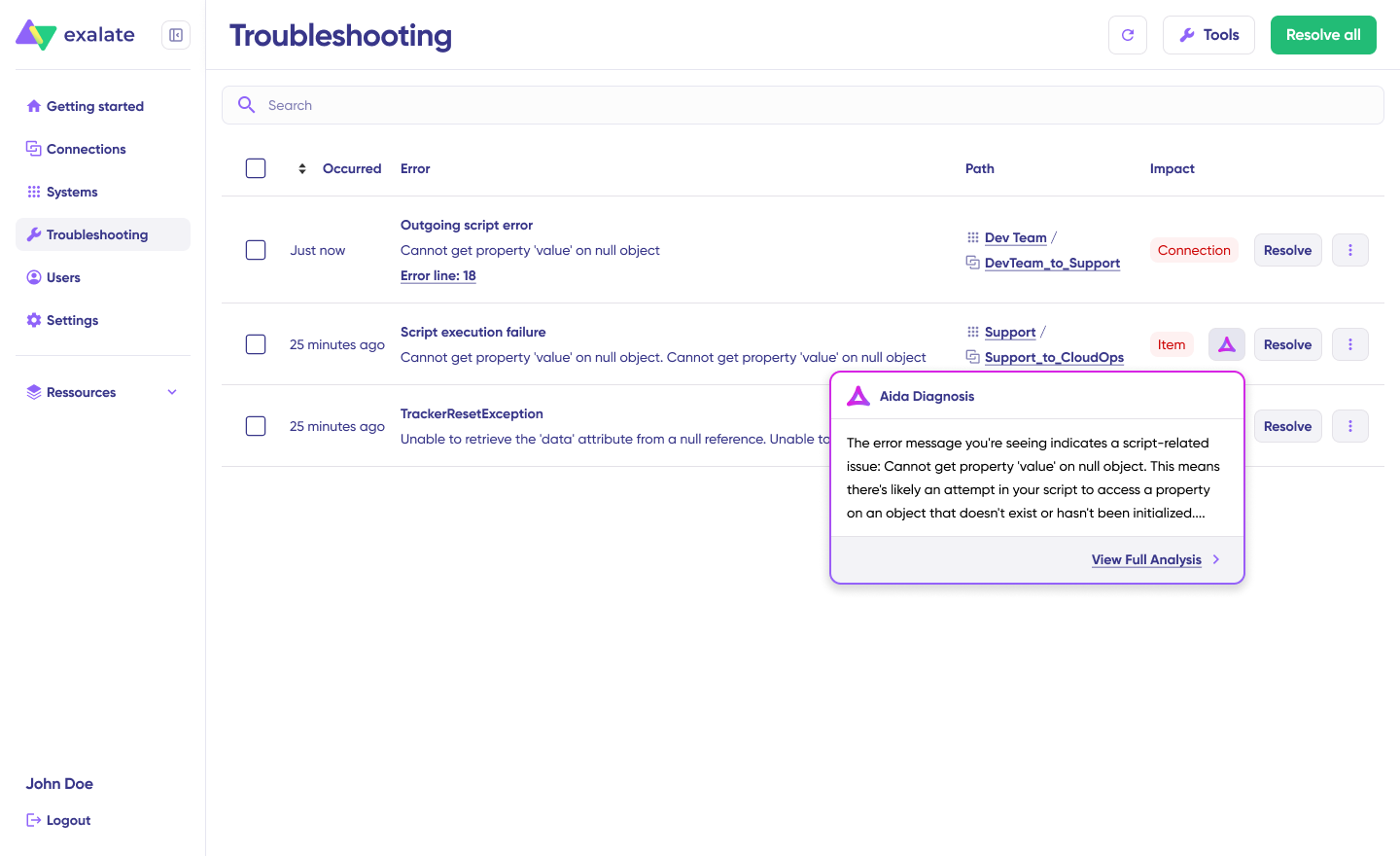
You can also “View Full Analysis” to get more context.
Additionally, you can view “Error details” to copy the stack trace and “Replicas” to view the JSON format, if required.
Choose to “Resolve” and retry errors as needed.
Sync Panel
Exalate also comes with a Chrome extension called Sync Panel that lets users check sync status, spot errors, trigger manual syncs, and unlink sync pairs straight from the browser, without opening the console.
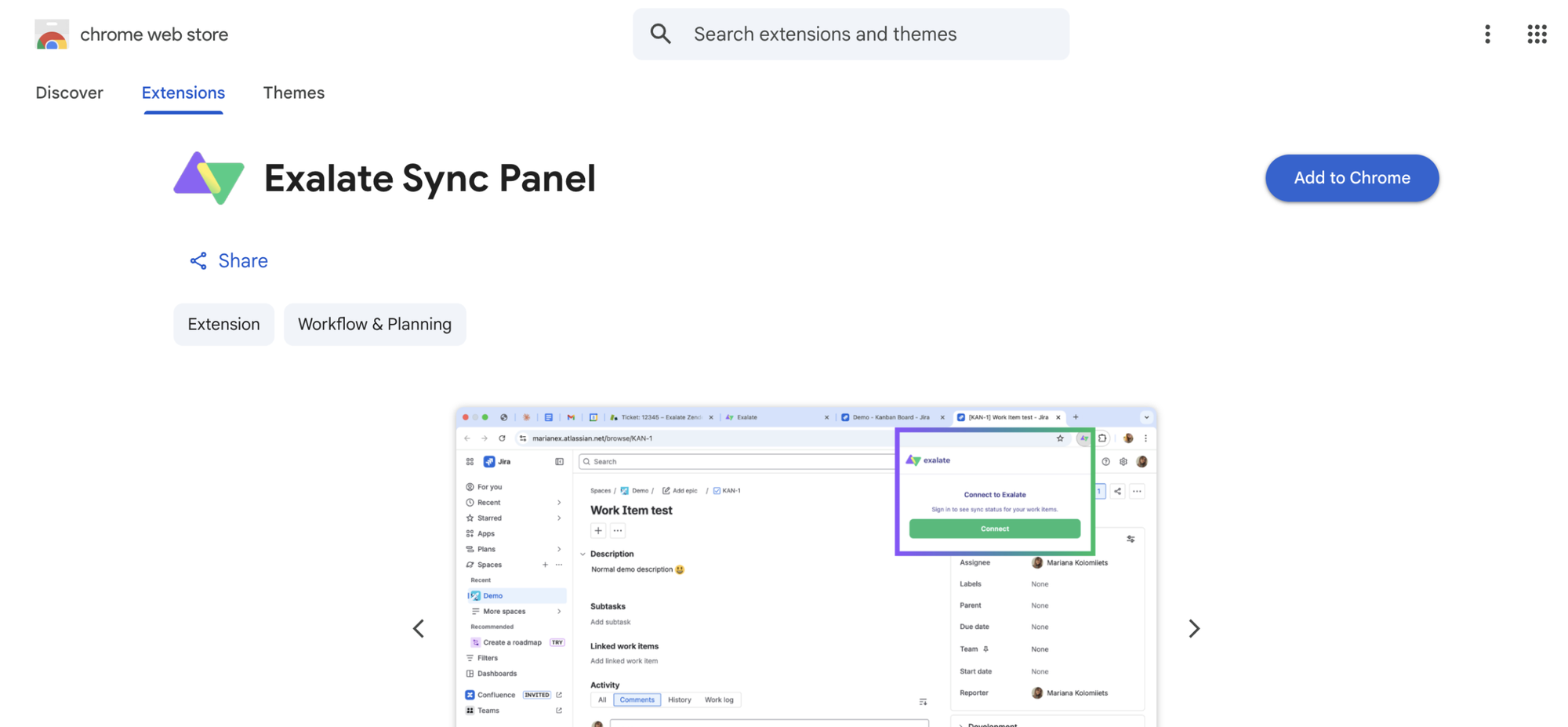
- Open the Exalate Sync Panel listing in the Chrome Web Store.
- Click Add to Chrome
- When prompted, click Add extension to confirm.
- The Exalate icon appears in your browser toolbar. Pin it for easy access.
Note: The extension works on Chrome. Other browsers are not supported at this time.
It’s useful for two groups: admins who want to keep an eye on sync status without switching tabs and end users who want to confirm that the remote side received their update.
You can access this feature via the browser. But if you want to check the sync queue status or configure your sync, you still need to log in to the Exalate console.
Dashboard
The Dashboard lets you track the number of items under sync over time. You can monitor all the connections you have access to or focus on a specific integration or connection.
- Log in to the Exalate Console.
- Select Dashboard from the left menu.
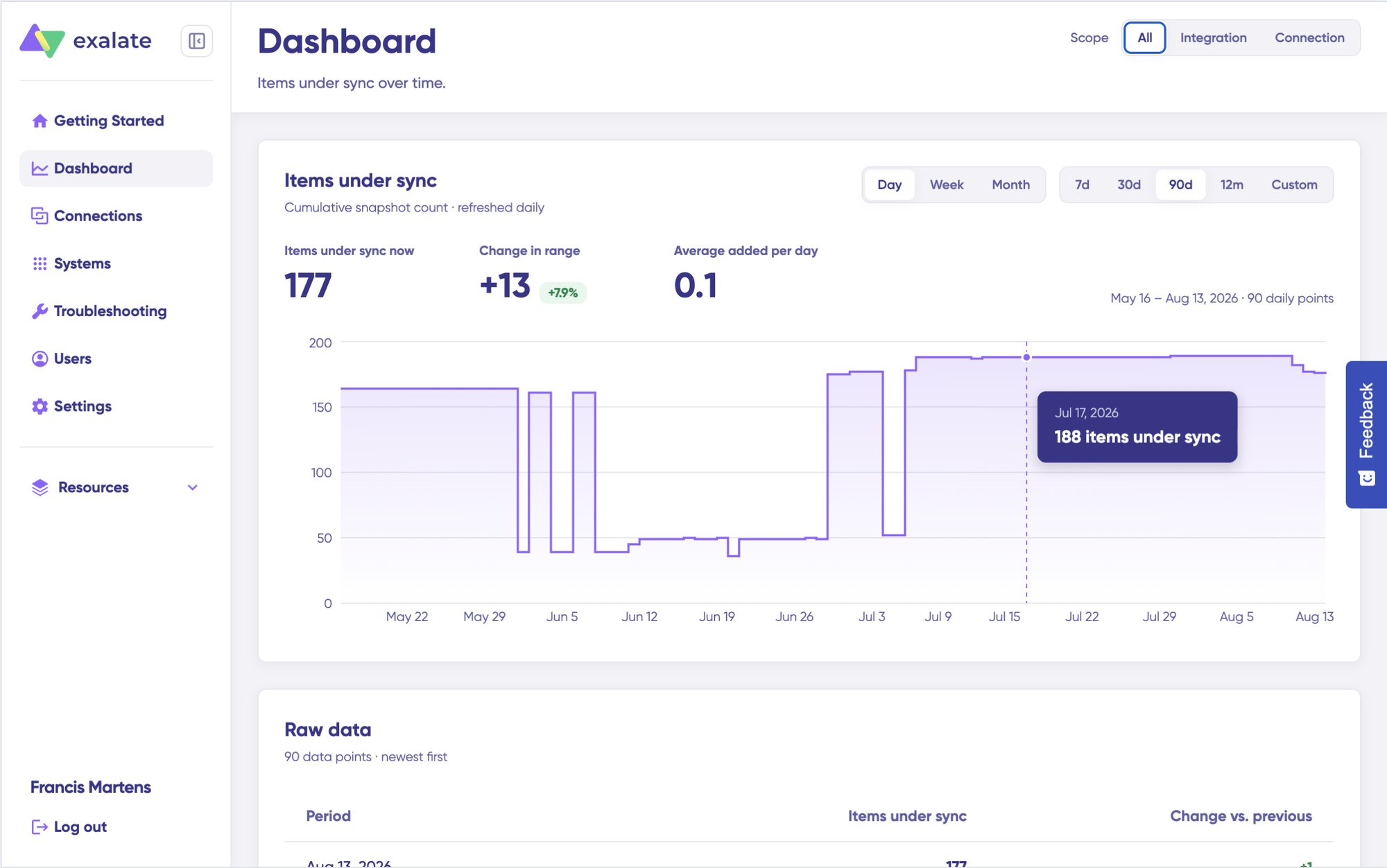
You can also open the Dashboard for a specific connection:
- Go to the Connections list.
- Open the Action Menu for the connection.
- Select View Dashboard.
Dashboard data is displayed as cumulative snapshots and refreshed daily. You can display everything or choose a specific integration or connection to be shown, as well as a time range.
Jira ServiceNow Integration Use Cases
In this section, we’ll take a deep dive into practical examples of Jira ServiceNow integration based on how teams use these systems. We’ll cover ITSM scenarios, enterprise use cases, and how MSPs can connect with their customers through integrations.
For every use case, we’ll provide a short summary of the potential business impacts you can expect.
Use Case 1: Incident Management
Challenge: A critical incident (urgency=1) occurs in your IT infrastructure. Your IT team handles incidents in ServiceNow while your development team tracks work in Jira. Without integration, someone must manually create tickets in both systems, copy details, and keep both updated throughout resolution.
Solution: With integration, the incident is automatically created in both Jira and ServiceNow. You can automatically trigger the escalation based on urgency and assignment group, creating a Jira work item with the corresponding “Highest” priority. SLA information passes along for additional context.
Real-World Application: Your IT team swiftly handles the incident in ServiceNow while your dev team simultaneously tracks the work progress in Jira. Comments, attachments, and status updates sync bidirectionally, keeping everyone aligned without duplicate data entry.
Specific Incident Scenarios
1. Network Outage Resolution
Challenge: A telecommunications company experiences a network outage affecting thousands of customers. The monitoring system detects the work item and raises an incident in ServiceNow, but the engineering team working on infrastructure fixes operates in Jira.
Solution: A Jira ServiceNow integration automatically creates a work item in Jira with all the necessary comments, attachments, work notes, and customer impact details the moment the incident reaches a specified severity level.
Real-World Application: The network operations team tracks customer communications and SLA metrics in ServiceNow while engineers work on the technical fix in Jira. Status updates flow bidirectionally, so customer service reps always know the current resolution progress.
2. Website Downtime Mitigation
Challenge: An e-commerce company’s website experiences downtime during a major sales event. Revenue loss mounts by the minute, and the customer support team in ServiceNow needs constant updates from the development team in Jira.
Solution: An IT team creates an Incident in ServiceNow, which is automatically reflected as a Jira work item where the dev team tracks it for resolution. Priority mappings ensure critical incidents get immediate attention.
Real-World Application: Executives monitor resolution progress through ServiceNow dashboards while developers work the technical problem in Jira. No one needs to ask “what’s the latest?” because the integration keeps both systems synchronized in real time.
3. Managing the Security Breach Response
Challenge: A cybersecurity breach is detected, and the incident response team in ServiceNow starts their investigation. Remediation requires code changes from developers who work exclusively in Jira. The security team needs visibility into development progress, and developers need the investigation findings.
Solution: With a Jira ServiceNow integration, an incident work item is created in Jira to engage the dev team in remediation efforts. Investigation notes and technical findings flow between systems automatically.
Real-World Application: Security analysts document their findings in ServiceNow while developers implement patches in Jira. Audit-ready documentation exists in both systems, showing the complete timeline from detection through remediation.
Use Case 2: Change Management
Challenge: IT infrastructure changes require coordination between the IT operations team (ServiceNow) and the development team (Jira). Change requests initiated in ServiceNow need developer input, but switching between systems creates delays and information gaps.
Solution: Integration ensures change requests are seamlessly transitioned into Jira for implementation. The Jira work item contains the reason for the change, the priority, the risk, the change type, the change category, and any additional information required.
Real-World Application: Your e-commerce platform needs upgrading. A change request is entered in ServiceNow to initiate the upgrade, which then synchronizes with Jira. Developers see full context without logging into ServiceNow, and IT operations see development progress without logging into Jira.
Use Case 3: Problem Management
Challenge: Your IT team notices recurring work items with your company’s email server. The root cause might be a code defect, infrastructure issue, or configuration problem. IT operations in ServiceNow and developers in Jira need to collaborate, but working across disconnected systems slows investigation.
Solution: A problem record is created in ServiceNow to investigate the root cause, and when the status transitions to “Assess,” this creates a trigger for the dev team. A Bug or Problem work item is created in Jira. Both teams exchange work notes, comments, attachments, and other important data to get to the bottom of the problem.
Real-World Application: IT operations documents symptoms and patterns in ServiceNow while developers analyze code and infrastructure in Jira. The bidirectional sync ensures neither team works with outdated information, and the complete investigation history lives in both systems.
Use Case 4: Release Management
Challenge: Coordinating software releases requires input from IT operations, development, QA, and sometimes security teams. Release plans exist in multiple systems, and version mismatches between ServiceNow and Jira cause deployment confusion.
Solution: Integration helps you plan, track, and execute releases seamlessly. ServiceNow initiates a release request, which triggers the creation of a release plan in Jira. Everyone has full visibility, ensuring smooth deployments.
Real-World Application: Your software development team is preparing for a major release. Release checklists, deployment schedules, and approval statuses sync between ServiceNow and Jira. Operations teams see development progress, and developers see infrastructure readiness, all without switching systems.
Use Case 5: Customer Support Escalation
Challenge: Customer support agents work in ServiceNow, but complex technical problems require developer involvement. Escalating tickets manually means support agents lose visibility into resolution progress, and developers miss customer context.
Solution: When a support ticket requires development work, the integration automatically creates a Jira work item with customer context, reproduction steps, and severity information. Updates flow back to ServiceNow, so support agents can keep customers informed.
Real-World Application: A customer reports a critical bug through your support portal. The ServiceNow incident automatically creates a Jira bug with full customer context. As developers investigate and fix the problem, status updates and resolution notes sync back to ServiceNow, enabling support agents to proactively update the customer.
Use Case 6: Compliance and Regulatory Response
Challenge: Regulatory bodies or internal audits identify compliance gaps requiring both IT process changes (ServiceNow) and code modifications (Jira). Tracking compliance work across disconnected systems makes audit response difficult.
Solution: Compliance work items created in ServiceNow automatically generate corresponding Jira tasks. Completion status, documentation, and sign-offs sync bidirectionally, creating an audit trail in both systems.
Real-World Application: A GDPR audit reveals data handling issues requiring both process updates and code changes. The compliance team tracks the overall remediation in ServiceNow while developers implement technical fixes in Jira. Auditors see the complete picture in either system.
Use Case 7: DevOps Pipeline Integration
Challenge: CI/CD pipeline failures detected by monitoring tools create ServiceNow incidents, but the development team needs to see these in Jira to prioritize fixes against other work. Manual ticket creation delays response to build failures.
Solution: Pipeline failure incidents in ServiceNow automatically create Jira work items with failure details, affected services, and deployment metadata. Resolution in Jira updates the ServiceNow incident automatically.
Real-World Application: Your production deployment fails at 2 AM. The monitoring system creates a ServiceNow incident, which immediately appears in Jira for the on-call developer. When the developer fixes the pipeline and closes the Jira work item, the ServiceNow incident closes automatically with full resolution notes.
Use Case 8: A Jira ServiceNow Integration Case for MSPs/MSSPs
Challenge: Managed Service Providers (MSPs) manage their own operations and ensure the smooth functioning of their customers’ IT environments. This often means dealing with customers who use different tools, leading to communication gaps, delayed responses, and inefficient processes.
Solution: A Jira ServiceNow integration allows MSPs to connect their internal workflows (often Jira-based) with customer ServiceNow instances. Tickets sync automatically based on agreed SLA thresholds and escalation criteria.
Real-World Application: An MSP’s customer logs an incident in their ServiceNow portal. The ticket automatically appears in the MSP’s Jira system, assigned to the appropriate team. As the MSP works on the issue, updates flow back to the customer’s ServiceNow, maintaining transparency without requiring the customer to grant system access or change their processes.
With an integrated Jira ServiceNow environment, MSPs can maintain separate workflows for different customers, each with customized field mappings and sync rules. This flexibility supports diverse customer requirements while standardizing internal operations.
Features to Consider When Choosing a Jira ServiceNow Integration Solution
Not all integration solutions deliver the same capabilities. When evaluating options for connecting Jira and ServiceNow, consider these essential features:
Flexibility and Customization
Many organizations have unique workflows that don’t fit predefined templates. Look for solutions offering:
- Custom field mapping — Map any ServiceNow field to any Jira field, including custom fields on both sides
- Conditional sync rules — Define which work items sync based on status, priority, assignment group, or any other criteria
- Transformation logic — Convert data formats, map status values, and transform field contents during sync
- Scripting capabilities — Use Groovy-based scripting for complex mapping scenarios that go beyond UI configuration
Exalate provides full scripting control over your sync side, letting you handle even the most complex integration scenarios.
Security and Compliance
Integration means data flows between systems, so security is non-negotiable:
- ISO 27001 certification — Demonstrates adherence to international information security standards
- Role-based access control — Limit who can configure integrations and what data they can access
- Encryption of data in transit and at rest — Protect information throughout its journey
- JWT authentication — Secure token-based authentication for system-to-system communication
- Independent configuration control — Each side controls their own sync rules without requiring external system access
Exalate meets enterprise security requirements with ISO 27001 certification, role-based access controls, and comprehensive encryption. Visit the Trust Center for security documentation and compliance certifications.
Multi-Platform Support
Your integration needs will likely expand beyond Jira and ServiceNow:
- Azure DevOps — Connect development teams using Microsoft’s DevOps platform
- Salesforce — Sync customer information between CRM and service management
- Zendesk — Bridge customer support platforms with development workflows
- GitHub and GitLab — Link code repositories to work items and incidents
- Freshservice and Freshdesk — Integrate additional ITSM and support platforms
- Asana — Connect project management workflows
- Custom connectors — Handle proprietary or niche systems through API-based integration
Exalate supports 15+ platforms and continues expanding its connector ecosystem.
AI-Assisted Configuration
Modern integration tools leverage AI to accelerate setup:
- Aida (AI-assisted configuration) — Describe your sync requirements in natural language and receive generated scripts
- Intelligent field mapping suggestions — AI analyzes your systems and recommends optimal mappings
- Error resolution assistance — Get contextual help when sync issues occur
Exalate’s Aida generates Groovy scripts based on your requirements, dramatically reducing implementation time.
Operational Control
Maintaining integration health requires robust operational features:
- Sync monitoring and alerts — Know immediately when syncs fail or encounter errors
- Retry mechanisms — Automatic retry for transient failures
- Error logging and diagnostics — Detailed logs for troubleshooting
- Testing capabilities — Validate sync rules before production deployment
- Rollback support — Revert to previous configurations if needed
Sync Panel
Exalate also has a Chrome extension called Sync Panel that lets users check sync status, spot errors, fire manual syncs, and unlink sync pairs from the browser.
It helps two groups: admins who keep an eye on sync status without swapping tabs, and end users wanting confirmation the remote side received their update.
The browser is where you’ll use this. But sync queue status and sync configuration still require an Exalate console login.
Jira ServiceNow Integration Tools: Native and Third-Party Options
Multiple approaches exist for connecting Jira and ServiceNow. Here’s how the primary options compare:
Native Integration Options
ServiceNow Integration Hub (Jira Spoke)
ServiceNow’s built-in Integration Hub includes a Jira Spoke for basic connectivity. The Spoke provides predefined actions to create and update Jira work items from ServiceNow workflows.
Best for: Organizations already invested in ServiceNow’s Integration Hub with simple, unidirectional sync needs.
Limitations: Limited customization options, ServiceNow-centric (orchestration must originate from ServiceNow), requires additional licensing.
Jira Service Management Native Integration
Atlassian offers a native ServiceNow integration for Jira Service Management that syncs alerts and incidents between platforms.
Best for: Teams using JSM’s operations features who need basic incident alert synchronization.
Limitations: Focused on incident/alert scenarios, limited field mapping flexibility, requires JSM Premium or Enterprise.
Third-Party Integration Solutions
Exalate
A dedicated integration platform supporting bidirectional sync between Jira and ServiceNow with full scripting capabilities. Supports complex scenarios including multi-instance connections, cross-company integrations, and advanced field transformations.
Best for: Organizations needing flexible, customizable integrations with full control over sync logic. Ideal for MSPs, enterprises with complex workflows, and cross-company collaboration.
Key features: Groovy-based scripting, Aida AI-assisted configuration, 15+ platform connectors, ISO 27001 certification, independent sync control.
Getint
A marketplace integration app offering no-code setup with automatic field mapping suggestions. Available as a Jira Cloud app or on-premise deployment.
Best for: Teams wanting a quick setup with minimal configuration for straightforward sync scenarios.
Limitations: Less flexibility for complex custom mappings compared to script-based solutions.
Unito
A low-code integration platform connecting multiple project management and work tracking tools, including Jira and ServiceNow.
Best for: Organizations using multiple project management tools beyond just Jira and ServiceNow.
Limitations: May require workarounds for complex ServiceNow entity types and field mappings.
ZigiOps
A standalone integration platform with on-premise and cloud deployment options. Focuses on ITSM and DevOps tool integrations.
Best for: Organizations requiring on-premise deployment with no data storage in the integration layer.
Limitations: Smaller ecosystem compared to larger integration platforms.
Custom API Integration
Organizations with development resources can build custom integrations using the REST APIs of both platforms.
Best for: Highly unique requirements that commercial solutions can’t address, organizations with dedicated integration development teams.
Limitations: Significant development and maintenance overhead, requires expertise in both platform APIs, no vendor support for the integration layer.
What’s Next?
A Jira ServiceNow integration goes beyond connecting software—it empowers businesses to excel operationally, optimize resources, and provide better services. We’ve explored its uses in incident, change, problem management, and service requests, as well as its benefits for MSPs serving diverse customer environments.
The right integration eliminates information silos, reduces manual errors, and keeps stakeholders aligned in real time. Whether you’re managing internal IT operations or serving external customers, connecting Jira and ServiceNow creates a foundation for more agile, efficient, and customer-centric service delivery.
Try for free on Exalate’s free tier, then build a working sync without sales contact. Connect both sides, configure rules with Aida or a Groovy engineer, and records flow.
If you’d rather see it run on your specific case first, book a demo so the Exalate team can walk through the integration patterns live.
Frequently Asked Questions
How do I link Jira and ServiceNow?
You can connect Jira and ServiceNow using a third-party integration platform like Exalate, native integration features like ServiceNow’s Jira Spoke or JSM’s ServiceNow integration, or custom API development. With Exalate, you establish a connection by entering instance URLs, configure sync rules using scripts or Aida AI-assisted configuration, and define triggers that determine which work items sync automatically.
What are the benefits of integrating Jira with ServiceNow?
Integrating Jira with ServiceNow streamlines work resolution, enhances collaboration between development and IT teams, reduces duplicate data entry, improves data visibility, and enables better reporting. The integration optimizes resource allocation, automates workflows, supports compliance requirements, and reduces operational costs by eliminating manual ticket synchronization.
How does Aida help with Jira-ServiceNow integrations?
Aida (AI-assisted configuration) generates Groovy scripts for your specific integration needs by understanding your requirements in natural language. Instead of manually writing field mappings and transformation logic, you describe what you want to sync between Jira and ServiceNow, and Aida produces the script code. This speeds up configuration while giving you complete control to review and modify the generated scripts.
What are the common use cases for a Jira ServiceNow integration?
Common use cases include incident management (escalating IT incidents to development teams), change management (coordinating infrastructure changes), problem management (investigating recurring work items), release management (aligning deployments), and MSP/customer integration (connecting service provider workflows with client systems). Organizations also use integration for compliance tracking, DevOps pipeline coordination, and customer support escalation.
What are some advanced use cases for a Jira ServiceNow integration?
Advanced use cases include bidirectional SLA tracking (syncing ServiceNow SLA data to Jira custom fields), customer case to epic mapping (connecting ServiceNow cases with Jira epics while maintaining hierarchy), time tracking synchronization (flowing effort data between platforms for resource planning), and multi-instance orchestration (connecting multiple ServiceNow instances to a single Jira instance or vice versa). Discuss your use case with our integration experts for implementation guidance.
Can I use Exalate to connect multiple Jira and ServiceNow instances?
Yes, Exalate supports connecting multiple Jira and ServiceNow instances in various configurations. You can connect multiple ServiceNow instances to a single Jira instance, multiple Jira instances to a single ServiceNow instance, or create complex mesh topologies. Exalate also supports connections to other platforms, including Azure DevOps, Salesforce, Zendesk, GitHub, Freshservice, Freshdesk, and Asana. Check our integrations page for the complete list.
How does Exalate secure Jira to ServiceNow integration?
Exalate protects data flowing through your ServiceNow integration with Jira using multiple security layers: JWT access tokens for authentication, role-based access controls limiting configuration permissions, HTTPS with TLS 1.2 and 1.3 for data in transit, encryption for data at rest, and multi-factor authentication support. Exalate holds ISO 27001 certification and undergoes regular security audits. Visit the Trust Center for detailed security documentation and compliance certifications.
What can I sync between Jira and ServiceNow?
In ServiceNow, you can sync Incidents, Problems, Change Requests, RITM (Request Items), Catalog Tasks, Customer Cases, and other entities available via REST APIs. In Jira, you can sync any work information, including summary, description, status, labels, comments, attachments, priority, custom fields, epics, and story points, while maintaining parent-child relationships. If standard sync doesn’t cover your needs, Exalate’s scripting capabilities and httpClient method let you access any data available through each platform’s API.
Can you synchronize custom fields between the systems?
Yes, Exalate supports comprehensive custom field synchronization. Standard field types like text, numbers, and dates sync with minimal configuration. Complex fields, including multi-select lists, cascading selects, and custom objects, can be mapped using transformation logic. You fetch custom field names and values through the respective APIs of both ServiceNow and Jira, then define mappings in your sync scripts.
What’s the difference between Exalate and ServiceNow’s Integration Hub with Jira Spoke?
Exalate provides bidirectional sync initiated from either platform, full scripting control for complex transformations, support for 15+ platforms beyond just Jira, and independent configuration where each side controls their own sync rules. ServiceNow’s Integration Hub with Jira Spoke focuses on ServiceNow-orchestrated workflows, works best for simple unidirectional scenarios, requires ServiceNow licensing, and limits customization to what the Spoke provides. Exalate is typically preferred for complex enterprise scenarios, cross-company integrations, and organizations needing platform flexibility.
Recommended Reading:
- Jira ServiceNow Integration: How to Connect Jira and ServiceNow in 6 Steps
- ServiceNow to ServiceNow Integration: Set up a Two-Way Sync
- How to Implement Advanced Integration Use Cases
- Jira to Jira Integration: The Comprehensive Guide to Jira Sync
- How to Synchronize a ServiceNow Customer Case to a Jira Epic
- How to Sync SLA Records and Maintain State Updates From ServiceNow Incident to Jira Issue
- Jira Salesforce Integration: How to Set up a Two-Way Sync between Different Teams