
Workflows are the routines and systems you use to get things done. They define what happens, when it happens, and who’s responsible. They include people, technology, and processes that flow through and between organizations.
Refining and improving them is key to growing your business, and automation is one of the most practical ways to do that. Automated tasks are faster, cheaper, and less error-prone than their manual counterparts. With AI evolving rapidly and tools dedicated to coordinating different software platforms becoming more accessible, there are more opportunities than ever to give your team an edge.
In this guide, you’ll learn what workflow automation is, the different types you’ll encounter, real-world examples across departments and companies, how to choose the right tools, and best practices for building automations that actually hold up.
Key Takeaways
- Workflow automation replaces manual, repetitive tasks with systems that execute them automatically based on predefined triggers, rules, and actions.
- Types of workflow automation range from simple task-level automation to complex cross-company process orchestration spanning multiple platforms.
- Automating workflows directly reduces labor costs, speeds up response times, and improves data accuracy across teams.
- Triggers, actions, logic and rules, and monitoring form the foundational building blocks of any automation system.
- Cross-company automation is where the biggest efficiency gains happen, connecting internal teams with external partners, vendors, and customers in real time.
- Choosing the right automation tool depends on sync flexibility, connector coverage, scripting capabilities, security posture, and scalability.
- Start with high-volume, repetitive workflows and expand incrementally rather than trying to automate everything at once.

What is Workflow Automation?
Workflow automation is the process of setting up systems that perform tasks you’d otherwise do manually. It involves defining the right sequence of actions, assigning the right triggers, and letting software handle execution without constant human oversight.
That could mean a code script, a no-code platform, or a dedicated integration tool that connects with your existing software stack. The core idea is the same: you define what should happen, when it should happen, and what conditions apply. The system takes care of the rest.
For example, when a customer submits a support ticket in Zendesk, an automation could instantly create a corresponding work item in Jira, assign it to the right team based on the ticket category, and notify the relevant engineer via Slack. No manual hand-off, no copy-pasting between tools, no delays.
Workflow automation software typically integrates with other platforms through APIs, enabling all kinds of actions across your tech stack. The more connected your tools are, the more you can automate.
Types of Workflow Automation
Not all workflow automation looks the same. The right approach depends on the complexity of what you’re trying to automate, how many systems are involved, and whether the process stays inside your organization or crosses company boundaries.
Task Automation
This is the simplest form. Individual, repetitive tasks are handled by software instead of people. Think auto-assigning incoming tickets based on category, sending a follow-up email after a form submission, or updating a field when a status changes. Task automation works well as a starting point because it targets specific pain points with minimal setup.
Process Automation
Process automation strings multiple tasks together into an end-to-end workflow. Instead of automating a single step, you’re automating an entire sequence. For example, when a new employee joins, process automation can trigger account creation, schedule onboarding sessions, assign training materials, and notify the relevant team leads, all without someone manually checking each step.
Integration-Based Automation
When workflows span multiple platforms, you need integration-based automation. This connects two or more tools so that data flows between them automatically.
A support team using ServiceNow and a development team using Jira can share work item updates in real time without either team switching tools. Integration-based automation is where platforms like Exalate operate, syncing data bidirectionally between connected systems while giving each side independent control over what they send and receive.
Cross-Company Workflow Automation
This extends integration-based automation across organizational boundaries. When you’re collaborating with external partners, vendors, MSPs, or customers, cross-company automation ensures both sides stay aligned without exposing internal systems or requiring shared access.
Each organization controls its own sync rules and data flow independently, which is critical for maintaining security and autonomy. This is particularly common in SIAM (Service Integration and Management) environments where multiple service providers need to coordinate.
Workflow Orchestration
Orchestration sits on top of automation, managing and coordinating multiple automated workflows as a unified process. It handles dependencies between tasks, manages error states, and ensures complex multi-step processes execute in the right order.
For example, orchestrating the full lifecycle of a customer-reported bug, from intake in Zendesk, through triage, development tracking in Azure DevOps, QA validation, and status updates back to the customer, requires orchestrating several automations together.
Benefits of Workflow Automation
Automating workflows requires upfront investment, but once running, automation delivers compounding returns. Here’s what you get.
Reduced Labor Costs
Automated workflows eliminate the need for staff to handle repetitive tasks or make simple, binary decisions. A support team that manually routes 200 tickets per day can redirect that effort to complex problem-solving once routing is automated. Over time, the cost savings add up significantly, especially across departments that handle high-volume, low-complexity work.
Faster Execution
Many automations complete tasks near-instantly. A synchronization between ServiceNow and Jira that would take an engineer 10 minutes to do manually happens in seconds when automated. That speed matters most in time-sensitive scenarios like responding to customer escalations, triggering incident workflows, or syncing status updates during active projects.
Improved Accuracy
Humans make mistakes, especially with repetitive work. Workflow automation removes the inconsistencies that come from manual data entry, copy-pasting between systems, or forgetting a step in a multi-stage process. The result is cleaner data, fewer errors, and more reliable outcomes for customers and internal teams.
Better Compliance and Consistency
Automated workflows follow the same rules every time. They don’t skip steps, miss approvals, or forget to log actions. That consistency is valuable for organizations that need to meet regulatory requirements or maintain internal process standards. When you pair automation with proper access controls and encrypted data exchange, you also strengthen your security posture.
Improved Visibility
When workflows are automated and connected, you get a unified view of what’s happening across teams and systems. Instead of asking five people for status updates, the information is already where it needs to be. That transparency helps managers make better decisions and helps teams collaborate without the constant back-and-forth.
Scalability Without Proportional Headcount
Manual workflows don’t scale well. Doubling your ticket volume typically means doubling the people handling those tickets. Automated workflows handle increased volume without proportional increases in staffing. As your business grows, your automations grow with it, provided you’ve built them on a platform that can handle the load.
Key Components of Workflow Automation
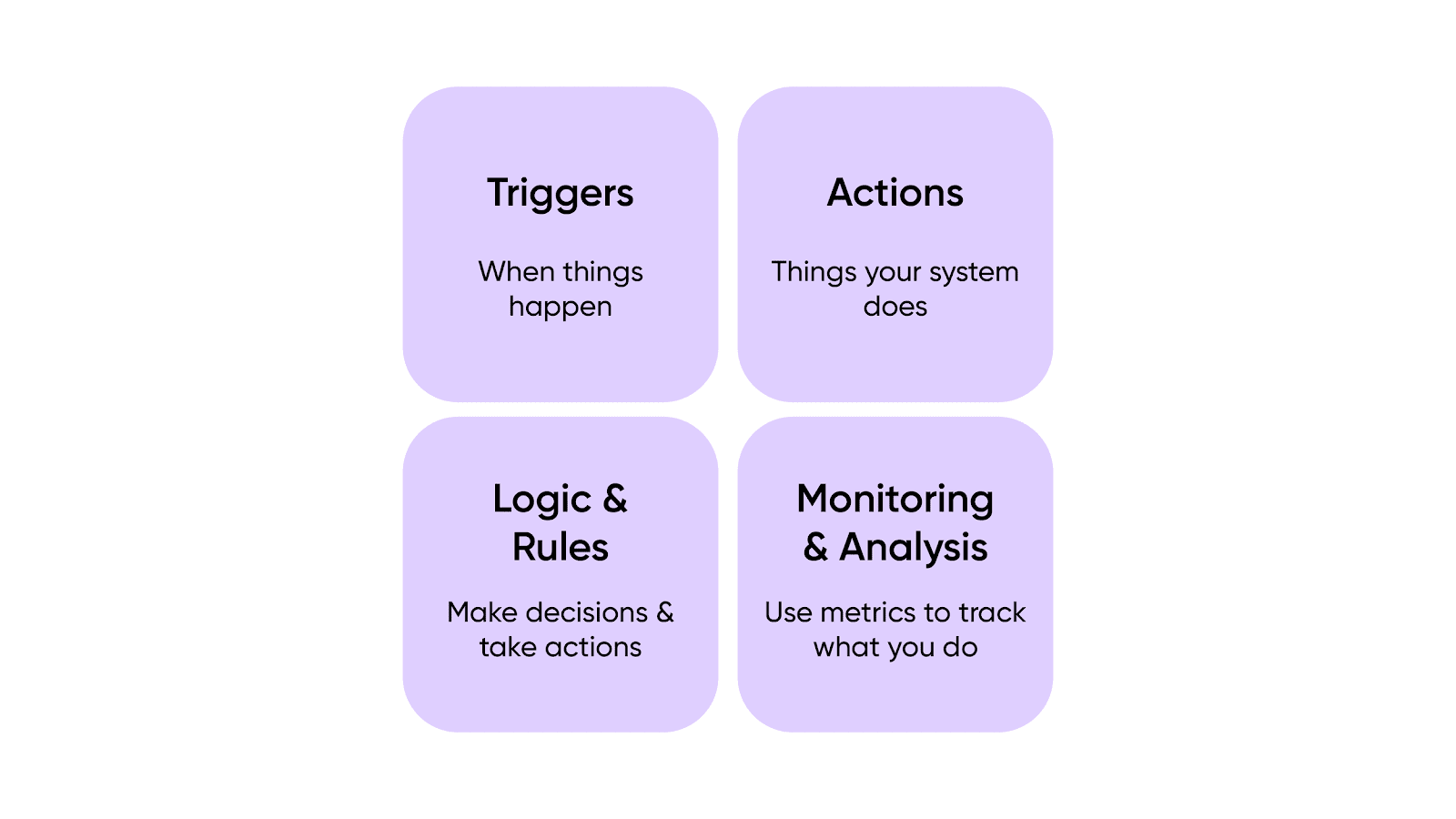
Whether you’re using a dedicated platform, a code script, or a no-code builder, all workflow automation systems share the same foundational building blocks.
Triggers
Triggers define when things happen: the creation of a new ticket, a changed status on a work item, the receipt of an email, or a scheduled time interval. Triggers are the starting point of every automation. The more granular your triggers, the more precisely you can control when automations fire.
In integration platforms like Exalate, triggers are native to each connected system. That means you can define triggers using the same query language or filter logic you already use within Jira, ServiceNow, Salesforce, or whichever platform you’re working with.
For instance, you can set a trigger to sync only Jira work items where the priority is “Critical” and the reporter belongs to a specific team.
Actions
Actions are what your system does once a trigger fires. They could involve creating a new record in another platform, updating a field, sending a notification, running a script, or copying an attachment. Virtually anything a computer can do programmatically can be an action.
The real power comes from chaining multiple actions together. A single trigger can kick off a sequence: create a work item, assign it, attach relevant files, and notify the right person, all in one pass.
Logic and Rules
Automation involves making decisions, and those decisions are based on rules defined by logical conditions. If a work item’s priority is “High,” route it to senior support. If a ticket’s category is “Billing,” sync it to the finance team’s system instead of engineering.
For advanced automation, scripting gives you full control. Exalate uses Groovy-based scripting that lets you define custom data mapping, conditional logic, and transformation rules.
For simpler requirements, AI-assisted configuration through Aida can generate these scripts from plain language descriptions, reducing implementation time for teams that don’t have dedicated integration engineers.
Monitoring and Error Handling
Reliable automation requires visibility into what’s happening. Systems should log the actions they take, flag failures, and provide clear error messages when something goes wrong.
Good error handling includes automatic retries for transient failures, queuing mechanisms that preserve the order of operations during outages, and alerts that notify administrators when intervention is needed.
This matters most in cross-company scenarios where a sync failure could mean a customer doesn’t get an update, or a partner misses a critical status change. The automation should be robust enough to recover on its own once the underlying issue resolves.
Workflow Automation vs. Robotic Process Automation (RPA)
Workflow automation and RPA both reduce manual effort, but they work differently and solve different problems.
Workflow automation operates at the process level. It defines sequences of tasks, applies conditional logic, and coordinates actions across systems through APIs and integrations. It’s designed for structured, repeatable processes where the steps and rules are well-defined.
RPA operates at the user interface level. It mimics human interactions with software, clicking buttons, copying fields, and navigating screens. RPA is useful for legacy systems that don’t have APIs or for bridging gaps where integration isn’t practical.
The two approaches complement each other. Workflow automation handles the core process logic and cross-system coordination, while RPA can fill in gaps where direct API integration isn’t available.
For most modern integration scenarios involving platforms like Jira, ServiceNow, Salesforce, Zendesk, and Azure DevOps, workflow automation through API-based integration is the more reliable and scalable option.
Workflow Automation Examples
Here are practical examples of how workflow automation applies across different teams and scenarios. Each one illustrates how connecting systems and automating hand-offs can eliminate bottlenecks.
Syncing Customer Bugs to Development Teams
Case: A customer support team logs defects in ServiceNow, while a software development team tracks work in Jira. Both teams store information about the same problems, but in different systems. Engineers waste time switching between platforms, and customer support doesn’t know when a fix is deployed unless someone manually updates them.
Solution: An automation syncs relevant support cases from ServiceNow to Jira as work items. Only the fields each team needs are shared, like summary, description, priority, and status. When the dev team updates the work item (e.g., marks it as resolved), the status change flows back to ServiceNow automatically. Each side controls what data it sends and receives independently.
Real-world application: Support agents see real-time engineering progress without leaving ServiceNow. Developers get customer context without joining a support tool. Response times drop because the feedback loop is automated, not dependent on someone remembering to send an update.
Triaging Tickets Across Support Tiers
Case: A support organization has multiple tiers, and teams at each tier prefer different platforms. Tier 1 works in Freshdesk, Tier 2 in ServiceNow, and engineering escalation happens in Azure DevOps. When a ticket gets escalated, someone has to manually recreate it in the next tier’s system.
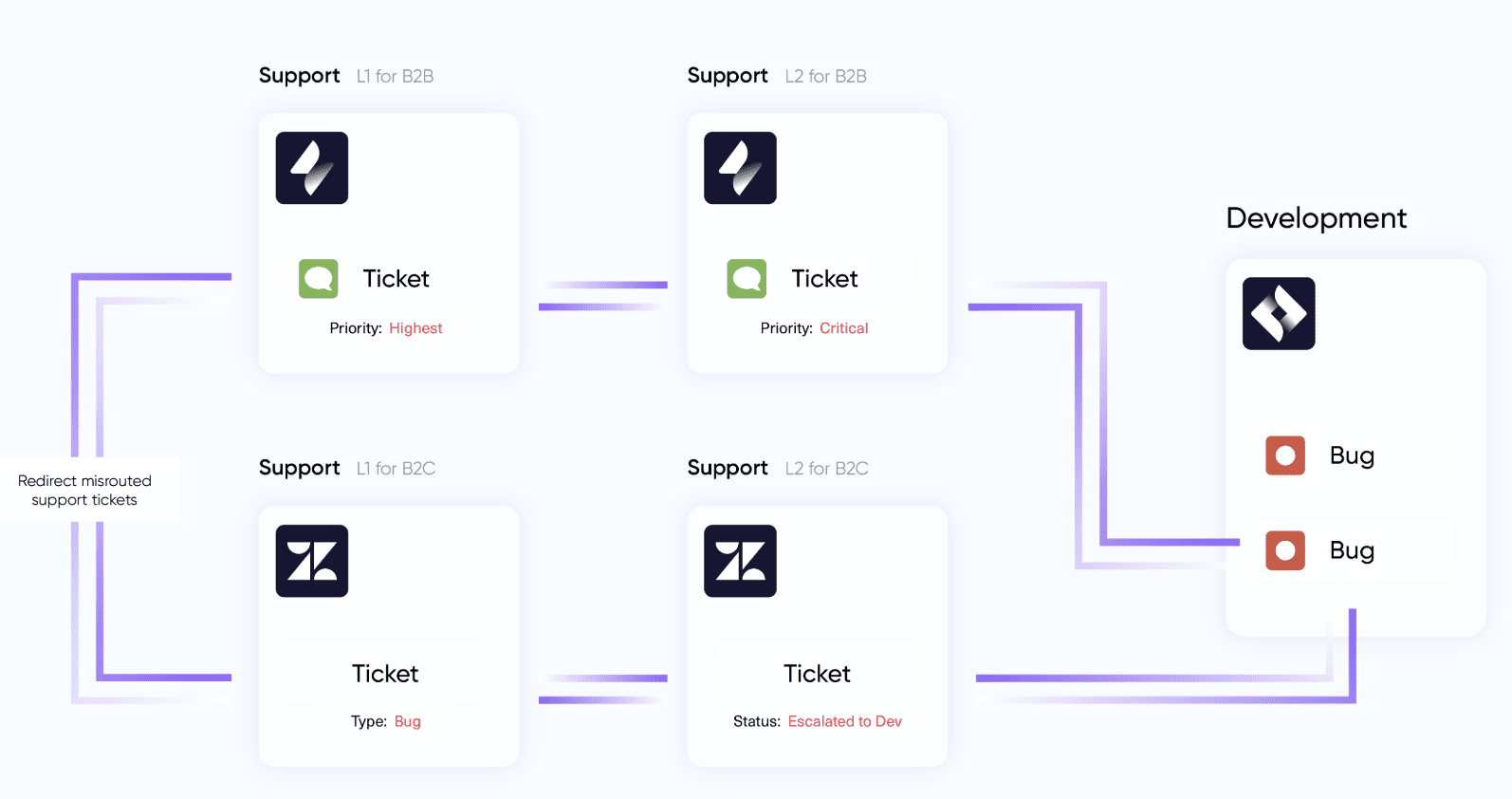
Solution: An automation routes tickets based on field values and escalation criteria. When Tier 1 flags a Freshdesk ticket as “needs escalation,” the automation creates a corresponding incident in ServiceNow with all relevant context. If Tier 2 determines it’s a code issue, a further escalation creates a work item in Azure DevOps. Status updates flow back down the chain. You can route tickets to the correct destination based on specific conditions like reporter, category, or priority.
Real-world application: Each tier gets the information they need in their own tool, in real time. No one waits for a manual hand-off or risks losing context during escalation. SLA compliance improves because escalation happens the moment criteria are met, not when someone gets around to it.
This kind of IT service management automation helps teams at every level of support proactively avoid SLA breaches, improve service quality, and reduce churn.
Consolidating Multiple Customer Tickets to a Single Development Work Item
Case: Multiple customers report the same bug through different channels. The support team uses Zendesk, and each report creates a separate ticket. Creating a separate Jira work item for each one clutters the development backlog.
Solution: Consolidate multiple Zendesk tickets into a single Jira work item. All customer context, comments, and status updates from the linked tickets flow into the consolidated work item. When the development team resolves the work item, the update propagates back to all connected Zendesk tickets.
Real-world application: Developers work on a single item instead of duplicates. Customer support can tell affected customers that the fix is in progress (and deployed) without manually tracking which tickets relate to the same underlying problem.
Streamlining Customer Onboarding
Case: Customer onboarding involves many steps: collecting user data, setting up accounts, provisioning access, assigning training, and confirming completion. When done manually, steps get missed, follow-ups are delayed, and the experience feels disjointed.
Solution: An automation manages the onboarding sequence end-to-end. Each completed step triggers the next: account creation triggers a welcome email, the welcome email triggers a training assignment, and a missed deadline triggers a reminder. If a step fails or a customer needs help, the system alerts a human team member automatically.
Real-world application: New customers move through onboarding faster and with fewer dropped balls. The team spends less time chasing status updates and more time helping customers who actually need human attention.
Centralizing Development Project Management Across Repositories
Case: An organization manages multiple projects across GitHub repositories but tracks overall progress in a central Jira instance. Keeping work item status, comments, and pull request data in sync manually across dozens of repos is unsustainable.
Solution: An automation syncs work items from all GitHub repos to a single Jira instance. Status changes, comments, and relevant metadata flow automatically in both directions. Teams continue working in their preferred tool while project managers get a unified view in Jira.
Real-world application: Engineering teams keep using GitHub. Project managers track everything in Jira. Nobody has to maintain manual spreadsheets or chase individual teams for status updates.
MSP Multi-Client Service Delivery
Case: A managed services provider supports multiple clients, each using a different ITSM or project management tool. Client A uses Jira Service Management, Client B uses Freshservice, and Client C uses Asana. The MSP tracks all work internally in ServiceNow. Copying ticket details manually between platforms eats up hours every day.
Solution: Exalate connects ServiceNow to each client’s platform. When a client raises an issue, the relevant details sync to the MSP’s ServiceNow automatically. Status updates, resolution notes, and comments flow back to the client’s tool. Each connection has independent sync rules, so data shared with Client A doesn’t leak to Client B.
Real-world application: The MSP eliminates manual ticket transcription across all client accounts. Clients see real-time updates in their own platform without requesting access to ServiceNow. Adding a new client with a different tool is a matter of setting up a new connection, not rebuilding the entire workflow.
CRM-to-Development Feedback Loop
Case: A product team wants engineering to prioritize fixes based on customer impact, but the customer data lives in Salesforce while engineering works in Jira. Product managers spend hours pulling reports from Salesforce and translating them into Jira work items.
Solution: An automation syncs high-impact customer cases from Salesforce to Jira as work items, carrying over context like account value, number of affected users, and severity. When engineering resolves the work item, the status update flows back to Salesforce, so the account team can proactively inform the customer.
Real-world application: Engineering gets customer impact context directly in Jira without needing Salesforce access. Account managers see fix status without pinging engineering. Product decisions are informed by real customer data rather than secondhand summaries.
Workflow Automation Tools: What to Look For
There are many automation tools available, ranging from general-purpose platforms to integration-specific solutions. Here’s what to evaluate when choosing one.
Bidirectional Sync vs. One-Way Automation
Most automation platforms handle one-way triggers well: “when X happens in System A, do Y in System B.” Fewer handle true bidirectional synchronization, where updates in either system flow to the other automatically.
If your workflows involve ongoing collaboration between teams using different tools, bidirectional sync is essential. One-way automation works for simple handoffs, but it falls short when both sides need to stay in sync continuously.
Connector Coverage
The tool should support the platforms your teams actually use. Beyond the obvious ones (Jira, ServiceNow, Salesforce), check for support for platforms like Freshservice, Freshdesk, Azure DevOps (Cloud and Server), GitHub, Zendesk, and Asana.
Also consider whether the tool supports custom connectors for proprietary systems with available REST APIs. The broader the connector coverage, the less likely you’ll hit a dead end when a new tool enters your stack.
Scripting and Customization Depth
No-code setups work for simple workflows, but real-world automation usually requires custom logic. Field mapping, conditional rules, data transformation, and filtering all demand a level of customization that visual builders can’t always deliver.
Look for tools that offer scripting capabilities (like Groovy in Exalate) alongside AI-assisted configuration that can generate scripts from plain language descriptions. That way, both technical and non-technical team members can contribute.
Security and Compliance
Automation that moves data between systems, especially across companies, must meet enterprise security standards. Look for encrypted connections (TLS 1.2+), role-based access controls, and proper credential management.
Independent data control on each side of a connection is critical for cross-company scenarios, where you need to guarantee that each organization governs what data enters and leaves their environment. Verify the vendor’s security certifications and review their published compliance documentation.
Scalability and Reliability
The tool should handle your current volume and grow with you. That means robust error handling, transactional sync queues that preserve data integrity during outages, and automatic recovery without manual intervention. Adding new connections, onboarding new partners, or expanding to additional platforms should not require rebuilding your existing setup.
Getting Started with Workflow Automation Using Exalate
One of the highest-value areas for workflow automation is syncing different systems, whether those are two platforms used within your company or an internal system connecting with a client, partner, or contractor. Managing data flow between these systems enables complex workflow orchestration that goes beyond simple task automation.
Exalate is an integration platform that lets you build advanced workflow automations connecting your critical business tools. Work items, tickets, cases, and service requests used by your systems are automatically synchronized between platforms.
With Exalate, you can:
- Define granular triggers using the native query languages of each connected platform. In Jira, that means JQL. In ServiceNow, that means encoded queries. In Salesforce, SOQL. Triggers stay familiar because they work the way you already filter data in each tool.
- Control field-level mapping to determine exactly what data syncs between platforms. Map priorities, statuses, custom fields, comments, and attachments. Transform data as it moves, so a “Critical” priority in Jira can map to a “P1” urgency in ServiceNow without manual translation.
- Automate end-to-end workflows using Groovy-based scripting. Define conditional logic, data transformations, and custom rules that handle your specific scenarios. For teams that need simpler setups, Aida provides an AI-assisted configuration that generates scripts from natural language descriptions.
After a thorough evaluation, we realized other solutions couldn’t match Exalate’s precision and flexibility. The results speak for themselves: with over 20,000 synced entries and nearly 10,000 synced comments, Exalate has become vital to our cross-company collaboration.
VODAFONE
Exalate supports connections between Jira, Azure DevOps (Cloud and Server), ServiceNow, GitHub, Salesforce, Zendesk, Freshservice, Freshdesk, Asana, and more. It also supports custom connectors for proprietary systems with available REST APIs. Here’s a guide to integrating Jira with Salesforce.
Workflow Automation Best Practices
Getting automation right takes more than picking a tool and flipping it on. These best practices help you build automations that deliver consistent value.
Map Your Current Workflow Before Automating It
Before automating anything, document the current process end-to-end. Identify every step, every decision point, every hand-off between teams or systems. Talk to the people who actually do the work, not just the managers who oversee it.
Support agents, engineers, and administrators often know about edge cases and workarounds that aren’t captured in any documentation. That knowledge is critical for building automations that handle real scenarios, not idealized ones.
Start with High-Volume, Low-Complexity Workflows
The best automation candidates are tasks that happen frequently, follow predictable rules, and currently require manual effort. Ticket routing, status syncing, notification triggers, and data entry across systems are all strong starting points. Get these running reliably before tackling more complex orchestration.
Build for Failure, Not Just for Success
Systems have outages. APIs throttle. Networks drop. Your automation should handle these gracefully. That means transactional sync queues that preserve the order of operations, automatic retries for transient errors, and clear alerts when something needs human attention.
You should also have a fallback plan for getting work done when the automation is temporarily offline. The most robust systems restart automatically without help once the underlying issue resolves.
Iterate and Expand
Workflow automation is an ongoing process, not a one-time project. Monitor performance, collect feedback from the teams using the automation, and look for ways to refine and improve.
Once you have reliable automations in one area, look for opportunities to replicate them across other departments, teams, or partner relationships. Automations that can be reused and adapted across different contexts become a force multiplier across the organization.
Involve Stakeholders Early
Changing workflows affects everyone who touches them. Involving team members from the start, support agents, developers, project managers, and IT administrators, helps you capture requirements you’d otherwise miss. It also smooths adoption because people are more likely to trust a system they helped design.
Conclusion
Automated workflows boost productivity and enable faster, more efficient collaboration across teams and companies. They cut costs, execute tasks quickly, and deliver consistent results. But the value depends entirely on making the right choices when setting things up.
There’s never been a better selection of software to help you get there, and much of it is accessible enough for anyone to use. By connecting your platforms together and automating the data flow between them, you eliminate the bottlenecks that slow teams down.
Exalate delivers a flexible, powerful solution for workflow automation. With it, you can build automations that sync data reliably across platforms, adapt to changing requirements, and scale as your business grows. Book a demo to see how it fits your workflows.
Frequently Asked Questions
What platforms does Exalate support for workflow automation?
Exalate supports bidirectional synchronization between Jira, ServiceNow, Salesforce, Zendesk, Azure DevOps (Cloud and Server), GitHub, Freshservice, Freshdesk, Asana, and Jira Service Management. It also supports custom connectors for proprietary systems with available REST APIs, so you can integrate platforms that don’t have pre-built connectors.
Can Exalate automate workflows between two different companies?
Yes. Cross-company automation is one of Exalate’s core strengths. Each organization independently controls what data it sends and how it processes incoming data. You can automate work item syncing with a partner, vendor, or customer without giving them access to your internal system and without needing to coordinate sync configurations with them.
How does workflow automation differ from workflow orchestration?
Workflow automation handles individual tasks or sequences of tasks based on triggers and rules. Workflow orchestration coordinates multiple automations as a unified process, managing dependencies, error states, and the overall flow across systems. Think of automation as the individual steps, and orchestration as the conductor managing how those steps work together.
Can I automate ticket escalation across different platforms?
Yes. You can set up automations that escalate tickets from one platform to another based on specific conditions: priority level, category, time elapsed, or custom field values. For example, a Freshdesk ticket flagged as “needs engineering” can automatically create a work item in Jira or Azure DevOps with all relevant context attached. Status updates flow back to the originating platform.
How does Exalate handle sync failures?
Exalate uses transactional sync queues that track changes in the order they occurred. If a connected system goes offline, changes queue up and are applied in sequence once the system recovers. The platform also provides error logging and alerting so administrators can identify and resolve issues quickly.
What’s the difference between one-way and bidirectional workflow automation?
One-way automation pushes data from System A to System B when a trigger fires. Bidirectional automation keeps both systems in sync continuously, so updates in either system flow to the other. Bidirectional is necessary when both teams actively work in their own tool and need to stay aligned. One-way works for simple hand-offs where only one side needs the data.
Can I use AI to help configure workflow automations in Exalate?
Yes. Aida provides AI-assisted configuration that generates Groovy scripts from plain language descriptions. Instead of writing sync rules from scratch, you describe your requirements (e.g., “sync high-priority Jira work items with attachments and comments to ServiceNow”) and Aida produces a script you can review and adjust. This reduces the learning curve and accelerates setup for both simple and complex scenarios.
Does Exalate support automating workflows with custom or proprietary systems?
Yes. Beyond pre-built connectors, Exalate supports custom connectors for any system with an available REST API. This extends automation capabilities to proprietary tools, homegrown platforms, and niche applications that aren’t covered by standard integration offerings.
Recommended Reading:
- How to Get the Most out of Your Workflow Integration
- Understanding Workflow Orchestration for Complex Business Processes
- Jira ServiceNow Integration: How to Connect Jira and ServiceNow in 6 Steps
- ITSM Integration: Simplify Your IT Services Like Never Before
- B2B Integration: The Comprehensive Guide
- Integration Security: Safeguarding Your Data in Connected Systems
- Groovy Scripting Made Easy: A Beginner’s Guide to Mastering the Basics
- How Business Process Automation Improves Workflows and Processes
- Automated Integration: A Key to Scalable and Agile Business Operations


