The only way to extend ServiceNow for your ITSM is through integration.
Although this is possible with IntegrationHub and other native integrations, these solutions give you limited flexibility and customization options.
With a ServiceNow third-party integration tool, you can explore multiple use cases for connecting with other platforms, applications, databases, and more.
But all third-party integration solutions come with unique features and challenges, which you must account for before choosing one for your organization.
This guide explores everything worth knowing about ServiceNow third-party integration, from types of tools available to the essential features that matter most and practical use cases across industries.
Key Takeaways
- Native options like IntegrationHub work for simple scenarios but lack the flexibility and customization needed for complex cross-platform integrations involving multiple partners or advanced data transformations.
- Third-party integrations reduce context switching by 40-60% for IT teams who previously relied on email and chat to coordinate with external stakeholders.
- Enterprise use cases include MSP multi-tenant operations, vendor collaboration across company boundaries, DevOps pipeline coordination, and customer escalation workflows.
- AI-assisted configuration through tools like Aida reduces integration setup time from weeks to hours for common synchronization scenarios.

What Are ServiceNow Integration Tools?
ServiceNow integration tools are applications or scripts that allow users to connect ServiceNow with third-party platforms like cloud services, SaaS applications, work management systems, and databases.
These tools provide an interactive environment for applications that are not compatible with ServiceNow to fetch data from their native APIs and send it to ServiceNow, and vice versa.
Integration tools bridge the gap between ServiceNow’s incident, change, and problem management workflows and external systems where development, customer support, or partner teams work.
Without integration, teams resort to manual data entry, email updates, and spreadsheet tracking, all of which introduce delays and errors.
Types of ServiceNow Integration Tools
Tools for connecting ServiceNow with other systems are either ServiceNow-developed or available through third parties. These tools usually fall within these categories:
Native (IntegrationHub)
IntegrationHub is a platform provided by ServiceNow to facilitate connections with third-party systems. It enables the execution of third-party APIs as a part of a flow when a specific event occurs in ServiceNow.
IntegrationHub relies on spokes, which control the connection without the need to write a script. Installing any of the packages allows users to configure spokes for other platforms using the built-in Flow Designer.
For instance, if you want a ServiceNow connector for Jira, use bi-directional webhooks and subscribe to Jira with a ServiceNow callback URL. This activates the Jira Spoke and assists with API calls.
Limitations: IntegrationHub works well for straightforward automations but requires additional spoke purchases for each platform.
Complex customizations often need Flow Designer expertise, and pricing scales with spoke count, making it expensive for organizations connecting multiple systems.
Third-Party Integration Platforms
Third-party tools help ServiceNow interact with other systems by bridging the formatting and interoperability gap. These solutions handle the technical complexity of connecting different APIs, data structures, and authentication methods.
ServiceNow third-party data integration lets you display retrieved data in Agent Workspace for CSM without storing it in your ServiceNow instance.
Third-party integrations in the ServiceNow environment can function as either iPaaS solutions, specialized integration tools, or custom ETL solutions.
iPaaS Solutions
ServiceNow iPaaS solutions provide a suite of tools that go beyond simply getting two incompatible platforms to share data.
These solutions combine no-code configuration with code-based algorithms and triggers to control how the configuration works.
Embedded iPaaS systems for ServiceNow take things further by providing AI-powered engines and other forms of automation for scripting connections.
The services of support engineers are at your disposal whenever the solution malfunctions—a significant advantage over DIY approaches.
Custom-Built Solutions
Even with the multitude of options available for ServiceNow data integration, companies with massive R&D departments sometimes opt for custom scripts to set up connections.
This involves an expert team of developers who thoroughly understand the API architecture and the programming language needed to work with it.
Custom solutions bring challenges around maintenance and upgrades to keep the custom code up to par. Developer turnover creates knowledge gaps, and API changes require ongoing attention.
When you calculate the total cost of ownership—including development time, maintenance burden, and opportunity cost—an enterprise ServiceNow third-party solution usually delivers better value.
ServiceNow Third-Party Integration Tools Compared
Here are the leading iPaaS solutions that support ServiceNow integrations with third-party apps. Each tool has different strengths depending on your use case, technical requirements, and budget.
Exalate
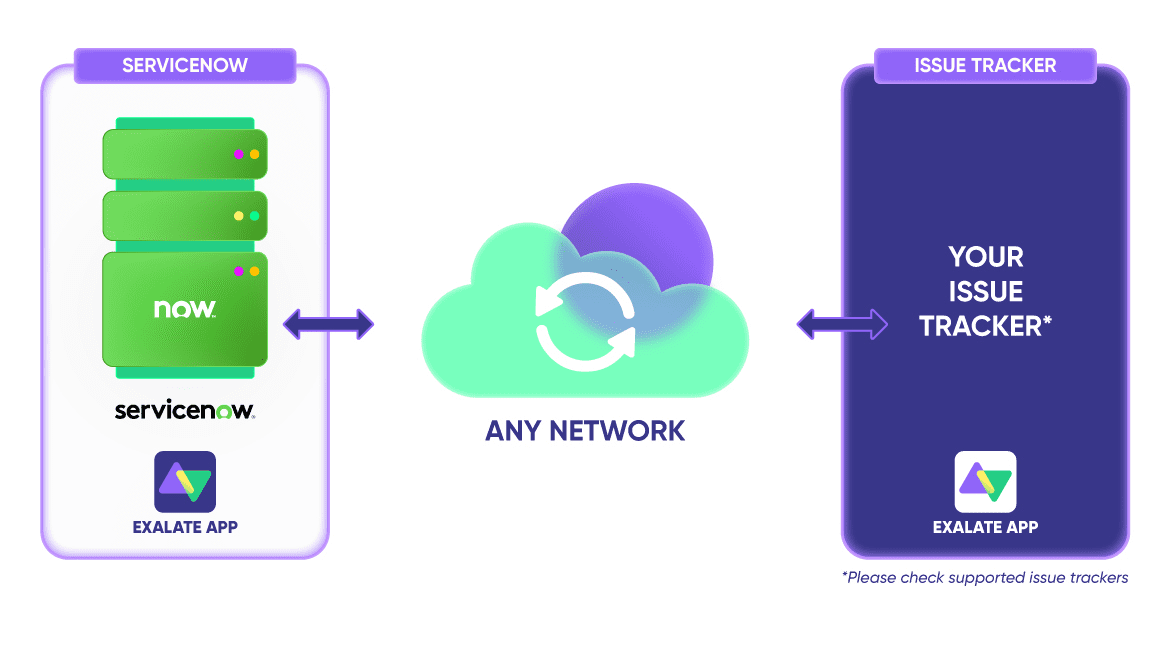
Exalate is an integration platform that supports ServiceNow third-party integrations as well as connections between multiple ServiceNow instances. It provides AI-assisted configuration through Aida for rapid setup and Groovy-based scripting for advanced customizations.
For example, if you want to sync a ServiceNow instance with Jira, Exalate allows you to sync entities such as incidents, CMDBs, change requests, problems, and much more.
To obtain any other information related to Exalate, you can always ask Aida, the AI-enabled scripting assistant.
Key capabilities:
- Bidirectional real-time synchronization with automatic conflict resolution
- AI-assisted configuration through Aida for natural language setup (“sync all high-priority incidents to Jira project X”)
- Groovy-based scripting for conditional logic, data transformations, and custom workflows
- Independent sync rules per connection—changes to one integration don’t affect others
- Cross-company collaboration without requiring access to partner systems
- TestRun validation to verify configurations before production deployment
Supported platforms: Jira (Cloud), Azure DevOps, Azure DevOps Server, Salesforce, Zendesk, GitHub, Freshdesk, Freshservice, Asana, and additional platforms through custom connectors.
ServiceNow entities supported: Incidents, problems, change requests, service requests, catalog items, CMDB configuration items, and custom tables.
Security: ISO 27001 certified with encryption in transit and at rest, role-based access control, and full scripting control over data synchronization. Each side of an integration maintains complete operational control over what data leaves its environment and how incoming data is processed. Visit the Exalate Trust Center for complete security documentation.
Best for: Organizations needing flexible, customizable integrations with full control over sync behavior. Particularly strong for MSP environments, cross-company collaboration, and complex scenarios requiring conditional logic.
Considerations: Advanced customizations require Groovy scripting knowledge, though Aida handles most common scenarios without code.
MuleSoft (Anypoint Platform)
MuleSoft is the premium iPaaS connector within the Salesforce ecosystem. That’s why it’s a safe bet for ServiceNow to Salesforce integration. This solution supports both default and custom connections.
The Anypoint ServiceNow Connector integrates seamlessly with multiple CRMs, SaaS applications, and cloud services.
MuleSoft connects other systems bidirectionally to guarantee accuracy and timely exchanges.
Key capabilities:
- API-led connectivity approach for building reusable integration assets
- Anypoint Studio IDE for designing complex integration flows
- Pre-built connectors for 400+ applications and systems
- DataWeave transformation language for data mapping
- API management and governance features
- Comprehensive monitoring and analytics
Supported platforms: ServiceNow, Salesforce (native), SAP, Workday, NetSuite, Oracle, AWS services, and hundreds of SaaS applications.
ServiceNow entities supported: All standard and custom tables through REST and SOAP API access.
Security: SOC 2 Type II certified, GDPR compliant, supports OAuth 2.0, and provides detailed access controls. Enterprise plans include dedicated infrastructure options.
Considerations: Significant investment in both licensing and expertise. The learning curve is steep—expect to hire certified MuleSoft developers or invest heavily in training. Overkill for straightforward ServiceNow-to-single-platform integrations.
Dell Boomi (Boomi)
Boomi is an iPaaS platform that combines AI and automation to enable synchronization of systems.
Boomi AI Studio allows users to automate workflows with low code, design event streams, and establish a foundation for trusted data.
In conjunction with ServiceNow, Boomi has developed Workflow Data Fabric, an automation engine for keeping track of syncs between ServiceNow and other systems.
Key capabilities:
- Low-code integration builder with drag-and-drop interface
- Boomi AI for intelligent mapping suggestions and error resolution
- Master Data Hub for data quality and governance
- Event-driven architecture support
- API management capabilities
- Extensive connector library with pre-built accelerators
Supported platforms: ServiceNow, Salesforce, SAP, Oracle, Workday, NetSuite, Microsoft Dynamics, AWS, Azure, and 1,500+ other applications.
ServiceNow entities supported: Incidents, problems, changes, service requests, CMDB, and custom tables through REST API integration.
Security: SOC 2 Type II certified, ISO 27001 compliant, HIPAA-ready, and supports various authentication methods, including OAuth 2.0 and SAML.
Considerations: While marketed as low-code, complex transformations still require technical expertise. Pricing can escalate quickly with additional connections and higher data volumes. Implementation often requires Boomi-certified partners.
Zapier
Zapier is an automated integration tool that allows you to connect ServiceNow with multiple platforms. It has an extensive library of Zaps—automated connections and workflows—that enable data exchange between applications and services.
Even with advanced features such as filters and webhooks, Zapier is limited in applicability because it doesn’t support fully custom connections and works mostly for “fire and forget” kind of use cases. You are limited to the default options.
Key capabilities:
- Simple trigger-action automation builder requiring no code
- 6,000+ app integrations with pre-built templates
- Multi-step Zaps for sequential workflows
- Filters and conditional paths for basic logic
- Webhooks for custom triggers
- Scheduled automations
Supported platforms: ServiceNow, Slack, Microsoft Teams, Google Workspace, Salesforce, HubSpot, Trello, Asana, and thousands of other web applications.
ServiceNow entities supported: Limited to incidents and basic record operations through the ServiceNow connector. Complex entities and custom tables have restricted support.
Security: SOC 2 Type II certified, GDPR compliant, supports OAuth where available. Enterprise plan adds SSO and advanced admin controls.
Considerations: Not suitable for complex bidirectional sync scenarios or enterprise data governance requirements. Task limits can become expensive at scale. Limited customization means you work within Zapier’s constraints rather than your own requirements. ServiceNow connector lacks depth compared to specialized tools.
Workato
Workato is an enterprise iPaaS solution that provides an integration and automation platform for connecting multiple applications.
Apart from basic integration, Workato also has a Data Hub as well as Workflow Bots for automating workflows and processes.
Workato Recipes include actions and triggers that follow predefined conditions. These control how the connection works and how data flows between the two connected applications.
Key capabilities:
- Recipe-based automation builder with visual workflow design
- Workbot for Slack and Teams, enabling conversational automation
- Workato Copilot AI for recipe suggestions and optimization
- API platform for building and managing custom APIs
- Data orchestration capabilities
- Community library with thousands of pre-built recipes
Supported platforms: ServiceNow, Salesforce, SAP, Oracle, Workday, NetSuite, Jira, Slack, Microsoft 365, and 1,000+ other applications.
ServiceNow entities supported: Incidents, problems, changes, requests, CMDB items, and custom tables. Strong support for ServiceNow-specific functions.
Security: SOC 2 Type II certified, ISO 27001 compliant, HIPAA-ready. Supports SSO, role-based access, and audit logging.
Considerations: Requires significant investment in recipe development and maintenance. While more accessible than MuleSoft, it still demands technical resources for complex scenarios. A recipe-based model can become unwieldy with many interconnected automations. Pricing lacks transparency.
Unito
Unito provides two-way sync between ServiceNow and project management tools like Asana, Trello, monday.com, and spreadsheets.
The platform focuses on creating relationships between work items across tools rather than one-time data transfers. Updates in one tool automatically reflect in the connected tool.
Key capabilities:
- True two-way sync with automatic update propagation
- Visual field mapping interface requiring no code
- Rules engine for filtering which items sync
- Historical sync to include existing items
- Real-time updates (within minutes)
- Connector-specific optimization for each platform
Supported platforms: ServiceNow, Jira, Asana, Trello, monday.com, ClickUp, Smartsheet, Notion, Airtable, Google Sheets, Microsoft Excel, GitHub, GitLab, Zendesk, Intercom, and HubSpot.
ServiceNow entities supported: Incidents with mapping to equivalent entities in connected platforms. Focus on work item synchronization rather than comprehensive ServiceNow data access.
Security: SOC 2 Type II certified. Data is encrypted in transit and at rest. Supports SSO for enterprise customers.
Considerations: Limited to supported connectors—can’t build custom integrations. Less flexibility for enterprise scenarios requiring conditional logic or data transformation. ServiceNow support is narrower than dedicated ServiceNow integration tools. Per-user pricing can become expensive for larger teams.
Perspectium
Perspectium specializes in ServiceNow data replication and integration, particularly for reporting and analytics use cases.
The platform excels at high-volume data transfers to warehouses like Snowflake, Power BI, and Tableau for business intelligence.
Key capabilities:
- High-throughput data replication (40+ million records daily)
- Real-time and scheduled sync options
- Native ServiceNow application deployment
- Push-based replication minimizing ServiceNow performance impact
- Data transformation during replication
- Support for data archiving and compliance
Supported platforms: ServiceNow to Snowflake, Power BI, Tableau, SQL Server, MySQL, PostgreSQL, Oracle, Amazon S3, Azure Blob Storage, and other data warehouses.
ServiceNow entities supported: All tables, including custom tables. Comprehensive support for CMDB, incidents, changes, problems, and any ServiceNow data structure.
Security: SOC 2 certified. Data is encrypted in transit and at rest. Customer-managed encryption keys are available. No access to customer data by Perspectium.
Considerations: Focused on data replication rather than workflow integration between operational systems. If you need Jira work items to sync with ServiceNow incidents, Perspectium isn’t the right tool. Strong for BI and analytics use cases but not for process integration.
Integration Tools Comparison Summary
| Tool | Best For | Sync Type | Customization |
| Exalate | Cross-platform workflow sync, MSP environments, cross-company collaboration | Bidirectional, real-time | Full scripting + AI-assisted |
| MuleSoft | Salesforce-centric enterprises, API management | Bidirectional | Full code (DataWeave) |
| Boomi | Enterprise data integration, legacy systems | Bidirectional | Low-code + scripting |
| Zapier | Simple notifications, basic automations | Mostly unidirectional | Limited (filters only) |
| Workato | Process automation, enterprise workflows | Bidirectional | Recipe-based + code |
| Unito | Project management tool sync | Bidirectional | Visual mapping |
| Perspectium | BI/analytics, data replication | Unidirectional (out of ServiceNow) | Transformation rules |
One integration tool that fits organizations needing flexibility, security, and cross-platform sync is Exalate. It helps you achieve bidirectional synchronization across work management platforms, including Zendesk, Jira, ServiceNow, Salesforce, GitHub, Freshdesk, Freshservice, Azure DevOps, Asana, and others.
Features to Consider When Choosing a ServiceNow Integration Tool
Selecting the right integration tool requires evaluating more than just connectivity. Here are the critical factors:
Security and Compliance
Integration tools handle sensitive data flowing between systems. Essential security features include:
- ISO 27001 Certification: Validates that the vendor follows international information security standards
- Encryption: Data should be encrypted both in transit (TLS 1.2/1.3) and at rest
- Role-Based Access Control (RBAC): Ensures only authorized users can configure, modify, or monitor integrations
- OAuth 2.0 Support: Provides secure authentication without exposing credentials
- Full Scripting Control: Maintains complete operational control over what data leaves your environment and how incoming data is processed
Verify these capabilities before evaluating other features. For detailed security documentation, reputable vendors maintain trust centers with compliance certifications and audit reports.
Customization and Scripting Flexibility
Basic integrations sync predefined fields. Real-world scenarios demand more:
- Conditional Logic: Apply different rules based on ticket priority, category, or source
- Data Transformation: Convert values between systems with different field formats
- Dynamic Routing: Direct data to different destinations based on content
- Custom Field Mapping: Sync non-standard fields specific to your ServiceNow configuration
Look for tools that offer both AI-assisted setup for common scenarios and scripting capabilities (like Groovy) for complex requirements. AI-assisted configuration accelerates initial setup while scripting handles edge cases.
Connector Breadth and Depth
The tool should support multiple connectors beyond just ServiceNow. This is valuable for multi-platform integrations, especially when different organizations or partners are involved.
Consider current and future integration needs. If you use ServiceNow with Jira today but plan to connect Azure DevOps, Salesforce, Zendesk, Freshservice, Freshdesk, or GitHub tomorrow, choose a platform that scales.
Real-Time vs. Scheduled Sync
Different use cases demand different sync frequencies:
- Real-time sync: Essential for incident escalation workflows where minutes matter
- Scheduled sync: Appropriate for reporting data that doesn’t require immediate updates
- Event-based triggers: Sync only when specific conditions are met, reducing unnecessary data transfers
The best tools support all three approaches within a single platform.
Scalability and Performance
Integration tools should handle:
- High transaction volumes without degrading performance
- Multiple concurrent connections for organizations with many integration points
- Large attachments and comment histories without timeouts
Ask vendors about throughput limits and how their architecture handles peak loads.
Support and Documentation
When integrations fail, response time matters. Evaluate:
- Support availability: 24/7 support vs. business hours only
- Response SLAs: Guaranteed response times for critical issues
- Documentation quality: Comprehensive guides, API references, and troubleshooting resources
- Community resources: Forums, knowledge bases, and user communities
Why Do You Need ServiceNow Third-Party Integration?
The main reason to integrate ServiceNow with other systems is to enable the smooth flow of data between them. This can be a unidirectional or bidirectional integration.
For instance, LF Logistics uses Exalate to share updates between its help center and customer service department. The state of the ServiceNow incident was always instantly conveyed to the corresponding Jira work item.
Another reason to connect ServiceNow with third-party applications is to receive instant updates and data promptly.
Nviso, a cybersecurity MSSP, uses Exalate to share updates with partners, who mostly use ServiceNow. This is a valuable asset for companies facing constant cybersecurity threats.
Organizations like WirelessCar also deploy ServiceNow third-party integrations to streamline internal workflows and external collaborations with other brands.
Most importantly, third-party tools like Exalate shrink your SaaS sprawl and eliminate the need for context switching when collaborating with other teams or working with outsourcing partners.
Practical Use Cases for ServiceNow Third-Party Integration
MSP Multi-Tenant Client Management
Challenge: Managed Service Providers juggle multiple clients, each with their own ticketing systems and workflows. Routing ServiceNow incidents to the correct client environment while maintaining data isolation is complex and error-prone.
Solution: Configure independent connections for each client. Each connection has its own field mappings, status transformations, and sync rules. Changes to one client’s integration don’t affect others.
Cross-Company Vendor Collaboration
Challenge: Your company uses ServiceNow for ITSM. A software vendor partner uses Jira for development. When ServiceNow incidents require vendor involvement, teams resort to email threads that lose context and delay resolution.
Solution: Establish a secure integration between your ServiceNow and the vendor’s Jira. Share only the fields necessary for resolution—incident description, priority, affected systems—while keeping internal notes and customer details private.
DevOps Pipeline Coordination
Challenge: Infrastructure incidents in ServiceNow require code fixes in Azure DevOps. Developers don’t have ServiceNow access, and IT doesn’t have Azure DevOps access. Coordination happens through meetings and Slack messages.
Solution: Sync ServiceNow incidents with Azure DevOps work items. When IT identifies incidents requiring code changes, the integration creates linked work items in Azure DevOps. Developers see incident context, reproduce steps, and affected systems without switching tools.
Customer Escalation Workflows
Challenge: Customer support uses Zendesk or Freshdesk for ticket management. Complex issues require IT involvement tracked in ServiceNow. Escalations involve copying ticket details into ServiceNow manually, then updating both systems separately.
Solution: Create bidirectional sync between the customer support platform and ServiceNow. Escalated tickets automatically create ServiceNow incidents. Updates in either system reflect in both, keeping support agents and IT aligned.
Security Operations Coordination
Challenge: Security teams identify vulnerabilities in their SIEM or security platform. Remediation requires IT action tracked in ServiceNow. Manual handoffs create gaps where critical vulnerabilities wait for attention.
Solution: Integrate security tools with ServiceNow to automatically create incidents for vulnerabilities exceeding severity thresholds. Sync remediation status back to security dashboards.
Product Development Feedback Loop
Challenge: Customer-reported bugs and feature requests in ServiceNow need routing to product teams in Jira. Product managers manually review ServiceNow tickets weekly, creating delays and dropped items.
Solution: Configure conditional sync that routes specific incident types to product Jira projects. Customer feedback flows directly to product backlogs while IT maintains incident ownership.
Frequently Asked Questions
What is ServiceNow third-party integration?
ServiceNow third-party integration connects your ServiceNow instance with external platforms like Jira, Azure DevOps, Salesforce, Zendesk, Freshservice, and others. Data flows bidirectionally between systems, keeping tickets, incidents, and work items synchronized without manual intervention.
How do I choose between IntegrationHub and third-party tools?
IntegrationHub works well for simple automations within the ServiceNow ecosystem. Choose third-party tools when you need advanced customization, cross-company collaboration, multi-platform connectivity, or features like AI-assisted configuration that accelerate setup.
Can I integrate ServiceNow with multiple platforms simultaneously?
Yes. Enterprise integration platforms like Exalate support connections to multiple systems—Jira, Azure DevOps, Salesforce, Zendesk, Freshservice, Freshdesk, Asana, GitHub, and others—from a single ServiceNow instance. Each connection operates independently with its own sync rules.
What ServiceNow entities can be synchronized?
Common entities include incidents, problems, change requests, service requests, catalog items, and CMDB configuration items. Custom tables and fields can also sync depending on the integration tool’s capabilities.
Is my data secure during integration?
Reputable integration platforms provide enterprise-grade security, including ISO 27001 certification, encryption in transit and at rest, role-based access control, and OAuth 2.0 authentication. Verify these capabilities before selecting a vendor. Review their trust center documentation for detailed security information.
Can I control what data leaves my ServiceNow instance?
Yes. Advanced integration tools provide full scripting control over outgoing data. You define exactly which fields sync, apply transformations, and filter sensitive information before it reaches external systems.
How do integrations handle different field formats between systems?
Integration tools provide data transformation capabilities. Convert dates between formats, map status values between different workflows, transform text fields, and apply conditional logic based on source data values.
Do I need coding skills to set up ServiceNow integrations?
Not necessarily. AI-assisted configuration handles common scenarios through natural language input. Describe what you want to sync, and the AI generates the configuration. Complex requirements may need Groovy scripting, but many integrations work without custom code.
Can integrations sync attachments and comments?
Yes. Most enterprise integration tools sync attachments, comments, and work logs along with core ticket data. Configure which elements sync based on your requirements—some organizations sync everything while others limit to essential fields.
What’s the difference between unidirectional and bidirectional integration?
Unidirectional integration pushes data one way—ServiceNow to Jira, for example. Bidirectional integration syncs changes in both directions, keeping systems aligned regardless of where updates originate.
How do I handle integrations when ServiceNow upgrades?
Quality integration tools maintain compatibility across ServiceNow versions. Vendors test against new releases and update their connectors as needed. Ask potential vendors about their ServiceNow version support and upgrade process.
Recommended Reads:
- ServiceNow to ServiceNow Integration: The Step-by-Step Guide to Setting up a Two-Way Sync
- ITSM Integration: Simplify Your IT Services Like Never Before
- ServiceNow Integrations: Integrate ServiceNow and Other Systems Bidirectionally
- Everything You Need to Know About ServiceNow Data Integration
- ServiceNow Connectors: How to Keep Systems and Companies Connected