Teams use various iPaaS solutions to manage business relationships and organize workflows across platforms.
With the right software, you can automate data transfer between applications, apply advanced filtering and customization, and cut the manual workload that slows teams down.
But with dozens of options on the market, picking the right one isn’t straightforward. Pricing models vary widely. Some tools handle simple one-way automations, while others manage complex bidirectional sync. And not every platform can handle cross-company scenarios where both sides control their own data independently.
This guide covers the top iPaaS platforms, what to evaluate when comparing them, and how to match a tool to your actual use case.
Key Takeaways
- iPaaS solutions eliminate manual data transfer between platforms by automating synchronization, reducing human error, and freeing up team bandwidth.
- The best iPaaS platforms combine no-code setup for simple workflows with scripting capabilities for complex, conditional logic.
- Cross-company integrations require independent sync rule control on each side, so both organizations maintain autonomy over their data.
- Connector depth matters more than connector count: shallow integrations that only sync basic fields create more problems than they solve.
- AI-assisted configuration is becoming a baseline expectation, helping teams generate sync rules and troubleshoot errors faster.
- Enterprise iPaaS adds governance, compliance certifications, and high availability on top of the core connectivity layer.
- Pricing models differ significantly: per-task billing spirals fast at volume, while per-connection or flat-rate plans are more predictable at scale.
Discuss your integration setup with our experts
Get free, expert advice on your setup. We’ll reach out via email to discuss your use case.
What is iPaaS?
iPaaS (Integration Platform as a Service) is a cloud-based solution that connects different applications, systems, and data sources so they can exchange information automatically.
Your CRM, ITSM tool, project management platform, and development tracker don’t communicate natively. An iPaaS solution sits between them, translating data formats, triggering sync events, and routing information where it needs to go without anyone manually copying between tabs.
Most platforms provide pre-built connectors for popular tools, alongside customization options (APIs, scripting engines, or visual builders) for more specific needs.
How Does iPaaS Work?
An iPaaS platform operates through a cycle of triggers, transformations, and actions. A trigger is the event that starts the sync: a new work item created in Jira, or a ServiceNow incident changing status. The platform detects this through webhooks, polling, or API calls.
Next comes the transformation layer. The platform takes incoming data and maps it to the format the destination system expects. A “Priority” field in Zendesk might need to become an “Urgency” field in ServiceNow with different value options. The iPaaS handles that translation.
Finally, the action pushes the transformed data to the target system. This could be creating a new record, updating an existing one, or appending a comment. In bidirectional setups, this cycle runs in both directions simultaneously, keeping both systems in sync without either side overwriting the other’s changes.
iPaaS vs. ESB vs. Custom API Integration
If you’ve been researching integration approaches, you’ve probably seen ESB (Enterprise Service Bus) and custom API development alongside iPaaS. Here’s how they differ.
- iPaaS is cloud-native, vendor-managed, and designed for speed. You get pre-built connectors, managed infrastructure, and faster time to value. It works best for SaaS-to-SaaS integrations where you need to connect multiple cloud applications without managing servers.
- ESB is an older, on-premise-first architecture that routes messages between systems through a central bus. It offers deep control but comes with significant infrastructure overhead, requires dedicated middleware teams, and scales less gracefully in cloud-first environments. Organizations with heavy legacy system investments still rely on ESBs, but most new integration projects lean toward iPaaS.
- Custom API integration means building connections yourself from scratch. This gives you total control but requires development resources for building, testing, maintaining, and updating every integration. For one or two simple connections, this can work fine. For anything beyond that, the maintenance burden grows fast.
| Factor | iPaaS | ESB | Custom API |
|---|---|---|---|
| Deployment | Cloud-native | On-premise or hybrid | Self-managed |
| Setup time | Hours to days | Weeks to months | Weeks to months |
| Maintenance | Vendor-managed | Internal team | Internal team |
| Best for | SaaS-to-SaaS, cross-company | Legacy system routing | Highly specific, low-volume needs |
| Scalability | Elastic, vendor-managed | Requires infrastructure planning | Depends on the architecture |
| Cost model | Subscription-based | Licensing + infrastructure | Development + maintenance |
What Are the Different Types of iPaaS?
iPaaS covers five distinct types, each built for a different scope of use: cloud-native, hybrid, enterprise, embedded, and specialized.
- Cloud-native iPaaS connects SaaS applications without any on-premise component. Zapier, Workato, and Make fall here. Setup is fast, and maintenance is entirely vendor-managed. These work well for internal workflows between cloud tools, but they don’t typically support cross-company scenarios where each organization needs to control its own sync rules.
- Hybrid iPaaS bridges cloud and on-premise systems. This is relevant if you’re running Jira Data Center, ServiceNow on-prem, or Azure DevOps Server alongside cloud tools. Exalate, MuleSoft, and Boomi support hybrid deployments. Not all iPaaS tools do, so check before committing if on-premise connectivity matters to your setup.
- Enterprise iPaaS adds governance, audit trails, role-based access controls, and compliance certifications (ISO 27001, etc.) on top of the core connectivity layer. It’s designed for organizations running hundreds of integrations at scale, where a misconfigured sync rule has real operational consequences. MuleSoft, Boomi, and enterprise tiers of Exalate target this segment.
- Embedded iPaaS is for software companies (ISVs) that want to offer native integrations inside their product without building each one from scratch. The iPaaS engine handles the connectivity layer while the product team focuses on core functionality. See our guide to embedded iPaaS for how this works in practice.
- Specialized iPaaS focuses on a specific domain. ITSM-to-development sync (Exalate), eCommerce and ERP workflows (Celigo), or work management sync (Unito) are examples. Specialized tools go deeper into fewer use cases rather than being shallow on many. If your integration needs fit a specific domain, a specialized tool usually outperforms a general-purpose one.
What Is Enterprise iPaaS?
Enterprise iPaaS is an integration platform built for large-scale, compliance-sensitive environments where multiple teams, systems, and organizations need to exchange data reliably under strict governance requirements. It goes beyond basic automation by adding API management, audit logging, security controls, and support for complex field mapping logic.
The practical differences from basic iPaaS are significant. An enterprise iPaaS handles thousands of simultaneous integration events without degrading. It provides audit trails for every sync action and supports role-based access controls so only authorized teams can modify sync configuration. And it includes SLAs with guaranteed uptime, not just best-effort availability.
At the field mapping level, enterprise iPaaS platforms offer scripting engines (Groovy, Python, or similar) that let you encode complex business rules. You can write conditional logic, transform data on the way in or out, filter records based on field values, and prevent sync loops at the code level. Pre-built connectors handle simple cases. Scripting handles everything else.
For cross-company scenarios — MSPs managing client environments, enterprises syncing with external vendors, or organizations collaborating across organizational boundaries — enterprise iPaaS is the minimum viable option. Each organization needs to control its own sync rules independently. If your partner changes their field mapping, it shouldn’t break your configuration. Not all iPaaS tools support this architecture.
The IT service management and integration service provider use cases are where enterprise iPaaS earns its price.
Why Use an iPaaS Solution?
iPaaS solutions let you work across tools and take advantage of different platforms without building and maintaining custom integrations yourself.
- Eliminates manual data transfer. Copying data between systems is slow, error-prone, and doesn’t scale. An iPaaS automates this, so updates in one platform show up in another without anyone touching them. A support ticket escalated from Zendesk to Jira carries all the context automatically, so the engineering team doesn’t chase down details. Across prospects we’ve spoken with, teams report 8–14 hours per week spent on manual sync before automating it.
- Speeds up internal and external processes. When systems share data in real time, teams stop waiting for handoffs. A product defect logged by a customer in Salesforce can trigger a work item in Jira or Azure DevOps within seconds, cutting resolution time from days to hours.
- Scales with your workload. Good iPaaS platforms handle the increasing volume without requiring you to rebuild your integration architecture. One enterprise customer we work with copies 500–1,000 tickets per month across three systems. Automating that sync removed a part-time job’s worth of manual work.
- Reduces the total cost of ownership. Building integrations in-house means paying for development, testing, maintenance, and updates every time an API changes. iPaaS vendors absorb that burden. Our build vs. buy calculator shows the math for your situation.
- Improves decision-making through unified data. When your tools are connected, you get a unified view across systems. Sales data from your CRM combined with support ticket trends from your ITSM tool gives a much clearer picture of customer health than either system alone.
- Supports cross-company collaboration. Some iPaaS platforms allow organizations to sync data with external partners, clients, or vendors while each side maintains independent control over sync rules. This is critical for MSPs managing multiple client environments or enterprises collaborating with third-party development teams.
- Strengthens data security. Rather than giving external teams direct access to your systems, an iPaaS creates a controlled data exchange layer. The best platforms include TLS encryption, JWT authentication, role-based access controls, and compliance certifications to protect sensitive data in transit and at rest.
How to Choose the Right iPaaS Platform
A team automating simple marketing workflows has different needs from an enterprise managing cross-company ITSM-to-development sync.
Connector Depth, Not Just Count
Vendor websites love to advertise connector numbers, but this means little if those connectors only sync basic fields. What matters is how deep each connector goes.
Can it sync custom fields? Does it support bidirectional updates? Can it handle attachments, comments, and status changes, or just the top-level record? A platform with 50 deep connectors will serve you better than one with 5,000 shallow ones.
Bidirectional vs. One-Way Sync
Many iPaaS tools only support one-way data flow: push data from system A to system B. That works for simple use cases like logging form submissions to a spreadsheet.
For ITSM, development, and cross-company workflows, you need true bidirectional sync where changes in either system reflect in the other without conflict.
Customization Options
Pre-built templates get you started fast, but real-world integrations almost always need customization. Look for platforms that offer scripting capabilities (like Groovy-based engines) alongside no-code setup. That combination lets you handle simple workflows quickly while retaining the power to build complex conditional logic when needed.
Independent Control for Each Side
In cross-company scenarios, both organizations need to control their own sync rules independently. If your partner changes their field mapping, it shouldn’t break your configuration. Not every iPaaS tool supports this, and it becomes a dealbreaker the moment you’re integrating with an external team.
Error Handling and Recovery
Integrations break, APIs change, systems go down, and rate limits get hit. What matters is how the platform handles failures. Does it queue missed events and retry automatically? Does it alert you when something goes wrong? Can it recover gracefully after an outage without losing data?
Pricing Model Alignment
iPaaS pricing varies widely. Some charge per task or operation, which spirals fast in high-volume environments. Others charge per connection, per user, or offer flat-rate plans. Make sure the pricing model aligns with your expected data volumes so you don’t hit a surprise bill after month one.

Calculate time and money savings from automated bidirectional sync.
Top 14 iPaaS Solutions for Businesses
The table below gives a quick comparison across the criteria that matter most. Detailed reviews follow.
| Tool | Bidirectional | Cross-company | Scripting | On-prem support | Pricing model | Best for |
|---|---|---|---|---|---|---|
| Exalate | Yes | Yes (independent rules) | Groovy | Yes (Docker/JAR) | Per connection | Cross-company, ITSM-to-dev |
| MuleSoft | Yes | Limited | Yes | Yes | Custom (quote) | Large enterprise, Salesforce-heavy |
| Boomi | Yes | Limited | Yes | Yes (hybrid) | From $50/month | Broad enterprise, B2B EDI |
| Workato | Yes | Limited | Low-code recipes | No | Quote-based | Mid-to-large org, quick automations |
| Zapier | One-way primarily | No | No | No | Per task | Simple one-way automations |
| Unito | Yes | No | No | No | Per item in sync | Work management sync |
| Jitterbit | Yes | Limited | Yes | No | Quote-based | Integration + API creation |
| Celigo | Yes | Limited | SDK | No | From free trial | ERP/eCommerce, NetSuite |
| Tray.io | Yes | No | Yes | No | $695–$2,450/year | Operations/RevOps |
| TIBCO | Yes | No | Yes | Yes (hybrid) | From $400/month | Dev teams, event-driven |
| Oracle | Yes | Limited | Yes | No | Usage-based | Oracle ecosystem |
| Integrately | Limited | No | No | No | From $19.99/month | Non-technical, simple workflows |
| Martini | Yes | No | Yes | Yes | $500–$5,000/month | API + integration, on-prem |
| Automate.io | Limited | No | No | No | From free | Small teams, simple automations |
Discuss your integration setup with our experts
Get free, expert advice on your setup. We’ll reach out via email to discuss your use case.
1. Zapier
Zapier connects more than 7,000 web apps through a trigger-and-action model called “Zaps.” You define a trigger event in one app, and Zapier executes an action in another.
Its more advanced features include filters, formatters, paths for conditional logic, and webhook connections. Plans range from free (with limited tasks) to enterprise tiers for high-volume use.
Best for: Teams that need broad app coverage for simple, one-way automations. Zapier’s connector library is unmatched, but most integrations are trigger-action based rather than true bidirectional sync. Complex data transformations or cross-company scenarios aren’t its primary focus.
2. Workato
Workato gets teams operational quickly through thousands of pre-built connectors and a community library of shared automation recipes. It takes a low-code approach with an emphasis on ease of use and enterprise-grade automation, and includes API management and bot-based workflow automation for more advanced use cases.
Best for: Mid-to-large organizations that want pre-built recipes and community-shared automation templates. Its strength is getting common business automations running quickly, though its pre-built solutions may not offer the fine control needed for deeply customized field mapping or cross-company sync.
Pricing is quote-based with no free trial.
3. Exalate
Exalate creates reliable integrations between Jira, ServiceNow, Salesforce, Zendesk, Azure DevOps (including Azure DevOps Server), GitHub, Freshservice, Freshdesk, Asana, and other systems through custom REST API connectors.
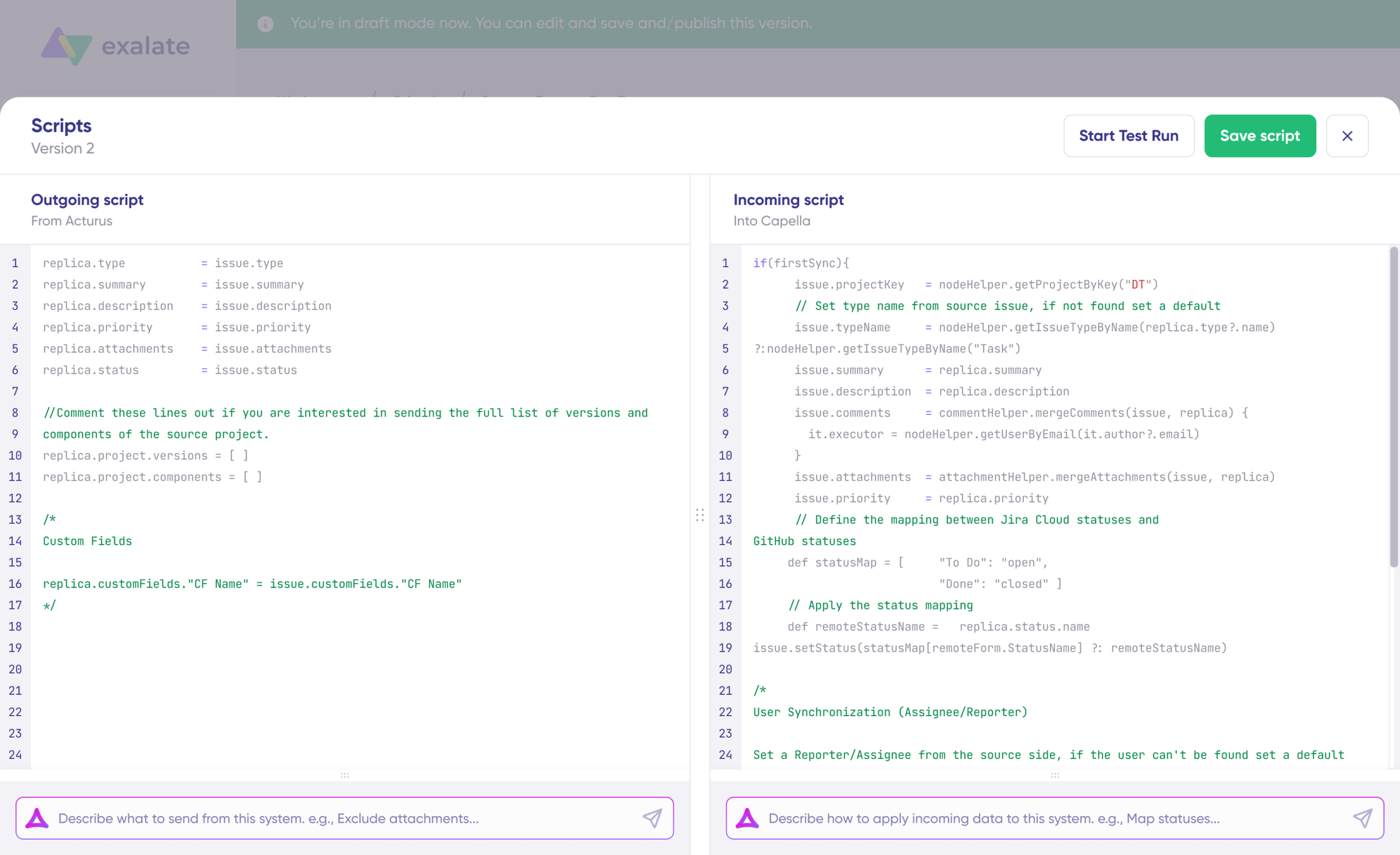
It combines a no-code interface with an optional Groovy-based scripting engine. You can get started quickly with pre-configured sync rules, but also apply advanced programming logic when your use case demands it.
What separates Exalate from most iPaaS tools on this list is its approach to cross-company integration. Each side of the integration controls its own sync rules independently. Your team decides what data to share and how incoming data maps to your system. Your partner does the same on their end. Neither side can break the other’s configuration.
Dashboard data is available, where you can see everything or choose a specific integration or connection to be shown, as well as a time range. The Chrome extension called Sync Panel lets users check sync status, spot errors, trigger manual syncs, and unlink sync pairs straight from the browser, without opening the console.
Exalate includes an AI-assisted scripting assistant called Aida that generates Groovy script snippets for field mapping and sync rule configuration. You describe what you need, Aida produces the code, and you review and refine it.
The platform handles outages by queuing sync events during downtime and restoring connections automatically when systems come back online. Security features include TLS encryption, JWT authentication, and role-based access controls. Exalate holds ISO 27001 certification, which you can review at trust.exalate.com.
QUALCO, a financial technology company operating across multiple countries, switched to Exalate after its previous integration tool became too expensive and too slow to configure. They now sync Jira and ServiceNow across teams in different organizations with full field-level control on each side.
Best for: Cross-company integrations, MSPs managing multiple client environments, and teams that need deep bidirectional sync with independent control on each side. Especially strong for ITSM-to-development workflows involving Jira, ServiceNow, Zendesk, and Salesforce.
4. MuleSoft
MuleSoft’s Anypoint Platform combines API management, integration, and low-code development through its Composer tool.
It follows an API-led connectivity approach, meaning integrations are structured as reusable API layers rather than point-to-point connections. This makes it powerful for large enterprises with complex system landscapes, but also introduces a steeper learning curve than most iPaaS alternatives.
MuleSoft is now part of the Salesforce ecosystem, which gives it strong native Salesforce integration but can also mean vendor lock-in if your stack extends beyond the Salesforce universe.
Best for: Large enterprises with dedicated integration teams that want API-led connectivity and deep Salesforce integration. Less suited for teams that need quick, no-code setup or cross-company sync scenarios.
MuleSoft has a free trial, with prices available on request.
5. Boomi
Boomi offers a cloud-native integration platform with a visual, drag-and-drop interface for building integrations. It supports application, data, B2B, and API integration in a single platform. Its Integration Process Library includes thousands of pre-built templates, and the platform supports master data management and EDI (Electronic Data Interchange) for B2B scenarios.
Best for: Organizations that need a broad integration suite covering application integration, data management, and B2B EDI in one place. Its visual interface is approachable for non-developers, and the three-month free trial plus $50/month baseline makes it accessible for budget-conscious teams.
6. Unito
Unito syncs entire work items (tasks, tickets, spreadsheet cells) between project management apps, including Asana, Jira, GitHub, Google Sheets, and others. All integrations support two-way syncing with real-time updates. As a no-code solution, it doesn’t require technical expertise to set up. You define field mappings visually and set rules for what gets synced and in which direction.
Best for: Teams syncing work items between project management and collaboration tools. Strong for internal workflows, but doesn’t support the same depth of customization or cross-company independence that scripting-capable platforms offer.
Pricing starts at $10/month for 100 items in sync, scaling to $769/month for 10,000 items.
7. Jitterbit
Jitterbit combines iPaaS tools with API creation capabilities, helping you integrate data from multiple sources while also building APIs for your specific needs. That API creation angle is useful if you’re trying to connect to an app that isn’t supported elsewhere or working with your own custom system. Jitterbit Harmony, its main platform, includes pre-built connectors, recipe templates, and a visual design studio.
Best for: Teams that need both integration and API creation capabilities, particularly when connecting to custom or unsupported applications.
Pricing is on request.
8. Integrately
Integrately connects 1,050+ apps through a visual builder and one-click automation library, designed for non-technical users. Advanced features include filters, conditions, and multi-step integrations for more complex workflows. Integrately provides 24×5 support and a dedicated automation expert at no extra cost.
Best for: Small teams and non-technical users who want quick, simple automations without learning a complex platform. Its automation library makes common integrations fast to deploy, though it lacks depth for complex enterprise scenarios.
Pricing starts at $19.99/month.
9. Tray.io
Tray.io positions itself as a general automation platform for operations teams. You can use visual tools to connect apps, create scheduled triggers, and build multi-step workflows with conditional logic. It includes connections to over 600 apps, elastic scaling, full logging, and its own SDK for custom development. Higher-tier plans include SAML SSO and HIPAA BAA.
Best for: Operations and RevOps teams that need flexible, multi-step automations with conditional logic and good security compliance. Its visual workflow builder is powerful but requires more ramp-up time than simpler tools like Zapier or Integrately.
Pricing ranges from $695 to $2,450/year, with custom pricing for enterprise users.
10. Celigo
Celigo manages connectivity needs for both IT and business teams in one place. Pre-built connectors get you moving fast, and an SDK adds flexibility for custom scenarios. The marketplace includes templates and business process automations. Celigo has end-to-end encryption, SSO, and HIPAA compliance. The platform focuses heavily on ERP and eCommerce integration patterns, with strong NetSuite and Shopify connectors.
Best for: ERP-centric organizations, particularly those running NetSuite, that need pre-built business process automations for order-to-cash, procure-to-pay, and similar workflows.
It has a 30-day free trial. Contact their sales team for pricing.
11. Martini
Martini is a low-code API management platform that also handles platform integration. It runs on the cloud but is also available in desktop or on-premise form, which is unusual for an iPaaS tool. Its machine-generated integration services let you connect platforms, tune workflows, and manipulate data sources with visual tools. The platform includes API design, testing, and publishing capabilities alongside its integration features.
Best for: Development teams that need API management alongside platform integration, particularly those that require on-premise deployment options.
Martini costs from $500 to $5,000/month, depending on your plan.
12. TIBCO Cloud Integration
TIBCO Cloud Integration offers API-led, event-driven integration. It leans toward high flexibility rather than pre-built solutions, making it a good fit for developer-heavy teams that want granular control. There are some concerns about its scalability, with users reporting a slowdown as data volumes increase. The platform includes TIBCO BusinessWorks for complex integration patterns and TIBCO Flogo for lightweight, event-driven microservice integrations.
Best for: Development teams comfortable with event-driven architecture that want fine-grained control over integration logic. Less ideal for non-technical users or teams needing quick deployment.
It has a 30-day free trial, then pricing starts at $400/month with custom pricing for hybrid plans.
13. Oracle Integration
Oracle Integration is part of Oracle’s Cloud suite. It offers a variety of features for automating business processes and comes with many pre-built adapters for Oracle’s own ecosystem, as well as other cloud services, databases, and applications. The platform includes file management, process automation, and a visual application builder. It works best when you’re already in the Oracle ecosystem.
Best for: Organizations already invested in Oracle’s cloud ecosystem that want integration across Oracle products with extensions to third-party tools.
Its trial includes thousands of hours of computing time, with usage-based pricing after that.
14. Automate.io
Automate.io is a low-code platform pitched to non-technical users. It connects to over 200 apps through a code-free, drag-and-drop interface, with templates to help you perform common tasks quickly. The platform supports multi-step workflows (called “Bots”) and one-to-many integrations for distributing data to multiple destinations simultaneously.
Best for: Small teams and non-technical users wanting simple, affordable automations. Its lower price point makes it accessible, though its app library and customization options are more limited than those of larger competitors.
There’s a free tier, and its top plan costs $159/month for 10 users.
iPaaS Use Cases: Where These Platforms Deliver Real Value
iPaaS platforms solve real operational problems. Here are three scenarios where the value is concrete.
Support-to-Engineering Escalation
A SaaS company’s support team works in Zendesk while engineering works in Jira. When a customer reports a bug, the support agent manually creates a work item in Jira, copying over the description, priority, and attachments. Updates flow back the same way: manually, often late, sometimes not at all.
An iPaaS creates a bidirectional sync between Zendesk tickets and Jira work items. When a support agent escalates a ticket, a corresponding work item is created in Jira automatically with all relevant context. When engineering updates the status or adds a comment, that syncs back to Zendesk so the support agent can update the customer without switching tools.
The result: engineers get full context on the first handoff, and updates flow back to support in real time, removing the “let me check with engineering and get back to you” delay.
MSP Managing Multiple Client Environments
A managed service provider handles ITSM for 15 clients, each using a different combination of ServiceNow, Freshservice, Zendesk, or Jira. The MSP needs visibility across all client environments, while each client needs to control their own data and processes.
An iPaaS that supports independent sync rules for each side handles this. The MSP configures its own incoming and outgoing rules. Each client controls what data they share and how incoming data maps to their system. No client can see another client’s data, and the MSP gets a consolidated view across all environments.
The MSP cuts context-switching because client tickets sync directly into their internal system. Clients maintain autonomy because they control their own sync configuration.
Onboarding a new client means setting up a new connection, not rebuilding the entire integration architecture. Quorum Cyber manages 500+ tickets monthly across client environments this way.
CRM-to-Development Feedback Loop
A B2B software company’s sales team logs feature requests and product feedback in Salesforce, while the product team tracks the roadmap in Azure DevOps.
There’s no connection between the two, so product decisions are made without full visibility into what customers are actually asking for, and the sales team has no way to tell customers when their requested features are shipping.
An iPaaS solution syncs relevant Salesforce cases or custom objects to Azure DevOps work items. When a feature request is logged in Salesforce, it appears in Azure DevOps with the customer context attached. When the product team moves a feature to “In Progress” or “Released,” that status update flows back to Salesforce so the account manager can follow up.
Product priorities become informed by actual customer demand data. Sales teams can proactively notify customers when requested features ship, which reduces churn. The feedback loop that used to rely on monthly cross-team meetings now happens automatically.
iPaaS Trends to Watch
The iPaaS market is evolving fast. A few trends are worth tracking as you evaluate platforms.
AI-assisted configuration is becoming standard rather than optional. Platforms are introducing AI tools that generate sync rules, suggest field mappings, and troubleshoot errors based on natural language descriptions. This reduces the scripting expertise needed to set up complex integrations and speeds up initial configuration significantly.
Composable integration architecture is gaining traction over monolithic platforms. Instead of one tool doing everything, organizations are combining specialized connectors and APIs into modular integration stacks. This plays well with iPaaS tools that offer open APIs and extensibility.
Cross-company integration is moving from nice-to-have to baseline requirement. As more organizations outsource, work with MSPs, or collaborate with external vendors, the ability to integrate across organizational boundaries with independent control on each side is becoming critical. Platforms that only handle internal, same-organization sync are losing ground.
Embedded iPaaS is growing for ISVs and SaaS companies that want to offer native integrations within their product. Rather than building each integration from scratch, they embed an iPaaS engine that handles the connectivity layer while they focus on their core product.
What’s Next
The right iPaaS depends on what you’re actually connecting. If you need simple one-way automations across hundreds of apps, tools like Zapier or Integrately will do the job. If you need deep, bidirectional sync with cross-company support and independent rule control on each side, Exalate is built specifically for that. If you’re an enterprise with complex API management needs and a dedicated integration team, MuleSoft or Boomi might be the better fit.
A few steps to move forward:
- Map your integration scenarios. List every tool you need to connect, the direction of data flow, and whether each scenario involves an external organization or just internal teams.
- Check connector depth. For your two or three most critical integrations, confirm the platform supports bidirectional sync, custom field mapping, and the specific fields your teams rely on.
- Evaluate pricing at your volume. Estimate your expected monthly event volume. Per-task billing at 50,000 events/month looks very different from per-connection billing.
- Run a trial with your actual use case. Don’t test with a demo scenario. Connect your real systems, map your real fields, and see where the platform’s limits are before committing.
- Check the security posture. If you’re handling customer data or regulated information, verify the platform’s certifications, data residency options, and access controls before going to procurement.
Book a demo to see Exalate’s cross-company sync in action, or start a free trial to set up your first connection.
Still deciding between an iPaaS and a dedicated sync tool for a large rollout? Contact our sales team and we’ll go through your requirements together.

Frequently Asked Questions
What is an iPaaS solution?
An iPaaS (Integration Platform as a Service) is a cloud-based platform that connects applications, data sources, and systems so they can exchange information automatically. It sits between your tools, translating data formats, triggering sync events, and routing information without manual intervention. Most platforms include pre-built connectors for popular tools alongside customization options for more complex needs.
What are the different types of iPaaS?
There are five main types: cloud-native iPaaS (SaaS-to-SaaS only, no on-prem), hybrid iPaaS (cloud and on-premise), enterprise iPaaS (governance, compliance, and API management at scale), embedded iPaaS (built into a product for ISVs), and specialized iPaaS (focused on a specific domain like ITSM or eCommerce). Most vendors fit into one or two of these categories, so knowing which type you need narrows your shortlist fast.
How does enterprise iPaaS differ from basic iPaaS?
Enterprise iPaaS adds governance, audit trails, role-based access controls, compliance certifications, and scripting capabilities on top of the core connectivity layer. Basic iPaaS tools handle simple automations reliably. Enterprise iPaaS handles thousands of simultaneous integration events, provides auditability for compliance requirements, and supports complex conditional sync logic across large-scale, multi-team environments.
What are the top iPaaS platforms?
The top platforms by use case: Zapier and Workato for broad app coverage and quick automation, MuleSoft and Boomi for large enterprise API management, Exalate for cross-company ITSM-to-development sync with independent rule control on each side, Celigo for ERP and eCommerce workflows, and Unito for work management sync. The right answer depends on your use case, not a general ranking.
What is the best iPaaS solution for cross-company integration?
Exalate is built specifically for cross-company integration scenarios. It allows each organization to control its own sync rules independently, so neither side can accidentally break the other’s configuration. This makes it well-suited for MSPs managing multiple clients, enterprises collaborating with external vendors, and organizations that need bidirectional sync across organizational boundaries.
What platforms does Exalate integrate with?
Exalate supports Jira, ServiceNow, Salesforce, Zendesk, Azure DevOps (including Azure DevOps Server), GitHub, Freshservice, Freshdesk, and Asana. It also supports custom REST API connectors for systems not in its standard connector library.
What is Aida in Exalate?
Aida is Exalate’s AI-powered scripting assistant. It generates Groovy script snippets for field mapping and sync rule configuration based on natural language descriptions. You describe what you need, and Aida produces the code, which you can then review and adjust.
How does iPaaS differ from ESB?
iPaaS is cloud-native, vendor-managed, and designed for fast SaaS-to-SaaS connectivity. ESB (Enterprise Service Bus) is an older, typically on-premise architecture that routes messages through a central bus. iPaaS offers faster setup and lower maintenance overhead. ESB offers deeper control for complex legacy system landscapes but requires dedicated middleware teams to manage.
Can iPaaS handle bidirectional sync?
Not all iPaaS platforms support bidirectional sync. Many popular tools like Zapier primarily handle one-way, trigger-action flows. For true bidirectional sync where changes in either system reflect in the other without conflict, you need platforms specifically designed for it, such as Exalate or Unito, that include conflict resolution and independent rule management.
Is iPaaS secure for sensitive data?
Security varies significantly between providers. Look for platforms that offer TLS encryption for data in transit, role-based access controls, authentication mechanisms like JWT or OAuth, and compliance certifications such as ISO 27001. The best platforms also offer detailed access controls that let you define exactly what data is shared and with whom. Exalate’s full security posture is available at trust.exalate.com.
How much does an iPaaS solution cost?
Pricing models differ widely. Zapier charges per task, Unito charges per item in sync, Boomi starts at $50/month, and enterprise tools like MuleSoft and Tray.io offer custom pricing. Exalate has a free plan. The total cost depends on your data volume, number of connections, and required features. Visit the pricing page for more details.
What is the difference between iPaaS and SaaS integration?
iPaaS is a type of SaaS product specifically designed to connect other SaaS applications. SaaS integration is the broader concept of linking cloud-based software tools together. You can achieve SaaS integration through iPaaS, native integrations, custom API code, or middleware. iPaaS is typically the most efficient approach for organizations connecting multiple tools at scale.
Can I integrate on-premise systems with an iPaaS?
Some iPaaS platforms support hybrid deployments that connect cloud-based and on-premise systems. Exalate supports Azure DevOps Server (on-premise) alongside its cloud connectors and offers Docker-based deployment options. Not all iPaaS tools handle on-premise connectivity, so check this before committing if it’s relevant to your setup.
How long does it take to set up an iPaaS integration?
Setup time depends on complexity. Simple, pre-configured sync templates can be operational within minutes to hours. More complex scenarios with custom field mappings, conditional logic, and multi-platform connections take longer, but AI-assisted configuration tools like Exalate’s Aida reduce setup time significantly compared to writing integration scripts manually.
Recommended Reads:
- The Comprehensive Guide to iPaaS (Integration as a Platform Service)
- Integration as a Service (IaaS): Everything Explained
- API Integration: A Practical Guide to Maximizing Business Efficiency
- B2B Integration: The Comprehensive Guide
- How to Build an Effective SIAM Operating Model
- eBonding Integration: The Ultimate Guide to Flexible Data Sync