Migration moves your data once, in one direction, and then forgets about the source system. But synchronization keeps both systems running and connected, exchanging updates as records change on either side.
Most teams start with sync and only opt to migrate later, if they ever do. Some just keep the sync running. But to choose which one works for you, you need to understand the scenarios that necessitate either synchronization or migration.
When Should You Migrate or Sync?
The reason for comparing synchronization with migration is usually one of a few things.
For instance:
- Your ServiceNow Data Center instance is hitting end-of-life, and someone floats the idea of moving everything to Jira instead of paying to re-platform.
- You’ve just acquired a company: the parent runs ServiceNow, the acquired team lives in Jira, and both need to see the same incidents by Monday.
- Finance looks at the ServiceNow renewal, sees the per-seat cost, and asks whether the dev team really needs those licenses at all.
Each of these options leads to the same question: move the data, or connect the two systems?

Migration vs. Sync: What Each One Actually Means
The difference comes down to what moves, what stays, and whether you can undo it.
| Migration | Sync (integration) | |
| What moves | All historical data, one time | Selected fields, continuously |
| What stays live | Only the target system | Both systems |
| Direction | One-way | Two-way (or one-way by choice) |
| What “done” looks like | Source is decommissioned | Connection runs indefinitely |
| Reversibility | Difficult. You’d need a second migration back | Yes. Turn it off and both systems still work |
There’s a third case that fits neither box, and it comes up more than people expect. A team already on Jira Software adds Jira Service Management to take over ITSM work that used to live in ServiceNow. No ServiceNow data gets moved, and no sync gets built. The work itself just changes hands.
That’s a scope handoff, not a migration or a sync. Teams keep filing it under “we’re migrating off ServiceNow” when what they’re really doing is standing up JSM for a slice of work and leaving ServiceNow alone.
If you’re weighing a full move, our ServiceNow-Jira integration overview breaks down what a live connection actually covers before you touch a migration plan.
The Decision Framework
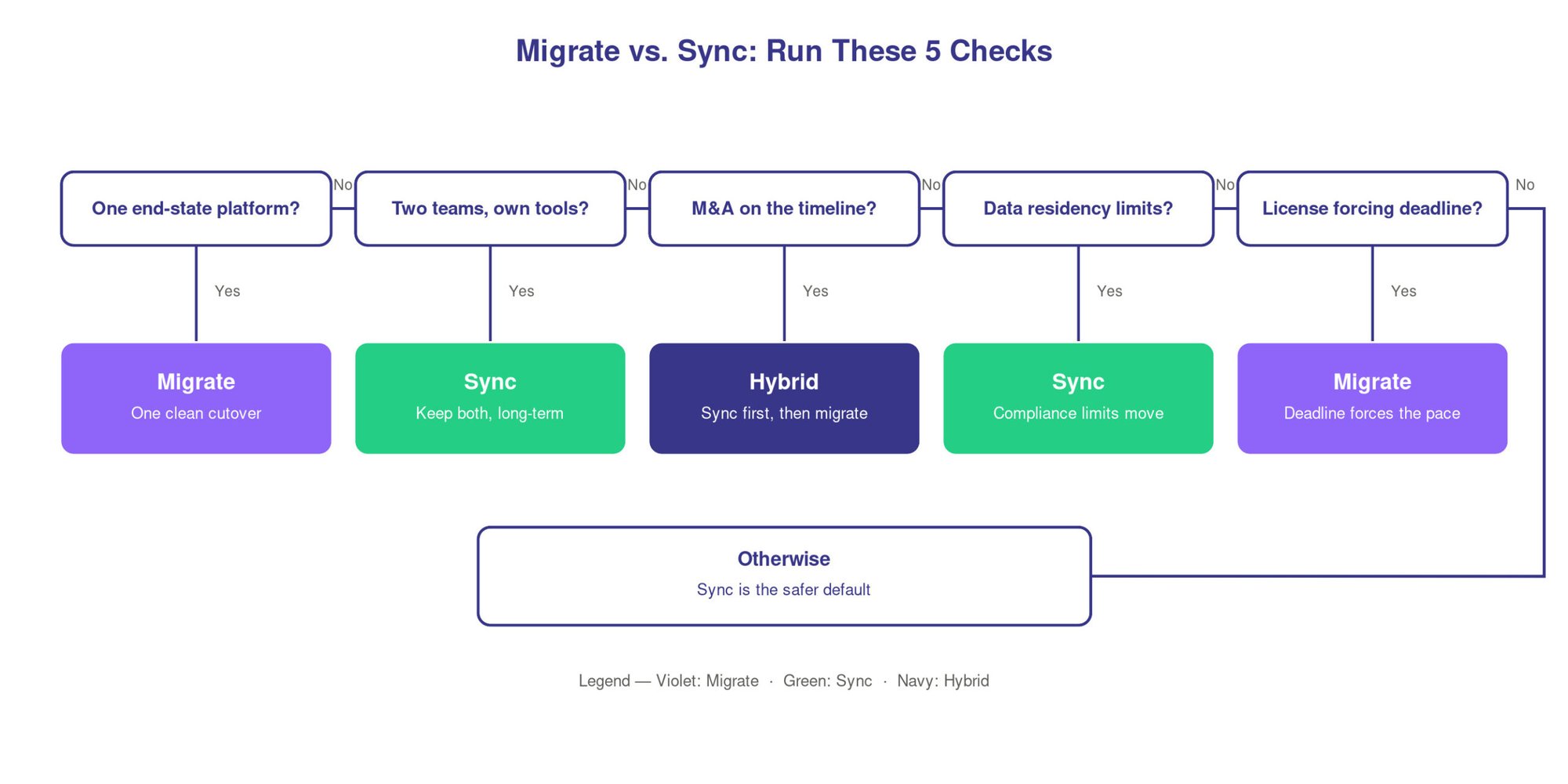
Each signal below points to a different requirement. Migration needs one-time fidelity: getting every record across cleanly, once. Sync needs durable field mapping: keeping two systems agreeing over months and years. Those are different tasks, so figure out which one you’re actually facing before you pick a tool.
Ask yourself:
- Is there one planned end-state platform? If leadership genuinely wants everything on Jira within a year or two, and means it, you’re looking at migration.
- Are two teams keeping separate tools long-term? If dev stays on Jira and IT stays on ServiceNow because each tool fits its team, that’s a sync, permanently.
- Is there an M&A timeline? Acquisitions usually need both systems working now, with a slower decision about full consolidation later, so sync first and migrate later if you ever do.
- Do you have a compliance or data-residency requirement? Some records can’t leave a specific system or region, and that constrains what you’re allowed to move.
- Is a license expiration setting the deadline? A renewal date forcing a cutover is a real constraint, but it also pushes teams toward rushed migrations that drop history.
One more signal gets missed a lot. Figure out whether you’re asking “ServiceNow vs. Jira” or “ServiceNow vs. Jira Service Management.” Teams say they want to replace ServiceNow with Jira, when what they want is the service management layer Jira provides.
Regular Jira won’t give you request queues, SLAs, and an ITSM structure out of the box, but Jira Service Management will. Sorting this out early saves you from migrating into the wrong product.
The Hybrid Migration to Sync Path That Most Teams Choose
Here’s the part nobody plans for. You rarely migrate and walk away clean, and you rarely sync forever with no data ever moving. Most real setups mix the two workflows.
- Sync during the migration window. A customer running Jira alongside ServiceNow kept a live sync in place while migrating their ServiceNow instance to Cloud, so tickets created mid-cutover still showed up correctly on both sides instead of falling into the gap between the old instance going quiet and the new one going live.
- Sync that stays after migration finishes. The migration completes, and everyone’s on the new system, but the sync stays switched on anyway. Usually it’s because a partner, a supplier, or one legacy department never fully moved off ServiceNow. This is common after acquisitions. The integration keeps connecting two organizations that were never going to standardize on one tool, and the migration everyone was waiting for never happens.
- ServiceNow and Jira Service Management running side by side, on purpose. Some teams keep both long-term by design. One side owns customer-facing service requests, the other owns internal ITSM, and neither wants to hand its workflow over. The sync keeps the shared records aligned while each team keeps its own tool.
The ACA Group managed to help its client migrate 150k+ work items with zero downtime.
And underneath all of this sits the ordinary case, the reason most of these connections exist in the first place. Dev works in Jira, IT works in ServiceNow, and a bug found in support needs to reach engineering without anyone copying it by hand.
That day-to-day sync is the baseline. The migration scenarios get added on top when a deadline or an acquisition shows up.
For more of these patterns in practice, see our Jira-ServiceNow integration examples.
What Breaks When You Pick Wrong?
Both choices fail in specific, predictable ways.
- Migration gone wrong: Ticket IDs get dropped or renumbered, so every old reference and link points at nothing. Original create-dates get replaced with the migration date, which quietly wrecks your SLA reporting and any age-based metric. ServiceNow work notes, meant to stay internal, flatten into regular comments in Jira or JSM, and suddenly private context is visible to everyone on the ticket. Project skeletons get recreated from scratch rather than carried over, and that breaks the workflows and permission schemes that used to sit underneath them, so tickets land in the new system without the approval steps or access rules they had before.
- Sync gone wrong: Priority and status drift because the two systems name their values differently and the mapping was never checked, so a P1 on one side reads as medium on the other. Fields that exist in ServiceNow have nowhere to land in Jira, so data just stops crossing.
And the biggest one is when a team assumes the migration ended the relationship, tears down the connection, and then finds out a partner or a report still depended on data flowing across.
The pattern behind most of these is the same. Someone treated a two-way, ongoing problem as a one-time move, or the other way around.
The Cost Angle
Most orgs don’t restrict their choice between ServiceNow and Jira but rather buy into one and bolt the other on.
Jira-to-ServiceNow is the single most common expansion path across the Exalate Universe (EXAVerse). That timing matters: these teams knew from day one they’d run both, not migrate from one to the other.
Read that against the migrate-or-sync question and the plan changes. Budget for both tools running together, not for one replacing the other.
The common story is a team starting in Jira or Jira Service Management for development work, then adding a ServiceNow sync as their IT and dev sides need to share data. Essentially, full migration off either tool almost never happens.
Questions to Ask Before Committing to Migration or Synchronization
This is the short list of questions leadership should answer before choosing a path.
- What’s the actual end state we want, and does everyone actually agree on it?
- Which records genuinely have to move, and which just need to be visible across both systems?
- If we migrate, who or what still depends on the old system afterward?
- Are we replacing ServiceNow, or standing up JSM for one slice of work?
- What’s forcing the timeline, and is that deadline pushing us toward a rushed migration we’ll regret?
Answer those five before you scope a single field mapping. The teams that get this wrong are almost always the ones that skipped straight to the tool.
If you’re planning to eventually consolidate onto one platform, reach out to our experts to see how that would work in practice.
FAQs
Can I migrate ServiceNow tickets to Jira without losing history?
Yes, but only if the migration explicitly preserves create-dates, ticket IDs, comments, and attachments. Many don’t by default, so confirm how each field maps before you run it. Losing create-dates alone is enough to break your SLA reporting.
Can ServiceNow and Jira sync in real time?
Yes. A proper integration syncs both directions on ticket creation and updates, so a change on one side reaches the other within seconds. You control which fields sync and in which direction.
What’s the difference between integrating and migrating ServiceNow and Jira?
Migration moves your data once and retires the source system. Integration connects both systems and keeps them running together indefinitely. Migration is one-way and hard to reverse. Integration is ongoing, and you can switch it off without losing either system.
Is Jira Service Management a replacement for ServiceNow, or something else?
It depends on scope. For many mid-size teams, JSM covers the ITSM work they used ServiceNow for. For large enterprises with deep ServiceNow customization and CMDB dependencies, JSM handles some of that work but isn’t a straight swap. Map your must-have ServiceNow features against JSM before you assume it replaces the whole thing.
Can I keep syncing ServiceNow and JSM after migration is done?
Yes, and plenty of teams do. A sync often stays in place because a partner, supplier, or one department never fully leaves ServiceNow. Keeping the connection live is usually cheaper than forcing a full cutover nobody needs.
Do I need Jira Service Management or regular Jira for this?
If you’re taking over ITSM work: request queues, SLAs, service-desk structure, you need JSM. Regular Jira Software is built for dev work and doesn’t include that layer. Teams that try to run ITSM in plain Jira usually run into missing SLAs and broken request queues within a few weeks.
What’s involved in an ITSM migration off ServiceNow?
It’s more work than moving tickets. You’re moving history, rebuilding workflows and permissions in the target tool, remapping SLAs, and deciding what stays connected afterward. Most teams underestimate the workflow rebuild, not the data move.
Recommended Reading