

Enterprises and organizations can take close collaboration one step further through embedded iPaaS integration.
This goes beyond using an iPaaS solution to connect disparate systems. Embedded iPaaS involves getting deeply woven into the other side’s processes, so the integration feels like a native feature rather than an external add-on.
What does this mean in practice? And how do you decide whether embedded iPaaS is the right model for your organization?
In this article, I’ll explain how embedded iPaaS works, break down the differences between it and traditional iPaaS, walk through the key components and benefits, highlight the challenges of adopting it, and provide practical examples of how teams use it today.
Key Takeaways
- Embedded iPaaS builds integration capabilities directly into a software product, so end users can connect systems without leaving the host application.
- It differs from traditional iPaaS because it targets customer-facing and cross-company integrations rather than internal system connectivity.
- Core components include pre-built connectors, API management, event-driven triggers, and AI-assisted configuration to reduce setup complexity.
- Organizations that need to offer integrations as a product feature, manage multi-vendor partnerships, or sync data across company boundaries benefit most.
- The build vs. buy decision depends on your engineering capacity, the number of integrations you need to support, and how fast your connected systems evolve.
- Compliance, data governance, and independent sync control are non-negotiable when integrating across organizational boundaries.

What is Embedded iPaaS?
Embedded iPaaS is an integration model that allows users to connect their SaaS applications and other systems using a white-label solution built directly into the host product.
Under this model, you can build multiple integration scenarios with the help of templates, scripting engines, and management consoles, all without forcing the end user into a separate interface.
Think of it this way: traditional iPaaS gives your IT team a standalone platform to wire up internal applications. Embedded iPaaS takes those same capabilities and packages them inside your product, so your customers, partners, or external teams can set up and manage integrations themselves.
Organizations can use embedded iPaaS to establish a one-way flow of notifications and updates. For instance, get updates in Jira whenever a new Salesforce account is created. The other option is to implement a bidirectional connection between your organization and other companies, vendors, MSPs, and partners by connecting their cloud CRMs and on-premise systems.
Any company that wants to connect internal teams or sync data with external entities can benefit from embedding iPaaS solutions.
How Does Embedded iPaaS Work?
Under the hood, embedded iPaaS relies on APIs, webhooks, and event-driven protocols to move data between connected systems.
Here’s the general flow:
A trigger event occurs in the source system. This could be a status change on a Jira work item, a new case in Salesforce, or a ticket update in Zendesk. The embedded iPaaS platform detects this event, transforms the data into the format required by the destination system, and pushes it through, often in real time. If the integration is bidirectional, the reverse also happens.
The transformation step is where things get interesting. Different systems use different data structures. A “priority” field in ServiceNow might map to a “severity” field in Azure DevOps, with completely different value sets. The embedded iPaaS platform handles this translation, including custom field mappings and conditional logic for edge cases.
For the end user, none of this complexity is visible. They work in their own system, and data flows automatically. That transparency is what makes embedded iPaaS different from middleware or manual import/export processes.
Modern platforms also use AI-assisted configuration to speed up this process. Instead of writing transformation rules from scratch, teams can describe what they need and get intelligent suggestions for field mappings, sync triggers, and data filters.
Key Components of Embedded iPaaS
The unique features of embedded integration include the following:
- Pre-built connectors. These are ready-made connection templates containing default logic and algorithms for common sync scenarios. The best platforms also support custom connectors for proprietary systems with available REST APIs, extending your reach beyond the standard connector library.
- Low-code integration builder. Most embedded integration platforms combine no-code visual editing with scripting to reduce the amount of coding needed to configure a connection. For complex use cases, platforms like Exalate provide a Groovy scripting engine that gives you full control over data transformation logic. This combination means simple integrations are fast to set up, while advanced scenarios remain possible.
- API management and standardization. Embedded iPaaS handles API keys, access tokens, OAuth flows, and other protocols for verifying user identity and permissions. It also manages the abstraction layer between different API formats, so your integration doesn’t break every time a connected platform updates its API schema.
- Triggers and automation. Real-time updates and exchanges require conditional event triggers. These can be query-based (e.g., sync only Jira work items where
priority = High) or event-driven (e.g., sync immediately when a Salesforce case status changes to “Escalated”). Without well-configured triggers, integrations either miss critical updates or generate noise by syncing everything indiscriminately. - Unified management console. This gives admins a single view of all existing connections, including active syncs, error logs, and event triggers. Rather than jumping between systems to troubleshoot, admins can monitor health, pause syncs, and adjust configurations from one place.
- Support documentation and AI assistance. Users can consult documentation to troubleshoot problems before escalating to support engineers. Modern platforms go further by incorporating AI assistants. For instance, Exalate includes Aida, a documentation assistant that helps teams navigate setup and configuration through contextual guidance.
Traditional iPaaS vs. Embedded iPaaS vs. Unified API
Before comparing these models, here’s a quick refresher on each.
Integration Platform as a Service (iPaaS) is an integration delivery model that provides companies with a system for connecting applications within their SaaS sprawl. It’s designed for internal use: your IT team sets it up, manages it, and keeps the connections running.
A unified API is an abstraction layer that connects with multiple endpoints to extract and normalize information. It acts as a hub managing request-response traffic from multiple systems and applications. Unified APIs are great for read-heavy use cases (pulling data from many sources into one view) but often lack the depth needed for complex bidirectional syncs.
Embedded iPaaS combines elements of both. It provides a platform for connections (like iPaaS) and handles API standardization and data transformation (like a unified API), but packages everything as a native feature within the host application.
Here’s where the differences matter most:
- Connector flexibility. While iPaaS solutions provide connectors, embedded iPaaS systems allow you to build, modify, and extend them. If a pre-built connector doesn’t cover your use case, you can script custom logic rather than waiting for the vendor to build it.
- System coupling. iPaaS solutions sit as a separate layer between connected systems. Embedded iPaaS systems are intrinsically connected with the host application, creating a tighter, more responsive integration experience for the end user.
- Audience. iPaaS targets your internal operations team. Embedded iPaaS targets your customers, partners, and external stakeholders who need to connect their tools to yours.
- API development. Some embedded iPaaS products even allow you to build and modify APIs when developing native integrations, giving you control over both the integration logic and the interface through which external systems connect.
Who Needs Embedded iPaaS?
Not every organization needs embedded iPaaS. Here’s who benefits most.
- SaaS vendors offering integrations as a feature. If your customers expect your product to connect with their existing tools (Jira, Salesforce, ServiceNow, etc.), embedded iPaaS lets you offer those integrations as a native product capability without building each one from scratch.
- MSPs and service providers managing multiple clients. Managed service providers that handle IT operations for several organizations often deal with a mix of platforms. One client uses Freshservice, another uses Jira, and a third runs ServiceNow. Embedded iPaaS creates consistent integration workflows across all of them, with each client’s data remaining isolated and secure. MSP integration scenarios benefit heavily from this model.
- Companies going through mergers and acquisitions. Post-M&A, teams inherit different systems that need to share data during the transition. Embedded iPaaS provides a fast path to interoperability without forcing either side to abandon their existing tools.
- Organizations with cross-company partnerships. When two companies collaborate on a shared project, product development, or support workflow, they need their systems to talk to each other. Embedded iPaaS lets each side maintain independent control over what data they share, making it a safer bet than giving partners direct system access.
- Enterprises with legacy system dependencies. If you’re running older on-premise systems alongside modern cloud applications, embedded iPaaS bridges the gap. Platforms that support both cloud and on-premise connectors (like Azure DevOps Server alongside Azure DevOps Cloud) can handle these hybrid environments without requiring a full migration.
Benefits of Embedded iPaaS
Your company can reap the following embedded iPaaS benefits:
- Speed up decision-making processes. When the iPaaS system is embedded into your infrastructure, relevant data becomes available where your teams already work. Stakeholders don’t need to request reports from another system or wait for manual data transfers. The information lives in their tool, updated in real time, which means faster and more informed decisions.
- Increase productivity. With embedded integration, your developers free up their schedules to focus on core product work. The vendor takes charge of building, updating, and maintaining the iPaaS solution, including handling API changes when connected platforms push updates. This is especially valuable for smaller teams that can’t dedicate full-time engineers to integration maintenance.
- Improve scalability. When the solution is deeply embedded within your SaaS ecosystem, you can scale integration scenarios as your business grows. Adding new partners, onboarding new clients, or expanding into new regions means standing up new connections, and embedded iPaaS makes this repeatable rather than requiring custom development each time.
- Build custom integrations for complex use cases. Off-the-shelf connectors work for standard syncs, but real-world scenarios often need custom logic. Embedded iPaaS gives you the platform to configure and customize sync rules for these edge cases. For instance, Exalate uses a Groovy scripting engine to let teams write custom transformation logic, conditional sync rules, and multi-step workflows that go well beyond default connector capabilities.
- Keep your customers on board. Deep integration with your customers and partners helps you address their pain points in real time. When a customer’s support tickets automatically sync to your development backlog, resolution times drop and satisfaction increases. The Gantner Group uses Exalate to connect support and development teams, reducing the feedback loop between customer-reported problems and engineering fixes.
- Consolidate partnerships. When working with MSPs or going through a merger and acquisition, embedded iPaaS tools create a collaborative environment for the accurate exchange of data and insights. Each partner maintains their own system while sharing only the data points that matter for the collaboration.
Embedded iPaaS Use Cases
Cross-Company Support Escalation
Case: A software company’s support team uses Zendesk, while the engineering team works in Jira. When a support ticket needs a code fix, the handoff is slow. Support agents copy ticket details into a Jira work item manually, and engineers lose context because formatting, attachments, and conversation history don’t carry over cleanly.
Solution: Embedded iPaaS syncs qualifying Zendesk tickets to Jira as work items automatically when escalation criteria are met. Status changes, comments, attachments, and custom field values flow bidirectionally. The support agent sees engineering progress without leaving Zendesk. The developer gets full ticket context without joining a support tool they don’t use daily.
Multi-Vendor MSP Environment
Case: An MSP manages IT operations for several clients, each using a different ITSM platform. Client A runs Freshservice, Client B uses ServiceNow, and the MSP’s internal team works in Jira. Manually transferring case details between these platforms wastes time and introduces errors.
Solution: Embedded iPaaS connects the MSP’s Jira instance to each client’s platform individually. Case details, comments, priorities, and status updates sync automatically. Each connection has its own sync rules, so the MSP controls exactly what data flows between their environment and each client’s environment without exposing internal workflows or other clients’ data.
Post-Acquisition System Alignment
Case: After an acquisition, the parent company uses Azure DevOps for project management while the acquired company uses Asana. Forcing either team to switch tools would disrupt productivity during an already complex transition period.
Solution: Embedded iPaaS syncs relevant projects and tasks between Azure DevOps and Asana bidirectionally. The parent company’s project managers see task progress in Azure DevOps, while the acquired team continues using Asana without disruption. Custom field mappings translate different terminology (e.g., “Epic” in Azure DevOps to “Section” in Asana) so both sides understand the data in their own context.
CRM-to-Development Feedback Loop
Case: A company’s sales team logs feature requests and product feedback in Salesforce. The development team works in Jira. Without integration, product managers manually review Salesforce reports and create Jira work items, a process that delays the feedback loop and loses important context like deal size and customer priority.
Solution: Embedded iPaaS connects Salesforce to Jira, syncing qualified feature requests as work items with all relevant context: customer name, deal value, account tier, and the original request description. When the engineering team updates the work item’s status or adds a comment, those updates flow back to Salesforce so the sales team knows exactly where the request stands.
Challenges of Embedded iPaaS Implementation
Embedding iPaaS solutions sounds straightforward. But in practice, this integration framework involves a lot of moving parts and organizational decisions.
- Choosing a solution that everyone agrees on. For internal integrations, the teams involved must reach a consensus. For external integration scenarios involving partners, vendors, or clients, this decision gets harder. Different organizations have different preferences, budgets, and security requirements. A platform that gives each side independent control over their sync configuration (rather than requiring both sides to use the same tool) simplifies this significantly.
- Assembling the right team. Someone needs to own the embedded iPaaS implementation. Your team needs to understand how the solution integrates with your APIs, how the scripting or configuration language works, and how to troubleshoot sync failures. Platforms with AI-assisted configuration and strong documentation (like Exalate’s Aida assistant) reduce this learning curve, but there’s still a ramp-up period.
- Defining what data to sync. You need to determine which processes, projects, work items, tickets, data fields, and entities to integrate without exposing sensitive business data. Most partners agree on this upfront during implementation planning. When they don’t, clear data governance policies and field-level sync controls become essential. Look for platforms that let you filter, transform, or exclude specific data points before they leave your environment.
- Meeting compliance requirements. The solution must comply with data regulations and industry-specific standards such as GDPR and others. This means verifying that the vendor encrypts data in transit and at rest, maintains relevant certifications (like ISO), and provides transparent security documentation. Exalate publishes its full security posture at its Trust Center for teams that need to verify compliance before committing.
- Managing ongoing maintenance. Connected platforms update their APIs, change data models, and introduce new features. Your embedded iPaaS solution needs to keep up. When evaluating vendors, ask how they handle API version changes and how quickly their connectors are updated when a connected platform pushes a major release.
Should You Build or Buy Embedded iPaaS Solutions?
When you build an iPaaS solution from scratch, you have to cater to the following requirements: a team of dedicated developers, security and authentication features, software licensing and compliance, maintenance and updates, cloud or on-premise hosting, API governance limits, and connector development for every platform you want to support. Each time a connected platform updates its API, your team absorbs that maintenance cost.
When you buy an embedded iPaaS product, the pricing covers all of these requirements. The vendor handles connector updates, security patches, compliance documentation, and infrastructure. You can even engage support engineers to help set up the integration architecture.
The break-even analysis usually comes down to how many integrations you need and how fast they change. If you need one simple connection between two internal systems, building might make sense. If you need five or more connections across different platforms, or if those connections involve external partners with their own system requirements, buying is almost always more cost-effective.
Unless you’re a large enterprise with a dedicated integration engineering team and very specific data sovereignty requirements, buying from a vendor with a proven track record in your industry is the faster and cheaper path.

Calculate time and money savings from automated bidirectional sync.
Examples of Embedded iPaaS Platforms
Here are some of the leading embedded iPaaS platforms, each with different strengths.
Exalate
Exalate is an embedded integration solution that facilitates data exchange between work management systems such as Jira, Salesforce, Zendesk, ServiceNow, GitHub, Azure DevOps (Cloud and Server), Freshservice, Freshdesk, Asana, and more. It also supports custom connectors for proprietary systems with available REST APIs, extending your integration reach beyond the standard connector library.
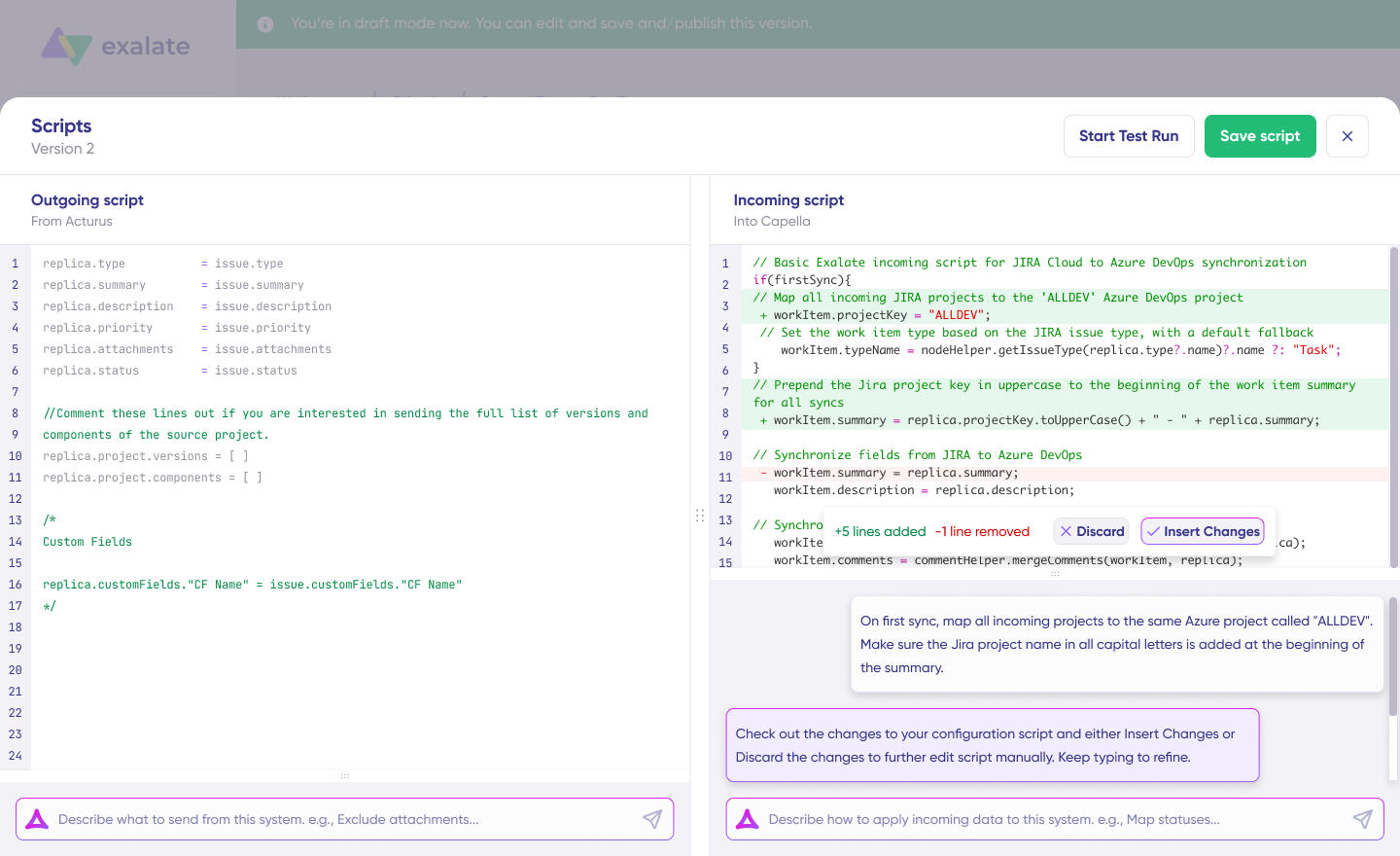
Customer support teams can use the Zendesk embedded iPaaS offering to improve customer experience. Salespeople can rely on the Salesforce embedded iPaaS to manage accounts and opportunities. Engineering teams can connect Jira to GitHub for seamless development workflows.
Exalate supports bidirectional integration with pre-built connectors as well as custom Groovy-based integrations. For complex use cases, the Groovy scripting engine lets you write custom transformation logic, conditional sync rules, and multi-step workflows.
Exalate also includes Aida, an AI documentation assistant that helps teams navigate setup and configuration. For more complex scenarios, AI-assisted configuration accelerates the creation of custom sync rules and field mappings, reducing the learning curve and getting integrations running faster, especially for teams without dedicated integration engineers.
Each organization in a cross-company integration maintains independent control over their sync configuration, meaning the other party can’t override or access your settings. This makes Exalate particularly strong for cross-company and MSP scenarios where data governance is a priority. Exalate holds ISO 27001:2022 certification, and full security details are available at the Trust Center.
Depending on your business needs, you can use the IaaS package or the MSP offering.
Best for: Cross-company integrations, MSP environments, and complex sync scenarios that require independent control on both sides.
Zapier
Zapier is an iPaaS solution that allows companies to keep their applications, social media platforms, CRMs, ERPs, databases, and communication tools connected. The system automates workflows using Zaps, Tables, and Interfaces, and provides AI automation for 7,000+ app connections.
Zapier excels at internal workflow automation. It’s easy to set up, has an enormous connector library, and works well for straightforward, trigger-action scenarios. However, it’s less suited for complex bidirectional syncs or cross-company integrations where each side needs independent control over data flow.
Best for: Internal workflow automation with simple, one-directional trigger-action patterns across a wide range of apps.
Jitterbit Harmony
Jitterbit Harmony is a low-code iPaaS platform that allows the fast-paced development and publishing of APIs and embedded integrations. Harmony provides a Cloud Studio and API management console for establishing granular rules for connectivity. It includes EDI capabilities and supports both cloud and on-premise deployments.
Best for: Organizations that need API management alongside integration capabilities, especially in industries with EDI requirements.
Informatica
Informatica is a data management cloud that handles API creation and management, data integration, governance, and compliance policies. It uses the CLAIRE AI engine to automate and manage data workflows using both no-code and low-code options. Informatica also handles data engineering and analysis at scale.
Best for: Large enterprises with heavy data governance requirements and complex data management needs beyond basic integration.
Tray.io
This embedded iPaaS platform uses artificial intelligence to create an ecosystem of interconnected integrations between your workforce, partners, and customers. Features like Tray Build allow organizations to develop custom automation with low-code technologies. Merlin AI uses natural language models to transform LLM outputs into complete business processes.
Best for: Mid-market to enterprise teams that need AI-powered automation with low-code flexibility for internal and external workflows.
How to Evaluate an Embedded iPaaS Vendor
Choosing the wrong embedded iPaaS solution creates technical debt and integration headaches. Here’s a practical framework for evaluating vendors.
- Connector coverage. Does the platform support the systems your organization and your partners actually use? Look beyond the total connector count and verify that connectors exist for your specific platforms. Also, check whether the vendor supports custom connectors for proprietary systems, since not every tool your partners use will be in the standard library.
- Bidirectional sync capabilities. One-way data pushes are simple. Bidirectional integration, where changes in either system are reflected in the other, requires more sophisticated conflict resolution and transformation logic. If cross-company or partner integrations are in your roadmap, this is non-negotiable.
- Scripting and customization depth. No-code templates cover 80% of use cases. The other 20% often includes your most valuable integration scenarios. Evaluate whether the platform supports custom scripting (like Groovy) for complex transformation logic, conditional rules, and multi-step workflows.
- Security and compliance posture. Verify the vendor’s certifications (ISO 27001:2022 is a baseline), encryption standards (TLS 1.2/1.3 in transit, encryption at rest), and access control model. For cross-company integrations, confirm that each organization maintains independent control over their sync configuration. Ask for a trust center or security documentation you can review before committing.
- AI-assisted configuration. Setting up integrations manually is time-consuming, especially for complex scenarios. Platforms that offer AI-assisted configuration reduce setup time and help teams with less integration experience get running faster.
- Deployment flexibility. Can you run the solution in the cloud, on-premise, or in hybrid environments? This matters for organizations with data residency requirements or legacy infrastructure that can’t move to the cloud.
- Vendor track record. Look at case studies, customer reviews, and how long the vendor has been operating. Check how quickly they update connectors when connected platforms push major releases.
Adopt Embedded iPaaS for Your Organization
Choosing the right implementation model for your embedded iPaaS system will streamline your business’s collaborations with partners and customers.
The decision comes down to understanding your integration scope: how many connections you need, whether those connections are internal or cross-company, how much customization your use cases require, and what compliance standards apply to your data.
Exalate is an embedded integration solution for connecting internal and external teams to share important data through a compliant, secure architecture. It supports connections across Jira, Salesforce, Zendesk, ServiceNow, Azure DevOps (Cloud and Server), Freshservice, Freshdesk, GitHub, Asana, and custom REST API connectors.
Are you looking for an embedded integration solution? Contact our team to get started with a demo right away.
Frequently Asked Questions
What is embedded iPaaS?
Embedded iPaaS is an integration model that packages integration capabilities directly into a software product, allowing end users to connect systems without leaving the host application. Unlike traditional iPaaS, which operates as a standalone platform managed by IT, embedded iPaaS makes integrations feel like a built-in product feature. For example, a support platform might embed iPaaS to let customers sync their Zendesk tickets with their engineering team’s Jira work items automatically.
What is the difference between iPaaS and embedded iPaaS?
iPaaS is a standalone platform designed for internal integration: connecting the apps your organization uses (CRM to ERP, HR to payroll). Embedded iPaaS takes those capabilities and builds them into a software product for customer-facing or cross-company use. The key distinction is audience. iPaaS serves your IT team. Embedded iPaaS serves your end users, partners, and customers.
What platforms does Exalate support for embedded integration?
Exalate connects Jira Cloud, ServiceNow, Zendesk, Salesforce, Azure DevOps (Cloud and Server), Freshservice, Freshdesk, GitHub, and Asana. For systems not on that list, Exalate supports custom REST API connectors that extend integration capabilities to proprietary platforms and niche tools.
How does embedded iPaaS handle security for cross-company integrations?
Strong embedded iPaaS platforms give each organization independent control over their sync configuration. Each side defines what data they send and receive through their own sync rules and field mappings, and the other party can’t override or access these settings. Look for vendors with ISO 27001:2022 certification, TLS 1.2/1.3 encryption, and transparent security documentation.
Can embedded iPaaS handle complex, custom integration scenarios?
Yes. While pre-built connectors cover standard syncs, the best embedded iPaaS platforms also support scripting for complex use cases. Exalate provides a Groovy scripting engine that lets you write custom data transformation logic, conditional sync rules, and multi-step workflows. AI-assisted configuration through Aida also helps teams build these configurations faster.
Is it better to build or buy an embedded iPaaS solution?
For most organizations, buying is more cost-effective. Building requires a dedicated engineering team, ongoing API maintenance, security infrastructure, and compliance management. Buying means the vendor handles all of that. Building only makes sense when you have a very narrow integration scope (one or two connections), a dedicated integration engineering team, and specific data sovereignty requirements that no vendor can meet.
What role does AI play in embedded iPaaS?
AI reduces the setup and maintenance burden. AI-assisted configuration suggests field mappings, sync triggers, and transformation logic based on your requirements. Documentation assistants (like Exalate’s Aida) help teams navigate configuration and troubleshooting. This makes embedded iPaaS accessible to teams without deep integration expertise.
How does embedded iPaaS compare to a unified API?
A unified API normalizes data from multiple sources through a single interface, which works well for read-heavy use cases (aggregating data into one view). Embedded iPaaS goes further by handling bidirectional sync, data transformation, event-driven triggers, and custom logic. If you need data to flow in both directions with conflict resolution and conditional rules, embedded iPaaS is the stronger option.
What should I look for when evaluating embedded iPaaS vendors?
Prioritize connector coverage for your specific platforms, bidirectional sync capabilities, scripting depth for custom scenarios, security certifications, AI-assisted configuration, deployment flexibility (cloud and on-premise), and the vendor’s track record with connector updates when connected platforms push major API changes.
Can Exalate work as an embedded iPaaS for MSP environments?
Yes. Exalate’s architecture gives each organization in a cross-company integration independent control over their sync rules. For MSPs managing multiple clients on different platforms (Freshservice, ServiceNow, Jira, Zendesk), this means each client connection has its own isolated configuration. The MSP controls what data flows between their environment and each client’s, without exposing one client’s data to another. Exalate offers a dedicated MSP offering for this use case.


