
IT Service Management (ITSM) refers to the practices organizations use to manage IT services. It involves improving service delivery to boost quality and customer satisfaction.
Here’s the challenge: organizations rely on multiple software tools to manage IT operations. Integrating them with CRMs, ERPs, or cloud services creates friction.
This often leads to data silos, workflow inefficiencies, manual work, and miscommunication.
With enterprise tools ITSM integration, your team can streamline operations, automate workflows, and get essential data flowing seamlessly between systems.
You just need to find the right tool. This guide covers the best ITSM integration tools—key features, pricing, pros, cons, and best use cases to help you decide. You’ll also see how to integrate ITSM and ESM platforms with Exalate.
Key Takeaways
- ITSM integration tools connect disparate systems to eliminate data silos and reduce manual data entry across IT operations.
- Real-time bidirectional synchronization keeps ITSM platforms, CRMs, and development tools aligned without constant human intervention.
- AI-assisted configuration reduces the technical barrier for complex integrations, enabling faster deployment and fewer scripting errors.
- Scalability matters—choose tools that support multi-platform connectivity and can grow with your integration network.
- Trigger-based automation and custom field mapping provide granular control over what data flows where and when.
- iPaaS solutions differ significantly in flexibility; script-based options offer limitless customization while no-code tools prioritize speed over depth.

What Is ITSM Integration?
ITSM integration connects your IT service management platform with other business systems: development tools, CRMs, ERPs, monitoring solutions, and collaboration platforms.
When your ITSM operates in isolation, IT teams struggle to see how their work influences organizational performance. Integration changes that enable:
- Automatic ticket creation from monitoring alerts
- Bidirectional sync between service desks and development backlogs
- Real-time status updates across customer support and engineering teams
- Unified incident tracking across multiple platforms
Without these connections, support agents copy-paste ticket details into Slack messages that get lost. Developers fix bugs without updating service desk tickets. Customers wait in the dark.
Integration eliminates these gaps by making your ITSM the central coordination point for service delivery.
Features To Consider When Choosing an ITSM Integration Tool
Not all integration tools are built equal. Before committing to a solution, evaluate these capabilities based on your organization’s needs.
Real-Time Data Synchronization
Delays in data transfer create confusion and duplicate work. Look for tools that offer real-time data synchronization so ITSM systems and teams receive updates promptly.
Bidirectional Data Flow
One-way integrations create information asymmetry. True bidirectional sync ensures changes in one system are reflected across all integrated platforms. When a developer updates a Jira work item, the ServiceNow incident should update automatically, and vice versa.
AI-Assisted Configuration
Modern integration tools leverage AI to simplify scripting, field mapping, and troubleshooting. This reduces implementation time and makes complex integrations accessible to users without deep coding expertise.
Exalate offers Aida, an embedded scripting co-pilot that generates sync rules from natural language prompts.
Workflow Automation and Triggers
Workflow automation reduces human error and accelerates repetitive tasks like ticket creation, escalation, and status updates. Advanced triggers let you define precisely when and how data flows between systems using each platform’s native query language.
Custom Field Mapping
Every organization has unique workflows and custom fields. Your integration tool should support mapping between default and custom fields without forcing you into rigid templates.
Multi-Platform Connectivity
Enterprise environments rarely use just two tools. Evaluate solutions that support multi-platform integration across ITSM systems (ServiceNow, Freshservice, Jira Service Management, Zendesk), DevOps tools (Azure DevOps, GitHub), and CRMs (Salesforce).
Security and Compliance
Data protection isn’t optional. Look for tools with:
- ISO 27001:2022 certification
- GDPR compliance
- TLS 1.3 encryption
- OAuth2 or token-based authentication
- Role-based access controls
For detailed security information, visit the Exalate Trust Center.
Scalability
Your integration needs will grow. Choose a solution that scales from simple peer-to-peer connections to complex integration networks across partners, vendors, and MSPs without architectural limitations.
Error Handling and Monitoring
When syncs fail, you need visibility. Look for tools with sync queues, automatic retries, and alerting capabilities that notify administrators of issues before they impact operations.
What Are The Best ITSM Integration Tools For Businesses
Here are some top ITSM tools integration options:
1. Exalate
Exalate is an AI-assisted ITSM integration solution that specializes in bidirectional synchronization between platforms like Freshservice, ServiceNow, Freshdesk, Service Desk Plus, Jira Service Management, Zendesk, Azure DevOps (Cloud and Server), Salesforce, GitHub, Asana, and Ivanti.
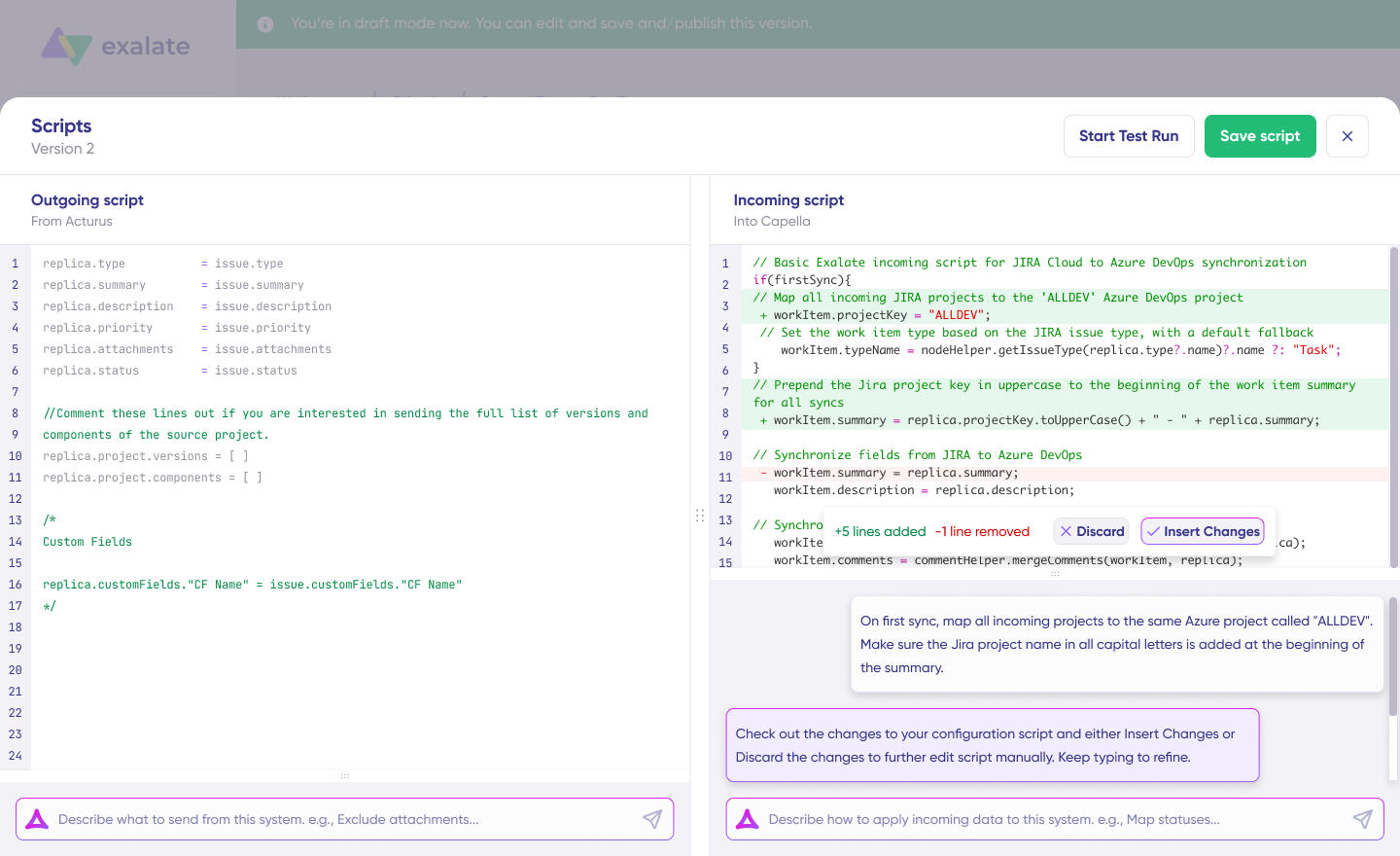
It’s built for organizations that need complete control over what data flows where, without being locked into rigid templates.
Exalate Pricing
Exalate has tier-based pricing, which is available after a free trial. To get a full quote for your integration solution, reach out to us for a quote or book a demo.
Exalate Key Features
- Real-time one-way or two-way integration between any supported platforms
- AI-assisted configuration with Aida (scripting co-pilot)
- Groovy-based scripting engine for limitless customization of field mappings and workflow logic
- Advanced sync triggers using each platform’s native query language
- Rich text formatting and hierarchy support, including parent-child relationships
- Advanced comment and custom field handling with private comment filtering
- Sync queue with automatic retries for resilient data delivery
- Multi-platform connectivity supporting mesh, star, and hub-and-spoke topologies
- Enterprise-grade security with ISO 27001:2022 certification, GDPR compliance, JWT authentication, and TLS 1.3 encryption
Exalate Pros
- Groovy-based scripting provides complete control over integration logic
- AI Assist converts natural language prompts into sync scripts, reducing implementation time by 50%
- Supports cross-company integrations where each party maintains independent control
- Scales from single connections to complex integration networks
Exalate Cons
- Initial setup for complex workflows requires planning and scoping
- Advanced customization benefits from familiarity with Groovy scripting (though AI Assist reduces this barrier significantly)
Best Use Cases for Exalate
MSP Client Management
- Case: MSPs managing multiple clients across different ITSM platforms need unified ticket handling without giving clients direct system access.
- Solution: Exalate connects each client’s platform (ServiceNow, Freshdesk, Zendesk) to the MSP’s central Jira Service Management instance.
Development-Operations Alignment
- Case: Support teams in Freshservice or ServiceNow need to escalate technical work items to developers in Jira or Azure DevOps without constant back-and-forth.
- Solution: Exalate syncs incidents to development backlogs with all relevant details (priority, customer impact, attachments, comments).
Cross-Company Collaboration
- Case: Enterprises working with external vendors or partners need to share selected data without exposing internal systems.
- Solution: Each organization controls their own Exalate configuration independently, sharing only what’s necessary.
Multi-System Incident Tracking
- Case: Large organizations using different ITSM tools across departments need unified incident visibility.
- Solution: Exalate creates a unified view by syncing incidents across ServiceNow, Freshservice, and Zendesk.
2. SnapLogic
SnapLogic is an integration platform that automates ITSM workflows by connecting applications, data, and APIs at scale. Its no-code/low-code interface streamlines incident management, service request automation, and data synchronization across systems like Jira, ServiceNow, Salesforce, and Slack.
SnapLogic Pricing
Subscription-based pricing starting at $0, scaling with integration scope and complexity. Contact sales for specific quotes.
SnapLogic Key Features
- SnapLogic AutoSync for automatic data ingestion from SaaS applications into cloud data warehouses
- No-code/low-code iPaaS with 1,000+ pre-built connectors (Snaps)
- API management for creation, management, and security of APIs
- SnapGPT generative AI co-pilot that converts natural language to workflows
- AutoPrep for normalizing, cleansing, and preparing data for transformation
- AgentCreator AI for building AI agents to handle workflows and make real-time decisions
SnapLogic Pros
- Scalable platform with extensive pre-built connector library
- Intuitive drag-and-drop interface
- Real-time data processing for operational efficiency
- Low-code environment accessible to non-developers
SnapLogic Cons
- Performance issues under high data volumes
- Steep learning curve for advanced features
- Limited support for legacy systems
- Complex pricing structure
Best Use Cases for SnapLogic
- Automate incident creation and assignment across Jira and ServiceNow
- Integrate service request handling with CRM and ERP tools
- Streamline HR workflows during employee onboarding
- Automate finance workflows for invoicing and approvals
3. Microsoft Power Automate
Power Automate enables non-technical users to automate workflows and integrate ITSM systems with other applications using a simple, no-code interface. As a Microsoft product, it integrates seamlessly with Microsoft tools and third-party applications.
Power Automate Pricing
- Free Trial – 30 days with UI-based cloud flows and standard connectors
- Power Automate Premium – $15.00/user/month (annual billing)
- Power Automate Process – $150.00/bot/month (annual billing)
- Power Automate Hosted Process – $215.00/bot/month (annual billing)
- Process Mining add-on – $5,000.00/tenant/month (annual billing)
- AI Builder Capacity Add-on T1 – $500.00/unit/month (annual billing)
Power Automate Key Features
- Real-time insights through reporting capabilities
- Managed Environments to prevent data loss and maintain security
- 1,000+ API connectors plus custom API connector support
- Copilot in Power Automate for desktop development acceleration
- Hosted RPA to manage peaks and optimize resources
Power Automate Pros
- Seamless integration with Microsoft 365 ecosystem (Outlook, SharePoint, Teams)
- Low-code drag-and-drop interface
- Pre-built connectors for third-party applications
- Cloud-based and desktop automation options
- AI capabilities including AI Builder and Copilot
Power Automate Cons
- Advanced workflows may require knowledge of expressions or PowerShell
- Latency or errors in complex flows with high data volumes
- Error messages can be ambiguous
- Expensive for organizations with complex automation needs
- Optimized for Microsoft ecosystem but limited flexibility for diverse toolsets
Best Use Cases for Power Automate
- Create incident tickets in ITSM systems from Microsoft Teams or Outlook inputs
- Categorize and route incoming support tickets automatically
- Share ticket information and updates across platforms
- Trigger workflows based on KPI thresholds for automatic escalation
- Automate procurement requests and approvals within SAP-integrated ITSM systems
4. Zapier
Zapier connects ITSM systems like Jira, ServiceNow, and Zendesk with over 8,000 apps. It automates ticket creation, approval processes, and updates without coding expertise.
Zapier Pricing
Start free. Annual pricing for 2,000 tasks:
| Plan | Zaps | Tables | Chatbots (Beta) | Interfaces |
| Free | $0 | $0 | $0 | $0 |
| Pro | $49/month | $13.33/month | $13.33/month | $13.33/month |
| Team | $69/month | $66.67/month | $66.67/month | $66.67/month |
| Enterprise | Custom | Custom | — | Custom |
Zapier Key Features
- Pre-built integrations with 8,000+ apps including Gmail, Slack, and Salesforce
- Multi-step Zaps for complex, sequential workflows
- Conditional logic with filters and paths for triggered automations
- Drag-and-drop interface requiring no coding
- Customizable templates for tailored integrations
- Webhook integrations for apps without native Zapier support
- Task history and logs for monitoring and troubleshooting
Zapier Pros
- Intuitive, no-code interface
- Massive 8,000+ application library
- AI-powered features with Copilot and Model Context Protocol (MCP)
- Various pricing tiers including a free plan
Zapier Cons
- Expensive for small businesses at scale
- Limited advanced features for complex workflows
- Steep learning curve for multi-step automations
- Occasional automation glitches
- Customer support response times vary
Best Use Cases for Zapier
- Provide sales reps with customer context to speed ticket resolution
- Sync marketing data with support teams for personalized responses
- Automate ticket updates and escalations for improved resolution times
- Enable seamless handoffs between departments
5. MuleSoft Anypoint Platform
MuleSoft Anypoint Platform is a Salesforce product that enables integration with enterprise applications. Its scalable architecture enhances operational efficiency for incident and service request management.
MuleSoft Anypoint Platform Pricing
30-day trial available. Contact sales for quotes on:
- MuleSoft Integration Starter
- MuleSoft Integration Advanced
- MuleSoft API Management Solution
MuleSoft Anypoint Platform Key Features
- Anypoint Monitoring with customizable real-time dashboards and alerts
- Anypoint Code Builder cloud-native IDE for APIs and integrations
- Anypoint Connectors with pre-built and custom connectors for SaaS and cloud platforms
- Anypoint Exchange marketplace for APIs, templates, and connectors
- Anypoint Studio IDE for building and debugging integrations
- Anypoint API Manager for securing and managing APIs with policies and access controls
MuleSoft Anypoint Platform Pros
- Seamless integration with cloud, on-premises, and legacy applications
- Comprehensive tool library for designing, deploying, and managing APIs
- Strong security protocols including edge security and automatic hardening
- Highly scalable for growing enterprise needs
- Extensive pre-built connector library
MuleSoft Anypoint Platform Cons
- Expensive, particularly for SMBs
- Complex and challenging to learn
- Resource-heavy IDE
- Can struggle with legacy systems
- Escalating costs with added features
Best Use Cases for MuleSoft Anypoint Platform
- Large enterprises with complex IT environments needing API-led integration
- Organizations with experienced developers capable of managing complex API integrations
- Sales teams automating Jira task creation from Salesforce cases while keeping account information updated.
6. Dell Boomi
Dell Boomi offers robust integration capabilities focused on scalability and complex workflows. It handles large-scale enterprise integrations but comes at a premium price point.
Boomi Pricing
Custom pricing based on integration complexity. Contact sales for quotes.
Boomi Key Features
- Boomi AgentStudio to design, govern, and orchestrate AI agents
- AI Agents for rapid task and process automation
- DataHub for establishing trusted unified data foundations
- Flow low-code platform for building user experiences
- Event Streams for real-time event-driven integrations
- B2B and EDI Management for automated business document exchange
- Managed File Transfer for secure enterprise file transfers
Boomi Pros
- User-friendly interface
- Pre-built connectors
- Supports enterprise-level operations
- Cloud-based architecture minimizes downtime
Boomi Cons
- Often requires third-party solutions for complex scenarios
- Too expensive for smaller organizations
- Documentation and support resources need improvement
- Slow processing speed for large datasets
- Steep learning curve for advanced features
Best Use Cases for Boomi
- Integrate change management workflows across ITSM systems, CRMs, and project management tools
- Connect ITSM with analytics platforms for real-time performance insights
- Streamline system monitoring, incident tracking, and maintenance workflows
- Connect HR and IT for automated onboarding access requests
7. Workato
Workato offers a user-friendly, no-code interface for ITSM integration. It provides automation features for service request handling and incident management, though at a higher cost.
Workato Pricing
Plans include:
- Standard
- Business
- Enterprise
- Workato One
Contact sales for full quotes. Additional features available depending on plan.
Workato Key Features
- Enterprise iPaaS connecting enterprise applications at scale
- Embedded Integrations for adding integrations within existing software
- Agentic AI-driven automation agents performing complex tasks autonomously
- Workflow Bots for automating repetitive tasks
- Data Hub / MDM for centralizing data across sources
- BPM Services for business process management and workflow optimization
Workato Pros
- Drag-and-drop interface simplifying automation setup
- Wide application support including Salesforce, Google, and Microsoft 365
- AI-driven automation tools
- Pre-built automation Recipes for faster deployment
- Real-time synchronization
Workato Cons
- Expensive for smaller teams
- Steep learning curve for advanced features
- Cluttered user interface
- Not ideal for beginners without tech experience
- Performance dips with complex workflows or high data volumes
Best Use Cases for Workato
- Sync Zendesk tickets to Salesforce for better customer insights
- Create Salesforce tasks based on Marketo lead activity
- Sync new hire information from Greenhouse to SAP
- Create or update Jira work items based on PagerDuty incidents
8. TIBCO Cloud Integration
TIBCO Cloud Integration connects ITSM systems like Jira with enterprise applications. It offers flexible deployment options for complex architectures and regulatory requirements.
TIBCO Pricing
Custom pricing based on integration requirements. Options include:
- Basic
- Premium
- Hybrid
See TIBCO documentation for details.
TIBCO Key Features
- Flows for visual workflows connecting applications and automating processes
- Endpoints defining how systems connect
- Business Monitoring for real-time process and performance tracking
- Environment Control for managing integration environments
- Logs for detailed activity records and troubleshooting
- History for tracking changes, analyzing trends, and ensuring compliance
TIBCO Pros
- Simple initial setup
- Handles significant data volumes
- Robust performance under heavy workloads
- Cloud-based and on-premises deployment options
- Analytics tools for integration performance insights
TIBCO Cons
- Some connectors require additional configuration
- Occasional UI glitches
- Difficult to integrate with non-standard or legacy systems
- Steep learning curve
- Expensive for SMEs and startups
Best Use Cases for TIBCO
- Modernize ITSM workflows with event-driven integrations in cloud-native applications
- Integrate on-premise and cloud-based ITSM systems using hybrid patterns
- Unify incident management with pre-built connectors
- Implement real-time service desk integration for IT and support coordination
- Use event-driven flows to escalate incidents and automate asset status updates
9. Make (formerly Integromat)
Make is a cloud-based automation platform connecting apps and automating workflows without code. Its visual editor enables complex workflows across CRMs, marketing tools, and ITSM platforms.
Make Pricing
Start free. Annual pricing for 10k credits:
| Plan | Price | Key Features |
| Free | $0/month | 1,000 operations/month, 2000+ apps |
| Core | $9/month | Unlimited active scenarios, increased data transfer |
| Pro | $16/month | Priority execution, full-text search |
| Teams | $29/month | Advanced collaboration features |
| Enterprise | Custom | 24/7 support, Value Engineering team access |
Make Key Features
- Visual Editor with drag-and-drop automation building
- Multi-step Automation linking multiple apps and processes
- Error Handling with clear workflow execution visibility
- Scenarios for creating and managing automation workflows
- Templates for quick automation setup
- Teams collaborate on building and managing automations
- Variables for dynamic data handling
- 1,500+ app connectors, including Slack, Shopify, and Salesforce
Make Pros
- Intuitive drag-and-drop visual editor
- Broad library of app connectors
- Affordable pricing for individuals and smaller businesses
- Real-time data synchronization
Make Cons
- Advanced features challenging to learn
- Performance issues under high task loads
- Lacks advanced capabilities for enterprise integrations (no scripting)
- Debugging complex workflows is difficult
Best Use Cases for Make
- Integrate order management systems for faster fulfillment
- Automate lead qualification and routing
- Create web pages automatically for new service agents or clients
- Automate customer onboarding workflows
10. Jitterbit
Jitterbit supports IT service management tools integration with collaboration apps, which supports an extensive library of pre-built connectors. It provides a balance between affordability and robust integration capabilities with API management and secure integrations.
Jitterbit Pricing
Custom pricing based on organizational needs:
- iPaaS: Standard, Professional, Enterprise
- App Builder: Standard, Professional, Enterprise, Enterprise Plus
Jitterbit Key Features
- Harmony Platform unified AI and low-code automation platform
- Jitterbit iPaaS cloud-based integration platform for apps, data, and devices
- Jitterbit EDI for automating business document exchange
- Management Console for integration management, performance monitoring, and system health tracking
Jitterbit Pros
- Highly versatile for data loading, extraction, and mapping
- Pre-built connectors simplify integration
- Responsive customer support
- Real-time data sync
- Cloud-based and on-premises deployment options
Jitterbit Cons
- High pricing
- Requires technical expertise for setup
- Weak debugging and error handling
- Lengthy configuration process
- Performance lags with large datasets
Best Use Cases for Jitterbit
- Automate EDI data transfers to ERP systems for order processing workflows
- Integrate expense management tools for automated reimbursements
- Connect lead management systems with ITSM for tracking customer inquiries
- Automate order management from purchase orders to payment
- Connect inventory management with ITSM for improved purchasing transparency
ITSM Integration Challenges and How to Solve Them
Data Silos Across Departments
When IT, support, and development teams work in separate systems without integration, information gets trapped. Customer context never reaches developers. Technical updates never reach support agents.
Solution: Implement bidirectional sync between service desks and development tools. Ensure incidents in ServiceNow or Freshservice automatically create linked work items in Jira or Azure DevOps with full context.
Complex Multi-Vendor Environments
MSPs and enterprises often manage multiple ITSM platforms across clients, partners, or acquired companies. Each integration point multiplies complexity.
Solution: Choose integration tools that support multi-platform connectivity and network topologies (mesh, star, hub-and-spoke). Exalate’s architecture scales from single connections to complex networks without architectural changes.
Security and Compliance Requirements
Regulated industries face strict requirements around data handling, encryption, and access controls. Integration tools that lack proper certifications create compliance risks.
Solution: Evaluate security credentials before selection. Look for ISO 27001 certification, GDPR compliance, SOC 2-aligned controls, and features like role-based access, encryption at rest and in transit, and detailed access logs.
Firewall and Network Restrictions
Many organizations operate behind firewalls that block inbound connections, making traditional integration approaches impossible.
Solution: Use the best ITSM systems for enterprise software integration designed for private-public connectivity from behind the firewall. Exalate supports this architecture without requiring inbound port openings.
Maintaining Control in Cross-Company Integrations
When integrating with external partners or vendors, organizations need to share data without exposing internal systems or losing control over what information flows.
Solution: Choose tools with independent configuration on each side of the connection. This lets each organization define exactly what data they send and receive without dependencies on partner configurations.
Conclusion
Selecting the right ERP CRM ITSM integration tool determines how effectively your teams collaborate, how quickly incidents are resolved, and how seamlessly information flows across your organization.
Here’s what each tool delivers:
- Exalate connects ITSM systems like Jira Service Management, ServiceNow, Freshservice, Freshdesk, and Zendesk with DevOps and CRM platforms. AI-assisted configuration and Groovy scripting enable everything from simple syncs to complex cross-company integrations.
- SnapLogic automates data and application workflows with AI-powered tools connecting cloud and on-premises systems.
- Microsoft Power Automate integrates Microsoft applications and services, automating repetitive tasks without coding.
- Zapier connects 8,000+ apps for task and workflow automation without coding requirements.
- MuleSoft Anypoint Platform connects APIs, data, and devices to streamline enterprise operations.
- Dell Boomi connects applications, data, and devices for enterprise-scale integration.
- Workato integrates applications and automates workflows with AI-driven capabilities.
- TIBCO Cloud Integration connects cloud and on-premise applications with flexible deployment options.
- Make connects apps and automates workflows through a visual, no-code interface.
- Jitterbit connects applications, APIs, and data for faster workflows and smarter automation.
Ready to explore how Exalate can solve your ITSM integration challenges? Book a discovery call with our integration experts.
FAQs
How do I choose the best ITSM integration tool for my organization?
Start by identifying your specific integration requirements: which platforms need connecting, what data should sync, and how complex your workflows are. Evaluate tools based on supported connectors, customization flexibility (no-code vs. scripting), security credentials, scalability, and total cost of ownership, including implementation time.
What’s the difference between iPaaS and dedicated ITSM integration tools?
Dedicated ITSM integration tools like Exalate specialize in deep, bidirectional synchronization between service management platforms with advanced features like custom field mapping, comment filtering, and work item hierarchy handling. iPaaS (Integration Platform as a Service) solutions like Zapier and Make offer broad connectivity across thousands of apps but may lack depth for complex ITSM use cases.
What security features should I look for in ITSM integration tools?
Look for ISO 27001 certification, GDPR compliance, TLS 1.3 encryption for data in transit, OAuth2 or token-based authentication, role-based access controls, and detailed access logging. For cross-company integrations, ensure each party can control its configuration independently without exposing internal systems.
How does AI improve ITSM integration?
Aida improves ITSM integration in several ways: generating sync scripts from natural language prompts, suggesting field mappings based on context, troubleshooting sync errors, and automating routine configuration tasks. This reduces technical barriers and accelerates deployment while maintaining customization flexibility.
Can I integrate multiple ITSM platforms simultaneously?
Yes, advanced integration tools support multi-platform connectivity. You can sync Freshservice with Jira, ServiceNow, Zendesk, Azure DevOps, and Salesforce simultaneously using network topologies like mesh, star, or hub-and-spoke configurations. This is particularly valuable for MSPs managing multiple clients or enterprises with diverse departmental tools.
Recommended Reading:
- ITSM Integration: Simplify Your IT Services
- An Overview of Integrated Service Management (ISM)
- ServiceNow Integrations: Sync ServiceNow & Other Tools
- How Integration Service Providers Can Help Simplify Data Integration
- Keeping Customers and Partners Satisfied with Jira Service Management Salesforce Integration


