Your support agent leaves an internal note on a Jira Service Management request. It’s a blunt line for the team about a customer who keeps reopening the same ticket. Then the request syncs to your partner’s Jira Service Management project, and that note lands as a public reply the customer can read.
But that’s the risk when you sync comments across two Jira Service Management projects without specifying which comments are internal and which are public. The visibility flag is part of how Jira Service Management works, and you decide whether it carries over.
We’ll cover how to sync internal and public comments between two Jira Service Management projects, then discuss how to sync comments restricted to a specific project role.
Key Takeaways
- The internal/public distinction is native to Jira Service Management, but project-role restrictions aren’t.
- Users can filter comments on the way out, set their visibility on the way in, and use Exalate to control how the sync works.
- If restricted comments aren’t syncing, it’s almost always a proxy user permissions issue.

Internal vs Public Comments in Jira Service Management
In Jira Service Management, every comment is either public or internal. Public comments are visible to the customer on the portal, while internal comments stay with the agents and never reach the customer.
This is different from project-role restrictions, which is where a lot of the confusion starts. The internal/public split is a Jira Service Management feature, and Exalate supports it natively, thanks to an AI-powered scripting engine. Role-based visibility is a separate thing, and it doesn’t work the same way. More on that below.
One thing to know up front is that out of the box, all public and private comments sync as public, so the internal/public control is only possible with scripting.
Where This Shows Up in Practice
Comment visibility is a popular use case that keeps surfacing across different setups.
Teams need visibility into the comments restricted only by user roles. Users are walking away from integration tools that can’t sync internal and public notes properly.
A common setup involves a technical team working on the issue and a separate team crafting the customer-facing responses, with communication filtering as the whole point of the integration. The internal/public flag is how you keep those layers apart, so working notes stay with the team while only the curated replies reach the customer.
Beyond teams, MSPs running multiple client instances often need comments flowing to a central instance without one client ever seeing another’s notes, which is the same internal control applied across more connections.
How to Send Only Public Comments
The most common scenario is that you sync customer-facing replies across both Jira Service Management projects, but internal agent notes stay in-house, with no accidental leaks to the partner side or the customer.
You handle this on the outgoing script, where you filter out anything internal before it leaves.
// Outgoing script

// Send only public comments

replica.comments = issue.comments.findAll { !it.internal }Code language: JavaScript (javascript)
findAll keeps only the comments that pass the check. The check is !it.internal, which reads as “not internal,” so public comments go through, and internal notes get dropped from the replica. Nothing meant for internal consumption ever leaves your instance.
One requirement here is that the issue you’re syncing needs a customer request type assigned, or the internal/public flag won’t behave as expected.
If your goal is broader, drop anything with a group or role level set rather than the Jira Service Management internal flag; specifically, there’s a built-in function for that:
// Outgoing script

// Send only comments with no group or role level assigned

replica.comments = commentHelper.filterLocal(issue.comments)Code language: JavaScript (javascript)
filterLocal strips out comments that carry a group or role restriction, so you don’t have to write the condition yourself.
Make Every Incoming Comment Internal
You can also decide to hide all incoming comments from the public.
Comments come in from the partner’s Jira Service Management project, and you want all of them to land as internal on your side, so your agents see the context but your customers don’t.
You can handle this on the incoming script, where you set the internal flag as the comments merge in.
// Incoming script

// Create every synced comment as internal on this side

issue.comments = commentHelper.mergeComments(issue, replica, {it.internal = true})Code language: JavaScript (javascript)
mergeComments reconciles the replica’s comments with what’s already on the request, adding new ones and keeping existing ones updated. The closure is the third argument, and it runs on each comment as it merges. Setting it.internal = true forces every comment to land as an internal note, so your customers on the portal never see them.
You should also know how mergeComments behaves by default. If called without a closure, it prepends each comment with the original author’s name. If you want the body only, with no author prefix, pass {it} as the closure:
// Incoming script

// Apply received comments with no author prefix

issue.comments = commentHelper.mergeComments(issue, replica, {it})Code language: JavaScript (javascript)
That same closure slot is where you’d reformat comments, set visibility, or do anything else per comment. Setting internal is just one use of it.
How to Restrict Comments to a Project Role
If you’re syncing comments restricted to a specific Jira project role, not the Jira Service Management internal/public flag, that’s a different problem.
You can handle this with Exalate by writing Groovy scripts for this specific use case or choose to use Aida, the AI assistant, to help you write them.
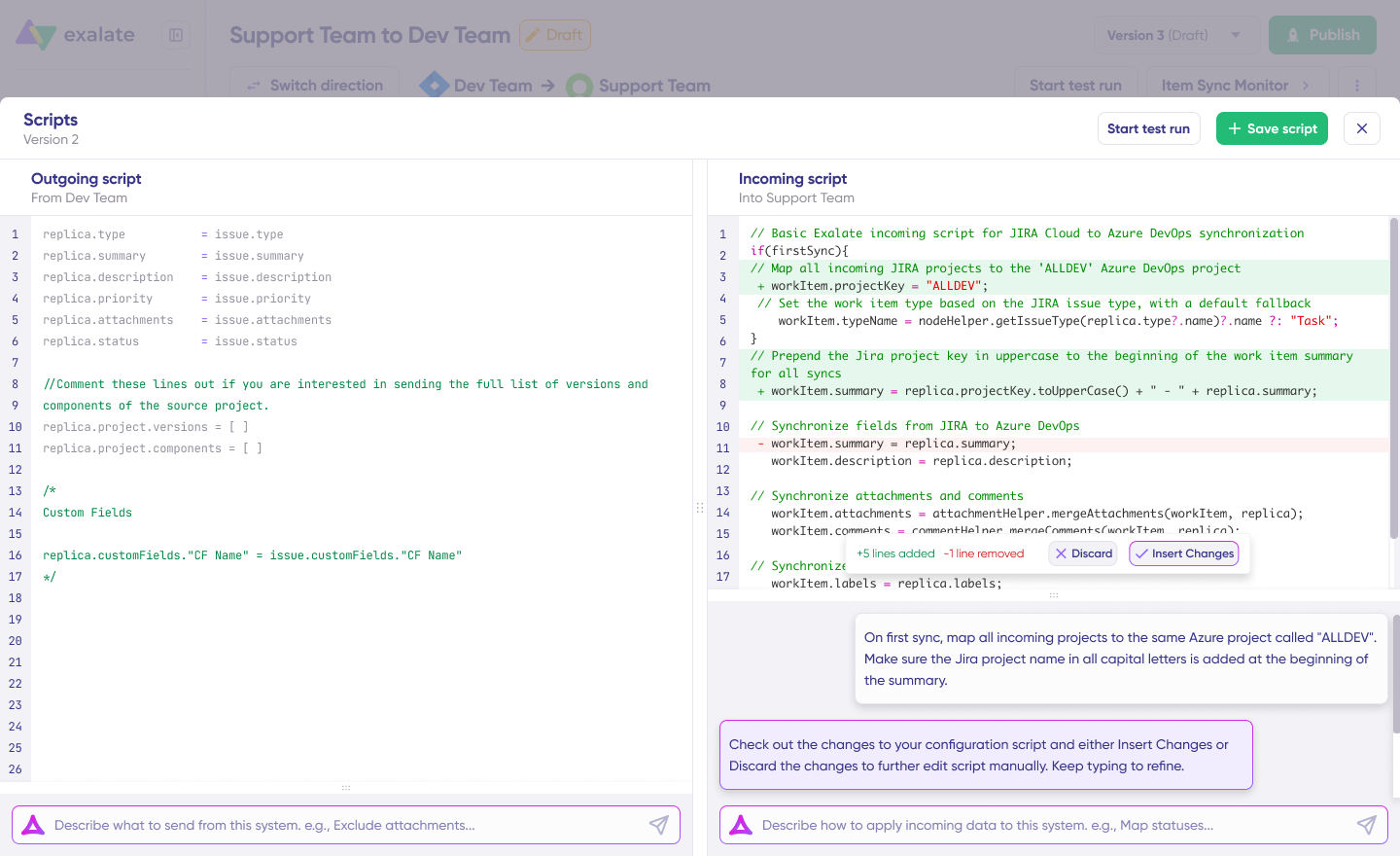
If you want to filter by role visibility, the approach is to use httpClient() to retrieve each comment’s visibility information, then apply your filtering logic inside the sync rules.
The comment object doesn’t expose the role restriction directly on Cloud, so you fetch it from the Jira REST API and decide what to do from there.
If your restricted comments aren’t syncing at all, it’s almost always permissions. When a comment is restricted to a role, only members of that role can read it, and that includes the Exalate proxy user.
Having full comment permissions in the permission scheme isn’t enough. The Exalate app has to be a member of that specific role to see the comment, and Jira Cloud won’t let you add an app to a role through the UI. You add the proxy user to the restricted role through the REST API using its account ID.
Both situations, including the full cURL walkthrough for finding the Exalate account ID and adding it to the right role, are covered in Exalate’s community article. I highly recommend reading it in full before you start, since the project-role case has more moving parts than the internal/public one.
What’s Next?
Test both scripts using Exalate’s Test Run functionality before pushing to production. Pay more attention to the incoming rules since a comment that syncs as public when you meant it to be internal is the exact leak you are trying to prevent, and you won’t notice until a customer reads something they shouldn’t.
If you don’t have Exalate in your tech stack already, sign up for a free trial to see how it fits into your ecosystem. If you have a specific use case that involves role-restricted comments, book a call with our engineers to get started.
FAQs
Can Exalate sync comments from Jira Software into JSM as internal only, and only sync internal JSM comments back to Jira Software?
Yes, but it takes scripting on both ends. On the outgoing side (from Jira Software), you sync all comments as usual since Jira Software has no internal/public concept. On the incoming side (into JSM), use mergeComments with a closure that sets it.internal = true, so everything from Jira Software lands as an internal note. Going the other way, filter the outgoing script on the JSM side with issue.comments.findAll {!it.internal} so only public, customer-facing comments make it to Jira Software.
Why do all my comments sync as public even though some are marked internal in JSM?
All comments sync as public by default. Exalate connections sync all comments as public regardless of their internal/public flag. You need to add the filtering script yourself if you want internal comments to stay internal.
Why aren’t comments syncing at all when they’re restricted to a project role?
This is almost always a proxy user permissions problem, not a script problem. The Exalate proxy user has to be an actual member of the restricted role, not just hold general comment permissions in the permission scheme. Since Jira Cloud won’t let you add an app to a role through the UI, you add the proxy user’s account ID to that role via the REST API.
Is a project-role restriction the same as the JSM internal/public flag?
No, they are different, and mixing these up is where most confusion comes from. Internal/public is a native JSM feature Exalate handles directly through scripting. Project-role restriction is a separate Jira mechanism that isn’t natively exposed on the comment object in Cloud, so you have to fetch visibility info via httpClient() and the Jira REST API, then apply your own filtering logic.
Can Exalate keep one client’s comments completely invisible to another client in an MSP setup?
Yes, that’s the same internal/public control applied across more connections. MSPs running multiple client instances commonly sync comments to a central instance while making sure no client instance ever sees another client’s internal notes.
Recommended Reading