

This article was originally published on the Atlassian Community.
We got this question from one of our users: how do you automatically sync all subtasks whenever a parent work item is synced with Exalate?
Exalate is a work item sync solution that integrates Jira, Jira Service Management, ServiceNow, Azure DevOps Cloud, Azure DevOps Server, Salesforce, Zendesk, Freshservice, Freshdesk, Asana, GitHub, and more through custom connectors.
So I thought I’d implement this requirement with ScriptRunner. This article shows how the Exalate classes can be instantiated to trigger a sync operation.

How It Works
When a sync operation finishes, Exalate raises an “Exalated” event in Jira. A ScriptRunner custom listener picks up that event, then triggers a new sync for each subtask on the parent work item.
Here is the flow:
- A sync operation completes on a parent work item, which raises a
com.exalate.api.domain.trigger.EXALATEDevent. - A ScriptRunner custom listener catches this event.
- The listener loops through all subtasks on the parent and triggers a sync operation for each one.
Setting Up the Custom Listener
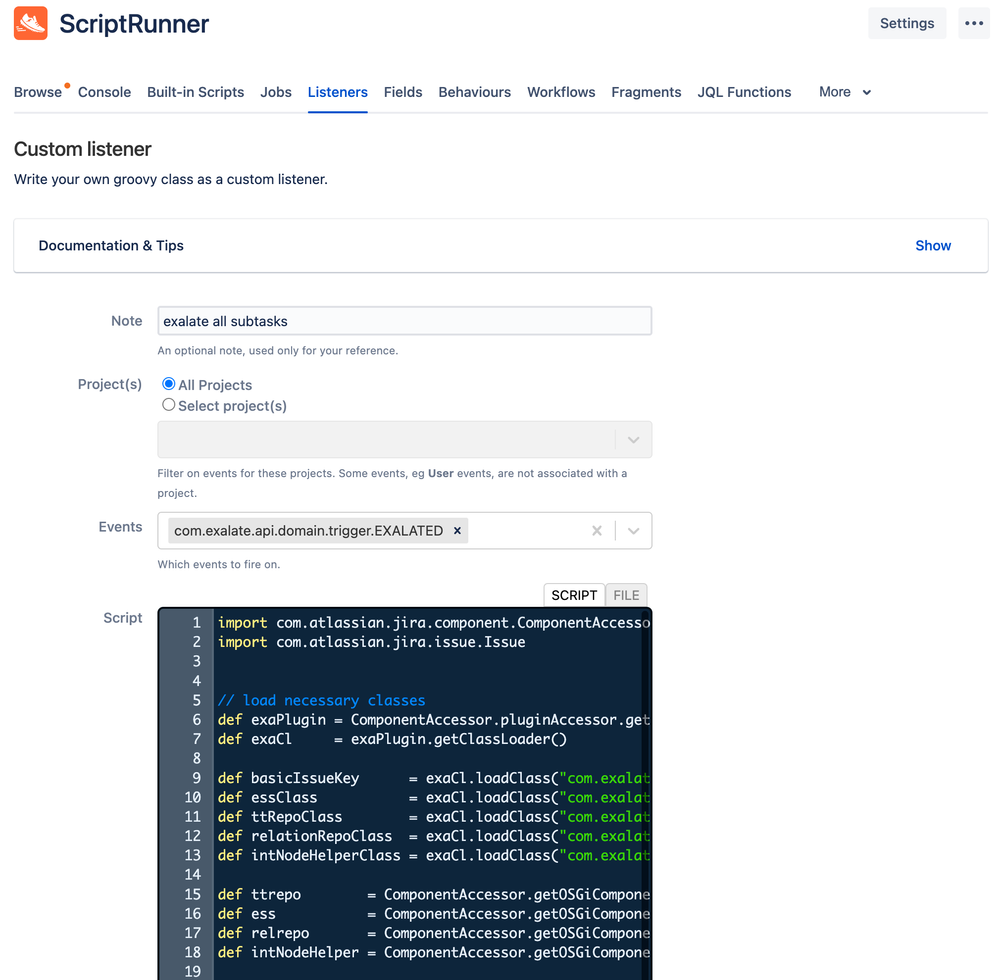
The event the listener needs to listen to is com.exalate.api.domain.trigger.EXALATED.
How does it work in detail?
The whole script code can be found in this snippet.
event.issue contains the parent work item that has been synced. The exalateNow function is called on every subtask.
The exalateNow function is a closure that takes a work item object and a connection name.
Here’s what each line does:
- Line 26: The connection used to sync the subtask is looked up by name. An error is raised if the name is not found.
- Line 33: A unique identifier (Exalate key) is generated for the work item.
- Line 36: The outgoing sync processor runs on the subtask, creating a replica (the data payload sent between synced entities in JSON format).
- Line 39: The sync operation is scheduled (internally called “Pairing”).
The exalateNow code uses several classes that need to be instantiated. This can be done using the code below:
Here is a breakdown:
- Lines 6-7: Get the Exalate class loader from the PluginAccessor.
- Lines 9-13: Retrieve classes from the class loader.
- Line 9: BasicIssueKey generates a unique identifier for the work item.
- Line 10: EventSchedulerService manages sync events.
- Line 11: A “twin” is the pair of work items linked to each other across systems. The twin trace repository holds all twins. It is not used in this code, but can be useful for other use cases.
- Line 12: A “relation” is another name for a connection. The relation repository holds all defined connections.
- Line 13: The node helper class runs the outgoing sync processor.
- Lines 15-18: Access the OSGi components.
A Simpler Alternative: Syncing Subtasks with Exalate’s Outgoing Script
If you prefer a more straightforward approach that does not require ScriptRunner, you can handle subtask syncing directly inside Exalate’s outgoing sync script.
Add this snippet to the bottom of your outgoing script:
httpClient.get("/rest/api/3/issue/"+issueKey.id).fields.subtasks?.collect{
    def subTaskKey = new com.exalate.basic.domain.BasicIssueKey(it.id, it.key)
    syncHelper.exalate(subTaskKey)
}Code language: JavaScript (javascript)
This checks for subtasks on every synced work item and automatically triggers a sync for each one. No ScriptRunner setup needed.
You can also add conditions to control which subtasks get synced. For example, to skip low-priority subtasks:
// At the top of your outgoing sync
if(issue.type.name == "Sub-task" && issue.priority?.name == "Low"){
    return // Ignore low-priority subtasks
}Code language: JavaScript (javascript)
On the receiving side, make sure your incoming script properly handles the parent-child relationship:
if(firstSync && replica.parentId){
    issue.typeName = "Sub-task"
    def localParent = nodeHelper.getLocalIssueFromRemoteId(replica.parentId.toLong())
    if(localParent){
        issue.parentId = localParent.id
    } else {
        throw new com.exalate.api.exception.IssueTrackerException(
            "Subtask cannot be created: parent work item with remote id " +
            replica.parentId + " was not found. Sync the parent first."
        )
    }
}Code language: PHP (php)
Keep in mind: always sync the parent work item before its subtasks, otherwise the child will fail to find its parent on the remote side.
Tip: You can use Exalate’s Test Run feature to validate your subtask sync scripts against real data before deploying to production. This way, you catch mapping errors without affecting live work.
Why This Matters for Cross-Tool Integrations
Syncing subtasks automatically is especially useful when you are running integrations between Jira and external systems like ServiceNow, Azure DevOps, Zendesk, or Salesforce. Parent-child relationships often carry important context (like sprint scope or escalation structure) that should flow across systems without manual effort.
Exalate supports this with its Groovy scripting engine, which gives you full control over how data is mapped. Combined with features like Aida (AI-assisted configuration) for generating scripts, script versioning for safe rollback, and a unified console for managing all your connections, you can build reliable subtask sync workflows across any supported platform.
Start a free trial to try it out.
Wrap Up
This article demonstrates two approaches for automatically syncing subtasks with Exalate: using ScriptRunner with Exalate’s internal classes, and using Exalate’s native outgoing script.
The ScriptRunner approach gives you event-driven control, while the outgoing script method is simpler and works out of the box.
Using either approach, you can extend the logic to synchronize a complete work item structure (Project > Epic > Story) along with all related subtasks.
Disclaimer
The ScriptRunner example uses non-public APIs which may change between different versions of the add-on. Keep this in mind when implementing production scripts.
This is provided as an example with no guarantee it will work in every scenario. If you need help, there are 130+ Exalate partners providing professional services.
Recommended Reading:


