When Ellesh became the Head of Support and Enablement Global, he noticed that support operations across different regions were siloed. Each region was handling tasks differently, which was causing inefficiencies.
He had been in the Head of Service Operations (UK) role for a while, and when he moved into the global position, he started to look for ways to improve things.
Leveraging his engineering experience, Ellesh and Gavin (Global Escalations Manager) aimed to improve communication and efficiency at Qoria.
As they continued to work on improving processes, he realized that the cohesion of communication between teams was crucial.
Ellesh spoke with stakeholders, highlighting how much time was being spent on manual tasks.
For example, every time there was a dev escalation, it took 15 to 20 minutes to gather the correct information from the customer. Then, it needed to go through several teams, from first-line support to escalation managers, before reaching development.
Ellesh recognized the spent time and saw an opportunity to streamline the process.
The inefficiency of having to work across two platforms, Zendesk and Jira, was another trigger for the change.
This was the tipping point for both Ellesh and Gavin, prompting them to look for a solution that could simplify the workflow and reduce the time spent on administrative tasks.
Solutions Qoria Considered For Jira Zendesk Integration
It’s been a bit of a journey for Qoria because their business needs are quite specific.
Previously, they used Azure DevOps alongside Jira in Qoria, but the business decided to streamline and focus solely on Jira. The default Jira automation solution wasn’t versatile enough, so they had to do a lot of workarounds.
Unito was also one of the options they considered, but they found Exalate to be more approachable. They felt Unito was more of a self-serve solution, whereas Exalate offered a more personalized onboarding process.
“I think Exalate is more approachable than Unito because I think Unito was basically like self-serve. Whereas with Exalate, we could do a customized onboarding.”
- Ellesh Miyangar, Head of Support Enablement/Operations (UK & Global)
Ellesh believes Exalate will scale as they continue to use it. He is confident it will expand further as they move forward with their global enterprise.
Qoria’s Use Case
Considering Ellesh’s engineering background, we asked if they ever thought about building a custom integration themselves.
They thought about it, but didn’t want something just out of the box. They didn’t want a simple solution where they just escalated something from Zendesk (support) to Jira (engineering).
Working with Exalate’s scripting capabilities and Dhiren Notani (integration engineer at Exalate) gave them the advantage of learning more about Zendesk as a tool itself and what it can do.
Having this ability to build custom integration rules using Exalate with the SaaS tools they use has been great for Qoria.
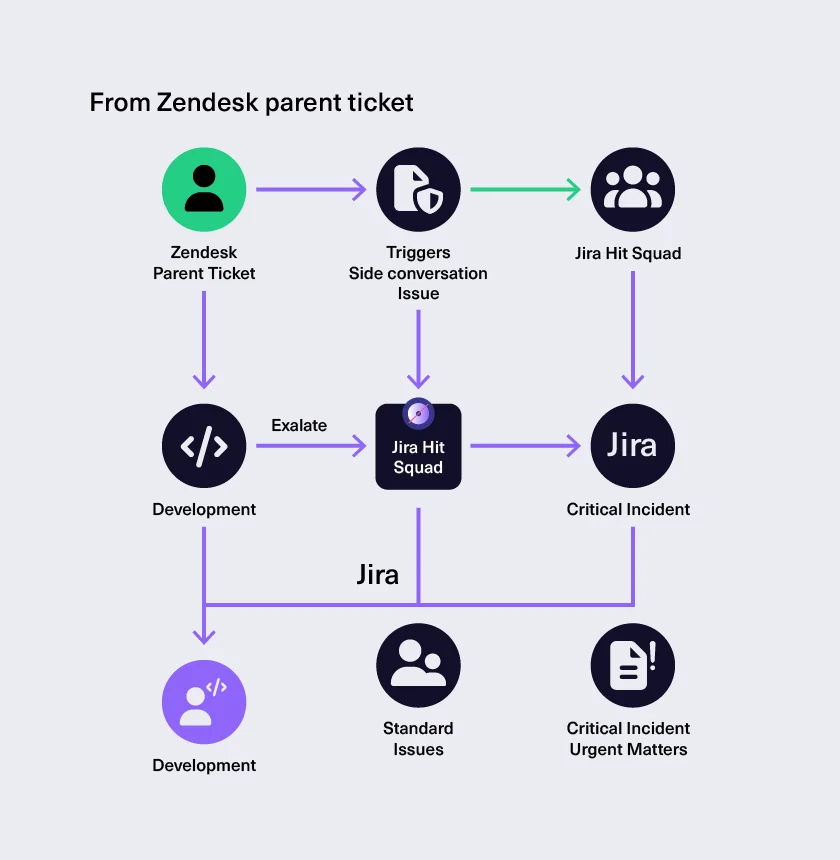
For example, changing the status to start the escalation workflow from Zendesk to Jira was an important factor for them. And when the Jira work goes back into Zendesk, it tells the support team that a ticket is logged with the hyperlink pointing to the actual work item.
It’s like being on a journey, where the support team logs into their Zendesk and sees a story of everything that’s happening. When they look at how the bidirectional sync works, they can ask questions directly from Zendesk, without having to log into another platform.
Qoria’s integration focuses on syncing key fields that are critical for cross-team collaboration.
Specifically, the following data points are essential:
- Ticket status updates to ensure both platforms reflect the same state of work, reduce the risk of miscommunication.
- Internal comments between support (Zendesk) and engineering (Jira) teams, which will allow for smoother handovers, better visibility, and context sharing across teams without requiring users to log into both systems.
- The syncing should be real-time or as close to real-time as possible to avoid latency in communication.
Why Qoria Chose Exalate?
The key Exalate highlight for the team at Qoria was the speed of the bidirectional sync. Other products they used were slower, and they had to wait for information to flow through. With Exalate, the sync happens almost instantly.
“We were evaluating various products, and Exalate intrigued us because of the flexibility with coding.”
- Ellesh Miyangar, Head of Support Enablement/Operations (UK & Global)
Now, with Exalate, the time spent on manual updates is significantly reduced. It still goes through the support team in Zendesk, but once it reaches the escalation manager, it’s just a quick click-and-go.
The team has also made the process smoother for problem tickets where multiple customers have the same issues.
“We essentially built the custom integration we needed using Exalate, without overcomplicating things.”
- Ellesh Miyangar, Head of Support Enablement/Operations (UK & Global)
Additionally, the flexibility of the AI is a major advantage. The team can simply say, “I want to do this, how can you help?” and it will provide the necessary code. The AI then asks, “Do you want me to apply it for you?” They can either accept that or enter the script themselves, check if it works, and tweak it if needed. From there, they can evolve the solution as they move forward.
“The bidirectional sync is lightning-fast, seconds, not minutes.”
- Ellesh Miyangar, Head of Support Enablement/Operations (UK & Global)
Qoria’s Onboarding with Exalate
Exalate intrigued Qoria because of its flexibility with coding. It was particularly unique because Qoria had a specific way of using Zendesk for support operations, and everything needed to integrate smoothly into their development process, which was based on Jira.
Ellesh, with his engineering background, found this to be very beneficial. It wasn’t just about working on a global enterprise level and structuring processes, but also about understanding the technical side of things.
He wasn’t working alone either. He collaborated with a colleague, Gavin, Escalations Manager of Engineering, who was based in Australia. They worked together because they shared a similar mindset when it came to coding.
“Our Jira Zendesk integration has driven global cohesion. The ticket holds the entire story, from support to engineering and back, which gives us a clean audit trail and protects customers from impact.”
- Ellesh Miyangar, Head of Support Enablement/Operations (UK & Global)
At first, the process was a bit daunting due to the new kind of scripting and coding. However, after going through the documentation and collaborating with Dhiren, they began to understand the system much better and could get everything implemented the way they wanted to.
Measurable Improvements After Using Exalate
Since Ellesh also manages Zendesk administration, he can now track reports easily and share them with relevant stakeholders. He reports directly to the COO, enabling him to demonstrate how case loads have decreased and how capacity planning is improving.
With Exalate, the escalation process has become much more automated and efficient.
When a ticket is logged, it is tagged correctly and placed in the right system, making it easier for the team to handle. The bidirectional sync between Zendesk and Jira has proven to be very helpful. It allows support teams to see the full journey of a ticket without needing to log into both platforms.
“When I showed leadership the before/after, manual escalations taking 20–30 minutes plus another 20 to create dev tickets versus a couple of clicks, they saw the time and cost savings immediately.”
- Ellesh Miyangar, Head of Support Enablement/Operations (UK & Global)
Plus, when a ticket is logged, it goes into the correct tagging system and flows through the proper processes.
The escalation process has been cut down significantly.
Future
“We treat vendors as partners. When things go well, we promote them to other businesses. Exalate is one of those.”
- Ellesh Miyangar, Head of Support Enablement/Operations (UK & Global)
This mindset reflects a long-term perspective, where successful solutions are not only adopted internally but are also promoted to other businesses.
Ellesh recognizes the potential for Exalate to expand its reach through word-of-mouth referrals and recommendations, particularly as the product continues to perform well.