

ConnectALL (now part of Broadcom’s ValueOps portfolio) is a value stream management platform that helps enterprises integrate software tools across their development and delivery pipelines. If you’re evaluating alternatives because of pricing concerns, limited customization, or simply need a different approach to bidirectional data synchronization, this guide covers the best options available.
Quick Comparison Table
| Tool | Best For | Pricing Model | Bidirectional Sync | Scripting | Free Trial |
|---|---|---|---|---|---|
| Exalate | Complex intra- or cross-company integrations | Outcome-based (active items in sync) | Yes | Groovy scripting | 30 days |
| Workato | Enterprise workflow automation | Custom (starts ~$15,000/year) | Yes | Low-code recipes | Yes |
| Zapier | Simple app connections | Task-based ($0-$103.50/month) | No | No | Yes |
| Boomi | Hybrid cloud integration | Custom (~$50/month starting) | Limited | Templates + custom | Yes |
| MuleSoft | Large enterprise API management | Custom (enterprise pricing) | Limited | DataWeave | Trial available |
| Jitterbit | Mid-market hybrid integration | Custom pricing | Limited | Low-code | Yes |
| SnapLogic | AI-powered data integration | Custom (~$9,995/year starting) | Limited | Visual pipeline | Yes |
| Power Automate | Microsoft ecosystem automation | $15/user/month (Premium) | No | Low-code | Yes |
| Informatica | Enterprise data management | Custom pricing | Limited | Mappings | Yes |
| Cleo | B2B/EDI integration | Custom pricing | Limited | No-code | No. Live Demo Approach to showcase the software |
| ZigiOps | No-code ITSM integration | Starts at $300/month | Yes | No-code | Yes |
What to Consider When Evaluating ConnectALL Alternatives
Before exploring specific tools, consider these factors based on your integration requirements:
Sync complexity: Do you need simple one-way data transfers, or bidirectional synchronization with custom field mappings and conditional logic?
Cross-company collaboration: Are you integrating systems within your organization, or do you need to sync data with external partners, vendors, or managed service providers?
Technical requirements: Does your team prefer no-code templates, or do you need scripting capabilities for advanced customization?
Security and compliance: What are your data residency, encryption, and audit requirements?
Pricing predictability: Do you prefer usage-based pricing that scales with transactions, or predictable costs based on what you’re actively syncing?
1. Exalate
Exalate is a bidirectional integration platform built for teams that need flexible, script-based synchronization between enterprise systems. It connects issue trackers, service desks, CRMs, and development tools with full control over what data flows in each direction.
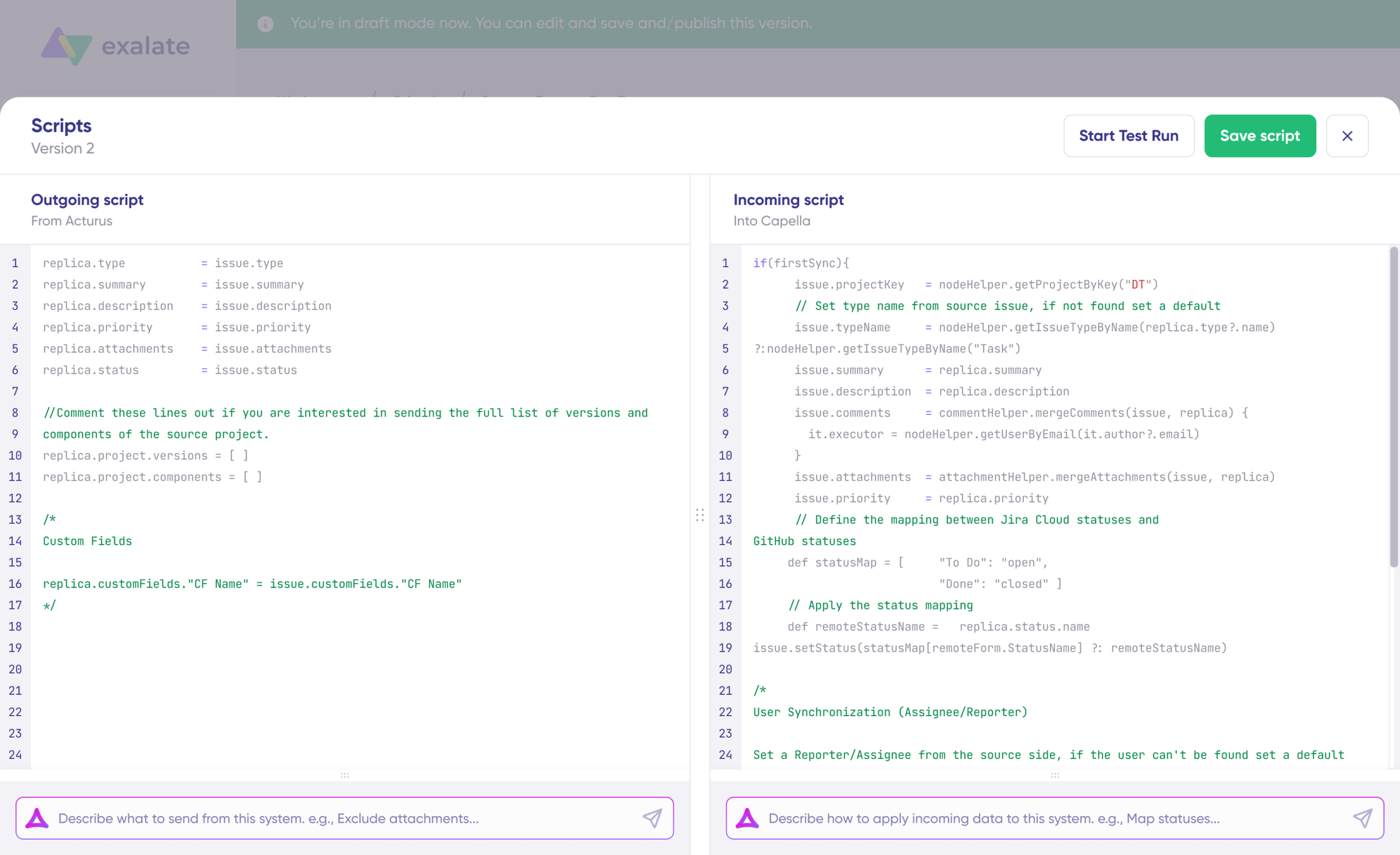
Key Features
Groovy scripting engine: Write custom sync rules using Groovy scripts to handle any transformation logic, conditional workflows, or field mappings your use case requires.
Unified console: Manage all your integrations from a single interface. View connections, monitor sync status, configure rules, and troubleshoot issues without switching between multiple consoles.
Aida (AI-assisted configuration): Exalate’s AI assistant helps you write scripts, troubleshoot sync errors, and implement integrations based on your specific platform context and existing rules.
Test Run: Safely test your sync configurations before deploying to production. Preview how data will transform and verify your rules work correctly without affecting live data.
Script versioning: Track changes to your sync rules with full version history. Roll back to previous configurations if needed, and maintain an audit trail of all modifications.
Sync Queue: Monitor sync operations in real time. Track synchronization progress, identify issues, and get visibility into both outgoing and incoming sync queues.
Real-time synchronization: Changes sync immediately with full issue history. No delays or data gaps between connected systems.
Supported Platforms
Exalate connects Jira, Azure DevOps (Cloud and Server), ServiceNow, Salesforce, Zendesk, GitHub, Freshdesk, Freshservice, and Asana. Additional early access connectors are available for platforms like TOPdesk, Ivanti, Xurrent, HaloITSM, SolarWinds, and ConnectWise. You can also request custom connector development.
Security and Compliance
Exalate is ISO 27001 certified and provides encryption for data both in transit and at rest. The platform uses role-based access control and flexible authentication models (API keys, OAuth, PAT) that decouple integration management access from your ticketing system credentials. For detailed security documentation, visit the Exalate Trust Center.
Pricing
Exalate uses outcome-based pricing, where you pay based on the number of work items actively syncing between your systems. You can choose a different plan for each integration you create.
Plans include Starter, Scale, Pro, and Enterprise tiers. The Starter plan works for smaller sync volumes with platforms like Jira Cloud, Azure DevOps Cloud, Zendesk, Freshdesk, GitHub, Freshservice, and Asana. Pro and Enterprise plans add ServiceNow, Salesforce, Azure DevOps Server, and early access connectors.
Use the pricing calculator to estimate costs based on your specific integration needs. See full pricing details.
Who Should Use Exalate
Exalate works best for organizations that need complex, bidirectional synchronization with custom logic. It’s particularly strong for cross-company integrations where you’re collaborating with external partners, vendors, or MSPs and need each side to maintain control over their own sync rules.
If you’re weighing whether to build custom integrations in-house or use a platform like Exalate, the build vs. buy calculator can help you compare the total cost of ownership.
Support and Resources
Exalate provides comprehensive documentation, a community forum, and direct support options. For teams that need hands-on help, managed services are available for implementation and ongoing maintenance.

2. Workato
Workato is an enterprise integration and automation platform that uses “recipes” to connect applications and automate workflows. It focuses on making automation accessible to business users through a low-code interface while providing enough depth for technical teams.
Key Features
Workato recipes combine triggers and actions to automate multi-step workflows across applications. The platform includes:
- Recipe Copilot for AI-assisted workflow creation
- Workbots for Slack and Teams integration
- API management and governance tools
- Data Hub for centralizing business data
- Pre-built connector library with 1,000+ apps
Limitations
Workato struggles with complex data import/export scenarios involving large volumes. The platform requires Ruby programming knowledge for advanced customizations. It doesn’t support true bidirectional, real-time synchronization for ongoing use cases.
Pricing
Workato uses custom, usage-based pricing. Subscription fees typically range from $15,000 to $50,000 per year, depending on connections, recipes, and task volumes. Contact their sales team for specific quotes.
Best For
Enterprise teams needing workflow automation across multiple departments (HR, Finance, IT) with moderate integration complexity.
3. Zapier
Zapier connects over 7,000 applications through automated workflows called “Zaps.” It’s designed for simplicity, allowing non-technical users to create integrations without coding.
Key Features
- Drag-and-drop interface for building automations
- Multi-step Zaps with conditional logic
- Tables for workflow databases
- Interfaces for building custom pages
- Canvas for mapping automations visually
- Chatbots powered by AI
Limitations
Zapier doesn’t support bidirectional synchronization or ongoing real-time sync. It works best for “fire and forget” automations rather than continuous data synchronization. Custom scripting isn’t available, limiting what you can accomplish with complex use cases.
Pricing
Zapier offers a free tier with limited tasks. Paid plans range from $19.99/month (Professional) to $103.50/month (Team) with annual billing. Task-based pricing means costs increase with usage volume.
Best For
Small teams and individuals need simple app connections and one-way automations without technical complexity.
4. Boomi
Boomi is an integration platform as a service (iPaaS) that connects applications, data, and devices across cloud and on-premise environments. It provides tools for data integration, API management, and workflow automation.
Key Features
- AtomSphere for cloud and hybrid deployment
- Master Data Hub for unified data management
- Event Streams for real-time data exchange
- B2B/EDI Management for trading partner communications
- Boomi AI for intelligent integration suggestions
- Agent Studio for AI-powered automation
Limitations
Boomi’s API management capabilities are limited to basic functionality. Most connectors are pre-built templates with limited customization options. The platform can struggle when connecting multiple custom connectors simultaneously.
Pricing
Boomi offers Professional, Pro Plus, Enterprise, and Enterprise Plus plans. Starting pricing is around $50/month with a 3-month free trial available. Contact sales for detailed pricing based on your integration needs.
Best For
Organizations needing hybrid cloud integration with strong data management capabilities and a preference for template-based workflows.
5. MuleSoft Anypoint Platform
MuleSoft provides an API-led integration platform for large enterprises. It’s designed for organizations building comprehensive API strategies and need enterprise-grade governance.
Key Features
- Anypoint Platform for unified API management
- DataWeave for data transformation
- API Designer and Exchange
- Runtime Manager for deployment
- Anypoint Monitoring and Analytics
Limitations
MuleSoft requires significant technical expertise and dedicated resources. Implementation timelines are typically longer than lighter-weight alternatives. Pricing is at the enterprise level, making it less accessible for mid-market companies.
Pricing
MuleSoft uses custom enterprise pricing. Expect six-figure annual costs for most implementations. Contact Salesforce (MuleSoft’s parent company) for quotes.
Best For
Large enterprises with dedicated integration teams building API-first architectures that need comprehensive governance tools.
6. Jitterbit Harmony
Jitterbit Harmony is a low-code integration platform that connects systems and enables application development. It targets mid-market companies needing integration without heavy development investment.
Key Features
- Design Studio for visual integration development
- Harmony Portal for management and monitoring
- Pre-built Harmony Recipes for common use cases
- API Manager for API lifecycle management
- 400+ pre-built connectors
Limitations
The user interface can be complex for non-technical users. Documentation is sometimes lacking for advanced scenarios. Support response times vary based on plan tier.
Pricing
Jitterbit uses custom pricing based on your integration requirements. Contact their sales team for quotes.
Best For
Mid-market companies that need a balance between no-code simplicity and technical customization capabilities.
7. SnapLogic
SnapLogic is an AI-powered integration platform that uses visual pipelines (called “Snaps”) to connect applications and data sources. It emphasizes generative integration through AI assistance.
Key Features
- SnapGPT for natural language pipeline creation
- Intelligent Integration Platform (IIP)
- Pre-built Snap Packs for common applications
- Self-service data integration
- API management capabilities
Limitations
Premium Snaps for specific connectors add high cost. The learning curve for advanced features is steeper than simpler alternatives. Documentation can be inconsistent.
Pricing
SnapLogic Premium Snaps start at approximately $9,995/year. Enterprise pricing is custom-based on data volume and connectors needed.
Best For
Data-centric organizations that want AI assistance in building integration pipelines and have significant data transformation needs.
8. Microsoft Power Automate
Power Automate (formerly Microsoft Flow) provides workflow automation within the Microsoft ecosystem. It integrates tightly with Microsoft 365, Dynamics 365, and Azure services.
Key Features
- Desktop flows for RPA automation
- Cloud flows for app integration
- Process mining capabilities
- AI Builder for intelligent automation
- Copilot for natural language flow creation
- 1,000+ connectors
Limitations
Power Automate works best within Microsoft environments. Cross-platform integrations with non-Microsoft tools are less robust. Complex bidirectional sync scenarios aren’t well supported.
Pricing
Power Automate Premium costs $15/user/month. Process plans are $150/bot/month for attended RPA. Additional capacity can be purchased separately.
Best For
Organizations heavily invested in the Microsoft ecosystem needing to automate workflows across Microsoft applications.
9. Informatica
Informatica is an enterprise data management platform that combines data integration, quality, and governance capabilities. It’s used by large enterprises with complex data landscapes.
Key Features
- Intelligent Data Management Cloud (IDMC)
- PowerCenter for ETL processes
- Cloud Data Integration
- Data Quality and Governance tools
- Master Data Management
- API and Application Integration
Limitations
Informatica requires significant expertise to implement effectively. The platform is optimized for data management rather than real-time application synchronization. Costs are at enterprise scale.
Pricing
Informatica uses custom enterprise pricing. Contact their sales team for quotes based on your data management requirements.
Best For
Large enterprises with complex data management needs spanning integration, quality, governance, and master data management.
10. Cleo Integration Cloud
Cleo provides B2B integration focused on supply chain and partner ecosystems. It specializes in EDI, API, and file-based integrations for trading partner communications.
Key Features
- EDI integration and compliance
- API-based integrations
- MFT (Managed File Transfer)
- Integration monitoring and visibility
- Partner onboarding workflows
- Compliance management
Limitations
Cleo is specialized for B2B and EDI use cases. It’s not designed for general application integration or bidirectional sync between internal tools like issue trackers or service desks.
Pricing
Cleo uses custom pricing. Contact their sales team for quotes based on your B2B integration requirements.
Best For
Organizations with significant B2B, EDI, and supply chain integration requirements who need partner ecosystem management.
11. ZigiOps
ZigiOps is a no-code integration platform focused on connecting ITSM, monitoring, DevOps, and CRM systems. It offers pre-built templates and bidirectional sync capabilities without requiring scripting.
Key Features
- No-code integration setup
- Pre-built integration templates
- Bidirectional data synchronization
- Real-time data exchange
- Advanced field mapping and filtering
- Support for ServiceNow, Jira, Azure DevOps, Salesforce, Dynatrace, and more
Limitations
ZigiOps doesn’t provide custom scripting capabilities, which limits what you can accomplish with highly complex or unique use cases. The no-code approach works well for common scenarios but may not handle edge cases that require programmatic logic.
Pricing
ZigiOps pricing starts at $300/month based on the number of system pairs (not transactions), providing predictable costs for growing integration needs.
Best For
IT operations teams needing quick, no-code integrations between ITSM and monitoring tools without scripting requirements.
How ConnectALL Compares (Now ValueOps ConnectALL)
ConnectALL was acquired by Broadcom in 2023 and is now part of the ValueOps portfolio alongside Rally and Clarity. The platform focuses on value stream management, providing visibility across software development and delivery pipelines.
Current State
ValueOps ConnectALL offers:
- Universal and vendor-specific adapters
- Database adapters for custom connections
- Value stream visualization
- Flow metrics and analytics
- Integration with Broadcom’s Rally and Clarity products
Considerations
As part of Broadcom’s enterprise software portfolio, ConnectALL is positioned for large enterprises using other Broadcom/CA tools. Pricing and licensing follow Broadcom’s enterprise model, which may be less accessible for mid-market companies or teams needing focused bidirectional sync capabilities.
Choosing the Right Alternative
Your choice depends on your specific requirements:
Choose Exalate if you need flexible, script-based bidirectional synchronization with full control over data transformation. It’s particularly strong for cross-company integrations and complex sync scenarios that template-based tools can’t handle.
Choose Workato if you need enterprise workflow automation across multiple departments and can invest in a higher-cost platform with extensive pre-built recipes.
Choose Zapier if you need simple, one-way automations between common apps and want the easiest possible setup experience.
Choose Boomi if you need hybrid cloud integration with strong data management and prefer template-based approaches.
Choose MuleSoft if you’re building an enterprise API strategy with dedicated integration resources and need comprehensive governance.
Choose ZigiOps if you want no-code bidirectional sync between ITSM and monitoring tools without learning scripting.
Frequently Asked Questions
What is the best ConnectALL alternative for Jira and ServiceNow integration?
Exalate provides the most flexible option for Jira and ServiceNow integration. Its Groovy scripting engine handles complex field mappings, conditional logic, and bidirectional sync scenarios that template-based tools struggle with. You can control exactly what data syncs in each direction and transform fields during synchronization. For security details, see the Exalate Trust Center.
How does Exalate pricing compare to ConnectALL?
Exalate uses outcome-based pricing where you pay based on active items in sync, not user counts or per-transaction fees. This makes costs predictable and scales with actual usage. Use the pricing calculator to estimate costs for your specific integration needs, or view the pricing page for plan details.
Can I sync data between two companies using these tools?
Yes, Exalate is specifically designed for cross-company integrations where each organization maintains control over its own sync rules. Both sides can independently configure what data they send and receive, making it suitable for vendor relationships, partner collaborations, and MSP scenarios.
Do I need coding skills to use Exalate?
Exalate’s Groovy scripting provides maximum flexibility, but the Aida AI assistant helps you write scripts based on plain language descriptions of what you want to accomplish. For teams evaluating whether to build integrations in-house or use a platform, the build vs. buy calculator helps compare options.
What security certifications does Exalate have?
Exalate is ISO 27001 certified and provides encryption for data in transit and at rest. The platform uses role-based access control and decoupled authentication that separates integration management access from ticketing system credentials. Visit the Trust Center for complete security documentation.
How long does it take to set up an integration with Exalate?
Setup time depends on complexity. Simple bidirectional sync between two systems can be configured in hours. Register your account at exalate.app, connect your two systems by entering and verifying URLs, name your connection, and start configuring sync rules. The Test Run feature lets you verify configurations before going live.
What support options are available?
Exalate provides documentation, community forums, and direct support depending on your plan. Standard support is included with Scale plans and above. Enterprise plans include priority support with faster response times. For teams needing hands-on implementation help, managed services are available.
Recommended Reads:
- The Reality of Business Process Integration
- ZigiOps vs. Exalate: A Side-by-Side Comparison
- TFS4JIRA vs. Exalate: How Do They Compare?
- ServiceNow IntegrationHub or Exalate: How do they Compare?
- Adaptavist ScriptRunner Connect vs. Exalate: How Do They Compare?
- The Best ConnectALL Alternatives For Business Integration
- 10 Most Valuable Integrationhub Alternatives Right Now
- The Best MuleSoft Alternatives for Business Process Integration
- Exalate or Getint: An Objective Comparison to Help You Choose the Best Integration Solution
- The Best Workato Alternatives For Scalable Business Integrations


