Highlights
- Customer: Stellantis e‑Transmissions NV
- Industry: Automotive. Stellantis e-Transmissions NV is part of Stellantis, one of the largest carmakers in the world.
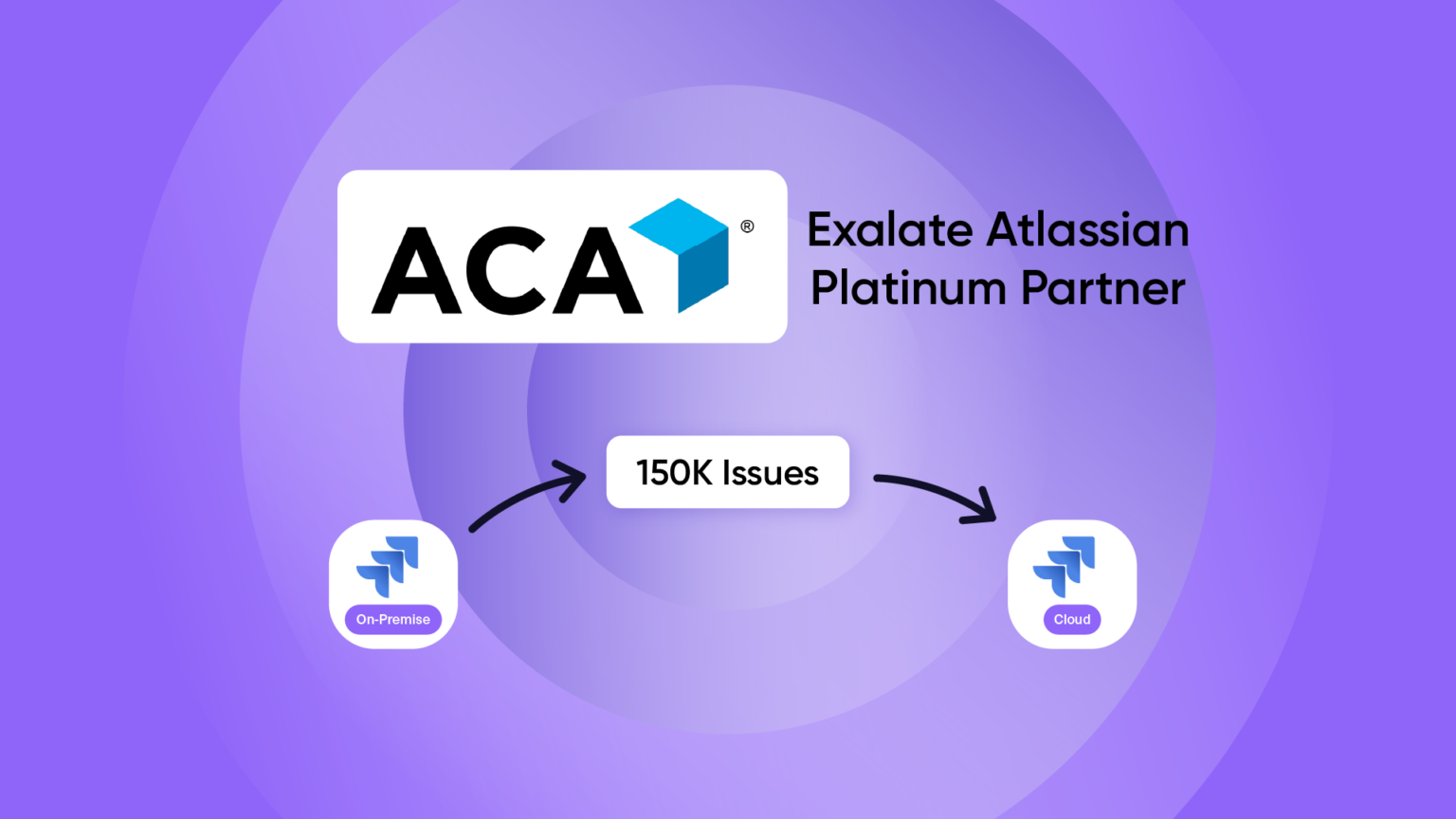
- Partner: ACA Group (Exalate Atlassian Platinum Partner)
- Challenge: Migrating 150,000 issues from Jira 7 On-premise (Server) to a modern Jira Cloud environment to accelerate development, adopt new capabilities, and leave behind legacy processes from a former joint venture.
- Tool: Exalate, a live-sync migration, processing ~5,000 issues per day.
- Result: Zero downtime during the transition, data cleanup executed on the fly, and a quiet go-live weekend.
About the Customer and the Partner
Stellantis e‑Transmissions NV, a multinational automotive group, recently took over a joint venture that was running its operations on an outdated Jira 7 Server instance.
The inherited environment came with legacy processes, duplicated configurations, and outdated structures that no longer served the business. To accelerate development cycles, embrace modern capabilities like Jira Plans for portfolio management, and leave the old joint venture processes behind, Stellantis mandated a move from Jira on-premise (Server) to a fully supported Jira Cloud environment.
They needed to migrate 150,000 Jira work items (or issues) to Jira Cloud, and the standard migration tools were not an option, since the instance was too old for Atlassian’s Jira Cloud Migration Assistant (JCMA). Plus, the timeline was aggressive, and they wanted a greenfield approach that included cleaning up years of duplicated custom fields and inconsistent configurations.
To execute this massive transition, Stellantis partnered with ACA Group, Exalate’s Atlassian Platinum Partner in Belgium, with deep specialization in Cloud migrations.
Over approximately 35 days, the ACA migration team, equipped with Exalate, performed a live phased migration with zero downtime and synchronized all 150,000 issues, including attachments, comments, and linked work items, while Stellantis teams continued working uninterrupted in their on-premise environment.
The Challenge: A Tight Deadline and a Greenfield Requirement
Stellantis inherited a Jira Server instance through its joint venture. This instance was running Jira 7, a version that was outdated and unable to support the modern development workflows and tooling Stellantis needed to stay competitive.
The business drivers were clear: move to a fully supported Jira Cloud environment to speed up development, adopt new functionality like Jira Plans for aligning portfolio management with business goals and industry needs, and break free from the outdated processes and structures inherited from the joint venture. This was not just a technical migration; it was a strategic decision to start fresh with a clean, lean environment built for the future.
Stellantis requested a greenfield approach. This meant the migration team had to dynamically merge issue types and consolidate duplicate fields while the data was moving.
The Complexity
This was far from a simple lift-and-shift. Several factors made the migration particularly challenging:
Dirty data and duplicated configurations: The old Jira had duplicate custom fields per project rather than reusing shared fields. There were also inconsistent workflows and years of accumulated configuration debt.
Aggressive timeline: Stellantis made a stricter go-live as soon as possible, originally targeting December 1st.
125,000+ active issues: The instance contained approximately 125,000 to 150,000 work items that needed to be migrated, complete with attachments, comments, work logs, and linked issues.
“Together with upgrading two major versions, while upgrading to Data Center, and a shorter deadline, we didn’t believe JCMA was a valid option.”
— Atlassian Consultant, ACA Group
Evaluating the Options: Four Jira Migration Approaches Compared
The ACA Group presented Stellantis with four potential migration paths:
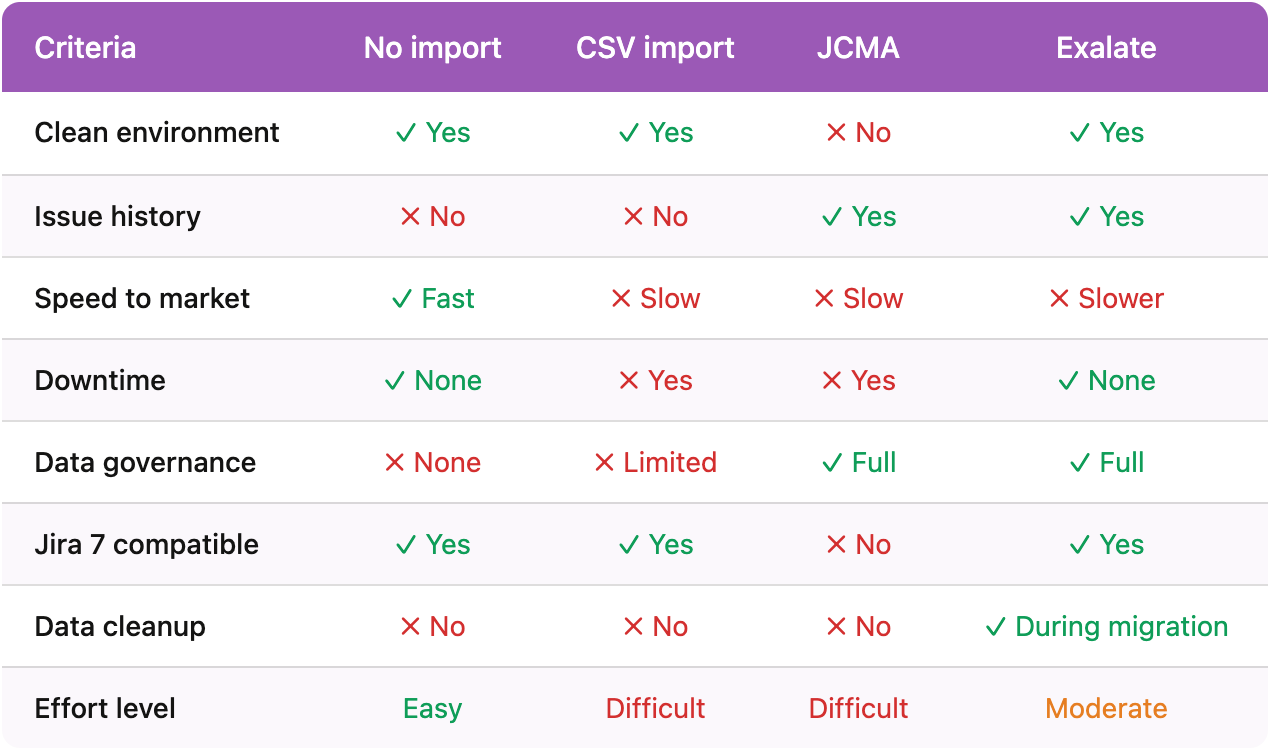
- No Import: Users start fresh in the Cloud and manually copy tickets over if needed.
- Pros: Clean environment, fast, no downtime.
- Cons: No governance, total loss of work item history (comments, attachments, worklogs, linked issues).
- Manual CSV Import: ACA handles the data dump and upload via CSV.
- Pros: Results in a clean environment.
- Cons: Highly manual, heavy effort, significant downtime, and severe loss of issue history.
- Jira Cloud Migration Assistant (JCMA): Atlassian’s native migration tool.
- Pros: Migrates all issue (or work item) data perfectly.
- Cons: Because the server was on Jira 7, ACA would have had to upgrade the server by two major versions and buy a temporary Data Center license just to run the tool. Most importantly, JCMA brings over all the legacy configurations, completely ruining the Greenfield data cleanup requirement.
- Exalate: A live synchronization tool.
- Pros: Allows for a Greenfield data cleanup during the transfer, migrates all history (comments/attachments), enables a phased migration with zero downtime, and was a tool ACA Group and Stellantis were already using.
- Cons: Required some effort in Groovy scripting to map complex workflows and custom fields.
Why Exalate Won The Decision Journey
The decision to use Exalate was driven by two primary factors:
Existing relationship and expertise: ACA Group is an established Exalate partner with extensive experience using the tool for cross-instance synchronization. Whenever ACA evaluates tools for migrating data between systems, Exalate is their first consideration.
Customer already had Exalate in place: Stellantis was already using Exalate to synchronize one project between their on-premise Jira and a cloud environment. The infrastructure, licensing, and basic familiarity were already in place.
This combination made Exalate the natural choice.
The Decisive Exalate Advantage: Data Cleanup During Migration
The single most compelling reason to choose Exalate for this project was its ability to transform data during migration. Exalate’s Groovy scripting engine allowed ACA to merge duplicate issue types, consolidate custom fields, map old workflows to new ones, and clean up years of configuration debt, all as part of the migration process itself.
“One of the biggest reasons why I would recommend using Exalate is that you can clean up your data while migrating, and that’s a very interesting option. Especially useful if your Jira has a lot of “dirty” data. The normal approach is to usually clean up before or after migration.”
— Atlassian Consultant, ACA Group
This meant Stellantis did not need to choose between speed and quality. They could achieve their greenfield vision with merged issue types, consolidated fields, and clean workflows without a separate, time-consuming cleanup phase before or after migration.

The Live Migration Strategy & Technical Approach
Migrating 150,000 issues via live sync requires a highly orchestrated strategy.
The ACA Group implemented several technical best practices and a phased migration approach to ensure the Exalate synchronization ran smoothly:
1. Strategic Sync Order. To avoid creating “empty shells” (which take Exalate just as long to process as fully loaded tickets), ACA scripted the sync to always migrate in a specific hierarchy: Epics first, then non-subtasks, and finally subtasks.
2. Synchronizing Slow-Moving Data First. To prevent Exalate’s queue from backing up during daily operations, the team synchronized older, closed data first (working year-by-year from before 2020 to 2021, etc.). This left the active, constantly changing data for last. The sync operated at a reliable capacity of ~5,000 issues per day.
3. Preserving Historical Integrity with Custom Fields. Because some legacy users were no longer with the company (and lacked Cloud licenses), mapping assignees natively would fail. ACA created custom fields in the Cloud specifically to store legacy metadata. This allowed Stellantis users to easily search for old tickets and retain complete historical context.
4. Data transformation via Groovy Scripting. The Groovy scripting engine was the backbone of the data transformation. ACA wrote custom scripts to handle issue type merging, custom field consolidation, select and multi-select mappings, string truncation, & more.
5. Bypassing Workflow Restrictions Old tickets often failed to sync because they lacked data for fields that were recently made “required” in the Cloud. ACA solved this by creating a special workflow for the Atlassian Add-on (Exalate) user, granting it permission to transition a ticket from “any status to any status”.
“It is absolutely vital to finalize the list of fields to migrate before you start counting the migration days. Also, keep some extra time to resync data in case you forget some fields.
— Atlassian Consultant, ACA Group
Zero Downtime and a “Non-Event” Go-Live
Because Exalate continuously synced live data in the background, the actual go-live over the weekend of January 10-11 required virtually no effort.
ACA simply executed a permission switch: they disabled write access on the old Server, enabled read/write access on the Cloud, and turned on outgoing emails. There was no “Big Bang” migration, no massive data dumps, and zero downtime for end-users.
That was it. No frantic weekend of data transfers. No war room. No migration scripts running through the night. Users arrived on Monday and simply started working in the new environment.
“Because Exalate is already synchronizing on a daily basis, you can go live very easily.”
— Atlassian Consultant, ACA Group
The transition was so smooth that it caught even the ACA off guard. Compared to other migration teams within the organization who dealt with daily issues for weeks after go-live, the Exalate migration generated essentially no complaints related to data.
The end-user feedback was universally positive:
“We didn’t hear anything at all about the migration. So we don’t even know if people are actually using it. Afterwards, we did get a lot of compliments from people saying, like, it was extremely quiet, nothing exploded.”
— Stellantis Project Team Lead
Results and Outcomes
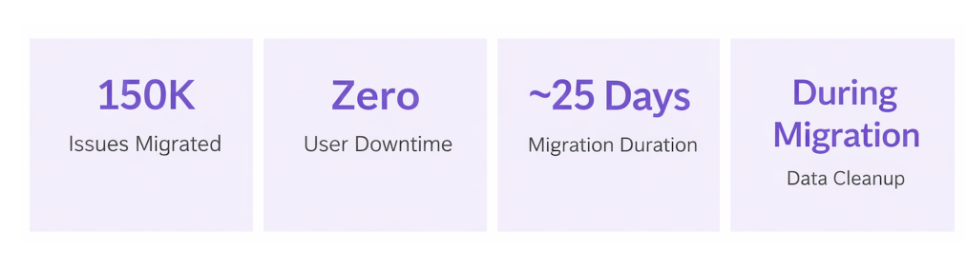
| Issues (Work items) Migrated | ~150,000 (including all attachments, comments, work logs, and linked issues) |
| User Downtime | Zero. Users worked uninterrupted during the entire migration period |
| Go-Live Process | Permission scheme changes and email enablement only; completed in minutes |
| Migration Duration | ~25 days of continuous synchronization at ~5,000 issues per day |
| Data Transformation | Issue types merged, custom fields consolidated, workflows cleaned up during migration |
| Legacy Data Preserved | Old keys, assignees, reporters, and timestamps preserved in custom fields for ongoing reference |
💡 Lessons Learned & Best Practices for Complex Migrations
For teams looking to perform similar Greenfield migrations, the ACA Group shared invaluable advice:
- The Exalate Booster Pack is Mandatory: When using Groovy scripting for complex scenarios, the Booster Pack is critical. Without it, debugging errors and resetting queues can take 15–20 minutes per iteration. The Booster Pack enables rapid debugging and faster queue processing. ACA strongly recommends the Exalate Booster Pack for any migration project, not primarily for speed, but for debugging efficiency.
- Prepare Your Triggers in Advance: Instead of writing JQL queries on the fly, prepare up to 20 sequential triggers ahead of time. Execute them one by one in chunks of 5,000 issues to maintain system stability and easily track progress.
- Write JQL directly into Triggers: Triggering bulk syncs via saved Jira filters can take up to 10 minutes to process. Writing the JQL directly into the Exalate trigger cuts processing time down to about 20 seconds.
- Watch the Jira 60,000 JQL Limit: Standard Jira On-premise (Server) environments block JQL queries that return more than 60,000 results. If you rely on the Under-sync view to find un-synced tickets, update this parameter in your Jira database and restart the server before the migration begins.
- Limit User Access During Sync: While Exalate is syncing in the background, grant users full activity permissions in the new Cloud but restrict “Browse Project” access. This prevents users from accidentally working in the new production environment before go-live.
“Synchronizing live data takes a lot of time. Consider 5000 issue updates per day, this INCLUDES live changes to already synced data. Furthermore, if you change the status, update a field, and add a comment, that counts as 3 changes. It’s important to account for these scenarios.”
— Atlassian Consultant, ACA Group
Advice for Organizations Planning Similar Migrations
Is Exalate Right for Your Migration?
Based on ACA Group’s experience, Exalate is particularly well-suited for migrations that meet one or more of the following criteria:
Your source Jira version is incompatible with JCMA. If your instance is running an older, unsupported version of Jira Server, Exalate eliminates the need for risky intermediate upgrades.
You need a greenfield/clean migration. If you want to restructure issue types, consolidate custom fields, or redesign workflows as part of the migration, Exalate’s Groovy scripting allows you to transform data during the sync.
Zero downtime is a requirement. Exalate’s live synchronization means users continue working in the source environment until go-live. The cutover is a permission change, not a data transfer.
You have complex data relationships. Linked issues, parent-child hierarchies, and cross-project references are handled natively by Exalate’s synchronization engine.
You want to test the target environment before committing. Because data is continuously synchronized, you can validate workflows, automations, and configurations in the cloud environment long before go-live.
When Exalate May Not Be the Best Fit
Exalate is optimized for synchronization, not bulk data transfer. It processes items one by one, which means it will take longer than a direct project import/export. For straightforward lift-and-shift migrations where the source instance is compatible with JCMA and no data transformation is needed, native Atlassian tools may be faster.
If your migration involves fewer than 10,000 issues with simple configurations, the overhead of Groovy scripting may not be justified. However, for complex, large-scale migrations where the standard tools fall short, Exalate fills a critical gap.
ACA’s Top Advice
“Given the pros and cons of JCMA, I’m very happy with the fact that we chose Exalate. The tricky migrations are the ones that are still left over. The easy ones are already migrated. And for the tricky ones, I really think that Exalate could be a solution.”
— Atlassian Consultant, ACA Group
ACA has also offered to share its experience with other Exalate partners facing similar migration challenges, reflecting the collaborative spirit of the Exalate partner ecosystem.
About Exalate
Exalate is the leading integration and synchronization platform for connecting work management and ITSM tools across organizational boundaries. Trusted by over 2,000 international customers, Exalate supports bidirectional, customizable synchronization between Jira, ServiceNow, Azure DevOps, Salesforce, Zendesk, GitHub, and many other platforms. While primarily an integration tool, Exalate’s live synchronization capabilities make it a powerful solution for complex migration scenarios where standard tools fall short, particularly for organizations that need zero downtime, data transformation during migration, or phased cutover strategies.
To learn more about using Exalate for migration, visit the migrations page or book a discovery session with an integration expert. You can always get in touch with ACA if you have a similar use case.