

This article was originally posted on the Atlassian community.
Keeping change requests in sync can make all the difference in resolution speed, team collaboration, customer satisfaction, and more.
By syncing change requests between ServiceNow and Jira (including Jira Cloud, Jira Software, and Jira Service Management), you can ensure that essential data like comments, descriptions, attachments, and custom field data flows across both platforms, creating visibility for all stakeholders.
It also allows both development and IT teams to have real-time visibility into the same data, which eliminates duplicate data entry, reduces errors, and saves time.
All in all, change request sync enables quicker work item resolution with real-time updates and automatic notifications.

Why Syncing Change Requests Matters
Change management is at the heart of ITIL and DevOps workflows. When change requests live in ServiceNow, but the development work happens in Jira, manual handoffs create delays and errors. Syncing change requests removes that friction by keeping both platforms aligned automatically.
Teams get a single source of truth for approval status, implementation progress, and post-change validation without toggling between systems. This is especially valuable for organizations that need to maintain audit trails and compliance documentation across both platforms.
Use Cases for Syncing Change Requests Between Jira and ServiceNow
- Sync product change requests initiated from Jira Service Management to ServiceNow so that all status updates and relevant comments will flow between teams.
- Automatically escalate a ServiceNow change request to the dev team using Jira Software whenever a client logs a complaint. All relevant fields, including category, priority, SLA status, correlation ID, and state, will also be in bidirectional sync.
- Sync SLA field status or countdowns between Jira and ServiceNow so that all SLA breaches can create an instant alert in real time.
- Sync multiple change requests coming from ServiceNow as subtasks in a Jira ticket or task. Closing tasks in Jira triggers updates or closure in ServiceNow. This helps users handle change management and pipelines from multiple sources.
- Feature change requests from customers will be forwarded to the IT team, who can then escalate them to the development team. Comments and custom fields can be mirrored across platforms or left private, depending on the level of context you want to give each team.
- Automate change request creation based on task or ticket labels in Jira. For example, all tickets with a “software” label will automatically create a ServiceNow change request.
- Map ServiceNow change requests as a Jira defect or bug so that the development team can start working on it based on priority and severity.
- Create Jira stories for ServiceNow catalog requests, syncing comments, state changes, and user assignments back to the relevant child tasks in ServiceNow.
- Sync ServiceNow change tasks to Jira sub-tasks so internal support teams can distribute and track development work without leaving their own platform. Closing a sub-task in Jira updates the corresponding change task in ServiceNow automatically.
What Data Can You Sync Between Jira and ServiceNow Change Requests?
When syncing change requests, you are not limited to just a few standard fields. Exalate supports syncing virtually any data accessible via REST APIs on both platforms. Common fields include:
Standard fields: Summary/short description, description, priority/urgency, status/state, assignee, comments (work notes and customer-facing), attachments, due dates, and labels or categories.
Advanced fields: Custom fields, SLA data and breach times, CMDB configuration items, correlation IDs for traceability, parent-child relationships between change requests and change tasks, and time tracking data like original estimates and time spent.
You decide what gets shared and what stays private. For example, you can sync comments and attachments publicly while keeping internal statuses or work notes private to each team.
How to Sync Change Requests With Exalate in 5 Steps
Log In to Exalate
Go to exalate.app and log in. If you are a new user, create an account by entering your email and verifying it, or sign up using Google.
Configure Sync Rules for Change Requests
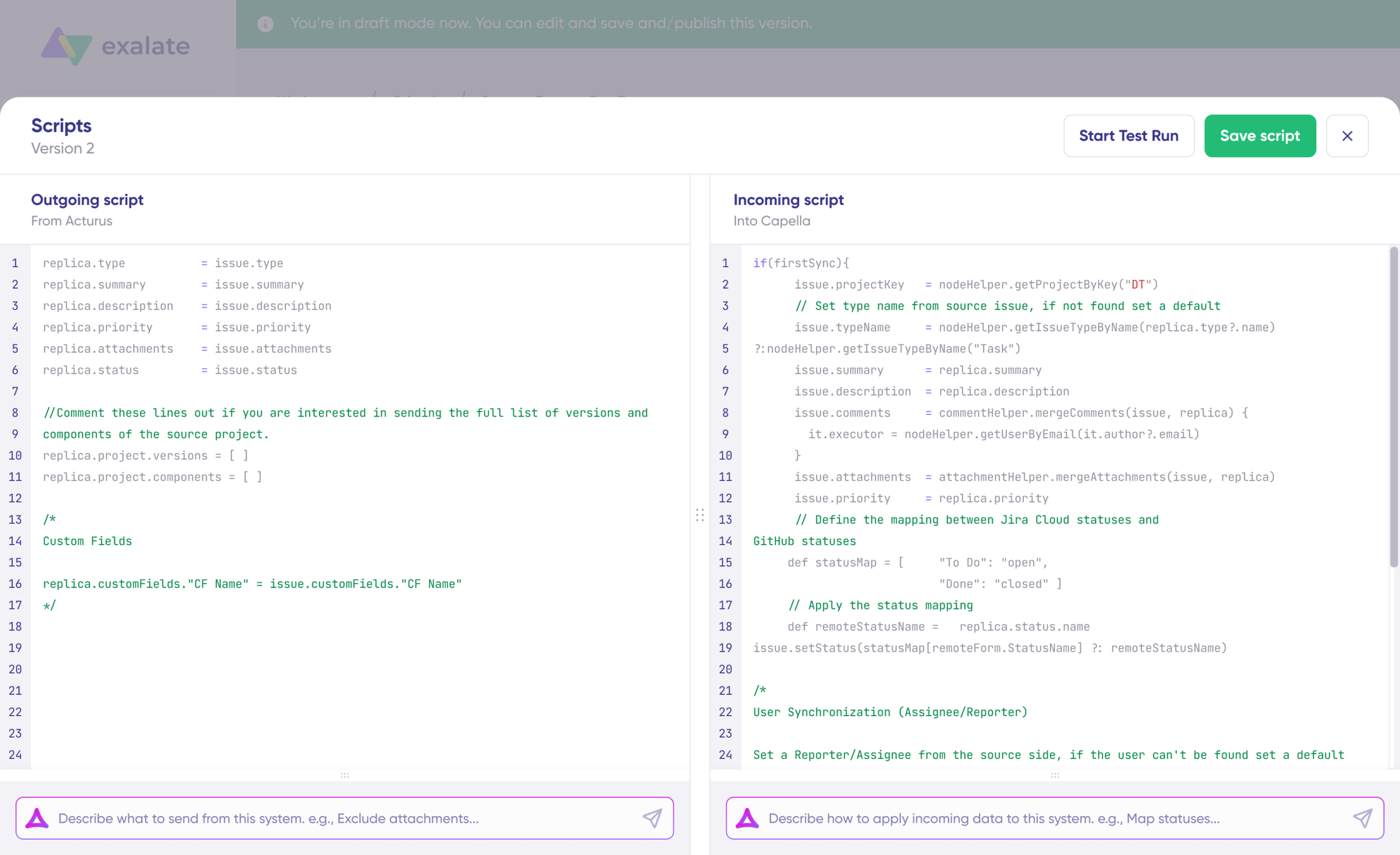
The scripts are divided into incoming and outgoing scripts:
- Outgoing script: If the sync direction is from Jira to ServiceNow, the outgoing script holds the values passed from Jira to ServiceNow.
- Incoming script: The incoming script defines how the values coming from Jira are mapped in ServiceNow.
To save time and simplify the scripting process, use Exalate’s AI-assisted configuration feature called Aida to generate sync scripts. Describe what you want to sync in plain language, and Aida will generate the Groovy code for you.
Once everything matches your needs, click “Publish Version” to apply the configuration to your live synchronization. Every time you publish, a new version is created. You can roll back to previous versions at any time using script versioning.
Set Up Triggers to Automate the Sync
Click the “+ Add trigger” button to start creating triggers. Triggers are platform-specific conditions that automate which work items enter the sync.
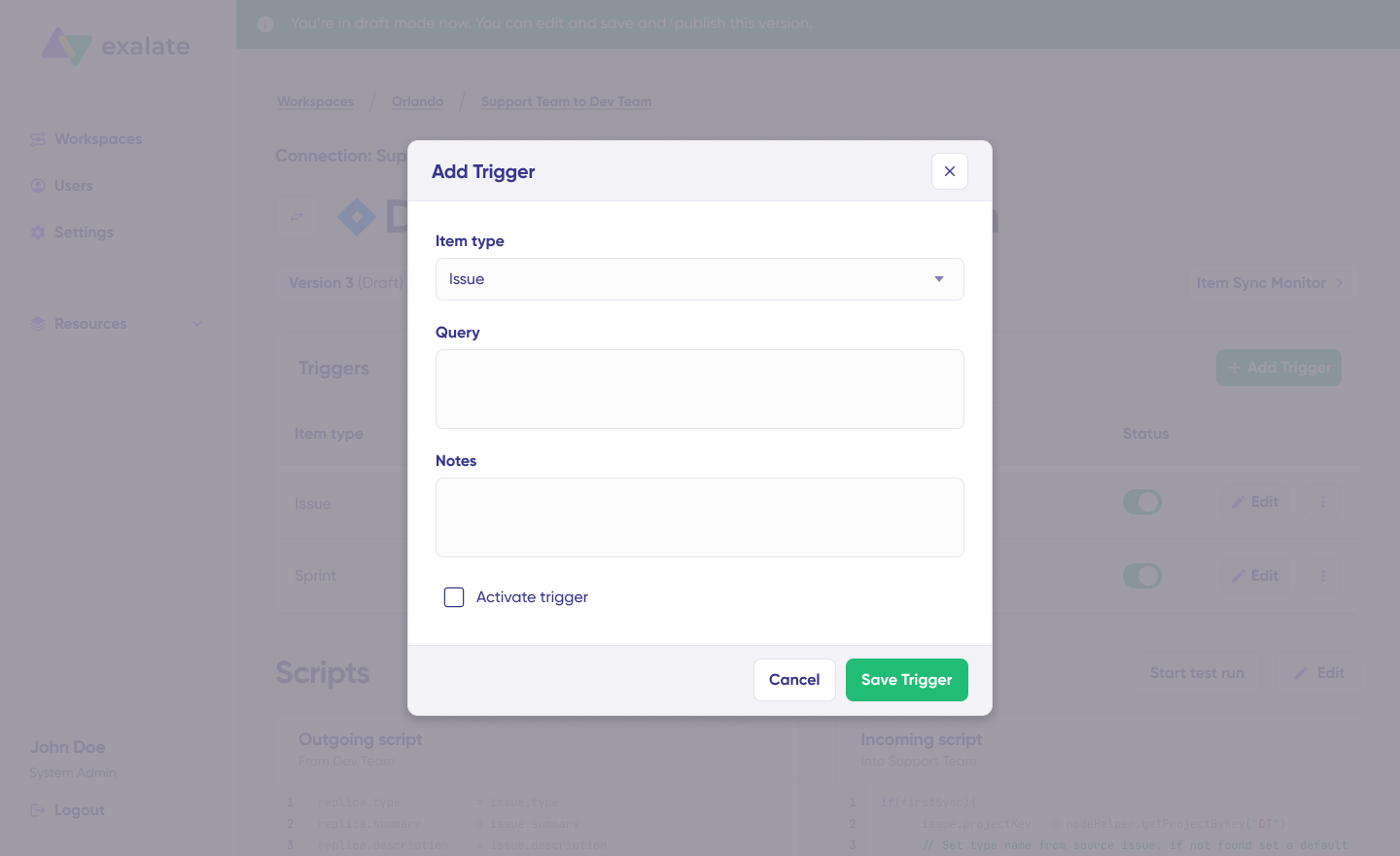
- For Jira: Use Jira Query Language (JQL) to specify conditions. For example:
project = SUPPORT AND type = "Change Request". - For ServiceNow: Use the advanced search syntax. For example:
assignment_group=Change Management AND priority<=2.
Test and Deploy
Start making changes to the fields to test if the integration works as expected and if the correct fields have been mapped correctly. Use the Item Sync Monitor to search for specific work items and verify the sync status. You will receive status updates while items sync, and once complete, you can view both synced items by opening them in a new window.
Conclusion
Syncing change requests between Jira and ServiceNow can create an environment where both development and IT teams can respond more swiftly to changes, minimizing errors and improving overall efficiency.
The business impact on work item resolution, SLA tracking, and team collaboration is clear, but the real advantage lies in how it transforms your daily business operations.
With integration to automate your change request workflows, you can make them smarter, gather deeper insights, and accelerate the change management process.
If this solution resonates with your team’s needs, it might be worth exploring how syncing your change requests could optimize your processes further.
How do you currently manage change requests between Jira and ServiceNow?
Start a free trial to try it yourself, or book a call with us to discuss your use case.
Recommended Reading:


