
Pricing Based on Results, Not Transactions
- No per-user fees
- No hidden transaction costs
- Pay per integration, for active items in sync
Predictable pricing that scales with your synchronization needs
Starter
Small teams with straightforward synchronization needs
price per integration
$
100
85
/mo
If billed annually (save 15%)
Available for





Main features include
- 25 active items in sync
- Real-time, two-way sync
- Support with no SLA
Scale
Growing teams with moderate synchronization volume
price per integration
$
325
280
/mo
If billed annually (save 15%)
Available for
Everything in "Starter", plus
- 100 active items in sync
- Bulk Operations
- Support with no SLA
Pro
Organizations needing enterprise systems
pricing per integration starts atThis is the entry price for the lowest-cost integration. Your price depends on which systems you connect, items in sync, environments, SLA/support, and add-ons. To get a tailored quote, contact sales.
$
550
/mo
Billed annually
Available for












Everything in "Scale", plus
- Custom active items in sync
- Exalate Classic Support
- Booster Addons Available
- Standard Support
Enterprise
Large-scale deployments with custom requirements
Let's talk
Get in touch for your custom pricing
Available for
& more
Everything in "Pro", plus
- Unlimited active items in sync
- Extra Environments
- Data residency
- Priority Support
- Managed Services
- Multi-integration Pricing









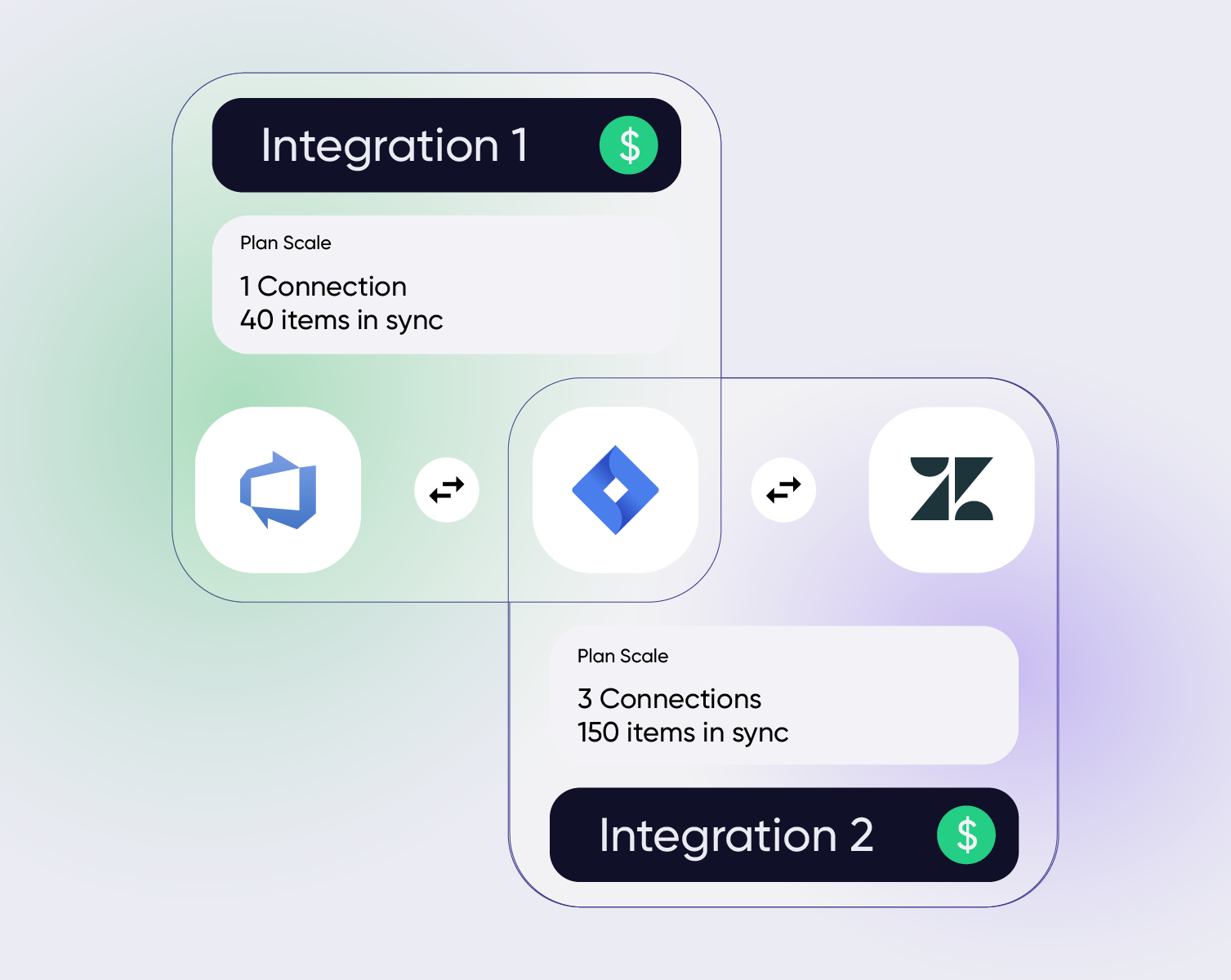
Pay for Integration, Not Connections, Users, or Transactions
With Exalate, you pay per integration (e.g., Jira ↔ ServiceNow), but you can create as many connections as you need within it. Different triggers, different field mappings, different teams, all included in one plan.



Zero Downtime Migration
With Exalate, you pay per integration (e.g., Jira ↔ ServiceNow), but you can create as many connections as you need within it. Different triggers, different field mappings, different teams — all included in one plan.


Tailored Multi-Integration Pricing
If you're connecting multiple systems, serving several customers, or syncing across a larger network of systems, Exalate is built for that. Enterprise includes multi-integration pricing tailored to your setup.








What's Included
Not sure which plan fits your needs?
Use our ROI CalculatorNot sure which plan fits your needs?
Available Extensions
booster package
Enhance your Exalate Cloud Infrastructure
For Large or Extra-Large Synchronization Load Handling & Catering Strict Compliance Rules
Enlarging Resource Profile
Manage high-load operations and execute more synchronizations per minute, ensuring smoother and faster workflow.
Extra Disc Space
Enable the storage of larger attachment files and more extensive logs, facilitating better data analysis and smoother operation of integrated systems.
Request a Quote
priority support
Get Immediate Assistance and Faster SLAs
For large and growing organizations looking for a scalable integration solution with top-tier support and customization.
Enterprise SLA
2X faster SLA, shorter resolution time, 24/7 support & optimized escalation paths.
Integration Engineer
Have your dedicated Exalate engineer handle your incoming tickets with higher priority, reducing resolution time.
Direct Access to Your Exalate Team
Have direct contact with Exalate team via Slack or Teams.
SAFEGUARD PACKAGE
Have Extra Visibility Over Your Exalate Infrastructure
For organizations that like to be in control.
Dedicated Status Page
Real-time visibility into cloud performance and alerts.
Version Pin
No automatic upgrade of your production environment.
Various Hosting Options
Choose a preferred hosting option that suits your needs.

I was positively surprised by how Exalate satisfied our synchronization needs. We managed to reduce the monthly costs of growth's Service Desk by around 95%.

Without Exalate, we would have had to add each developer to Salesforce to be able to track that information, which would have been a huge cost on our side.

When we first found Exalate, we thought, well, they’ve invented the integration wheel;. it makes no sense for us to reinvent it.
FAQ
Answers to the most frequent questions.
Didn't find what you were looking for? Ask Aida
You can find our full pricing in the table above. Keep in mind that you pay per integration between two systems, and every integration will have its own plan and price. You will also need to estimate how many items you’ll have in sync to choose the right plan, which is not always straightforward. That’s why we created the [Plan Calculator]. It won’t give you 100% accuracy, but it will give you a solid idea of what Exalate would cost based on your workflow.
Not sure which plan fits? Our team is happy to talk through your specific needs. Reach out to us at sales@exalate.com, and we’ll help you figure it out.
Exalate pricing is based on two factors: items in sync and your integration needs.
What are active items in sync? An “active item in sync” is any work item – such as an issue, ticket, case, or incident – that is currently being synchronized between two systems. This means you only pay for what’s actively syncing, not for historical or resolved items.
Per-integration pricing: You pay separately for each integration. An integration is a connection between two unique system URLs (for example, your Jira Cloud connected to your ServiceNow instance). This gives you flexibility – you can have different plans for different integrations based on their specific needs.
What determines your plan? Two things matter: the number of items you need to sync simultaneously, and which connectors you need. Some enterprise connectors (like ServiceNow or Salesforce) require Pro or Enterprise plans regardless of volume.
The Pro plan starts at $550/month, but that’s the lowest possible entry point. Your actual price depends on several factors and will likely be higher.
What affects your Pro price:
The biggest factor is which systems you’re connecting. Enterprise connectors such as ServiceNow, Salesforce, or ADO Server have a higher base price than standard connectors. Additionally, the number of active items in sync, your environment setup, support level, and any add-ons all shape the final price.
Bottom line: The “starts at” price on the pricing page is not a reliable estimate for your specific integration. We strongly recommend reaching out to our sales team before budgeting, so we can scope your actual requirements and give you an accurate quote. Contact us at sales@exalate.com or via the live chat.
Yes, absolutely. Each integration is independent – you choose the plan that fits that specific sync relationship.
For example, your Jira-to-ServiceNow integration needs the Pro plan for advanced connectors and higher volume, while a Jira-to-Zendesk integration for a smaller team works fine on Starter.
Changing plans: You can upgrade or downgrade each integration separately, without affecting your other integrations. This gives you flexibility to scale each connection based on actual needs and team budgets.
Your trial includes full access to all features, so you can test Exalate with your real systems and workflows. You can sync up to 500 items during the trial period. No credit card required to start.
When your trial ends: Your sync will pause, but your data and configuration stay intact. You can pick up right where you left off by choosing a paid plan.
Per integration – not per system.
In the past, Exalate charged separately for each system (or “node”). Now, you pay for the integration itself: the connection between two systems.
How it works: Connecting Jira to ServiceNow = one integration. Connecting that same Jira to Zendesk = a second integration. Each integration has its own plan and pricing based on how many items you need to sync.
Integration is the link between two specific systems, identified by their unique URLs.
Connection is a set of sync rules and logic within that integration. You can have multiple connections inside one integration, each serving different teams or use cases.
Example: Your Jira-to-ServiceNow integration might have:
- One connection for the Support team (syncing only P1 incidents)
- Another connection for the DevOps team (syncing change requests)
- A third for the QA team (syncing bug reports with priority “Major“)
Each connection can have its own filters, field mappings, and sync behavior – all within the same integration.
Billing is based on integrations, not connections. So you can set up as many connections as you need within an integration without additional cost.
Active items in sync are the work items, like tickets, issues, or cases, that are currently linked and syncing between your two systems.
When you escalate a support ticket from Zendesk to Jira, that ticket becomes an “active item in sync.” It stays active until you stop syncing it. Your plan includes a capacity for how many items can be active at any given time.
Quick example: If you have a support team escalating 10 new issues per week and each typically resolves & unlinks within 2 weeks, you’d have roughly 20 active items in sync at any moment.
All your existing items in sync will keep running normally. The only change is that new items won’t start syncing until you free up or add capacity.
If you approach or exceed your limit, we’ll let you know so you can decide what to do next. You can upgrade to a higher-capacity plan, free up capacity by manually unlinking items, or contact us to discuss your needs.
Need more capacity mid-cycle? You can upgrade your plan anytime. The change takes effect immediately, and we’ll prorate the difference – you only pay for what you use.
For Starter and Scale plans: No. You can start a free trial and purchase directly.
For Pro and Enterprise plans: Yes, these require a conversation with our team to tailor the solution to your needs. Contact sales at sales@exalate.com or fill in this form
We accept all major credit cards (Visa, Mastercard, American Express) through our secure payment system powered by Stripe.
For Enterprise plans and annual contracts, we can also arrange invoicing and bank transfers. Contact sales to discuss payment options for larger deployments.
At Exalate, keeping your data private, safe, and secure is the topmost priority. Hence, we follow the best-in-class security practices and procedures.
We have the following security measures in place:
- ISO 27001:2022 Certified
- Single-tenancy model
- Decentralized integration control so you decide what gets shared and what doesn’t
- Secure connection between instances via a shared secret, no need to share access credentials
- Authentication lies with the underlying platform
- GDPR compliant
- JWT-based tokens authenticate every data transfer request to ensure the destination instance always gets data from the expected source instance.
- Transport Layer Security (TLS) 1.3 (and 1.2)
To learn more about the complete security posture, have a look at the Exalate Security and Architecture Whitepaper, or the Trust Center.
Check out the data security and privacy statement here.
Nothing changes for you right now. Your current Exalate Classic license and pricing stay exactly as they are until your renewal date.
When renewal comes up, our team will reach out to help you find the best plan under the new model, based on your actual sync setup, not a one-size-fits-all switch.
Want to explore the new model sooner? You can. Just reach out and we’ll walk you through your options